
Why TTS and Voice Cloning Matter for Accessibility Marketing: Data, KPIs, and a 90-Day ROI Roadmap

Mar 30, 2026 14:1013 mins read
Share to
Contents

TL;DR — What this post shows and the bottom line

This guide shows how text-to-speech, voice cloning, and subtitle alignment drive measurable growth. It focuses on accessibility marketing and cuts cost and time to publish.
You’ll get key metrics at a glance, plus ROI steps and KPI templates. The guide also covers tool tradeoffs, workflows, and quick case snapshots.
Key metrics to watch include reach, cost per localized asset, and engagement. Also track time to publish and subtitle alignment accuracy.
Who should read this: marketers, product leads, creators, training teams, and nonprofits. Use the quick checklist and 90-day pilot map inside to test results.

Why accessibility marketing is a growth opportunity (market size & drivers)

Accessibility marketing is no longer just a compliance checkbox. It is a growth lever for teams that want broader reach, stronger brand trust, and lower localization friction. This section explains why investing in accessible media pays off and what is driving market expansion now.

Market size and trajectory

Global demand for accessible content has grown with video, e-learning, and digital services. Industry estimates put the accessibility-related market in the multi-billion dollar range, with steady annual growth as more companies digitize learning and marketing. Spend comes from public sector updates, corporate remediation budgets, and content localization for global audiences. The trend is durable because content volume keeps rising, and organizations must serve users across devices and abilities.

Key growth drivers

Several concrete forces are expanding the opportunity. Each one raises both need and budget for accessible media:
  • Aging populations, which increase demand for readable audio and larger text.
  • Mobile and streaming adoption, which boosts audio-first and captioned video use.
  • Remote work and online learning, which require accessible training at scale.
  • Globalization of content, which pushes teams to localize quickly and affordably.
These drivers interact. For example, more video content means more captions and audio narration are needed, which creates a market for efficient TTS and dubbing tools.

Regulatory and legal levers

Regulation is a primary reason businesses act now. Standards like WCAG (Web Content Accessibility Guidelines) set technical expectations. In the United States, ADA (Americans with Disabilities Act) related cases and enforcement have created legal risk for inaccessible digital services. In the EU, recent digital accessibility rules increase compliance pressure on public and private organizations. Together, these rules make accessibility an operational priority, not an optional extra. That shifts budgets toward accessible design, captioning, and audio alternatives.

Cost reduction and efficiency benefits

Making accessibility a core practice reduces long term costs. Investing in reusable assets, like narrated transcripts and aligned subtitles, cuts future localization time. Automated TTS and voice cloning lower per-video dubbing costs compared to human-only workflows. Accessibility work also reduces legal risk and saves remediation expenses later. Plus, accessible pages and videos often improve SEO, which raises organic reach and reduces paid acquisition spend.

The business case for marketers and product teams

Accessible content unlocks new audience segments and improves conversion for existing visitors. It boosts brand trust for users who need captions, audio, or clear layouts. From a product perspective, accessibility requirements create reusable components, like subtitle pipelines and voice assets, that speed up global launches. When you layer measurement on top, accessible content shows measurable lift in retention, completion rates, and search traffic.

Practical takeaways

Start by mapping the high-impact content you publish, such as course videos, product tutorials, and ads. Prioritize captioning, transcript generation, and high-quality TTS for these assets. Treat accessibility as both risk mitigation and growth strategy. Build repeatable processes so each piece of content becomes easier and cheaper to adapt over time.
Accessibility marketing is a strategic play. It reduces legal risk, expands addressable audiences, and lowers localization friction. When teams treat accessible media as a repeatable capability, the return shows up in faster launches, better SEO, and more inclusive brand experiences.

How TTS (Text-to-Speech) is fueling market growth

TTS (Text-to-Speech) is unlocking fast, low-cost audio for large audiences. For accessibility marketing this matters because it scales audio experiences while improving reach and inclusivity. This section shows why TTS adoption is rising, what technical gains make it usable, and how it fits into scalable workflows.

Adoption trends and technical gains

TTS moved from robotic voices to near-human quality in a few years. Advances in neural synthesis and better training data cut artifacts and improved prosody (the rhythm and stress of speech). Latency dropped, allowing near-real-time rendering for short clips and live captions. Costs fell as models became more efficient, making per-minute TTS viable for marketing teams.
Key technical improvements:
  • Naturalness: neural TTS models now produce smoother intonation and fewer glitches.
  • Latency: faster inference enables quick revoices and previewing during edits.
  • Cost: cloud-scale models and usage tiers lower per-hour costs.
These gains let creators add voice tracks to hundreds of videos without huge budgets.

How TTS complements captions, transcripts, and sign-language

Good accessibility is multi-modal, and TTS is one part. Captions and transcripts help people who are deaf or hard of hearing, while TTS helps people with low vision or reading challenges. Sign-language services remain essential for fluent users, but TTS fills gaps for audio-first access.
Complementary roles:
  • Captions: exact text displayed for clarity and search indexing.
  • Transcripts: searchable text for repurposing and SEO.
  • TTS: audio narration for sight-impaired users and mobile listeners.
  • Sign-language: visual interpretation for native sign users.
Using all four creates redundancy and choice, which improves overall accessibility outcomes.

Core scalable use cases for marketers and creators

  1. E-learning and training. Convert slide decks and scripts to narrated lessons at scale. TTS reduces time to publish and keeps costs predictable.
  2. Video localization and dubbing. Auto-translate scripts, then use TTS or cloned voices for native-language audio.
  3. Podcast repurposing. Turn blog posts into short podcast episodes or create foreign-language versions.
  4. Microcontent and social clips. Quickly generate short narrated clips for stories and Reels, expanding reach.
Each use case benefits from fast iteration, low marginal cost, and consistent voice across assets.

Where TTS, voice cloning, and subtitle alignment meet

Real workflows combine modules to deliver polished output. A typical flow looks like this:
  • Source text or transcript generation (manual or STT, speech-to-text).
  • Translate or adapt the script when needed.
  • Produce audio with TTS or a cloned voice for brand consistency.
  • Auto-generate and align subtitles for each language.
  • Export media and subtitles in standard formats.
Tool chains that support TTS, voice cloning, and subtitle alignment in one place reduce friction. For example, integrated platforms let teams move from transcript to aligned captions and dubbed audio without manual syncing. That saves hours per video and cuts localization costs.

Practical impact for marketing teams
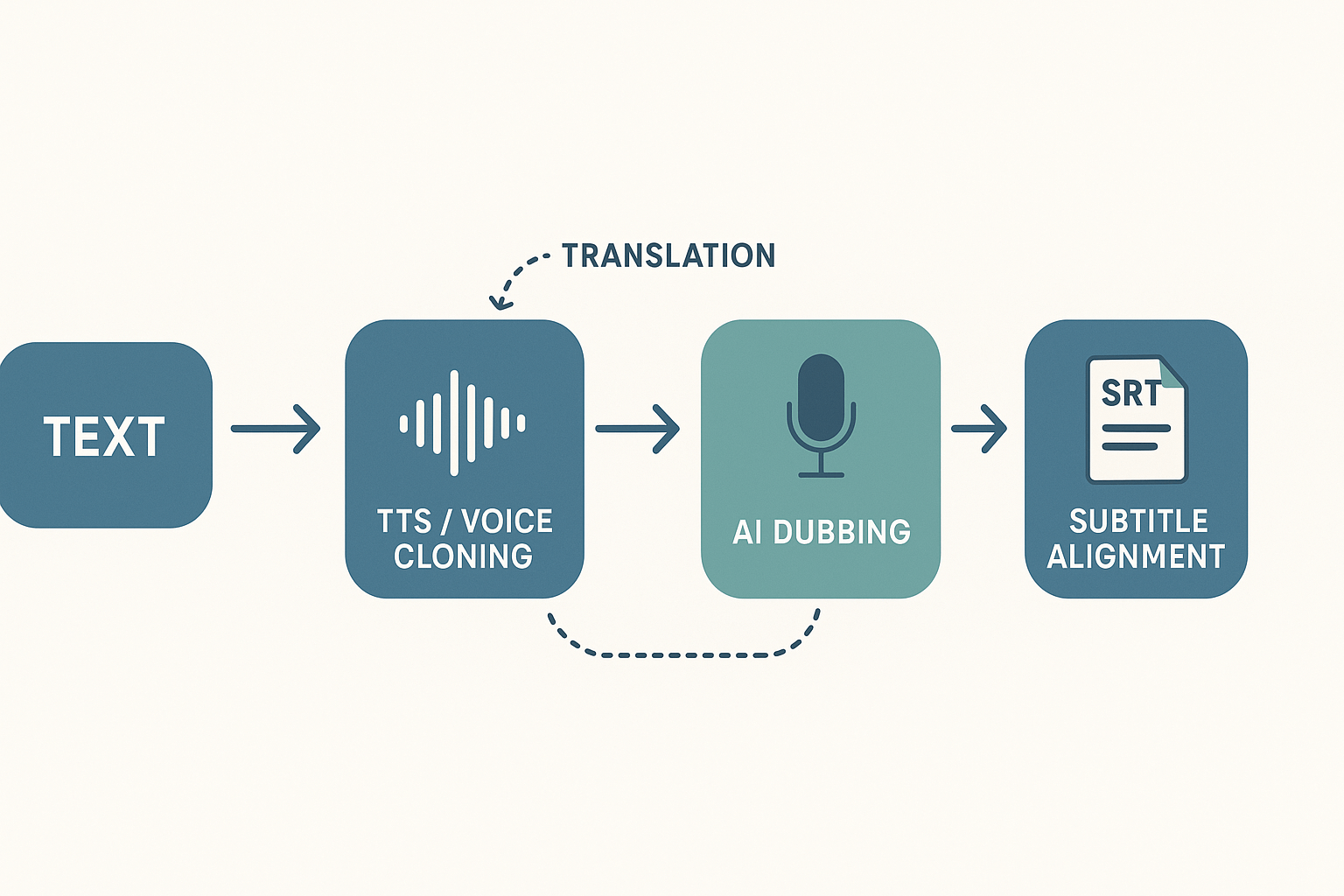
TTS makes inclusive audio easier to build into campaigns. It lowers marginal cost and speeds up localization. Teams can publish more experiments, reach new geographies, and keep a consistent brand voice. When paired with accurate subtitles and optional sign-language services, TTS helps content hit both accessibility and growth goals.
Workflow diagram showing text to TTS/voice cloning to AI dubbing to subtitle alignment, with arrows and module labels.

Evidence & mini case scenarios (how creators and organizations use TTS today)

These three short scenarios show how TTS and voice cloning drive measurable gains in accessibility marketing and audience reach. Each mini case lists inputs, measurable outcomes, and quick lessons you can copy. Numbers below are realistic, tied to clear KPIs you can track.

Nonprofit outreach: reach and donations from new audiences

A mid-size NGO turned one 8-minute donor story into six dubbed versions and subtitle packs. The team prioritized speech clarity, local phrasing, and rapid publishing. The goal was to reach under-served language groups without hiring multiple voice actors.
  • Inputs: one source video, TTS dubs in Spanish, Mandarin, Arabic, Portuguese, Hindi, French; auto-aligned subtitles; paid social in target regions.
  • Measurable outcomes: unique viewers rose 2.1x for localized posts; donations from non-English audiences grew 38%; social shares increased 55% on translated clips.
  • Quick lessons: local language equals discoverability, subtitles help search and SEO, and synthetic voices let you iterate fast without huge costs.

E-learning provider: cut localization cost, keep instructor voice

A corporate training vendor needed 120 hours of audio localized into six languages. They used voice cloning to retain the instructor voice, then synced translated subtitles for transcripts. Speed and brand voice consistency were the two highest priorities.
  • Inputs: 120 hours source audio, 6 target languages, one 30s sample for voice cloning, batch TTS rendering, automated subtitle alignment.
  • Measurable outcomes: localization cost dropped about 78% versus studio dubbing; time to market fell from 12 weeks to 10 days; course completion rose 12% in localized cohorts.
  • Quick lessons: cloning keeps instructor trust, batch workflows scale, and time saved converts directly to more translated offerings.

YouTube creator: higher watch time and engagement with localized dubs

A weekly creator added localized TTS dubs and subtitles for top-performing episodes. They tested two markets first, tracking watch time and click-through rates. The aim was more engaged viewers and subs from non-native channels.
  • Inputs: 15-minute weekly show, localized TTS for two target languages, auto-synced SRT files, split A/B tests across regions.
  • Measurable outcomes: average watch time rose 22% on localized episodes; subscriber growth in test markets increased 9%; thumbnail CTR improved 14% on dubbed uploads.
  • Quick lessons: localized audio keeps viewers longer, combine dubs with native-language thumbnails, and A/B test messaging for max lift.

Compact KPI checklist (printable HTML)

  • Baseline metrics: total views, unique viewers, watch time, completion rate, conversions.
  • Localization metrics: cost per localized hour, time to publish, # of languages per asset.
  • Engagement lift: percent change in watch time, CTR, shares, and conversions by language.
  • Quality checks: AI voice naturalness score, subtitle accuracy percent, sync error rate.
  • ROI quick calc: (Incremental revenue minus localization cost) / localization cost, over 90 days.
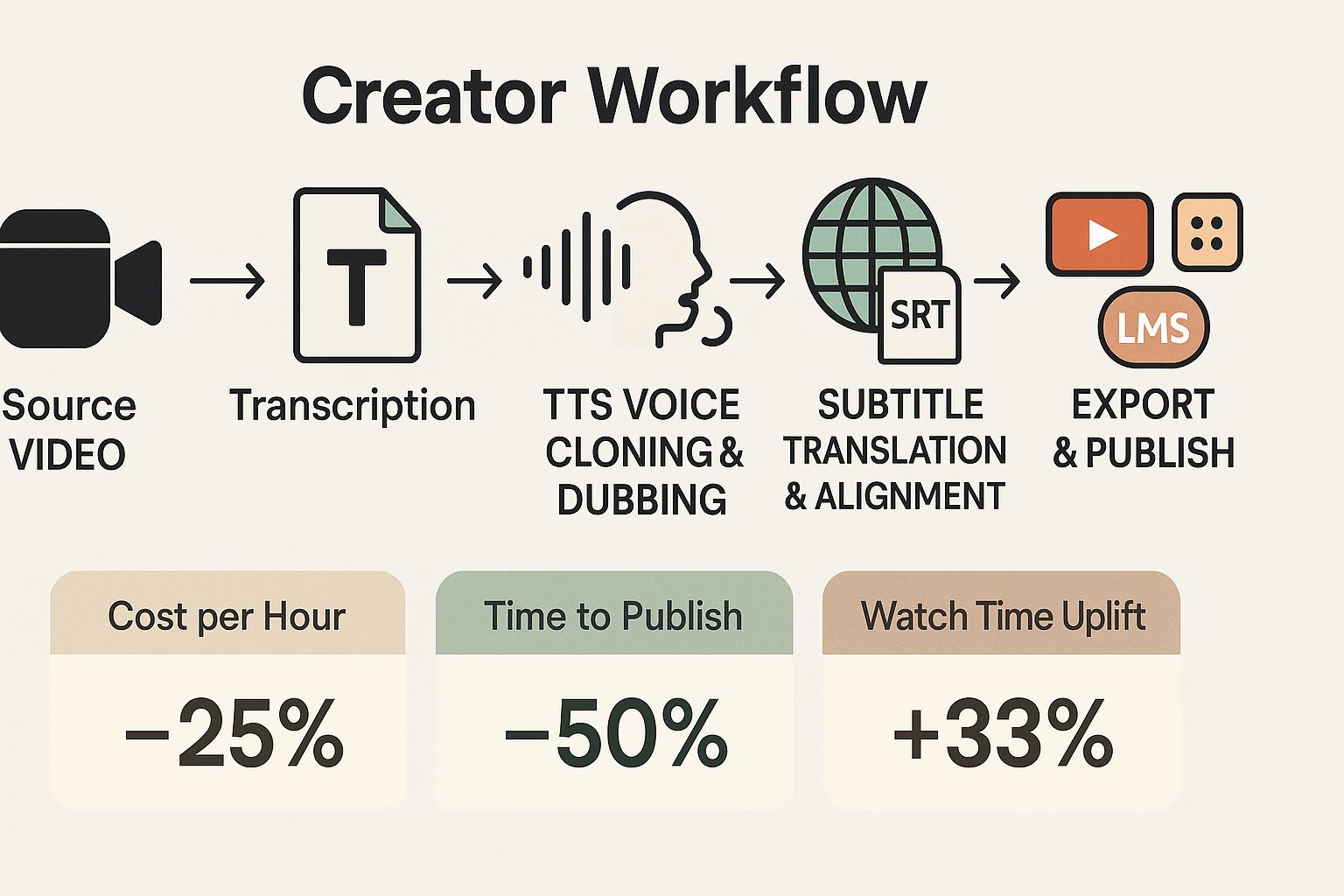
These mini scenarios show predictable patterns. First, TTS and cloning cut time and cost. Second, measured lifts in reach and engagement follow scalable publishing. Third, you can convert those gains into revenue or mission impact quickly if you track the right KPIs.
Workflow diagram showing source video to transcription, TTS dubbing, subtitle translation and alignment, and distribution across platforms.

Measuring impact: KPIs, metrics and an ROI framework for accessible TTS campaigns

This section gives a practical KPI set and a simple ROI template you can copy for pilots. It explains four primary metrics, shows sample assumptions, and gives a printable checklist. Use these to measure the business value of accessibility marketing with TTS and voice cloning.

Primary KPIs to track

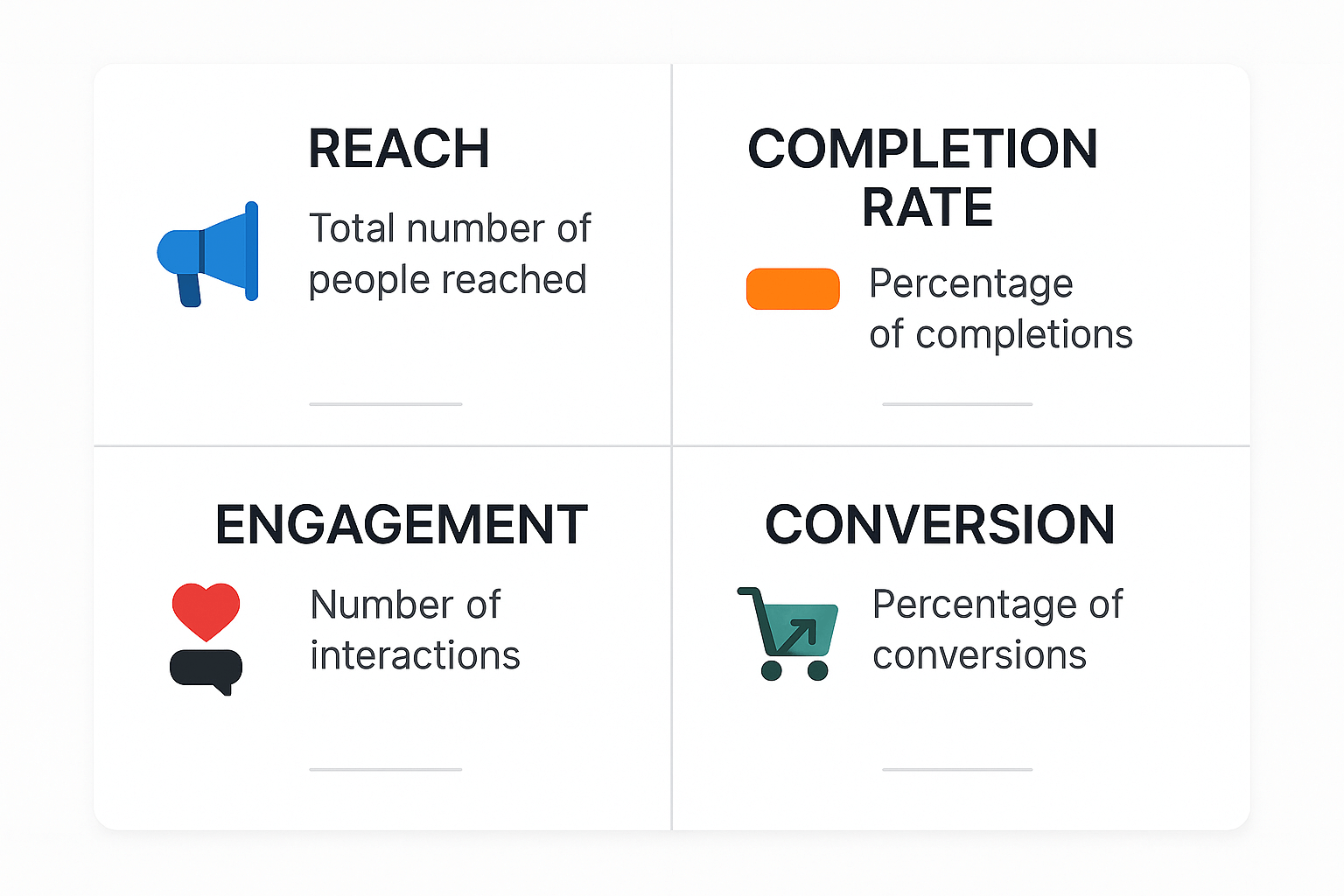
Start with four clear metrics: reach, completion rate, engagement, and conversions. Track them across channels and variants so you can compare native audio, TTS, and dubbed versions. Keep one dashboard that updates after each campaign run.
Reach: audience size and distribution. Measure unique viewers, impressions, and views by platform. Include language splits and geo data to show localization lift.
Completion rate: percent who finish the content. Compute finished plays divided by starts. Use both time-based and percent-based thresholds to detect partial drop offs.
Engagement: depth of interaction with your content. Combine watch time per viewer, comments, shares, and rewatch rate into a single engagement index. Weight metrics by business value, for example shares = 2x comments.
Conversions: actions tied to campaign goals. Define conversions as signups, trial starts, downloads, or donations. Measure conversion rate and value per conversion to link media improvements to revenue.

Simple ROI framework and sample template

A clear ROI starts with incremental lift and cost inputs. Use this formula: Incremental Value minus Incremental Cost, divided by Incremental Cost. That gives your ROI percentage.
Template inputs to collect:
  1. Baseline conversion rate and revenue per conversion.
  2. Lift in conversion observed after TTS localization.
  3. Campaign cost including TTS credits, editing, and labor.
  4. Time window for measuring lift, typically 30 to 90 days.
Sample calculation using simple assumptions:
  • Baseline monthly viewers: 10,000.
  • Baseline conversion rate: 0.5 percent.
  • Revenue per conversion: $50.
  • After TTS localization lift: +0.25 percentage points (to 0.75 percent).
  • Monthly cost to localize and run: $1,500.
Monthly baseline conversions = 10,000 * 0.005 = 50. Monthly new conversions = 10,000 * 0.0075 = 75. Incremental conversions = 25. Incremental value = 25 * 50 =1,250. ROI = (1,250 -1,500) / $1,500 = -16.7 percent for month one.
Use this template in a spreadsheet. Replace inputs with your channel data and labor cost. Run conservative and optimistic scenarios side by side.

Benchmarks and reporting cadence

Below are practical benchmark ranges you can expect during pilots. Use them as starting points, not guarantees. Benchmarks vary by content type, audience, and platform.
KPI
Pilot benchmark range
Reach (view growth after localization)
+5% to +40%
Completion rate
30% to 70%
Engagement index (relative)
+5% to +30%
Conversion lift
+0.1 to +1.5 percentage points
Report weekly during the first 30 days of a pilot. Move to a biweekly or monthly cadence once metrics stabilize. Include raw counts, rate changes, and confidence intervals when possible.

Printable KPI checklist (HTML)

  • Define campaign goal and primary conversion
  • Set baseline metrics for reach, completion, engagement, conversions
  • Log TTS/voice cloning costs and production hours
  • Track language and geo splits for localized assets
  • Run A/B or holdout tests where possible
  • Calculate incremental conversions and revenue
  • Report weekly for first 30 days, then monthly
Use the checklist as a one‑page pilot guide. Update inputs after each run and store them in a shared workbook.
Measuring accessibility investments does not need to be complex. Pick clear metrics, use the template, and iterate quickly. Small lifts in conversion or reach scale fast when applied across languages and platforms.
Compact KPI dashboard infographic with four blocks labeled Reach, Completion Rate, Engagement, and Conversion, each showing a one-line definition and a small icon.

Implementing accessible multimedia at scale: tools, workflows and common pitfalls

Scaling accessible content means picking the right tools and a repeatable workflow. This section shows the core tool types, a step by step workflow teams can adopt, a side by side vendor checklist, and simple fixes for common problems. It also notes where DupDub's TTS, voice cloning, subtitles, and API slot into enterprise pipelines for faster delivery and consistent voice.

Core tool types you need

Start with four building blocks. First, TTS engines that convert text to natural speech. Second, STT, or speech to text, for accurate transcripts and caption generation. Third, subtitle alignment tools that sync text to audio and support translation. Fourth, accessibility testing tools that check keyboard navigation, screen reader output, and caption accuracy.
Each tool has a job. TTS produces audio files or dubbed tracks. STT creates editable transcripts. Subtitle alignment makes SRT or VTT files that match timing. Testing tools validate the final asset meets accessibility standards.

Scalable workflow: repeatable steps for teams

  1. Ingest media: upload your video or audio to a central platform. Keep files named with content ID and language.
  2. Auto-transcribe: run STT to produce a master transcript. Clean obvious errors and mark speaker changes.
  3. Translate and review: translate text where needed, and have a native reviewer check tone and terminology.
  4. Generate TTS or cloned voice: produce voice tracks for each target language. Use consistent voice profiles for brand alignment.
  5. Auto-subtitles and align: generate subtitles, then run alignment so captions map to the new audio timing.
  6. Accessibility QA: test with screen readers, keyboard only navigation, and closed caption checks.
  7. Publish and monitor: publish versions and track KPIs like completion rate, caption accuracy, and reach.
This pipeline supports parallel work. For example, while reviewers check translations, TTS batches can render new files.

Vendor comparison: feature checklist

Feature
Core TTS naturalness
Languages & accents
Voice cloning
Auto subtitles & alignment
API & automation
Enterprise controls
Pricing fit
Quality TTS engines
High
90+
Optional
Varies
Yes
Role-based
Mid to High
Quick STT services
Medium
40+
No
Good
Yes
Basic
Low to Mid
Subtitle alignment tools
N/A
40+
No
Best-in-class
Yes
Basic
Mid
All-in-one platforms
High
40+ to 90+
Yes
Integrated
Strong
Advanced
Mid to High
Use the checklist to score vendors on the features your team needs, such as voice cloning, subtitle alignment, and API access. Weight items by impact on cycle time and quality.

Common implementation pitfalls and quick fixes

  • Pitfall: Poor transcript accuracy causes bad subtitles. Fix: Add a light human edit pass on the master transcript before translation. Even a 5 minute review reduces errors a lot.
  • Pitfall: Voices sound inconsistent across languages. Fix: Create a voice profile or clone for brand voice, then reuse it across languages where supported.
  • Pitfall: Timing mismatch after dubbing. Fix: Re-run subtitle alignment against the final audio and export SRT/VTT for each language.
  • Pitfall: Accessibility checks only at the end. Fix: Add small QA sprints at each milestone, especially after STT and after subtitle alignment.

Where DupDub fits in enterprise workflows

  • TTS and voice cloning: DupDub provides 700 plus voices and multilingual cloning for consistent brand voice across languages. Use cloned voices to keep messaging uniform.
  • Auto-subtitles and alignment: DupDub syncs subtitles to re-voiced audio, which cuts manual alignment time dramatically.
  • API and automation: The API supports batch processing and integration with CMS or video platforms. That enables automated localization pipelines.
  • Security and controls: DupDub locks cloned voices to original speakers and offers encrypted processing, which helps meet enterprise privacy needs.
These features let teams build the workflow above and reduce manual handoffs.

Best practices: TTS voice selection, subtitles, multilingual & inclusive language

Good accessibility marketing starts with voice and text that everyone can understand. This section gives clear rules for picking TTS voices, writing inclusive scripts, and producing high quality subtitles and transcripts across languages. Use these steps to reduce friction, improve comprehension, and make media usable for more people.

Pick voices for clarity and trust

Choose voices that sound natural and steady. Prefer neutral pacing, clear enunciation, and moderate pitch. Avoid overly stylized or theatrical voices for instructional or service content. Test voices on short clips with real users, including people with low vision or cognitive differences.
Quick voice checklist:
  • Use a primary voice for brand consistency. Limit alternates to 2 per campaign.
  • Choose a slower pace if content is complex or for audiences with cognitive needs.
  • Turn on phoneme control or SSML (speech markup) for tricky names and acronyms.
  • Include a plain-language sample line so reviewers judge clarity, not style.

Write inclusive scripts that read well aloud

Write for the ear, not the eye. Short sentences and active verbs improve comprehension when spoken. Use plain language and avoid dense clauses. If you must use technical terms, add a brief explanation in parentheses the first time.
Script tips:
  1. Use one idea per sentence. Keep sentences under 14 words when possible.
  2. Add audio cues sparingly, like "on screen" or "link below," so listeners know where to act.
  3. Avoid slang and idioms that do not translate well.
  4. Tag optional on-screen text in the draft, so subtitle authors match meaning.

Produce accurate subtitles and transcripts

Subtitles and transcripts are not the same. Subtitles appear on screen and must match timing and reading speed. Transcripts are full text records for searches and downloads. Create both and treat each purpose differently.
Subtitle best practices:
  • Keep subtitle lines to 32 characters per line, max two lines.
  • Time subtitles to show for at least 1.5 and no more than 7 seconds, depending on reading complexity.
  • Include speaker labels for multi-person audio.
  • Use sentence case and avoid ALL CAPS.
Transcript tips:
  • Provide a verbatim transcript plus a cleaned version for quick reading.
  • Include timestamps every 60–90 seconds or at speaker changes.
  • Tag non-speech sounds like [applause] or [music], useful for assistive tech.

Multilingual and cultural considerations

Translation is more than word swap. Localize tone, date formats, and examples. Test translations with native speakers who represent your audience.
Localization checklist:
  • Localize examples, idioms, and units (dates, currencies).
  • Verify right-to-left rendering and subtitle placement for RTL languages.
  • Confirm reading speed norms vary by language; adapt subtitle timing.
  • Use native reviewers for final voice choices and pronunciation checks.

Consent and ethical voice cloning

Always obtain informed consent before cloning a voice. Record and store a signed release that states allowed uses, languages, and duration. For brand or employee voices, include a revocation clause that explains how to stop use.
Minimum consent items:
  • Who will use the clone and for what channels.
  • Languages and accents the clone may speak.
  • Retention and deletion policy for voice data.

Quick pre-publish checks teams can run

Run a short QA pass before publishing. Keep checks simple so teams use them.
Pre-publish checklist:
  1. Play the TTS audio alongside subtitles, confirm sync and meaning.
  2. Read the transcript for accuracy and remove false captions.
  3. Ask two native speakers to review localized scripts and voices.
  4. Verify consent forms for any cloned voice are signed and stored.
  5. Run automated accessibility tests for caption presence and contrast.
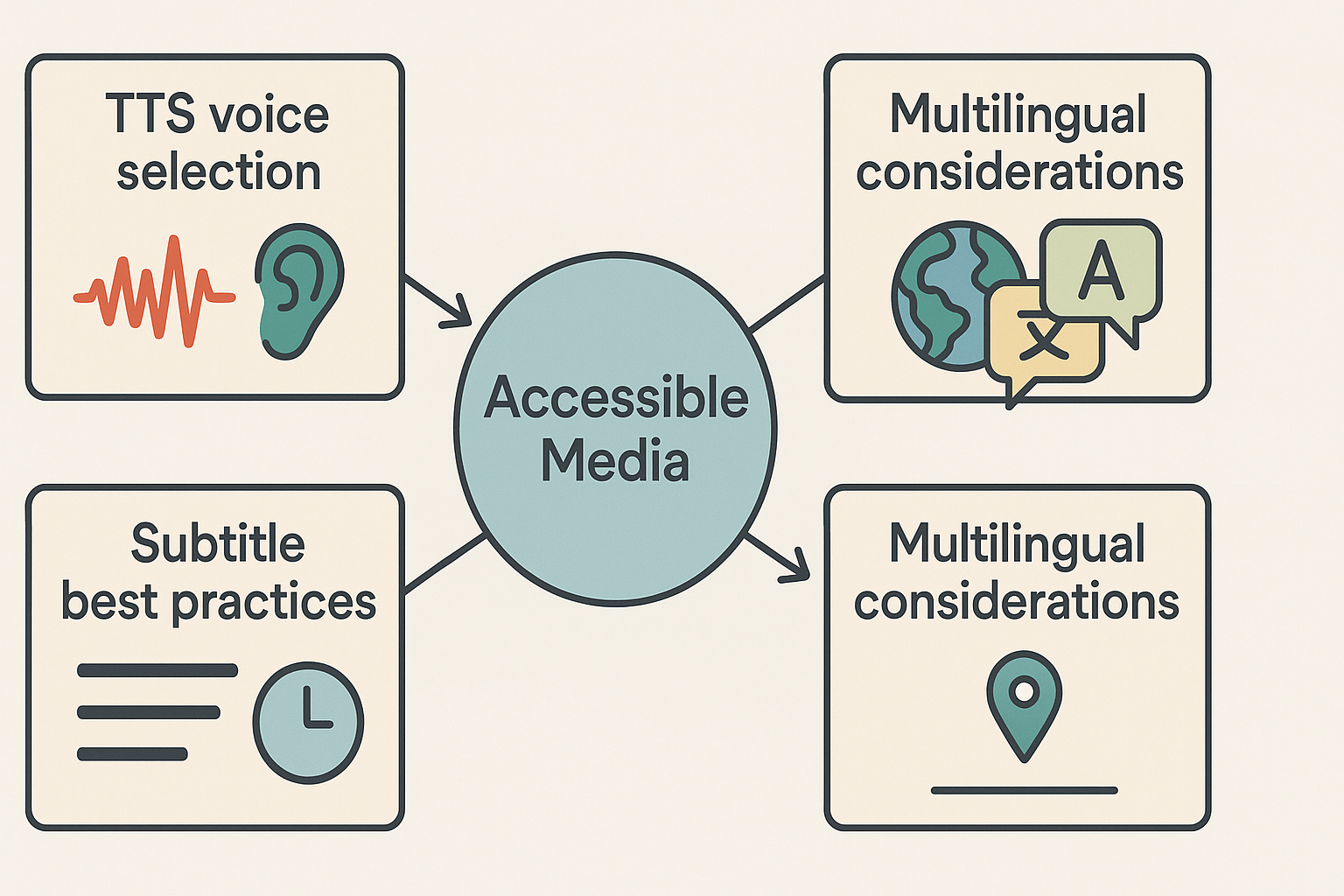
Following these practices reduces risk and raises comprehension across audiences. Make the checks part of your routine, and you’ll publish accessible, clear media faster.
Diagram of three connected blocks: TTS voice selection, subtitle best practices, and multilingual considerations, all pointing to a central accessible media hub.

Organizational buy-in, training and a 90-day pilot roadmap

Getting teams to adopt accessible TTS starts with a clear business case and a short, measurable pilot. This section shows how to win executive buy-in, map stakeholders, and train content creators to use text to speech for reach and inclusion. It also gives a tight 90-day checklist with roles, goals, and sample deliverables so teams can test impact fast.

Build a tight business case

Start with outcomes, not features. Estimate audience reach gains, reduced localization costs, and faster publish cycles. Use simple math: time saved per video, cost per hour saved, and projected percentage lift in engagement. Present three scenarios: conservative, likely, and aggressive, with clear KPIs for each.

Map stakeholders and roles

List who will sponsor, who will approve, and who will do the work. Typical roles are executive sponsor, accessibility lead, content owner, editor, and a technical owner for platform access. Assign single owners for training and measurement so accountability is clear. Add a compliance reviewer if your org has legal or privacy needs.

Train content teams: a simple plan

Keep training short and hands on. Run a one-hour kickoff, a two-hour demo session, and two 30-minute followups in the first month. Use real scripts and your brand voice for practice. Include a simple style guide: voice tone, subtitle rules, and when to use voice cloning.

90-day pilot checklist (compact, measurable)

Below is a week-by-week plan you can run with one content stream: a weekly video series or an e-learning module. Each week lists a measurable goal, the responsible role, and a sample deliverable.
  1. Week 1: Setup and baseline
    1. Goal: Define KPIs and capture baseline metrics (views, watch time, cost per localization).
    2. Roles: Executive sponsor approves scope, technical owner sets up accounts.
    3. Deliverable: Baseline KPI sheet.
  2. Week 2: Tools, access and templates
    1. Goal: Create templates for TTS scripts and subtitles.
    2. Roles: Content owner and editor produce templates, technical owner configures platform.
    3. Deliverable: Script and subtitle template files.
  3. Week 3: First draft and internal review
    1. Goal: Produce first TTS-narrated video with subtitles aligned.
    2. Roles: Editor produces video, accessibility lead reviews.
    3. Deliverable: Internal review version, feedback log.
  4. Week 4: External soft launch
    1. Goal: Publish to a limited audience and collect feedback.
    2. Roles: Content owner manages release, analytics owner captures early metrics.
    3. Deliverable: Published video and feedback summary.
  5. Weeks 5 to 8: Iterate and optimize
    1. Goal: Run two more iterations, refine voice choice, subtitle timing, and speed settings.
    2. Roles: Editor and accessibility lead implement changes.
    3. Deliverable: Two improved videos, updated style rules.
  6. Weeks 9 to 12: Scale test and measurement
    1. Goal: Publish 3 to 5 localized versions, measure engagement lift and cost per localized minute.
    2. Roles: Analytics owner reports on KPIs, executive sponsor reviews ROI.
    3. Deliverable: Pilot report with KPI comparison and go/no-go recommendation.
Printable checklist:
  • Define KPIs: views, watch time, conversion, cost per localization
  • Assign roles: sponsor, owner, editor, accessibility reviewer
  • Run 3 iterations with public feedback
  • Measure: baseline vs pilot performance
  • Decide: scale if engagement up and cost down

Scaling triggers and decision points

Use clear pass/fail rules to decide whether to expand. Common triggers are a 10 percent lift in watch time, a 20 percent reduction in localization cost, or a net positive on faster time to publish. If metrics hit targets, move to a phase with API automation and batch localization. If not, run one optimization sprint and re-evaluate.
Putting this plan into motion gives you a short feedback loop and measurable wins. The pilot keeps risk low and makes the case for budget and tool adoption with numbers, not promises.

FAQ — common questions marketers ask about TTS & accessibility

  • Is synthetic speech safe to use for accessibility marketing?

    Yes, when you follow legal and accessibility standards. Disclose synthetic audio clearly, provide transcripts for auditability, and match voice clarity and speed to user needs. Involve legal and accessibility teams early, and test with real assistive technologies to ensure it improves the user experience.

  • What are voice cloning consent and privacy best practices?

    Always obtain explicit, documented consent before creating a voice clone. Store consent records, limit usage scope, and apply safeguards like voice locks and encryption. If users upload audio, include a clear consent checklist during onboarding.

  • Which accessible multimedia KPIs should I start tracking?

    Track a focused set of metrics: retention at key timestamps (30s, 1m), subtitle usage and completion, transcription accuracy, shares and saves, cost per localized asset, and time to publish. These indicate reach, usability, and efficiency.

  • Can small teams scale accessible multimedia affordably?

    Yes. Use templates, subtitle presets, and reusable voice profiles to reduce repetitive work. Batch processing and prioritizing high-impact content helps small teams scale efficiently while controlling costs.

  • What TTS and subtitle alignment accuracy should we aim for?

    Aim for subtitle timing within 200–400 milliseconds of natural speech and transcript accuracy above 90% for clear audio. Ensure captions include non-speech elements like sound cues and speaker labels for compliance.

  • Is using cloned voices for public figures straightforward legally?

    No. Public figures still require consent. Treat them like any individual: obtain permission or use clearly synthetic alternatives. Add disclosures when needed and consult legal counsel if unsure.

  • What quality checks should we run for accessible video and TTS?

    Check pronunciation and pacing, verify subtitle timing and formatting, confirm transcript accuracy, test with screen readers, and review translations for cultural accuracy. These steps catch most accessibility issues before publishing.

  • Which 90-day ROI metrics should we use for accessibility marketing?

    Track new audience reach, watch time lift, cost per localized minute, and production time savings. Compare before-and-after performance to estimate break-even and scaling potential.

  • Who should be involved in accessible TTS pilots?

    Include a cross-functional team: content owner, product manager, legal representative, and accessibility specialist. Pilot a small set of assets and measure defined KPIs before scaling.

  • How do we maintain brand voice with TTS and voice cloning?

    Define tone, pacing, and vocabulary in a style guide. Use consistent voice presets and test with users to ensure the output feels natural and on-brand. Iterate in small batches until consistency is achieved.

Experience The Power of Al Content Creation

Try DupDub today and unlock professional voices, avatar presenters, and intelligent tools for your content workflow. Seamless, scalable, and state-of-the-art.