A quick verdict: if you need fast, consistent voiceovers for videos, a text to speech video maker is worth testing. It slashes turnaround time, standardizes your brand voice, and scales localization without hiring voice talent.
-
Faster output: generate narration in minutes instead of days.
-
Consistent voice: reuse clones or presets for brand continuity.
-
Multilingual reach: translate and dub with synced subtitles.
-
Cost effective: far cheaper than studio recording for volume.
Bottom line: try a trial to validate quality and workflow fit. Read the step-by-step workflow and the pricing summary later in this guide to see if it meets your production needs and budget.
Why text-to-speech video makers matter in 2026
Creators and teams need faster, repeatable ways to publish audio for video. A text to speech video maker lets you turn scripts into natural voiceovers quickly, cut localization costs, and widen audience reach. It also improves accessibility, so more viewers can consume your content.
Faster production, lower cost
AI voice tools shrink the time from script to publish. You can generate a draft voiceover in minutes, not days. That saves money on studio time and speeds up short-form repurposing across platforms.
-
More platforms, more formats: Repurpose long videos into clips, reels, and podcasts with minimal re-recording. Each format gets a matched voice in less time.
-
Short-form growth: Faster cycles mean more frequent uploads and better audience testing.
-
Legal and accessibility needs: Auto-subtitles and clear narration help meet accessibility rules and reduce compliance risk.
Accessibility and global reach
High-quality synthetic voices make content understandable for nonnative speakers and people with hearing or visual impairments. Auto-aligned subtitles and localized dubbing make content usable worldwide.
Adoption is rising, and
Text to Speech Market Size, Share | CAGR of 15% reports the global Text-to-Speech (TTS) market is projected to reach USD 14.6 billion by 2033, growing at a CAGR of 15% from 2024 to 2033. This growth reflects demand for faster localization, legal accessibility, and scalable voice cloning.
Why text-to-speech video makers matter in 2026
A text to speech video maker cuts time and cost for voiceovers. In 2026 creators need speed, lower budgets, and a consistent brand voice. These tools also help teams meet accessibility and legal requirements faster.
Fast turnaround, cheaper localization, better accessibility
More platforms and short-form formats make rapid repurposing essential. Teams can translate one asset into many languages without hiring studios. Synthetic voices and automated subtitle alignment speed projects while keeping quality steady.
-
Faster turnaround: publish localized clips and episodes in hours, not days.
-
Cheaper localization: synthetic voices scale across languages with low incremental cost.
-
Accessibility and compliance: auto audio and captions help meet regulations.
Real-world drivers and who benefits
Streaming services, social apps, and e-learning platforms now expect native audio variants. Content creators, localization teams, and marketers reuse the same footage across markets. That lowers per-minute cost and removes bottlenecks in production.
For creators, it means faster publishing and more variants with the same team. For localization teams, it means repeatable workflows and easier QA (quality assurance). For marketers, it keeps messaging consistent across regions.
These forces make AI voice tools a core part of modern video stacks. They let teams reach global audiences faster, with lower cost and predictable quality.
What is DupDub? Quick product overview and key features
DupDub is an all-in-one AI dubbing and text to speech video maker that bundles voice cloning, speech-to-text, subtitles, avatars, and exports in one web app. It speeds up multilingual publishing and cuts manual dubbing time. If you need fast, repeatable voiceovers for video, DupDub handles the core tasks from transcription to final MP4 export.
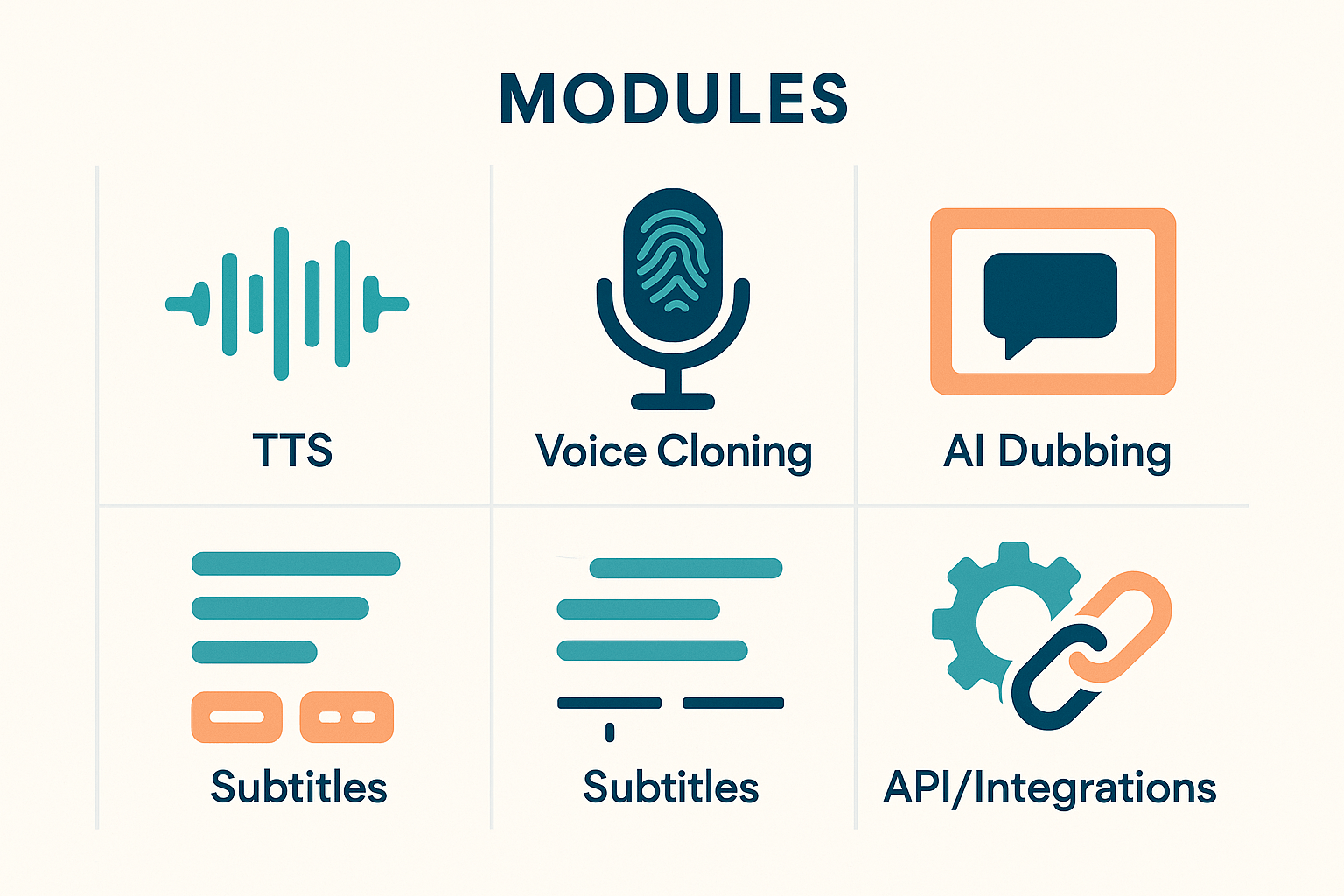
Core product modules and what they do
-
AI Dubbing: Translate and revoice full videos while keeping timing and lip sync. Subtitles are auto-aligned.
-
Text-to-Speech: 700 plus natural voices, multiple accents and speaking styles.
-
Voice Cloning: Create a synthetic voice from a short sample, usable across languages.
-
Speech-to-Text and Subtitles: Auto-transcribe and translate, then sync captions to video.
-
Avatars and Talking Photos: Add lifelike characters for narration and social clips.
-
API and Integrations: Automate bulk workflows and connect to content tools.
Key specs at a glance
-
TTS coverage: 90 plus languages and regional accents
-
Voice library: 700 plus voices and 1,000 plus speaking styles
-
Voice cloning: supports 47 languages
-
Exports: MP3, WAV for audio; MP4 for video; SRT for subtitles
-
File limits and credits vary by plan, from a free trial to enterprise tiers
Who benefits most
Content creators, YouTubers, e-learning teams, localization teams, and marketing teams all gain speed and consistency. Small businesses and social media managers get faster repurposing for global audiences.
DupDub bundles the modules creators need to scale voice and video localization without juggling multiple tools.
How to create a text-to-speech video with DupDub — step‑by‑step workflow
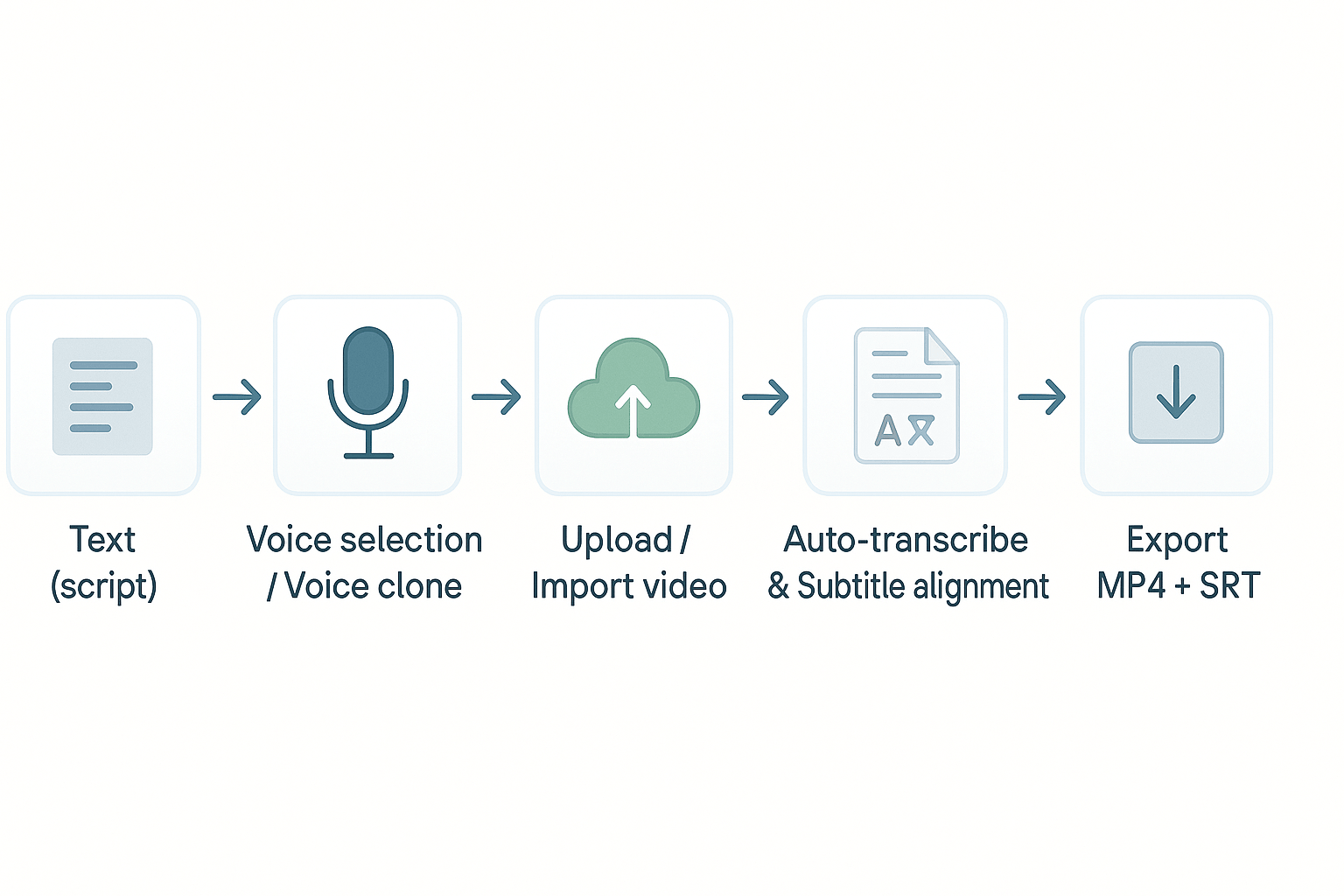
This step‑by‑step workflow shows how to turn a script and a video into a finished MP4 with synced captions using DupDub. It covers script prep, picking or cloning a voice, importing video, auto-transcribing and aligning subtitles, fine‑tuning timing and prosody, and exporting MP4 and SRT. Use the method for YouTube, social shorts, or e‑learning modules.
1) Prep a tight script for speed and clarity
Write a short, framed script that matches on-screen pacing. Keep lines 6–12 seconds long so captions read comfortably. For YouTube, aim for 120–150 words per minute; for social shorts, 50–70 words per 15 seconds; for e‑learning, break content into 30–60 second chunks. Tip: mark visual beats in square brackets, like [show chart], so voice timing matches edits.
2) Pick a voice or create a voice clone
Listen to a few voices to match tone: conversational for socials, neutral professional for e‑learning. If you need brand consistency, record a 30‑second sample to create a voice clone (voice cloning). Choose language and accent that fit your audience. Tip: test a short phrase at multiple speeds to check prosody and naturalness.
3) Upload or import video, then auto-transcribe and align
Upload the MP4 or import a YouTube link. Run auto‑transcription (STT) to generate a base transcript and auto-align subtitles. Review and correct obvious misreads, especially names and technical terms. Tip: enable sentence-level alignment to keep subtitle lengths readable on mobile.
4) Fine-tune timing and prosody
Adjust pauses, emphasis, and pacing in the editor. Use short edits to tighten or lengthen pauses without re-recording. For social shorts, compress pauses for energy; for e‑learning, add longer pauses after key points. Tip: preview on phone and laptop to confirm timing.
5) Export MP4 and SRT, finalize delivery
Choose export settings: 1080p 16:9 for YouTube, 1080x1920 for vertical shorts, high bitrate for e‑learning. Export MP4 and separate SRT so platforms can toggle captions. Tip: keep a version with burned‑in captions for platforms that lack SRT support.
[Workflow diagram: text → voice selection/clone → upload/import video → auto-transcribe & subtitle align → fine-tune timing → export (MP4 + SRT)]
Pricing & plan summary — what you get per tier
DupDub offers a clear set of plans so you can scale AI voiceovers without surprise costs. If you need a quick trial, the Free 3-day option gives starter credits and no credit card. Paid tiers add annual credits and higher limits for TTS, voice cloning, avatars, and transcription, plus a pay-as-you-go credit pack for ad hoc projects.
Quick decision checklist
-
Need to test features, experiment with voices, or demo AI dubbing? Choose the Free 3-day trial.
-
Solo creators publishing weekly videos, podcasts, or social clips: Personal fits most needs, cost-effective for 1–3 voice clones.
-
Small teams and agencies that need more hours, more clones, and larger file support: Professional is the best balance.
-
Enterprise localization, heavy avatar use, or large-volume dubbing: Ultimate gives the biggest credit pool and unlimited file size.
-
One-off projects or irregular workloads: pick Pay-as-you-go credits to avoid monthly fees.
Pricing snapshot (table placeholder)
|
Plan
|
Price (annual billing)
|
Key limits
|
Best for
|
|
Free
|
3-day trial, free
|
Starter credits
|
Trialing features
|
|
Personal
|
$11/mo
|
~1,800 yearly credits, 3 voice clones
|
Solo creators
|
|
Professional
|
$30/mo
|
~6,000 yearly credits, 5 clones
|
Small teams
|
|
Ultimate
|
$110/mo
|
30,000 credits, 10 clones, unlimited size
|
Enterprise
|
|
Pay-as-you-go
|
One-time credits
|
500–6,000 credit packs
|
Sporadic projects
|
This checklist helps match needs to a plan quickly. Start with the free trial to validate voice quality and workflow before upgrading.
DupDub vs competitors, feature and value comparison
Choosing the right text to speech video maker matters if you publish at scale. This section compares DupDub with ElevenLabs, Murf, Play.ht, and Synthesia. Focus is on voice quality, language coverage, dubbing workflow, avatars, and enterprise features.
Voice quality and cloning
DupDub delivers natural voices and a quick 30 second voice clone in many languages. ElevenLabs leads in expressive, narrative TTS for long-form audio. Murf and Play.ht offer many polished voices, suited for e learning and podcasts. Synthesia focuses on avatar lip sync more than raw TTS nuance.
Languages and coverage
DupDub supports 90 plus TTS languages and 47 clone languages. Play.ht and Murf cover many accents and styles, but their cloned-language range is smaller. ElevenLabs excels at English quality, while Synthesia targets multilingual avatars first.
End to end dubbing workflow
DupDub is built for video localization: it handles STT, subtitle alignment, translation, and revoicing in one flow. That reduces edit passes and time to publish. Competitors often require stitching services together. Synthesia gives a tight avatar workflow, but needs extra steps for subtitle alignment in many cases.
Avatars, integration, and automation
DupDub includes talking photo avatars and browser editing. Synthesia has more polished video avatars and templates. Murf and Play.ht focus on audio with basic avatar features. For teams, DupDub and Synthesia offer APIs and integrations to automate batch localization.
Enterprise features and security
DupDub adds voice clone locking and encrypted processing. Larger vendors match with enterprise SLAs and single sign on options. Evaluate support, data retention, and compliance when picking a tool.
Quick comparison table
|
Feature
|
DupDub
|
ElevenLabs
|
Murf
|
Play.ht
|
Synthesia
|
|
End-to-end dubbing
|
Yes
|
No
|
Partial
|
No
|
Partial
|
|
Voice cloning languages
|
47
|
Limited
|
Limited
|
Limited
|
N/A
|
|
Avatars
|
Yes
|
No
|
Basic
|
Basic
|
Advanced
|
|
API & integrations
|
Yes
|
Yes
|
Yes
|
Yes
|
Yes
|
Bottom line: DupDub is the practical choice for creators needing one tool to translate, align, and dub video at scale. It balances voice quality, language reach, and video workflows for fast publishing.
Best use cases and a real-world workflow (mini case study)
DupDub fits three common production needs where a text to speech video maker speeds delivery and cuts cost. This section gives three short workflows with measurable outcomes, then a compact mini case you can copy. The examples highlight script prep, voice cloning, auto-subtitles, and batch dubbing for fast, repeatable results.
YouTube channel localization: reach more viewers fast
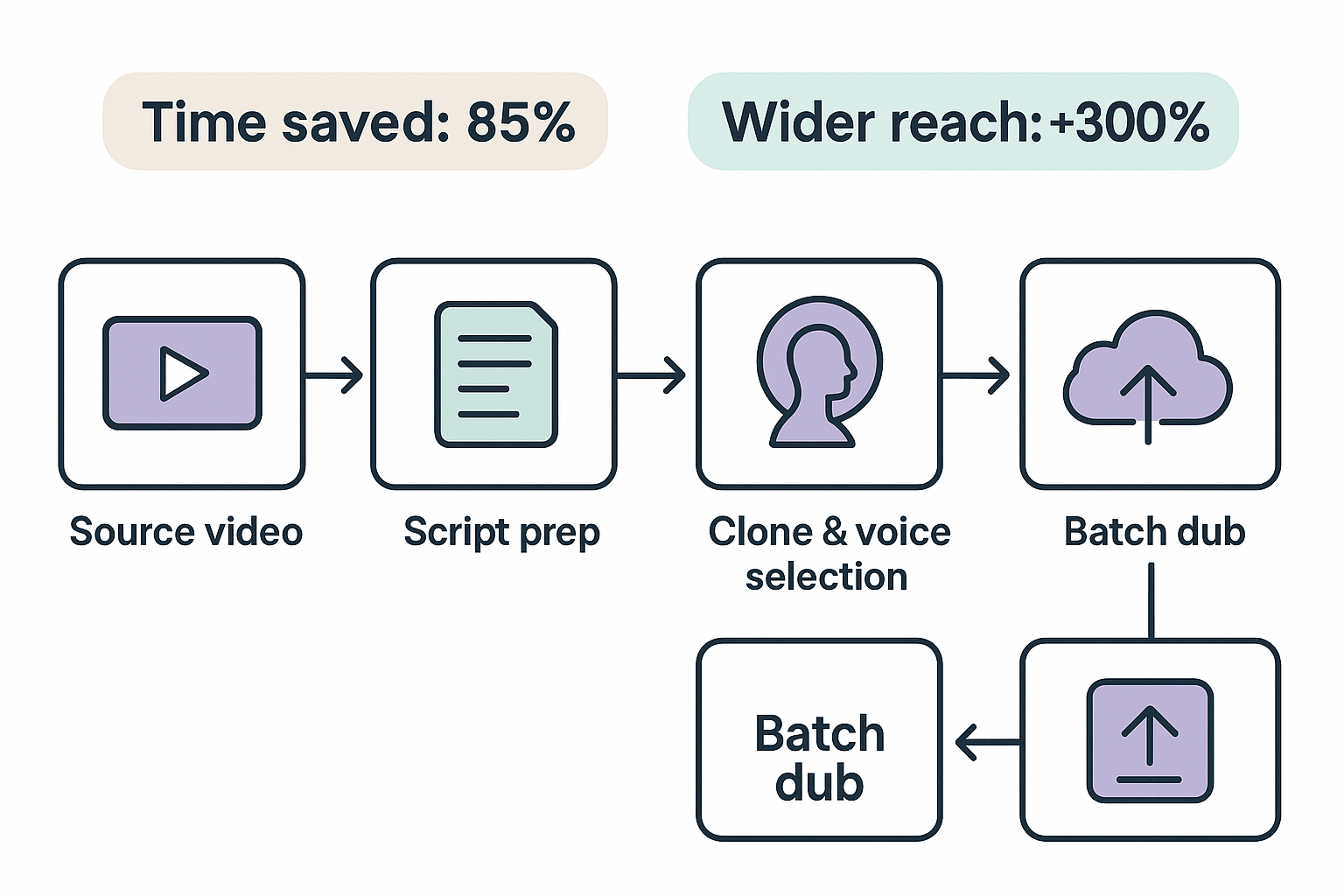
Workflow: pick high-performing videos, auto-transcribe, translate subtitles, clone a target language voice, batch dub. Outcome: publish 10 localized videos in the time it used to take to dub one. Typical savings: 70 to 85 percent time saved and 60 to 80 percent lower cost versus hiring voice talent.
E-learning repurpose: scale courses across regions
Workflow: export lesson audio, transcribe, create a brand voice clone, re-voice modules, sync subtitles and slides. Outcome: a 30-module course translated into three languages in under two weeks. Typical savings: 6x faster turnaround and major reduction in per-learner localization costs.
Localizing marketing ads: test more variants quickly
Workflow: produce one master ad, generate three language variants, clone native-sounding voice, render short A/B cuts. Outcome: three markets tested in days, not weeks. Typical savings: cut production costs by 50 to 70 percent and speed time-to-market.
Mini case: indie creator, 50-video batch
-
Export 50 source videos and auto-transcribe.
-
Clean scripts and set brand voice clone.
-
Batch dub into two target languages and generate SRTs. Expected time savings: from 200 hours manual work to 30 hours with AI dubbing. Result: 6x faster release cadence and 3x more international views within a month.
"Using a single cloned voice kept our tone consistent and cut localization time dramatically," says a content director with localization experience.
Audio quality, voice options & advanced tips
If you want natural results when using a text to speech video maker, focus on voice choice, pacing, and export quality. This short guide covers voice styles, cloning best practices, simple SSML-like phrasing, and export settings. Use these steps to raise perceived audio quality quickly.
Pick the right voice style
Match voice style to the content: conversational for social clips, clear and steady for training. Try three voices and pick the one with natural cadence and consistent tone. Avoid extreme accents unless you know the audience.
Voice cloning best practices
Record a clean 30 second sample: quiet room, good mic, steady distance, 16-bit 44.1 kHz or higher. Read varied lines: short phrases, questions, and one emotional line to capture range. More samples help, but a focused 30 second clip gives reliable clones in many platforms.
Use SSML-like phrasing to shape prosody
-
Insert pauses: to mimic breaths.
-
Emphasize words: important to draw attention.
-
Control speed and pitch: for calm tone.
Export recommendations and quick checks
Choose WAV 48 kHz, 24-bit for highest fidelity, especially for broadcast or remixing. Use MP3 192–256 kbps for fast uploads and social platforms to save bandwidth. Before final export, test one clip in both formats, trim extra silence, and ensure subtitles and SRT files stay aligned.
Privacy, security & troubleshooting common issues
If you're using a text to speech video maker, privacy and quick fixes matter. DupDub processes audio and cloning in encrypted pipelines, and it locks voice clones to the original speaker. Below are how DupDub handles consent and a short troubleshooting checklist you can use in production.
Privacy and consent
DupDub uses encrypted processing and limits stored data to what’s needed for the task. Voice cloning is locked to the original speaker, and DupDub requires explicit consent before cloning a voice. For EU projects, remember: According to Article 7(1) of the GDPR,
General Data Protection Regulation (2016), 'Where processing is based on consent, the controller shall be able to demonstrate that the data subject has consented to processing of his or her personal data.' Keep signed consent, timestamp, and scope records for audits.
Quick troubleshooting checklist
-
Sync drift (audio and subtitles): re-run auto alignment, confirm project frame rate, and re-export at original codec. If drift persists, split the video and realign segments.
-
Artifacts or robotic voice: switch to a higher quality voice model, clean the source sample, or re-clone with a quieter recording.
-
Rate-limit or API errors: throttle requests, batch uploads, and check your plan quota; retry with exponential backoff.
-
Bad transcription: export SRT, fix timestamps manually, then re-import for a fresh TTS pass.
-
Voice mismatch: confirm clone language and accent settings, and re-record a 30 second sample if needed.
These steps fix most production issues without redoing the whole job.
-
How accurate are DupDub voices for text to speech video maker projects?
DupDub voices sound natural for most narration and dubbing. Accuracy depends on voice, language, and recording quality; use Ultra voices or test a short clip and tweak pacing in the editor.
-
How does DupDub voice cloning work for multilingual voice cloning?
Upload a 30 second clean sample and DupDub generates a synthetic clone usable in supported languages (47 languages). Get clear audio and consent, then test the clone on short scripts first.
-
Which file formats does DupDub accept for audio and video exports?
DupDub exports MP3 and WAV audio, MP4 video, and SRT subtitles. Check the app for import options and any file size limits before large projects.
-
Can I delete my voice data and recordings from DupDub, and how does data deletion work?
Yes, cloned voices are locked to the original speaker and processing is encrypted. Request deletion through account settings or support, and review DupDub's privacy documentation for enterprise options.
-
Which DupDub plan is best for YouTube creators wanting scalable AI voiceovers?
Personal works for occasional creators, Professional fits frequent publishers and localization, and Ultimate suits heavy, enterprise-level use. Try the free 3-day trial and see the pricing and API docs on DupDub's site for exact credits and limits.




 Discord
 YouTube
 Tiktok
 Twitter
 Facebook
 Instagram