AI Voice Trend 2026: Market Size, Top Trends & How Creators Scale Multilingual Audio

Mar 16, 2026 18:0111 mins read
Share to
Contents

TL;DR: What creators need to know about the ai voice trend

The ai voice trend is making it faster and cheaper to publish narrated and dubbed content in many languages, but it also raises quality, legal, and ethical questions creators must manage. Expect big gains in speed and reach, plus new review steps for voice quality and rights.
  • Speed and scale: Automated dubbing cuts time to publish, letting you test language markets quickly.
  • Cost and workflow: Synthetic voices reduce per-video expense, and let small teams produce more content.
  • Quality and risk: Machine voices can sound lifelike, yet may need editing, and you must secure consent and clearances.
Quick actions to try this week:
  1. Run a 1-minute dub test: translate, auto-dub, and review sync and tone.
  2. Create a short voice clone with explicit consent, then compare natural vs synthetic for clarity.
  3. Add three checks: a release form, an accessibility caption pass, and a quality review before publish.

Why AI voice trends matter in 2026 (market size & growth)

The ai voice trend matters because creators and teams can reach global audiences faster, at lower cost, and with consistent brand voice. Knowing where spending and adoption concentrate helps you plan budgets and prioritize workflows for multilingual reach. This section gives a compact market snapshot and the growth levers creators should watch.
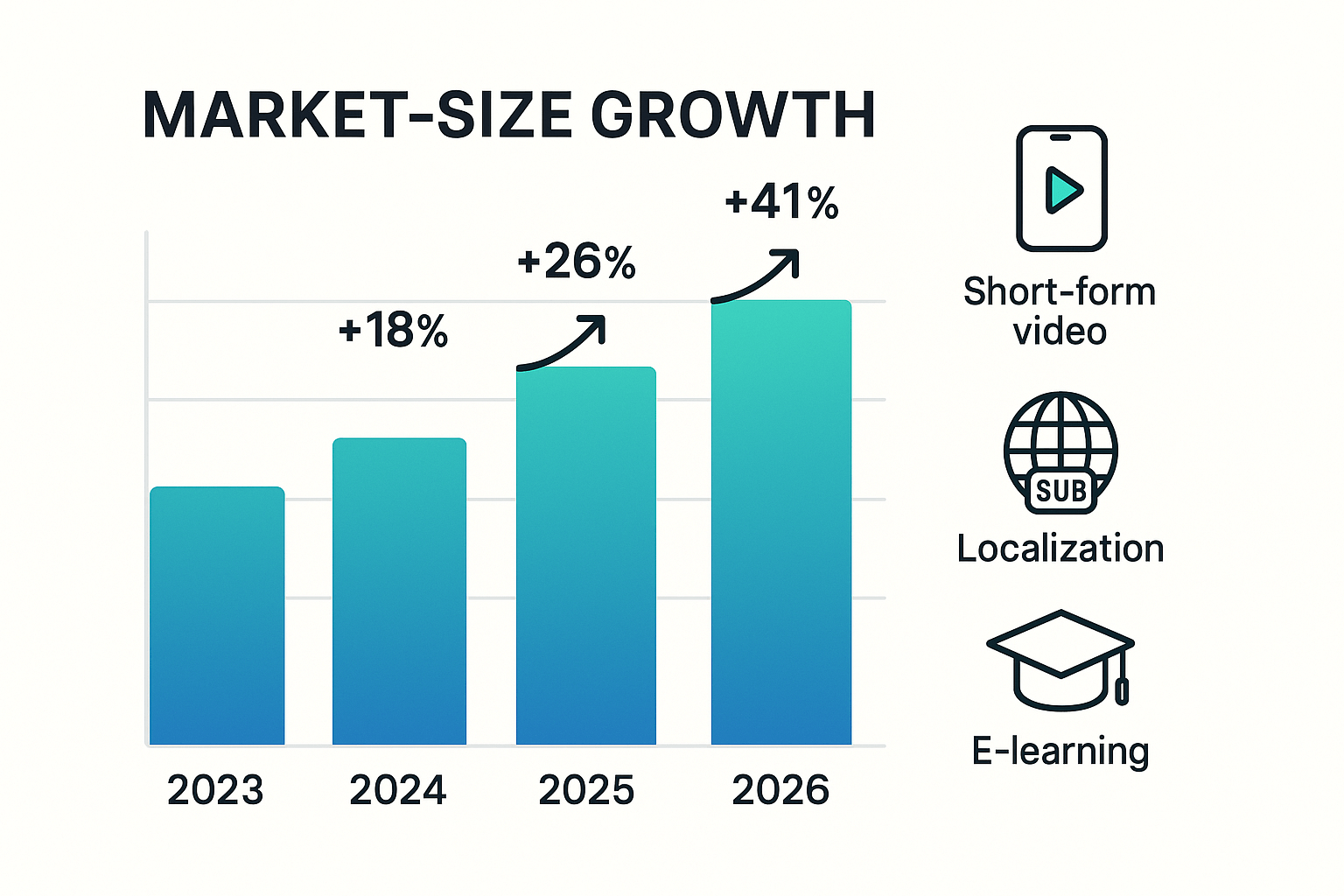
Analysts report rapid growth in voice AI markets. According to Grand View Research (2023), the global AI voice cloning market size was estimated at USD 1,924.5 million in 2023 and is projected to reach USD 9,751.4 million by 2030, growing at a CAGR of 26.1% from 2024 to 2030. That scale makes voice AI an investable area for creators, localization teams, and learning producers.
Where spending and adoption concentrate through 2026 is clear: short-form video, localization, and e-learning. Short-form platforms demand rapid repackaging and native-language audio. Localization budgets keep rising as brands chase regional audiences. E-learning buys voice AI to cut narration costs and speed course launches.

Key growth levers

  • Short-form video: Fast turnaround and low per-asset cost make synthetic voices ideal. Creators reuse clips in multiple languages and formats.
  • Localization at scale: Automated dubbing and subtitle alignment reduce agency costs and speed global launches. Teams keep brand tone consistent across markets.
  • E-learning and training: Institutions use TTS and voice cloning to produce many course hours quickly and affordably, including accessible options for learners with disabilities.
Table: Where creator spend is moving
Driver
Primary spend focus
Creator benefit
Short-form video
Fast dubbing, captions, repurposing
Quicker publish cycles, broader reach
Localization
Multilingual audio and synced subtitles
Consistent brand voice globally
E-learning
Bulk narration and voice variants
Lower course production cost
By 2026, creators who map budget to these levers will win time and reach. Start by auditing which driver fits your goals, then pick tools that handle translation, voice cloning, and subtitle sync in one flow.
Bar chart showing AI voice market growth from 2023 to 2026 with callouts for short-form video, localization, and e-learning.

Top 6 AI voice trends shaping content in 2026

AI voice trend developments are reshaping how creators reach audiences, tell stories, and meet accessibility needs. Below are six trends to watch, with practical implications, real examples, and quick tests you can run today.

1) Multilingual dubbing at scale

AI tools now let teams translate, align subtitles, and revoice videos quickly. Practical implication: publish in more markets without huge budgets. Example: a creator repurposes one tutorial into five languages. How to test: pick one video, auto-translate subtitles, generate one dubbed track, and compare watch time across languages.

2) Hyperreal voice cloning

Cloning creates a near-identical synthetic voice from short samples. Practical implication: keep a consistent brand voice across languages, but manage consent and ethics. Example: a podcaster clones their voice to localize episodes. How to test: make a 30 second clone, narrate a short script, and run blind listener feedback.

3) Fine-grained style and emotion control

You can now tweak pace, emotion, and style at the sentence level. Practical implication: tailor tone for ads, tutorials, and explainer videos. Example: upbeat narrator for promos, calm voice for tutorials. How to test: produce three style variants and measure engagement and retention.

4) Avatar plus voice combos

Talking avatars combine visual characters with synced synthetic speech. Practical implication: faster brand spokespeople and localized host characters. Example: a learning series with the same avatar in different languages. How to test: build a 30 second avatar clip and test clarity and viewer preference.

5) Accessibility and inclusivity improvements

Better TTS and audio descriptions help neurodiverse and visually impaired users. Practical implication: expand audience and meet accessibility standards. Example: podcasts adding audio descriptions and simple-language tracks. How to test: add an audio description track and collect direct feedback from target users.

6) Regulation and safety tooling

Expect stronger consent, watermarking, and abuse filters. Practical implication: you must prove permission for clones and monitor misuse. Example: consent workflows before creating a voice clone. How to test: enable consent and watermark options and run a compliance checklist.
Quick tests to run this week:
  • Clone one short clip and compare feedback.
  • Dub a single video into one new language and track metrics.
  • Publish an avatar clip with an audio description and collect user notes.
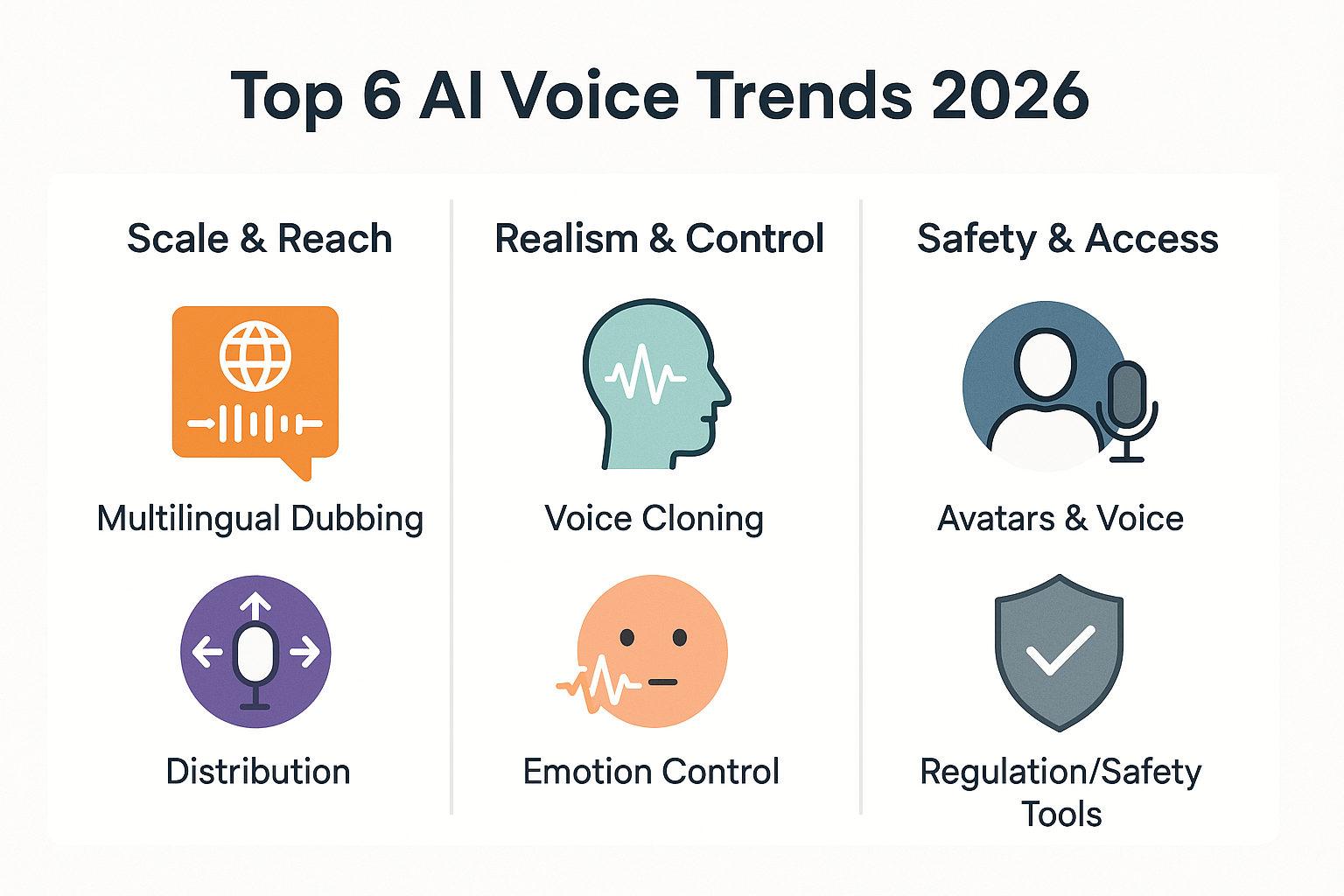
Infographic with six icons grouped into three buckets: Scale & Reach, Realism & Control, Safety & Access, titled Top 6 AI Voice Trends 2026.

Where AI voice still falls short (limitations & risks)

The ai voice trend has real limits in production workflows. Current systems struggle with natural prosody and with keeping long-form context coherent. Teams must weigh cost, quality, and legal risk before trusting synthetic audio for high-stakes content.

Technical limits: prosody and long-form context

TTS (text to speech) still finds emotional rhythm hard to get right. Short clips can sound natural, but longer narration often loses intonation and pacing. Models also forget earlier context, so multi-minute scripts can feel disjointed. Expect manual editing or human re-reads for narrative work.

Quality versus cost tradeoffs

Higher voice tiers sound more natural but cost more in compute and credits. Low-cost voices are fine for captions and short promos, not brand narrators. Also, cloned voices can drift in tone across long videos, requiring spot fixes or re-records.

Safety and misuse vectors

Synthetic voice can be misused for scams, impersonation, or misinformation. According to FTC Submits Comment to FCC on Work to Protect Consumers from Potential Harmful Effects of AI (2024), in 2024 the Federal Trade Commission launched a Voice Cloning Challenge to promote ideas that protect consumers from such harms. Legal and copyright rules also lag behind tech, creating gray areas for reused performances and celebrity likenesses.

Production-ready checklist: when to use AI only, and when to add humans

  1. Identify risk level: public trust, regulated content, or financial claims raise risk.
  2. Run a short pilot: generate a draft and test with target users.
  3. Add human-in-the-loop for narration longer than 3 minutes, sensitive topics, or brand voices.
  4. Pick voice tier by role: cheap voices for drafts, premium/clone for hero content.
  5. Log provenance and get consent when cloning a real voice.
Use AI voice to speed iteration, not to skip ethical checks. When in doubt, bring a human back into the loop to keep speed and trust aligned.

How creators and teams are using AI voice today — 4 real use cases

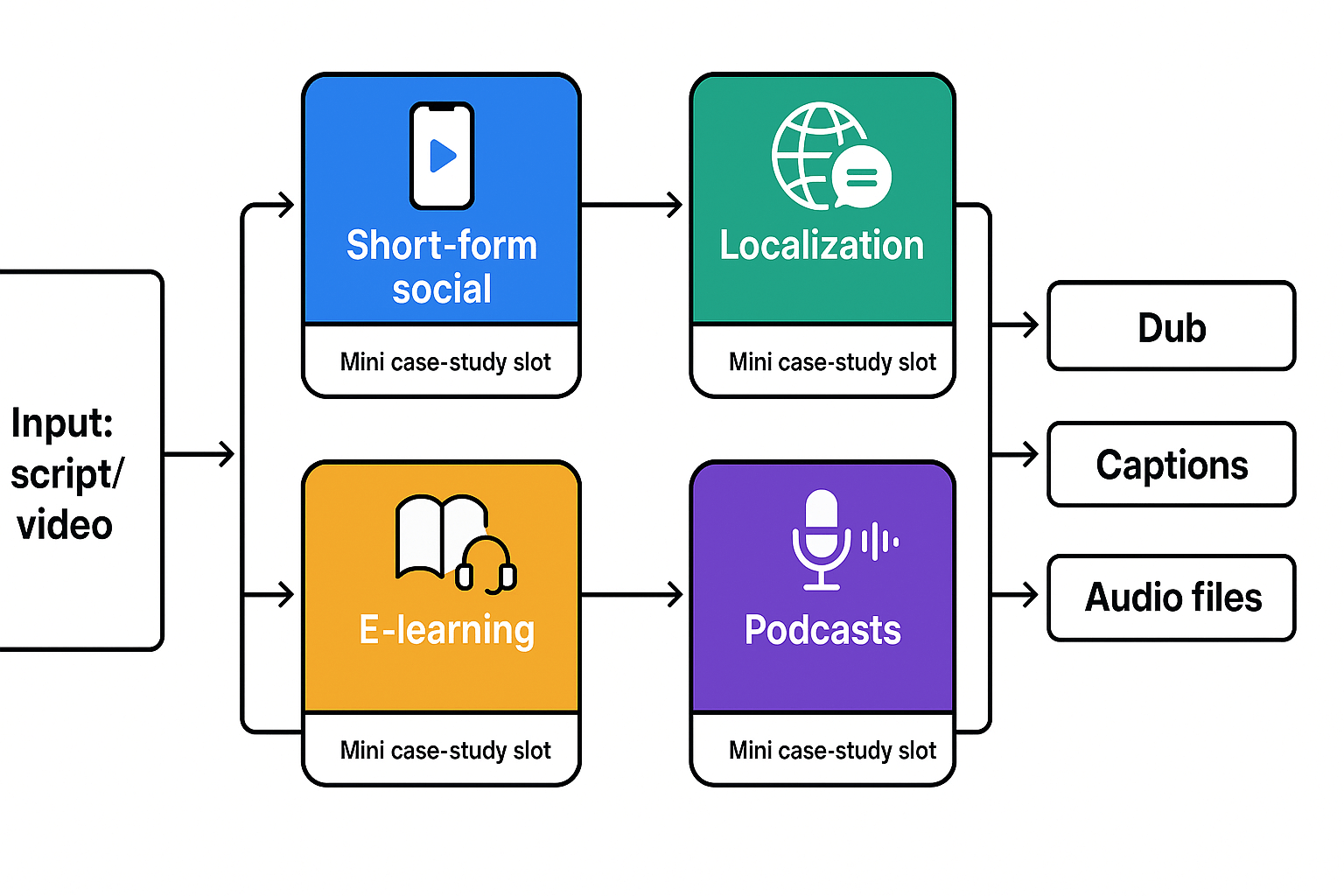
AI voice tools are already cutting costs and speeding time to publish for creators and teams. The ai voice trend shows up in four clear workflows: short-form social repurposing, global localization, e-learning narration, and podcast spin-offs. For context, Statista (2025) reports: In 2020, 68 percent of Generation Z and Millennials in the United States reported watching user-generated short-form videos daily, up from 58 percent in 2019.

Short-form social: faster repurposing for reels and shorts

Creators use AI voice to turn long video clips into native short-form videos with localized audio. It trims editing time and keeps brand voice consistent across languages.
Mini case-study template to collect during production:
  • Quote from creator about time saved
  • Time to publish before vs after (hours)
  • Views or engagement lift in first 7 days
  • Voices and languages used
Practical note: DupDub speeds subtitle alignment and offers quick voice clones for consistent brand tone across short videos.

Global localization: scale international reach

Marketing teams convert hero assets into multiple markets without studio costs. Automated translation, synced subtitles, and one-click dubs make global launches predictable and fast.
Mini case-study template:
  • Number of target languages
  • Cost per language vs manual dubbing
  • Speed to market (days)
  • Regional engagement lift
Practical note: DupDub offers 90+ languages and one-click multilingual dubs to repurpose hero content at scale.

E-learning and training: personalized, accessible narrations

Instructional teams create multiple narrator voices and localized lessons quickly. AI voice reduces narration budgets and supports alternative formats for accessibility.
Mini case-study template:
  • Course length and modules localized
  • Learner completion rate change
  • Accessibility improvements (captions, alt audio)
  • Voice cloning usage
Practical note: DupDub’s voice cloning and STT help keep training consistent and accessible.

Podcasts and audiograms: more outputs from one recording

Podcasters use AI voice to produce translated audio clips and short audiograms for social channels. It creates more touchpoints from one episode.
Mini case-study template:
  • Number of audiograms produced per episode
  • Time to create clips
  • New audience reach by language
  • Monetization or ad lift
Practical note: DupDub exports MP3/WAV and generates aligned subtitles for quick audiogram creation.
Four-node schematic showing inputs (script/video) feeding four use cases: Short-form social, Localization, E-learning, Podcasts, then outputs (dub, captions, audio files); each use case includes a mini case-study callout.

DupDub in the landscape: practical comparison vs competitors

AI creators need clear, practical signals when evaluating tools. This short comparison focuses on what matters most: languages, cloning, avatar capabilities, and trial or pricing signals that let teams test fast. The ai voice trend is pushing teams to choose platforms that balance voice quality, scale, and ease of testing.

Practical feature comparison

Feature
DupDub
ElevenLabs
Murf AI
Synthesia
Languages (TTS)
90+ languages & accents
50+
30+
120+ (avatar-focused)
Voice cloning
47 languages, 30s sample
Industry-leading voice quality
Limited cloning
Some voice options, not full cloning
Avatars / talking characters
Talking photos, AI avatars, 40+ languages
No native avatars
No native avatars
Advanced video avatars
Trial / pricing signals
3-day free trial, starter credits; clear Personal/Professional/Ultimate tiers
Pay-as-you-go, tiered
Monthly tiers, smaller catalogs
Enterprise and pay-as-you-go plans
Best-packed use case
Multilingual dubbing, localization at scale
Studio-grade single-language narration
Studio-like TTS for podcasts
Video-first avatar localization
Short note: the table shows practical metrics creators use to decide fast. DupDub blends broad language reach, real cloning, avatar support, and a try-before-you-buy trial.

When to pick DupDub versus alternatives

  • Pick DupDub when you need scalable multilingual dubbing, intact brand voice across languages, and avatar/video output. It’s built for creators and teams that localize often.
  • Pick ElevenLabs for single-language, ultra-natural spoken audio and deep voice-quality needs.
  • Pick Murf if you want a simple studio-style TTS workflow for podcasts and narration.
  • Pick Synthesia when your core need is polished video avatars rather than large-scale voice cloning.
This comparison helps match tooling to scale, brand voice needs, and integration priorities. Consider trialing two options side by side, using short pilot projects to compare turnaround, voice fidelity, and subtitle sync.

A step-by-step DupDub workflow to implement the ai voice trend

Use this compact workflow to go from raw video to polished multilingual audio. It covers each step: transcribe, translate, pick or clone a voice, generate TTS or a dub, auto-sync subtitles, and publish. This guide also gives natural-sounding tips, caption checks, and DupDub shortcuts to save time.

Quick step-by-step

  1. Transcribe the source audio using STT (speech-to-text). Export a timestamped transcript.
  2. Translate the transcript into target languages. Prefer human review for idioms.
  3. Select a TTS voice or create a voice clone from a 30 second sample. Test clarity and tone.
  4. Generate multilingual TTS or full video dubs. Use ultra or standard models per budget.
  5. Auto-sync subtitles and captions with DupDub’s alignment tool. Export SRT and burned-in options.
  6. QA: listen for timing, pronunciation, and cultural fit. Make quick edits in the browser studio.

DupDub quick settings to save time

  • Use voice presets to lock pitch and speaking rate.
  • Enable speaker lock when cloning to secure the sample.
  • Batch translate for multiple languages and review with side-by-side editor.
  • Save subtitle styles and export one-click SRT files.
  • Automate with the API for bulk jobs and credits management.

QA and accessibility checks
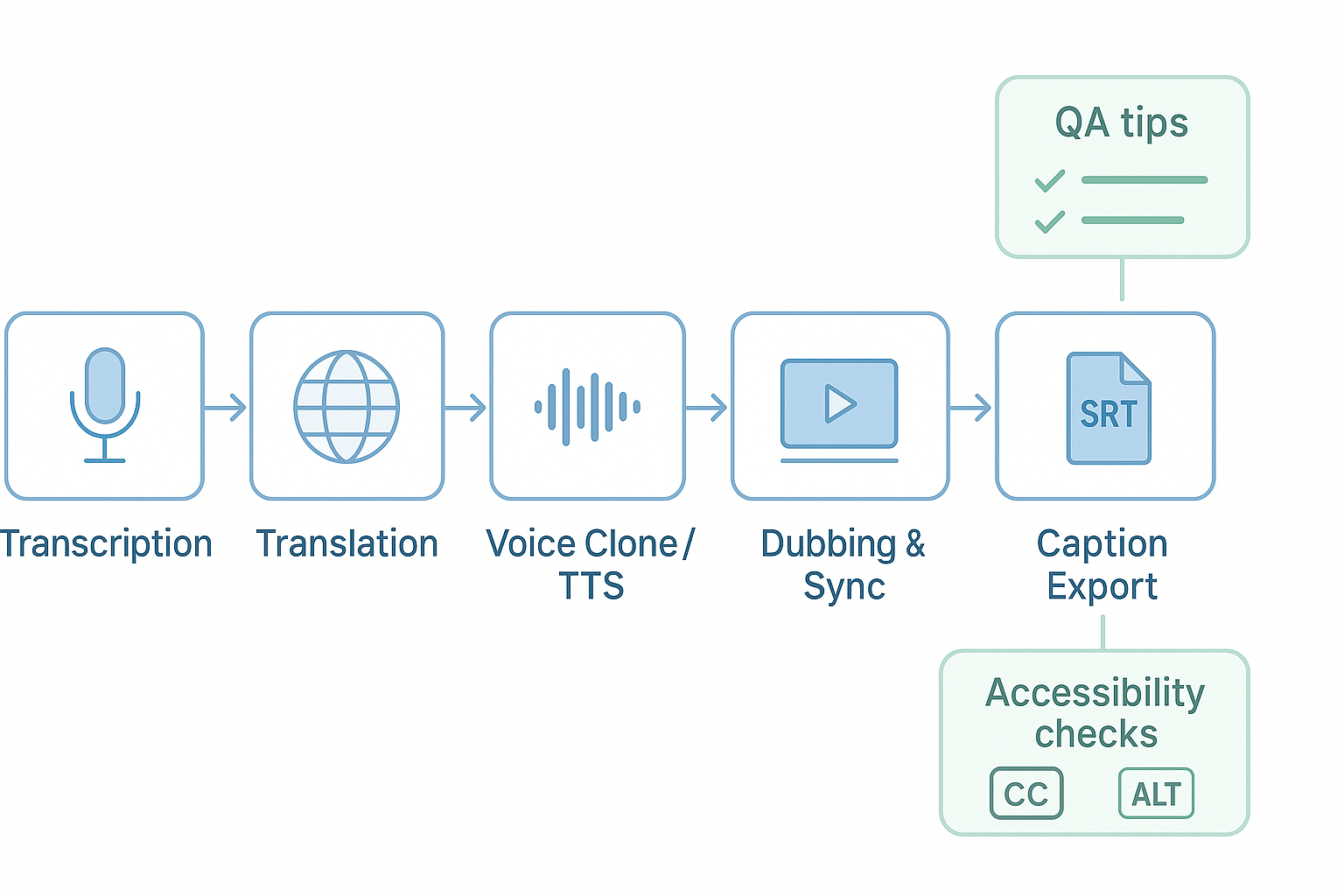
Listen at 0.75x and 1.25x speeds to catch odd words. Check subtitle reading speed and line length to meet WCAG guidance. Verify cloned voices have signed consent and match brand tone. Export accessible caption files and add alt text for video players.
Make audio sound natural by adding short pauses and breath markers. Use punctuation and line breaks in scripts to control rhythm and emphasis. Do a final listen on mobile and desktop then publish.
Workflow diagram: Transcription → Translation → Voice Clone/TTS → Dubbing & Sync → Caption Export, with QA tips and accessibility check callouts.

Ethics, legal checklist, and accessibility best practices

The ai voice trend opens fast new possibilities for creators, but it also raises clear legal and accessibility duties. This section gives a compact, action-focused checklist teams can run through before cloning a voice or launching mass dubbing. Use these steps to reduce risk, protect talent, and improve access.

Consent and voice rights: get signed, specific permission

Get written consent from the speaker that covers languages, platforms, and time period. Define allowed uses, revenue sharing, and revocation terms in a short contract. Verify identity and age, and store signed records securely.
  • Signed release specifying scope and duration
  • Samples of allowed audio, and a usage ledger
  • Proof of identity and age verification

Copyright and IP: clear sources and licenses

Confirm you own or licensed the original script and media. Check third party music, stock clips, and quoted material for reuse rights. Keep versioned source files and license records for audits.
  • Script ownership statement or license files
  • Music and SFX clearance notes
  • Chain-of-title folder for each campaign

Transparency and disclosure: label synthetic audio

Tell viewers when audio is synthetic or cloned, in the video and description. Maintain a public policy page on synthetic content and a point contact for concerns. Flag paid endorsements per advertising rules.
  • On-screen label and transcript note
  • Disclosure in metadata and captions
  • Contact and takedown procedure

Accessibility wins when implemented correctly

Follow the Web Content Accessibility Guidelines (WCAG) 2.2, approved as an ISO standard in October 2025, which provide comprehensive guidelines to make web content more accessible to people with disabilities. Add captions, readable transcripts, and audio descriptions. Choose voice styles that improve clarity for listeners with cognitive or hearing issues.
  • Time-synced captions and full transcripts
  • Optional audio description tracks
  • High-clarity voice presets and volume normalization

Quick pre-launch audit checklist

Run one final audit before publish: consent, IP, privacy, disclosure, and accessibility. Test with screen readers and a sample of target-language native speakers. Archive audit logs and make them available to stakeholders.
  1. Signed consent and identity check
  2. License and music clearance
  3. Privacy and security review
  4. Disclosure labels applied
  5. WCAG checks and assistive tech testing

FAQ — People also ask about ai voice trend & DupDub

  • Is the AI voice trend creating copyright problems for voice actors and creators?

    No single rule covers every country. Rights usually attach to the recorded performance and the speaker’s consent, not the synthetic model alone. Always get written permission before cloning a real person, keep clear records, and test with non-identifying samples when exploring voice cloning.

  • How accurate are voice clones for creators and localization projects?

    Quality depends on the sample and the use case. A clear 30-second sample can yield high fidelity for narration and dubbing, while singing or extreme acting often needs extra tuning. Run short A/B tests on 1–2 minute scripts to judge voice match, pacing, and intelligibility before scaling.

  • Is DupDub safe for sensitive content and creator privacy?

    DupDub locks cloned voices to the original speaker and processes data with encryption, which helps reduce misuse risk. For sensitive topics, add internal review steps, redact personal data, and run a private pilot before publishing. Contact sales if you require enterprise controls or API isolation.

  • How do DupDub pricing and credits work for small tests?

    Start with the free 3-day trial that provides starter credits for quick experiments. Paid tiers scale by yearly credits and features, and pay-as-you-go options allow one-off credit purchases for pilot runs. Compare tiers and choose pay-as-you-go for low-risk testing.

  • How do I run small AI voice tests before committing to a workflow?

    Pick a short representative clip (30 seconds to 2 minutes). Create a clone or choose a TTS voice, then generate 2–3 variants. Check timing, subtitles, and clarity, gather feedback, and iterate on tone and speed before rolling out to larger batches.

Experience The Power of Al Content Creation

Try DupDub today and unlock professional voices, avatar presenters, and intelligent tools for your content workflow. Seamless, scalable, and state-of-the-art.