Protecting API keys stops data leaks, account takeover, and service abuse. This short list gives the must-do controls for api key security and the immediate actions to take if a key is exposed.
-
Limit scope and lifetime: issue keys with least privilege and short TTLs.
-
Store secrets in a managed secrets store, never in source code or public repos.
-
Use per-client keys and rotate them regularly, automate rotation where possible.
-
Enforce network controls, IP allowlists, and strong auth for sensitive endpoints.
-
Monitor usage, alert on anomalies, and apply rate limits to stop automated abuse.
If a key is exposed: revoke it, rotate affected keys, search commits and CI logs for leaks, and update any dependent credentials. Run your incident playbook and rotate backups before redeploying.
See the full guide for practical checklists, language-agnostic code snippets, secrets manager comparisons, incident detection playbooks, and secure API integration notes.
Why API keys still matter (and their limitations)
API keys are simple, fast, and still a practical choice for many automation and media workflows, so api key security matters. Use keys when you need lightweight machine-to-machine access, CI/CD automation, or server-side integrations where a single shared credential simplifies calls. But keys are not a one-size-fits-all authentication method, and teams must add controls so they don't become a single point of failure.
Where keys work well
-
Server-to-server integrations, like backend calls to a media processing API.
-
CI/CD pipelines and build agents that need non-interactive access.
-
Low-risk public endpoints, webhooks, or short-lived test environments.
Limitations and how to pair keys with stronger controls
API keys carry no built-in user identity, they tend to be long lived, and they leak easily if embedded in client code or repos. Standards now favor short-lived tokens and safer flows: the OAuth BCP deprecates the Implicit Grant due to security vulnerabilities in
RFC 9700: OAuth 2.0 Security BCP (2025), so prefer authorization methods that issue short-lived credentials for user context.
Practical pairing: store keys in a secrets manager, enforce IP allowlists, bind keys to specific scopes and rate limits, rotate them automatically, and use mTLS or short-lived JWTs when you need strong identity guarantees. These steps keep keys useful without letting them become an attack vector.
How API keys are commonly exposed (real-world exposure scenarios)
API key security starts with knowing where keys leak. Below are the most frequent exposure paths, short real-world examples, and quick fixes you can run now. As noted by
OWASP Non-Human Identities Top 10 (2025), In 2023, 51% of organizations lacked a formal process to offboard or revoke long-lived API keys.
Git commits and history
Developers accidentally commit keys in code or config files. Example: a push to a public repo that included a service token. Quick fix: git-secrets or truffleHog scan, rotate the exposed key, and force-remove it from history.
Public buckets and storage
S3 or GCS buckets misconfigured to public read show secrets. Example: backups or build artifacts containing .env files. Quick fix: run cloud-bucket scanners, tighten ACLs, and replace any leaked keys.
CI logs and artifacts
CI systems (Continuous Integration) can print secrets in build logs or store credentials in artifacts. Example: failed test output showing a token. Quick fix: mask secrets in CI, purge old artifacts, and enable log scrubbing.
Accidental debug output
Local debug prints or verbose error handlers leak tokens. Example: stack traces with headers logged to stdout. Quick fix: remove debug prints, use structured logging that redacts sensitive fields.
Third-party compromise
Vendor breaches can expose tokens you shared. Example: an integration provider leaked credentials. Quick fix: isolate provider scopes, rotate keys, and limit access via least privilege.
Client-side embedding
Embedding secrets in web or mobile clients exposes them to attackers. Example: API keys in bundled JS. Quick fix: move secrets to a backend or use short-lived tokens issued per session.
Quick checks to find exposures fast:
-
grep or secret scanners across repos and history
-
scan public buckets and CDN endpoints
-
search CI logs and artifacts for token patterns
-
audit token age and unused scopes
Best practices for securing API keys (practical checklist)
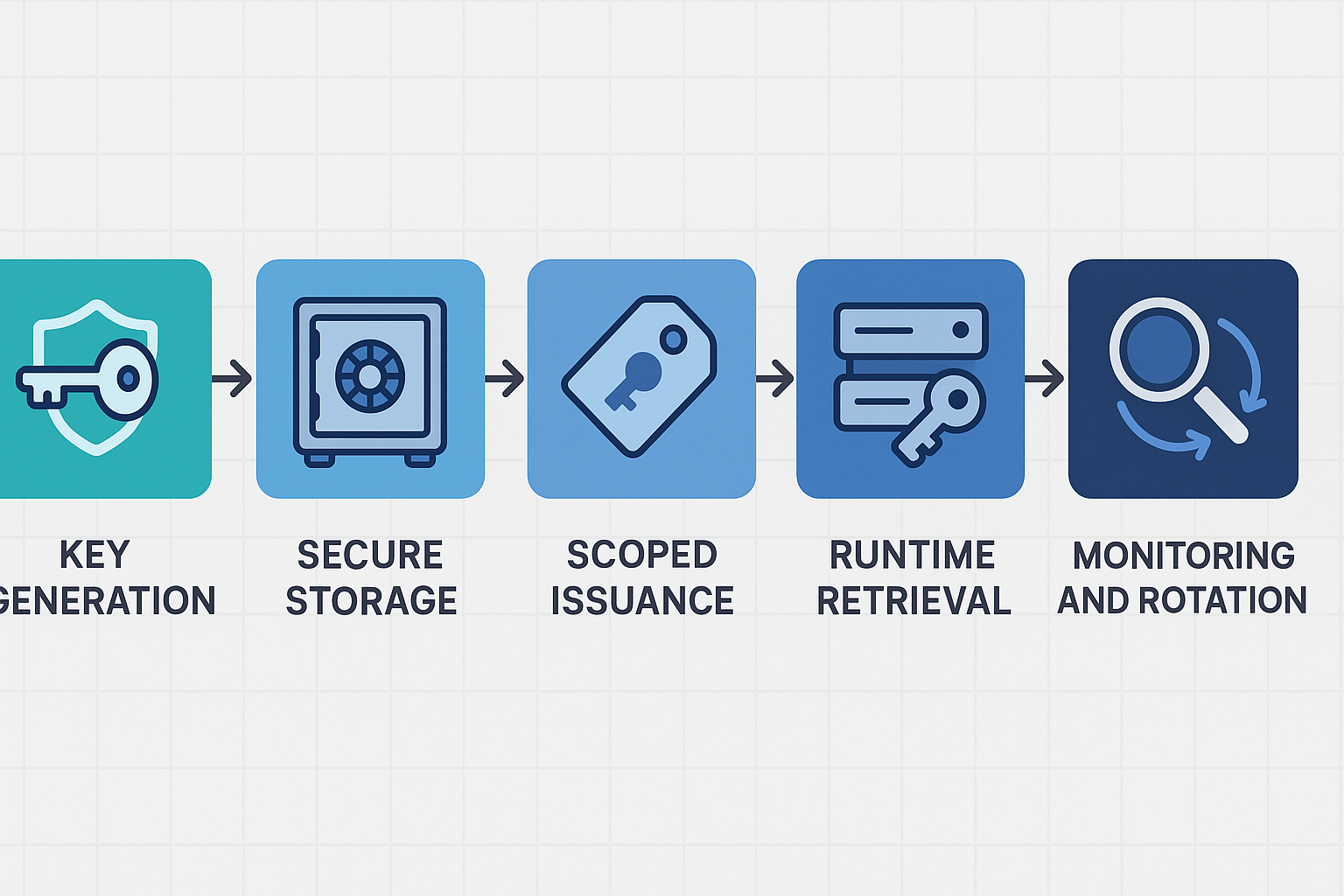
A compact, actionable checklist makes securing API keys doable. This section covers generation, scoping, secure storage, least privilege, lifecycle limits, network controls, and logging hygiene. It includes language-agnostic patterns for env vars, secrets managers, and safe runtime retrieval, plus notes on how DupDub's API modules map to common secret and access patterns.
Generate and scope keys first
Create keys per purpose, not per developer or machine. Use short-lived keys for automation tasks and long-lived read-only tokens only when needed. Embed intent in the key name, for example: project:video-transcode:ci.
Checklist:
-
Issue keys per application, environment, and role.
-
Use scoped scopes or policies to limit actions.
-
Tag keys with owner and expiry metadata.
Store secrets where software can fetch them securely
Never bake keys into source control. Use environment variables for local dev and a secrets manager for production. Rotate secrets automatically and restrict console access.
Patterns (language-agnostic):
-
Env var example for local dev: DUPDUB_API_KEY=proj-abc123 export DUPDUB_API_KEY
-
Runtime retrieval pseudocode from a secrets manager: secret = secretsClient.getSecret("dupdub/prod/api-key") setEnv("DUPDUB_API_KEY", secret.value)
Apply least privilege and lifecycle limits
Grant the minimum permissions needed. Use separate keys for creation, upload, and transcription. Limit scope to endpoints and HTTP methods. Enforce expiry and automatic revocation for CI tokens.
Quick rules:
-
Use read-only keys for downloads.
-
Use scoped write keys for uploads and voice cloning.
-
Enforce expiry and require reissue for long-lived keys.
Network controls and runtime retrieval
Restrict key use by IP ranges, VPC endpoints, or referer headers when supported. For server-side calls, keep calls inside private networks and call DupDub via backend proxies that inject keys at runtime.
Server call flow pattern:
-
Client calls backend with user auth.
-
Backend fetches key from vault at runtime.
-
Backend calls DupDub API with injected key.
Logging, rotation, and monitoring hygiene
Log key usage without storing raw secrets. Alert on anomalies like spikes or unknown endpoints. Automate rotation and use canary keys for safe rollouts.
Checklist summary (copy-ready):
-
Issue per-purpose keys, tag owner and expiry.
-
Store in a secrets manager, not in repo.
-
Enforce least privilege and scoped policies.
-
Restrict network surfaces and use backend proxies.
-
Log usage, alert on anomalies, and rotate automatically.
Mapping note: use project-level keys for bulk video jobs and per-service scoped tokens for TTS or voice cloning modules in DupDub. For API docs and quick setup, place links in your onboarding flow and developer README so teams can find DupDub API docs and trial signup easily.
Automating rotation, provisioning, and CI/CD integration
Rotate keys automatically so services never run long on old credentials. This section shows a production-ready rotation flow, scripts for automatic key rotation and revocation, and safe CI/CD patterns. It also contrasts runtime retrieval versus build-time injection and gives a short DupDub integration note.
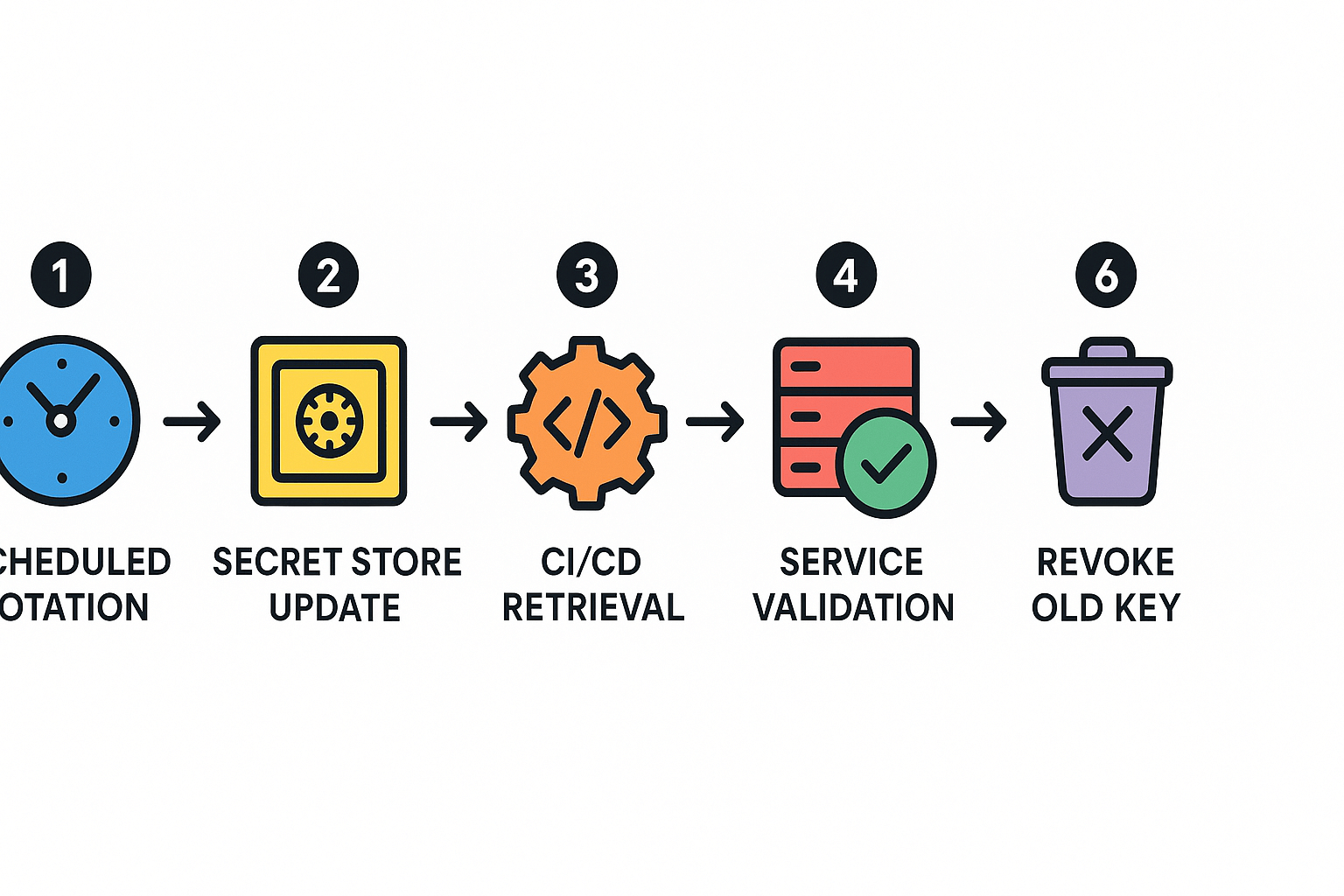
Automated rotation workflow
-
Schedule rotation: run a cron or serverless job every X days.
-
Create new key in the secrets store, tag it as "pending".
-
Push the secret to the store and update metadata atomically.
-
Roll rollout: instruct services to fetch the new key at next check-in.
-
Validate traffic using canary endpoints.
-
Revoke the old key after confirmations, log the event.
Use versioned secrets and short-lived API keys where possible. Keep rotation idempotent so retries are safe.
Runtime retrieval vs build-time injection
Runtime retrieval (fetch at boot or call time) keeps keys out of images. It works best for short-lived tokens and auto-reload. Build-time injection embeds secrets in artifacts. It is simpler, but riskier for long-lived keys. Prefer runtime retrieval for api key security and use build-time only for non-sensitive configs.
CI/CD patterns for safe consumption
-
Use ephemeral CI secrets: generate job-scoped tokens.
-
Limit scopes: grant least privilege per pipeline.
-
Avoid printing secrets in logs.
-
Use secret-zero pattern: bootstrap with minimal credential to fetch richer secrets.
DupDub integration note: sign up for API keys during onboarding and follow the DupDub API docs to register rotated keys and scopes.
Rate-limit strategies to protect your API and keys
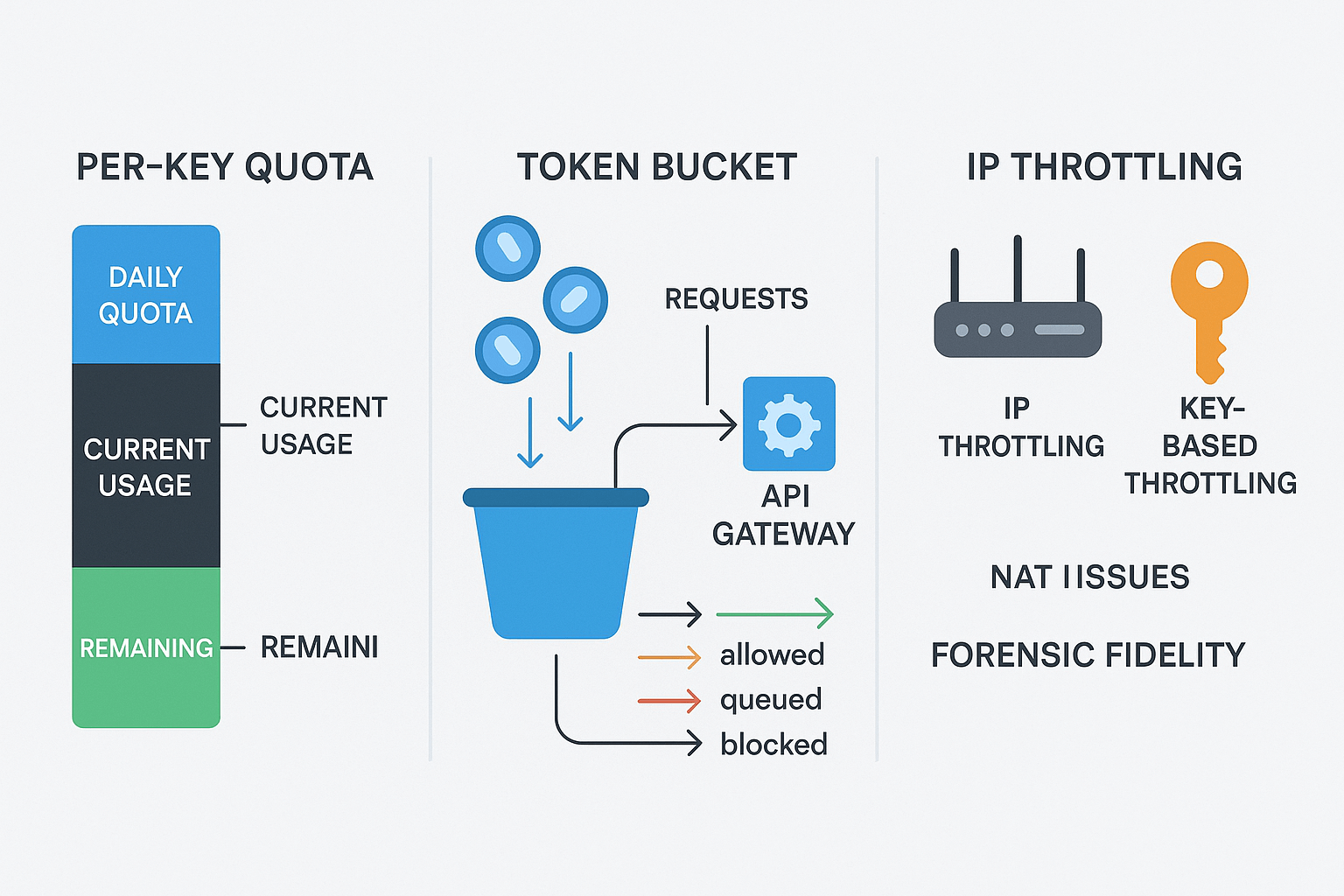
Good rate limits protect cost and integrity while letting legit bursts through. This section covers per-key quotas, token-bucket burst handling, IP versus key throttling, and auto-throttle detection. It ties those patterns to media workloads and explains what to watch for in api key security.
Per-key quotas and token bucket models
Set a per-key quota to cap daily or monthly usage per account. Use a token bucket (tokens refill at a set rate, the bucket holds a max burst) to allow short spikes without overload. Tune refill rate for steady throughput and bucket size for allowed bursts. For media uploads, make burst size match typical uploader behavior.
IP throttling versus key-based throttling
IP throttling stops abuse from single hosts, it's cheap and fast. But IP rules break with NAT, proxies, and mobile carriers. Key-based throttling ties limits to an account or client, giving better billing control and forensic data. Combine them: global IP caps, per-key quotas, and per-endpoint rules for heavy operations like transcodes.
Detecting anomalies and auto-throttle
Watch simple signals: sudden request spikes, rising concurrency, long-running jobs, and error-rate changes. Use sliding windows or exponential decay counts to detect short bursts. When you detect anomalies, prefer graduated responses.
-
Soft throttle: add delays or queue new requests for a few seconds.
-
Rate cut: lower refill rate for the offending key temporarily.
-
Reject: return 429 after warnings if misuse persists.
-
Auto-revoke: revoke keys if clear abuse or credential leak appears.
-
Alerts: send automated alerts to ops and revoke tokens if cost risk spikes.
For media platforms, let uploads queue and reserve tokens for long transcodes. That avoids failing user jobs while keeping costs bounded. Start conservative, monitor real traffic, and iterate limits by feature.
Secrets management tool comparison (practical guide)
Pick a secrets manager based on deployment needs, team skills, and cloud footprint. This short guide compares HashiCorp Vault, AWS Secrets Manager, Google Secret Manager, and Azure Key Vault across deployment complexity, access controls, rotation, and multi-cloud posture. Use this to pick a solution that minimizes exposure and improves api key security for automation and media workflows.
Quick comparison table
|
Tool
|
Deployment complexity
|
Access controls
|
Rotation features
|
Multi-cloud posture
|
DupDub integration notes
|
|
HashiCorp Vault
|
High: needs operators and HA planning
|
Fine-grained ACLs, dynamic secrets
|
Strong: dynamic leases, renewals
|
Best for multi-cloud via Consul/replication
|
Good for self-hosted pipelines, store DupDub keys in KV v2 with AppRole auth
|
|
AWS Secrets Manager
|
Low in AWS: managed service
|
IAM policies, resource-based policies
|
Built-in rotation using Lambda
|
AWS-first, cross-account possible
|
Use IAM roles on EC2/Lambda to fetch DupDub keys at runtime
|
|
Google Secret Manager
|
Low in GCP: managed + IAM
|
IAM roles, resource-level grants
|
Basic rotation via Cloud Functions
|
GCP-first, can integrate via hybrid tools
|
Use Workload Identity for GKE to access DupDub keys securely
|
|
Azure Key Vault
|
Low in Azure: managed service
|
RBAC and access policies, managed identities
|
Built-in rotation and cert support
|
Azure-first, hybrid with Key Vault Managed HSM
|
Use Managed Identity on Azure apps to call DupDub without embedding keys
|
Choose by scale and multi-cloud
If you run across clouds, favor Vault for control, or combine a cloud native manager with a central syncing layer. If you want low ops overhead and you live mostly in one cloud, pick the cloud provider’s manager for native IAM integration. Consider encryption, audit logs, and secret replication when you plan growth.
Integration notes for calling DupDub’s API securely
Avoid baking API keys into images or repos. Use short-lived credentials or instance identities to fetch secrets at runtime. Keep DupDub keys in a secrets path scoped to the service that calls the API. Add strict ACLs and audit logging, and require automated rotation with CI/CD pipelines so compromised keys are short lived.
Incident detection & response — playbook and a short case study
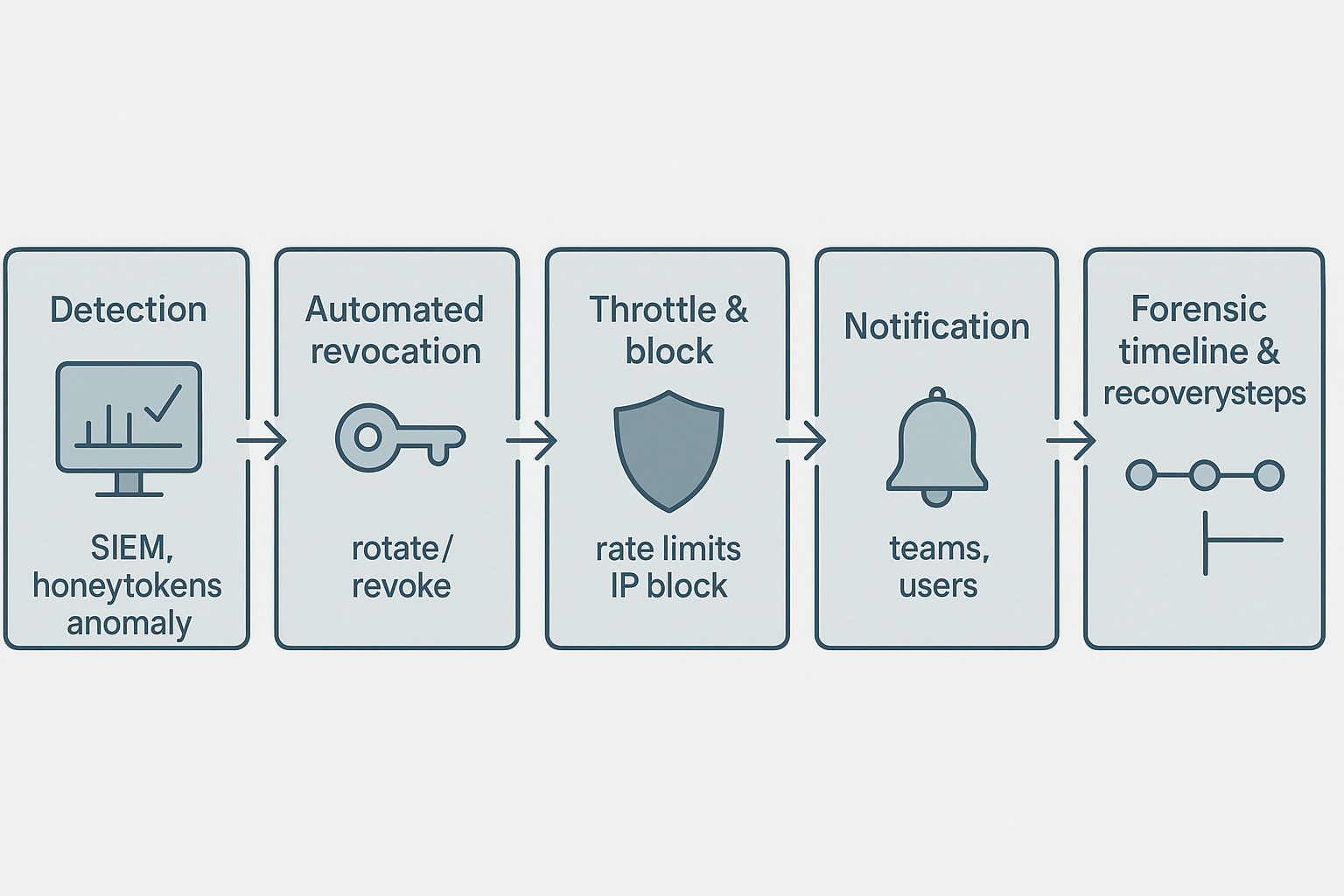
Fast detection and a clear playbook stop key leaks from becoming breaches. This section gives a tight detection, containment, and post-mortem flow focused on API key security, plus an anonymized timeline and a one-page hardening checklist teams can apply immediately.
Detect early: SIEM, honeytokens, and anomalous usage
Monitor your logs and metrics continuously. Feed API gateways, auth logs, and cloud audit trails into a SIEM (security information and event management) for correlation. Use honeytokens (fake keys) and alert on any use. Add simple anomaly rules:
-
Sudden spike in requests per key or client IP.
-
New geographic regions or unusual user agents.
-
Unusual rate-limit bypass attempts or credential stuffing.
Contain fast: rotate, revoke, throttle, notify
When you detect compromise, act in this order:
-
Revoke or rotate the exposed key immediately. Prefer automated rotation (CI/CD or secrets manager trigger).
-
Apply temporary throttles or stricter rate limits to affected endpoints.
-
Block offending IPs and client IDs at the gateway or CDN.
-
Notify downstream teams and customers, and open a forensic ticket.
Post-incident: run a short post-mortem and harden
Keep the post-mortem brief, factual, and focused on fixes. Example anonymized timeline:
-
Day 0, 02:10 UTC: Honeytoken used from new IP.
-
Day 0, 02:12 UTC: SIEM alert triggered and automated revoke executed.
-
Day 0, 02:30 UTC: Investigators identify exposed key in CI logs.
-
Day 1: Key rotated, CI secret removed, additional audit added.
-
Day 3: Post-mortem and action items assigned.
One-page hardening checklist:
-
Enforce least privilege on keys and scopes.
-
Move keys to a secrets manager with automatic rotation.
-
Remove keys from code and CI logs; use short-lived tokens.
-
Add honeytokens and SIEM rules for quick alerts.
-
Enforce per-key rate limits and geo fences.
This playbook is language agnostic and ready to plug into CI/CD and secrets manager workflows. Apply these steps now to reduce blast radius and speed recovery.
Compliance, summary checklist, and FAQ
-
How do GDPR, HIPAA, and PCI affect API key security compliance?
GDPR requires data minimization, clear purpose limits, and access logs when API keys touch personal data. HIPAA mandates technical and administrative safeguards for keys that access protected health information. PCI calls for strict key handling, strong logging, and limited access in payment flows.
-
What should be on a pre-launch API key checklist?
Enforce least privilege and role-based access.
Store keys in a secrets manager (HashiCorp Vault, AWS Secrets Manager, Google Secret Manager, Azure Key Vault).
Use short-lived credentials and automated rotation.
Enable audit logging, SIEM alerts, and test revocation.
Harden CI/CD: no plaintext secrets, use pull-only agents and scoped tokens.
Apply rate limits and monitoring.
-
Where can I find key lifecycle standards for secure API keys?
Refer to NIST Special Publication 800-57 Part 1, Revision 5, which emphasizes the protection required for cryptographic keys and their associated metadata.
-
How do I get DupDub API key rotation support and request an enterprise demo?
Contact DupDub support via the help center for key rotation assistance. Sign up for API access on DupDub’s site, request an enterprise demo, or subscribe to the newsletter for product and security updates.




 Discord
 YouTube
 Tiktok
 Twitter
 Facebook
 Instagram