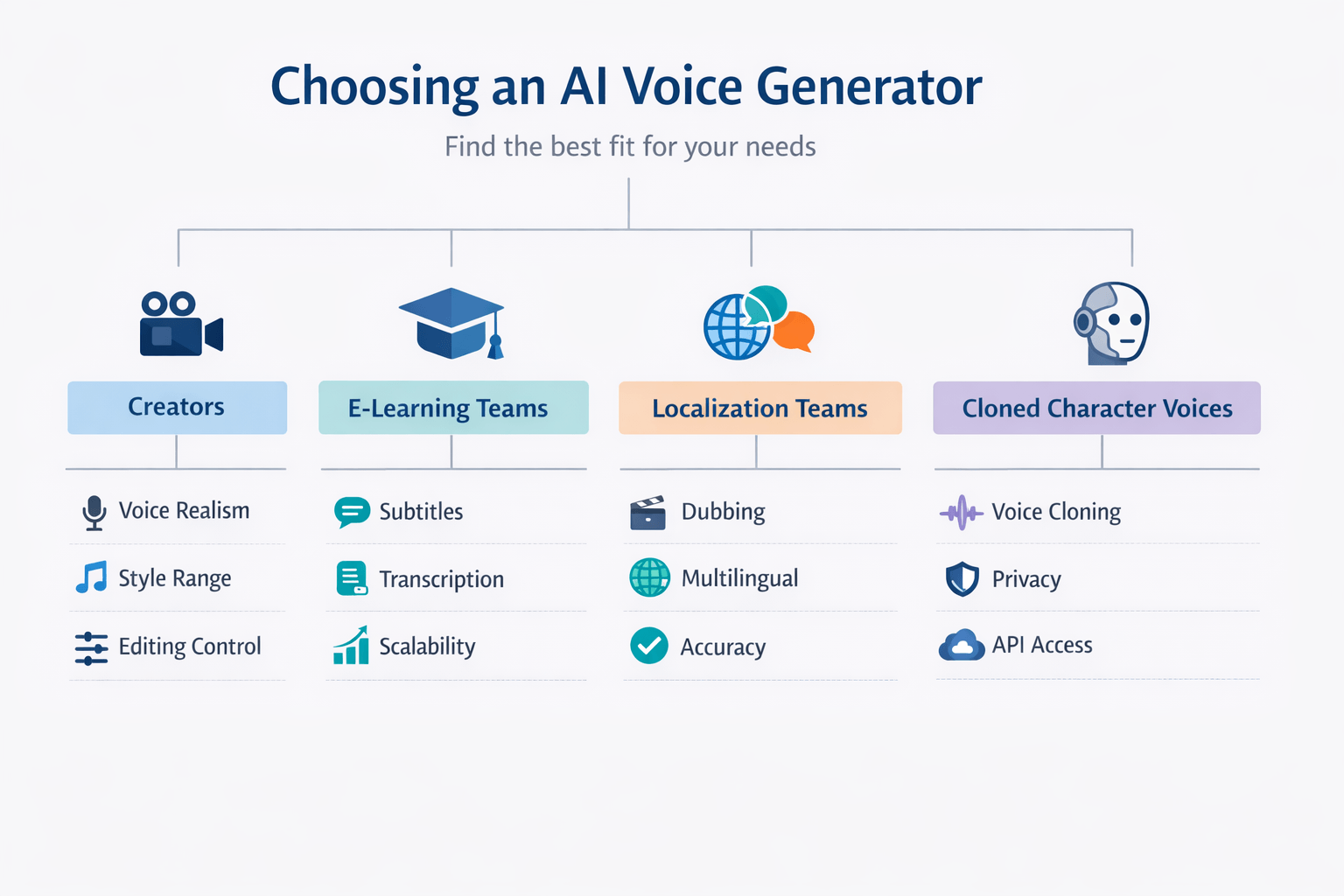
The best AI characters voice generator depends on your goal: lifelike acting, fast dubbing, easy editing, or team scale. Most buyers should compare five things first: voice quality, style range, language support, cloning, and workflow tools for subtitles, scripts, and exports.
A strong tool should do more than read text well. It should help you shape tone, switch character styles, localize content, and keep output consistent across videos, courses, ads, and podcasts. That matters for creators, marketers, educators, and global teams.
Here’s the short list of what to look for:
-
Natural voices that fit different character types
-
Fine control for pacing, emotion, and pronunciation
-
Multilingual support for dubbing and localization
-
Voice cloning that is fast and reliable
-
Clear pricing, credit rules, and export options
-
Team features like API access, privacy, and shared workflows
Some tools are best for pure voice quality. Others are better for video localization or business use. All-in-one platforms stand out when you need text-to-speech, cloning, dubbing, subtitles, transcription, avatars, and scale in one place. This guide breaks down the top options, shows where each fits best, and explains how to choose without wasting time or credits.
What Is an AI Characters Voice Generator?
An AI characters voice generator is a tool that turns text into speech with a specific personality. It does more than read words out loud. The best AI characters voice generator can shape tone, pace, emotion, and delivery so a voice feels like a real character, not a flat narrator.
That’s the key difference from basic text-to-speech. Standard TTS often aims for clear, neutral speech. A character voice tool adds style controls, emotional range, accent options, and sometimes voice cloning, which means copying a speaker’s vocal traits from a short sample. This helps creators build fictional voices, branded mascots, or repeatable cast members for ongoing content.
See how it works
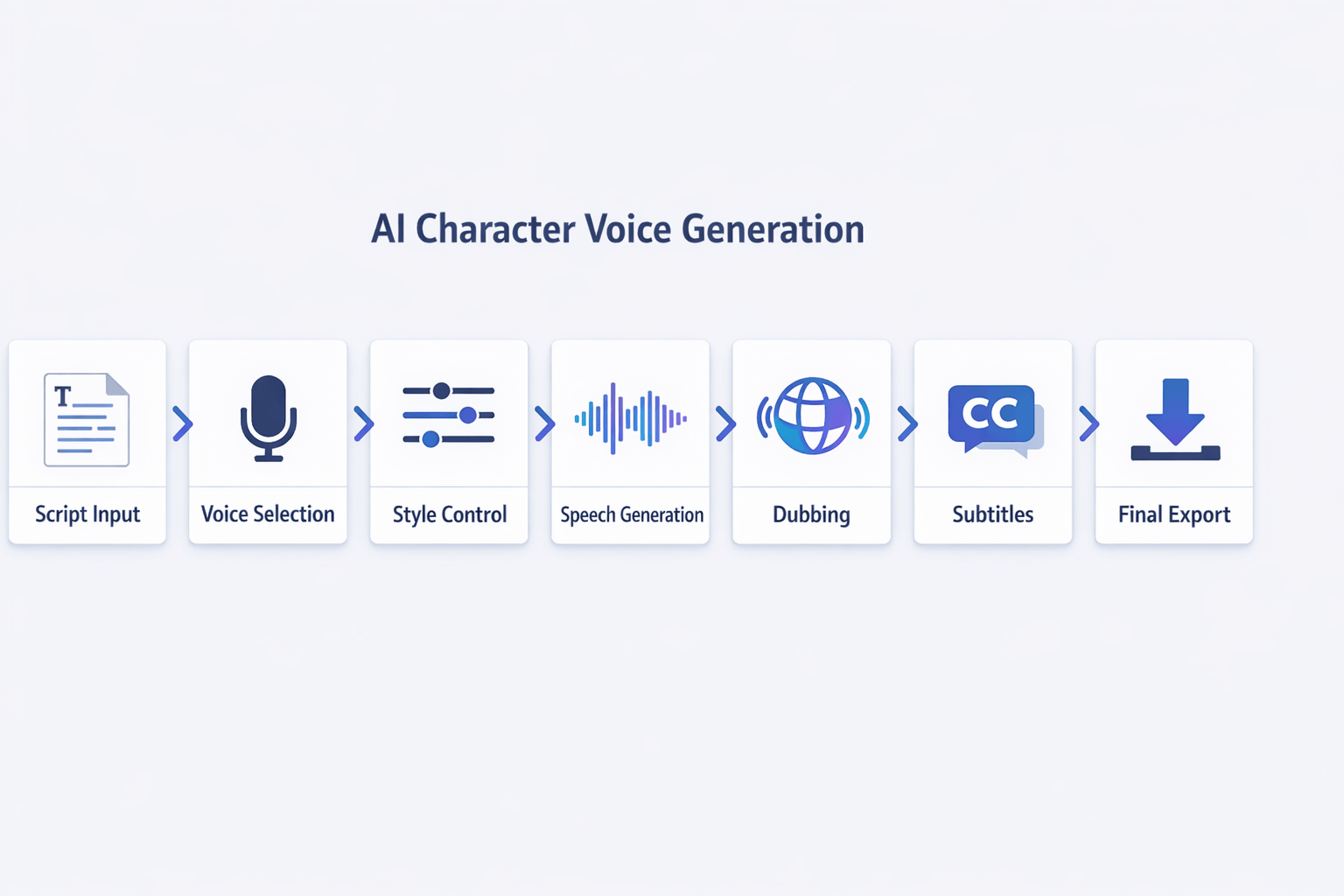
Most tools follow a simple workflow. You start with a script. Then you pick a voice, adjust the style, generate speech, and export the final file. Some platforms also add dubbing, subtitles, and translation in the same workflow.
Typical character voice steps include:
-
Write or paste a script
-
Choose a voice or cloned voice
-
Set tone, speed, pitch, or emotion
-
Generate and preview audio
-
Edit pauses, pronunciation, and timing
-
Add subtitles or dub into other languages
-
Export as audio or video
That extra control is what makes these tools useful for story-led content. You can make one voice sound warm and calm, and another sound sharp and fast. In a skit or explainer, that matters a lot.
Go beyond basic narration
An AI characters voice generator is built for range. Instead of one generic voice, it can help you create distinct roles for scenes, episodes, or lessons. Some tools also support multilingual output, so the same character can speak in more than one language while keeping a similar identity.
Useful features often include:
-
Emotion or style presets
-
Accent and language selection
-
Pronunciation editing
-
Voice cloning from short samples
-
Subtitle and transcription support
-
Dubbing for video localization
-
API access for larger workflows
Match the tool to the use case
Character voice tools show up in more places than many buyers expect. YouTubers use them for skits, faceless channels, and recurring personas. Podcasters use them for intros, bits, and fictional scenes. Training teams use them to make lessons less dry. Social teams use them for fast, voice-led clips.
Common use cases include:
-
YouTube narration with recurring characters
-
Podcast skits and audio drama segments
-
Training content with friendly guide voices
-
Short social videos with branded personas
-
Multilingual storytelling and dubbed video
-
Game prototypes and interactive demos
In short, a characters AI voice generator helps you create speech that sounds intentional, not just audible. If you need personality, consistency, and scale, it can do far more than a basic AI voice generator.
How We Evaluated the Best AI Voice Generators for Characters
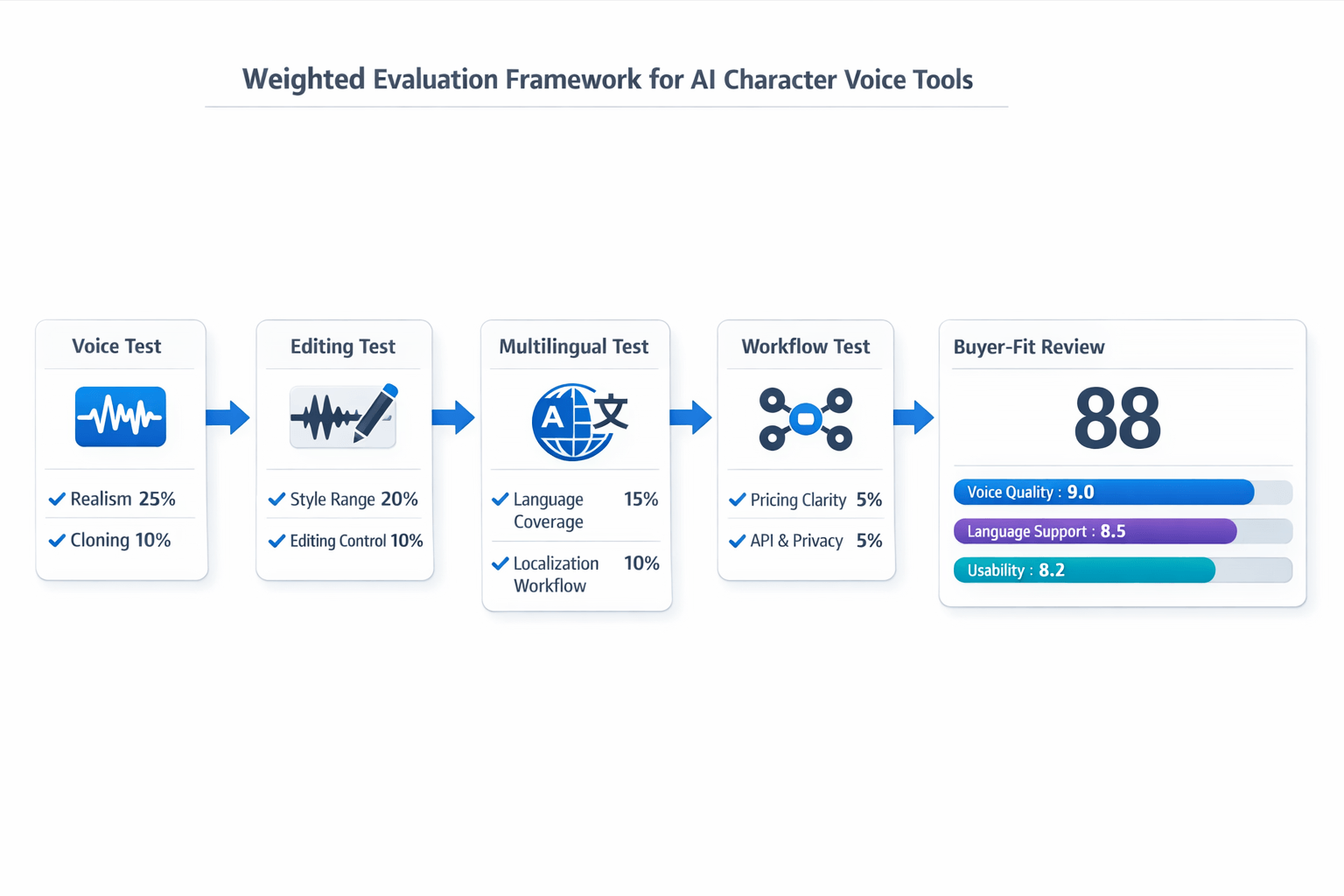
To rank the best AI characters voice generator tools fairly, we used a clear scoring system. The goal was simple: help readers trust the list and reuse the same method on their own shortlist. We tested each platform on voice quality, creative range, language support, workflow depth, and buyer fit.
We also looked past demo clips. A polished sample can sound great, but real work is messier. So we checked how each tool handled script edits, tone shifts, multilingual output, subtitle sync, team use, and pricing details.
Score the traits that matter most
We used weighted criteria instead of a simple feature checklist. That matters because not every feature has equal value. For character work, voice realism and style control carry more weight than a long list of extras.
Here is the framework we used:
-
Voice realism and clarity, 25% We tested how natural the speech sounded in short lines, long narration, and emotional dialogue. We listened for pacing, breath control, word stress, and awkward pauses.
-
Style range and character flexibility, 20% We checked how well each AI characters voice generator handled different ages, moods, accents, and performance styles. This included playful, dramatic, educational, and branded reads.
-
Language coverage and multilingual quality, 15% We reviewed language count, accent support, and output quality across languages. Tools scored higher if voices stayed consistent when switching markets.
-
Voice cloning speed and quality, 10% We looked at sample length, setup time, and how close the clone felt to the source speaker. We also noted guardrails around consent and access.
-
Editing control, 10% We tested pronunciation tools, pause control, script revision flow, subtitle editing, and retake speed.
-
Localization workflow, 10% We checked dubbing, transcription, subtitles, translation support, and export options.
-
Pricing clarity and value, 5% We reviewed whether credits, limits, and overage costs were easy to understand.
-
API, privacy, and team scalability, 5% We looked for automation options, workspace support, and clear privacy claims.
Test each tool in real use cases
We ran the same core tasks across platforms to keep the review fair. That gave us a side-by-side view of what works in daily production, not just in marketing copy.
Our test workflow included:
-
Generate a short character monologue from text
-
Rewrite the same script in a second tone
-
Clone or customize a voice where supported
-
Dub or translate the script into another language
-
Export audio, subtitles, or video assets
-
Check how easy it was to edit errors fast
We also grouped results by use case. A tool may be great for social videos, but weak for long-form training. Another may shine for multilingual dubbing, but offer limited voice acting range.
Check quality with known evaluation standards
Subjective listening still matters most in speech tools. To ground that process, we looked to established speech-quality methods. For example,
ITU-T Recommendation P.800.2 (2016) was approved on 14 July 2016 and provides the methodology for the subjective assessment of conversational speech quality.
In plain English, that means careful listening tests are still a valid way to judge output. So we combined hands-on listening with workflow checks and pricing review. That mix gives buyers a more practical picture.
Note the limits of any ranking
No ranking is perfect. Voice quality can vary by script, language, speaker style, and even genre. A platform that sounds great for a fantasy character may not be the best AI voice generator for characters in corporate training or product explainers.
We also did not treat every plan tier as equal. Some features, like API access, advanced dubbing, or larger clone limits, may sit on higher plans. When pricing or compliance details were unclear, we treated that as a limit, not a hidden bonus.
Keep the review editorially fair
This guide is vendor-aware, but the scoring model comes first. We did not rank tools by brand size alone, and we did not give extra credit for broad product suites unless they improved the character voice workflow. That helps readers compare focused voice apps against all-in-one platforms like DupDub on the same terms.
If you build your own shortlist, use the same weights first. Then adjust them for your needs. For example, a solo creator may raise price and ease of use, while a global team may care more about dubbing, API access, and privacy controls.
What Makes a Great Character Voice Generator
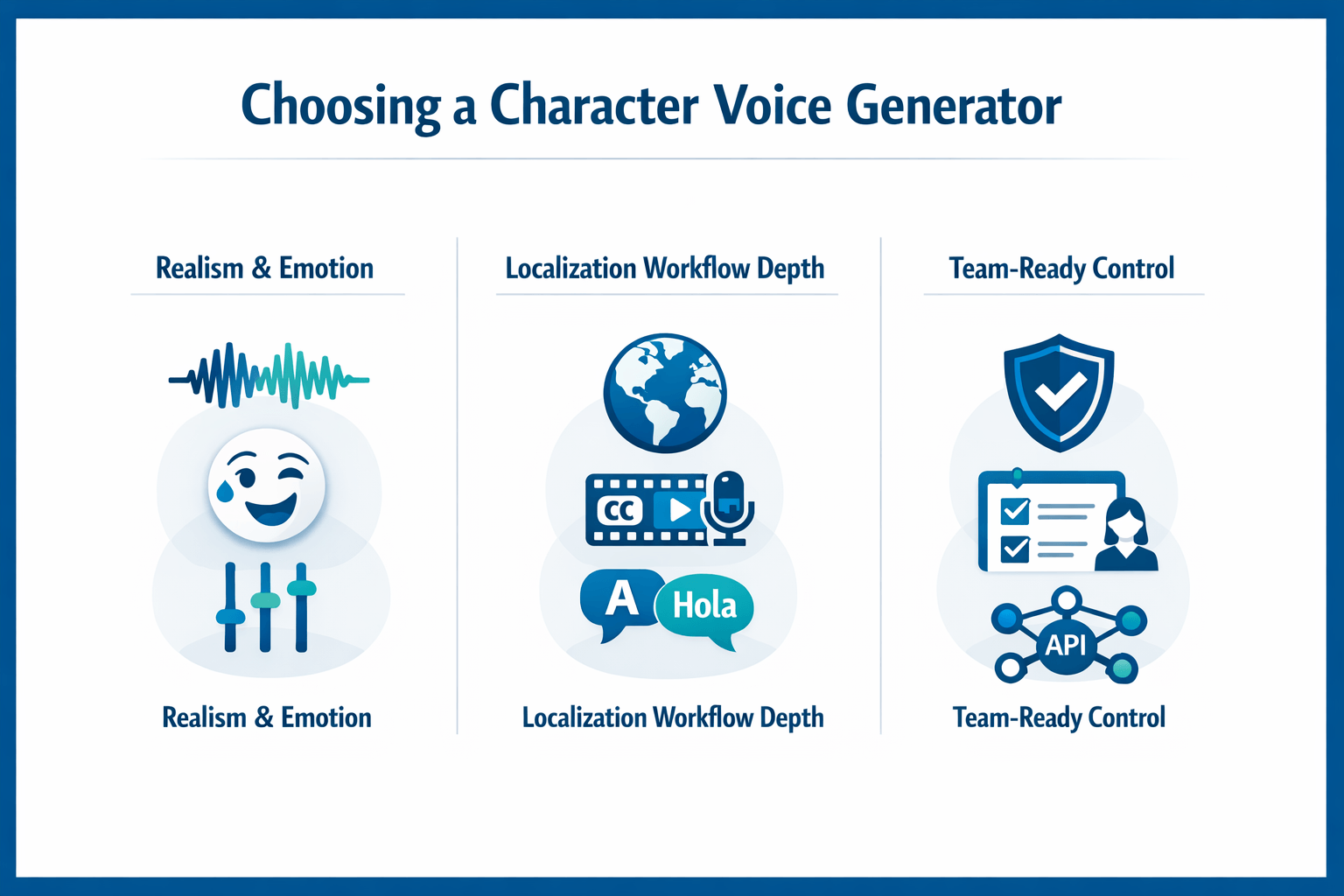
A solid tool can read lines. The best AI characters voice generator can perform them. That difference matters when you need a villain, teacher, narrator, or brand mascot to sound real, clear, and consistent across many scenes and languages.
When you compare tools, don’t stop at the voice demo page. Look at how well the platform handles emotion, editing, localization, privacy, and scale. A strong character voice system should help one creator make better content fast, and also help a team ship many assets without chaos.
Prioritize realism and emotional range
First, the voice has to sound human. That means natural pacing, clean pauses, and smooth emphasis. It should not feel flat, robotic, or too polished.
Emotional range is just as important. A good characters AI voice generator should shift tone for humor, tension, warmth, or urgency without sounding fake. This is what makes dialogue believable in YouTube skits, game trailers, training stories, and dubbed videos.
Look for these signs during testing:
-
Natural rhythm, with pauses in the right spots
-
Clear emotion controls for tone, speed, and energy
-
Strong results on both short lines and long scripts
-
Consistent voice quality across multiple takes
-
Low drift, so the character still sounds like the same person
Check language depth, accents, and pronunciation tools
Character content often travels across markets. So language count alone is not enough. You also need accent variety, speaking styles, and reliable pronunciation control.
The best AI voice generator for characters should let you fix names, brand terms, and place names with ease. Useful tools include custom dictionaries, phonetic spelling, and line-by-line editing. These features save a lot of cleanup time.
A strong platform should support:
-
Multiple accents within major languages
-
Style options for age, mood, or scene type
-
Pronunciation editing for hard words
-
Fast re-generation of single lines, not full projects
-
Stable quality in multilingual output
Make sure cloning is useful and safe
Voice cloning can speed up production fast. It helps you keep a repeatable character voice, localize in more languages, or preserve a known host voice. But it also raises consent and data risks.
Here’s what to ask vendors:
-
Do they require proof of voice ownership or consent?
-
Can cloned voices be locked to the original speaker?
-
Is audio data encrypted in storage and transit?
-
Can your team delete training samples and outputs?
-
Are privacy terms clear for business and client work?
Demand editing control, not just one-click output
One-click generation sounds nice. In real work, you need control. Character scenes often need retakes, timing fixes, and subtitle sync.
That’s why editing depth matters so much. The right AI characters voice generator should support line edits, pause control, subtitle alignment, and quick exports in formats your team already uses.
Key workflow features include:
-
Script splitting by speaker or scene
-
Regenerate only one sentence or phrase
-
Subtitle export, such as SRT
-
Audio export in common formats like MP3 or WAV
-
Dubbing tools that align voice and captions together
Think beyond solo use: privacy, teams, and API scale
If you work alone, voice quality may be enough. If you run marketing, e-learning, or localization, you need more. Team workflows break fast when tools lack roles, file limits, or automation.
Look for platforms that support collaboration, large projects, and repeatable production. API access matters if you want to automate video dubbing, batch voice generation, or connect voice output to your CMS, app, or editing stack.
Use this quick buyer checklist:
-
Solo creators: realism, ease of use, fast edits
-
Video teams: dubbing, subtitles, shared workflows
-
Global brands: language coverage, privacy, consistency
-
Developers: API access, batch jobs, stable output
-
Enterprises: security review, admin controls, data policy
The bottom line is simple: a great character voice tool does more than sound good in a demo. It helps you create believable voices, fix details fast, protect source voices, and scale content across formats, teams, and languages.
DupDub Review: Why It Stands Out for Character Voices and Localization
DupDub stands out because it does more than generate a single voice line. For teams comparing the best AI characters voice generator options, that matters a lot. You can write, voice, dub, transcribe, subtitle, and publish in one place. That makes it useful for creators who need speed, control, and multilingual output.
A lot of tools are strong at one job. DupDub tries to connect the full workflow. Instead of moving a project across five apps, you can keep most steps in one system. That saves time, and it can also cut rework when scripts, timing, or language tracks change.
Use one workflow for voice, dubbing, and edits
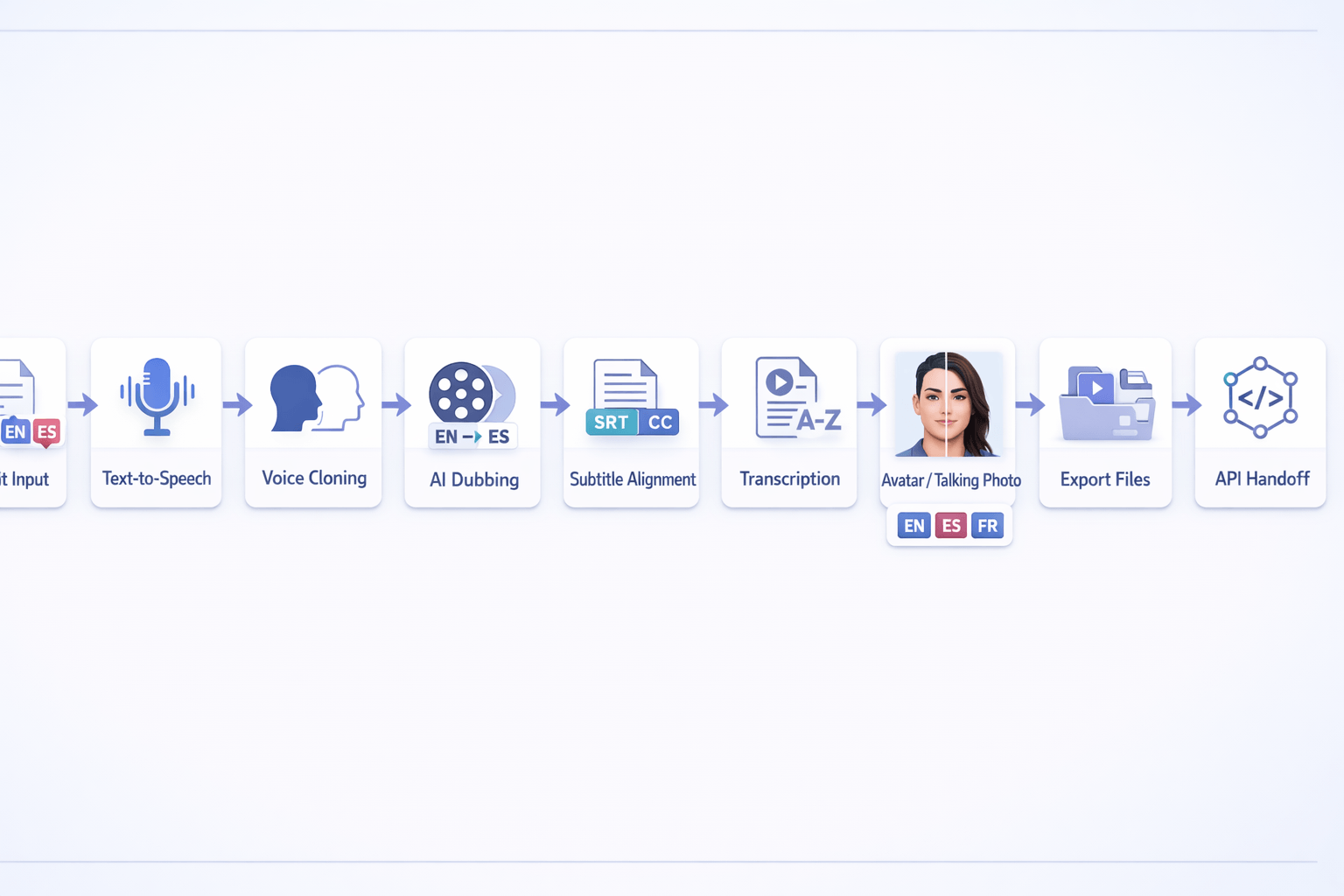
DupDub combines several tools that usually live in separate platforms:
-
Text-to-speech with 700+ voices
-
90+ languages and accents for TTS
-
1,000+ voice styles
-
Voice cloning from a short sample
-
AI dubbing for translated video voice tracks
-
Subtitle generation and alignment
-
Transcription for audio and video
-
AI avatars and talking photo output
-
Browser-based recording and editing
-
API access for larger workflows
This all-in-one setup is its main edge. If you produce character content in many formats, that matters. A marketer can turn one script into ads, dubbed videos, subtitles, and voiceovers. An e-learning team can do the same for lessons, explainers, and training clips.
Get more range for character voices
For character work, range is the real test. A good AI characters voice generator needs more than clean audio. It should let you shape tone, pacing, mood, and language without making every voice sound flat.
DupDub does well here because it offers a large voice library plus style options. That helps when you need a playful narrator, a serious trainer, or a dramatic game-style voice. The platform also supports multilingual voice cloning, so teams can keep a more consistent identity across markets.
That said, results still depend on the script and settings. If you want highly nuanced acting for one hero character, you may need several test runs. Like most AI voice tools, it works best when prompts, pauses, and pronunciation are tuned with care.
Simplify localization for global teams
Localization is where DupDub becomes more useful than a standalone characters AI voice generator. It links dubbing, subtitles, transcription, and translation-friendly workflows in one place. That is a big plus for YouTubers, course creators, and brands publishing in many regions.
Here’s what that looks like in practice:
-
Upload or write a script.
-
Create a voiceover with TTS or cloning.
-
Transcribe existing audio or video.
-
Generate subtitles and align timing.
-
Dub the content into other languages.
-
Export audio, video, or subtitle files.
This flow is practical, not just feature-heavy. Small teams often lose time when they jump between voice software, subtitle tools, and editors. DupDub reduces that friction.
Know who it fits best
DupDub is a strong fit for users who need content production, not just voice samples.
Best-fit users include:
-
YouTubers making character shorts or dubbed explainers
-
Podcasters repurposing shows into clips
-
Marketing teams localizing campaign videos
-
E-learning teams building narrated lessons
-
SMBs that need multilingual content without a large studio
It is also a smart option for teams that want API access. That opens the door for batch production, app features, or automated media workflows at scale.
Weigh the trade-offs before you buy
No tool is perfect, and this review should stay balanced. DupDub’s broad feature set is a strength, but it can also mean a bigger learning curve than a simple voice app. New users may need time to understand credits, voice modes, cloning limits, and export choices.
Pricing is flexible, with a free 3-day trial and tiered plans, but buyers should still map credits to real output. For example, teams making long-form dubbed video should check how fast credits burn across TTS, avatars, and transcription. Also, if your top priority is elite voice acting depth for one language only, a more specialized tool may still be worth testing side by side.
Privacy-wise, DupDub states that voice cloning is locked to the original speaker, with encrypted processing and no data sharing with third parties. It also describes itself as GDPR-aligned. For enterprise use, though, teams should still confirm policy details during procurement.
Overall, DupDub is best for users who want one platform for voice creation and localization. It may not be the lightest tool for simple tasks. But for teams that need dubbing, subtitles, cloning, avatars, and workflow scale in one place, it is one of the more complete options in this category.
Best AI Characters Voice Generator Tools Compared
Choosing the best AI characters voice generator gets easier when you use the same scorecard for every tool. That matters because some platforms shine at raw voice quality, while others win on dubbing, editing, or team workflow. In short, the right pick depends on whether you need character acting, multilingual production, or a full content pipeline.
Compare the tools by what matters most
Here’s a simple side-by-side view of the main tradeoffs.
|
Tool
|
Best for
|
Core strength
|
Main limitation
|
Team readiness
|
|
DupDub
|
Character voices plus localization
|
Strong mix of TTS, cloning, dubbing, subtitles, and avatars
|
Can feel broader than needed for single-task buyers
|
Good for creators and growing teams
|
|
ElevenLabs
|
High-quality voice output
|
Natural delivery and large voice library
|
Less of an all-in-one localization stack
|
Good, especially for voice-first workflows
|
|
Murf AI
|
Business narration and training content
|
Easy editing and clean business workflow
|
Less character-focused style range in many use cases
|
Good for business teams
|
|
Play.ht
|
API-driven voice projects
|
Developer-friendly access and broad voice generation use
|
Workflow depth may depend on your stack
|
Strong for technical teams
|
|
Speechify
|
Fast listening and simple voice use
|
Easy consumer experience
|
Not built around deeper character production workflows
|
Better for individuals than production teams
|
For buyers who want one tool for script-to-publish work, DupDub stands out. It combines text-to-speech, voice cloning, AI dubbing, subtitles, transcription, avatars, and API access in one place. That makes it useful for YouTube channels, training teams, and brands that publish in more than one language.
See where each platform wins
If your top goal is voice realism, ElevenLabs is often the benchmark many buyers check first. The platform says its Voice Library offers “thousands of unique voices” in “32 languages,” according to
ElevenLabs API Overview (2025). That makes it a strong fit for teams that care most about voice quality and library depth.
But realism alone is not the whole job. Many teams also need subtitle sync, transcript editing, translation, and file export. That’s where a broader AI characters voice generator can save time.
Use this framework when you compare tools:
-
Pick DupDub if you need voices, dubbing, subtitles, and multilingual publishing in one workflow.
-
Pick ElevenLabs if lifelike voice output is your main priority.
-
Pick Murf AI if you create training, explainers, or business audio.
-
Pick Play.ht if API access and custom builds matter most.
-
Pick Speechify if you want simple voice output for personal use.
Match the platform to your workflow
Not every team works the same way. A solo creator may just need a fast characters AI voice generator for short videos. A localization team may need review steps, subtitle files, and batch output.
That’s why workflow depth matters as much as voice quality. DupDub has a clear edge for end-to-end production because you can move from script to voice, dubbing, subtitles, and even avatar content without jumping across tools. Murf AI is often easier for business narration, while Play.ht can make more sense when developers want to plug voice into apps.
Watch for the real tradeoffs
The best AI voice generator for characters is not always the most famous one. Some tools are better at expressive acting. Others are better at scale, governance, or editing control.
Before you choose, check these buying points:
-
Voice style range: Can it handle emotion, pacing, and distinct character types?
-
Language reach: Can you create or clone voices across the markets you serve?
-
Editing control: Can you fix pronunciation, pauses, and timing?
-
Localization workflow: Does it support subtitles, dubbing, and transcript cleanup?
-
Team features: Can multiple users review, edit, and export without friction?
-
Pricing clarity: Are credits easy to estimate before you commit?
For many SMBs, educators, and creator brands, an all-in-one platform wins on speed and total cost. For advanced audio teams, a specialist tool may still be the better fit. The smart move is to map the platform to the bottleneck you need to fix first.
In practice, DupDub is one of the most balanced options in this comparison. It may not be the only strong AI voice generator here, but it covers more of the full production path than most rivals. That broader coverage is often what turns a good voice tool into a scalable content system.
How to Choose the Right AI Voice Generator for Your Use Case
Choosing a tool gets easier when you start with the job, not the brand list. The best AI characters voice generator for one team may be a poor fit for another. A solo creator may need speed and style, while a training team may need control, subtitles, and clean exports.
The simplest way to decide is to match your use case to the features that save time every week. That means looking past voice demos alone. You also need to check editing, language support, cloning rules, workflow fit, and how well the tool scales.
Start with your main content type
Ask one question first: what are you making most often? Your answer will narrow the field fast.
-
YouTube videos and explainers: prioritize natural text-to-speech, script editing, and fast retakes
-
Short-form social clips: prioritize speed, style variety, captions, and easy exports
-
E-learning and training: prioritize consistency, pronunciation control, and subtitle support
-
Localized brand video: prioritize dubbing, translation flow, subtitle sync, and team workflow
-
Recurring character content: prioritize voice cloning, style range, and identity consistency
If a platform combines several of these jobs, it can remove handoffs between tools. That matters when you need voice generation, dubbing, subtitles, transcription, and even avatars in one place.
Pick for speed if you publish often
If you run a YouTube channel, podcast, or social account, speed matters more than edge-case controls. You want an AI voice generator that can turn scripts into publish-ready audio with little cleanup. A large voice library also helps when you test different tones for intros, skits, or recurring characters.
For this use case, look for:
-
Fast text-to-speech generation
-
Multiple speaking styles and tones
-
Easy line-by-line editing
-
MP3 and WAV export
-
Built-in captions or transcript tools
A tool like DupDub can fit well here because it bundles script help, TTS, transcription, subtitles, and editing in one workflow. That means fewer exports, fewer tabs, and faster revisions.
Prioritize control for training and e-learning
Training teams need clarity more than novelty. The voice should stay steady across long lessons. You may also need to fix product names, acronyms, and key terms.
For e-learning, focus on:
-
Pronunciation editing for brand or technical words
-
Stable pacing across long modules
-
Subtitle and transcript export
-
Support for many lessons and file batches
-
Team-friendly review flow
This is where all-in-one platforms can help again. If your team records lessons, transcribes them, updates subtitles, and re-voices content for other markets, one shared system cuts friction.
Choose localization features if you publish in many languages
If your brand is expanding into new regions, the core need is not just voice output. It’s localization workflow, meaning translation, dubbing, subtitle timing, and review. Many tools sound good in a demo but slow down once you manage dozens of videos.
Use this checklist before you buy:
-
How many languages does the platform support?
-
Can it dub video directly, not just make audio?
-
Are subtitles auto-generated and editable?
-
Can your team review scripts before final export?
-
Is there API access for scale?
If multilingual production is central to your workflow, a platform with dubbing, subtitles, transcription, and avatars can be more efficient than a voice-only app. That’s especially true for marketing teams that need fast turnaround across markets.
Use cloning when character identity matters most
If you make serialized content, game-style scenes, or branded character campaigns, cloned voices may matter most. In that case, the best AI voice generator for characters should do more than mimic tone. It should keep the voice stable across episodes, languages, and script changes.
Look for these features:
-
Fast voice cloning from a short sample
-
Strong emotional range
-
Multilingual voice support
-
Clear privacy rules for cloned voices
-
Consistent output across long scripts
This matters a lot for teams building repeatable character IP (intellectual property). You don’t want to rebuild the same voice from scratch every time.
Match the tool to your team size
A solo creator and a global team buy very differently. Here’s a simple way to think about it:
-
Solo creators: focus on low cost, ease of use, and fast exports
-
Small teams: focus on shared workflow, subtitles, and flexible credits
-
Agencies: focus on language range, client turnaround, and batch work
-
Enterprise teams: focus on privacy, API access, governance, and scale
If your needs may grow, choose a platform that can handle both simple voice work and full localization later. That helps you avoid switching tools once your content volume rises.
The right choice comes down to this: buy for your real workflow, not a generic ranking. When one platform can cover character voices, dubbing, transcription, subtitles, and avatars, it often reduces cost and production drag over time.
Pricing, Credits, and ROI: What Buyers Should Check First
Pricing is where many teams pick the wrong tool. A low monthly price can look great at first, then break your budget once credits, export caps, dubbing minutes, and clone limits kick in. If you’re comparing the best AI characters voice generator options, you need to read past the headline price and map costs to your real workflow.
The key is simple: price the full job, not one feature. A voice plan may seem cheap until you also need subtitles, transcription, translation, and video dubbing. When those sit in separate tools, your true cost rises fast, and so does the time your team spends moving files around.
Read the pricing page like a buyer
Start with usage, not plan names. Ask how many minutes you create each month, how many voices you need, and whether you need standard text-to-speech or premium voices. Then check file limits, export formats, language access, and whether voice cloning is included or gated.
Here are the cost points buyers should check first:
-
credits per month or per year
-
how many TTS hours those credits really cover
-
separate limits for premium or ultra voices
-
dubbing minutes and subtitle usage
-
voice clone limits
-
avatar or video generation caps
-
max words or file size per project
-
team seats, approval flows, and API access
-
export formats like MP3, WAV, MP4, and SRT
If any of those are unclear, treat that as a pricing risk.
Compare subscription vs pay-as-you-go
Subscriptions usually win when you publish often. Pay-as-you-go works better for short campaigns, tests, or seasonal localization. The break-even point depends on how steady your output is.
DupDub is a useful example because the plans show how credits map to actual work. The Personal plan includes 1,800 yearly credits, about 25 hours of standard TTS or 5 hours of ultra voices. Professional raises that to 6,000 yearly credits, and Ultimate goes to 30,000, with larger file limits and more clones and avatars.
|
Model
|
Best for
|
Main upside
|
Main watch-out
|
|
Monthly or annual subscription
|
|
Lower unit cost over time
|
Unused credits can reduce value
|
|
Pay-as-you-go credits
|
Irregular projects
|
No long commitment
|
Higher cost per minute
|
|
Mixed model
|
Growing teams
|
Flexibility plus base capacity
|
Can be harder to forecast
|
A creator posting weekly videos may save more with a subscription. A small brand dubbing one launch video per quarter may spend less with one-time credits. Simple, right?
Watch for hidden workflow costs
This is where many budgets go off track. One tool handles voice generation, another does transcription, another translates subtitles, and a fourth edits video timing. Each extra step adds labor, review time, and more chances for errors.
Common hidden costs include:
-
manual subtitle cleanup
-
paying twice for transcription and dubbing
-
re-exporting files between apps
-
buying separate clone, avatar, or translation add-ons
-
time lost on review and version control
-
higher compliance risk when files pass through many vendors
An all-in-one platform can improve ROI because it cuts handoffs. If your team needs text-to-speech, cloning, dubbing, subtitles, and transcription in one place, bundled pricing may beat a cheaper single-feature tool.
Tie ROI to output speed
ROI is not just about the cheapest plan. It’s about how much finished content you can publish, localize, and update with the team you already have. Faster turnaround matters if you run a YouTube channel, ad program, course library, or multilingual support content.
Before you buy, build a simple cost model:
-
Estimate monthly audio or video minutes.
-
Add language count and subtitle needs.
-
Check if premium voices cost more credits.
-
Add clone limits, team needs, and exports.
-
Compare that total against your current workflow cost.
That gives you a real ROI view. Not just a plan-page guess.
Best Practices for Creating Better AI Character Voices
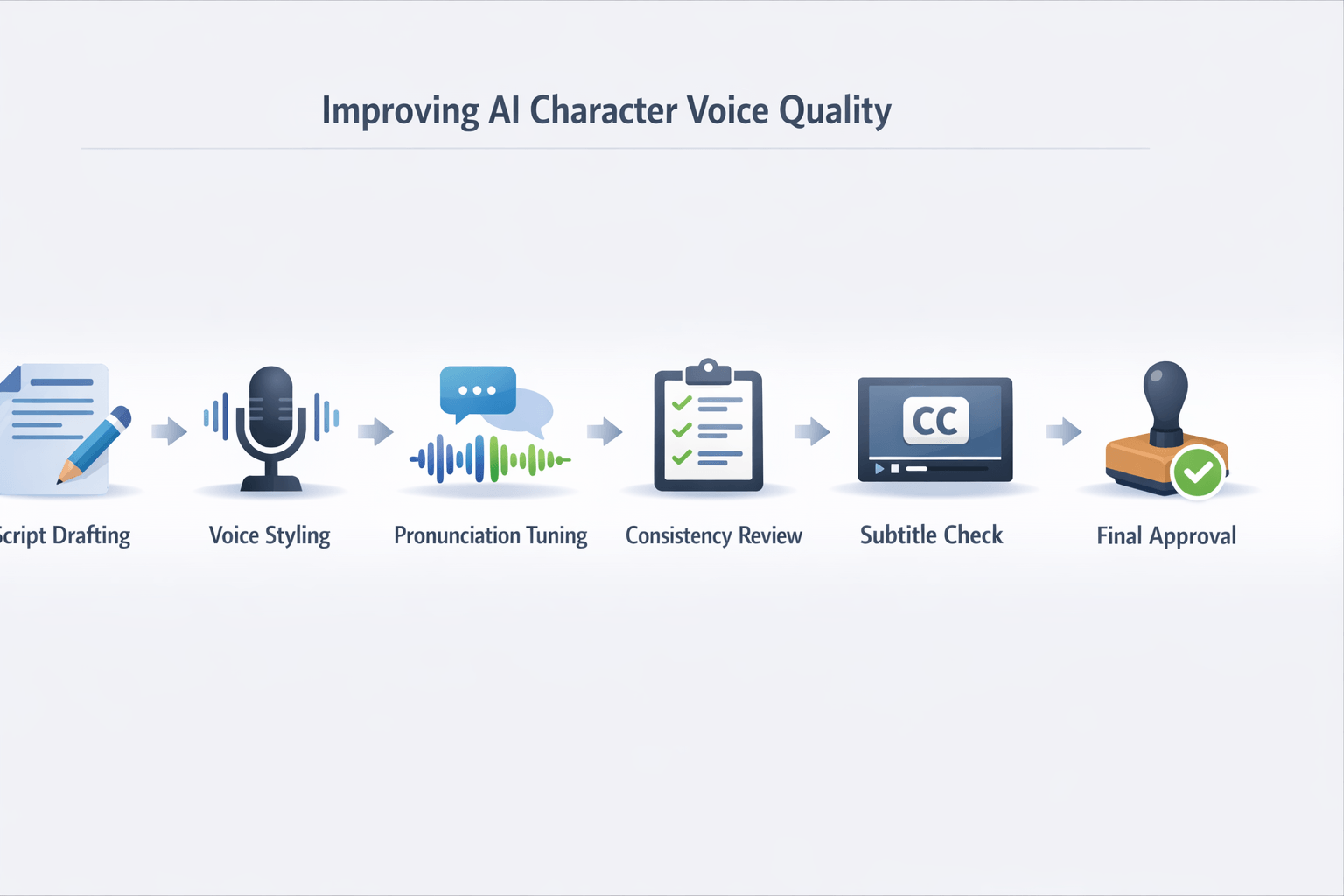
Great results do not come from one click alone. Even the best AI characters voice generator needs clear direction, clean scripts, and a simple review process. If you want voices that sound natural and stay consistent, focus on how the script is written, how the voice is guided, and how the final audio is checked.
Write for the ear, not the page
A script that reads well may still sound stiff out loud. Keep sentences short. Use simple words, natural pauses, and clear punctuation so the voice model knows where to slow down or stop.
Try these script fixes before you generate audio:
-
Break long lines into two short sentences
-
Replace formal words with spoken ones
-
Add commas where a person would pause
-
Spell out hard names or acronyms
-
Remove tongue twisters and repeated sounds
Read the script out loud once. If you trip over a line, the model may too.
Match the voice to the character role
Start with the job the voice needs to do. A playful game guide, a serious trainer, and a comic villain should not use the same style. Pick a voice based on age, pace, tone, accent, and energy level.
When you test a characters AI voice generator, compare two or three styles on the same script. That makes it easier to hear what fits. A voice that sounds impressive alone may feel wrong for the scene.
Direct emotion with small, clear cues
Most tools perform better with light direction. Do not overload the prompt with too many traits. Give one emotional goal per line or scene, such as calm, excited, nervous, warm, or urgent.
Use this simple order:
-
Define the character in one line
-
Set the scene goal
-
Add one emotion
-
Note any key word to stress
-
Generate a short test clip first
This keeps the output focused and easier to revise.
Build a character voice bible
Consistency matters across episodes, ads, and lessons. Create a short reference sheet for each voice. This is your voice bible, a simple guide that locks in how the character should sound.
Include:
-
Voice name and tool preset
-
Accent and language variant
-
Speaking pace and pitch target
-
Emotional range to use often
-
Words, names, and brand terms with pronunciation notes
-
Sample lines that represent the character well
If your platform supports saved presets, cloning, or reusable projects, use them. That helps keep the same sound across future content.
Edit the output and review subtitles
Raw output is rarely final. Trim extra pauses, fix odd emphasis, and regenerate weak lines instead of accepting a whole bad take. Small edits often make the biggest difference.
Then review subtitles and captions line by line. Check names, timing, punctuation, and sentence breaks. This step is vital for dubbing, training videos, and social clips where viewers may watch on mute.
Before you publish, run a final check:
-
Listen with headphones once
-
Listen on mobile speakers once
-
Confirm pronunciation of names and products
-
Check subtitle sync and line length
-
Make sure the character still sounds like the same person
A good AI voice generator can save hours. A smart review process is what makes it sound polished.
FAQ: Best AI Characters Voice Generator
-
What is the best AI characters voice generator?
The best AI characters voice generator depends on your goal. If you need expressive voices for skits, games, or story content, look for strong voice realism, style range, and easy editing. If you also need dubbing, subtitles, and team workflows, an all-in-one platform will often save more time than a single-purpose voice app.
-
Can an AI voice generator clone a character voice?
Yes, many tools can clone a voice from a short sample. But there’s an important limit: you should only clone voices you own or have permission to use. The best tools also let you adjust pacing, tone, pronunciation, and language so the cloned voice feels consistent across scripts.
-
Which tool is best for multilingual character voices?
For multilingual work, focus on language coverage, accent options, subtitle support, and dubbing workflow. A good characters AI voice generator should do more than read text. It should help you translate, sync speech, and export clean audio or captions for video, training, and social content.
-
Is DupDub a good fit for dubbing and narration?
DupDub is a strong fit if you want more than basic text-to-speech. It combines character-style voices, voice cloning, AI dubbing, subtitles, transcription, and avatars in one platform. That makes it useful for creators, marketers, educators, and teams that publish in multiple languages.
-
What should buyers check before choosing a tool?
Start with these five points:
Voice quality and emotional range
Language and accent support
Editing control for pauses, tone, and pronunciation
Pricing, credits, and export limits
Team features, API access, and privacy
If your projects include narration, social videos, or localization, choose a platform that can scale with you. That way, you won’t need to switch tools once your content volume grows.




 Discord
 YouTube
 Tiktok
 Twitter
 Facebook
 Instagram