TL;DR — Quick verdict and who should read this
Verdict: For creators who need fast, accurate drafts plus seamless audio and video localization, the best ai to help with writing now blends writing, transcription, and dubbing into one workflow. It speeds script creation, converts speech to clean transcripts, and exports ready audio in multiple languages. Expect solid time savings and fewer tool handoffs compared with piecemeal workflows.
Who benefits: YouTubers, podcasters, e-learning teams, indie marketers, and localization managers who publish multilingual content. If you edit audio, repurpose episodes, or localize videos, you’ll save hours per project. Solo creators get easy voice cloning; teams get consistent brand voice across formats.
Quick plan: Start with a short free trial to test transcription accuracy and voice quality on real content. Compare one mid tier plan for regular creators, and scale to a higher plan for bulk localization. Read the workflows if you want ready recipes, or jump to the comparison matrix to see feature-level tradeoffs.
Fast checks to run: try a full script to voice pipeline, test subtitle alignment, and measure transcription accuracy against a human transcript. Note limits: accents, noisy audio, or niche terminology lower accuracy. Use the full guide for hands-on workflows and feature comparisons.
Why AI writing tools matter for creators in 2026
AI writing assistants are now core tools for creators who must move fast and reach global audiences. The best ai to help with writing speeds idea generation, drafting, and revision, so one person can run an entire channel or course. In 2026, that speed is the difference between weekly publishing and burnout.
Productivity gap and reach
Solo creators face three big limits: time, consistency, and language. Writing tools cut draft time by half or more, while linked audio tools turn text into publishable media. That means a single script can become a video, a podcast episode, and translated versions without hiring extra staff.
Benefits creators get right away:
-
Faster drafts and outlines, so ideas move to publish in hours.
-
One-click transcription to get accurate captions and searchable text.
-
TTS and dubbing that repurpose scripts into local language audio.
-
Voice cloning and avatars for consistent brand presence across formats.
-
Editable subtitles and alignment to speed localization workflows.
Connecting writing to TTS, dubbing, and transcription changes the calculus for global publishing. Instead of translating after production, creators localize the script and export multiple audio tracks. You can test formats faster, run A/B language launches, and keep brand voice consistent across channels.
Practical impact is measurable: creators report 30 to 70 percent time savings on repurposing tasks, and transcription accuracy often ranges from about 85 percent to 99 percent depending on audio quality and language. A major estimate, from
The economic potential of generative AI: The next productivity frontier (2023), says Generative AI has the potential to generate value equivalent to
$2.6 trillion to$4.4 trillion in global corporate profits annually, and creators who automate writing and localization can capture part of that through faster publishing and lower costs.
AI writing plus multimedia tools are not a fad. They let independent teams scale reach, keep quality steady, and publish more languages without adding full-time hires.
Meet DupDub — what it is and the promise it makes
If you want the best ai to help with writing and localize that content fast, DupDub is built for that workflow. It combines an AI writing assistant with transcription, multilingual text-to-speech (TTS), voice cloning, and end-to-end dubbing. The aim is simple: let creators write, transcribe, translate, and re-voice videos in one platform.
What DupDub bundles for creators
DupDub groups core modules into a single workspace, so you don’t switch tools mid-project.
-
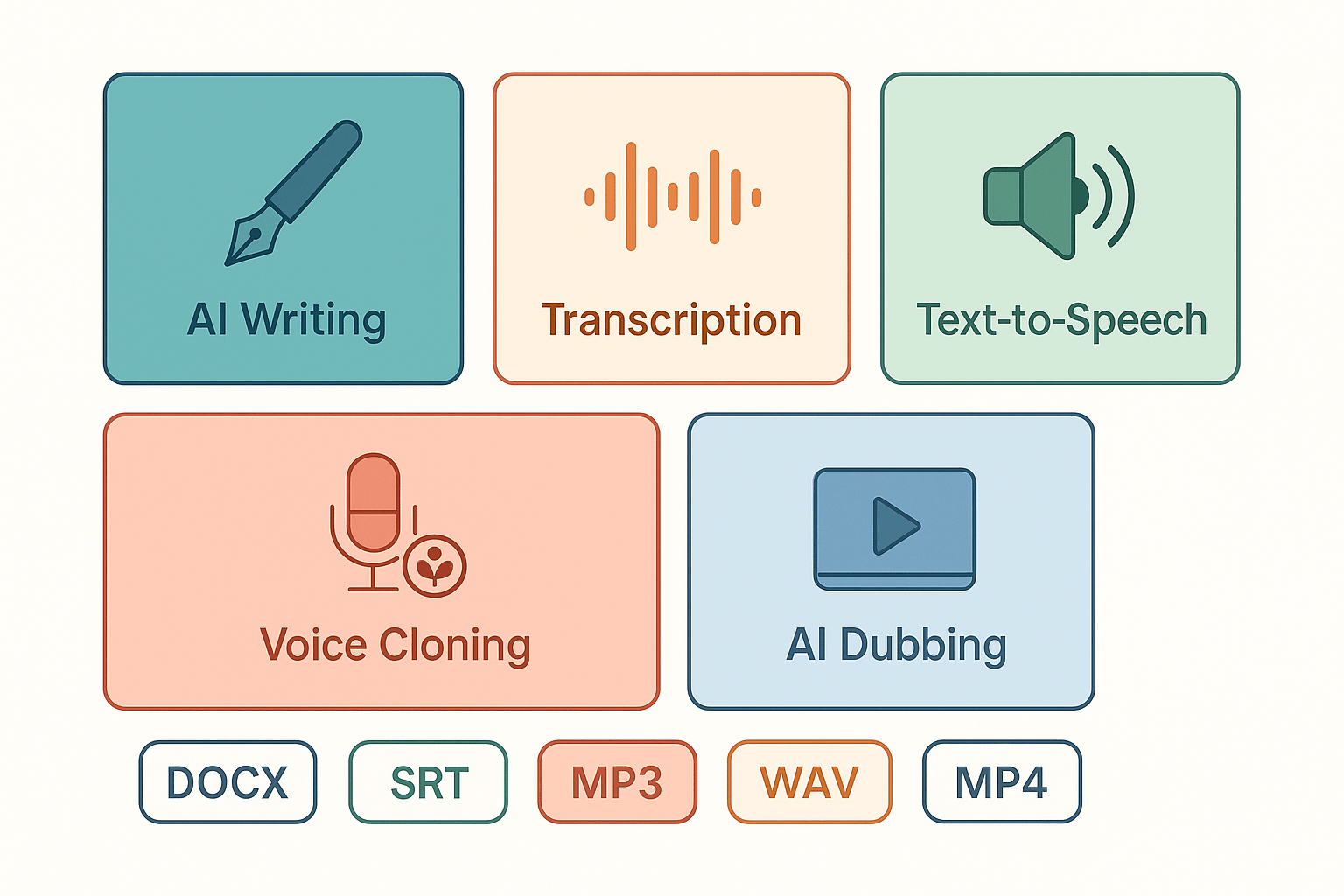
AI Writing: GPT-powered drafting, rewriting, summarizing, and script polishing.
-
Transcription (speech-to-text): Convert audio or videos into editable transcripts and subtitles.
-
TTS (text-to-speech): 700-plus voices across 90-plus languages and accents.
-
Voice Cloning: Create a multilingual synthetic voice from a short sample.
-
AI Dubbing: Translate, align subtitles, and re-voice video automatically.
Each module exports standard formats: audio MP3 or WAV, video MP4, subtitles SRT, and writing as Markdown, TXT, or DOCX. That makes handoffs and CMS uploads predictable and fast.
Why the all-in-one approach matters
Working in one product removes friction. You can draft a script, pull a published video transcript, translate it, and generate a dubbed track without file juggling. That cuts project time and reduces rework.
Benefits at a glance:
-
Faster time to publish: fewer file exports and imports.
-
Consistent brand voice: same cloned voice across languages.
-
Lower localization cost: automated dubbing scales better than manual recording.
DupDub also includes security and privacy controls. Voice cloning is locked to the original speaker and processing is encrypted. It states GDPR alignment for enterprise users. As the UK regulator notes in
Biometric data guidance: Biometric recognition, "processing special category information requires greater care and consideration as it is more sensitive or private than other kinds of personal information." That guidance matters when cloning or storing voice data.
Who this helps most: YouTubers, podcasters, e-learning teams, localization managers, and small marketing teams who need fast, multilingual publishing without stitching several vendors together.
How DupDub’s AI Writing works — features, limits, and real examples
DupDub blends a GPT-powered editor with transcription and TTS tools. This section walks through drafting, ideation, rewriting, summarizing, and tone control. If you’re comparing the best ai to help with writing and end-to-end localization, you’ll get concrete examples and honest limits here.
Draft, ideate, and polish in the editor
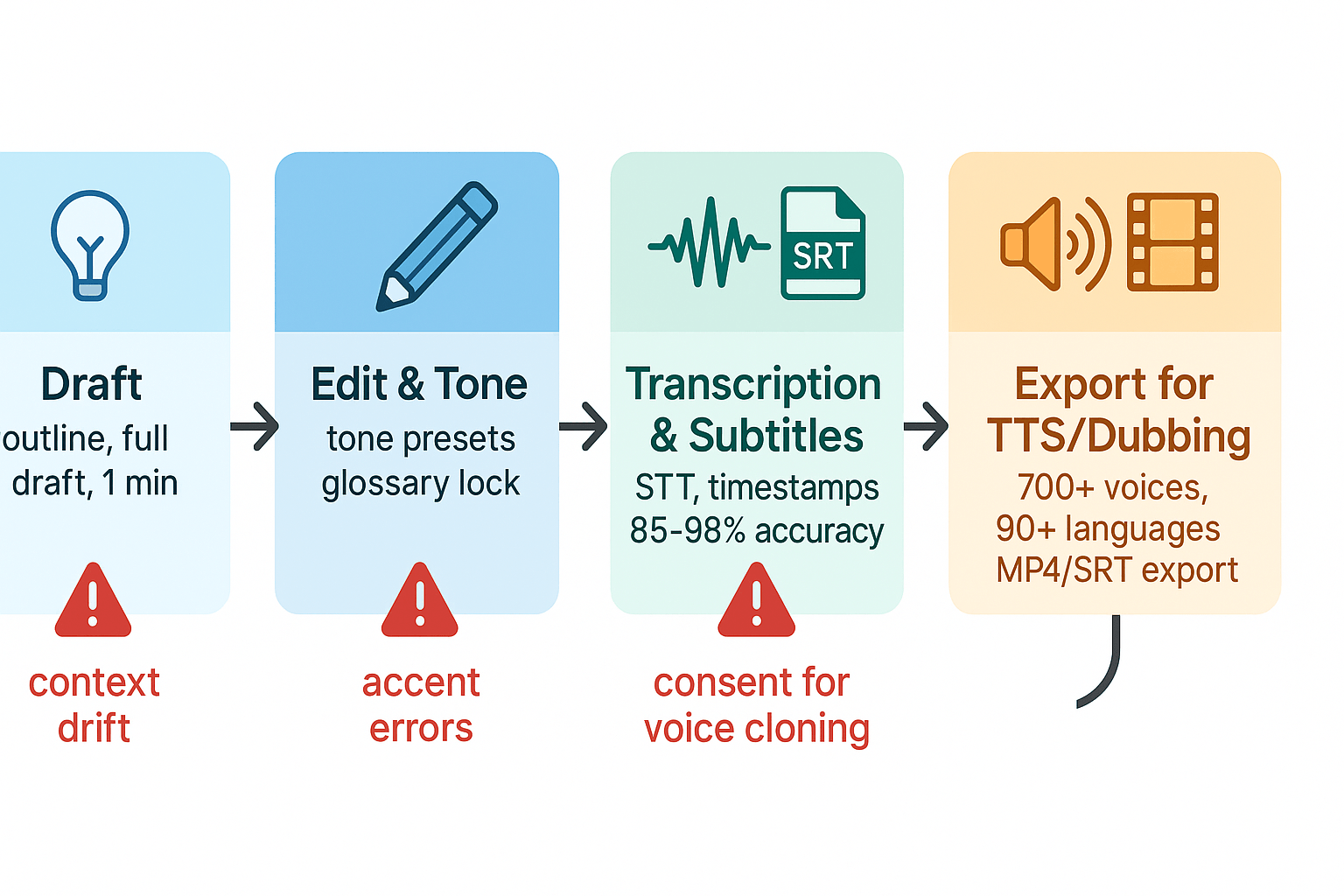
DupDub’s AI Writing gives fast first drafts and guided rewrites. You can ask for ideas, outlines, or a full script. Tone controls let you toggle formal, casual, or branded voice, and the editor preserves context across rounds. Key features include:
-
AI prompts for topic ideas and outlines.
-
One-click rewrite, shorten, or expand commands.
-
Summarize long transcripts into bullets or a script.
-
Style and tone toggles, plus glossary locking for brand terms.
How writing links to transcription and subtitles
The editor connects directly to DupDub’s STT (speech-to-text) and subtitle tools. Upload audio or paste a YouTube link, auto-transcribe, then send the editable text to the writer. That keeps speaker notes, timestamps, and cue points intact. Quick steps:
-
Transcribe audio or video in the studio.
-
Edit the transcript inline in the AI Writing pane.
-
Generate a cleaned script or localized subtitle file.
-
Export for TTS or AI dubbing with aligned timings.
Real examples and measurable performance
Example 1: A 10-minute podcast auto-transcribes in under five minutes. The AI drafts a 700-word episode summary in 60 seconds. Time saved: rough drafts cut from 90 minutes to 20 minutes. Example 2: A tutorial video gets subtitle translation and a native-sounding TTS voice in one workflow, reducing manual dubbing costs. Measurable ranges depend on source audio, but expect transcription accuracy from about 85% to 98% depending on noise and accents.
Limits and honest failure modes
DupDub is fast, but not flawless. Common issues:
-
Context drift after many edits: long threads can lose earlier nuance.
-
Brand-voice edge cases: the AI may need manual tuning for strict style guides.
-
Transcription errors on heavy accents or overlapping speech.
-
Voice cloning limits for legal or ethical restrictions, requiring consent.
Expect to proofread scripts and check timing for lip sync with avatars.
Quick workflow: script to dubbed video
-
Transcribe the original video and clean the text.
-
Use AI Writing to adapt the script for target audience.
-
Generate translated subtitles and align timings.
-
Select TTS voice or cloned voice and render audio.
-
Produce final dubbed MP4 with subtitles.
Side-by-side comparison: DupDub vs top AI writing & dubbing tools
This side-by-side matrix shows key features and trade-offs so you can pick the best AI to help with writing and multimedia work in 2026. Read this if you need a single platform for writing, transcription, TTS, voice cloning, and video dubbing, or if you want to mix best-in-class tools for parts of your workflow.
The study 'Convnext-TTS And Convnext-VC: Convnext-Based Fast End-To-End Sequence-To-Sequence Text-To-Speech And Voice Conversion' presents a Convnext-based model for text-to-speech and voice conversion, achieving state-of-the-art performance in speed and quality, as shown by
Okamoto et al. (2024). This kind of research pushes quality across vendors, but product fit still depends on workflow and formats.
Feature matrix at a glance
|
Feature
|
DupDub
|
ElevenLabs
|
Murf
|
Play.ht
|
Synthesia
|
Speechify
|
HeyGen
|
|
AI writing (drafting, rewriting)
|
Yes: GPT-powered, one-click draft-to-subtitle
|
Limited prompts, tuning for narration
|
Studio-focused notes, no full writing suite
|
Basic prompts, mostly TTS-focused
|
Script upload for avatars
|
No
|
Script input for avatar scenes
|
|
TTS voices & languages
|
700+ voices, 90+ languages & accents
|
Very high naturalness, fewer language packs
|
100+ voices, emphasis on studio clarity
|
Large library, many accents
|
Avatar voices, many languages
|
Reader-first voices, limited cloning
|
Avatar-focused voices and lip sync
|
|
Voice cloning
|
30s sample, 47 languages
|
Advanced cloning, best for expressive read
|
Limited/custom requests
|
Offers cloning, variable quality
|
Not cloning focused
|
Not cloning focused
|
Not cloning focused
|
|
Dubbing / video localization
|
End-to-end dubbing, subtitle sync, avatar support
|
No full video pipeline, strong audio output
|
Voiceover exports, no full dub tool
|
TTS-first, external sync needed
|
Full avatar video creator, lip sync
|
No dubbing features
|
Avatar video, generative scenes
|
|
Transcription & subtitles
|
40+ languages, 25–416h transcribe tiers
|
Not core product
|
Offers transcription add-ons
|
Offers transcription
|
No native STT
|
STT for assistive reading
|
Limited STT
|
|
Typical transcription accuracy (clear audio)
|
85–95%
|
90–97%
|
85–95%
|
85–95%
|
N/A
|
85–92%
|
80–90%
|
|
Pricing signal
|
Free trial, Personal $11, Pro$30, Ultimate $110, PAYG
|
Premium pricing for audio API
|
Mid-market studio plans
|
Subscription tiers, per-voice add-ons
|
Per-video / seats, enterprise
|
Consumer subscriptions
|
Per-video pricing
|
Practical trade-offs and quick wins
When you want a single end-to-end flow: DupDub is the fastest pick. It links AI writing, transcription, TTS, voice cloning, and dubbing in one workspace. That reduces handoffs and can cut localization time by roughly 30 to 60 percent for typical creator projects.
When you need hyper-realistic narration: pick ElevenLabs. It often wins on raw voice naturalness, but it lacks a turnkey video dubbing pipeline, so you’ll stitch outputs into a video tool.
When you want a simple studio voiceover workflow: Murf is easy for clean, broadcast-style narration. The downside is weaker multilingual dubbing and no deep cloning across many languages.
When you need a huge voice catalog and browser tools: Play.ht scales well for many accents and quick TTS. It requires external subtitle alignment for true dubbing.
When you need talking avatars and visual presenters: Synthesia or HeyGen beat others for avatar-led videos. They trade off fine-grain voice cloning and advanced subtitle localization.
When accessibility and read-aloud are prime: Speechify is reader-first with strong mobile support, but it lacks video dubbing and localization features.
Quick selection checklist
-
Pick DupDub if you want write, transcribe, dub, and translate in one app.
-
Pick ElevenLabs for best-in-class voice realism for audio-first products.
-
Pick Synthesia or HeyGen for avatar-led visual content.
This table and notes should help you map tool strengths to your workflow. Test with a short project to measure time saved and transcription accuracy for your audio type; results vary by recording quality and language.
Pricing & plan guide — which DupDub plan fits your workflow
Finding the right plan means matching credits to the work you do. This section helps creators pick a plan and shows an easy way to estimate cost per asset. If you’re searching for the best ai to help with writing, this guide shows which DupDub tier fits common workflows.
Quick plan breakdown
Free trial: 3-day trial with 10 starter credits. Good for testing AI writing, TTS samples, and quick transcribes.
Personal ($11/mo billed annually): 1,800 yearly credits; about 25 hours Standard TTS, 5 hours Ultra voices, 2.5 hours avatar, 25 hours transcription, 3 voice clones, 3 avatars, 10,000 words per file. Best for solo creators who publish weekly.
Professional ($30/mo billed annually): 6,000 yearly credits; about 83 hours Standard TTS, 16 hours Ultra voices, 8 hours avatar, 83 hours transcription, 5 voice clones, 5 avatars, 30,000 words per file. Suited for small teams and power creators.
Ultimate ($110/mo billed annually): 30,000 yearly credits; high limits for enterprise-style output and unlimited file size.
Pay-as-you-go: One-time credits packs for irregular needs, from 500 credits to 6,000 credits.
How to estimate ROI and cost per asset
-
Convert credits to a measurable unit: pick hours for audio, or words for writing. Use the plan summary to map credits to hours or words.
-
Estimate consumption per asset: e.g., a 10-minute dubbed video needs 10 minutes transcription plus 10 minutes TTS and minor editing.
-
Calculate credits per asset, then divide plan cost by annual credits to get dollar per credit. Multiply by credits per asset.
Example: on Personal, 1,800 credits at $11/year equals about$0.006 per credit. If a 10-minute video uses 20 credits, cost per video is roughly $0.12 in credits plus your time.
Which plan fits you
-
Solo YouTuber or podcaster: Personal. It covers weekly uploads and a few voice clones.
-
Growing creator or small team: Professional. Use it if you localize content often.
-
Agency or enterprise: Ultimate. Pick it for high-volume localization and unlimited file sizes.
-
Sporadic projects: Pay-as-you-go.
Start your 3-day free trial
Real-world workflows & use cases: concrete recipes for creators
This section shows hands-on recipes for creators who want a fast end-to-end path: draft, transcribe, dub, add subtitles, and publish. Each recipe uses DupDub modules at each step and includes inputs, outputs, and time saved. Try these to evaluate DupDub as the best ai to help with writing and multimedia localization.
YouTuber: one-video, multi-language publish
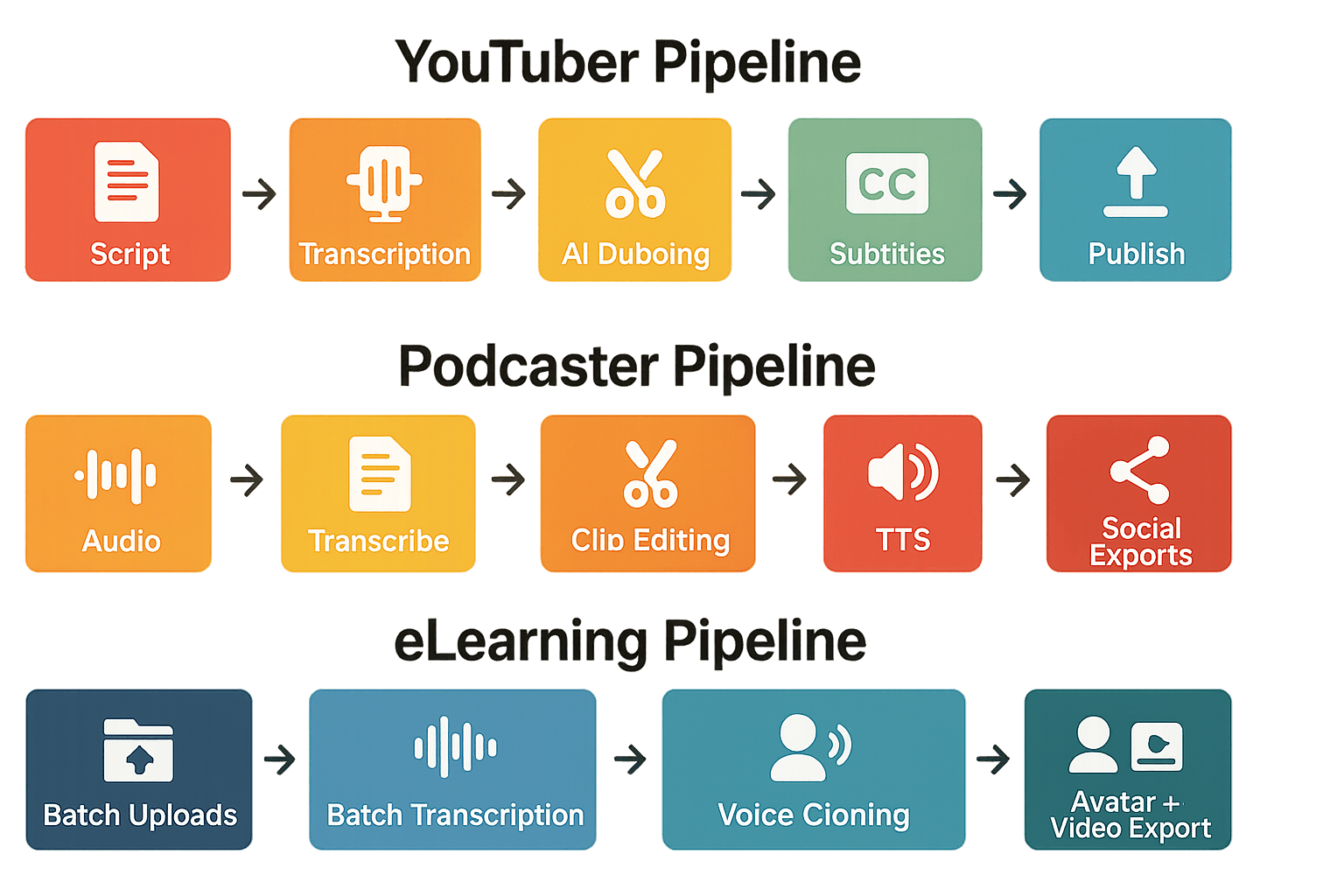
A solo YouTuber wants a translated, dubbed version of a new video. Start with a script or upload raw video, then export localized video files ready to upload.
-
Draft or paste script into AI Writing (rewrite for tone).
-
Upload final video, run AI Transcription (speech-to-text).
-
Translate transcript, create AI Dubbing track (voice clone or standard TTS).
-
Auto-generate and sync subtitles, export MP4 and SRT.
-
Inputs: source video, original script or raw audio.
-
Outputs: dubbed video files, SRTs, translated transcripts.
-
Estimated time saved: 60 to 80 percent vs manual workflow, about 2–6 hours saved per video.
-
Limitation: voice clones may need tuning for emotional nuance in long scenes.
Podcaster: episode repurposed into short social clips
A podcaster wants short clips with native voices for global reach. The workflow turns a single episode into localized shorts fast.
-
Upload episode audio, run AI Transcription.
-
Use AI Writing to create short excerpt scripts and show notes.
-
Produce TTS snippets or cloned voice dubs for each language.
-
Export audio clips and caption files, add to social editors.
-
Inputs: episode audio, target languages list.
-
Outputs: translated clips, caption files, episode notes.
-
Estimated time saved: 4–8 hours per episode for clip repurposing.
-
Limitation: very colloquial speech can drop transcription accuracy to the lower end of ranges.
eLearning and localization team: batch course translation
Training teams need consistent voice and subtitle quality across many lessons. DupDub scales batch jobs and keeps a uniform voice.
-
Bulk upload lesson files, run batch Speech-to-Text.
-
Clean transcripts, send to AI Writing for adapted lesson scripts.
-
Generate voice clones and TTS in target languages, create avatars if needed.
-
Export SCORM-friendly MP4s, SRTs, and DOCX transcripts.
-
Inputs: lesson audio/video batch, style guide.
-
Outputs: localized course videos, subtitles, transcripts.
-
Estimated time saved: up to 70 percent vs agency dubbing, weeks cut to days for medium catalogs.
-
Limitation: avatar lip-sync can need manual frame edits for highly technical visuals.
Marketing team: campaign assets and A/B voice tests
Marketing teams want fast variants for ads and landing pages. Use AI Writing plus TTS to test voice and copy combos.
-
Generate headline and script variants with AI Writing.
-
Produce multiple TTS voices or clones, export short ads.
-
Create localized subtitle sets and asset bundles for ad platforms.
-
Inputs: product brief, target markets.
-
Outputs: ad audio, localized scripts, subtitle packages.
-
Estimated time saved: 50 to 90 percent for audio creative production.
-
Limitation: high-stakes brand spots may still need human voice approval.
Each recipe is ready to run as a quick pilot. Start with one video or episode, measure time saved, and scale. Keep a short test checklist: confirm transcription accuracy, review voice clone samples, and verify subtitle timing.
Best practices, ethics & legal considerations for AI-generated content
When you use AI tools like DupDub, follow simple rules to cut legal risk and make content inclusive. If you’re evaluating the best ai to help with writing, dubbing, or localization, this guide gives practical checks for copyright, consent, privacy, and accessibility.
Get explicit consent for voice cloning
Ask for written permission before cloning any voice. Keep a dated release that names allowed languages, uses, and duration. If you accept voice submissions, verify identity and store consent records securely.
Prevent hallucinations, verify facts
AI can invent details, so always fact-check outputs before publishing. Use a simple checklist:
-
Verify names, dates, and statistics against primary sources.
-
Cross-check quotes with original transcripts or recordings.
-
Flag and edit any speculative language the model adds.
Copyright, attribution, and derivative content
Treat AI output like a draft that still needs rights clearance. If you feed copyrighted text or audio into a model, confirm you have the right to transform it. When using third-party clips, add attribution and keep a record of licenses.
Demand vendor safeguards
Choose providers that lock cloned voices to the original speaker. Require encrypted processing, clear data retention policies, and the ability to delete samples on request. Ask for GDPR alignment and written guarantees on how training data is used.
Accessibility checklist
-
Auto-generate captions and human-edit them.
-
Offer readable scripts and plain-language summaries.
-
Provide subtitle translations and synchronized timing.
-
Include audio descriptions or transcripts for visual content.
Ethics quick tips: disclose AI use when it affects trust, limit synthetic replicas for sensitive contexts, and log editing decisions. These steps protect your audience and keep your team out of legal trouble.
How to choose the best AI writing tool for your needs (decision framework)
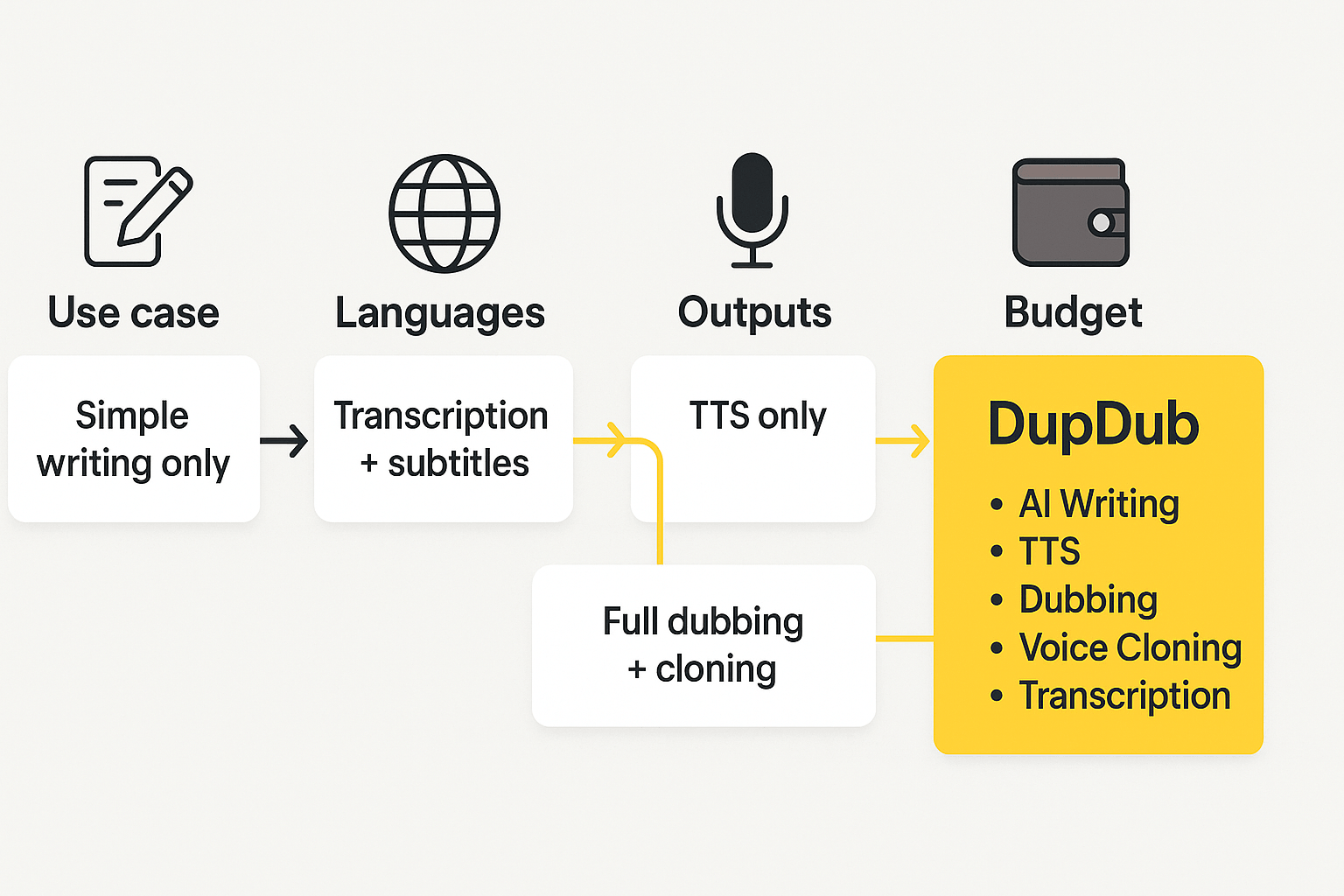
Choosing the right tool starts with your main goal, who will use it, and what outputs you need. Use this quick decision framework to score tools by priorities and pick a clear path. If you search for the best ai to help with writing, this framework helps map needs to features and budget.
Step 1: Rank your priorities
List your top 4 needs, for example: script writing, fast transcription, natural TTS, and video dubbing. Give each need a weight from 1 to 5, with 5 being critical. That score shows whether a tool that pairs writing with multimedia is worth the cost.
Quick feature-priority scoring table
|
Criteria
|
Weight
|
Example score (0-5)
|
Notes
|
|
Script drafting quality
|
5
|
4
|
How well it drafts long-form scripts
|
|
Transcription accuracy
|
4
|
5
|
For editing and subtitles
|
|
Multilingual TTS & dubbing
|
5
|
5
|
For global reach
|
|
Voice cloning / avatars
|
3
|
3
|
Brand consistency needs
|
|
Budget fit
|
4
|
3
|
Monthly spend tolerance
|
Add weighted scores to compare tools. Multiply weight by score for each row, then sum. Higher totals mean closer fit.
Final flow: When to pick DupDub
If your workflow links writing, transcription, and dubbing, DupDub is a strong pick. Choose DupDub when you need: fast transcripts plus one-click subtitle translation, multilingual TTS, or voice cloning tied to short turnaround times. For plan mapping: Personal suits solo creators with light dubbing; Professional fits small teams and regular localization; Ultimate serves heavy localization and enterprise exports.
Decision rules, quick:
-
Pick DupDub if you need writing plus integrated transcription and dubbing in one app.
-
Pick DupDub if you localize videos across many languages and want avatar or cloned-voice options.
-
Consider cheaper single-purpose TTS tools if you only need standalone voice output.
FAQ — quick answers to common questions
-
Is DupDub the best ai to help with writing for creators?
Short answer: it’s a top all-in-one choice if you need writing plus audio and video localization. DupDub pairs GPT-powered drafting with one-click transcription, TTS, and dubbing, so you can write, repurpose, and publish faster. Try a quick test project to see if the voice and tone fit your channel or course.
-
What transcription accuracy can creators expect from DupDub speech-to-text for creators?
Accuracy depends on audio clarity, mic quality, and language. Expect roughly 85 to 98 percent in clean English audio, lower for noisy or highly accented files. To improve results, upload clear audio, add speaker labels, or edit the generated transcript before export.
-
What are DupDub voice cloning limits and safety controls for creators?
DupDub creates a clone from about a 30 second sample and supports cloning in 47 languages. Clones are locked to the original speaker and processed with encryption for privacy. Don’t use cloned voices without consent, and expect varied realism across languages and styles.
-
Which languages does DupDub support for TTS, dubbing, and AI writing workflows?
TTS covers 90 plus languages and accents, voice cloning spans 47 languages, and speech-to-text/subtitles support 40 plus languages. The AI writing tool can draft and edit in 90 plus languages. That mix suits global creators, but check specific voice availability per language before big projects.
-
How does the DupDub free trial work and which plan should I try first?
The trial runs three days with no credit card and includes starter credits to test writing, TTS, and dubbing. Solo creators often start with Personal, power users pick Professional, and teams choose Ultimate or pay-as-you-go credits. If you want to assess a team rollout, request a demo and run a test localization project.




 Discord
 YouTube
 Tiktok
 Twitter
 Facebook
 Instagram