
DupDub Review: Is it the Best AI Story Generator for Writers and Creators?

Jun 01, 2026 00:0013 mins read
Share to
Contents

TL;DR — Quick verdict and who should use it

Verdict: This platform is a practical, all-in-one AI dubbing and narration tool. It balances voice realism, multilingual reach, and simple workflows. It ranks among the best AI story generator options for creators.
Best for fast localization, believable voice cloning, and flexible TTS. Ideal users include YouTubers, podcasters, educators, and small creative teams who need to repurpose audio and video quickly.
If you need to scale narrated content without heavy studio costs, this fits well. Expect a straightforward setup and enough polish for most audience-grade projects.

Why DupDub matters for modern storytelling

Stories succeed when they reach people where they live, in their language and on their favorite channel. DupDub shortens the path from script to multilingual narrated content, so creators can publish faster and scale reach without hiring studios. If you search for the best ai story generator, tools that combine dubbing, voice cloning, and TTS matter because they turn a single script into many localized assets.

Reach more readers and listeners

Localization is no longer optional. Videos, podcasts, and learning modules find far larger audiences when translated and voiced for local markets. DupDub gives creators quick access to 90 plus languages and hundreds of voices, so a single story can speak to many cultures with consistent tone and timing.
Who benefits most:
  • Independent writers repackaging short stories into audio for global listeners.
  • YouTubers and podcasters who want faster multilingual episodes.
  • Educators and course creators localizing lessons for broader classes.
  • Small businesses and marketers repurposing video ads and explainers.

Cut time from draft to voiced asset

Speed matters when content is competitive. DupDub automates transcription, subtitle alignment, and dubbing, so you skip manual timing and voice direction. That reduces turnaround from days to hours for most short projects, letting creators test more ideas.

Keep a consistent brand voice across channels

Voice cloning (synthetic copies of a speaker) helps preserve a brand’s persona across languages and formats. With voice clones and centralized style controls, DupDub helps creators maintain recognizable tone, which supports audience trust and repeat engagement.

Tradeoffs: quality, cost, and control

No tool is perfect for every project. Higher realism can cost more credits and may need manual edits for idioms and cultural nuance. Voice cloning raises consent and privacy questions, and some creators prefer human narration for stylistic reasons. Consider these tradeoffs:
  • Quality: very good for most narration, occasional unnatural phrasing in tricky lines.
  • Cost: scalable plans lower per-hour cost, but heavy users should check the math.
  • Control: full automation speeds things up, but fine tuning still improves final output.

Decide fast: match the tool to the goal
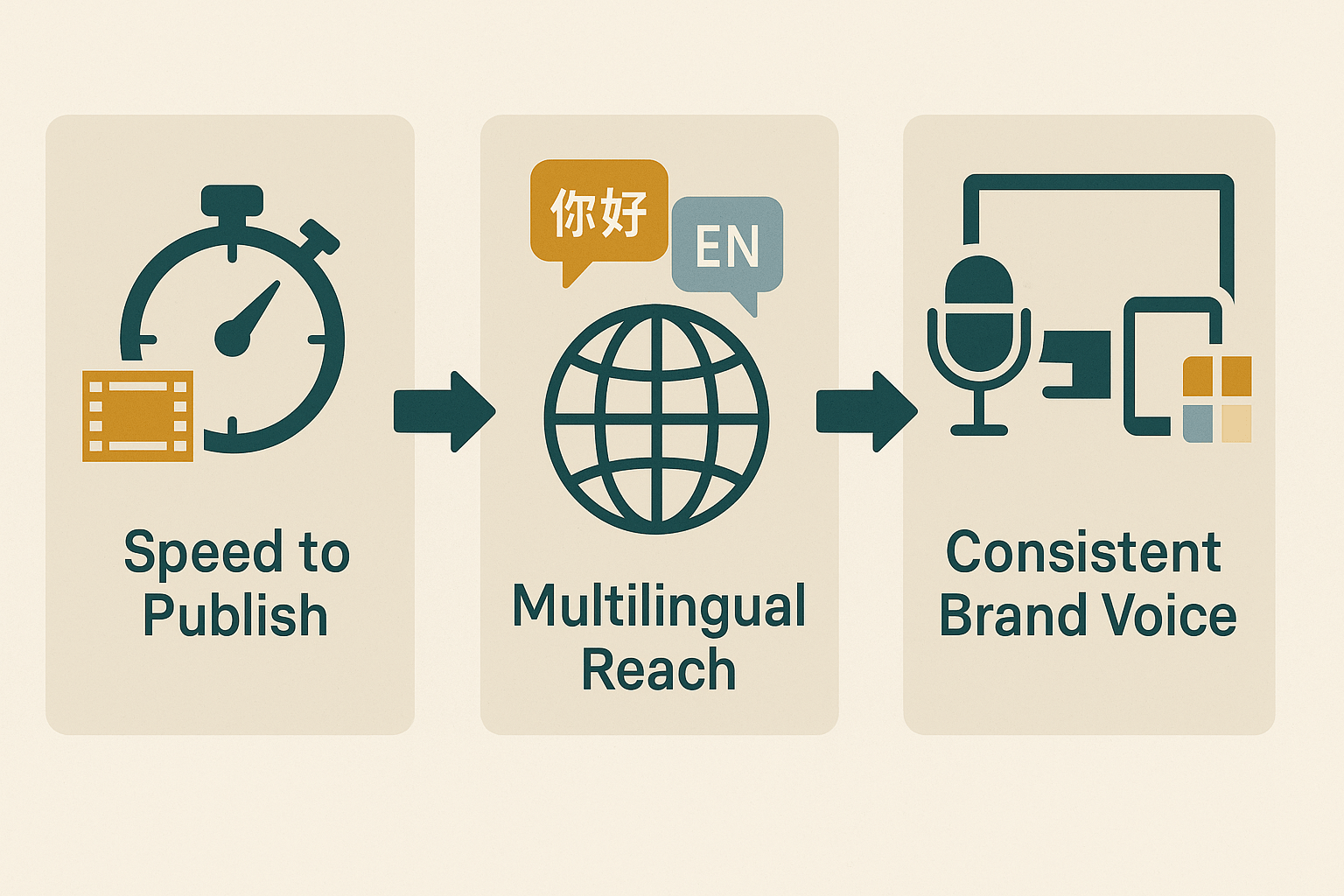
Pick DupDub if you need fast, repeatable localization, consistent brand voice, and scalable output. Choose human talent if you need extreme nuance or bespoke performance. For most creators republishing content across platforms, DupDub shortens the gap between idea and audience.
(Next sections show hands-on prompts and tests so you can judge sound quality and workflow fit.)
Infographic showing three differentiators: speed to publish, multilingual reach, and consistent brand voice

DupDub feature deep-dive: What you'll actually use

DupDub bundles the building blocks creators need to draft, dub, and publish narrated stories. If you search for the best ai story generator, DupDub is not just a text engine. It pairs writing assistance with multilingual text-to-speech, voice cloning, and video dubbing tools that help you ship finished audio or video. This section shows the core modules you’ll touch daily, where DupDub shines, and which limits to test first.

AI dubbing and video translation: fast global reach

The AI dubbing tool replaces original speech with translated, aligned audio. It excels at subtitle alignment and re-voicing for full videos. Use it when you need quick localization across 90 plus languages, and when you want subtitles and audio in sync. Watch for credit use during long videos: credits scale with runtime, and ultra-quality voices use more quota.

Multilingual TTS: voices and language coverage

DupDub’s TTS offers 700 plus voices across 90 plus languages and accents. That breadth means you can match tone for different markets. The TTS is browser-based, so you can test voices instantly without software installs. Limits show up with high-quality premium voices, which consume the ultra-voice bucket faster than standard voices.

Voice cloning: preserve your brand voice

Voice cloning uses a short sample to create a reusable synthetic voice. It supports many languages for the clone, which helps keep your brand consistent across markets. Cloning is handy for serialized audio stories or narrated courses. Keep in mind cloning quotas and ethics: clones are tied to the original speaker and use specific clone credits.

Transcription and subtitles: accurate drafts, quick edits

Automatic speech-to-text turns audio and video into editable transcripts. The tool supports transcription for 40 plus languages. The auto-subtitle generator is great for repurposing content into blog posts or episode notes. Expect high accuracy on clear speech; expect extra editing when audio has overlap or heavy accents.

Avatars and talking photos: visual narration options

Avatars turn scripts into talking characters for social clips and explainer videos. They work best for short intros, course modules, and social cutdowns. Avatars save time compared to full video shoots, but avatar customizations have limits per plan. Test avatar lengths and lip sync in your trial to confirm quality.

GPT-powered writing assistant: prompt to polish scripts

The built-in AI writing assistant helps with idea generation, drafting, and script polishing. Use it to create story beats, craft narration, or rewrite dialogue for different languages. Pair the assistant with TTS to quickly hear pacing and tone. It speeds iteration, but you should still verify facts and character consistency manually.

Quick workflow you can try in 10 steps

  1. Draft a short story with the GPT assistant, 300 to 800 words.
  2. Export the script to the editor and split into scenes.
  3. Generate a voice clone or pick a TTS voice for your narrator.
  4. Produce audio tracks using standard voices first, then try an ultra voice.
  5. Upload a short video or visual asset to the dubbing tool.
  6. Auto-transcribe to create subtitles and check timing.
  7. Apply dubbed audio and auto-align subtitles.
  8. Add an avatar for a visual host if desired.
  9. Export MP4 and SRT files for publication.
  10. Reuse voice clones to create localized episodes faster.

Practical testing checklist and tips

  • Start with the 3-day free trial and use starter credits to test a full short workflow.
  • Try one standard and one ultra voice to compare quality and credit cost.
  • Check cloned voice samples in each language you plan to publish.
  • Use browser recording for small edits instead of re-uploading files.
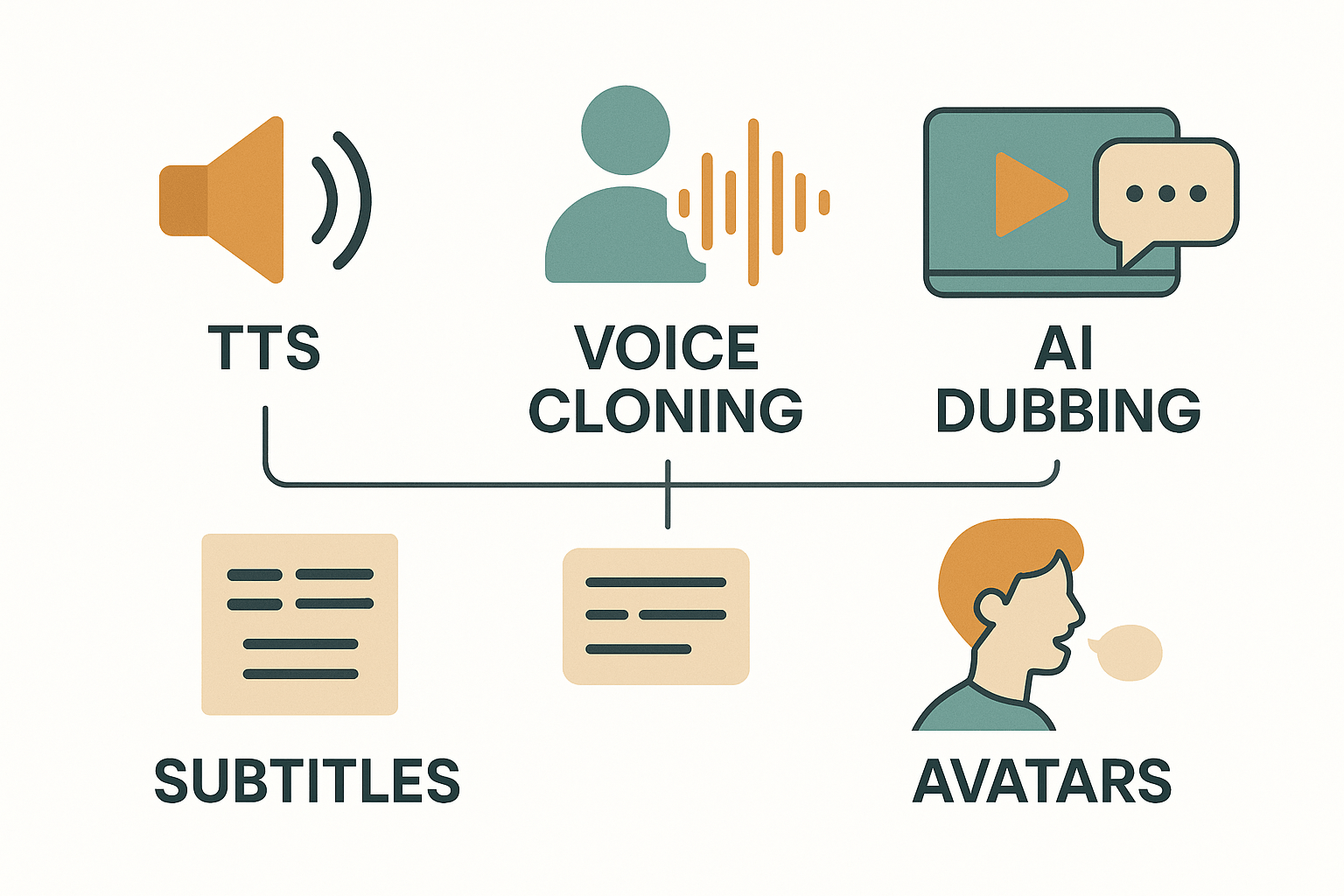
DupDub combines TTS, dubbing, cloning, transcription, avatars, and writing tools into a single loop. For creators, that reduces handoffs and simplifies publishing. Test credits, ultra-voice quotas, and avatar limits early to match the plan to your output needs.
Conceptual infographic of five DupDub modules: TTS, Voice Cloning, AI Dubbing, Subtitles, and Avatars, shown as labeled icons in a neat grid.

Hands-on test: Generate and narrate a short story (step-by-step)

If you want to test whether DupDub is the best ai story generator for your workflow, this hands-on guide walks you through every step. You’ll set up a project, use ready-made prompt templates, generate a short story excerpt, and produce a polished narrated clip. Follow the steps, tweak tone and pacing, and you’ll have a publish-ready audio or dubbed clip by the end.

1) Set up the project and assets

Create a new project in DupDub and pick the language you want to narrate in. Upload a placeholder image or short video if you plan to publish a visual clip. Enable transcription and subtitles so you can export SRT alongside the audio. Keep the project name clear, like "Short Story Test: Homebound Fox."

2) Use these prompt templates

Use the templates below to tell DupDub what you need. Copy and paste, then tweak details like tone or length.
  • System prompt (context): "You are a concise story assistant. Write vivid scenes and clear dialogue for narration."
  • Story prompt (core): "Write a 400-word short story about a curious fox who finds a glowing key at the edge of a village. Keep language simple and cinematic. Include one clear scene break. Tone: warm, slightly mysterious. POV: third person."
  • Voice direction (for narration): "Calm, measured pace. Slight pause after sentences with emotional beats. Soft low-mid pitch. Narration duration about 2.5 to 3 minutes."

3) Example short-story prompt you can paste

Write a 400-word short story about a curious fox who finds a glowing key at the edge of a village. Keep language simple and cinematic. Include one clear scene break. Tone: warm, slightly mysterious. POV: third person. Keep sentences crisp and suitable for voiceover narration.

4) Expected DupDub-generated excerpt

The fox found the key beneath a split log, its teeth buzzing like a captured bird. Moonlight pooled on the metal and turned the markings into tiny constellations. She held the key in her paw and felt the village sleep around her, the chimneys breathing soft smoke. The key hummed once, a note that matched something deep inside her chest.
By the time she reached the old gate, the locks remembered her name. She did not know whether the gate led to a room or a memory, only that the key fit as if it had been waiting for her whole life. Inside, the air smelled like pine and stories, and a single lantern burned, as if someone had left a place at a table on purpose.

5) Narration script and voice settings to try

Use the generated text as your narration script. Edit only to add brief audio cues like [pause] or [soft sigh] where needed. For voice settings use these starting values:
  • Language: English (US)
  • Voice type: Warm male or female, mid-range (700+ voice list)
  • Style: Storyteller or Calm
  • Speed: 0.95 to 1.05 (slower for mystery)
  • Pitch: neutral to slightly low
  • Breath control: add 300ms pause after full stops and 700ms after scene breaks
Upload the script to the TTS editor or pick a cloned voice if you have one. Use the editor to add markers for pacing and to preview short segments. Enable subtitles: DupDub will auto-sync the SRT to the narration and let you adjust timings.

6) Export checklist and tips

  1. Preview the full narration and listen for rushed sections.
  2. Tweak speed and pauses in 5 to 10 percent increments.
  3. Generate subtitles and check line breaks for readability.
  4. Export MP3 or WAV and SRT, or render MP4 if you added video or an avatar.
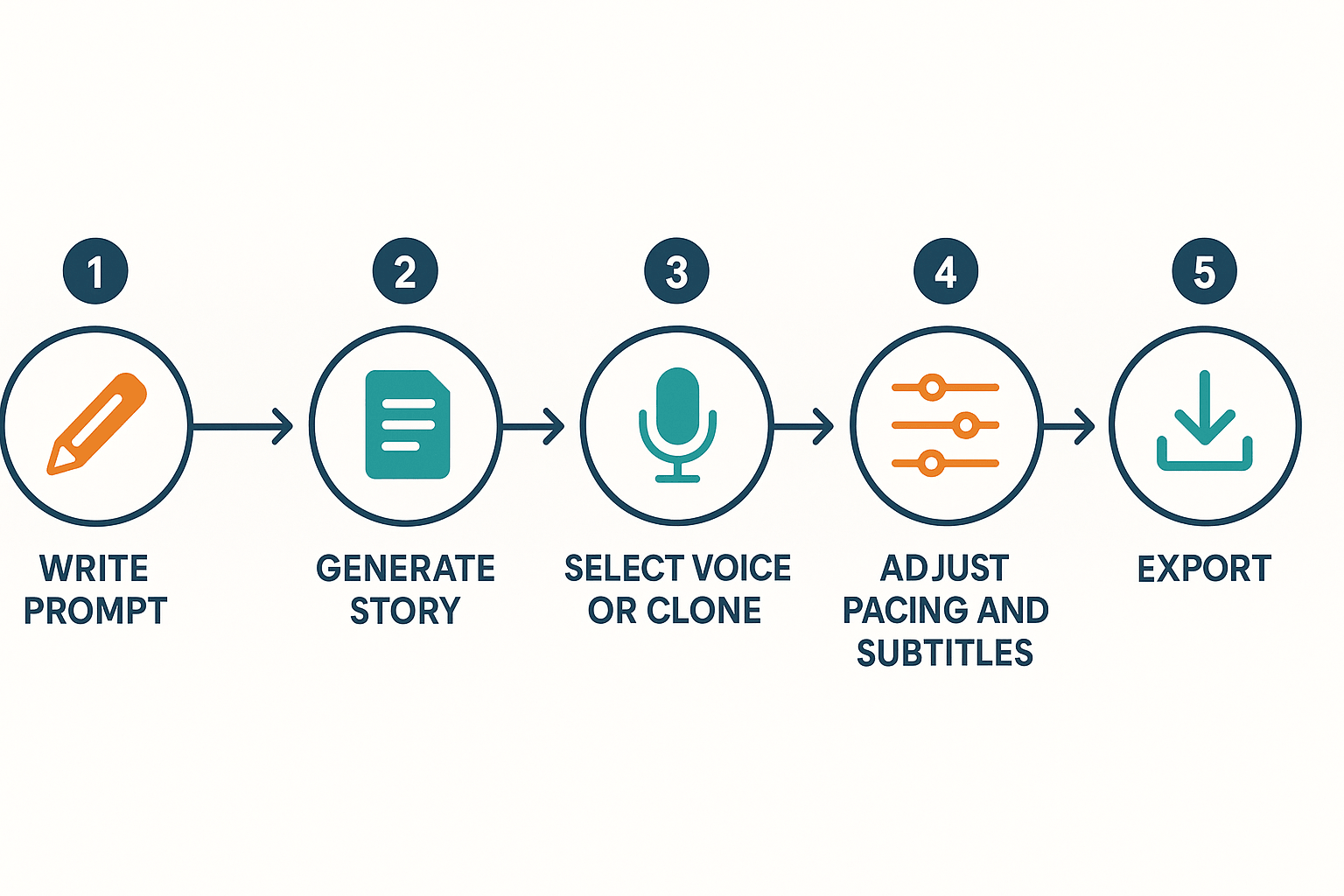
If you want a cloned voice, upload a 30-second sample and test multilingual output. For localizing, generate the story in the original language and then use DupDub to translate and re-voice into your target languages.
Workflow schematic: write prompt, generate story, select voice or clone, adjust pacing and subtitles, export.

How DupDub compares to other AI story tools

Choosing the best ai story generator means balancing story coherence, voice realism, language reach, and production plumbing. This section compares DupDub with ElevenLabs, Murf, and Play.ht. You’ll get clear strengths and trade offs, so you can pick the right tool for your stories, podcasts, or video dubs.

Comparative snapshot and quick rankings

Below I rank four key attributes, with short notes on why each matters. Scores are qualitative, on a five point scale.
  • Story coherence (writing and script follow through): DupDub 3.5, ElevenLabs 3, Murf 2.5, Play.ht 2.5.
  • Voice realism (naturalness and emotion): ElevenLabs 5, DupDub 4, Murf 3.5, Play.ht 3.
  • Multilingual support (TTS, cloning, subtitles): DupDub 5, Play.ht 4, Murf 3, ElevenLabs 2.5.
  • Accessibility and subtitle pipeline: DupDub 5, Play.ht 4, Murf 3, ElevenLabs 3.

Side by side: features and trade offs

Feature
DupDub
ElevenLabs
Murf
Play.ht
Voice realism
Very good, many styles
Industry leader, highly expressive
Good, for narration
Good, fast options
Voice cloning
Multilingual cloning, avatar sync
Strong single-language clones
Limited clones
Cloning with fewer languages
Languages supported
90+ TTS, 47 clone langs
Fewer lang clones
~30 TTS
40+ TTS
Subtitles & alignment
Full pipeline, video first
Basic subtitle export
Basic
Strong subtitle tools
Avatars & dubbing
Talking avatars, video revoice
No avatars
No avatars
No avatars
API & automation
Full API, workflow hooks
API, model focus
API for studios
API available
Best fit
Multilingual creators, localizers
Writers seeking top realism
Podcasters needing easy studio
Fast TTS for multi-audio use

Voice realism and cloning

If realism is your priority, ElevenLabs leads for raw vocal nuance and emotional delivery. It makes voice acting feel alive. DupDub follows closely, especially for multilingual clones and synced avatars. Murf and Play.ht are reliable, but they favor convenience over fine emotion control. For creators who need consistent brand voice in many languages, DupDub has a clear edge.

Multilingual dubbing and localization

DupDub stands out for localization. It supports 90 plus TTS languages and 47 for voice cloning. That makes it ideal for global releases. Play.ht also supports many languages, but DupDub adds avatar dubbing and subtitle alignment. If you plan to turn one story into many local versions, DupDub saves steps and reduces manual syncing.

Accessibility, subtitles, and workflow

Captions and subtitle alignment matter for accessibility and search. DupDub builds subtitle translation, alignment, and exports into one flow. That reduces manual fixes. Play.ht has solid subtitle tools, but you may need extra steps. Murf and ElevenLabs focus more on voice than full subtitle pipelines. For educators or publishers who must meet accessibility rules, DupDub is more complete out of the box.

Developer access and scaling

All four offer APIs. DupDub pairs API access with avatars and a dubbing pipeline. That combo makes batch localization and automated narration easier. ElevenLabs offers strong model control and SDKs for voice research. Murf and Play.ht provide studio-style APIs. Choose DupDub if you need large scale, multilingual automation tied to avatars or video.

Pros and cons by use case

  1. Writers seeking realism: pick ElevenLabs for top expressive TTS.
  2. Multilingual creators and localizers: pick DupDub for language range and avatar sync.
  3. Podcasters and educators: DupDub for subtitles and cloning across languages, Murf for quick studio workflows.
  4. Quick narration and cost focus: Play.ht offers fast TTS and lower friction.
In short, DupDub beats many rivals when you need true multilingual dubbing, subtitle automation, and avatar-driven narration at scale. If you want the single most natural English voice, ElevenLabs still leads. Match the tool to your main use case, then test voice samples.

Pricing breakdown and value-for-money analysis

Use this pricing guide to match your production volume to a plan. It breaks down Free through Ultimate and pay-as-you-go. I include monthly production scenarios and transcription needs. If you want the best ai story generator for narrated content, read on.

Quick plan snapshot

Here are the core plan facts at a glance. Numbers are yearly equivalents or one-time prices for credits. Use these to compare capacity and voice clones.
Plan
Cost (annual equiv)
Yearly credits
Std TTS hrs
Voice clones
Free (3-day trial)
Free
10 starter credits
0
0
Personal ($11/mo, annual)
$132
1,800
25 hrs
3
Professional ($30/mo, annual)
$360
6,000
83 hrs
5
Ultimate ($110/mo, annual)
$1,320
30,000
416 hrs
10
Pay-as-you-go (one-time)
500 credits $68 etc
variable
variable
variable

Who gets the best ROI

Solo podcasters and solo writers
If you publish weekly short episodes, Personal often covers you. You get a few hours of TTS and three voice clones. That is enough for a solo creator or a small podcast.
Small teams and multi-channel creators
Teams that batch content, translate videos, or run multiple shows usually need Professional. It gives more TTS hours, more clones, and higher transcription quotas.
Agencies and heavy localizers
If you localize many videos or run client work, Ultimate is the best value. The large credit pool and extra clones cut per-hour costs.

Common cost scenarios and plan match

Scenario A: Hobby podcaster
  • Monthly: 2 TTS hours, 30 minutes transcription, 1 clone. Personal fits if you pay annually. If you only test, use the free trial.
Scenario B: Small editorial team
  • Monthly: 8 TTS hours, 5 hours transcription, 2 clones. Professional fits most months. It keeps per-hour costs lower than pay-as-you-go.
Scenario C: Agency or course studio
  • Monthly: 40+ TTS hours, 20+ transcription hours, 5+ clones. Ultimate gives the best unit price. You avoid frequent top-up purchases.

When pay-as-you-go makes sense

Choose pay-as-you-go if your needs are irregular. It suits one-off campaigns, pilot seasons, or short localization bursts. It also makes sense if you want to experiment without an annual commitment.

Actionable mapping and decision tips

Map your average monthly TTS hours to yearly plan allowances first. Then check transcription minutes and clone needs. If your monthly usage sits under the Personal monthly equivalent, pick Personal. If it sits near Professional, upgrade for steady savings. For unpredictable spikes, combine an annual plan with occasional pay-as-you-go top-ups.
Nail the fit quickly by starting the free 3-day trial, then compare your real usage to these plan caps.

Privacy, hallucination risk, and accessibility considerations

DupDub lists several privacy safeguards, and you should evaluate them before you publish. The platform says voice cloning is locked to the original speaker, processing is encrypted, and it aims to align with GDPR. If you test the best ai story generator on real voices, treat those claims as starting points, not guarantees.

Verify privacy safeguards and enterprise terms

Ask for specifics in contracts, not just marketing blurbs. Request these items and confirm them in writing:
  • Data retention and deletion policies, including timelines for voice samples.
  • Whether voice clones can be revoked or permanently removed on request.
  • Where audio and transcripts are processed and stored, and any subprocessors used.
  • Evidence of encrypted processing and breach notification timelines.
  • Clauses on model training use, to confirm your voice or content won't train public models.
These checks protect creators and clients. They also reduce future legal friction.

Reduce hallucination risk in AI-written storylines

Hallucinations happen when models invent facts or inconsistent plot details. Use simple, repeatable steps to cut errors.
  1. Anchor scenes with concrete facts or source snippets before generation.
  2. Ask the model to list sources or say "I don't know" when unsure.
  3. Chunk bigger stories into beats, then verify each beat.
  4. Keep a human-in-the-loop editor for final checks and continuity.
Also keep versioned drafts and a changelog. If you publish narrated episodes, note the verification date and editor initials in metadata.

Accessibility checklist and legal ethics for voice cloning

Follow formal guidance when designing for diverse users: ISO/IEC 30071-1:2019 provides guidelines for building and maintaining ICT systems that are accessible to diverse users, including those with disabilities and older people. Use these practical checks before release:
  • Provide accurate captions and full transcripts for every audio or video file.
  • Offer adjustable playback speeds and multiple voice styles for non-native listeners.
  • Include audio descriptions for visual content when needed.
  • Add alt text for avatars and clear labels for controls.
  • Maintain plain-language summaries for complex plots.
Legal and ethical checks for voice cloning
  • Obtain explicit, recorded consent for any voice clone, with clear usage limits.
  • Use written release forms for paid talent or contributors, and keep copies.
  • Avoid cloning minors or public figures without clear legal counsel.
  • Check copyright and moral-rights laws by territory before wide distribution.
These steps help you publish responsibly and protect audience trust.

Best workflows, prompts, and templates for story creators

This section gives hands-on workflows you can copy into DupDub to draft, voice clone, narrate, and export finished stories. It shows short, action-first paths for fiction, non-fiction, educators, and multilingual creators. If you want the best ai story generator to speed from idea to published audio, use these step-by-step flows and ready prompts.

Rapid fiction workflow: idea to narrated episode

  1. Draft with the AI Writing assistant. Open DupDub's writing assistant and paste this prompt: "Write a 700-word dark fantasy scene, quiet tone, slow pacing. Show not tell. Focus on sensory detail and a twist in the last paragraph." Ask for three short scene variations. Save the strongest as your script.
  2. Polish for narration. Use: "Rewrite this scene for spoken reading. Short sentences, clear cadence, 6th-grade reading level, add brief pauses after commas and scene breaks." Keep the output as the narration script.
  3. Clone or pick a voice. Upload a 30-second sample to create a voice clone, or pick a similar voice from the 700+ voices. Label it with the character name.
  4. Produce narration. In the DupDub studio, import the script, select the cloned voice, set pacing to 0.95 for breathy reads, and choose an appropriate style from the voice controls.
  5. Export and subtitle. Export MP3 or MP4 and generate SRT subtitles. Check timing and adjust micro-pauses in the studio.

Educator workflow: lesson script to accessible audio

  1. Start with a lesson outline. Ask the AI Writing assistant: "Create a 10-minute lesson script on photosynthesis, simple language, three examples, two quiz questions." Save the script.
  2. Make it accessible. Run: "Convert to spoken-friendly script. Add clear signposting, shorter sentences, and a 1-second pause after each bullet." Add on-screen captions during export.
  3. Choose a neutral voice clone or standard TTS voice that supports the target language. For multilingual classes, select the language and test pronunciation on key terms.
  4. Export transcript and captions. Use SRT for captions and provide the editable transcript to students.

Voice cloning and localization workflow

  1. Clone once, reuse forever. Record a 30-second sample, label it, and lock it to the original speaker to reduce misuse risk.
  2. Localize script variants. For each target language, prompt: "Translate and adapt this script for a native speaker in [language]. Keep idioms natural and shorten by 10 percent for faster pacing." This keeps story length consistent.
  3. Generate voice-localized files. Use the cloned voice where supported, or pick the closest match and enable language-specific pronunciation.
  4. Export a side-by-side matrix of exports: MP3 for audio platforms, MP4 for video platforms, and SRT for captions.

Copyable prompt templates

  • Draft: Scene starter "Write a 400-word scene in [genre], main character [name], goal [goal], obstacle [obstacle], sensory detail, show emotion through action. Keep sentences short."
  • Polish for narration "Rewrite for spoken delivery. Short sentences, clear beats, natural pauses, no internal monologue. Aim for 5 minutes when read at normal pace."
  • Narration script with pacing tag "Narration: [script]. Add [pause:0.6s] where parentheses appear, mark scene breaks with [BREAK], and provide a version without timing codes."
  • Multilingual narrator prompt "Translate and localize to [language]. Keep voice age and tone equivalent. Mark culturally sensitive references for review."

Export checklist and quick tips

  • Always export SRT when publishing to video platforms. Subtitles boost SEO and accessibility.
  • Keep one editable transcript per episode. It helps repurposing and translations.
  • Test cloned voice on short reads first. Small fixes avoid large re-records later.
  • Use the API (application programming interface) for batch exports or automated pipelines.
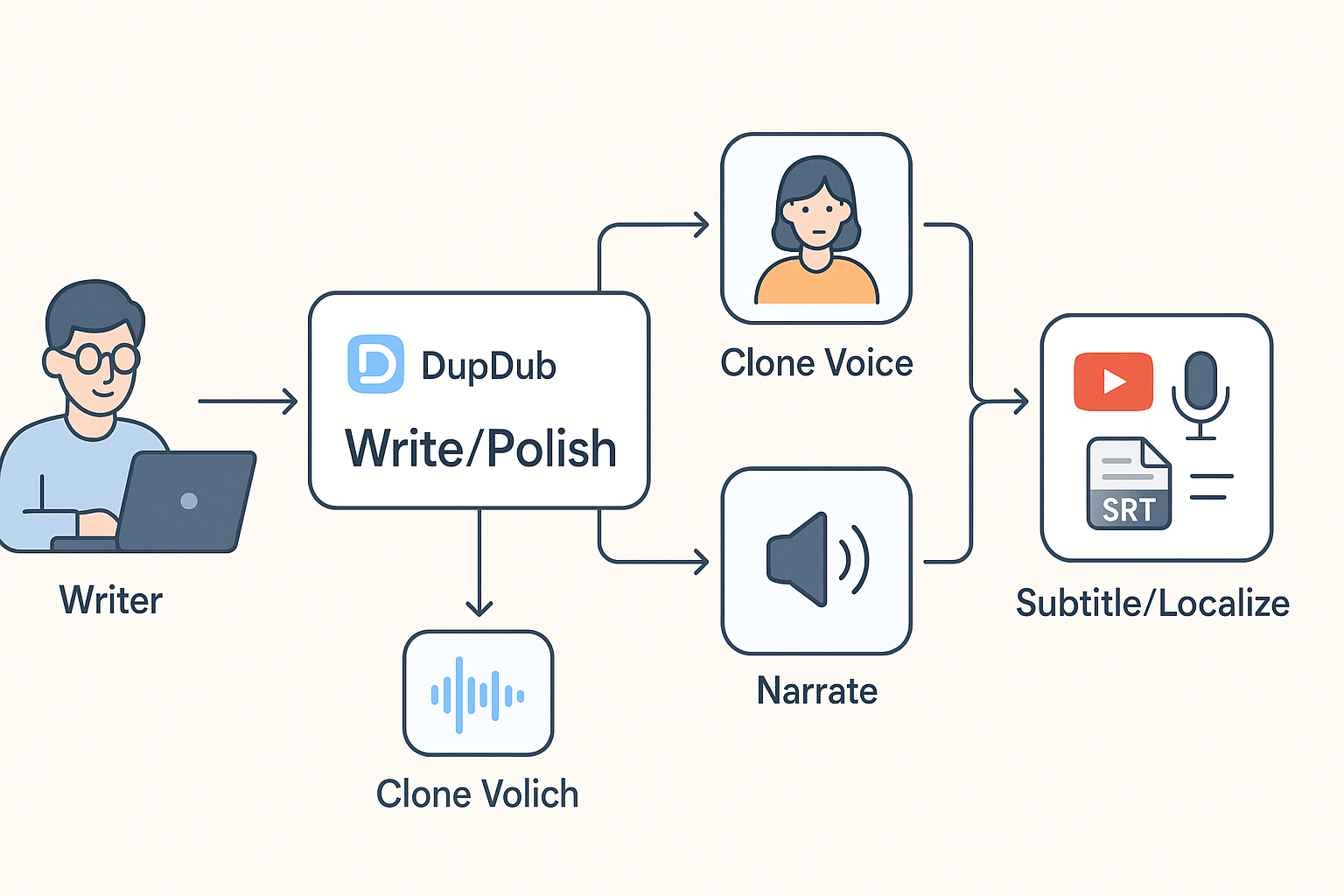
Workflow diagram showing writer to DupDub studio, voice cloning, narration, subtitle/localize, and publishing stages.

Final verdict and recommended next steps (including trial CTA)

DupDub is a practical choice when you need fast, multilingual narration, voice cloning, and video localization. It’s one of the best ai story generator options for creators who want narrated scripts, localized videos, and consistent brand voices. The platform fits writers, podcasters, educators, YouTubers, and small teams that need fast repurposing without big dubbing budgets.

When to pick DupDub

Choose DupDub if you need TTS in 90 plus languages, realistic voice clones, or avatar-led narration for lessons and videos. Consider other tools if you only need text-first drafting without audio or deep editorial AI features.

Recommended next steps

  1. Run the hands-on tutorial in this review to see voice cloning and narration in action.
  2. Compare plans against your usage, especially credits and voice hours.
  3. Sign up for the 3-day free trial to test real scripts and avatars.
  4. Test multilingual narration and subtitle alignment on a short video.
  5. Join the newsletter for ready-made prompt templates and narration scripts.
  6. If you need enterprise localization at scale, contact the enterprise team.
The trial needs no credit card, so you can validate fit quickly.

FAQ — People also ask and practical troubleshooting

  • Is AI-generated fiction original and safe to publish? (originality of AI-generated stories)

    AI can produce original text, but it may echo training data. Treat outputs as drafts and edit for voice, facts, and style. DupDub works well as a fast drafting tool and can be the best ai story generator for writers when you polish the output. Quick fixes: run a plagiarism check, add unique plot hooks in prompts, and keep prompt records for provenance.

  • How accurate are voice clones for creators? (voice clone accuracy for creators)

    Cloning matches tone and cadence, accuracy depends on sample quality. Use a clear 30 second sample, low noise, and matching language to improve fidelity. Troubleshoot by testing short scripts, adjusting prosody settings, and re-recording samples if results sound off.

  • Is DupDub GDPR compliant for voice cloning and data? (GDPR compliance for voice cloning)

    DupDub states GDPR alignment and uses encrypted processing for voice data. For sensitive projects, request a data processing addendum or enterprise contract. Tip: limit stored samples, enable account privacy settings, and document consent from speakers.

  • How do I prevent hallucinations in generated narratives? (avoid hallucinations in AI stories)

    Hallucinations occur when models invent unsupported facts. Anchor stories with concrete seeds like timelines, character bios, and source notes. Best fixes: ask the model to cite sources, keep outputs short, and run a quick fact check before publishing.

  • How does pricing scale for multi-episode podcasts? (pricing scales for podcasts with DupDub)

    Pricing scales by credits, voice hours, and plan tier. For serial audio, estimate minutes per episode, test one export on the free trial, then multiply. Choose annual plans if you need steady monthly hours, or use pay-as-you-go while you test volume.

Experience The Power of Al Content Creation

Try DupDub today and unlock professional voices, avatar presenters, and intelligent tools for your content workflow. Seamless, scalable, and state-of-the-art.