
Can DupDub Be the Best AI Storyboard Generator? Compare Features, Workflows & Pricing

Jun 12, 2026 10:5911 mins read
Share to
Contents
TL;DR: Quick answer: Can this be the best AI storyboard generator for your team?
Short answer: it’s not strictly the best AI storyboard generator. It can be the best practical fit for teams that need fast, consistent voice and quick localization.
It’s not a visual storyboard canvas. Instead, it focuses on AI dubbing, voice cloning, TTS, and transcription. It also uses avatars to convert scripts and shot lists into timed voiceovers, synced subtitles, and placeholder talking characters.
Pick it when your top needs are fast multilingual voice production, a consistent brand voice across markets, and smoother handoffs to editors or storyboard tools. Test common workflows quickly to judge fit.

Why AI storyboard generators matter in 2026

AI storyboarding tools speed creative decisions and cut revision loops by generating timed voice mockups, subtitle drafts, and scripted narration early in pre-production. If you’re evaluating the best ai storyboard generator, consider how voice-first outputs change decisions: hearing a timed narration makes shot length, pacing, and line reads obvious before any edit is cut.

Fix localization, voice consistency, and slow handoffs early

Production teams face three repeat bottlenecks that make voice tools essential:
  • Localization at scale: translating and dubbing a single video into many languages is slow and expensive without automation.
  • Inconsistent voice assets: different narrators create brand drift across markets.
  • Slow handoffs: waiting for human dubs or transcriptions delays edit cycles and approvals.
According to McKinsey (2026), in the United States, daily viewing hours spent on linear TV declined by 4 percent CAGR from 2022 to 2024, while streaming grew by 13 percent and social video platforms grew by 14 percent. That shift forces teams to publish more versions, faster.
Using AI dubbing, TTS, and voice cloning alongside visual storyboard tools gives teams early, listenable drafts. This reduces rework, speeds approvals, and keeps a consistent brand voice across languages. For global creators and marketing teams, voice-enabled storyboards are no longer optional, they are a production multiplier.

Why AI storyboard generators matter in 2026

In 2026, teams need faster, cheaper ways to test scenes and timing. AI storyboard generators produce timed voice mockups and subtitle drafts early in pre-production. When evaluating the best ai storyboard generator, check how well it supports voice-first workflows.

Key production bottlenecks

  • Localization at scale: Translating scripts is one thing, revoicing and syncing many languages is another. That work often adds weeks to a release.
  • Inconsistent voice assets: Different narrators or vendors change pacing and tone. The result is a patchwork audience experience.
  • Slow handoffs: Storyboards, scripts, and finished voice files live in different tools. Teams waste time on file exports and manual alignment.
  • Revision loops: Without time-aligned mockups, every creative change needs a new recording pass.

How voice tools change pre-production

Voice platforms with TTS (Text-to-Speech), voice cloning, and AI dubbing plug into storyboards early. They create time-aligned narration and draft subtitles that match frames. That reduces guesswork and cuts review cycles.
Producers who publish globally gain the most. Quick multilingual mockups let teams approve pacing, tone, and subtitles before animation or shoot days. In short, pairing visual storyboards with strong voice tooling speeds decisions, reduces rework, and makes global publishing practical at scale.

How DupDub compares to dedicated AI storyboard generators (quick comparison)

If you wonder whether DupDub is the best ai storyboard generator for your team, this quick comparison will help. It maps core storyboard needs to DupDub modules and shows what specialist visual tools still do better. Use it to decide whether to pair DupDub with a visual canvas or pick a dedicated storyboard app.

Quick feature map

DupDub focuses on voice, timing, and localization. Dedicated storyboard tools focus on visual planning and shot composition. The table below shows how common storyboard requirements map to capabilities.
Requirement
DupDub modules
Dedicated storyboard tool
Script-to-visual timing
Transcripts and timecodes from STT, editable cues
Visual timeline, frame-level shot markers, camera notes
Timed voiceovers
AI Dubbing, TTS, voice cloning, exportable MP3/WAV
Placeholder audio lanes, manual voice import, limited TTS
Subtitle alignment
Auto subtitle gen, translate, SRT export
Subtitle support, but often manual alignment
Multilingual outputs
90+ TTS languages, voice cloning in 47 languages
Visual notes for language changes, no built-in dubbing
Visual scene layout
Talking photos and avatars for temp visuals
Full visual canvas, boards, sketch import, animatics

Gaps to expect

DupDub fills audio and localization gaps in storyboarding. It does not replace a visual canvas for shot framing and scene composition. Expect to use DupDub for timed voice tracks, then import audio and subtitles into a storyboard or editing tool. You may also need manual frame-level notes if you want exact camera moves.

Side-by-side examples

• Timed VO: DupDub generates a voice file with timestamps from the transcript. A storyboard tool shows where that audio sits on a visual timeline. • Subtitle sync: DupDub exports SRT aligned to speech. Storyboard tools rely on SRT import and manual placement. • Multilingual draft: DupDub produces dubbed tracks and translated subtitles. A storyboard app holds translated scene notes but not auto-dubbed audio.

Where DupDub fits into storyboard-driven workflows (use cases)

If you’re evaluating the best ai storyboard generator for your team, think of DupDub as the voice, timing, and localization engine that plugs into a visual-first process. It doesn’t redraw panels, it supplies ready-to-drop audio, subtitles, and avatars that match your storyboard timing. Below are concrete use cases showing which DupDub modules to use and what an editor or storyboard canvas gets back.

YouTubers and short-form creators: fast multilingual versions

Use DupDub AI Dubbing, TTS, and Auto Subtitles to create translated voiceovers and SRT files from one master script. Outcome: multiple language voice tracks and aligned subtitles that editors import to the timeline, no re-record required.

Marketing teams: rapid ad variants and localization

Use Voice Cloning, TTS styles, and avatars to preserve brand tone across variants. Outcome: several ad versions with consistent brand voice and subtitle sets ready for A/B testing.

E-learning teams: narrated lessons at scale

Use Transcription, AI Writing for script polish, TTS, and caption exports. Outcome: clean transcripts, polished scripts, synchronized narration files, and SRTs for LMS upload.

Animation and previs: placeholder voice and timing

Use short TTS snippets, voice clones, and talking avatars for tempo and lip-sync checks. Outcome: placeholder tracks matched to storyboard beats, so animators lock timing before final casting.
How DupDub plugs into handoffs
  • Script to voice: AI Writing to polish, export script as time-stamped lines.
  • Voice to editor: MP3/WAV and SRT files for direct timeline import.
  • Localization: one master video, many dubbed tracks and subtitle files.
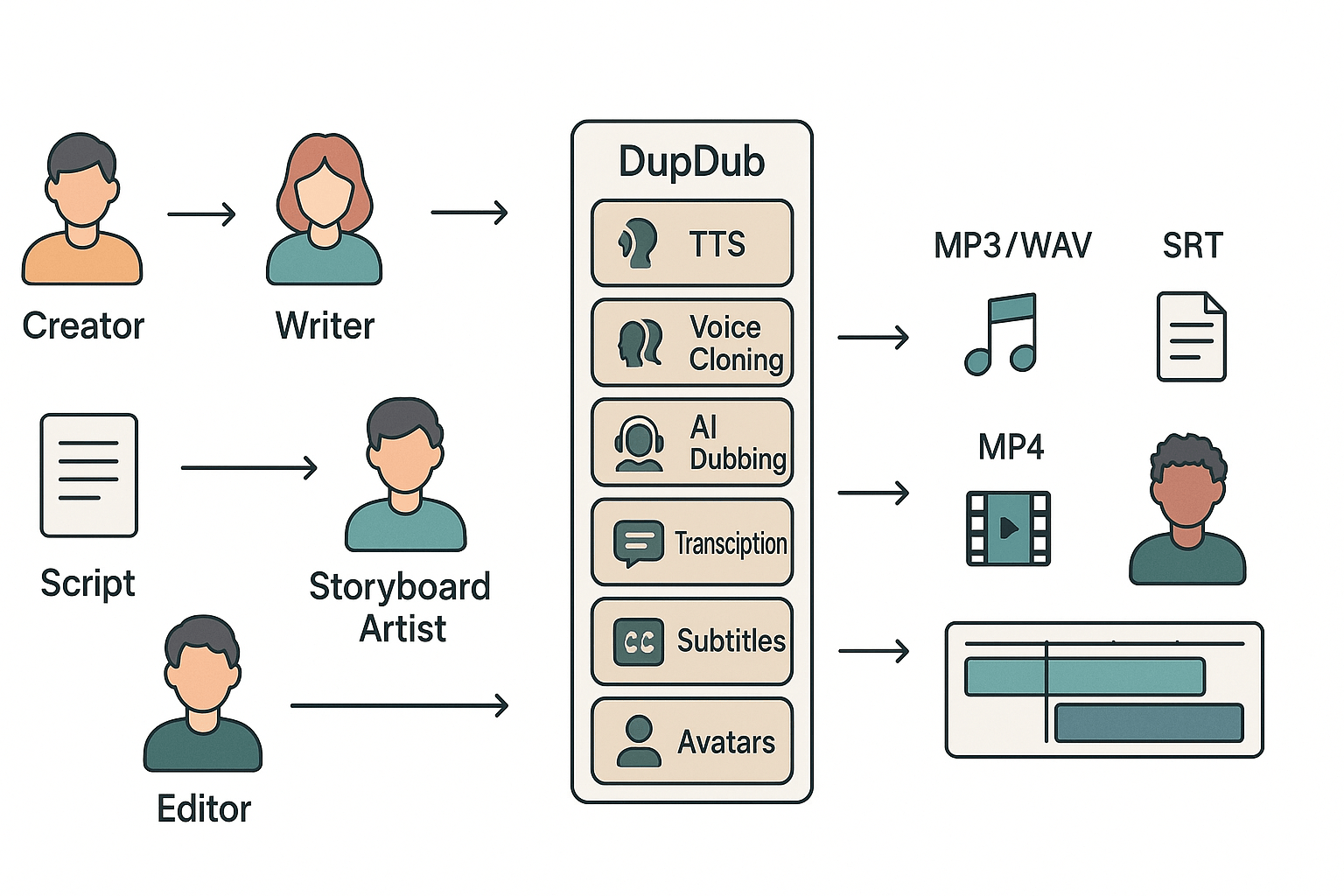
Suggest internal links to the AI Writing cluster for script drafting and polishing (script drafting and polishing).
Workflow diagram: script flows through DupDub modules (TTS, voice cloning, dubbing, transcription, subtitles, avatars) producing audio tracks and SRT files that drop into an editor timeline

Key DupDub features relevant to storyboarding (what to use and why)

When you judge whether DupDub can be the best ai storyboard generator for your team, look past pure visual tools. DupDub shines when storyboards need timed voice mockups, consistent narration, fast transcripts, and multilingual outputs. Below are the modules to use, practical tips, expected outputs, and short prompt examples you can drop into a storyboard-driven draft.

Use AI Dubbing and multilingual TTS for timed voice mockups

AI Dubbing and TTS let you attach voice to frames, so timing and emotional beats land early. Tip: upload a rough animatic, add scene durations, then generate a dubbed pass to check pacing. Expected output: MP4 with synced audio and SRT with timecodes. Prompt example: "Scene 3, 0:12-0:20: upbeat female voice, friendly tone, line: 'Welcome back to the lab.'"

Use Voice Cloning for a consistent brand narrator

Voice cloning (create from a 30s sample) keeps brand tone consistent across languages. Tip: clone once, then test short lines in target languages to ensure natural prosody. Expected output: consistent multi-language audio files and reusable voice asset. Prompt example: "Narrator (brand clone): summarize scene 1, 10 seconds, calm authoritative tone."

Use Speech-to-Text and subtitles for fast transcripts and accessibility

Transcription speeds script iteration and creates editable dialogue for storyboards. Remember, "Captions are text equivalents of auditory information from speech, sound effects, and ambient sounds that are synchronized with the multimedia presentation," per Web Content Accessibility Guidelines 2.0. Tip: export SRT, check 32-character line limits and readable timing. Expected output: searchable transcript, time-aligned SRT, and translated subtitles.

Use Avatars and talking photos as character placeholders

Avatars give a visual speaking stand-in when you lack final animation. Tip: use short avatar clips to validate mouth beats and emotional cues. Expected output: short MP4 avatar takes labeled by scene. Prompt example: "Avatar: angry teenager, 0:05 line: 'No way.'"

Use API and automation for batch localization

API access automates per-market dubs, subtitles, and file exports. Tip: build a single-source script, then loop targets via API to keep voice and timing consistent. Expected output: per-language MP4s, SRTs, and voice asset references ready for review.

Pricing, plans and value-per-workflow (pricing grid and examples)

If you want to estimate real costs for storyboard-driven work, this quick price guide maps DupDub plans to common tasks. If you are comparing which is the best ai storyboard generator for your team, focus on hours of TTS, transcription minutes, avatar time, and one-off credit packs for occasional runs.

Pricing grid

Plan
Cost (monthly, billed yearly)
Yearly credits
Std TTS (approx hours/yr)
Transcription (hours/yr)
Avatars / Voice clones
Free trial
Free (3 days)
10 starter credits
n/a
n/a
n/a
Personal
$11
1,800 credits
~25 hrs
25 hrs
3 avatars, 3 clones
Professional
$30
6,000 credits
~83 hrs
83 hrs
5 avatars, 5 clones
Ultimate
$110
30,000 credits
~416 hrs
416 hrs
10 avatars, 10 clones
Pay-as-you-go
One-time credits
500: $$68; 1,000:$$128; 6,000: $698
pay per use
pay per use
pay per use

Worked examples and when pay-as-you-go wins

Localize a 10-minute video: a standard TTS pass uses 10 minutes per language. Personal gives ~25 hours yearly, so you could localize about 150 ten-minute videos per year. That implies a marginal cost near zero per run on Personal. Pay-as-you-go beats plans when you localize one or two videos yearly.
Five social clips (5x60s): that is five minutes total. Even the free trial can test one clip. For frequent short clips, Professional lowers per-clip cost.
Voice a 30-lesson course (30x10min): 300 minutes equals 5 hours. Professional or Ultimate make sense for courses, since they include large TTS and transcription budgets and save on hourly pay-as-you-go fees.

Pros & Cons at a glance — when to pick DupDub vs a dedicated storyboard tool

If your decision centers on voice, timing, and multilingual delivery, consider DupDub while evaluating the best ai storyboard generator for your team. DupDub speeds up narration, localization, and subtitle alignment, but it is not a visual canvas for shot design.

When DupDub makes sense

  • Fast voice-first workflows: generate timed voiceovers and dubs in minutes.
  • Scale and multilingual reach: 90+ languages, 700+ voices, voice cloning across languages.
  • Avatars and talking photos for quick previs of performance.
  • Integrated transcription, subtitles, and TTS that keep audio and text aligned.
  • API and integrations to slot into existing pipelines.

When you still need a dedicated storyboard tool

  • No native visual storyboard canvas for frame-by-frame layout.
  • Complex previs, shot blocking, and iterative visual edits need specialist UIs.
  • Detailed animatics or camera moves are easier in a storyboard app.
Choose DupDub when voice and localization are primary. Pair it with a visual storyboard canvas when you need iterative shot design or precise timing. For larger teams, consider an enterprise demo or a short trial to test combined workflows.

Step-by-step workflow: Create a storyboard-driven video using DupDub

Start with a clear script and shot list, then use DupDub to generate timed voiceovers, subtitles, and avatar placeholders. This guide walks you through one session that takes a script to exportable SRT, MP3, and MP4 files, and helps you judge if DupDub fits into the best ai storyboard generator workflows for your team.

Quick walkthrough

  1. Prepare script and shot list
  • Action: Collate scene descriptions, timings, and on-screen text in one doc. Keep each shot to one or two sentences.
  • Prompt example: "Shot 3, 0:12 to 0:20: Close up, presenter explains product benefits in three bullets."
  • Expected text output: Short, timestamped shot list ready for narration.
  • Files/integrations: Paste into DupDub editor or upload as transcript via YouTube plugin.
  1. Generate narration with AI Writing or uploaded transcript
  • Action: Use DupDub's AI Writing to expand or polish narration. Or import a transcript for direct TTS.
  • Prompt example: "Polish this line for a friendly explainer tone."
  • Expected output: A cleaned script ready for TTS, with alternative short and long lines.
  • File note: Save as plain text or CSV for batch API use.
  1. Create or clone voices
  • Action: Choose a voice or create a clone from a 30 second sample. Match voice to brand tone.
  • Prompt example: "Clone voice A, warm and clear, for narrator."
  • Expected output: Voice profile and credit estimate for required minutes.
  • Formats: MP3, WAV exports available.
  1. Produce timed voiceovers and auto-synced subtitles
  • Action: Upload video or set timestamps, then run AI dubbing and subtitle alignment. Review and tweak timings in the editor.
  • Prompt example: "Sync narration to timestamps from shot list."
  • Expected output: MP3 voiceover track and SRT subtitle file, ready for import.
  • Integrations: Works with Canva and YouTube transcript import.
  1. Build talking avatars as placeholders
  • Action: Generate speaking avatars for rough cuts or presentations. Use avatars as stand-ins for final footage.
  • Prompt example: "Create a neutral avatar speaking the revised script in Spanish."
  • Expected output: MP4 placeholder with avatar and dubbed audio.
  • File note: Use MP4 for editor handoff, or replace avatar with live footage later.
  1. Export and hand off to editors
  • Action: Export SRT, MP3, and MP4 files. Provide the shot list and voice notes to the editor or storyboard canvas.
  • Expected deliverables: SRT subtitle file, MP3 voice track, MP4 avatar placeholder.
  • Scale option: Use DupDub API to batch localize episodes or request an enterprise demo for automation.
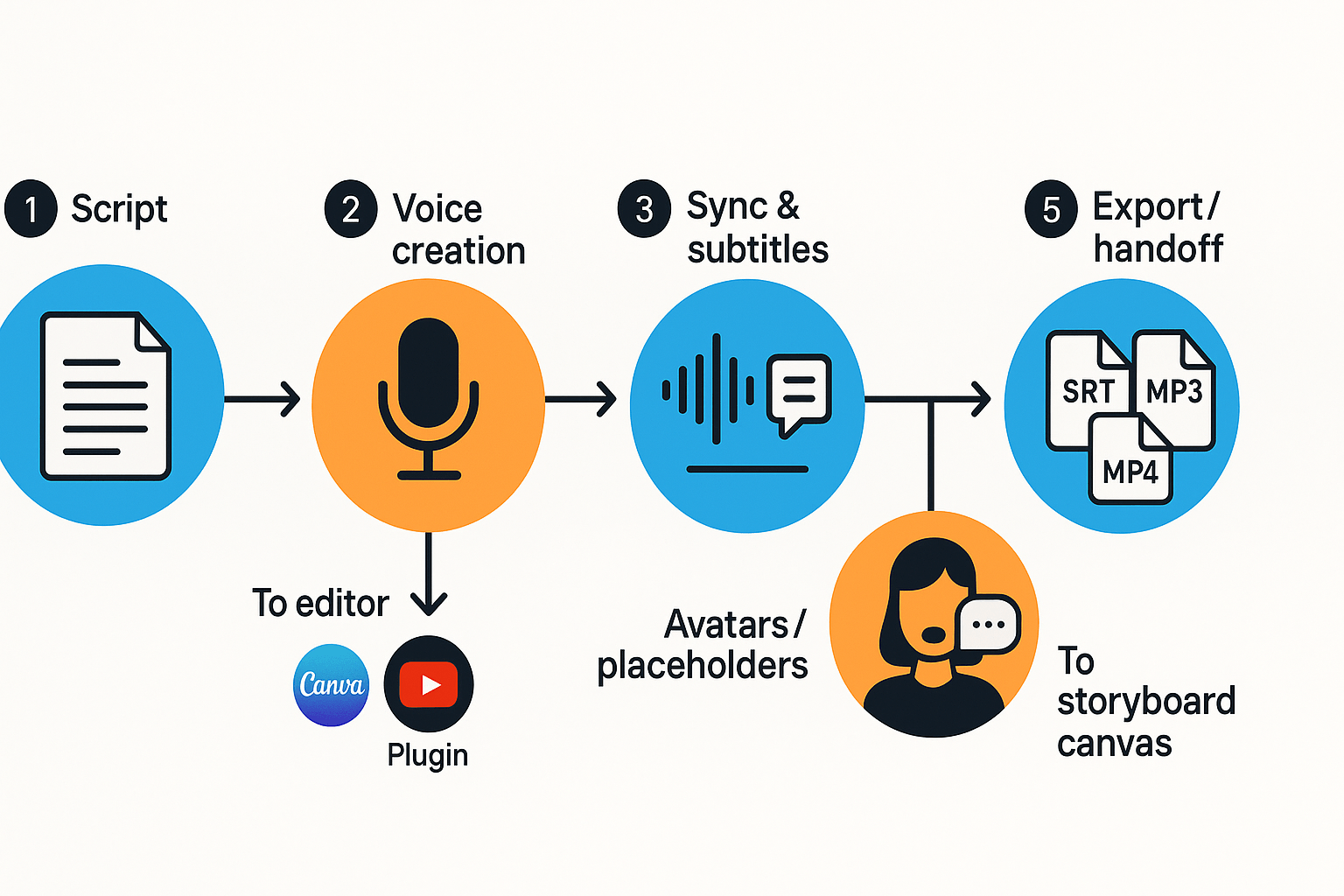
Schematic workflow: Script, Voice creation, Sync and subtitles, Avatars, Export to SRT MP3 MP4 with Canva and YouTube plugin icons, 16:9

FAQ — common purchasing, privacy, device and output questions

  • How long is the free trial and trial credits for the best ai storyboard generator?

    DupDub offers a 3-day free trial with 10 starter credits and no credit card required. Try common storyboard tasks, then compare plans in your account to pick Personal, Professional, Ultimate, or pay-as-you-go credits.

  • How does DupDub voice cloning work and what are the voice cloning safeguards for ai storyboard generator use?

    Voice cloning needs a short sample (about 30 seconds) and creates a synthetic voice you can use across languages. Clones are locked to the original speaker and processed with consent; ask sales for an enterprise review if you need custom legal controls.

  • What GDPR, encryption, and privacy controls apply for best ai storyboard generator customers?

    DupDub states GDPR-aligned practices and encrypted processing, and it does not share voice data with third parties. Procurement teams should request an enterprise review to get a DPA and security docs.

  • What devices, browsers, and integrations support storyboard workflows?

    The studio runs in modern browsers (Chrome, Edge, Safari) and works on desktops and tablets. Integrations include Canva and a Chrome extension, plus an API for automated pipelines.

  • What export formats work with storyboard software and timed voiceover tools?

    Exports include MP3, WAV, MP4, and SRT subtitles. Import audio tracks and SRT files into storyboard or editing tools to sync voiceovers and time-coded cues.

  • How do pricing and plan comparisons map to storyboard use cases?

    Free trial helps test YouTube localization or e-learning narration. Personal ($$11/yr billed) and Professional $$30/yr billed) scale up credits; Ultimate suits heavy volume. Compare plans in the DupDub Plans area for exact credits and limits.

  • What are the enterprise compliance and procurement next steps for teams evaluating an ai storyboard generator?

    Request an enterprise review to get SOC/DPA details, run a pilot, and confirm SLA terms. Your procurement contact can arrange legal and security reviews before purchase.

Experience The Power of Al Content Creation

Try DupDub today and unlock professional voices, avatar presenters, and intelligent tools for your content workflow. Seamless, scalable, and state-of-the-art.