The best AI voice generator in 2026 depends on what you need most: voice realism, easy editing, dubbing, cloning, or language support. If you want the fastest shortlist, focus on tools that balance natural speech, clear licensing, and a workflow that goes beyond basic text-to-speech.
-
Best overall: the tool with the strongest mix of natural voices, editing control, and pricing clarity.
-
Best for multilingual content: the platform with deep language coverage, subtitle sync, dubbing, and cross-language voice cloning.
-
Best free option: the one that gives useful output limits, not just a demo.
-
Best for creators: the tool that makes scripts, voiceovers, subtitle edits, and repurposing easy in one place.
-
Best fit for best ai singing voice generator intent: a music-focused model, not a general voiceover tool.
For most buyers, the top tools now split into two camps. Some are best for pure voice quality and narration. Others are better for full workflows like video translation, subtitles, transcription, and multilingual publishing.
If your goal is dubbing, voice cloning, and multilingual text-to-speech in one platform, DupDub stands out well. It combines 700+ voices, 90+ languages and accents, subtitle and transcription tools, and video dubbing features, which makes it a strong fit for creators, marketers, educators, and teams localizing content at scale.
One note on singing: if you specifically want AI vocals for songs, look for a dedicated music model first. General TTS tools can handle spoken intros, ads, explainers, and dubbed video far better than they handle full singing performance.
How We Ranked the Best AI Voice Generators
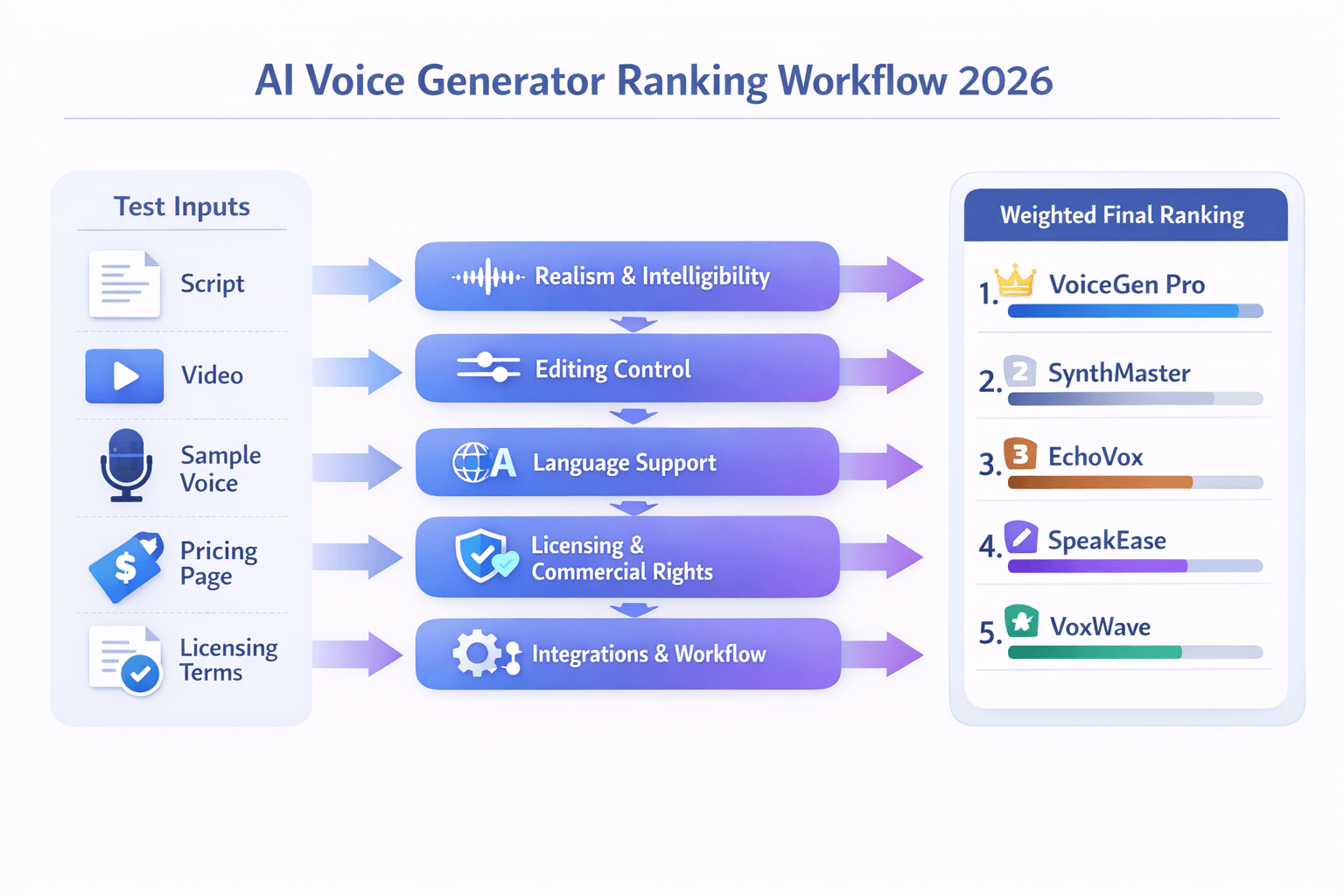
To rank the best ai voice generator tools for 2026, we used a simple rule: judge each product the way a real buyer would. That means we did not only listen for a nice voice. We also checked how easy it was to edit, how clear the pricing was, what rights you get, and how well the tool fits a real content workflow.
Our goal was trust, not hype. So we tested each platform with the same core tasks across voiceover, dubbing, and cloning. Then we weighted the results based on what matters most for commercial users in 2026, especially creators, teams, and businesses that need repeatable output.
We tested the full workflow, not just the demo
A lot of tools sound good in a short sample. That is not enough. We looked at what happens from script input to final export.
Each tool was tested on these jobs:
-
Turn a short script into a natural voiceover
-
Edit pace, pauses, tone, and pronunciation
-
Create or test a voice clone, if offered
-
Dub a video into another language, if supported
-
Export audio, subtitles, or video files
-
Check team, API, or app integrations
-
Review pricing, usage limits, and license terms
This helped us see which tools work well in real production. It also exposed weak points fast, like hidden credit rules, thin language support, or limited control after generation.
We scored six factors that matter to buyers
We used a weighted scoring model. In plain English, some factors counted more than others because they have a bigger impact on cost, output quality, and speed.
-
Realism and intelligibility: 30%
-
Editing control and customization: 20%
-
Pricing clarity and value: 15%
-
Commercial rights and licensing fit: 15%
-
Integrations and export options: 10%
-
Workflow breadth: 10%
Realism got the most weight because natural delivery still drives user trust and watch time. We listened for pacing, tone, clarity, emotion, and how well voices handled tricky names, numbers, and long sentences. For one benchmark on speech assessment,
ITU-T Recommendation P.85 (09/2023) specifies a method for subjective performance assessment of speech voice output devices.
Here is what each score meant
To keep the rankings fair, we used the same lens for every platform.
-
Realism and intelligibility: Did the voice sound human, clear, and stable?
-
Editing control: Could you fix pronunciation, pause length, emphasis, and speaking style?
-
Pricing clarity: Could a buyer understand credits, limits, and upgrade paths quickly?
-
Commercial rights: Could you use the output for ads, YouTube, courses, or client work?
-
Integrations: Did it connect to video, design, subtitle, or API workflows?
-
Workflow breadth: Could it handle TTS, dubbing, subtitles, transcription, and cloning in one place?
This matters because many buyers do not need a tool that is best at one tiny task. They need one that reduces handoffs. A strong platform saves time when writing scripts, making voiceovers, translating content, syncing subtitles, and exporting final files.
We favored tools that work for real teams
Some tools are fun for testing. Fewer are ready for paid work. We gave extra credit to platforms that make life easier for marketers, educators, podcasters, localization teams, and small businesses.
That meant looking closely at things like:
-
Language and accent coverage
-
Voice cloning safeguards and consent controls
-
Subtitle and transcription support
-
File formats such as MP3, WAV, MP4, and SRT
-
Browser tools, plugins, and API access
-
Stable output across long-form projects
In short, our rankings reward tools that sound good and fit the job. If a platform had great voice quality but weak licensing, poor editing, or confusing pricing, it scored lower. That is why this list leans toward products that can support full commercial workflows, not just one-off voice samples.
Quick Comparison Table: Best AI Voice Generator Tools at a Glance
If you want the best ai voice generator fast, start here. This quick scan helps you narrow the field before you read full reviews. We focused on the factors most buyers care about: voice quality, language range, cloning, exports, workflow fit, and pricing clarity.
A good tool is not just about natural sound. It also needs to fit your workflow. Some tools are best for solo voiceovers. Others are better for dubbing, subtitles, team use, or multilingual publishing.
|
Tool
|
Best for
|
Voice quality
|
Language support
|
Voice cloning
|
Export options
|
Workflow strengths
|
Pricing view
|
|
DupDub
|
Multilingual dubbing, TTS, and cloning
|
Strong, natural, flexible styles
|
90+ languages for TTS
|
Yes, multilingual
|
MP3, WAV, MP4, SRT, DOCX
|
Dubbing, subtitles, transcription, writing, avatars in one place
|
Clear free trial, tiered plans, pay-as-you-go
|
|
ElevenLabs
|
Premium voiceovers and cloning
|
Excellent realism
|
|
Yes
|
Common audio exports
|
Strong voice design and API options
|
Clear tiers, usage-based limits
|
|
Murf AI
|
Business narration and presentations
|
Polished, consistent
|
Good multilingual coverage
|
Limited by plan and use case
|
Standard audio and video options
|
Team workflows, script editing, business voiceovers
|
Mid-to-premium SaaS pricing
|
|
Play.ht
|
API-driven TTS and publishing
|
Very good
|
Wide language and accent range
|
Yes
|
Common audio exports
|
Developer access, fast voice generation
|
Mixed plans by feature and usage
|
|
Speechify
|
Read-aloud and simple narration
|
Good for listening
|
Solid language support
|
Limited focus
|
Audio exports on select plans
|
Fast consumer workflow, easy text import
|
Simple consumer-friendly pricing
|
|
HeyGen
|
Avatar-led video dubbing
|
Good for video use
|
Strong multilingual video support
|
Yes, for select workflows
|
Video and subtitle outputs
|
Talking avatars, translated video, on-screen delivery
|
Premium video-first plans
|
|
Synthesia
|
Training and corporate video
|
Good for presenter-style output
|
Broad for business localization
|
Limited compared with voice-first tools
|
Video and subtitle outputs
|
AI presenters, training content, team templates
|
Business-oriented pricing
|
Use the matrix to match the tool to the job
Here is the simple rule: pick by workflow first, then by voice. If you mostly need ad reads or YouTube narration, a voice-first tool may be enough. If you also need subtitles, transcript cleanup, translation, and re-voicing, an all-in-one platform will save time.
That is where the table helps. It shows which products stay narrow and which ones cover the full path from script to final export. For many teams, fewer handoffs means faster publishing and fewer edit errors.
Watch the tradeoffs that matter most
Before you choose, check these points:
-
Voice quality: Does it sound natural across long scripts?
-
Language depth: Are your target languages fully supported?
-
Cloning rules: Can you clone safely and with consent?
-
Export fit: Do you need WAV, MP4, or SRT files?
-
Workflow breadth: Do you need dubbing, subtitles, and transcription too?
-
Pricing clarity: Can you predict costs as volume grows?
This is also where many buyers get stuck. A tool can sound great in a demo, but still slow down your real process. If you publish in many markets, workflow breadth often matters as much as raw voice realism.
If multilingual dubbing is your top need, DupDub stands out because it combines text-to-speech, voice cloning, subtitle alignment, transcription, and video translation in one workflow. That makes it easier to move from script to localized video without juggling extra tools.
Best AI Voice Generator Tools in 2026, Compared and Ranked
Picking the best AI voice generator gets harder each year. More tools now offer text to speech, cloning, dubbing, subtitles, and editing in one place. So this ranking focuses on what matters most in real work: voice quality, language support, clone controls, workflow speed, and clear pricing.
Some tools are best for pure voice realism. Others work better for team editing, branded training, or fast social content. And if you need multilingual voiceovers, subtitle sync, and cloning in one workflow, the gap between basic TTS apps and full production tools becomes very clear.
1. DupDub: Best for multilingual dubbing, voice cloning, and creator workflows
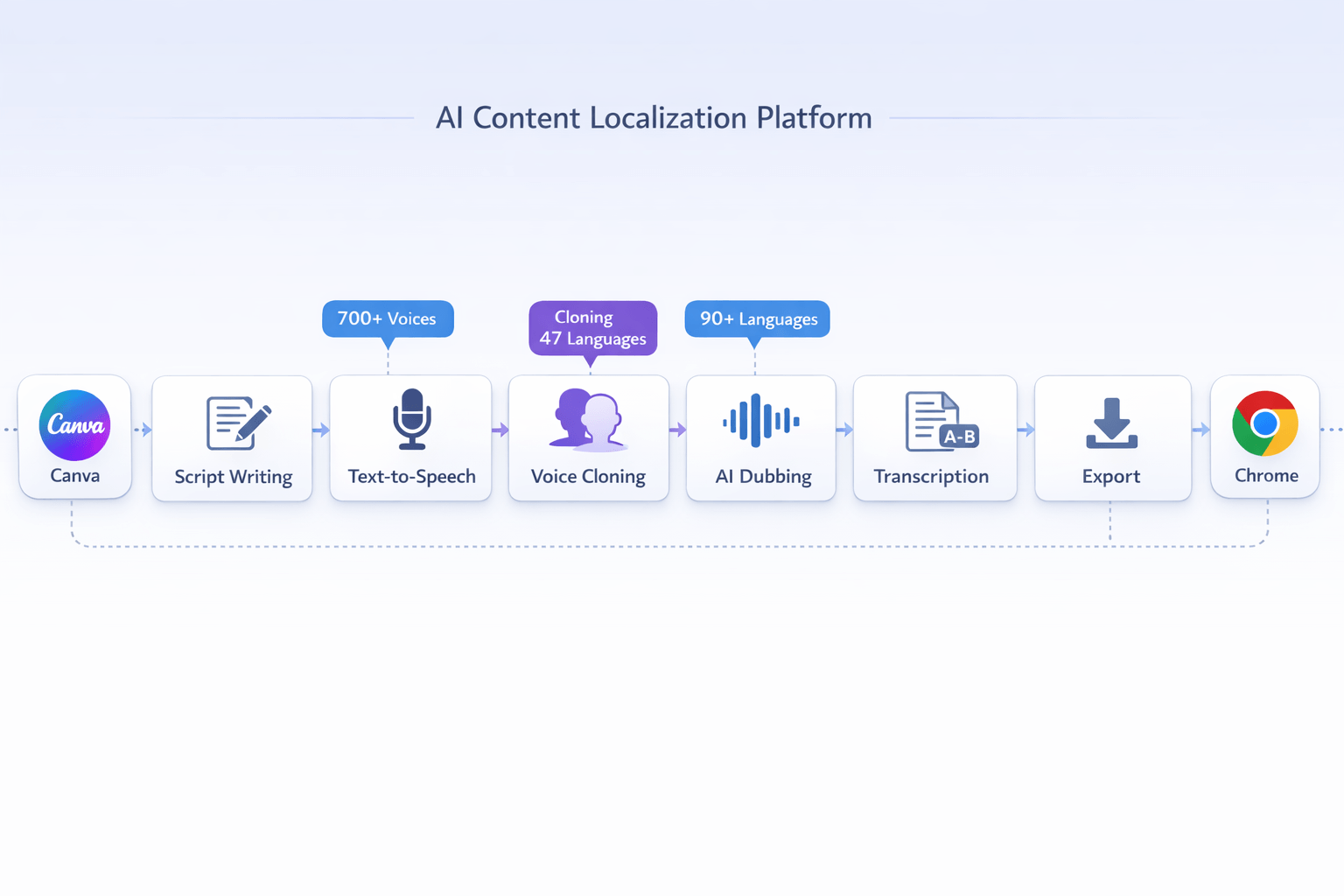
DupDub ranks first for users who need more than standalone speech output. It combines multilingual text to speech, AI dubbing, voice cloning, transcription, subtitle tools, AI writing, and browser editing in one system. That makes it a strong fit for YouTubers, educators, marketers, and small teams that want to publish faster in many languages.
What stands out most is workflow breadth. You can move from script to voiceover, then to subtitles, then to translated dubbing without bouncing across several apps. That saves time and reduces version errors, especially for video localization.
Key strengths:
-
700+ voices
-
90+ languages and accents for TTS
-
1,000+ speaking styles
-
voice cloning from a 30 second sample
-
cloned voice use across 47 languages
-
speech to text and subtitle workflows
-
exports for audio, video, and SRT subtitle files
-
browser recording and editing tools
-
Canva and Chrome integrations
Why it ranks so high:
-
It covers the full creator pipeline.
-
It supports multilingual publishing at scale.
-
It gives cloning, dubbing, and subtitles in one place.
-
The free trial is easy to test, with no card required.
Best for:
-
multilingual YouTube channels
-
training and course creators
-
marketing teams localizing video ads
-
podcasters repurposing episodes into clips
-
businesses that need voice, subtitles, and transcripts together
Potential tradeoffs:
If your work starts with video, not just raw text, DupDub is one of the most complete options in this list.
2. ElevenLabs: Best for raw voice realism and premium voice cloning
ElevenLabs is still one of the strongest picks for lifelike speech. Its biggest edge is natural prosody, which means the flow, rhythm, and stress sound more human. For creators who care most about realism in spoken narration, it remains a top choice.
Its cloning tools are also a major draw. Many users pick it for premium character voices, narration, audiobook demos, and branded voice assets. It is often the benchmark people compare against for natural sounding AI output.
Best points:
-
very strong voice realism
-
popular voice marketplace and library
-
solid cloning and custom voice options
-
strong fit for narration and character reads
Best for:
-
creators who want highly natural speech
-
audiobook and story voice work
-
teams focused on voice quality first
-
users building branded synthetic voices
Possible limits:
-
broader dubbing and subtitle workflow may need extra tools
-
pricing can rise fast with heavier use
-
some users may want more built in production steps
In short, ElevenLabs is great when voice quality leads the buying decision. It is less ideal if you want one workspace for transcription, subtitle sync, translation, and final delivery.
3. Murf AI: Best for business voiceovers and team friendly editing
Murf AI works well for business users who need polished voiceovers with less technical setup. It is often chosen for training videos, sales demos, internal explainers, and presentation style content. The interface tends to feel approachable for teams that are not audio specialists.
Its core value is control without too much complexity. You can edit scripts, adjust timing, and build clean narration tracks for professional use. That matters for L and D teams, agencies, and marketers who need fast approvals.
Why Murf AI stays competitive:
-
business focused voiceover workflow
-
good script based editing
-
suitable for presentations and training media
-
easier for teams than some developer first tools
Best for:
Tradeoffs:
-
not always the first choice for deep multilingual dubbing
-
creator focused repurposing workflows may feel narrower
-
voice cloning and localization breadth may vary by plan and use case
Murf AI is a strong middle ground. It may not win every feature category, but it often wins on ease, structure, and business readiness.
4. Play.ht: Best for API access and large voice catalog needs
Play.ht is a good fit for users who want a wide voice selection and flexible deployment. It often appeals to developers, publishers, and teams building voice features into apps or content systems. If API access matters a lot, it belongs on your shortlist.
The platform is known for broad voice inventory and support for varied use cases. That can help when you need many tones, accents, or use case specific reads. It is also useful for automated publishing workflows.
Where Play.ht does well:
-
strong voice catalog depth
-
good fit for API driven workflows
-
useful for publishers and product teams
-
practical for scalable audio generation
Best for:
-
developers building voice features
-
blogs or publishers turning articles into audio
-
apps with automated narration needs
-
teams testing many voice styles quickly
Possible downsides:
-
the experience may feel less unified for end to end video localization
-
non technical users may prefer simpler editing environments
-
some advanced workflow pieces may require outside tools
Play.ht is not the easiest all in one option for creators. But it is a smart choice for scale, automation, and voice variety.
5. Speechify: Best for listening, accessibility, and simple read aloud use
Speechify is best known as a listening tool. It helps users turn documents, web pages, and written content into spoken audio fast. That makes it useful for students, busy professionals, and accessibility focused users.
It can also help creators review drafts by ear. Hearing a script out loud often reveals awkward lines and pacing issues. So while it is not always the first pick for advanced dubbing or production, it has real value in content workflows.
Best use cases:
-
listening to articles and documents
-
script review before recording
-
accessibility support
-
basic voice output for non production tasks
Pros:
Cons:
-
not built as a deep dubbing suite
-
limited fit for complex localization work
-
less suited to multi step media production
Speechify is a great utility tool. It is less of a full studio for teams producing multilingual marketing or training assets.
6. Canva: Best for simple social content and design plus voice in one place
Canva is not a pure voice platform first. But it deserves a spot because many creators already use it to make slides, short videos, social posts, and simple promos. Built in voice features can speed up lightweight production.
This is where Canva shines: convenience. If your team already designs in Canva, adding voiceover inside the same app can remove friction. For basic needs, that matters more than advanced cloning depth.
Best for:
-
social media teams
-
teachers making quick lesson assets
-
founders creating simple promo videos
-
creators who want design and voice together
Strengths:
Weak points:
-
not the strongest option for premium voice realism
-
limited for deep localization pipelines
-
not the top tool for advanced cloning or large scale dubbing
Canva is best seen as a convenience pick. It works well for simple voiceover tasks inside a design workflow.
7. Best free AI voice generator picks: good for testing, not always for production
Many users start by searching for the best free AI voice generator. That makes sense. Free tools are great for testing voices, checking script pacing, or making low risk drafts before paying for a plan.
But free plans often come with limits that matter fast. These can include lower audio quality, fewer export options, fewer languages, watermarking, strict credit caps, or weak commercial rights. In other words, free is useful, but it rarely covers serious publishing needs for long.
What free tools are best for:
What free tools often lack:
-
clear commercial licensing
-
robust voice cloning
-
subtitle and transcription workflows
-
batch processing
-
team collaboration
-
high monthly usage limits
If you want the best ai voice generator free option for real work, look for a free trial that unlocks real workflow features, not just a toy demo. That is usually more useful than a forever free plan with heavy caps.
Quick ranking by use case
|
Use case
|
Best pick
|
Why it stands out
|
|
Multilingual dubbing
|
DupDub
|
Dubbing, subtitles, transcription, and TTS in one workflow
|
|
Most natural narration
|
ElevenLabs
|
Strong realism and premium voice output
|
|
Business training videos
|
Murf AI
|
Team friendly editing and polished voiceovers
|
|
API and automation
|
Play.ht
|
Good for developers and scalable generation
|
|
Accessibility and listening
|
Speechify
|
Fast read aloud and easy listening workflows
|
|
Design plus basic voiceover
|
Canva
|
Simple content creation inside a familiar editor
|
|
Budget testing
|
Free trials and free plans
|
Good for demos, limited for full production
|
What each tool does best, at a glance
Use this short list if you want the fastest buying shortcut.
-
Choose DupDub if you need one platform for TTS, dubbing, subtitles, transcription, and cloning.
-
Choose ElevenLabs if voice realism matters more than workflow breadth.
-
Choose Murf AI if your team makes training or business voiceovers often.
-
Choose Play.ht if you need API access and lots of voice options.
-
Choose Speechify if your main goal is listening and accessibility.
-
Choose Canva if you want quick visual content with simple narration.
How to decide between these ranked tools
If your content is mostly video, pick a tool that handles translation, subtitles, and voice in one place. If your content is mostly narration, raw speech quality may matter more. If your work involves teams, approvals, and repeatable output, editing controls and pricing clarity matter just as much as the voice itself.
Here is a simple way to choose:
-
List your main output, audio only or video.
-
Check if you need one language or many.
-
Decide if you need voice cloning.
-
Confirm subtitle and transcript needs.
-
Review commercial rights and privacy terms.
-
Test two tools with the same script.
That last step matters a lot. A short side by side test often tells you more than ten feature pages.
Final verdict on the ranked list
For most creators and small teams, the winner is the tool that reduces steps, not just the one with the prettiest demo voice. That is why DupDub ranks first here. It covers the real workflow around modern voice content: script polish, multilingual text to speech, dubbing, cloning, subtitles, and transcription.
ElevenLabs is still elite for realism. Murf AI is strong for business voiceovers. Play.ht makes sense for scale and APIs. Speechify and Canva both serve simpler needs well. And free tools are best used as a testing layer, not your whole production stack.
Why DupDub Stands Out for Multilingual TTS, Dubbing, and Voice Cloning
If you want the best AI voice generator for global content, workflow matters as much as voice quality. Many tools sound good, but they still force you to patch together scripts, voiceovers, subtitles, dubbing, and exports across separate apps. DupDub stands out because it brings those steps into one place, which saves time, cuts tool sprawl, and makes multilingual production easier to manage.
That matters for creators, marketers, teachers, and localization teams. Most buyers do not just need text-to-speech. They need a full path from draft to publish, with voice control, language coverage, subtitle handling, and clean exports.
Use one workflow instead of five tools
A common pain point is fragmentation. You write in one app, generate speech in another, edit subtitles in a third, and handle translation somewhere else. That setup slows reviews, creates version errors, and makes simple updates feel harder than they should.
DupDub solves that with a connected workflow built for production teams and solo users alike. You can move from script writing to voice generation, then into dubbing, transcription, subtitle syncing, and export without bouncing between platforms.
Here’s what that looks like in practice:
-
Draft or polish a script with AI writing tools
-
Turn text into speech with a wide voice library
-
Clone a voice for brand or creator consistency
-
Dub video into other languages
-
Generate transcripts and subtitles
-
Export audio, video, or subtitle files for publishing
For busy teams, that kind of flow is a big deal. It reduces handoff time and gives you one place to manage edits.
Get broad language and voice coverage
Language reach is often where tools start to separate. Some platforms offer strong English voices but weaker support for multilingual content. Others support many languages, but the editing and cloning features feel limited.
DupDub combines both range and flexibility. It includes 700+ voices, 90+ languages and accents, and 1,000+ speaking styles. For users creating regional campaigns, training videos, YouTube voiceovers, or multilingual lessons, that opens up more room to match tone, market, and audience.
Its voice cloning feature is also a key strength. With a 30-second sample, users can create a synthetic version of a voice and use it across 47 languages. That is useful when you want one speaker identity across several markets, instead of switching to a new voice in every language.
This helps solve a few common buyer problems:
-
Inconsistent brand voice across markets
-
Slow manual dubbing workflows
-
Limited language options for niche regions
-
Extra cost from hiring separate voice talent for each version
Make dubbing, subtitles, and transcription easier
For many buyers, the real job is not just voice generation. It is video localization. That means translating spoken content, syncing subtitles, checking timing, and exporting files that are ready for YouTube, courses, ads, or internal training.
DupDub is strong here because its dubbing and speech-to-text features connect well. You can transcribe audio or video, create editable text, generate subtitles, translate subtitles into 50+ languages, and align them for cleaner delivery. That is far more useful than a standalone voice tool if your team publishes video often.
This is especially helpful for:
-
YouTubers republishing videos for global audiences
-
Educators building multilingual lessons
-
Marketing teams localizing product videos
-
Small businesses turning webinars into subtitled assets
It also supports common export needs. You can export audio in MP3 or WAV, video in MP4, subtitles in SRT, and writing in Markdown, TXT, or DOCX. So the output fits real content workflows, not just demos.
Add voice cloning without losing control
Voice cloning gets attention fast, but buyers should look beyond the headline. The best tools make cloning usable, not just possible. That means fast setup, multilingual support, and policies that help protect the original speaker.
DupDub checks those boxes well. Its cloned voices are locked to the original speaker, and the platform describes encrypted processing and no data sharing with third parties. For brands, agencies, and educators, those details matter because trust and licensing concerns often shape the buying decision.
If your use case depends on a repeatable host voice, cloned narration can save serious production time. You can update scripts, refresh product details, or localize old content without re-recording every line from scratch.
Fit better into day-to-day content work
Features matter, but so does fit. A tool may sound great and still create friction if it does not connect with the way your team already works.
DupDub adds practical workflow support here with browser-based recording and editing, Canva integration, and a Chrome extension for transcript-related tasks. Those small touches help teams move faster because they reduce copying, pasting, uploading, and reformatting.
That makes the platform a strong fit for users who want:
-
One place for script, speech, and localization work
-
Fast turnaround on multilingual content
-
Better reuse of podcasts, videos, and webinars
-
Fewer subscriptions and less workflow clutter
In short, DupDub stands out because it is not only a voice generator. It is a broader content production system for multilingual audio and video. If your goal is simple voiceovers, many tools can help. But if you need TTS, dubbing, cloning, subtitles, transcription, and writing support in one workflow, DupDub is one of the more complete options in this category.
How to Choose the Right AI Voice Generator for Your Use Case
The best AI voice generator for you depends on the job you need done. A YouTuber, a teacher, and a localization team often need very different things. If you match features to your workflow first, you can choose faster and avoid paying for tools you will not use.
Start with the end result you want. Do you need clean voiceovers, fast dubbing, cloned brand voices, or subtitles too? The right tool should save steps, not add more handoffs between apps.
Pick your tool by the job you do most
Here is a simple way to think about it:
-
Creators and YouTubers need natural narration, fast editing, and easy exports.
-
Marketers need brand voice control, ad-safe licensing, and quick turnaround.
-
Educators need clear speech, slide or lesson support, and simple script updates.
-
Localization teams need multilingual dubbing, subtitles, transcription, and review workflows.
-
Budget-conscious buyers need solid voice quality, fair limits, and pricing that is easy to understand.
If your work spans several of these groups, an all-in-one platform can help. It keeps writing, text-to-speech, dubbing, subtitles, and transcription in one place. That means fewer file transfers, fewer errors, and less time lost.
For creators, focus on voice quality and editing speed
If you make videos, podcasts, or shorts, voice quality comes first. Listen for natural pauses, strong pronunciation, and tone that fits your script. A voice that sounds great in a demo but breaks on names or slang can slow you down.
Check editing controls next. You want to fix pacing, swap lines, and test multiple voices without starting over. Useful features include:
For this group, speed matters almost as much as realism. A tool that lets you record, rewrite, and re-export in one dashboard is often the better buy.
For marketers, check licensing and brand consistency
Marketing teams need more than a nice voice. They need usage rights that fit ads, product demos, social clips, and sales videos. Before you buy, check if the plan covers commercial use and client work.
Then look at brand consistency. Can you reuse the same voice across campaigns? Can your team save scripts, subtitles, and approved voice settings? These small workflow features make a big difference at scale.
Use this checklist:
-
commercial usage rights
-
shared workspaces or team access
-
voice cloning for brand consistency
-
subtitle and caption support
-
fast versioning for A/B tests
For educators, prioritize clarity and simple updates
Teachers, course creators, and training teams need clear speech more than dramatic delivery. The voice should be easy to understand over long lessons. It should also handle lists, terms, and lesson titles well.
Look for tools that make updates easy. Courses change often. If you can edit one line of text and regenerate the audio fast, you will save hours.
Helpful features include:
-
steady narration for long lessons
-
support for screen recordings or slides
-
transcript export
-
subtitle files like SRT
-
simple lesson-by-lesson organization
For localization teams, choose workflow depth over a single voice demo
This is where many buyers get stuck. A tool may have great text-to-speech, but weak dubbing or subtitle support. If you publish in many markets, you need the full workflow.
Look for support across multilingual text-to-speech, transcription, subtitle translation, voice cloning, and video re-voicing. Review steps matter too. Your team may need to check timing, speaker turns, and translated captions before publishing.
A strong fit for this use case should offer:
-
many languages and accents
-
subtitle generation and sync
-
speech-to-text for source files
-
voice cloning across languages
-
video dubbing in one workflow
-
team-friendly review and export options
This is one reason some teams prefer platforms like DupDub. Instead of stitching together separate tools, they can handle dubbing, multilingual TTS, cloning, and subtitles in one place.
For budget buyers, compare limits, not just monthly price
If you are looking for the best free AI voice generator, read the limits closely. Free plans can be useful for testing voice quality, but they often cap minutes, exports, clone access, or commercial rights. So the lowest price is not always the lowest real cost.
Compare these points before you decide:
-
how many audio minutes or credits you get
-
whether commercial use is included
-
if cloned voices cost extra
-
which export formats are locked
-
whether subtitles, dubbing, or transcription are separate add-ons
If you need more than simple voiceovers, a paid plan can be cheaper in the long run. That is especially true when one platform replaces several tools.
Choose based on your main workflow, then test with a real project. One short video, lesson, or ad script will tell you more than any feature page.
Best Free AI Voice Generator vs Paid Tools: What You Really Get
A free plan can help you test the best ai voice generator for simple jobs. You can hear voice quality, try a few accents, and check the editor. But free access often comes with hard limits on credits, exports, cloning, and commercial rights. If you make content every week, paid tools usually save more time than they cost.
Use free plans to test, not to scale
A best free ai voice generator is often enough for early testing. It works well if you want to:
That said, free tiers usually stop right where real work starts. You may get watermarked exports, low monthly credits, fewer voices, or no API access. Some tools also block voice cloning, subtitle export, or commercial use on free plans.
|
What you need
|
Free plan reality
|
Paid plan benefit
|
|
Voice testing
|
Good for short samples
|
Full project output
|
|
Audio quality
|
Often standard only
|
Better quality tiers
|
|
Export options
|
May be limited
|
More formats and longer files
|
|
Voice cloning
|
Often locked
|
Usually included or expandable
|
|
Commercial usage
|
Sometimes restricted
|
Clearer business use rights
|
|
Workflow speed
|
More manual steps
|
Faster editing and batch work
|
Paid tools create value when output matters
Paid software matters most when quality and speed affect revenue. That includes YouTube channels, podcasts, ads, training videos, and multilingual product demos. In those cases, better control is not a bonus. It is the workflow.
Here is where paid plans usually pull ahead:
-
more monthly or yearly credits
-
higher quality neural TTS (AI speech that sounds more human)
-
better pronunciation control and pauses
-
longer file limits
-
voice cloning access
-
subtitle, dubbing, and transcription tools in one place
-
clearer licensing for client or brand work
This is also where many "best ai voice generator free" searches hit a wall. Free tools can make a sample. Paid tools help you finish, revise, localize, and publish.
Check the real cost, not just the monthly price
The cheapest plan is not always the best deal. If a tool lacks dubbing, subtitle sync, or cloning, you may need extra apps. That means more editing, more uploads, and more room for errors.
For example, a platform like DupDub gives users a free 3-day trial with no credit card, then scales into paid plans with more credits, multilingual TTS, voice cloning, transcription, subtitle tools, and dubbing workflows. That setup makes sense for creators and teams who need one system instead of five.
Use this quick rule:
-
Pick free if you are testing voices or making one-off clips.
-
Pick paid if you publish often or need brand consistency.
-
Upgrade fast if you need commercial use, cloning, or multilingual output.
In short, free plans are best for evaluation. Paid plans are best for repeatable results. If your voice content supports marketing, training, or global reach, a strong paid tool usually pays for itself in speed and output quality.
What About AI Singing Voice Generators?
If you are comparing the best ai voice generator tools, it helps to split singing from speaking first. People searching for the best ai singing voice generator usually need tools that can turn lyrics and melody into a vocal performance. That is very different from standard text-to-speech, which is built for narration, dubbing, podcasts, training, and voiceovers.
Here is the key difference. A singing system must handle pitch, note length, vibrato, and musical phrasing. Speech tools focus more on clear words, natural pauses, tone, and editing control. According to
A Review of Singing Voice Synthesis and Singing Voice Conversion for Music Production (2020), singing voice synthesis is “the process of synthesizing a singing voice from a music score and lyrics,” distinguishing it from speech synthesis by its input requirements.
Know what music tools are built to do
A music-first platform is usually the better fit if you need:
-
sung vocals from lyrics plus melody
-
genre-specific expression, like pop, opera, or EDM
-
pitch control and note-by-note editing
-
harmony layers or vocal tuning
-
demo vocals for songwriting and music production
That is why someone searching for the best ai singer voice generator often has a very different workflow from a marketer or YouTuber. They are producing songs, not spoken audio. In most cases, they care more about melody control than subtitle sync or dubbing speed.
Use spoken TTS tools for narration and localization
General voice platforms are still the better fit for spoken content. If you need voiceovers for videos, course narration, ad reads, audiobooks, or multilingual dubbing, a TTS and dubbing tool will usually serve you better.
These tools tend to offer:
-
script-based voice generation
-
pronunciation control
-
subtitle creation and alignment
-
transcription and translation
-
multilingual voice cloning
-
export formats for audio, video, and captions
For example, a platform like DupDub makes more sense when your goal is spoken delivery across many languages. It is built for narration, localization, and re-voicing, not full music production. So if your content is a tutorial, podcast, sales video, or training module, a standard AI voice tool is usually the smarter buy.
Pick based on output, not hype
A simple rule helps here. If your project starts with lyrics and a melody, look at singing synthesis tools. If it starts with a script and a need for clear spoken audio, choose a text-to-speech platform.
Some creators want both, and that is fine. But don’t expect one tool to do each job equally well. Singing models are made for musical expression. Speech models are made for intelligibility, speed, dubbing, and editing control.
Legal, Ethical, and Licensing Questions to Check Before You Choose
The best ai voice generator can save time and cut production costs. But voice cloning and synthetic speech can also create legal and brand risk if you skip basic checks. Before you publish client work, ads, courses, or dubbed videos, review consent, usage rights, privacy, and disclosure rules first.
Get clear voice consent first
If a tool offers voice cloning, make sure you have clear permission from the speaker. That consent should say how the voice will be used, where it will appear, and whether commercial use is allowed. Verbal approval is risky. Written consent is safer.
This matters even more for freelancers, agencies, and teams. If a contractor records a sample, confirm who owns the clone after the project ends. Also ask if the speaker can revoke access later.
Check commercial rights and platform terms
Not every AI voice tool gives the same license. Some plans allow personal use only. Others allow ads, client work, training content, or monetized YouTube videos.
Before you choose a platform, review:
-
commercial use rights
-
client delivery rights
-
resale or white-label limits
-
ownership of generated audio
-
rights for cloned voices versus stock voices
-
refund, takedown, and dispute terms
If the terms are vague, that’s a red flag. Clear licensing is part of a safe buying decision.
Reduce impersonation and deepfake risk
A realistic cloned voice can sound useful, but it can also sound deceptive. Don’t use synthetic speech to mimic a public figure, executive, or private person without permission. That can trigger trust issues, complaints, or legal action.
In the EU,
Regulation (EU) 2024/1689 (EU AI Act) says AI systems that use voice likeness to create or expand deepfakes create or manipulate audio, image, or video content that appreciably resembles existing persons, places or events and would falsely appear authentic or truthful to a person, and Article 50 imposes transparency obligations for such content. If you publish dubbed or cloned audio across regions, check local disclosure rules too.
Review privacy and data handling
Voice data is personal data in many cases. So ask where recordings are stored, how long they are kept, and whether they are used to train future models. If your projects include customer calls, employee clips, or student voices, this step is critical.
Use this quick checklist:
-
Confirm data storage and deletion options.
-
Check encryption and access controls.
-
Verify whether data is shared with third parties.
-
Review regional compliance, such as GDPR needs.
-
Approve outputs before public release.
A good vendor should explain these points in plain language. If not, keep looking.
Ask who is liable if something goes wrong
Last thing: review support and risk terms. If a cloned voice is misused, can you remove it fast? Can your team lock cloning to the original speaker, limit access, or require approval before export?
These safeguards matter just as much as voice quality. The right tool should help you create faster, without creating avoidable legal problems.
FAQ
-
What is the best AI voice generator for voiceovers in 2026?
The best AI voice generator depends on what you need most. If you want the most natural speech, strong editing control, and clear commercial use options, top tools like ElevenLabs, Murf, PlayHT, and DupDub usually lead the list. For many buyers, the right pick comes down to voice realism, language support, cloning quality, and how easy it is to turn scripts into finished audio.
A good rule is simple:
Pick realism first for ads, videos, and podcasts
Pick language depth for global content
Pick dubbing tools if you publish video often
Pick pricing clarity if you need to scale
-
What is the best free AI voice generator?
The best free AI voice generator is usually the one that lets you test real output before you pay. Many free plans are limited, so they work best for short samples, drafts, or quick social clips. If you are searching for the best ai voice generator free, look for a tool with a no-card trial, enough credits to test voice quality, and clear licensing terms.
Free tools are best for:
Testing a few voices
Making short demo voiceovers
Trying script pacing and tone
Checking the editor before upgrading
Paid plans usually unlock better voices, longer exports, cloning, dubbing, and commercial rights.
-
Can AI voices be used commercially?
Yes, often they can, but you need to check the license for each plan. Some tools allow commercial use only on paid tiers. Others may limit cloned voices, client work, ads, or resale.
Before you publish, check these points:
Commercial rights for your plan
Rules for YouTube, ads, and sponsored content
Whether cloned voices need written consent
Whether you own the output or just get usage rights
Data and privacy terms for uploaded audio
If you work with clients, this step matters a lot.
-
Which AI voice generator is best for dubbing videos?
For video dubbing, the best tool is usually one that combines translation, subtitles, voice generation, and timing control in one workflow. That saves time and cuts tool switching. If your main job is localizing content, look for voiceovers that stay synced to the original video.
Strong dubbing tools should include:
Multilingual text to speech
Subtitle generation and editing
Voice cloning or speaker matching
Timeline or lip-sync support
Export options for audio, video, and SRT files
For this use case, DupDub stands out because it combines AI dubbing, subtitles, transcription, multilingual TTS, and cloning in one place.
-
Can AI generate singing voices?
Yes, AI can generate singing voices, but that is a different use case from standard text to speech. A best ai singing voice generator is built for melody, pitch, and performance, not just spoken narration. So if you need songs, jingles, or vocal demos, look for a music-focused tool instead of a general voiceover app.
That said, many standard TTS tools are still useful for:
Spoken intros before songs
Character lines in music videos
Demo narration for composers
Multilingual voiceovers around music content
-
Is DupDub good for multilingual voiceovers?
Yes. DupDub is a strong fit for multilingual voiceovers, especially if you need more than basic text to speech. It supports 700+ voices, 90+ languages and accents, voice cloning in multiple languages, plus subtitles, transcription, and dubbing features in one workflow.
That makes it useful for:
YouTube localization
Course translation
Podcast repurposing
Product demos
Marketing videos for global audiences
If you want one platform for voiceovers, dubbing, subtitles, and cloned voices, DupDub is one of the most practical options to test.




 Discord
 YouTube
 Tiktok
 Twitter
 Facebook
 Instagram