The best AI writing tool free for most people depends on one thing: what you need beyond drafting. Some tools are best for quick blog posts. Others work better for editing, SEO briefs, or multilingual content. Free value also changes fast once you hit word caps, export limits, or weak language support.
Here’s the short answer:
-
Best for general writing: pick a tool with solid draft quality and fair daily limits
-
Best for blog and marketing work: choose one with rewrite, tone, and outline tools
-
Best for students and basic tasks: use a simple free AI writing tool with clean prompts and easy editing
-
Best for global content workflows: choose a platform that combines writing with transcription, subtitles, dubbing, and localization
If you only need text, a basic AI tool for writing may be enough. But if you also turn articles into videos, podcasts, or translated content, an all-in-one workflow matters more than raw word count. That’s often where free plans differ most.
In the sections below, we compare output quality, free limits, language coverage, privacy, and repurposing features. We also show which option fits bloggers, marketers, freelancers, and video-first teams best.
How We Tested and Ranked These Free AI Writing Tools
To find the best AI writing tool free, we used one clear test method for every tool. That matters because free plans can look similar at first, but their real limits are often very different. We wanted this review to be easy to trust, so we scored each tool on the same tasks, the same checks, and the same standards.
We also separated true free plans from short trials. That way, a tool with ongoing free access did not get mixed in with a tool that only works for a few days. This made the rankings more fair for anyone who needs an AI tool for writing on a real budget.
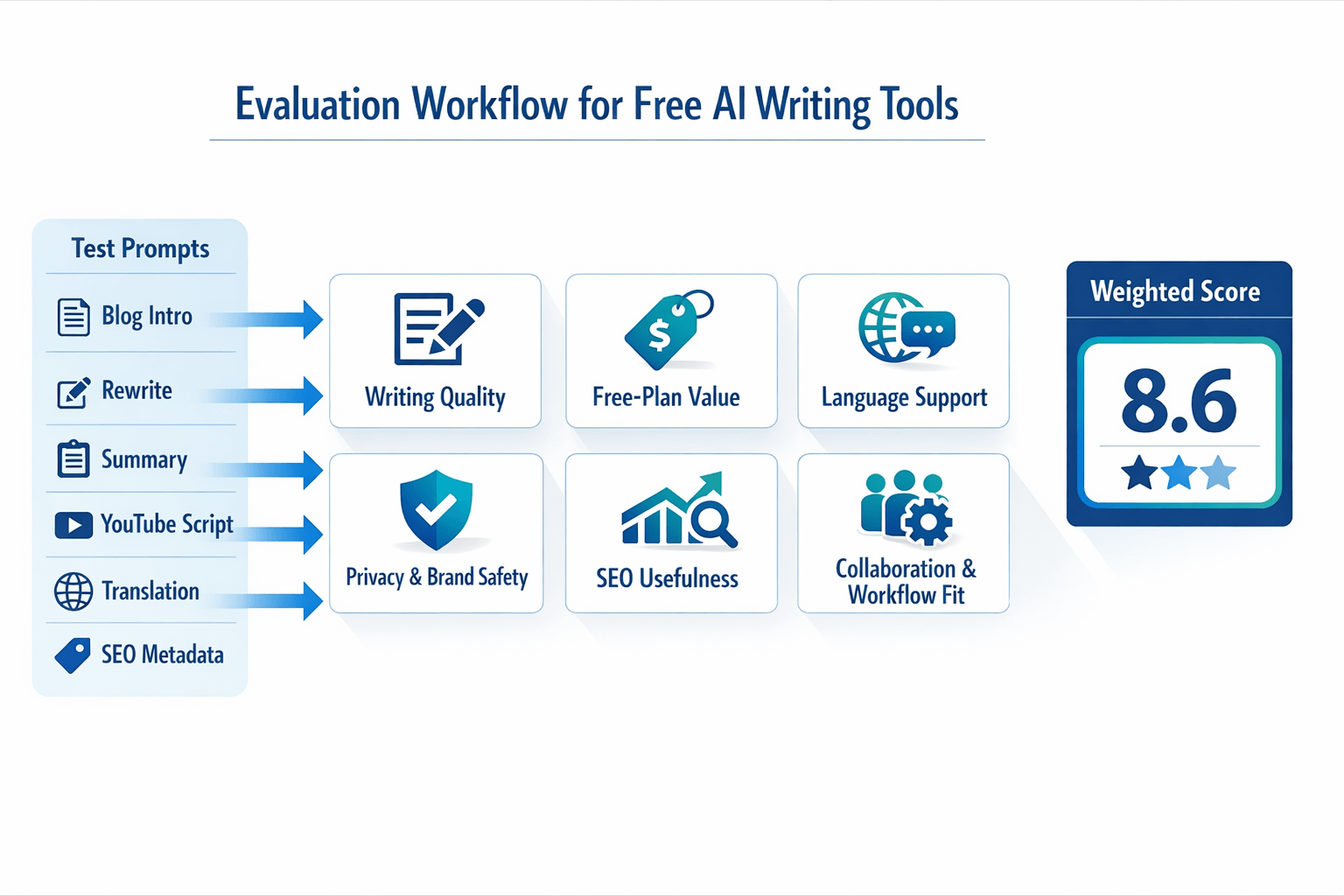
Use the same prompts for every tool
We ran each platform through a shared set of prompts based on common content jobs:
-
Write a 150-word blog intro for a small business topic
-
Rewrite a paragraph in a clearer brand voice
-
Summarize a transcript into key takeaways
-
Create a short YouTube script outline
-
Turn one English draft into another language version
-
Suggest title tags and meta descriptions for SEO use
These prompts helped us test output quality, speed, and control. We looked for clear structure, low fluff, accurate meaning, and useful edits. If a tool wrote fast but needed heavy cleanup, it scored lower.
Score what users actually care about
We used a weighted framework so the final ranking did not depend on just one feature. In simple terms, a weighted score gives more value to the factors that matter most.
-
Writing quality, 30%
-
Free-plan value, 20%
-
Language support, 15%
-
Privacy and brand safety, 15%
-
SEO usefulness, 10%
-
Collaboration and workflow fit, 10%
Separate free access from trial limits
This part is important. Some tools are free forever with caps. Others give short access, then lock key features.
We checked:
-
Whether a plan is free ongoing or trial-based
-
Word, credit, or prompt limits
-
Export limits and watermark rules
-
Access to premium models or templates
-
Whether billing info is required up front
A generous free tier scored better than a short demo. But we still noted when a trial gave strong value for testing advanced workflows.
Check workflow fit, not just text quality
Good writing tools do more than draft copy. We gave extra credit to platforms that help repurpose content across formats and languages.
That included features like transcription, script rewriting, subtitle support, dubbing, and multilingual output. This matters a lot for marketers, podcasters, and video teams that want one workflow instead of five separate tools.
Quick Comparison Table: Best AI Writing Tools Free vs Paid Limits
The best AI writing tool free for one person may be a poor fit for a team. Some tools give strong writing help but cap usage fast. Others do more than drafting, like transcription, dubbing, or localization, but lock key features behind paid plans. This table helps you scan the tradeoffs before the detailed reviews.
One quick note: free plans change often. For example,
ChatGPT Pricing states that ChatGPT’s Free plan provides access to GPT-4o mini and limited access to GPT-4o and tools such as file uploads, data analysis, web browsing, and image generation. That’s why it helps to compare both free access and the point where paid limits start to matter.
|
Tool
|
Best for
|
Free access
|
Output quality
|
Language support
|
Collaboration
|
SEO support
|
Privacy signals
|
Repurposing features
|
|
DupDub
|
Multilingual content workflows
|
3-day free trial, no card, starter credits
|
Strong for drafts, rewrites, scripts
|
90+ writing languages, broad audio support
|
Better fit for creator and team workflows
|
Useful for outlines, scripts, reuse
|
Encrypted processing, no third-party data sharing stated
|
Transcription, dubbing, subtitles, TTS, voice cloning
|
|
ChatGPT
|
General writing help
|
Free plan with usage caps
|
Very strong for ideation and rewrites
|
Strong multilingual support
|
Limited native team features on free tier
|
Good for briefs and content ideas
|
Privacy depends on settings and workspace tier
|
File analysis, browsing, image help
|
|
Grammarly
|
Rewrite and polish
|
Free writing assistance
|
Best for editing, not full drafting
|
Solid for common use cases
|
Good for shared writing environments
|
Light SEO value
|
Enterprise trust is clearer than free-tier detail
|
Tone help, grammar, rewrite
|
|
Copy.ai
|
Marketing copy
|
Free tier or trial, varies by plan
|
Good for short-form marketing text
|
Good language coverage
|
Better on paid plans
|
Stronger for campaign workflows
|
Check workspace policy by tier
|
Workflow templates, automations
|
|
Writesonic
|
SEO-first blog drafting
|
Limited free credits
|
Good for first drafts
|
Broad support
|
Limited on entry plans
|
Strong SEO tools on paid tiers
|
Review policy by workspace and model
|
Blog generation, paraphrase, chatbot tools
|
|
Notion AI
|
Notes plus writing assist
|
Add-on model, limited trial access in some cases
|
Good inside docs
|
Good for everyday work
|
Strong for team docs
|
Light SEO value
|
Tied to workspace controls
|
Meeting notes, summaries, docs
|
Use the table to find your fit fast
If you just need drafts, a simple AI tool for writing may be enough. If you publish blogs, videos, podcasts, and subtitles, a plain text tool can feel tight fast. In that case, repurposing features may matter more than raw word count.
Here’s a simple way to read the chart:
-
Pick output quality first if clean drafts save you the most time.
-
Check free access next, because many caps hit sooner than expected.
-
Look at language support if you publish for global audiences.
-
Review privacy signals if you handle client, legal, or internal content.
-
Weigh repurposing tools if you turn one script into audio, video, and subtitles.
The deeper reviews next will explain where each tool wins, where limits show up, and when a free AI writing tool stops being enough for real production work.
DupDub Review: Best Free AI Writing Tool for Multilingual Content Workflows
If you want the best AI writing tool free for more than blog drafts, DupDub stands out. It helps you write, then turn that same script into audio, subtitles, dubbed video, and local content. That makes it a strong fit for creators and teams who publish in many formats.
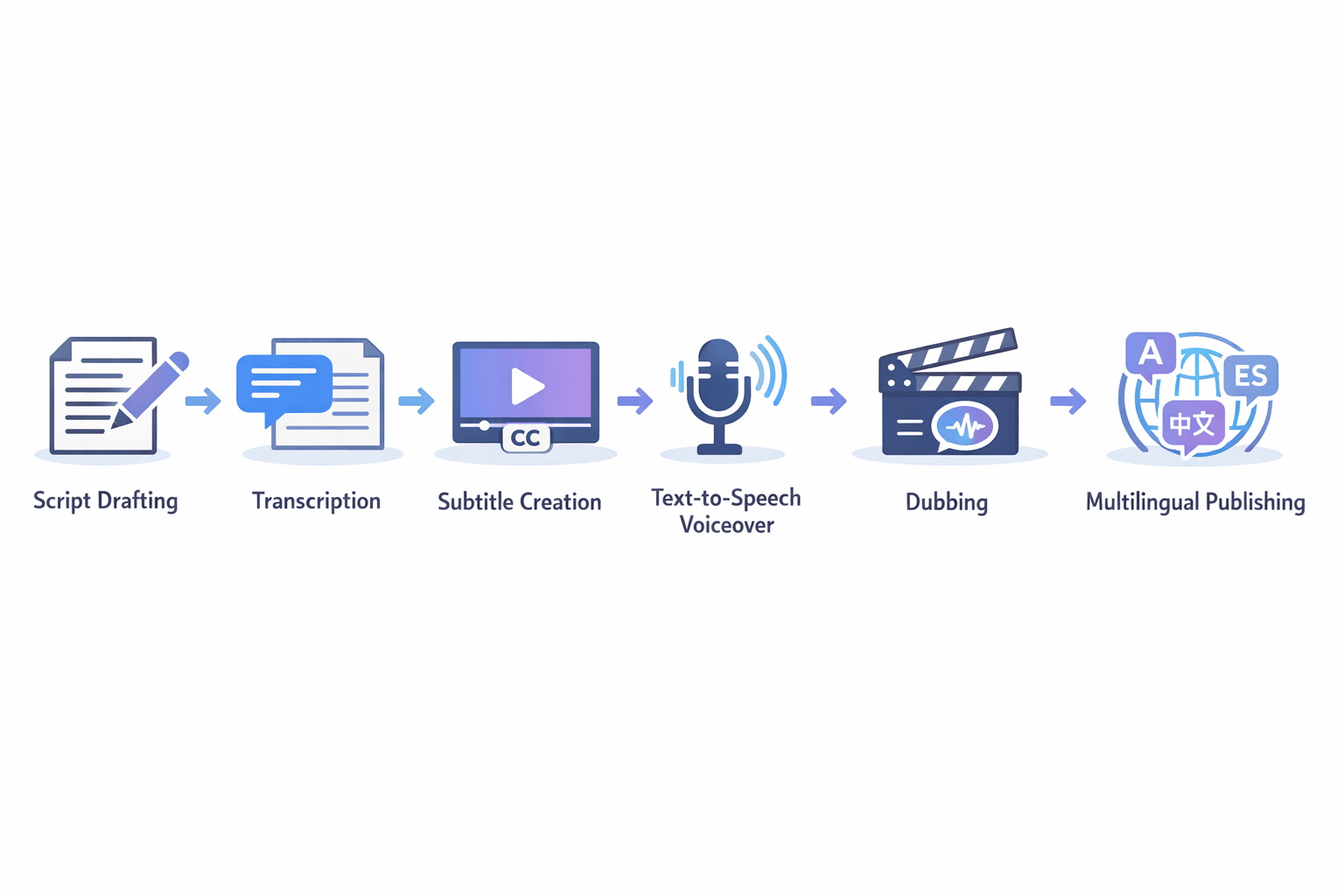
Most free writing tools stop at text. DupDub goes further. You can draft a script, clean up a transcript, create voiceover, and prep content for other markets in one workflow.
Use one draft across your full content workflow
DupDub is built for repurposing. Instead of moving between separate apps, you can keep the work in one place. That saves time and cuts copy-and-paste mistakes.
Here’s what makes it useful for content teams:
-
AI writing for ideas, outlines, rewrites, summaries, and script polish
-
Transcription for audio and video files
-
Text-to-speech for voiceover creation
-
Voice cloning for brand or creator voice consistency
-
Dubbing and subtitle tools for localized publishing
-
Export options for text, audio, video, and subtitle files
For global work, that matters a lot. According to
DupDub AI Writing, DupDub supports AI writing in over 90 languages. If you write for more than one market, that range is a real plus.
Why the free trial is useful
DupDub offers a 3-day free trial with no credit card required. That lowers the risk for users who want to test real workflows before paying. You can check writing quality, see how the editor feels, and test whether the voice and dubbing tools fit your content plan.
That setup is better than a free AI writing tool with tight limits on output alone. You get a chance to test the bigger system, not just a prompt box. For marketers and creators, that gives a clearer view of value.
Best use cases for DupDub
DupDub is not just for article writing. It works best when text is only the first step.
It’s a smart pick for:
-
YouTubers who need scripts, subtitles, and dubbed videos
-
Podcasters who want transcripts turned into posts and clips
-
Marketers who repurpose webinars into blogs, emails, and voiceover assets
-
Freelancers who manage multilingual client content
-
Small teams that need one tool for writing and media localization
If that sounds like your workflow, DupDub may be a better AI tool for writing than a text-only app. You get more ways to publish from one source file.
Know the tradeoffs before you choose
DupDub has clear strengths, but it is not perfect for every buyer. If you only need plain text for short blog posts, a simpler tool may feel faster at first. Some users also may not need dubbing, cloning, or subtitle features.
There is also a learning curve. When one platform does many jobs, the dashboard can take longer to learn. And as with any AI system, you still need to fact-check claims, review tone, and check brand safety before publishing.
A few practical tradeoffs to keep in mind:
-
Best value comes from multi-format workflows, not text only
-
Advanced media tools may be more than some writers need
-
Output still needs human editing for facts and style
-
Privacy and compliance claims should be verified for your use case
Why it matters for modern content teams
Today, one piece of content rarely stays as text. A blog post can become a video script, a podcast intro, subtitles, short clips, and translated assets. DupDub fits that reality well.
That is why it stands out in this list. It is not just trying to be an AI writing tool free option. It is built for people who publish across channels and languages.
For bloggers, it means faster repurposing. For YouTubers and podcasters, it connects script work to voice and subtitle production. For global teams, it helps keep messaging aligned across markets.
In short, DupDub is best for users who need writing plus production. If your workflow ends at text, look elsewhere. If your workflow starts with text and ends in audio, video, and localization, it is one of the strongest options to test.
Other Free AI Writing Tools Worth Considering
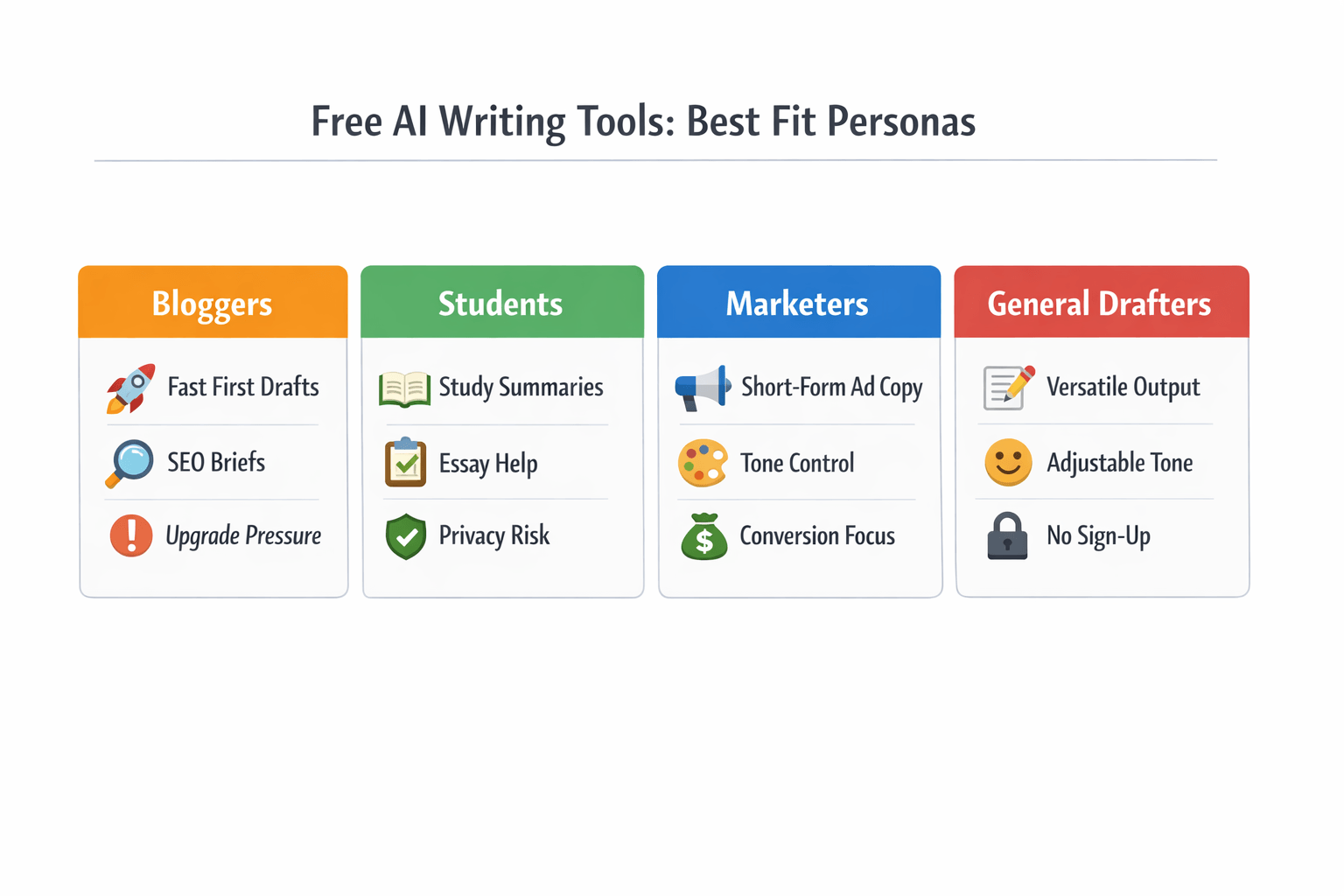
If you’re comparing the best AI writing tool free options, you may not need an all-in-one platform. Some tools work better for quick blog drafts, ad copy, school help, or simple rewrites. The key is to match the tool to the job, then watch for limits like weak tone control, thin fact checking, and fast upgrade pressure.
Many free tools look generous at first. But the real test is daily use. Can it keep your voice, follow a clear prompt, and give clean output without pushing you to upgrade after a few tries?
Try simple drafting tools for fast first drafts
If your main goal is speed, general AI writers can help. These tools are often best for outlines, rough blog posts, product descriptions, and email drafts. They usually have easy prompts and low setup.
Best fit for this group:
-
Bloggers who need a first draft fast
-
Freelancers writing client content
-
Small business owners making basic site copy
-
General users who want an AI tool for writing without a steep learning curve
What they do well:
-
Turn short prompts into usable rough drafts
-
Rewrite text in a clearer or shorter form
-
Summarize long notes or articles
-
Help beat a blank page problem
Common limits:
-
Output can sound generic after a few paragraphs
-
Brand voice control is often weak on free plans
-
Facts may be wrong or made up
-
Better templates may sit behind a paywall
These tools are helpful, but they still need editing. If you care about tone, accuracy, or SEO structure, expect to spend time cleaning up the draft.
Use SEO-focused tools for briefs and search content
Some free AI writing tools aim at search content. They can help with title ideas, meta descriptions, keyword clustering, and content briefs. That makes them useful for marketers and niche site owners.
They’re often a better fit when you need:
-
Blog post angles based on a target keyword
-
Headline and meta description ideas
-
Basic SERP-style content structure
-
Short landing page copy with keyword support
Still, there’s a tradeoff. Free tiers in SEO tools tend to be narrow. You may get limited credits, fewer optimization tips, or partial scoring that stops short of real guidance.
Also, some tools overpush keyword use. That can lead to stiff copy that reads for bots, not people. So if you use one, treat its advice as a draft, not a rulebook.
Pick student-friendly tools for study help and rewriting
Students often want help with summaries, study guides, citation formatting, or simpler rewrites. Free writing assistants can be useful here, especially for note cleanup and idea generation. They’re fast, and many have a low learning curve.
But this category needs extra care.
A student tool may sound confident while giving weak logic or false claims. Some also blur the line between writing help and full assignment generation. That raises quality and ethics concerns, especially if the output is used without review.
For safer use, student users should stick to:
Avoid trusting these tools for final facts, quotes, or sources unless you verify each one yourself.
Choose marketing copy tools for short-form work
If you write ads, social posts, or email subject lines, short-form copy tools can save time. Many free plans are built for this exact use case. They often include templates for product blurbs, ad hooks, CTAs, and social captions.
This makes them a strong fit for:
Their biggest strength is speed. Their biggest weakness is sameness. After a while, outputs can feel repetitive, broad, or too polished to sound human.
Before you rely on one, check these points:
-
Can it match your tone, not just generate “catchy” lines?
-
Can you edit outputs easily inside the tool?
-
Does the free plan cap generations too hard?
-
Does it store sensitive brand or client prompts?
Compare by use case, not by hype
A free AI writing tool is only useful if it fits your workflow. The best option for a student may be a poor fit for a marketer. Likewise, a blogging assistant may not help much with repurposing video, transcripts, or multilingual content.
Here’s a simple way to think about it:
-
For basic drafts: choose a general writer with strong rewrite tools
-
For SEO briefs: choose a search-focused tool with outline support
-
For study help: choose a clean summarizer and verify every fact
-
For ad copy: choose a template-heavy tool for short-form content
If your work starts with text and ends with audio, video, subtitles, or translation, these lighter tools can feel limited fast. They’re fine for single-step writing tasks. They’re not ideal for broader content workflows where writing, transcription, and localization need to connect.
Which Free AI Writing Tool Is Best for Your Use Case?
The best AI writing tool free for you depends on what you make each week. Some people just need blog drafts. Others need scripts, transcripts, subtitles, and voiceovers in one flow. That’s why the right pick often comes down to your format, team size, and how much editing you can handle.
A simple text generator can work well for short posts and idea outlines. But if your work starts as audio or video, you may need more than an AI tool for writing. In that case, a platform that connects writing with transcription, dubbing, and localization can save real time.
Match the tool to the job
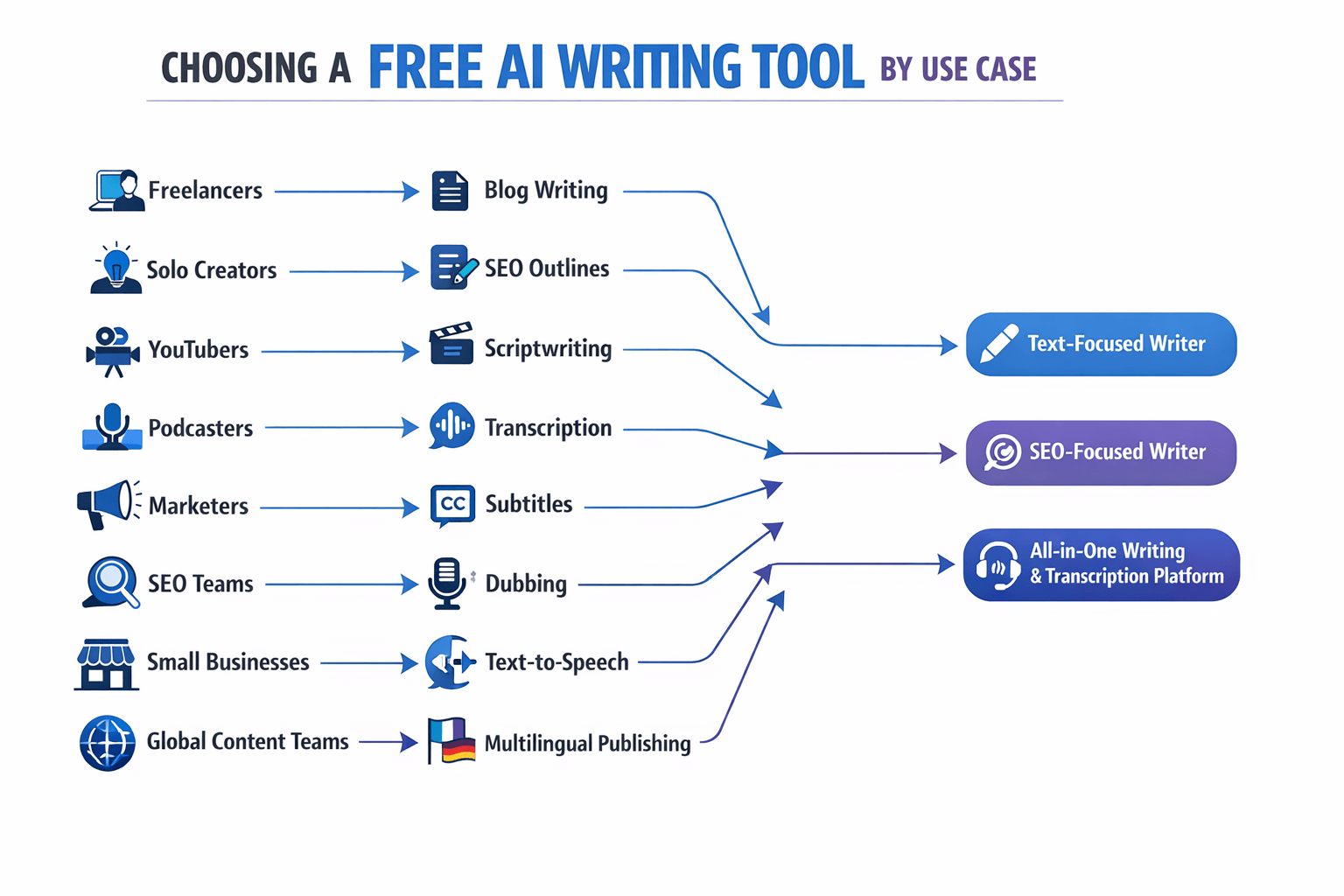
Here’s a simple way to choose:
-
Freelancers and students: Pick a free AI writing tool with clean drafting, rewriting, and summarizing tools.
-
Bloggers and SEO writers: Choose a tool with strong outlines, tone control, and room for fact-checking.
-
YouTubers and podcasters: Look for script help plus transcription, subtitles, and repurposing features.
-
Marketing teams: Use a tool that supports brand voice, team review, and multi-format content.
-
Small businesses: Focus on ease of use, low cost, and content reuse across channels.
-
Global teams: Prioritize language support, voice tools, and localization workflows.
Pick by workflow, not just by features
If you mostly write articles, a text-first tool is often enough. It helps with headlines, briefs, product copy, and social posts. But you’ll still need to check facts, fix tone, and add real examples.
If you create videos, podcasts, or courses, the workflow changes fast. You may want to turn a transcript into a blog post, then turn that blog into subtitles or dubbed audio. That’s where DupDub stands out. It links AI writing with transcription, text to speech, dubbing, and multilingual output in one place.
Best fit by user type
-
Solo creators: Best when the tool helps you draft fast and repurpose one idea into many assets.
-
SEO teams: Best when the tool supports outlines, refreshes old posts, and speeds up briefs.
-
YouTubers: Best when you can write scripts, transcribe uploads, and localize videos.
-
Podcasters: Best when transcripts turn into show notes, clips, emails, and blog posts.
-
Freelance marketers: Best when one tool handles copy, edits, and client-ready variations.
-
Small brands: Best when you can keep voice consistency across text, audio, and video.
Use this rule of thumb
Choose a basic writer if your work starts and ends with text. Choose an all-in-one platform if your content moves across formats. That second path is often the better value, even on a free trial, because it cuts tool switching.
So, what is the best AI writing tool for free? For plain text help, a simple writing app may be enough. For creators who need writing tied to transcription, voice, and multilingual content, DupDub is the better fit because it supports the full repurposing workflow, not just the first draft.
What to Watch Out for When Using a Free AI Writing Tool
A free plan can save money, but it can also add risk. Even the best AI writing tool free option can make up facts, miss context, or sound off-brand. That matters more when you publish blog posts, client work, product pages, or multilingual content.
The biggest issue is hallucination, which means the tool states false info like it is true. Some tools also give weak sourcing or no source at all. As
Artificial Intelligence Risk Management Framework (AI RMF 1.0) states, valid and reliable AI systems should maintain alignment with intended purpose and be “understood accurately by users and other interested parties.”
Check facts before you hit publish
Don’t trust claims just because they sound polished. AI can invent stats, studies, quotes, and product details. It may also mix old facts with new ones.
Use this quick review process:
-
Verify dates, names, and numbers in primary sources
-
Check quotes against the original page or transcript
-
Confirm product features and pricing on official sites
-
Review translated copy with a native speaker when stakes are high
-
Remove any claim you can’t prove fast
Watch for plagiarism and thin rewrites
Many free tools are better at remixing than creating. That can lead to copy that feels generic, too close to top-ranking pages, or too similar to a client’s past content. Even when a checker shows low overlap, the structure may still feel copied.
A good rule: use AI for drafts, outlines, summaries, and script ideas. Then rewrite key sections with original examples, brand language, and expert input.
Review privacy and data handling
This part gets missed a lot. Free tools may store prompts, use inputs for model training, or keep files longer than you expect. If you handle client notes, private transcripts, or internal strategy docs, read the terms first.
Look for these basics:
-
Whether your prompts are used to train models
-
How long files and chats are stored
-
Whether you can delete data easily
-
If the tool offers encryption or access controls
-
Any GDPR or regional compliance claims, and what they really cover
Protect your brand voice
Free AI writing tool outputs often drift in tone. One draft may sound sharp and clear. The next may feel robotic or overly salesy.
To fix that, create a simple style sheet. Include your voice, banned phrases, preferred terms, reading level, and sample intros. For teams using writing with transcription, dubbing, or localization, review each output so the message stays consistent across text, subtitles, and voice scripts.
How to Choose the Best AI Tool for Writing on a Budget
Choosing the best AI writing tool free starts with one simple question: what do you need it to do every week? Some people just need help with blog outlines or email drafts. Others need transcription, rewriting, subtitles, or voice output too. When you know your real workload, it gets much easier to see if a free plan is enough or if a paid plan will save time.
Check usage caps first
Free plans often look generous at first. Then you hit word limits, daily prompts, export blocks, or feature locks. That’s why the first thing to check is how fast you’ll run into the cap.
Ask these questions before you commit:
-
How many words can you generate each day or month?
-
Can you export in useful formats like Markdown, TXT, or DOCX?
-
Are key tools locked behind the paid plan?
-
Will you need more than one user or shared workspace?
-
Does the limit reset daily, monthly, or never?
If you write once a week, free access may be fine. If you publish often, upgrade costs can be cheaper than lost time.
Match the tool to your workflow
A good AI tool for writing should fit the way you already work. If you draft in Google Docs, post in WordPress, and repurpose content for YouTube or podcasts, look for a tool that supports that flow.
Here’s a simple way to think about feature fit:
-
Bloggers: need outlines, rewrites, SEO support, and clean exports
-
Marketers: need brand voice control, team review, and fast campaign drafts
-
Video creators: need scripts, transcription, subtitles, dubbing, or text-to-speech
-
Global teams: need strong language support and localization tools
This is where all-in-one tools can offer better value. For example, if one platform handles writing, transcription, and multilingual voice work, you may avoid paying for three separate tools.
Review safety, editing, and language support
Low price should not mean high risk. Always check how easy it is to edit outputs, protect brand voice, and review facts before publishing. Free tools can save time, but they still need human checks.
Use this quick checklist:
-
Test output quality on your real topics
-
Check privacy terms and data handling
-
Confirm language support for your audience
-
Review collaboration and approval features
-
Compare upgrade cost to the hours you save
If you need writing plus multilingual content workflows, a platform like DupDub can make sense because it connects drafting, transcription, dubbing, and voice tools in one place.
Final Verdict: What Is the Best AI Writing Tool for Free?
If you want the best AI writing tool free, the right pick depends on your workflow. For pure drafting, a simple text tool may be enough. But if you also turn blogs into videos, podcasts, subtitles, or translated content, an all-in-one platform gives you more value.
Pick the tool that fits your work
DupDub is the best overall choice for creators who need more than words on a page. It combines AI writing with transcription, text to speech, dubbing, and localization tools in one place. That makes it a strong fit for marketers, YouTubers, podcasters, and global teams.
A lighter AI tool for writing may still be the better pick if you only need fast outlines, rewrites, or short blog drafts. Students, solo bloggers, and casual users may prefer a simpler interface with fewer features to learn.
Use this simple rule
-
Choose DupDub if you need writing plus audio, video, or multilingual workflows.
-
Choose a basic free AI writing tool if you only need text generation.
-
Choose based on output quality, limits, language support, and privacy needs.
In short, what is the best AI writing tool for free? For all-around content creation, DupDub stands out because it helps you write once, then repurpose that work across formats and languages. If that matches how you publish, it’s the smartest place to start.
FAQ
-
Is there a truly free AI tool for writing?
Yes, but most free plans have limits. You may get a word cap, fewer templates, slower output, or fewer rewrites. If you want the best AI writing tool free, check what you can do before you hit a paywall.
-
What is the best AI writing tool for free?
It depends on your job. For blog drafts, look for strong editing and rewrite tools. For video scripts, podcasts, or global content, a tool that also handles transcription, text-to-speech, and localization gives you more value.
-
Is a free AI writing tool safe to use?
Usually, yes, but you should still be careful. Avoid pasting private client data, pricing, or legal text into any tool unless you trust its privacy policy and settings. It also helps to review data retention, team access, and export controls.
-
Can an AI tool for writing help with SEO?
Yes, it can speed up outlines, title ideas, meta descriptions, and content refreshes. But it won’t replace keyword research, search intent matching, or fact-checking. Human editing still matters if you want content to rank.
-
Are free AI writing tools good for blogs and scripts?
Yes, especially for first drafts. They work well for blog posts, YouTube scripts, podcast outlines, product descriptions, and social captions. You’ll still need to fix tone, facts, and brand voice before publishing.
-
Which free option is best for multilingual content?
Choose a platform that goes beyond writing alone. If you also need transcripts, dubbing, subtitles, or voice tools, an all-in-one workflow can save time and reduce copy-paste work.




 Discord
 YouTube
 Tiktok
 Twitter
 Facebook
 Instagram