The best free AI voice generator depends on what you need most: voice quality, language range, or workflow tools. Some free tools are great for quick text-to-speech. Others are better if you also need dubbing, subtitles, transcription, or voice cloning in one place.
Here are the main takeaways:
-
Best overall: Choose the tool with natural voices, clear commercial-use terms, and easy exports.
-
Best for multilingual work: Pick a platform with broad language support, accent options, and built-in dubbing.
-
Best for creator workflows: An all-in-one option can save time if you write scripts, make voiceovers, localize videos, and repurpose content often.
-
Best for testing free plans: Check credit limits, watermark rules, file export options, and whether the trial needs a credit card.
A simple free AI voice generator may be enough for short videos or test projects. But if you need a free ai voice generator text to speech tool that also supports team use, brand voice, and global content, a broader platform often fits better. That matters most for creators and marketers who want fewer tools and faster output.
What Makes the Best Free AI Voice Generator?
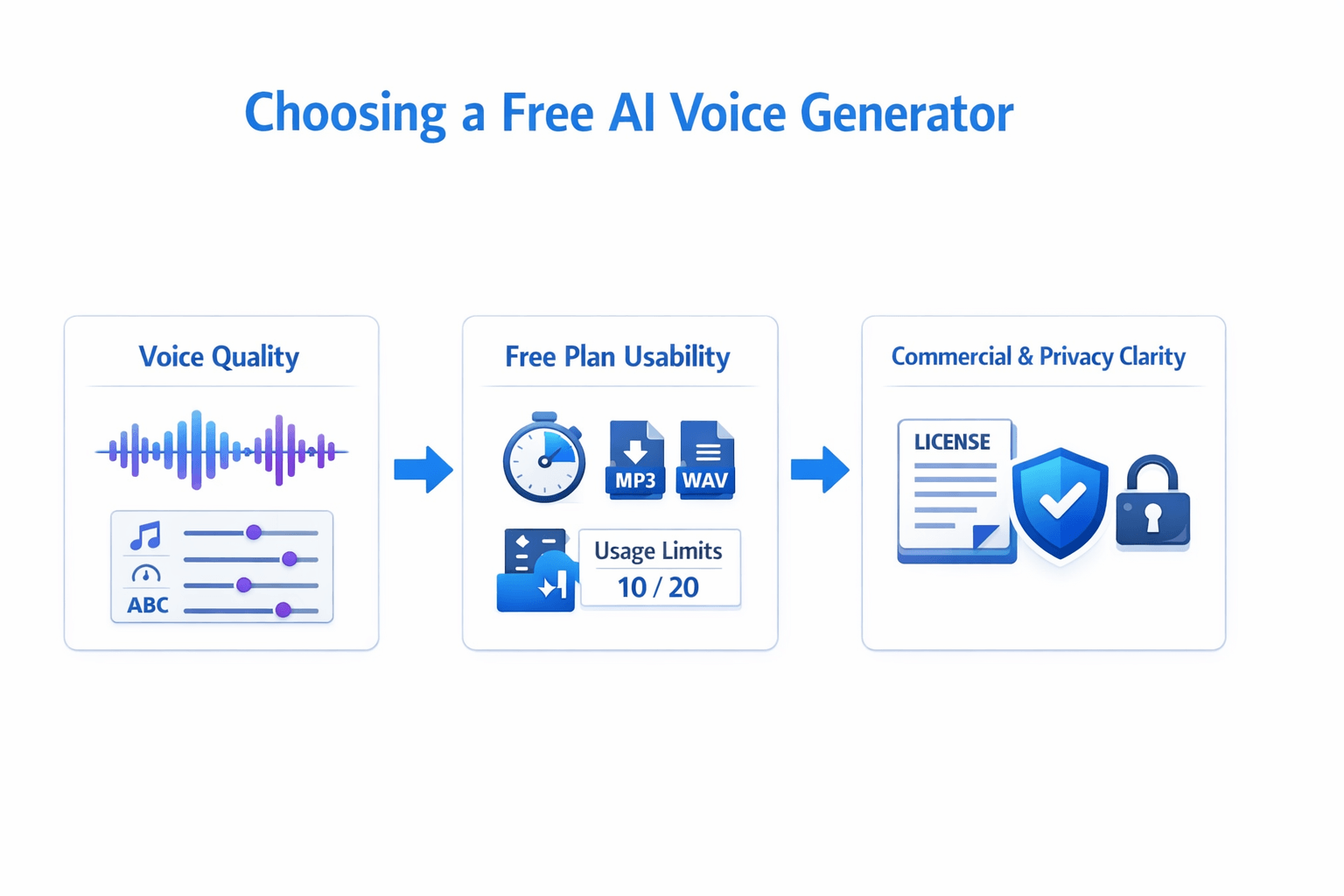
The best free AI voice generator is not just the one with a free button. It should sound natural, give you control, and let you export work you can actually use. In most cases, voice quality, plan limits, and usage rights matter more than a tool that simply says it is free.
Check voice quality first
Start with the voice itself. Good speech should sound clear, smooth, and easy to follow. It should handle pauses, tone, and pacing well, especially for videos, ads, lessons, and podcasts.
Look for tools that let you adjust speed, emphasis, pronunciation, and breaks. Those controls help text-to-speech sound less flat. If audio will play on a web page,
Web Content Accessibility Guidelines (WCAG) 2.2 states: "If any audio on a Web page plays automatically for more than 3 seconds, either a mechanism is available to pause or stop the audio, or a mechanism is available to control audio volume independently from the overall system volume level."
Look beyond the word free
A free ai voice generator can be useful, but only if the limits fit your workflow. Some tools cap minutes, exports, languages, or voice choices. Others lock key features like HD audio, commercial use, or downloads behind a paid plan.
Before you choose, check:
-
monthly or trial usage limits
-
commercial-use rights
-
watermarking or branding rules
-
export formats like MP3 and WAV
-
editing tools for script fixes and retakes
-
privacy handling for uploaded text and cloned voices
Match the tool to your workflow
If you make short social clips, basic exports may be enough. If you run client work, courses, or multilingual campaigns, you may need better formats, licensing clarity, and stronger privacy controls. That is also true for niche use cases like a free ai voice generator text to speech tool for tutorials or an ai singing voice generator free test for creative demos.
The right tool saves time after generation, not just before it.
How We Evaluated Free AI Voice Generator Tools
We judged each tool by how well it works in real projects, not just on landing pages. To find the best free ai voice generator options, we looked at voice quality, free access, export limits, and how fast you can turn text into usable audio. We also checked whether each tool fits common jobs like YouTube voiceovers, ads, training clips, podcasts, and multilingual content.
Focus on quality you can hear
First, we tested naturalness, clarity, and pacing. In simple terms, we asked: does the voice sound human, easy to follow, and right for the script? We also looked for control over tone, speed, pauses, pronunciation, and language support. As a baseline for listening quality,
ITU-T Recommendation P.800 (08/96) defines the Mean Opinion Score (MOS) listening-quality scale from 5 = Excellent to 1 = Bad.
Check if the free plan is truly usable
Not all free tools are really free. Some add watermarks, block commercial use, limit downloads, or hide the best voices behind a paywall. So we scored each free ai voice generator on a few practical points:
-
free credits or trial length
-
voice and language access
-
export formats like MP3 or WAV
-
commercial-use clarity
-
cloning, dubbing, or subtitle extras
-
editing speed and ease of use
Match features to real workflows
Finally, we gave extra weight to tools that solve full workflow problems. That includes script polish, multilingual TTS, voice cloning, subtitle support, and clean exports for social, e-learning, and marketing teams. A tool scored higher if it saved steps, not just if it made a nice demo.
Best Free AI Voice Generator Tools Compared
If you're comparing the best free ai voice generator tools, don't just look at the word free. Look at limits, export rights, voice quality, and how fast you can finish real work. Some tools are great for testing voices. Others fit full creator workflows, team use, or video localization.
The biggest differences show up in five areas:
-
free access and usage caps
-
voice realism and style control
-
language coverage
-
commercial use and licensing clarity
-
workflow fit for audio, video, and team production
Compare the tools by real workflow fit
|
Tool
|
Best for
|
Free access
|
Strong points
|
Watch-outs
|
|
DupDub
|
Creators, marketers, multilingual teams
|
3-day free trial, no card
|
TTS, dubbing, cloning, transcription in one place
|
Trial-based access, not a forever-free tier
|
|
ElevenLabs
|
Pure voice quality tests
|
Free plan available
|
Natural voices, strong speech quality
|
Free limits can feel tight for bigger projects
|
|
Murf AI
|
Business voiceovers
|
Limited free access
|
Clean studio feel, solid team use
|
Can feel more presentation-focused
|
|
Play.ht
|
Developers and voice libraries
|
Limited free access
|
Large voice catalog, API appeal
|
Interface and pricing may feel less simple
|
|
Speechify
|
Fast read-aloud use
|
Free version available
|
Easy listening, quick text-to-audio
|
Less built for full production workflows
|
|
HeyGen
|
Talking avatar videos
|
Free plan/trial varies by offer
|
Avatar-led video creation
|
Voice generation is part of a broader video tool
|
|
Synthesia
|
Training and corporate video
|
Free plan/trial varies by offer
|
Polished AI presenter workflows
|
Best fit is avatar video, not stand-alone TTS
|
For many buyers, the real question is simple: do you need a voice sample, or a full pipeline? That split matters. A tool made for quick text to audio may not help with subtitles, dubbing, or repurposing content later.
Look beyond free, then check output quality
ElevenLabs is often a first stop for testing voice realism. In fact,
ElevenLabs pricing states that its Free plan includes 10,000 characters per month. That's useful for short scripts, demos, and voice tests.
But free limits can change how useful a tool feels. A small character cap may work for one TikTok script, not a podcast intro pack or product video series. If you need a free ai voice generator text to speech tool for repeat work, usage policy matters as much as raw quality.
Here is the buyer's view:
-
Choose ElevenLabs if voice realism is your top test point.
-
Choose Murf AI if you want a polished business voiceover workspace.
-
Choose Play.ht if you care about voice choice and developer access.
-
Choose Speechify if your main need is simple listening and read-aloud.
-
Choose HeyGen or Synthesia if your end product is avatar video.
-
Choose DupDub if you want voice, dubbing, subtitles, transcription, and cloning in one workflow.
See where DupDub stands out
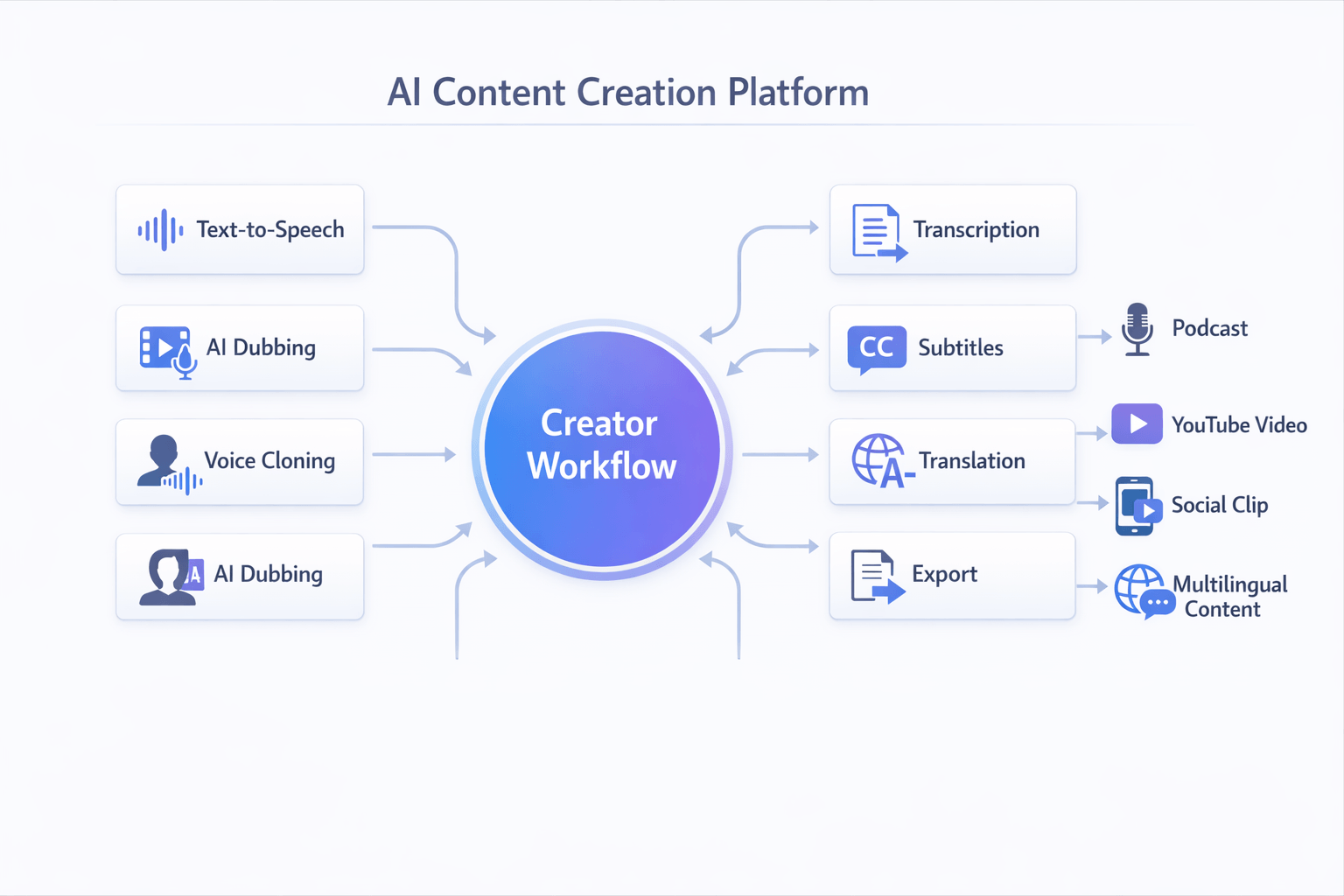
DupDub is a strong fit for people who publish in more than one format. You can create voiceovers, dub videos, clone a voice, transcribe speech, and export common assets without jumping between tools. That saves time for creators and lean teams.
Its feature set is broad: 700+ voices, 90+ languages and accents, voice cloning across 47 languages, plus subtitle and transcription support. That makes it more than a simple free ai voice generator. It's closer to a content production stack for audio and video.
That said, not every user needs that depth. If you only want to test one short script, a simpler free tier may be enough. But if your workflow includes YouTube videos, ads, courses, or social clips, an all-in-one setup tends to age better.
Match the tool to your use case
Use this simple shortlist:
-
For short voice tests: ElevenLabs.
-
For business narration: Murf AI.
-
For API or broad voice selection: Play.ht.
-
For read-aloud simplicity: Speechify.
-
For avatar videos: HeyGen or Synthesia.
-
For multilingual creator workflows: DupDub.
If you're also exploring ai singer voice generator free or ai singing voice generator free tools, note that most mainstream TTS platforms are built for spoken voice first. Some can support creative experiments, but they are not always tuned for full singing performance. For music-heavy use, check whether the tool supports style control, timing edits, and voice rights before you commit.
Why DupDub Is a Strong Choice for Creators and Marketing Teams
If you want the best free ai voice generator, basic text to speech may not be enough. Many teams need one tool that can write scripts, turn text into speech, dub video, clone a voice, and create subtitles. That’s where DupDub stands out, especially for multilingual content.
It brings several tasks into one workflow. Instead of moving between separate apps, you can create voiceovers, translate content, transcribe audio, and export files in one place. That saves time and helps teams keep a steady brand voice across channels.
Get more than a simple voiceover tool
DupDub is useful for creators who publish in many formats. A YouTuber can turn one script into a video voiceover, subtitles, and translated versions. A marketing team can reuse the same message for ads, product demos, and social clips.
Key strengths include:
-
700+ voices for different tones and styles
-
90+ languages and accents for wider reach
-
AI dubbing for video translation workflows
-
voice cloning for a more consistent brand sound
-
transcription and subtitle tools for repurposing
-
exports for audio, video, and subtitle files
That mix makes it more than a free ai voice generator text to speech tool. It works well for teams that need content production, localization, and editing in one system.
Support faster global content workflows
DupDub fits real production needs. You can start with text, make a voice track, add subtitles, then adapt the same content for other markets. If your team handles product videos, training, podcasts, or short-form social content, that matters.
Voice cloning also helps when consistency is key. Instead of using a new voice for every asset, teams can keep a familiar sound across campaigns. For brands, that can make content feel more polished and easier to recognize.
For creators testing new formats, it also opens the door to more niche projects. That includes character voices, multilingual narration, and even early ai singing voice generator free style experiments, though it is strongest in spoken audio workflows.
In short, DupDub is a strong fit for people who need scale, speed, and flexibility, not just a single voice clip.
How to Use DupDub as a Free AI Voice Generator Text to Speech Tool
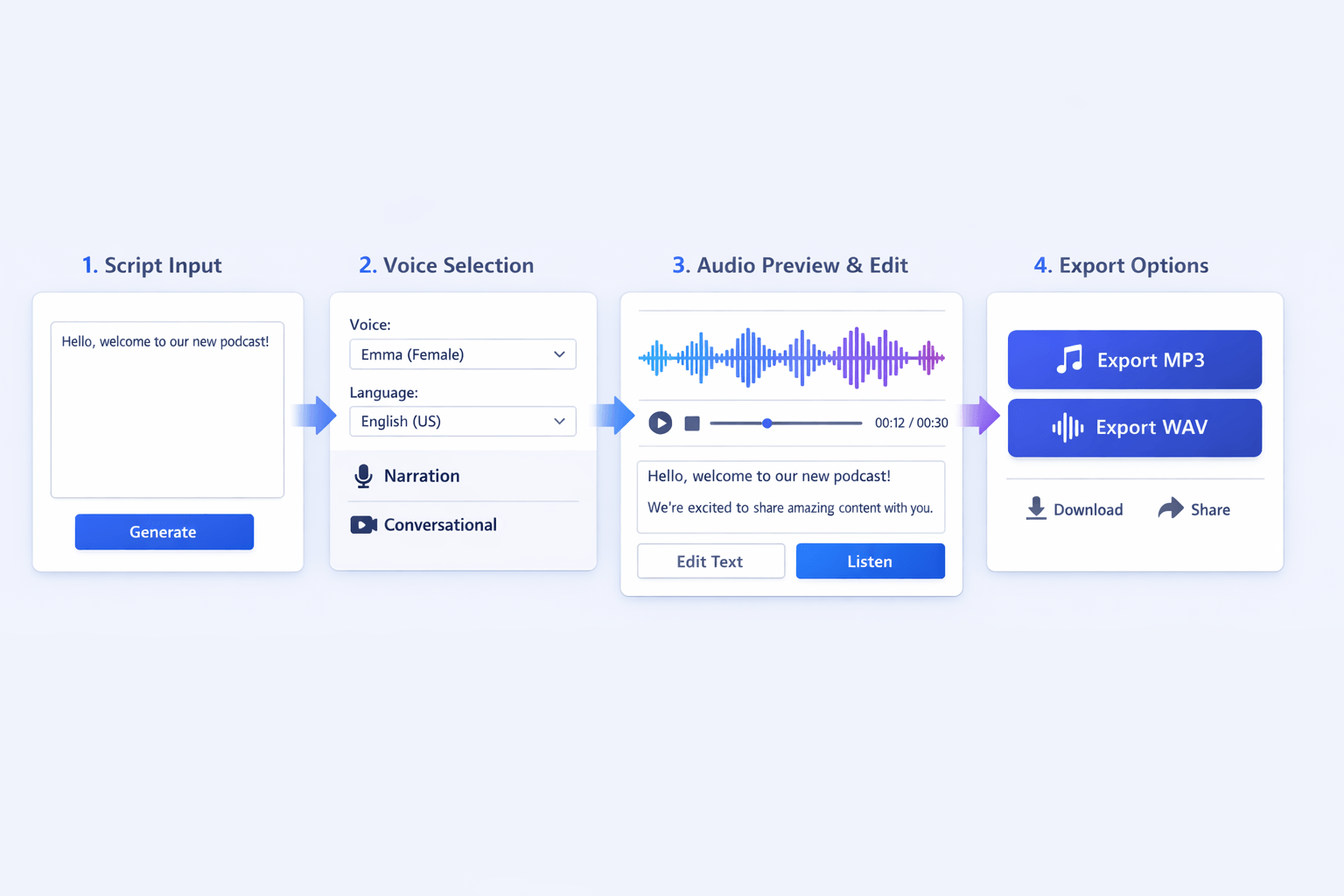
If you want the best free ai voice generator for quick voiceovers, the setup should feel simple. With DupDub, you can go from script to finished audio in a few clear steps. The main goal is to test, preview, and refine your read before you export.
Paste your script and pick a goal
Start by pasting your text into the editor. This works well for ads, YouTube intros, product demos, lessons, and podcast spots. If your script is long, break it into short sections so it is easier to edit.
Then decide what the audio needs to do. Do you want a calm explainer voice, a bright social clip, or a polished brand read? That choice helps you narrow the voice style fast.
Choose a voice, language, and style
Next, browse the voice library and select the language and accent you need. This is where a free ai voice generator text to speech tool becomes useful for teams that publish in more than one market. You can test different voices for tone, pace, and fit.
As you compare options, listen for clarity and natural pauses. A good voice should sound smooth, not robotic. If needed, tweak punctuation or split lines to improve rhythm.
Preview, edit, and export
Before you export, preview the audio a few times. Small edits often make a big difference. Change line breaks, swap a voice, or adjust wording until the delivery matches your script.
A simple workflow looks like this:
-
Paste the script.
-
Select voice, language, and accent.
-
Preview the read.
-
Edit text for timing and tone.
-
Export the final file.
Once it sounds right, export your audio in the format you need for video, social, or training content. That test-and-tweak loop is what helps you get better results, even on a first draft.
Best Use Cases: From Social Voiceovers to AI Singing Voice Experiments
The best free ai voice generator should match the job you need done. A YouTube narrator needs clear pacing. A marketing team needs fast ad variations. A course creator needs steady, easy-to-hear speech. And if you want an ai singer voice generator free option, it helps to know where normal text to speech works, and where it falls short.
Match the tool to the output
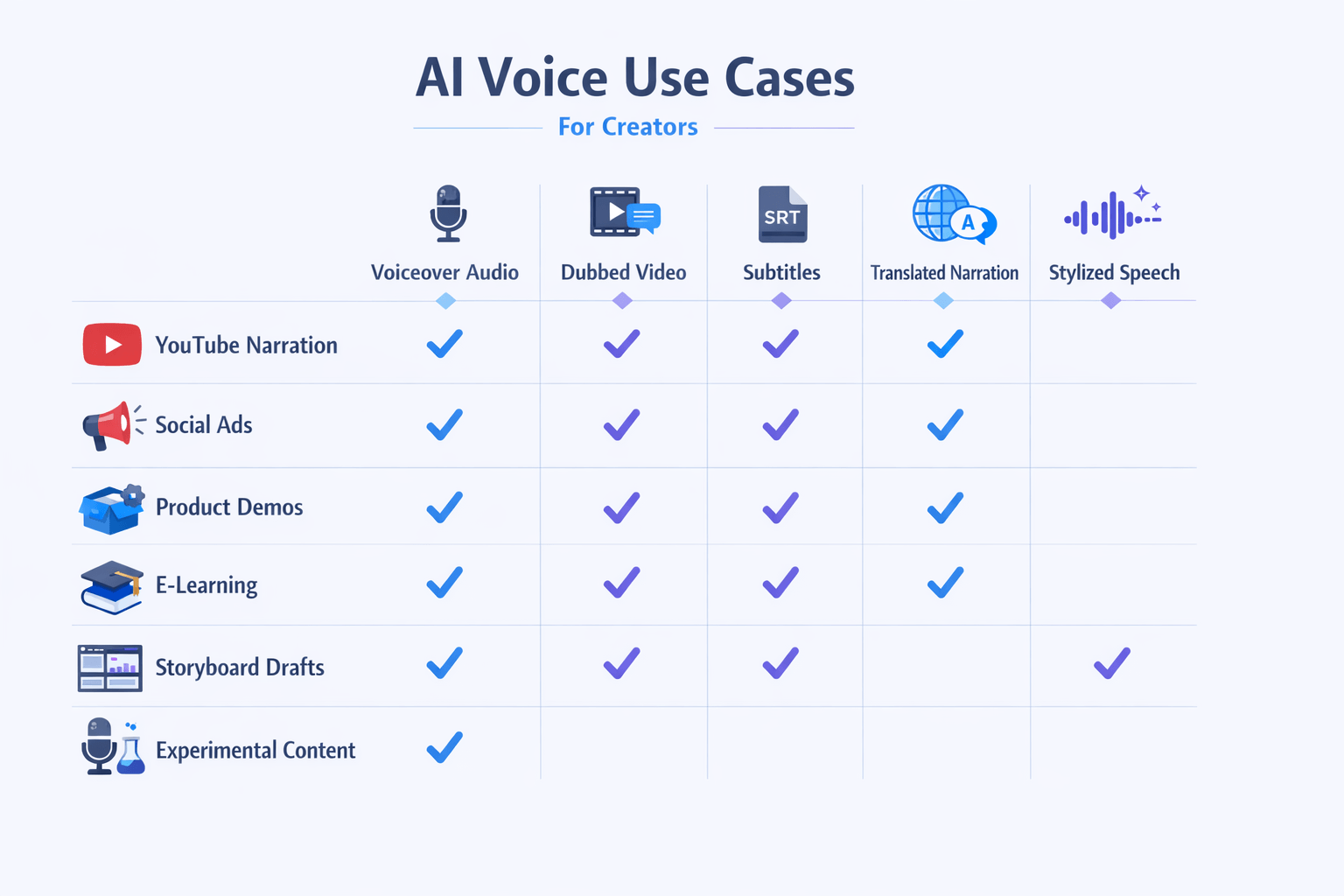
Use cases usually fall into a few simple buckets:
-
YouTube narration: natural speech, easy script edits, MP3 or WAV export
-
Short ads and social posts: fast voice swaps, many tones, quick turnaround
-
Product demos: clean pronunciation, screen video dubbing, subtitle support
-
E-learning: long-form clarity, multilingual voices, stable pacing
-
Storyboards and drafts: rough voiceover samples before final production
For most of these, standard TTS is enough. It works well for explainers, podcasts, training clips, and dubbed video. If you also need subtitles, translation, or voice cloning, a broader workflow tool saves time.
Know the limits of singing use cases
Many users search for an ai singing voice generator free tool, but most free TTS platforms are built for speech, not true singing. You can test melody-like phrasing, character voices, or stylized reads. But sustained notes, vibrato, and music timing often sound limited.
Pricing, Free Trial, and Plan Differences Explained
Free access sounds great, but the best free AI voice generator is only useful if the limits fit your workflow. With DupDub, the free option is a 3-day trial with no credit card required and 10 starter credits, which makes it easy to test voices, exports, and core tools before you commit.
That trial works well for short tests. You can try text to speech, check voice quality, and see if dubbing or transcription fits your process. It’s a smart starting point for creators who want a free AI voice generator text to speech tool before paying for steady use.
Pick a plan based on output volume
Paid plans make more sense once you publish often or work with longer files. Personal fits solo creators with light monthly needs. Professional is better for active teams, regular campaigns, and larger files. Ultimate is built for heavy production and high-volume localization.
Here’s the simple breakdown:
-
Free trial: Best for testing features and voice quality
-
Personal: Best for solo creators and small channels
-
Professional: Best for marketing teams and frequent production
-
Ultimate: Best for scale, bigger libraries, and longer files
-
Pay-as-you-go: Best if your needs change month to month
Pay-as-you-go is useful if you don’t want a subscription. It gives you one-time credits, which can suit seasonal campaigns or one-off projects. If you move from testing to weekly production, though, a paid plan is usually the better value.
How to Choose the Right AI Voice Tool for Your Needs
The best free ai voice generator for you depends on your goals, not just the price tag. Some tools are best for simple voiceovers. Others are built for teams that need dubbing, cloning, subtitles, and fast exports. Start with the job you need done most often, then check rights, languages, and total cost.
Match the tool to your workflow
Use this simple filter before you choose:
-
Pick a basic text to speech tool if you only need short scripts, social posts, or test projects.
-
Pick a platform with strong language coverage if you publish in more than one market.
-
Pick a deeper workflow tool if you need voice cloning, subtitles, transcription, or video dubbing in one place.
-
Pick a plan with clear commercial rights if you create client work, ads, courses, or branded content.
Choose based on where you are now
Beginners usually need ease of use, natural voices, and low export friction. A multilingual team needs language range, accent control, and good subtitle support. If you’re scaling content production, long-term credit value matters more than a flashy free tier.
That’s where all-in-one tools can stand out. DupDub is a strong fit for creators and marketing teams that want TTS, dubbing, cloning, and transcription in one workflow, especially for multilingual content.
FAQ
-
What does the best free AI voice generator really mean?
It usually means the tool gives you enough free access to test real work. You should check voice quality, word limits, export options, language support, and whether commercial use is allowed. A free plan that sounds good but blocks downloads or business use may not be the best fit.
-
Do free AI voice generator text-to-speech tools allow commercial use?
Sometimes, but not always. Many tools limit commercial rights on free plans, trial credits, or cloned voices. Before you publish client work, ads, or monetized videos, check these points:
commercial-use rights
attribution rules
watermark limits
voice cloning consent rules
resale or client delivery terms
-
Is DupDub a good free AI voice generator for creators?
Yes, if you want more than basic text-to-speech. DupDub combines multilingual TTS, dubbing, transcription, and voice cloning in one workflow. That makes it useful for YouTube videos, short-form social clips, training content, and marketing assets.
-
Can I use it for an AI singer voice generator free or AI singing voice generator free tests?
You can use it for singer-style experiments, demos, and creative voice tests. But it is best suited for spoken voiceovers, dubbing, and narration workflows. If your main goal is full music production, check how well the tool handles pitch, rhythm, and singing tone before you commit.
-
Which export formats should I look for?
Most users should look for simple, editable exports. With DupDub, you can export:
MP3 and WAV for audio
MP4 for video
SRT for subtitles
Markdown, TXT, and DOCX for writing outputs
These formats make editing, publishing, and repurposing much easier.




 Discord
 YouTube
 Tiktok
 Twitter
 Facebook
 Instagram