The best free AI voice generator depends on your workflow. Some tools are best for simple text-to-speech, some are better for multilingual dubbing, and some work best as all-in-one platforms for voice, subtitles, and transcription.
Here’s the short answer:
-
Choose an all-in-one tool if you need voiceovers, dubbing, subtitles, and script workflows in one place.
-
Choose a simple text-to-speech tool if you only need fast audio from text.
-
Choose a multilingual option if you publish in several languages and need accent, subtitle, or localization support.
Free plans can be useful, but they often come with limits. Common limits include fewer voices, lower monthly credits, export caps, no voice cloning, or restricted commercial use.
If you want the most value, compare free tools on five points: voice quality, language support, editing control, export rights, and upgrade cost. That makes it easier to find an AI voice generator free text to speech tool that fits your content goals, not just your budget.
What Makes the Best Free AI Voice Generator?
The best free AI voice generator is not just the one with the most voices. It should sound natural, be easy to test for free, and fit the work you already do. To compare tools fairly, this guide uses the same scoring framework across every platform.
That matters because features can look similar at first. But once you create a voiceover, dub a clip, or export audio, the gaps show up fast. A simple framework helps you judge real value, not just marketing claims.
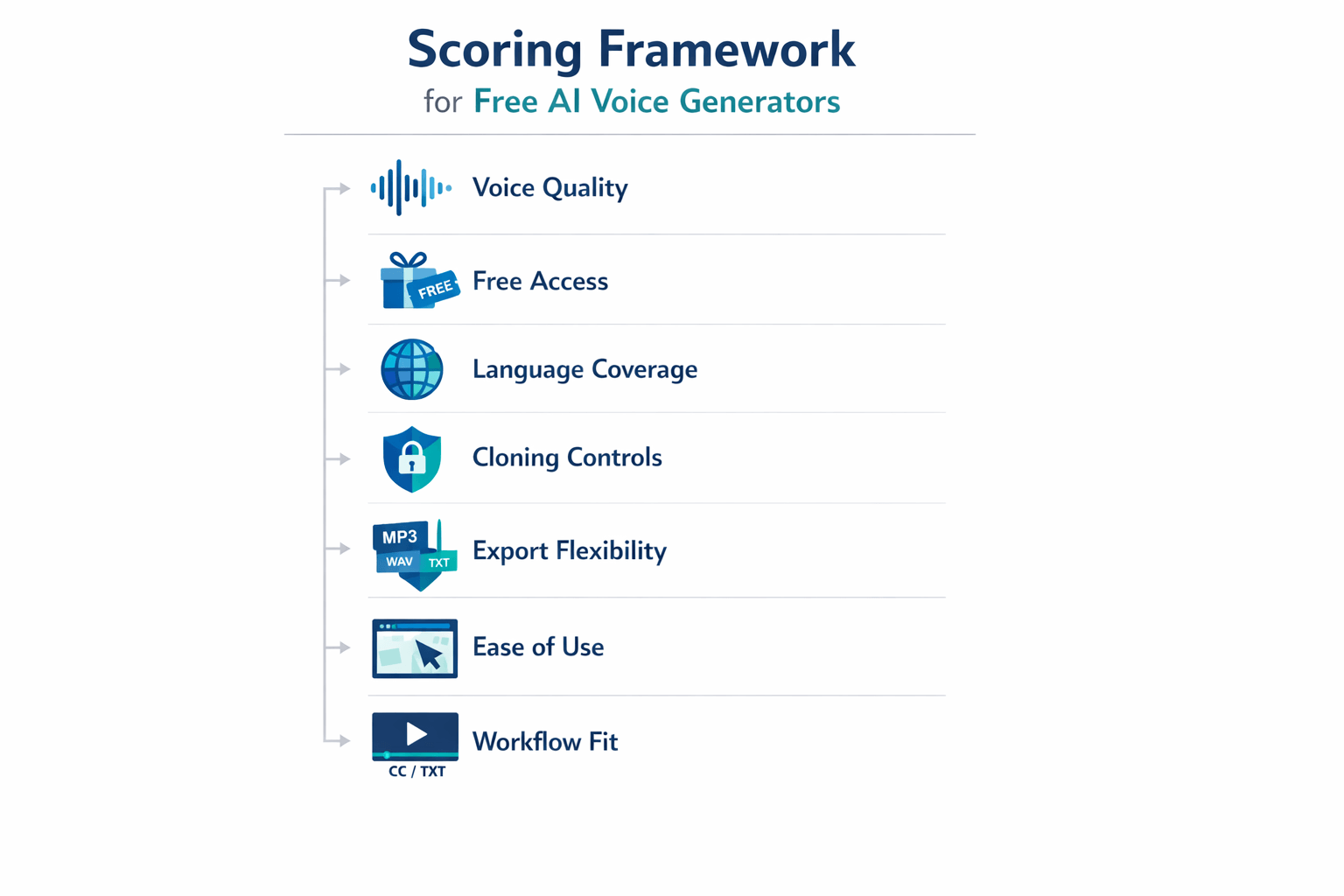
Score the parts that affect results
We look at the factors most users care about:
-
Realism: Does the speech sound human, clear, and steady?
-
Free access: Can you test enough before you hit limits?
-
Language coverage: Does it support the languages and accents you need?
-
Cloning controls: Are there consent tools, guardrails, or speaker protections?
-
Export flexibility: Can you download useful formats like MP3, WAV, MP4, or SRT?
-
Ease of use: Can a beginner make a clean voiceover fast?
-
Workflow fit: Does it also help with dubbing, subtitles, or transcription?
Speech quality should lead the score. For example,
ITU-T Recommendation P.805 (07/2023) specifies a subjective test methodology for evaluating the speech quality of conversational speech and audio systems, including synthetic speech. In plain terms, good testing should reflect what real listeners hear.
Use the framework by job, not just by feature
A creator may want fast voiceovers. A teacher may need clear narration. A small team may need free AI voice generator text to speech tools that also translate video and create subtitles.
That’s why this article weighs both output quality and workflow value. A tool with fewer voices can still win if it saves time, supports more steps, and makes publishing easier.
Best Free AI Voice Generator Tools Compared
Choosing the best free AI voice generator gets easier when you compare tools the same way. Some apps sound more natural. Others give better free limits, more languages, or stronger dubbing tools. So instead of chasing feature lists, use one simple framework.
Here’s the core idea: judge each tool on five things that matter most in real work. That means voice realism, free access, language support, voice cloning, and export options. If you need free AI voice generator text to speech for videos, podcasts, courses, or ads, these are the tradeoffs that shape your final pick.
Compare tools with one simple framework
|
Tool
|
Best for
|
Voice realism
|
Free access
|
Language support
|
Voice cloning
|
Export options
|
|
DupDub
|
All-in-one creator workflows
|
Strong
|
3-day free trial, no card
|
90+ languages and accents
|
Yes
|
MP3, WAV, MP4, SRT
|
|
ElevenLabs
|
Natural solo voiceovers
|
Excellent
|
Limited free usage
|
Broad multilingual support
|
Yes
|
Standard audio exports
|
|
Play.ht
|
Marketing and narration
|
Strong
|
Limited free plan
|
Wide language coverage
|
Yes
|
Common audio exports
|
|
Murf AI
|
Team voiceover projects
|
Strong
|
Free plan with caps
|
Multilingual voices
|
Limited by plan
|
Common audio exports
|
|
Amazon Polly
|
Developer-led TTS apps
|
Good
|
Free tier, usage-based after
|
|
No custom cloning focus
|
API and audio outputs
|
|
Speechify
|
Fast read-aloud tasks
|
Good
|
Free version available
|
Good language support
|
No
|
Basic audio options
|
No tool wins every category. That’s normal. The best choice depends on whether you care most about lifelike speech, free usage time, API access, or multilingual production.
Match the tool to your use case
If you want simple voiceovers, ElevenLabs and Play.ht are often strong picks. If you need a wider workflow, DupDub stands out because it combines TTS, dubbing, transcription, subtitles, and cloning in one place. That saves time when you publish in more than one language.
If you build apps, Amazon Polly makes more sense. If you need classroom or read-aloud help, Speechify may be enough. And if your team reviews scripts together, Murf AI can fit better than a solo-first tool.
Use this quick checklist before you choose:
-
Pick voice realism first for ads, YouTube, or client work
-
Check free limits before you script a long project
-
Confirm language coverage for dubbing or localization
-
Review cloning rules, consent, and plan limits
-
Make sure exports match your editing workflow
In short, the smartest comparison is not just about a free plan. It’s about how far that free plan gets you in real production.
Why DupDub Stands Out for Free AI Text-to-Speech
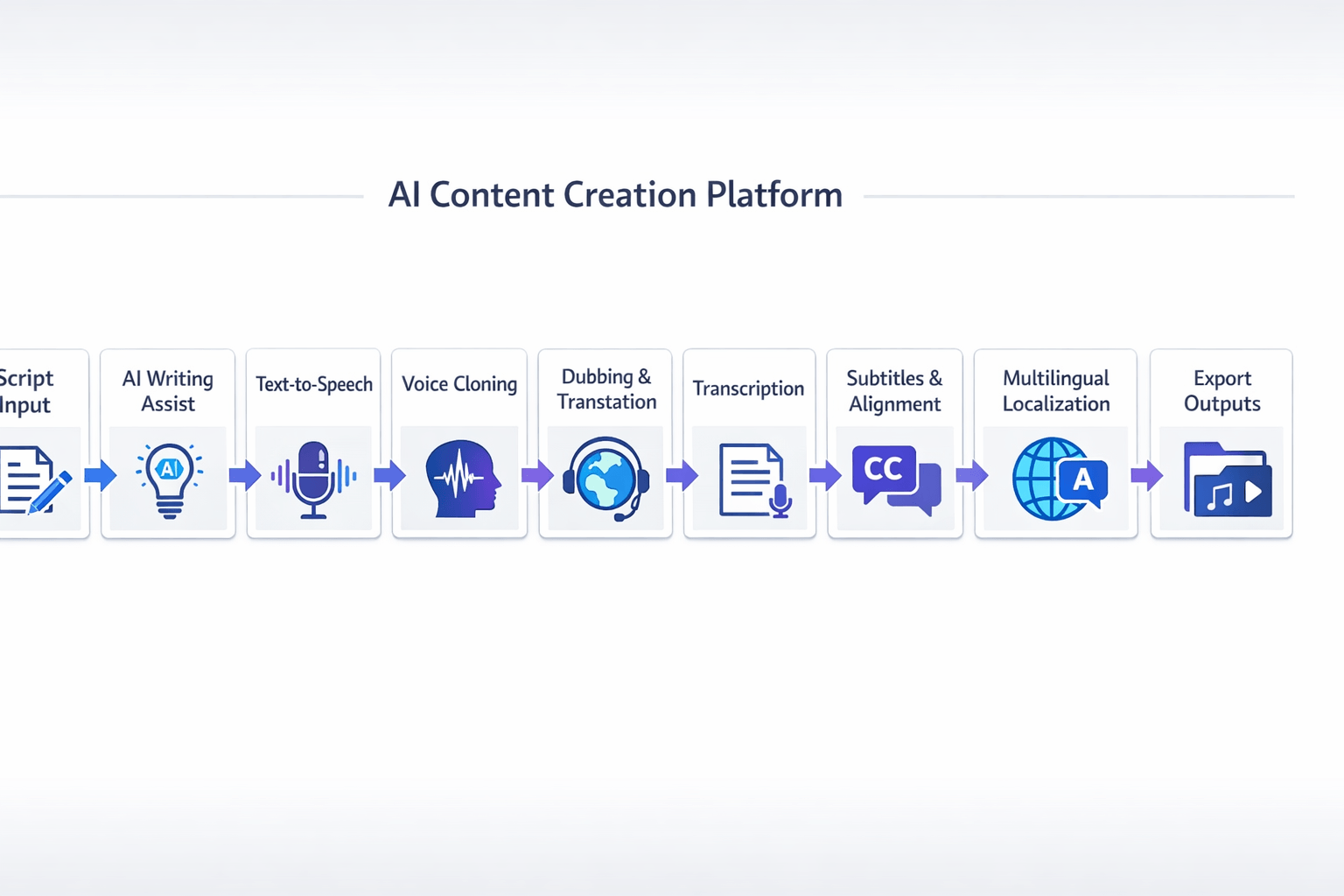
If you want the best free ai voice generator, features alone don’t tell the full story. What matters is how fast you can go from script to finished audio or localized video. That’s where DupDub fits well: it combines text-to-speech, dubbing, transcription, subtitles, and voice cloning in one workflow.
Many tools do one job well. One may offer strong voices. Another may handle subtitles or translation. DupDub is useful because it connects those steps in one place, which cuts tool switching and saves time.
Use one workflow instead of five tools
For creators, that all-in-one setup solves a real problem. You can write or polish a script, turn it into speech, clone a voice, transcribe audio, add subtitles, and export without bouncing between platforms. That’s a big plus for YouTubers, course creators, marketers, and small teams.
It also helps with multilingual work. If you create content for more than one region, you need more than a basic ai voice generator text to speech free tool. You need language coverage, dubbing support, subtitle control, and simple exports.
Key strengths include:
-
realistic voices for voiceovers
-
multilingual TTS for broader reach
-
voice cloning for brand consistency
-
transcription and subtitles in the same stack
-
dubbing tools for faster localization
-
browser-based workflow for quick edits and exports
Test the full workflow before you pay
Another practical advantage is the free access model. A no-card trial lowers the risk, especially if you want to test voice quality, language options, and export flow before you commit. That matters because TTS quality can sound very different once you add pacing, subtitles, and translated audio.
DupDub stands out most for users who need more than simple narration. If your work includes voiceovers, video translation, repurposing, or global content, the platform covers more of the production chain than many single-purpose tools. It’s a strong fit for creators who want one system that can scale with bigger content needs.
DupDub Pricing, Free Access, and Who It’s Best For
If you’re comparing the best free AI voice generator tools, pricing can get confusing fast. DupDub keeps it simple: you can test the platform with a 3-day free trial, no credit card needed, then move to a paid plan if you need more voice time, dubbing, or transcription. That makes it easier to match cost to real output, not just feature lists.
Start free, then scale by workload
The free trial is a good fit if you want to test voice quality, try a short voiceover, or see how dubbing and transcription work in one place. It’s best for small projects, early testing, or creators who want proof before they pay. If you only need a few sample clips, the trial may be enough.
Paid plans make more sense when you publish often or work with longer files. Here’s a simple way to think about it:
-
Personal: best for solo creators, teachers, and freelancers with light monthly use
-
Professional: best for marketers, YouTubers, and small teams with steady output
-
Ultimate: best for businesses that localize content often or need high volume
-
Pay-as-you-go: best if your work is occasional and you don’t want a subscription
Pick the plan by what you make
DupDub uses credits, but the practical question is simple: how many hours of audio, video, or transcripts do you need? The Personal plan works well for regular voiceovers and short-form content. Professional gives more room for longer campaigns, more cloning slots, and bigger files. Ultimate is for teams that need scale, faster production, and fewer limits.
DupDub is strongest for users who want more than an AI text-to-speech generator free tool. It fits creators, educators, and small businesses that also need dubbing, subtitles, transcription, and multilingual workflows in one dashboard.
How to Get Started With DupDub for AI Voice Generation
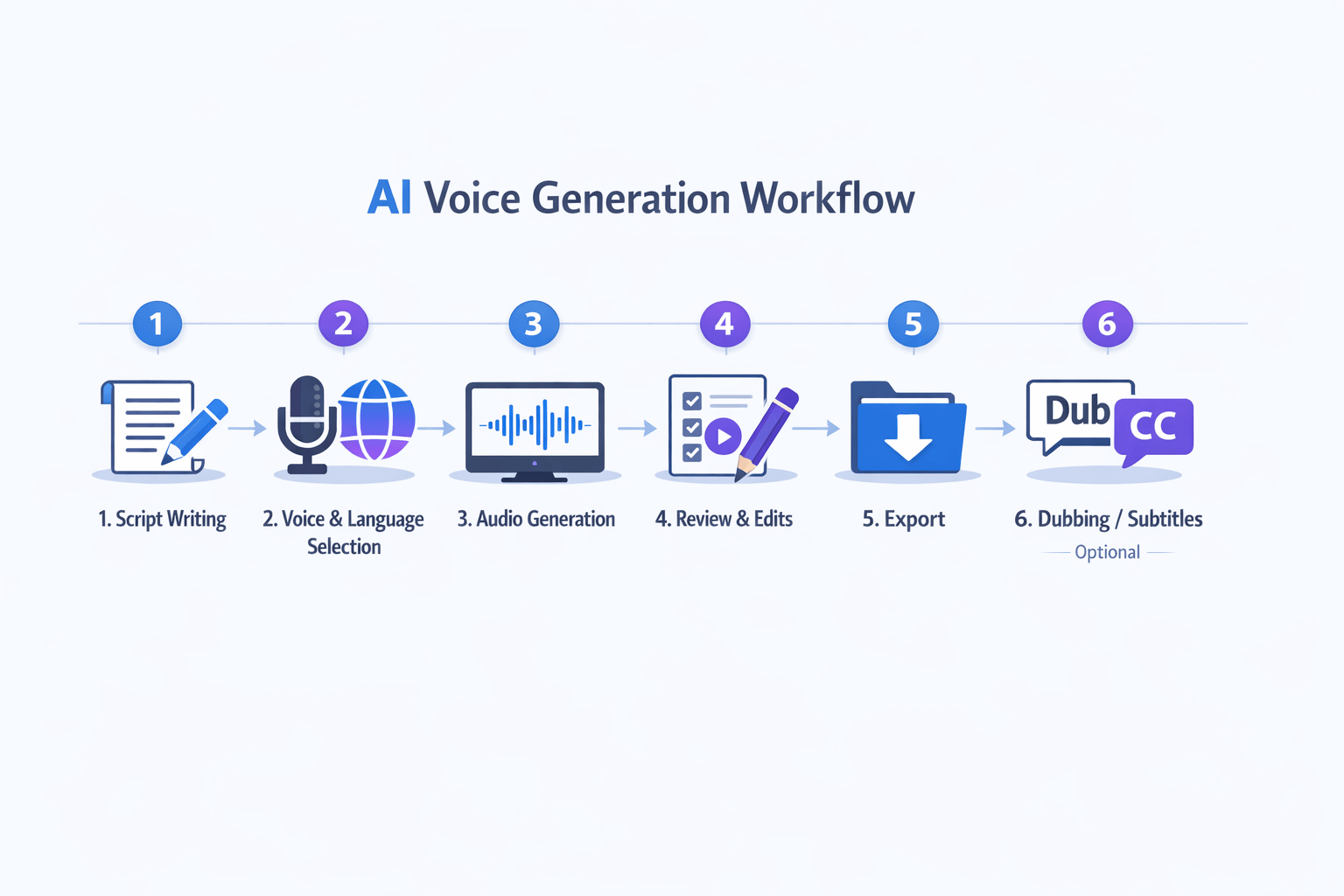
If you want the best free ai voice generator to do more than read text, start with a simple workflow. DupDub makes it easy to go from script to clean audio, then expand into subtitles, dubbing, or transcription. That matters if you publish on YouTube, build courses, or make multilingual content.
Start with a clean script
First, write or polish your script. Keep sentences short, clear, and easy to say out loud. If a line feels stiff, rewrite it so it sounds natural when spoken.
Then break the script into short sections. This makes it easier to test pacing, tone, and pronunciation. It also helps if you need to swap voices later.
Pick a voice and language
Next, choose your language, accent, and voice style. DupDub offers a wide range of voices, so you can match the sound to your use case. For example, a product demo may need a calm, clear tone, while a social clip may work better with more energy.
As you test voices, listen for three things:
-
Clarity
-
Natural pacing
-
Fit for your audience
If needed, adjust pauses, emphasis, or wording before you generate the full file.
Generate, review, and export
Once the voice sounds right, generate the audio and review it from start to finish. Check names, numbers, and brand terms first. Small edits here can save time later.
After that, export in the format you need, such as MP3 or WAV. If you're creating free ai voice generator text to speech assets for video, keep file names organized by scene or language.
Extend the workflow for publishing
You can also turn the same project into a bigger content workflow. That includes:
-
Dubbing videos into other languages
-
Creating subtitles for accessibility
-
Transcribing audio into editable text
-
Reusing transcripts for blog posts or captions
This is where DupDub stands out. You can start with voice generation, then move into localization without switching tools.
Best Free AI Voice Generator by Use Case
The best free AI voice generator depends on what you need to make. Some tools are great for quick voiceovers. Others help with dubbing, subtitles, and multilingual work. If you only need simple audio, an AI voice generator free text to speech tool may be enough. If you publish often, an all-in-one platform can save hours.
Pick the right tool for the job
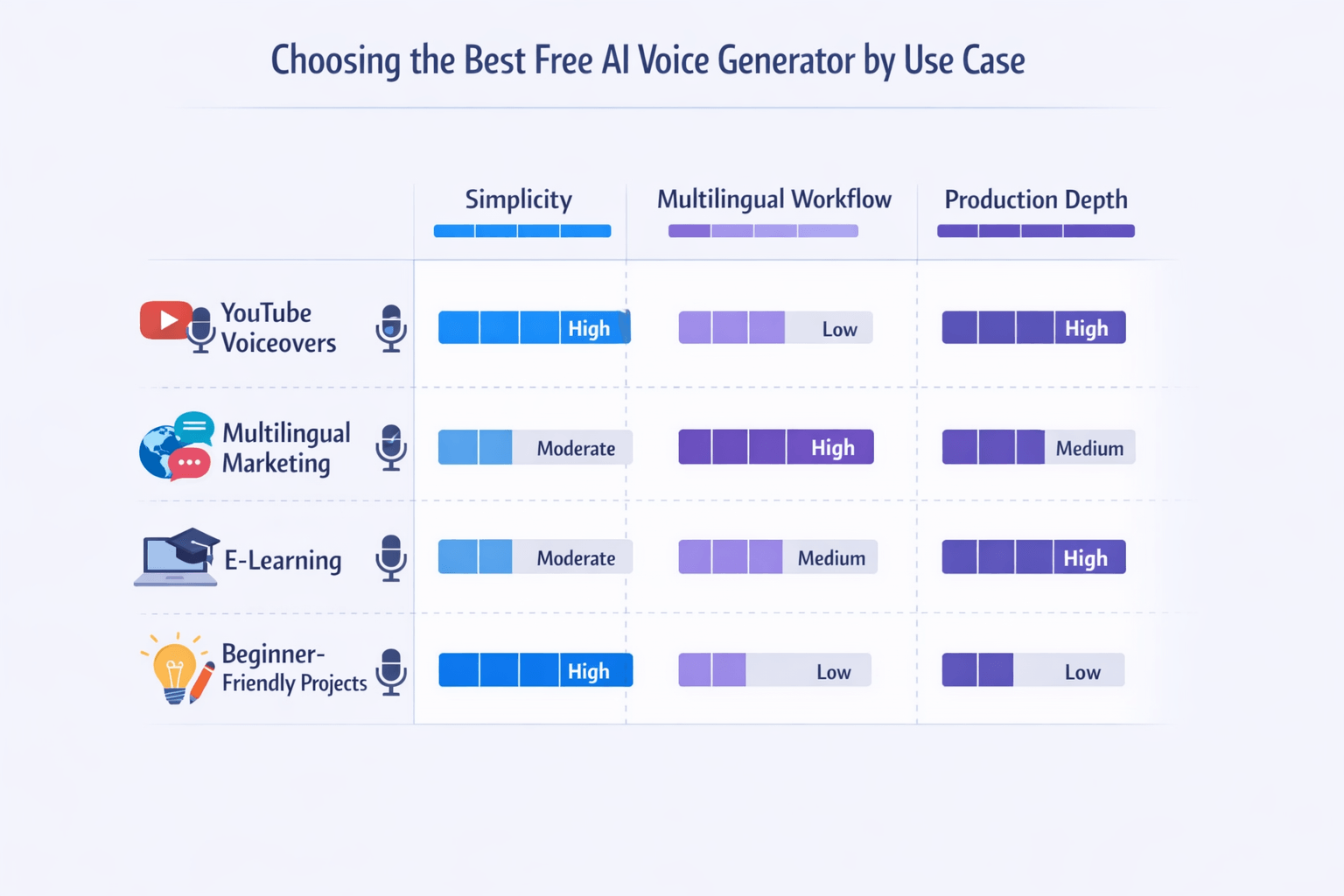
Here’s a simple way to match tool type to project needs:
-
YouTube voiceovers: Pick a tool with natural voices, easy script input, and fast MP3 or WAV export.
-
Multilingual marketing: Choose a platform with translation, dubbing, subtitle sync, and many language options.
-
E-learning and training: Look for clear narration, stable pronunciation, and support for long files.
-
Beginner-friendly projects: Start with a clean editor, free trial access, and simple controls.
Best fit by use case
For YouTube voiceovers, voice quality and speed matter most. A focused free ai voice generator text to speech app can work well if you just need short intros, explainers, or social clips. But if you also cut video, add captions, and repurpose content, a broader workflow tool is easier.
For multilingual marketing, the best choice is usually an all-in-one platform. You can write, translate, dub, and export in one place. That cuts handoffs and keeps brand voice more consistent across campaigns.
For e-learning, control matters. You may need longer scripts, steady pacing, and clean pronunciation for lessons and training modules. In that case, production depth beats a basic AI text-to-speech generator free plan.
For beginners, keep it simple. Start with the interface you can learn fast. Then upgrade only when you need voice cloning, transcription, or team workflows.
DupDub stands out when your project goes beyond basic TTS. It combines voice generation, dubbing, transcription, subtitles, and multilingual tools in one workflow, which makes it a strong fit for creators and small teams managing repeat content.
AI Voice Cloning Ethics, Copyright, and Disclosure
The best free AI voice generator can save time, but it also adds real risk. Before you publish AI speech, make sure you have consent, clear rights, and a simple review process. That matters for ads, lessons, podcasts, and dubbed videos.
Get consent before you clone
Only clone a voice when the speaker clearly agrees. That consent should say where you can use the voice, for how long, and in which languages. If you work with clients or freelancers, keep that approval in writing.
A voice can be part of a person’s identity and brand. Using it without permission can create legal trouble and hurt trust fast. When kids, public figures, or sensitive topics are involved, be extra careful.
Check rights, disclosure, and brand safety
Copyright may cover the script, recording, and performance rights around a project. It may not protect a voice itself in every case, so review local rules and platform terms before commercial use. Also ask a basic question: could this audio confuse, mislead, or harm your audience?
For public content, disclosure is smart and often expected. In the EU,
Regulation (EU) 2024/1689, Article 50 says certain AI outputs must be marked in a machine-readable format and be detectable as artificially generated or manipulated, with the rule applying from 2 August 2026.
Use this quick checklist before you publish:
-
Confirm written consent from the speaker
-
Check script, music, and performance rights
-
Label synthetic audio when needed
-
Review claims, tone, and brand risk
-
Keep records of approvals and source files
How This Article Fits the Neural TTS Technology Cluster
This guide on the best free AI voice generator is one piece of a bigger learning path. It helps readers start with tool discovery, then move into real production tasks like voiceovers, dubbing, subtitles, and localization. That matters because choosing a tool is only step one.
Build from tool choice to workflow
From here, readers can go deeper into related topics that shape results:
-
neural TTS (AI speech models that sound more human)
-
AI dubbing for video translation and re-voicing
-
transcription for scripts, captions, and edits
-
subtitle generation and timing
-
voice cloning for brand voice and creator workflows
-
multilingual localization for global publishing
These topics connect. For example, a creator may start with an AI text-to-speech generator free tool, then need subtitle sync, translated audio, and transcript cleanup.
Strengthen quality and compliance
This cluster also supports smarter implementation. Readers can compare voice quality, language coverage, export formats, and editing controls across tools. They can also learn key rules around consent, copyright, disclosure, and commercial use before publishing cloned or synthetic voices.
Together, these related pages build a clear path from testing free tools to running a reliable content workflow.
FAQ: Free AI Voice Generator Text-to-Speech Questions
-
What is the best free AI voice generator for realistic voiceovers?
The best free AI voice generator depends on your goal. If you want natural voiceovers, test voice quality, language range, export options, and commercial rights first. Tools with neural TTS (AI speech that sounds more human) usually sound better than basic robotic readers.
-
Is free AI voice generator text to speech good enough for commercial use?
Sometimes, yes. But you need to check the license. Some free plans allow testing only, while others limit client work, ads, or monetized videos. Always review usage rights before you publish.
-
Which AI voice generator text to speech free tools support many languages?
The strongest tools support multilingual voiceovers, subtitle workflows, and dubbing in one place. If you publish globally, look for language coverage, accent options, and easy script editing.
-
Can I use voice cloning on a free plan?
Some tools include limited cloning in trials or paid tiers only. Before using cloning, make sure you have clear consent from the original speaker and a lawful reason to use their voice.
-
How do I choose the right platform for my workflow?
Start with your main task:
voiceovers for YouTube
podcast intros or ads
dubbing and localization
training content
transcripts and subtitles
If you need more than basic TTS, an all-in-one platform like DupDub can save time by combining text-to-speech, dubbing, transcription, and multilingual tools in one workflow.




 Discord
 YouTube
 Tiktok
 Twitter
 Facebook
 Instagram