TL;DR: The quick answer
Short verdict: For multimedia creators who need fast scripts, episode summaries, and repurposed copy, this rates as one of the best free AI writing generator options. It links AI writing with transcription, text-to-speech, and dubbing workflows, so you spend less time switching tools.
Who should consider it: YouTubers, podcasters, course creators, marketers, and small teams that regularly repurpose audio or video. Freelancers and solo creators who want quick script polishing, subtitle-ready drafts, or voice-aware prompts will see the most value.
Key takeaway on trial and privacy: You can test core features with a no-credit-card, 3-day trial, so there’s minimal sign-up friction to evaluate fit. The platform states GDPR-aligned privacy and encrypted processing (EU data rules), but verify enterprise terms before you commit to large projects.
What is DupDub and where it fits in the AI writing ecosystem
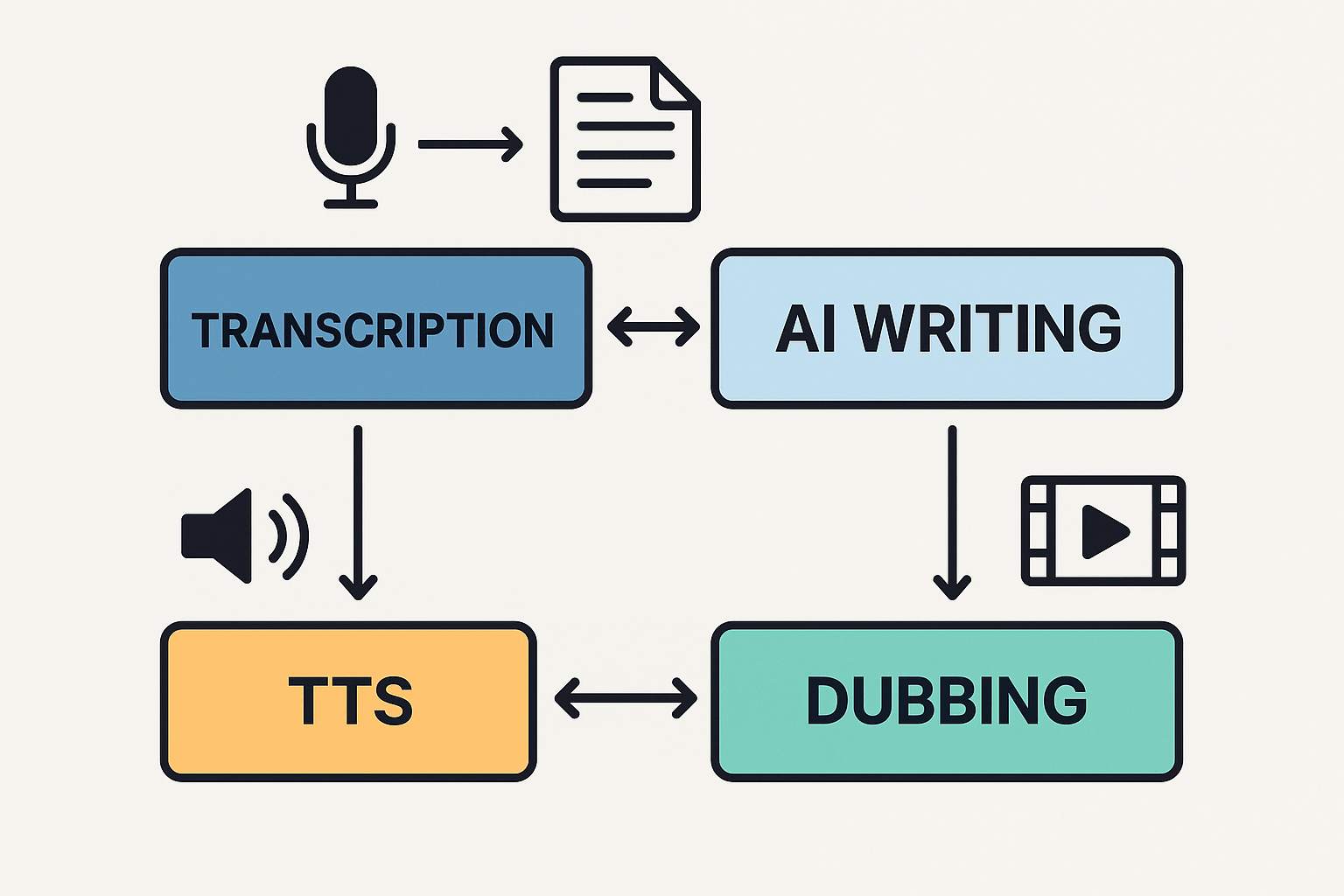
DupDub is an all-in-one content platform that pairs AI writing with text-to-speech, AI dubbing, and transcription. It combines a GPT-powered writing assistant with studio-grade audio and video tools. If you need the best free AI writing generator that also feeds directly into dubbing and TTS, DupDub removes the handoff between text and spoken media.
Core modules and what they do
-
AI Writing: Idea generation, script drafting, rewriting, summarizing, and script polishing. Outputs are exportable to TTS or dubbing workflows.
-
Text-to-Speech (TTS): Hundreds of natural voices across 90+ languages and accents, with style controls for pacing and tone.
-
AI Dubbing: End-to-end video voice translation with subtitle alignment and re-voicing for fast localization.
-
Transcription: Speech-to-text for 40+ languages, editable transcripts, and one-click export to the AI Writing editor.
Who this is built for
DupDub targets creators and teams who publish audio or video. Think YouTubers, podcasters, e-learning authors, marketers, and small businesses that need fast multilingual reach. It suits anyone who wants text work to flow straight into voice, avatars, or subtitled video.
How DupDub differs from single-focus writing tools
Single-focus writing apps only produce text. DupDub links text to audio and video in the same workspace, so you can draft a script, synthesize a voice, and generate subtitles without exports. That saves time, keeps brand voice consistent, and reduces format friction. In short, DupDub is a multimodal production hub, not just a text editor.
Quick side-by-side comparison: DupDub vs other free AI writing generators
This compact comparison helps you scan strengths and limits fast. We compare free access, sign-up friction, and media features. Searching for the best free ai writing generator? DupDub stands out when media matters.
Snapshot comparison table
|
Product
|
Free access
|
No-sign-up trial
|
Multimedia features
|
Best for
|
|
DupDub
|
3-day free trial, 10 starter credits
|
No credit card required
|
AI dubbing, TTS (text-to-speech), voice cloning, STT (speech-to-text), subtitles
|
Creators who repurpose video and audio across languages
|
|
Writing-only generators
|
Free tiers vary, often limited prompts
|
Most require an account
|
Text tools only, limited audio/video support
|
Fast drafting and long-form text work
|
|
TTS-first platforms
|
Free minutes or samples
|
Varies by vendor
|
Strong synthetic voices, fewer dubbing or subtitle tools
|
Voice-over and audio-first projects
|
Why multimedia features change rankings
Most writing tools focus on text only. DupDub links writing to audio and video tools. TTS (text-to-speech) turns scripts into voice tracks. STT (speech-to-text) creates editable transcripts from audio.
When you need translated voiceovers, a one-stop tool saves steps and time. It also keeps tone consistent across formats. For creators that publish video in many languages, that consistency matters. So integrated media often outranks pure text accuracy alone.
Quick best-for recommendations
YouTuber: Use DupDub to turn a script into dubbed videos fast. It saves editing time and keeps your brand voice across languages.
Course creator: Draft lessons, auto-generate transcripts, then produce TTS lectures. DupDub reduces the handoffs between writers and voice talent.
Marketer: Create short scripts, test voice variants, and export ready audio. Multilingual ads and landing page voiceovers become simpler.
Podcaster: Transcribe episodes, edit scripts from transcripts, and make short clips with synthetic voices. DupDub speeds repurposing for social.
Freelance writer or small business: If you only need text, a writing-first tool may be cheaper. But choose DupDub when you want audio or video output with the same workflow.
DupDub re-ranks higher when your workflow needs more than words. If you only write blog posts, a text tool still fits. If you publish multimedia, DupDub earns its place.
Hands-on: How to try DupDub’s AI writing (no-sign-up friction)
Want to test the best free ai writing generator quickly and without a credit card? This hands-on walkthrough shows how DupDub’s no-credit-card, 3-day trial works. You’ll see where to find AI Writing, run a sample prompt for a YouTube script or blog post, run quick quality checks, and export content into TTS or dubbing in minutes.
Quick account creation and trial start
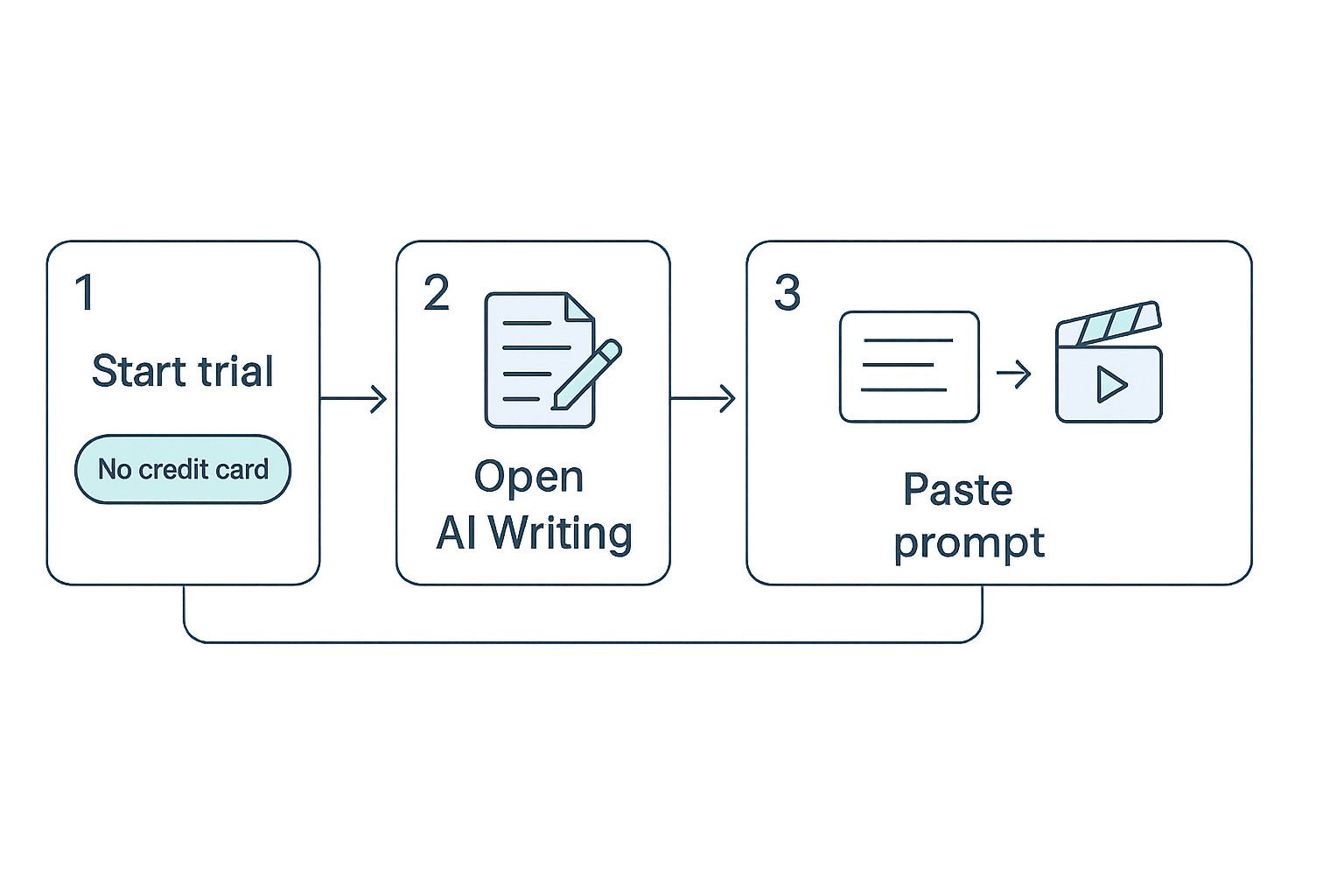
Creating an account is fast. Click Start your 3-day free trial and enter an email and password. No credit card is required and you get 10 starter credits to experiment.
Once you confirm your email, you’re in. The trial unlocks the AI Writing module and links to TTS and transcription tools. There’s a small opt-in checkbox for product updates during signup; opt out if you prefer no emails.
Open AI Writing and where to find it
From the DupDub dashboard, pick AI Writing in the left menu. The writing studio sits near transcription and dubbing tools, making it easy to jump between text and audio workflows. If you use multimedia workflows, you’ll like the one-click export options.
A sample prompt workflow for a YouTube script or blog post
Follow these steps to go from idea to usable draft in under 10 minutes:
-
Select the project type: YouTube script or blog post. Choose tone and target length.
-
Paste a brief creative brief: topic, audience, key points, and desired call to action. Example: "Topic: 60-second video on remote-work ergonomics; audience: freelance creators; tone: friendly; include 3 tips and CTA to subscribe."
-
Hit Generate and wait a few seconds for the draft.
-
Edit inline, ask the model to shorten, expand, or rewrite sections, and repeat until satisfied.
You can also try a variant prompt for a blog intro and then ask for a 90-second video script based on that intro.
Quick quality checks before exporting
-
Readability: ask the tool to simplify any paragraph to plain language.
-
Factual checks: flag and verify any specific stats or claims externally.
-
Brand voice: request a rewrite to match your channel’s tone or your company style.
-
Timing: for scripts, paste the text into a rough words-per-minute calculator to check runtime.
Export to TTS or dubbing
When the script is ready, use the export button to send text to DupDub’s TTS or dubbing studio. Pick a voice, language, or a cloned voice if you have one. The platform will align subtitles and audio for easy publishing.
This flow makes it easy to test writing, then hear it in a target voice, all inside the same trial window.
Feature deep-dive: DupDub’s AI writing capabilities and integrations
DupDub packs a focused set of writing tools that connect directly to transcription, text-to-speech, and dubbing. If you search for the best free ai writing generator, DupDub’s AI writing module stands out because it is built to feed multimedia workflows, not just produce text. This section shows what the writing tools do, how they link to audio and video, and what to test during the no-sign-up trial.
Core writing tools: draft, rewrite, summarize, polish
DupDub offers four core modes for creators: drafting, rewriting, summarizing, and script polishing. Drafting helps you turn a title or short brief into a scene, intro, or segment. Rewriting adjusts tone, length, or complexity so scripts match your host voice or brand. Summarizing compresses long transcripts into short episode notes, social captions, or lesson bullets. Script polishing tightens pacing, adds stage directions, and formats lines for on-camera or voiceover delivery.
Features you’ll use daily include template-based prompts for intros and CTAs, an adjustable tone slider, and a side-by-side compare mode that surfaces edits. These make it fast to create multiple script variants for A/B testing or multilingual versions.
From transcript to script to voice: connected multimodal flow
The tightest value is the flow from speech to script to voice. Transcription creates editable text from your raw audio or video. You can send that transcript into the writing tool to get a cleaned script, then one-click export to TTS or dubbing. That keeps timing and subtitle alignment intact, so your voiceover matches the original video.
Practical export paths include: transcript to short-form social posts, cleaned script to TTS audio files, and localized script to AI dubbing with subtitle sync. These links save hours compared to manual copy-paste workflows.
API and automation: scale captions and scripts
DupDub’s API supports automated pipelines for creators and teams. Use cases include batch transcribing a course library, auto-generating episode show notes, or creating localized voiceovers for product demos. The API returns structured data, so you can pipe generated scripts into publishing tools or a CMS.
Common automation patterns are: 1) webhook on upload triggers transcription, 2) cleaned transcript triggers script polish, 3) polished script triggers TTS render. This chain is ideal for creators who publish many short videos or lesson modules.
DupDub supports TTS voices and speech-to-text in dozens of languages, plus voice cloning across many accents, which matters for global reach. For broad industry context,
VoxBooster (2026) notes Microsoft Azure's Neural TTS service now offers 600+ voices spanning 150+ languages and locales, the broadest commercial coverage available. That sets a benchmark for voice variety creators expect when they scale to many markets.
In practice, DupDub gives you high-coverage TTS and cloning across major languages, plus subtitle translation for 40+ languages. If you need a rare locale, check voice availability before committing to a localization batch.
Practical limits to test during the free trial
Use the 3-day free trial to validate these limits: file size handling, transcription accuracy for noisy audio, voice clone fidelity from short samples, and timing when exporting dubbed tracks. Test a full end-to-end job: upload a 5 to 10 minute video, transcribe it, polish the script, then export a TTS and a dubbed version. That reveals real latency, subtitle sync, and voice quality for your content type.
Also try edge cases: overlapping speech, slang, or accented speakers. Note how the editor preserves speaker labels and how many words per file the plan allows.
Quick checklist for your trial
-
Upload a representative video or podcast episode.
-
Run transcription and export raw transcript.
-
Use rewrite and polish on the transcript.
-
Export TTS and one dubbed track to check sync.
-
Record a 30 second sample and try voice cloning.
These steps will show live limits and integration smoothness.
Three real user scenarios (micro case studies)
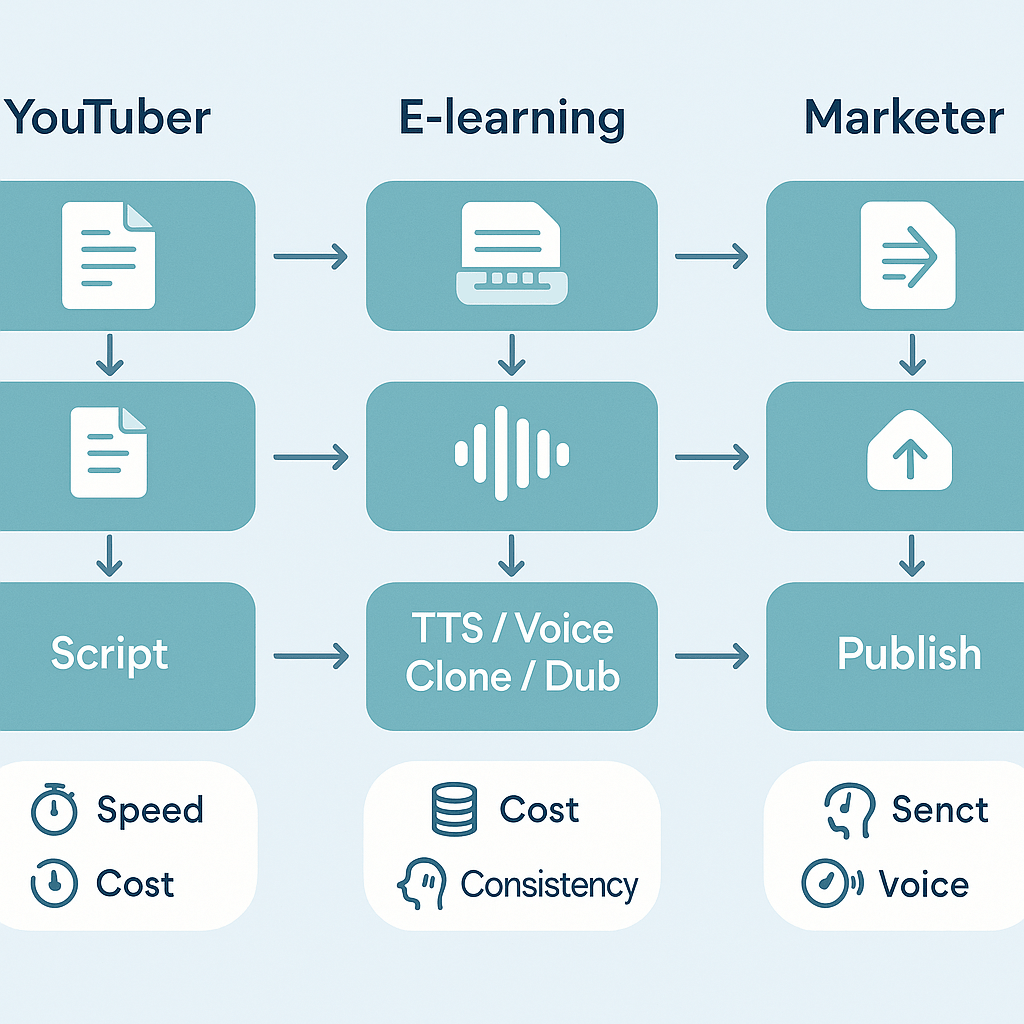
These short scenarios show how three creators use DupDub to speed production, cut localization costs, and keep voice and tone consistent. Each case lists the key outcomes to watch: speed, cost, and consistency, plus simple checks you can run during the free trial. If you’re evaluating the best free ai writing generator, use these micro case studies to map trial results to real work.
YouTuber: turn scripts into dubbed videos
A solo YouTuber repurposes one English script into three language versions. They use AI writing to adapt phrasing for each audience, then create TTS or voice-cloned dubs and synced subtitles. The workflow cuts turnaround from days to hours and keeps edits centralized in one project.
-
Speed: target publish time drop from 48 hours to under 8 hours. Validate: time a full script-to-publish run in the trial.
-
Cost: compare pay-as-you-go dubbing credits to previous agency fees. Validate: estimate credits used per minute and map to your hourly budget.
-
Consistency: check voice match and subtitle timing across languages. Validate: export one dubbed file and compare perceived tone and sync.
E-learning creator: build course narration and voice clones
An instructional designer creates multi-module narration and a branded voice clone for future updates. They draft scripts with AI writing, then generate a cloned voice from a short sample and produce narration in multiple accents. This keeps course voice stable across modules and reduces rerecording time.
-
Speed: measure how fast a module goes from script to finished audio. Validate: run one module through writing, cloning, and export during the trial.
-
Cost: watch credits used for cloning and long-form TTS. Validate: calculate credits per hour of finished audio and project annual spend.
-
Consistency: test the clone on two different modules, checking prosody and clarity. Validate: compare samples side by side.
Marketer: draft SEO posts and polish tone for markets
A content marketer uses AI writing to draft blog posts, then refines tone for regional audiences before localization and dubbing. The platform connects writing, TTS, and subtitle export so the same content feeds web, video, and audio channels.
-
Speed: measure time from idea to publishable draft. Validate: create a keyword-focused draft during the trial and check edit time.
-
Cost: compare credits for writing plus TTS vs hiring separate writers and voice actors. Validate: compute total cost per asset.
-
Consistency: ensure brand voice across text and audio. Validate: run a style edit, then generate TTS and review alignment.
Quick trial checklist
-
Run a full end-to-end asset from script to published file during the 3-day free trial. It’s no credit card, so you can test friction-free.
-
Track elapsed time, credits consumed, and a short listener/readability review for consistency.
-
Export at least one file per format you use, then compare cost and quality against your current process to decide.
Privacy, security, and ethical considerations
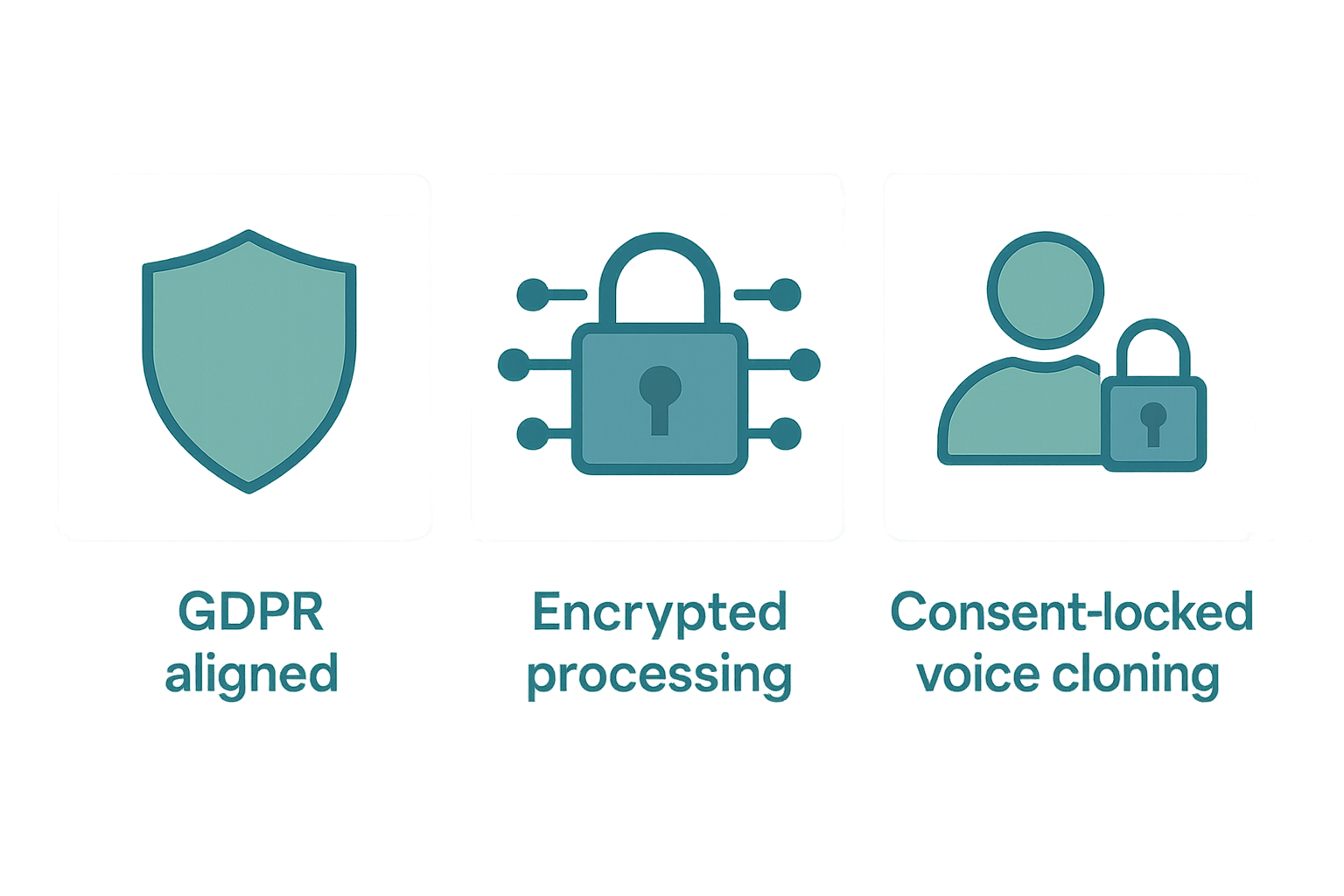
DupDub positions its AI writing and multimodal tools as GDPR-aligned, with encrypted processing and voice cloning locked to speaker consent. This matters when you evaluate the best free ai writing generator for multimedia workflows, because creators need both legal clarity and technical controls. Below we explain what DupDub states, the practical questions to ask, and the checks to run during a no-sign-up trial.
What DupDub says about privacy and security
DupDub claims GDPR alignment, encrypted processing, and consent-locked voice cloning. Under the GDPR, consent must be freely given, specific, informed, and unambiguous, according to
European Commission. The platform also notes voice clones are locked to the original speaker and that processing is encrypted, but you should verify how those terms work for your project.
Questions to ask before you upload sensitive material
-
What is the data retention period for transcripts, drafts, and voice models? Ask for precise retention windows.
-
How is consent captured for voice cloning, and is it auditable? Request sample consent logs.
-
Is processing encrypted in transit and at rest? Get technical specs and cipher names if possible.
-
Can you export or delete all data on demand? Confirm deletion SLAs (service level agreements).
-
Are voice clones flagged or revoked if consent is withdrawn? Ask how revocation is enforced.
-
Does the vendor train ML models on user content? If so, what opt-out controls exist?
Trial checks: fast, practical steps during the 3-day no-sign-up trial
-
Create an account and request their privacy or DPA (data processing agreement) link.
-
Upload a short audio clip and follow the voice-cloning flow, noting consent prompts.
-
Transcribe a video, then request export and deletion of that transcript. Time how long each action takes.
-
Ask support for details on encryption, retention, and where data is stored geographically.
-
Save screenshots of consent screens and support replies for your compliance record.
Enterprise verification steps before scaling
Enterprises should request a signed DPA, read the security whitepaper, and run a vendor security questionnaire. Consider an independent pen test or SOC-type report before large-scale use. Finally, build a policy for voice consent and revocation in your content workflow.
These checks turn vendor claims into verifiable facts. They help you use DupDub responsibly across dubbing, TTS, and AI writing for global content.
Pricing, free access, and how DupDub compares on value
If you want to judge whether DupDub is the best free ai writing generator for multimedia workflows, start with its 3-day trial. The trial is low friction: no credit card is required and you get 10 starter credits to explore AI writing, TTS, dubbing, and transcription. This section summarizes limits, paid tiers, and when an upgrade makes sense for creators and small teams.
Free trial: what it covers
Manual dubbing often costs $50-100 per minute of finished video, according to
Dubbing Tools (2026), so a short trial helps estimate savings. The 3-day free trial includes:
-
No credit card required, immediate access.
-
10 starter credits usable across AI writing, TTS, and basic dubbing tasks.
-
Full feature preview so you can test transcription, subtitle alignment, and voice cloning at small scale.
If you need a free ai writing generator no sign up, this trial removes signup friction while showing real output quality.
Paid tiers at a glance
-
Personal ($11/month, billed annually): 1,800 yearly credits, modest TTS and transcription capacity. Good for solo YouTubers and podcasters.
-
Professional ($30/month, billed annually): 6,000 yearly credits, bigger voice and transcription quotas, more clones and avatars for small teams.
-
Ultimate ($110/month, billed annually): 30,000 yearly credits, high limits and large-file support for agencies and frequent localizers.
-
Pay-as-you-go: one-time credit packs, useful for one-off large projects.
Cost to value and when to upgrade
Upgrade when you routinely run out of credits, need more voice clones or longer TTS hours, or must process long transcripts and large files. Choose Pay-as-you-go for irregular bursts of work. For steady monthly workloads, Personal often fits a solo creator; Professional suits small teams juggling several shows; Ultimate works when you scale localization across many languages.
Compare plans and match limits to your monthly minutes of video, transcription hours, and clone needs before committing. Start your 3-day free trial to test real projects and measure time and cost saved versus manual workflows.
Alternatives and why you might choose DupDub
If you search for the best free ai writing generator, you’ll find specialist tools that shine in one area. This section gives a quick competitor roundup and explains cases where a focused product still wins. Then use the recommendation matrix to pick DupDub or an alternative by needs, media type, privacy, and cost.
When a voice-first tool wins
ElevenLabs excels at ultra-natural narration and voice cloning fidelity. Pick it when you need broadcast quality narration or voice acting. Murf is strong for a studio-like workflow and team editing. Play.ht offers an extensive voice library and simple embedding for blogs and apps.
When video avatars or visuals matter
HeyGen focuses on talking avatars and on-screen presenters. If your goal is video-first marketing with lifelike avatars, a specialist like HeyGen can speed production and deliver polished visuals.
When reading and accessibility are the priority
Speechify is tuned for accessibility and personal reading experiences. Use it when your main need is readable audio for users, or when assistive features are central.
When a single platform wins: multimedia workflows
DupDub stands out if you want writing plus dubbing, TTS, transcription, and avatar features in one place. It cuts friction across steps: write, transcribe, translate, then re-voice. That saves time versus stitching several single-purpose tools together.
Recommendation matrix
|
Use case
|
Best fit
|
Why it wins
|
|
End-to-end video localization and scripts
|
DupDub
|
Writing, TTS, dubbing, and subtitles in one workflow
|
|
Highest-fidelity narration or voice cloning
|
ElevenLabs / Murf
|
Best-in-class voice realism and expressive controls
|
|
Large voice library for web publishing
|
Play.ht
|
Easy embedding, many voices and accents
|
|
Accessibility and read-aloud apps
|
Speechify
|
Features tuned for reading comfort and users with disabilities
|
|
Lifelike on-screen presenters
|
HeyGen
|
Avatar-first video creation and presenter tools
|
In short, pick a specialist when you need a single feature at the absolute top of its class. Choose DupDub when you want the best value for creators who need integrated writing, dubbing, and localization in one low-friction platform.
FAQ — common questions about using DupDub as a free AI writing generator
-
How does the 3-day trial work for free AI writing generator no sign up?
DupDub gives a 3-day free trial with no credit card and 10 starter credits. It’s a low-friction way to test the AI writing tools, TTS, and dubbing features. Sign up takes under a minute and you can export sample outputs during the trial.
-
What data is stored and how is voice and text privacy handled for free ai writing generator users?
Text and voice processing is encrypted while in transit and at rest. Voice cloning is locked to the original speaker, and DupDub states GDPR-aligned handling for user data. If you work with sensitive content, contact support to confirm enterprise controls.
-
Can I use AI-generated text and voices commercially with DupDub free AI writing generator?
Yes, commercial use is generally allowed, but you must follow DupDub terms of service. For brand voice cloning or large-scale licensing, request an enterprise review or written clearance from sales.
-
How does DupDub’s writing quality compare with other free AI writing generator tools?
DupDub uses a GPT-powered assistant tuned for scripts and multimedia workflows. It shines when writing for dubbing, subtitles, and TTS, so expect smoother repurposing for video than generic text-only tools.
-
Where do I get support, API docs, or an enterprise review for DupDub free ai writing generator?
Open the platform Help or Support section to file a ticket or chat. Look for API documentation inside the developer or integrations menu. For SLA, privacy, or enterprise purchasing, contact the sales or enterprise team.




 Discord
 YouTube
 Tiktok
 Twitter
 Facebook
 Instagram