


TL;DR: Can DupDub help you write better YouTube scripts faster?
Short verdict: using the best script writing AI for YouTube together with native TTS, voice cloning, and quick transcription can cut script lead time and speed localization. It turns rough ideas into publishable drafts and produces text that is ready for voiceover and subtitles.
Who benefits most: solo creators, small teams, and agencies that publish often or localize videos. Main trade-offs: you still need human editing for tone and facts, voice cloning requires consent and safeguards, and some cheaper tools force extra manual steps.
Next step: read the full guide for side-by-side comparisons, before and after script snippets, transparent pricing, and a step-by-step workflow to judge ROI and fit for your channel.
Why YouTubers Need an AI Script Writer (and when to use one)
An AI script writer solves three concrete problems for creators: speed, consistency, and scale. For ambitious channels, the best script writing AI for YouTube shortens research and drafting time. It also keeps your brand voice steady across episodes and makes localization easier with TTS and voice cloning. Use it to move faster, not to remove human judgment.
Use case: Where AI saves hours and money
AI shines when you need volume or variation. Teams use it for idea generation, episode outlines, and first drafts. Solo creators use it to batch scripts for a week or a month. Editors and agencies use it to produce localized versions with synced subtitles and TTS. Benefits include faster turnaround, predictable tone, and lower dubbing costs.
-
Ideation and headlines: generate 10 angles from one topic.
-
Batch scripts: turn one brief into a set of episode drafts.
-
Repurposing: convert long videos into short clips and episode summaries.
-
Localization prep: create translated scripts, then export to TTS and subtitles.
Use case: When AI helps most in a workflow
-
Research and outline, get a structured draft in minutes.
-
Drafting, to reduce writing time by 50 percent or more.
-
Subtitle and caption prep, so editors can sync faster.
-
Voice cloning and TTS for consistent multilingual releases.
When humans must steer the final script
AI makes strong first drafts, but humans finish the job. Always review tone, facts, and legal claims before publishing. Sensitive topics, branded claims, and jokes need human vetting. Also check cultural nuance when localizing, because literal translations can sound odd.
-
Fact-check numbers, names, and dates.
-
Tune jokes and references for your audience.
-
Approve any cloned voice use and confirm permissions.
In short, use AI to speed repeatable tasks and free time for creativity. Keep humans in the loop for accuracy, legal safety, and final voice choices. This combo scales output while protecting brand quality.
How AI YouTube Script Generators Actually Work (simple explainer)
When you research the best script writing ai for youtube, you want a clear, non-technical view of how a title becomes a draft. These tools take short inputs, run them through a language model tuned for prompts, and return a usable script that a human then polishes. The result speeds writing, but the quality depends on what you feed the system and how you tune it.
Step 1: Inputs create context
AI script generators start with structured inputs: a title, target keywords, a short brief, or a transcript. The system converts these into a prompt that tells the model the topic, audience, and desired format. Better inputs mean clearer, tighter drafts, and less editing later.
Step 2: The model and prompt engineering
At the core is a transformer-based language model (a large language model, or LLM) that predicts useful next words from context. According to IEEE Spectrum (2024), A transformer-based LLM is trained by giving it a vast dataset of text to learn from. The attention mechanism comes into play as it processes sentences and looks for patterns. Prompt engineering shapes the model: system prompts set voice and role, and example prompts show the format you want.
Step 3: Controls that shape output
Creators should tweak a few controls to improve pacing and CTAs:
-
Temperature: lower values make text safer and more factual. Higher values add flair but can wander.
-
Max length or token limit: controls draft size and pacing of sections.
-
Tone or persona: instructs the model to be friendly, formal, or snappy.
-
Segment markers: ask for intro, hook, body, recap, CTA to force structure.
-
CTA placement: specify whether the CTA is mid-roll or end-screen.
Input quality matters. A short, precise brief beats a vague prompt. A transcript gives concrete voice and timing cues, which helps for dubbing and TTS later.
Quick tips you can use now
Ask the model for time-stamped beats, or short scene lines for each visual. Request multiple hooks and A/B test them. Always run a human edit pass to check facts, pacing, and brand voice before recording or TTS. Finally, export a clean transcript to feed into your dubbing or TTS workflow for faster localization.
.png)
Top AI Script Tools Compared — Where DupDub Fits In
Finding the best script writing ai for youtube means judging more than pure prose. You need spoken-voice quality, SEO hooks, editor integrations, and built-in localization. This comparison looks at five common choices, and shows where DupDub fits when you want script writing plus native dubbing, TTS, and voice cloning in one workflow.
Quick market note and comparison table
According to Gartner Magic Quadrant for Content Marketing Platforms (2026), vendors are evaluated on ability to execute and completeness of vision, which matters when you pick a platform that must scale across creators and markets.
|
Tool
|
Spoken voice quality
|
SEO & thumbnail hooks
|
Integrations
|
Localization
|
Best for
|
|
DupDub
|
High: native TTS, voice clones
|
Built-in script prompts, subtitle-ready hooks
|
YouTube transcript import, editors, API
|
Strong: 90+ languages, dubbing workflow
|
Creators who localize and publish fast
|
|
ChatGPT
|
N/A (text only)
|
Excellent idea and hook generation
|
Plugins, API
|
Low native support, needs extra tools
|
Drafting, ideation, templates
|
|
vidIQ
|
N/A (text tool)
|
SEO, keyword research, thumbnail testing
|
YouTube-focused tools
|
Minimal
|
SEO-first creators and channel growth
|
|
Jasper
|
Good text voice, some spoken tones
|
Templates for hooks, outlines
|
CMS, API
|
Add-on workflows needed
|
Marketers and agencies
|
|
Quillbot
|
N/A for spoken voice
|
Paraphrase and polish hooks
|
Some integrations
|
None native
|
Fast rewriting and tone edits
|
Feature checklist creators should use
Use this checklist when evaluating tools for YouTube scripting and localization:
-
Spoken-voice realism, TTS styles, and voice cloning options.
-
One-click YouTube transcript import and subtitle export (SRT).
-
SEO features: keyword-driven hooks, title and thumbnail suggestions.
-
Editor integrations: Premiere, Final Cut, Canva, or browser-based studio.
-
Export formats: MP4, WAV, MP3, SRT.
-
API or batch processing for scale.
-
Privacy and voice-clone safeguards: encryption, speaker lock, GDPR alignment.
Pros and cons by creator type
Hobbyist solo creator
-
Pros: Low-cost AI writing plus simple TTS speeds drafts.
-
Cons: May need manual tuning for natural speech cadence.
Small team or agency
-
Pros: Tools with APIs and batch localization save hours per video.
-
Cons: Tool stack fragmentation adds integration overhead.
Localization-first channels
-
Pros: End-to-end dubbing, subtitle sync, and cloned voices keep brand voice across languages.
-
Cons: Higher-tier plans may be needed for heavy volume.
Editors and producers
-
Pros: Direct export to editing timelines, accurate transcripts, and aligned subtitles cut assembly time.
-
Cons: Some AI writers produce copy that needs human pacing edits for speech.
Where DupDub’s niche adds value
DupDub pairs GPT-style AI writing with native TTS, voice cloning, and subtitle alignment in the same pipeline. That removes friction: you draft, polish, create a localized track, and export a final media file without moving between five apps. The platform focuses on the whole publishing loop, from script to re-voiced video, which matters when speed and consistent brand voice matter.
Practical tradeoffs to expect
-
Text-first tools like ChatGPT and Jasper beat DupDub for pure draft variety. Use them for ideation.
-
DupDub wins when you need matched audio output, translated narration, or cloned presenter voices.
-
SEO specialists may keep vidIQ for keyword testing, then feed results to a script tool.
Bottom line
Pick tools by task: use a top AI writer for rapid drafts, an SEO suite for titles and thumbnails, and DupDub when you want script writing plus native dubbing and localization in one workflow. That mix delivers the fastest time-to-publish and the clearest ROI for creators who target multiple languages and audiences.
Why Choose DupDub for YouTube Scripts (unique strengths)
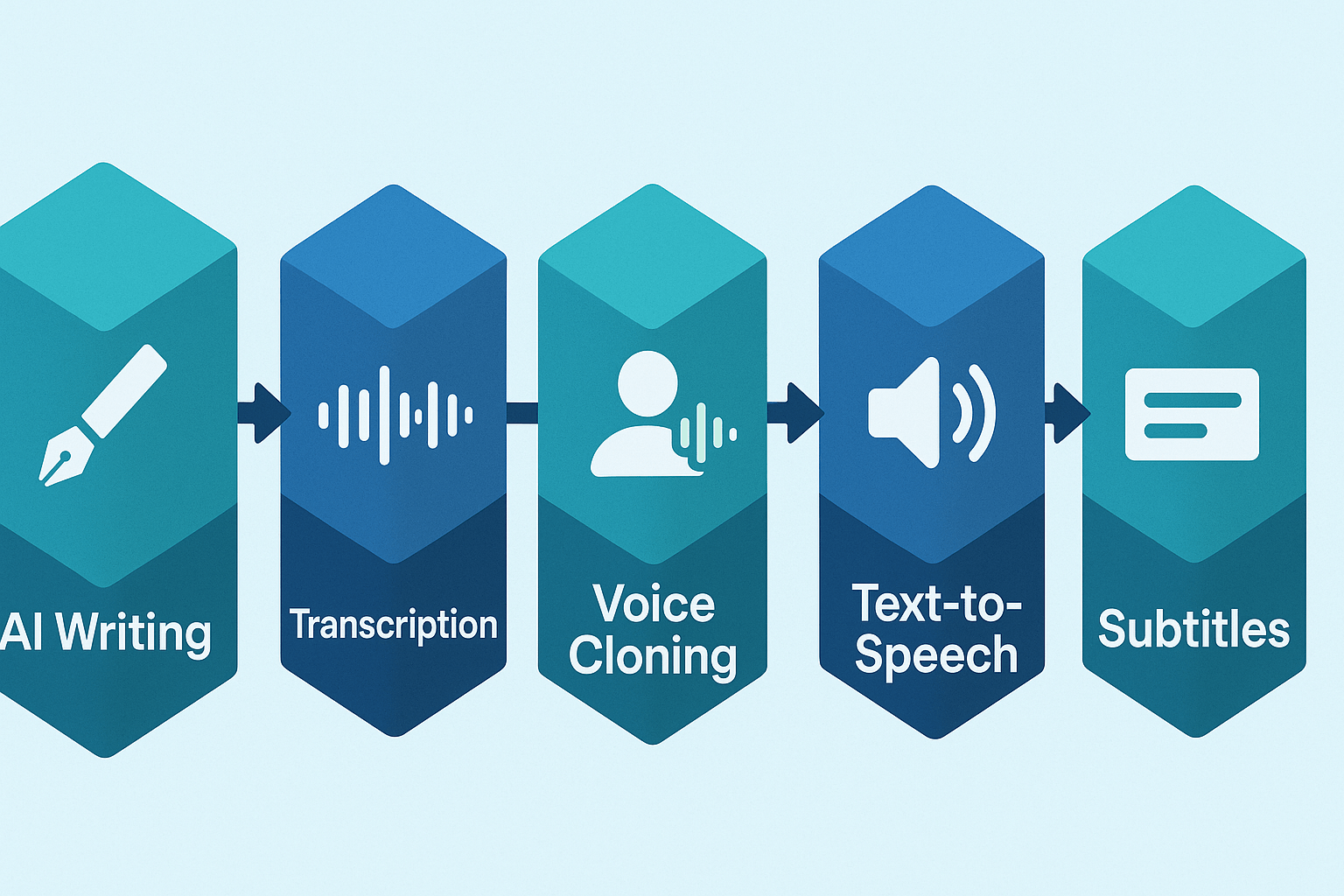
DupDub stands out for creators who want faster scripts and smooth multilingual publishing. Its transcript-first AI writing workflow turns raw speech into polished scripts and captions, so you spend less time retyping. Built-in TTS, voice cloning, and subtitle alignment let you move from draft to upload without juggling vendors.
Unified, transcript-first workflow
DupDub treats the transcript as the source of truth. Record, auto-transcribe, then use the AI writer to draft, tighten, and time lines to the video. That keeps your pacing and on-screen timing intact. It also cuts repeated edits, because script changes sync to subtitles and audio exports.
Built-in dubbing and brand voice control
You get TTS and voice cloning in the same app. Create a voice clone from a short sample, then generate narration in 40 plus languages. That keeps your brand voice consistent across markets. Using one tool also lowers per-video localization costs compared to hiring separate dubbing teams.
Key strengths at a glance:
-
Transcript-first AI writing that syncs to video timing
-
700+ TTS voices and voice cloning for consistent tone
-
Auto subtitles, translation, and frame-accurate alignment
-
Single export to MP4, SRT, MP3 ready for YouTube upload
Reduce handoffs, speed the pipeline
Handoffs cause delays and errors. DupDub removes them by combining writing, TTS, and subtitle exports. Here are the practical wins:
-
One file moves through writing, voice, and subtitles.
-
Fewer upload and re-sync steps, so faster publish cycles.
-
Lower outsourcing bills because you reuse credits for many languages.
Security and real-world fit
DupDub locks voice clones to the original speaker and uses encrypted processing, so creators keep control of assets. For solo creators and small teams it’s a step toward scalable workflows: less admin, more video output. For agencies, the API and export formats make batch localization practical.
DupDub isn’t a magic fix, you still need human edit and review, but it removes the biggest bottlenecks in script-to-publish. The result: faster scripts, consistent global voice, and lower localization cost per video.
Step-by-step workflow: From idea to publish with DupDub
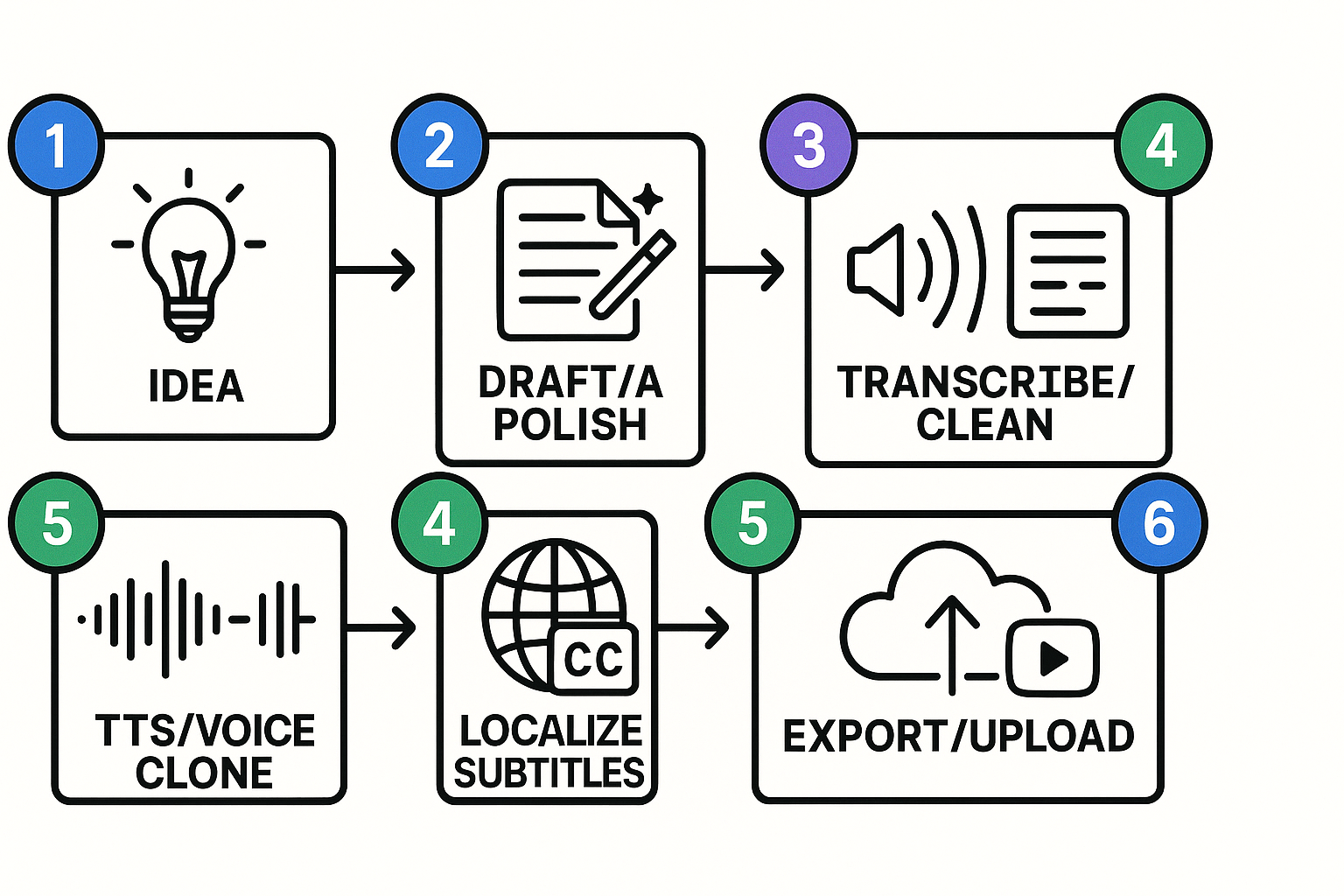
This walkthrough shows a fast, repeatable way to go from idea to a localized YouTube video using DupDub. It covers title and hook generation, drafting and AI polishing, transcribing footage, adding TTS or a cloned voice, creating subtitles, and exporting final files. If you want to scale scripts and localization, follow these steps and reuse the prompts.
1) Idea and title generation
Start with a clear outcome: teach, entertain, or convert. Use DupDub or a prompt to generate 8 title and hook variants. Pick one strong title and two hooks for the video opener and description.
Time-saver: limit options to eight, then A/B test the top two.
2) Draft the script and polish with AI
Draft a short outline, then ask DupDub to expand each bullet into 30–90 second scenes. Request voice and pacing notes for each segment. Run a polish pass to tighten language and add CTAs.
Quality check: read the script aloud, or paste into the built-in TTS to check flow.
3) Transcribe existing footage or notes
Upload raw video or audio to DupDub, and generate a transcript (editable text). Clean filler words, fix facts, and mark timestamps for cuts.
Time-saver: use auto-subtitle alignment to get timestamps instantly.
4) Choose voice: TTS or voice clone
Decide between a standard TTS voice for speed or a cloned voice for brand consistency. Upload a 30 second sample for cloning if needed. Preview several voices and pick the best match.
Quality check: listen at normal and 0.75x speed to catch mispronunciations.
5) Localize subtitles and audio
Translate subtitles into target languages, then generate dubbed audio tracks using TTS or cloned voices. Adjust timing and phrasing for natural cadence.
Time-saver: bulk-translate subtitles and export SRT files for each language.
6) Export, review, and publish
Export MP4 and matching SRTs. Run a final review with a native speaker for each language. Upload the main video to YouTube, add localized captions, and schedule posts across regions.
Deliverables checklist:
-
Final MP4
-
SRT files per language
-
Voice files (MP3/WAV)
-
Clean transcript and publish-ready description
Creator Case Studies & Before/After Metrics (what to include on the live post)
Start this section with short, reproducible case studies that prove value. Call out a solo creator time-saved example, a niche channel engagement lift after localization, and a revenue uplift from entering new markets. If you want search relevance, include the phrase best script writing ai for youtube once in the opening paragraph.
What to collect first: core metrics and context
Collect the basics before you edit or translate. Record channel niche, video length, and baseline audience country mix. Then capture these metrics for both before and after versions:
-
Time to publish: from idea to uploaded video.
-
Cost per localized minute: include human and AI hours, plus any vendor fees.
-
Click through rate (CTR) on thumbnails and titles.
-
Average view duration and watch time percent.
-
Retention curve snapshots at 10, 30, and 60 seconds.
-
Revenue metrics: RPM, ad revenue, affiliate or product sales tied to the video.
Show raw dates and file names. That helps readers reproduce results and builds trust.
How to present the before/after data
Use three simple blocks for each case study: setup, before, after. Keep tables for the numeric summary only. For each study, show:
-
One-line setup: channel, episode idea, audience.
-
Before snapshot: time to publish, cost, CTR, watch time, revenue.
-
After snapshot: same metrics for the AI-assisted or localized version.
-
Notes: what changed in workflow, voices, subtitles, and titles.
Include a small table with left-aligned labels and right-aligned numbers for quick scanning. Add a short paragraph explaining the experiment design and any confounders like thumbnail A/B tests.
Three case templates editors should publish
-
Solo creator time-saved: show absolute and percent time saved. Example metrics: scripting time, recording time saved through AI narration, and final edit time.
-
Niche channel localization lift: show viewers by country, CTR and watch-time changes after translated script and TTS dubbing.
-
Revenue uplift for new markets: compare RPM and direct sales from targeted region before and after launching localized content.
Each template should include a reproducible method section, with exact prompts, voice settings, and subtitle export steps used.
Show before/after script snippets
Readers love short, tangible examples. Use raw, unedited creator text followed by an AI-polished version. Keep examples under 50 words.
Raw snippet:
"Hey everyone, today I want to talk about getting more views on shorts. I tried a new trick, it worked. Let me show you quick steps so you can do it too."
AI-polished snippet:
"Want more views on Shorts? Try this fast three-step test I used last week. It worked and you can copy it in minutes. Watch for the two tweaks that doubled my early retention."
For localization, show the original English line and the localized transcript plus the chosen TTS voice note. Give readers the exact voice style and speed used.
Visualization suggestions for live posts
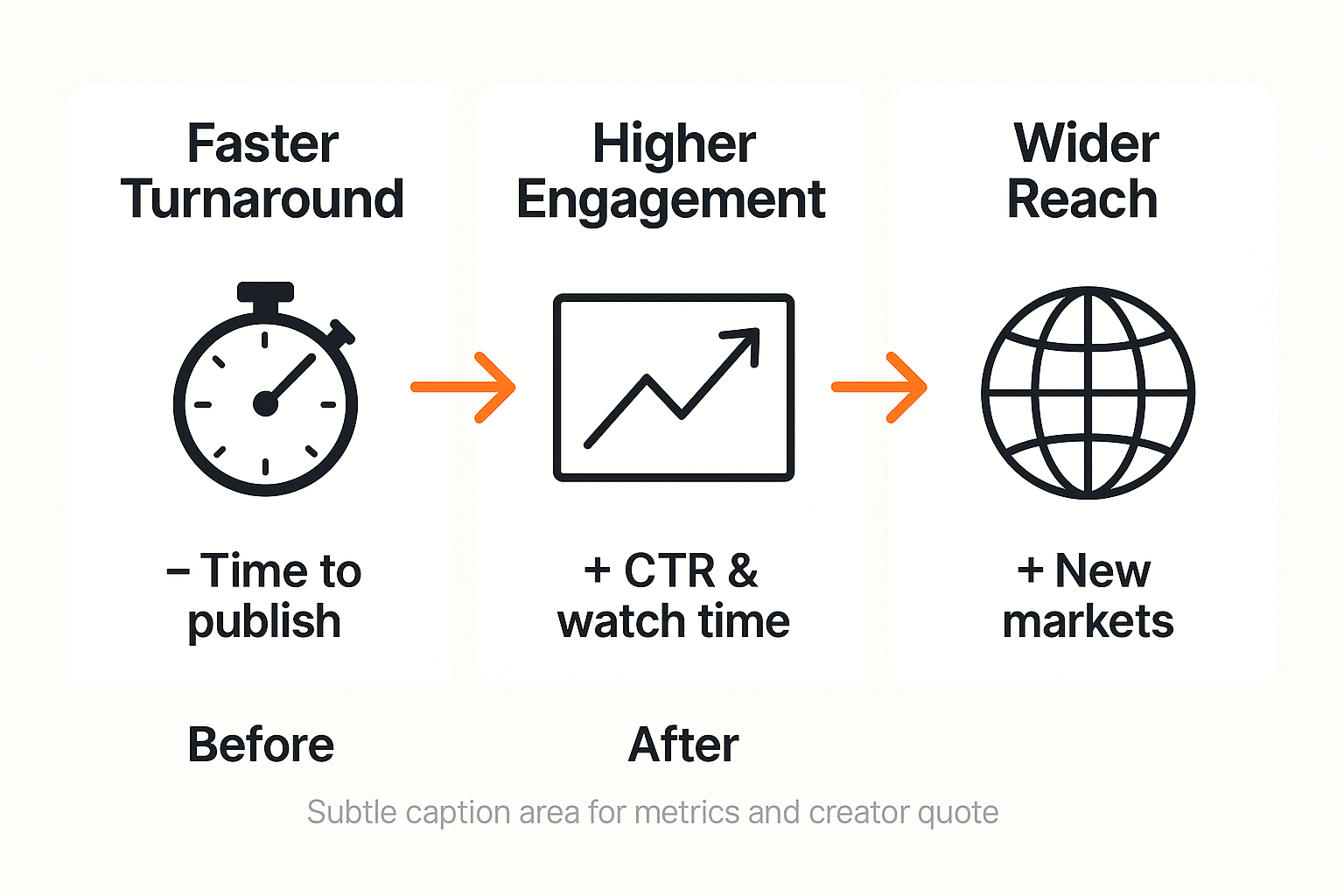
Use one before/after infographic that highlights faster turnaround, higher engagement, and wider reach. Add a small line chart for watch-time changes and a single table for cost per localized minute. Embed creator quotes and a short methodology sidebar.
What to include in captions and transparency notes
Always list the experiment dates, any paid promotions, and whether voice cloning was used. Note privacy controls: voice cloning locked to speaker, encrypted processing, and GDPR-aligned claims where relevant. This builds E E A T and user trust.
Quick checklist for editors
-
Raw video transcript and timestamps saved.
-
Baseline metrics exported before modifications.
-
Exact AI prompts and TTS settings documented.
-
Before and after thumbnails and titles archived.
-
Consent and voice usage permissions recorded.
Include a short downloadable CSV of raw metrics on the live post, and attach a one-paragraph creator testimonial where possible.
Transparent Pricing Breakdown & ROI Examples
This section shows clear pricing for DupDub and simple ROI math you can use to decide whether to start a trial or buy credits. If you're researching the best script writing AI for YouTube, this page helps you compare platform costs to hiring freelancers or studios. Read the quick plan summary, a cost table, and two break-even scenarios you can reuse.
Quick plan snapshot
-
Free trial: 3 days, no card, 10 starter credits.
-
Personal: $11/month billed annually, 1,800 yearly credits.
-
Professional: $30/month billed annually, 6,000 yearly credits.
-
Ultimate: $110/month billed annually, 30,000 yearly credits.
-
Pay-as-you-go: 500 credits $68; 1,000 credits$128; 6,000 credits $698.
According to Occupational Employment and Wages, May 2023, the median annual wage for film and video editors in the United States was $75,020. Use that as a benchmark when you compare DupDub to hiring editors, voice actors, or dubbing studios.
|
Plan
|
Monthly price
|
Typical per-video cost (AI workflow)
|
Equivalent freelancer cost
|
|
Free trial
|
$0
|
$0 for test clips
|
$50 to$200 per clip
|
|
Personal
|
$11
|
$2 to$12 per 5-min video
|
$150 to$400 per video
|
|
Professional
|
$30
|
$1 to$8 per 5-min video
|
$150 to$400 per video
|
|
Ultimate
|
$110
|
<$1 per 5-min video at scale
|
$150 to$400 per video
|
Numbers above are illustrative. Per-video AI cost assumes TTS, subtitle export, and light edits. Freelancer costs vary by region and scope.
Two simple ROI scenarios
-
Solo creator, 8 five-minute videos per month: compare Personal at $11/month. If manual dubbing and editing would cost$150 per video, total freelancer cost is $1,200. DupDub Personal plus credits might cost about$50 a month, so you save roughly $1,139 in month one.
-
Small channel, 40 five-minute videos per month: Professional at $30/month or Ultimate at$110 scales better. If studio dubbing is $200 per video, monthly cost is$8,000. Using DupDub at scale can drop AI per-video cost under $1, saving thousands monthly and paying back the plan fast.
Notes, assumptions, and next step
We assumed standard TTS and subtitle workloads. Voice cloning, avatars, or premium Ultra voices add to costs. For irregular volume, pay-as-you-go credits let you buy only what you need. Start a free 3-day trial to test voice quality and measure real per-video time savings before committing.
FAQ — Privacy, Limitations, Integrations & Best Practices
Is my script and voice data private when using the best script writing ai for youtube?
Yes. Uploaded scripts and voice samples are processed with encryption and are not shared with third parties by default. You can delete projects and voice clones, and enterprise plans offer stricter retention controls.
How do voice cloning safeguards protect creators' voices and privacy?
Cloning requires an explicit sample and consent from the speaker. Cloned voices are locked to the original creator profile and can be revoked or deleted on request.
Is DupDub GDPR aligned and what controls do I get?
DupDub states GDPR alignment and offers data export and deletion tools for accounts. For enterprise use, request a formal data processing addendum during procurement.
What YouTube and editor integrations speed localization and publishing?
Use the YouTube transcript plugin, SRT exports, MP4 audio/video exports, and API access to push scripts, subtitles, and dubbed audio into editors and pipelines.
When should I always human-edit AI YouTube scripts?
Always check facts, pacing, and cultural nuance. Match timing to visuals and tune brand voice before recording.
Best practices plus copyable prompts for better AI YouTube scripts
-
Review and edit for timing and CTA placement.
-
Keep voice samples short and clear for clones.
-
Prompts to copy:
-
"Write a 90-second YouTube script, energetic host voice, 4 key points, 10-second hook."
-
"Localize this script for [country], simplify jokes, keep brand tone."
-
"Polish this draft for clarity and cut wordy sentences to fit 60 seconds."
-

 Discord
 YouTube
 Tiktok
 Twitter
 Facebook
 Instagram