The best speech-to-text software does more than turn audio into text. It should also fit the full workflow: transcription, subtitle editing, dubbing, and voice output in many languages.
If you make videos, podcasts, courses, or marketing content, look for tools that handle four core jobs well:
-
accurate speech-to-text
-
natural text-to-speech voices
-
voice cloning with clear consent controls
-
subtitle, translation, and export options
Some tools are best for transcription only. Others focus on AI dubbing or synthetic voices. All-in-one platforms can save time because they keep scripts, subtitles, cloned voices, and multilingual output in one place.
Free tools can work for short tests or simple projects. But teams usually need better voice quality, easier editing, stronger privacy settings, and smoother multilingual workflows as output grows.
What Is AI Voice Cloning and How Does It Work?
AI voice cloning copies the sound and style of a real voice. It uses short voice samples to learn tone, pace, and speech patterns. If you are comparing the best speech to text software, this matters because transcription often comes first, then editing, then cloned voice output for dubbing, subtitles, or translated content.
Standard text-to-speech reads words in a built-in synthetic voice. Voice cloning goes further. It tries to sound like a specific person. That makes it useful for podcasts, training videos, creator content, and brand voice work.
Start with speech-to-text
Once you have the transcript, you can:
-
fix errors and clean filler words
-
turn rough speech into a clear script
-
create subtitles or captions
-
translate the text into other languages
-
send the final script into a voice clone or TTS engine
Turn text into a cloned voice
After the script is ready, the voice model reads it aloud. The model uses training data, meaning voice samples, to match pitch, rhythm, and pronunciation. Better samples usually lead to more natural output.
A strong tool also gives editing control. That includes pauses, speed, pronunciation, subtitle timing, and line-by-line retakes. Without those controls, even a good clone can sound flat or off.
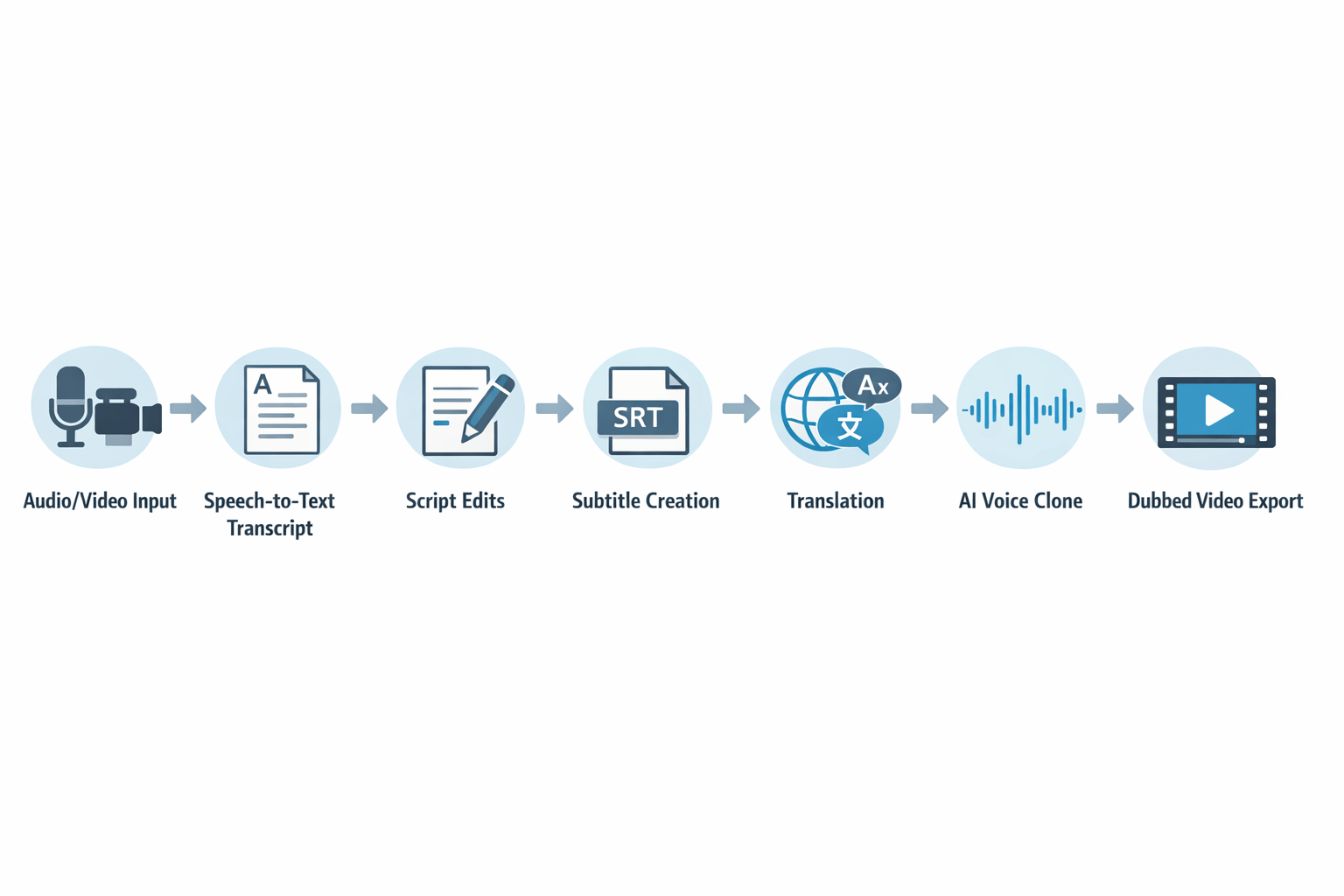
Here is the simple flow:
-
Upload audio or video.
-
Transcribe it into text.
-
Edit the script and subtitles.
-
Translate if needed.
-
Generate the cloned voice.
-
Export dubbed audio, video, or caption files.
When people search for ai voice clone free tools, they often find basic voice output. But quality depends on model strength, clean input audio, language support, and editing options. That is why all-in-one platforms are often easier for multilingual dubbing workflows.
Why People Searching for the Best Speech to Text Software Also Need Voice Cloning Tools
People looking for the best speech to text software often need more than a transcript. In many real workflows, transcription is the first step in a larger content process. Once speech becomes text, you can clean the script, turn it into captions, translate it, and then use AI voice tools to create new audio in the same style or tone.
That’s why speech-to-text and voice cloning often belong in the same stack. One tool helps you capture what was said. The other helps you reuse it across videos, podcasts, training modules, ads, and multilingual content.
Start with transcription, then build from it
Speech-to-text gives you an editable source file. That text makes it easier to fix filler words, tighten phrasing, and create subtitle files like SRT. It also helps teams review content before they dub or publish it.
From there, voice cloning adds the next layer. Instead of recording each version by hand, you can use a cloned voice to generate updated lines, translated scripts, or localized narration. This is where tools like ai voice clone free options may seem useful at first, but many teams outgrow them once they need better control, quality, or language support.
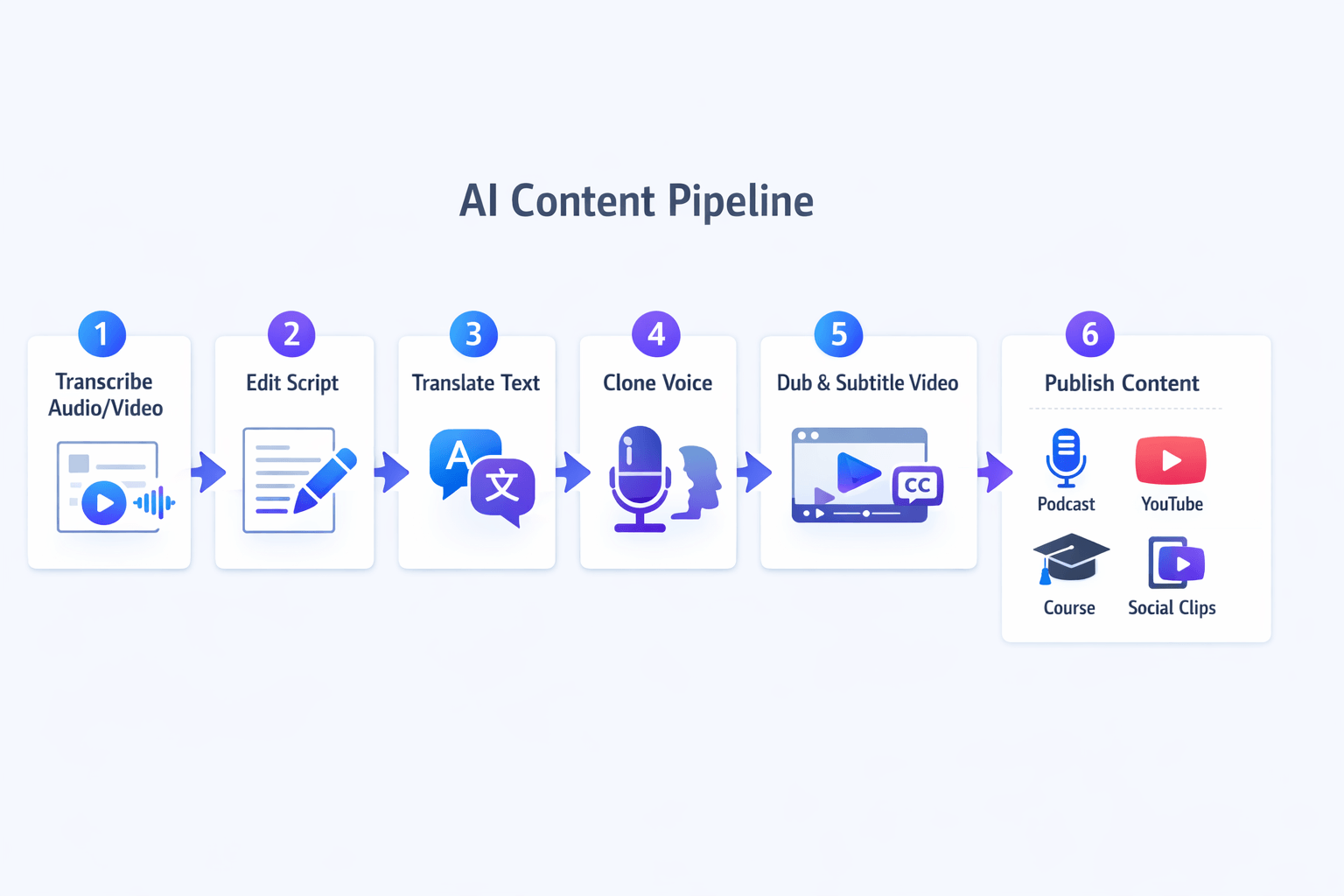
-
Transcribe the original audio or video
-
Edit the script for clarity and timing
-
Translate the final text if needed
-
Generate audio with a cloned voice
-
Dub the video and sync subtitles
-
Publish across channels and formats
Use one workflow for speed and reach
This combined workflow helps with more than dubbing. It improves accessibility with captions, supports repurposing for blogs or email, and speeds up multilingual publishing. For creators and marketers, that means less rework and a more consistent voice across formats.
If your goal is scale, not just transcription, it makes sense to look at platforms that connect speech-to-text, translation, and voice output in one place.
How We Evaluated the Best AI Voice Clone and Speech-to-Text Tools
To rank the best speech to text software fairly, we looked at the full workflow, not one feature in isolation. That means transcription accuracy, voice clone quality, dubbing support, edit speed, language coverage, pricing, and privacy all mattered. We also checked where free plans help, and where they create real limits.
Measure accuracy first
Speech-to-text quality starts with accuracy. In testing, we focused on word error rate, or WER, which means the gap between the spoken source and the final transcript. According to the
NIST OpenASR 2024 Evaluation Plan, speech recognition systems are tested with the primary metric word error rate (WER), which “measures the minimum edit distance between a reference and a hypothesis, in terms of insertions, deletions, and substitutions.”
But raw accuracy is only part of the story. We also looked at how well tools handled accents, noisy audio, speaker changes, and punctuation. A tool that saves cleanup time often wins in real use.
Check clone quality and language depth
For voice cloning, we compared how natural each cloned voice sounded. We listened for pacing, tone, emotion, and how well the output held up across long scripts. Multilingual support mattered too, because many users want one workflow for transcription, dubbing, and translated voice output.
We also reviewed:
-
sample length needed to clone a voice
-
number of supported languages
-
subtitle and dubbing features
-
export formats and editing controls
-
browser speed and workflow friction
Weigh price, privacy, and free-plan limits
Low cost is nice, but value matters more. We compared credit systems, usage caps, clone limits, and what you actually get on free tiers like ai voice clone free or clone voice ai free tools. In many cases, free plans are fine for testing, but weak for production work.
Privacy was a core check. We looked for consent controls, data handling claims, encryption, and limits on who can clone a voice. That matters just as much as features when you pick a platform.
Best AI Voice Clone Tools and Speech-to-Text Platforms to Consider
If you are comparing the best speech to text software, you may also need more than transcription. Many teams now want one flow for transcript cleanup, subtitle creation, voice cloning, dubbing, and multilingual text-to-speech. That is why it helps to group tools by job, not just by brand.
Some tools focus on one task and do it well. Others try to cover the full content pipeline. The right pick depends on whether you need simple voice output, team controls, or an all-in-one workspace for audio and video.
Start with the main tool types
Here are the four groups most buyers end up shortlisting:
-
All-in-one platforms: best for teams that want transcription, translation, cloning, and dubbing in one place
-
Pure voice generation tools: best for creators who mainly need text-to-speech or custom AI voices
-
Enterprise-focused platforms: best for large teams that need admin controls, API access, and scale
-
Free or low-cost starters: best for testing ideas before paying for larger workflows
That simple split saves time. It also keeps you from overpaying for features you may never use.
Compare tools by workflow, not hype
|
Tool type
|
Best for
|
Main strengths
|
Main tradeoff
|
|
All-in-one platforms
|
Creators, marketers, localization teams
|
Fewer handoffs, faster workflow, shared assets
|
May have more features than solo users need
|
|
Pure voice tools
|
Voiceovers, ads, short scripts
|
Strong voice quality, simple setup
|
Often weaker for subtitles, transcription, or video dubbing
|
|
Enterprise platforms
|
Large companies, product teams
|
API, governance, scale, team roles
|
Higher cost, longer setup
|
|
Free or budget tools
|
Beginners, side projects
|
Low risk, easy testing
|
Usage caps, fewer languages, weaker support
|
For many users, workflow breadth matters as much as raw voice quality. A great cloned voice is useful, but not if you still need three more tools to transcribe, translate, sync subtitles, and export files.
Look closely at all-in-one platforms
All-in-one tools fit people who publish often. They help when you turn one video, podcast, or lesson into many formats and languages. In that setup, built-in speech-to-text can save hours because your transcript becomes the base for subtitles, edits, and dubbed voice tracks.
DupDub stands out in this group because it covers transcription, AI dubbing, multilingual TTS, and voice cloning inside one workflow. That makes it a strong fit for YouTubers, course teams, podcasters, and SMBs that want fewer tool switches. It is also useful for teams that need browser-based editing, subtitle alignment, and export options from one dashboard.
Consider pure voice tools for narrow use cases
Some buyers do not need the full stack. They just want natural voice output, a branded narrator, or fast ad reads. In that case, a voice-first platform can make sense.
These tools often shine at:
-
Text-to-speech for scripts and promos
-
Custom voice creation for short content
-
Fast audio rendering
-
Simple voice libraries for creators
But there is a catch. If you also need speech recognition, subtitle files, or multilingual dubbing, you may end up patching together extra software.
Choose enterprise tools when control matters most
Larger teams often care less about a simple interface. They care more about policy, permissions, automation, and scale. If you work in training, media ops, or product localization, those needs can outweigh price.
Enterprise buyers should check:
-
API access and batch processing
-
User roles and team permissions
-
File security and data handling
-
Audit trails and approval steps
-
Support for high-volume localization
This is where the shortlist changes fast. A tool that feels perfect for a solo creator may feel too limited for a team with legal review and many markets.
Use free plans to test, but watch the limits
Free plans are helpful if you want to try ai voice clone free tools before you commit. They are good for testing voice quality, basic transcription, and simple script runs. But they often limit minutes, exports, custom voices, or commercial rights.
If you only need light experiments, a free tier may be enough. If you need repeatable multilingual output, subtitle sync, and voice consistency, paid platforms usually make more sense. That is where an all-in-one option becomes easier to justify, since it replaces several point tools at once.
DupDub Review: Best for Multilingual Voice Cloning, Dubbing, and Transcription in One Place
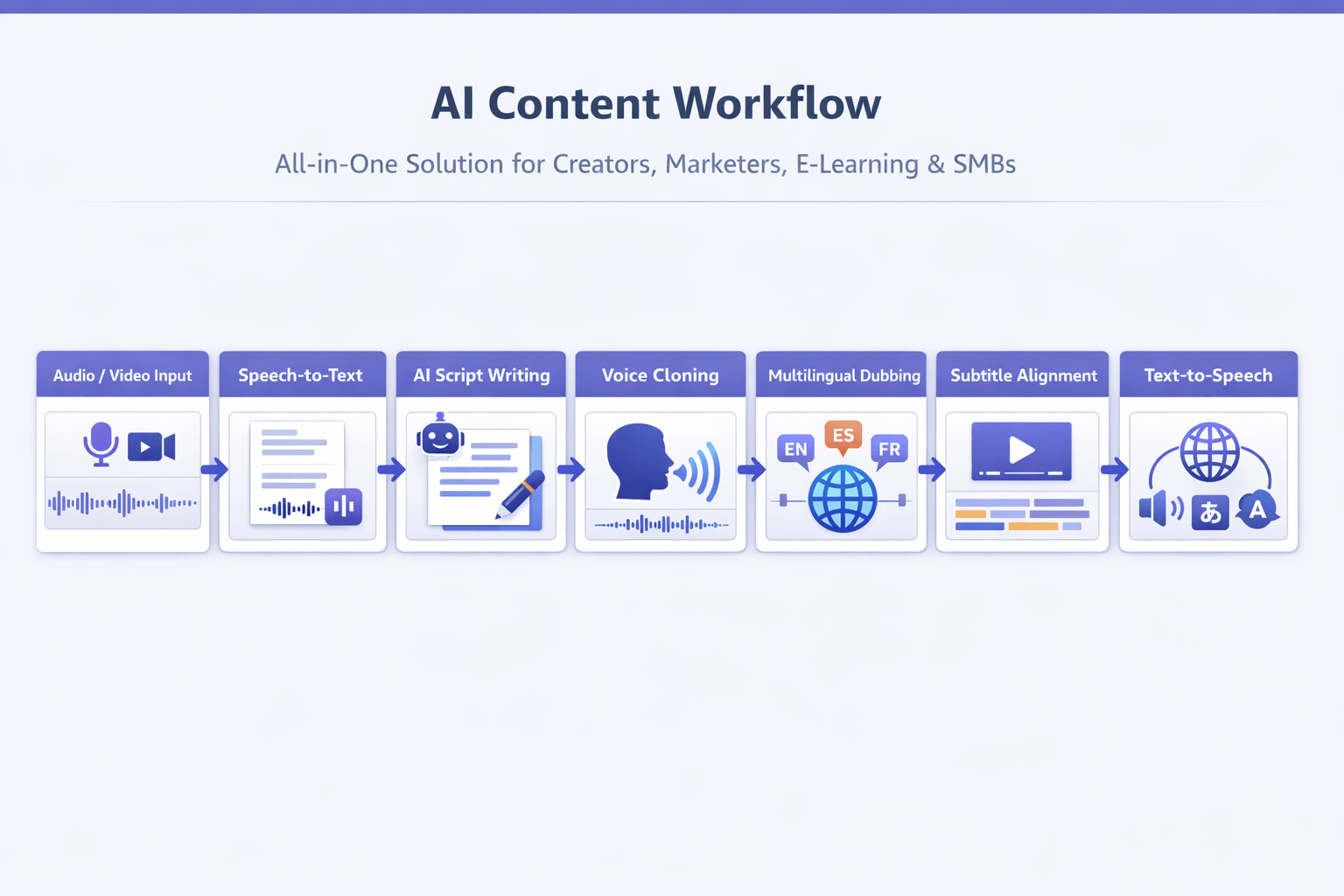
If you are comparing the best speech to text software, DupDub stands out because it covers more than transcription. It brings speech-to-text, AI voice cloning, dubbing, subtitle alignment, and multilingual text-to-speech into one workflow. That matters for teams that want fewer app switches, faster edits, and a simpler path from raw audio to finished local content.
For creators and small teams, that all-in-one setup can save real time. You can transcribe a video, clean the script, translate it, clone a voice, and publish dubbed versions from one place. Instead of moving files across several tools, you keep the project in one system.
Use one workflow from transcript to dubbed video
DupDub is strongest when your process starts with spoken content. You upload audio or video, generate a transcript, edit the text, then turn that script into new voice output. From there, you can add subtitles, align timing, and create multilingual versions.
That makes it useful for:
-
YouTubers republishing videos in new languages
-
Podcasters turning episodes into clips and subtitles
-
Marketers localizing ads, demos, and product explainers
-
E-learning teams updating lessons with consistent narration
-
SMBs that need voiceover, captions, and translation in one place
Its feature set is broad but still easy to map to real tasks. Speech-to-text supports 40+ languages. Voice cloning works from a short sample and supports multilingual output. Text-to-speech includes a large voice library, and dubbing tools help connect translated speech with subtitles and video timing.
Get flexible output without heavy tool handoffs
DupDub is a strong fit when speed matters more than building a custom stack. It also helps if you want one brand voice across scripts, voiceover, and localized media. That is a big reason some users looking for ai voice clone free tools end up choosing a paid platform later.
Here is the short version:
|
Need
|
What DupDub offers
|
|
Transcription
|
Editable transcripts from audio, video, and links
|
|
Voice cloning
|
Clone a voice from a short sample for multilingual use
|
|
Dubbing
|
Re-voice content for translated videos
|
|
Subtitles
|
Auto-generate, translate, and sync subtitles
|
|
TTS
|
700+ voices across 90+ languages and accents
|
|
Team use
|
Good fit for creators, marketers, e-learning, and SMBs
|
Pricing is also fairly clear. There is a 3-day free trial with no credit card, which is helpful for testing quality before you commit. Paid plans scale by credits, usage time, file size, and the number of voice clones or avatars you need.
If you only need a basic voice clone ai free tool for a quick test, DupDub may feel broader than necessary. But if your real workflow includes transcription, script polish, dubbing, subtitles, and multilingual publishing, the all-in-one setup is where it becomes more valuable.
In short, DupDub is best for people who want fewer handoffs and faster localization. It is not just a voice tool. It is a production workflow for multilingual content.
Free AI Voice Clone Options: What You Get and What You Give Up
If you are comparing the best speech to text software, you may also search for ai voice clone free tools. That makes sense. Free plans are a good way to test voice cloning, transcription, and basic dubbing before you spend money.
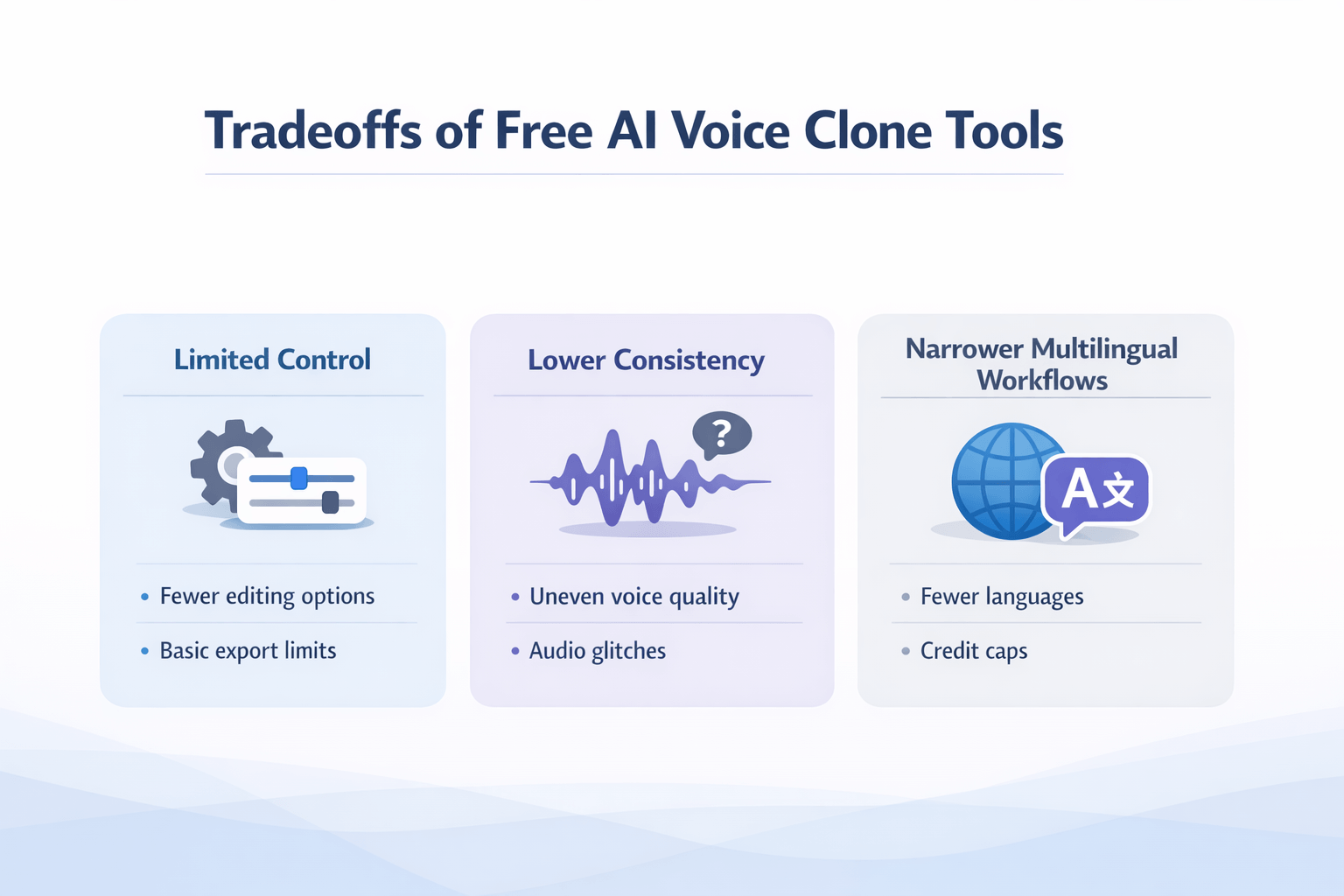
But free tools come with tradeoffs. You can check voice quality, hear how your cloned voice sounds, and test a short workflow. Still, most free plans limit credits, editing control, export options, and language support.
Use free tools to test the basics
Free voice cloning tools are often enough when you want to:
-
test a short voice sample
-
make one demo clip
-
compare accents or languages
-
see how text to speech and transcription fit your workflow
For a solo creator, that can be enough at first. You learn the interface fast. You also see if clone voice ai free results sound natural or robotic.
Expect limits as soon as you scale
Here is what free plans often give up:
-
lower audio quality or fewer voice styles
-
short credit caps or trial-only access
-
watermarks or limited downloads
-
fewer supported languages
-
weak subtitle, dubbing, or team features
That is the real catch. If you need steady quality for videos, courses, podcasts, or multilingual content, paid tools usually save time and rework.
A paid platform becomes the better value when you need one place for speech to text, voice cloning, subtitle translation, and dubbing. That matters even more if you publish often or work across markets.
Privacy, Consent, and Security: What to Check Before You Clone a Voice
Before you use any voice cloning tool, check the privacy rules first. This matters even if you started by comparing the best speech to text software. In many workflows, the same audio file moves through transcription, storage, editing, and synthetic voice output.
Get clear consent first
Only clone a voice when the speaker clearly agrees. That means written consent, a clear use case, and rules for where the voice can appear. If the voice belongs to an employee, actor, or client, define who owns the output and when that right ends.
Check storage and platform safeguards
Ask where voice samples are stored, how long they stay there, and whether data is encrypted. Look for access controls, audit logs, deletion options, and limits that lock a clone to the original speaker. If a vendor claims GDPR alignment or regional compliance, verify it yourself when legal risk is high.
Protect your brand
A cloned voice can save time, but misuse can hurt trust fast. Review approval steps, watermarking options, and abuse reporting tools. Free tools may work for testing, but paid platforms often offer better controls for teams and customer-facing content.
How to Choose the Right Tool for Your Workflow
The best speech to text software is only one part of the job. Most teams also need editing, voice output, subtitles, and dubbing. So the right tool depends on what you make, how often you publish, and how many steps you want in one place.
Match the tool to the team
-
YouTubers: Need fast transcription, subtitle export, voiceovers, and easy dubbing for global reach.
-
Podcasters: Need clean transcripts, clip repurposing, and natural voice tools for ads or updates.
-
Marketers: Need brand voice control, quick script changes, and multilingual content for campaigns.
-
Localization teams: Need translation, subtitle sync, voice cloning, and review workflows.
-
E-learning teams: Need clear narration, lesson updates, and support for many languages.
-
Internal training teams: Need speed, privacy checks, and simple version control.
Choose all-in-one or stack your tools
Separate tools can work well if your workflow is simple. For example, you might transcribe audio in one app, edit text in another, and clone a voice in a third. That setup can save money at first.
But stitched workflows often create extra work. You move files by hand, fix format issues, and review timing twice. If you publish often, an all-in-one platform is usually easier to manage.
DupDub fits teams that want transcription, multilingual TTS, dubbing, subtitles, and voice cloning in one workspace. That makes sense for creators and small teams who want fewer handoffs and faster publishing.
Use separate tools when you only need one task. Use one platform when you need a repeatable content pipeline.
FAQ
-
Is an ai voice clone free tool worth using?
Free tools can be enough for simple tests. They help you hear basic voice quality, try short scripts, and learn the workflow.
But most free plans limit minutes, languages, exports, or clone quality. If you need clean audio, dubbing, subtitles, and transcription in one place, a paid tool is usually the better fit.
-
What is the difference between speech-to-text software and AI voice cloning?
Speech-to-text turns spoken audio into text. AI voice cloning learns a speaker’s tone, rhythm, and sound, then uses that voice to read new text.
In many workflows, the best speech to text software comes first. You transcribe a video, edit the script, translate it, then generate a new voice track with a cloned voice.
-
Can I clone a voice in multiple languages?
Yes, some tools support multilingual voice cloning. That means the cloned voice can speak new languages while trying to keep the original speaker’s identity.
Results vary by tool. Check these points before you buy:
language support
accent quality
subtitle and dubbing tools
consent and privacy controls
export formats for audio and video
-
Is DupDub beginner-friendly for voice cloning and dubbing?
Yes, it’s approachable for beginners because it combines transcription, translation, dubbing, and voice cloning in one workflow. That means fewer tools to learn and fewer file handoffs.
It also offers a free trial, which lowers the risk for first-time users. If you want to test multilingual content without a complex setup, it’s a practical place to start.




 Discord
 YouTube
 Tiktok
 Twitter
 Facebook
 Instagram