TL;DR: AI Voice-to-Text vs Text-to-Speech
If you want the best transcribe audio to text workflow, start with the right job. Voice-to-text turns spoken words into written text. Text-to-speech turns written text into spoken audio. One helps you capture and edit ideas. The other helps you publish voice content at scale.
Use voice-to-text when you need transcripts, meeting notes, captions, subtitles, interview drafts, or searchable content from audio and video. Use text to voice AI when you need narration, dubbed voice tracks, training audio, or faster content reuse across channels and languages.
For many teams, the best setup uses both. You transcribe a podcast, webinar, or video first. Then you clean the script, translate it if needed, and use ai text to voice tools to create new voiceovers. That combined workflow is often the fastest path for subtitles, dubbing, repurposing, and multilingual publishing.
In short, speech-to-text helps you move from audio to text. Text-to-speech helps you move from text to audio. If your workflow includes editing, localization, or reuse, combining both usually saves the most time.
AI Voice-to-Text and Text-to-Speech: What’s the Difference?
If you're looking for the best transcribe audio to text tool, it helps to split two terms that often get mixed up. Voice-to-text turns spoken words into written text. Text-to-speech does the reverse, turning a script into spoken audio.
That sounds simple, but many search terms blur the line. Phrases like ai voice text to speech, text to voice ai, ai text to voice, and ai voice generator text to speech usually point to speech generation, not transcription. So the easiest way to tell them apart is this: speech-to-text starts with audio, while text-to-speech starts with text.
Compare the input, output, and goal
Here’s the practical difference:
-
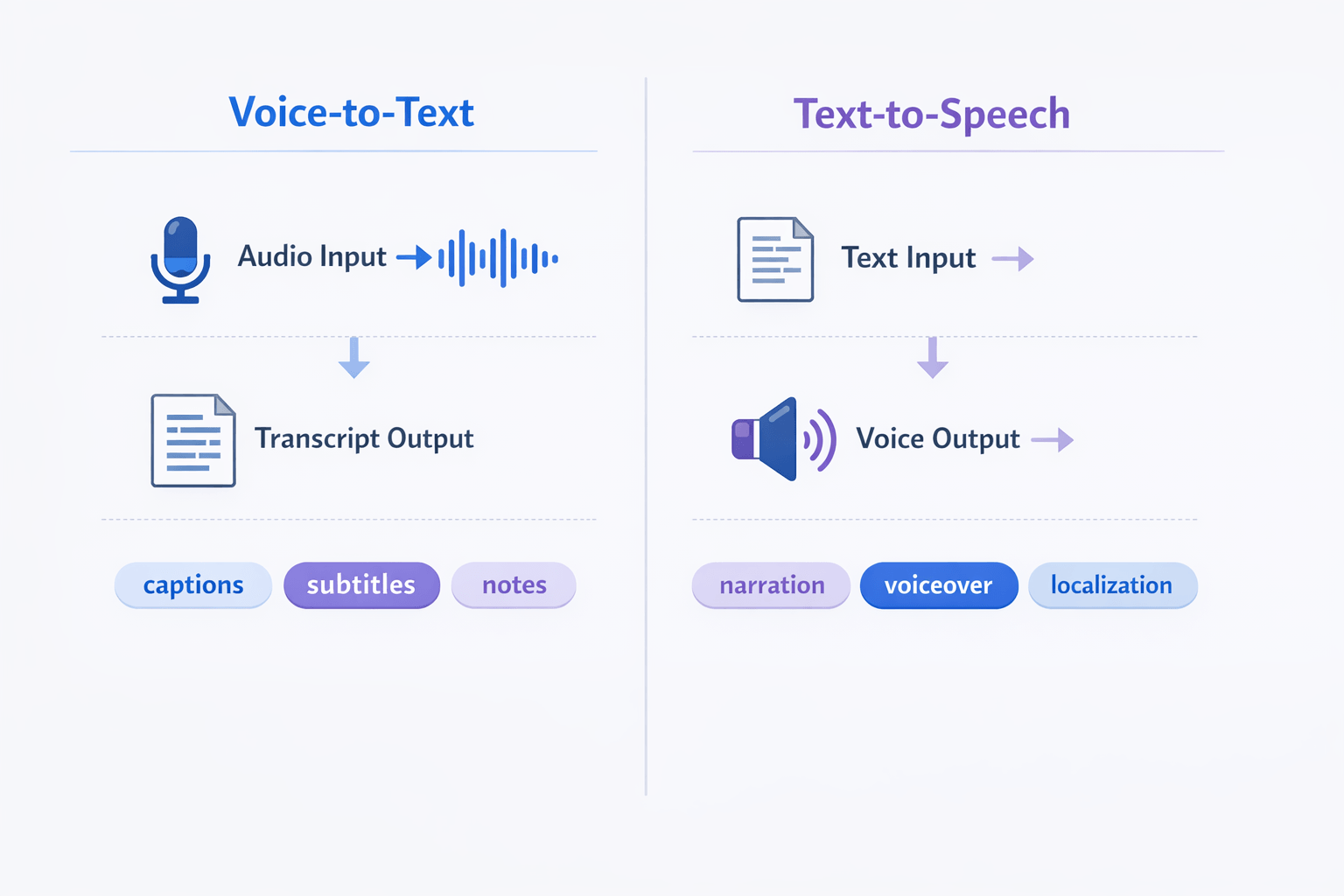
Voice-to-text: audio in, text out
-
Text-to-speech: text in, audio out
-
Main goal of voice-to-text: capture interviews, meetings, podcasts, and videos as editable words
-
Main goal of text-to-speech: create narration, voiceovers, training audio, and localized versions
Text-to-speech is built for delivery. It reads text aloud with a synthetic voice, often for videos, ads, demos, lessons, or multilingual content. If you need a voice from a finished script, this is the category to compare.
In short, use voice-to-text when you need to turn speech into usable text. Use text-to-speech when you need to turn text into clear, scalable audio.
Two-lane diagram comparing voice-to-text, audio to transcript, with text-to-speech, text to voice output, including captions, narration, and localization use cases.
How We Compare These Workflows
The best transcribe audio to text tool is not always the best pick for text-to-speech. These jobs solve different problems. So we compare them by workflow fit, not by long feature lists.
For voice-to-text, we look at transcript accuracy, speaker handling, edit time, and subtitle export. For text-to-speech, we focus on voice quality, pacing, language range, and how fast you can turn a script into usable audio. We also check privacy, file support, and total production effort.
Judge real output, not feature count
A tool can offer dozens of features and still slow your team down. What matters is the result: clean text, natural audio, fewer fixes, and less back-and-forth. That is why we weigh hands-on output more than marketing claims.
We use a simple checklist:
-
Accuracy for speech recognition and transcript cleanup
-
Naturalness for ai text to voice output
-
Editing speed for scripts, subtitles, and timing
-
Language and accent coverage
-
Privacy, compliance, and data handling
-
Total effort from upload to final publish
Even formal testing frameworks use clear scoring rules. In
The NIST Year 2006 Speaker Recognition Evaluation Plan, the primary cost metric is the minimum Detection Cost Function, defined as CDet = CMiss × PMiss|Target × PTarget + CFalseAlarm × PFalseAlarm|NonTarget × (1 − PTarget).
When Voice-to-Text Is the Better Choice
Voice-to-text works best when your main goal is to turn spoken content into usable text fast. If you want the best transcribe audio to text workflow for meetings, interviews, podcasts, webinars, or videos, speech-to-text usually gives you the most direct value. It helps you capture ideas once, then reuse them across notes, captions, blog posts, and search-friendly pages.
Turn spoken content into assets
Speech-to-text shines when people are already talking. Think team calls, customer interviews, course lessons, YouTube videos, and podcast episodes. Instead of taking notes by hand, you get a full draft you can scan, edit, and share.
That transcript can support many next steps:
-
meeting notes and action items
-
podcast show notes
-
video captions and subtitles
-
blog posts and recap pages
-
quote pulls for social posts
-
searchable knowledge bases
Save time on captions and SEO content
A transcript gives you raw material for content production. You can clean the text, break it into sections, and turn it into captions or subtitle files. That makes audio and video easier to watch, skim, and search.
It also helps with organic reach. Search engines can read text far better than spoken audio. So a transcript can help a webinar or video become an indexable page.
Use it when accuracy and editing matter
Voice-to-text is the better choice when you need editable text first. That includes legal reviews, research interviews, lesson outlines, and internal documentation. You start with speech, but the end product is text people can revise and approve.
A tool like DupDub can speed this up by turning audio or video into editable transcripts and subtitles in one place. That is useful when you want fewer handoffs between recording, captioning, and publishing.
When Text-to-Speech Is the Better Choice
Text-to-speech works best when you need fast, repeatable narration at scale. It is a strong fit for teams comparing the best transcribe audio to text workflow with the next step: turning scripts into polished audio. If your work depends on frequent script edits, many voiceovers, or content in several languages, text to voice AI can save a lot of time.
Use it when speed and consistency matter
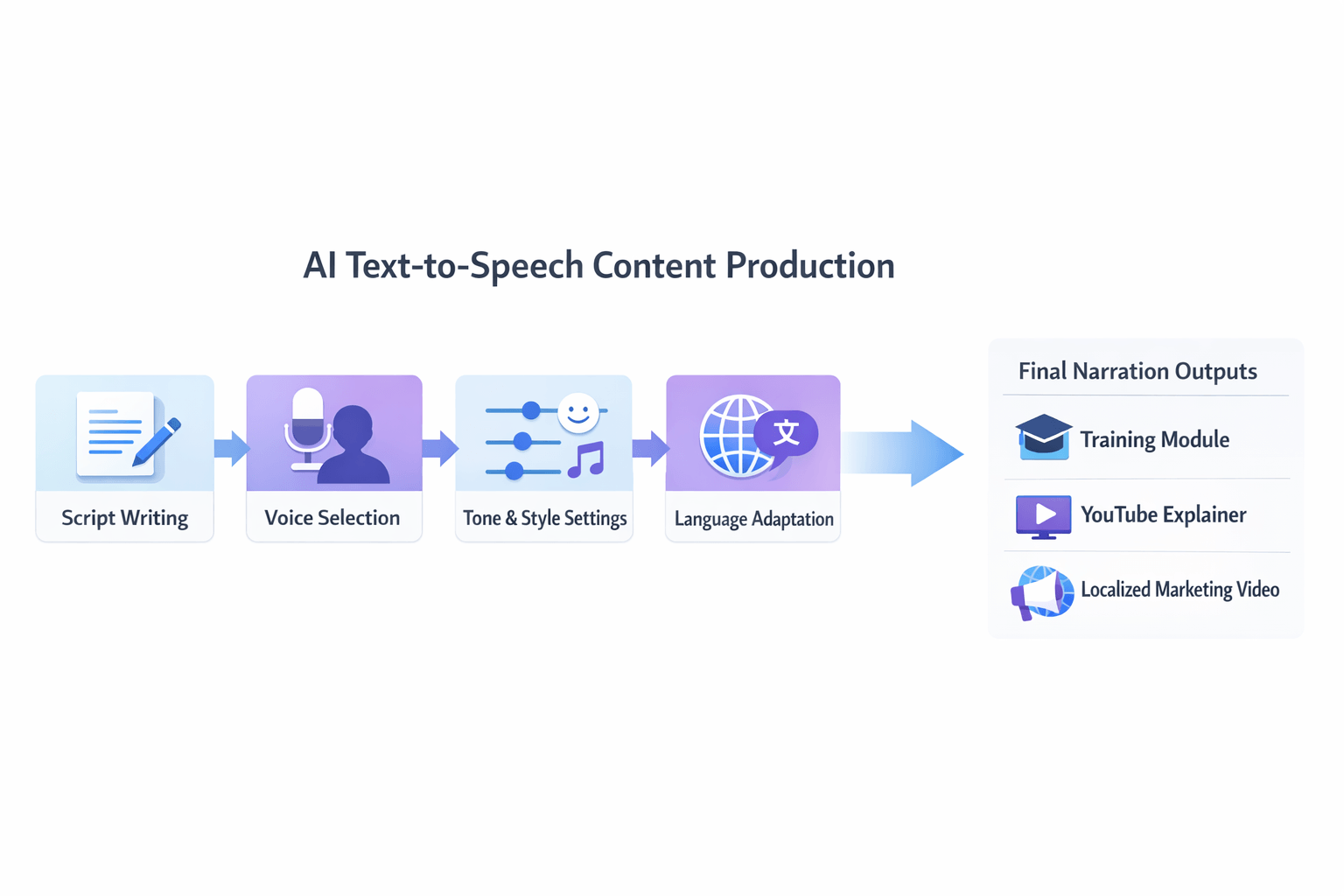
Text-to-speech is often the better choice for voiceovers, training modules, product demos, and help videos. You write the script once, pick a voice, and create narration in minutes. When the script changes, you update the text instead of booking another recording session.
That makes it useful for:
-
onboarding and training content
-
YouTube explainers and product walkthroughs
-
ad variations and social clips
-
accessibility audio for written content
-
multilingual marketing and localization
Scale across languages without re-recording
This is where ai voice text to speech tools stand out. A small team can turn one script into many versions for different markets. You can keep the same tone, pacing, and brand style across languages, which is much harder with manual recording.
It also helps when you need a text to voice AI workflow for updates. Prices change. Features shift. Legal lines get revised. With synthetic narration, those edits are faster and cheaper to publish.
Pick it for repeatable content systems
AI text to voice is a smart choice when narration is part of a repeatable process, not a one-time creative performance. Think lesson libraries, support docs, sales videos, and localized campaigns. An ai voice generator text to speech tool gives teams a simple way to produce more audio, with less back-and-forth.
The tradeoff is simple: use human recording for unique emotion, use TTS for speed, scale, and control.
Voice-to-Text vs Text-to-Speech: Side-by-Side Comparison
If you're choosing the best transcribe audio to text workflow, start with the job to be done. Voice-to-text turns spoken words into written text. Text-to-speech does the reverse, turning text into audio with a synthetic voice. They can work alone, or together, in one content pipeline.
The key tradeoff is simple. Speech recognition aims for accuracy. Text-to-speech aims for natural sound, control, and scale. That means the better tool depends on whether your team needs transcripts, subtitles, voiceovers, or all three.
According to
NIST 2022 OpenASR Challenge, on its 2022 conversational telephone speech benchmark, the best-performing speech recognition system achieved a word error rate of 6.2%.
|
Feature
|
Voice-to-Text
|
Text-to-Speech
|
|
Input
|
Audio or video
|
Written script or transcript
|
|
Output
|
Transcript, captions, notes
|
Spoken audio, narration, voiceover
|
|
Main goal
|
Capture words correctly
|
Sound clear and human-like
|
|
Best metric
|
Accuracy, speaker labels, timing
|
Naturalness, tone, pacing, pronunciation
|
|
Editing need
|
Clean up errors, filler words, names
|
Tune script, pauses, voice style
|
|
Language focus
|
Recognition quality by accent and noise
|
Voice quality, accent choice, style range
|
|
Pricing logic
|
Often based on audio minutes
|
Often based on characters, words, or voice quality tier
|
|
Accessibility value
|
Supports captions, search, and notes
|
Supports audio access and multilingual listening
|
|
Team impact
|
Helps editors, researchers, and subtitle teams
|
Helps marketers, trainers, and localization teams
|
Use the table to make a faster choice
Choose voice-to-text when speed matters most after recording. It's ideal for interviews, meetings, podcasts, and YouTube uploads. It also helps teams turn raw media into blog drafts, summaries, and subtitle files.
Choose ai text to voice when you already have approved copy. It's better for training modules, product videos, ads, and multilingual narration. In these cases, control over tone matters more than transcript cleanup.
Some teams need both. A creator may transcribe a video, edit the script, translate it, then produce a new voice track with a text to voice ai tool. That combined workflow is often the most efficient path for repurposing content across formats and languages.
Best Workflow by Use Case and Team Size
The right setup depends on your goal, team size, and output. If you are searching for the best transcribe audio to text workflow, start with the job you need done first. Then choose transcription, text-to-speech, or a mix of both.
Pick transcription for fast capture and reuse
Use voice-to-text when your main goal is to turn spoken content into text. This works best for solo creators, podcasters, coaches, and small teams that need drafts, show notes, captions, or searchable transcripts.
Choose this path if you need:
-
Fast transcripts from audio or video
-
Editable text for blogs, emails, or social posts
-
Subtitles for YouTube, courses, or webinars
-
A low-cost way to repurpose recorded content
Pick text-to-speech for narration and scale
Use text-to-speech when you already have a script and need audio output. This is often the better fit for marketers, educators, and teams making training, ads, demos, or product explainers with ai text to voice tools.
Choose this path if you need:
-
Voiceovers without recording talent
-
Consistent brand voice across many assets
-
Quick updates when scripts change
-
Audio in multiple tones, accents, or languages
Combine both for multilingual production
For larger content teams, agencies, or global brands, a combined pipeline saves the most time. Start with transcription, clean the text, translate or adapt it, then create new voiceovers with an ai voice generator text to speech workflow. This is the best choice for dubbing, subtitle localization, and multi-language publishing.
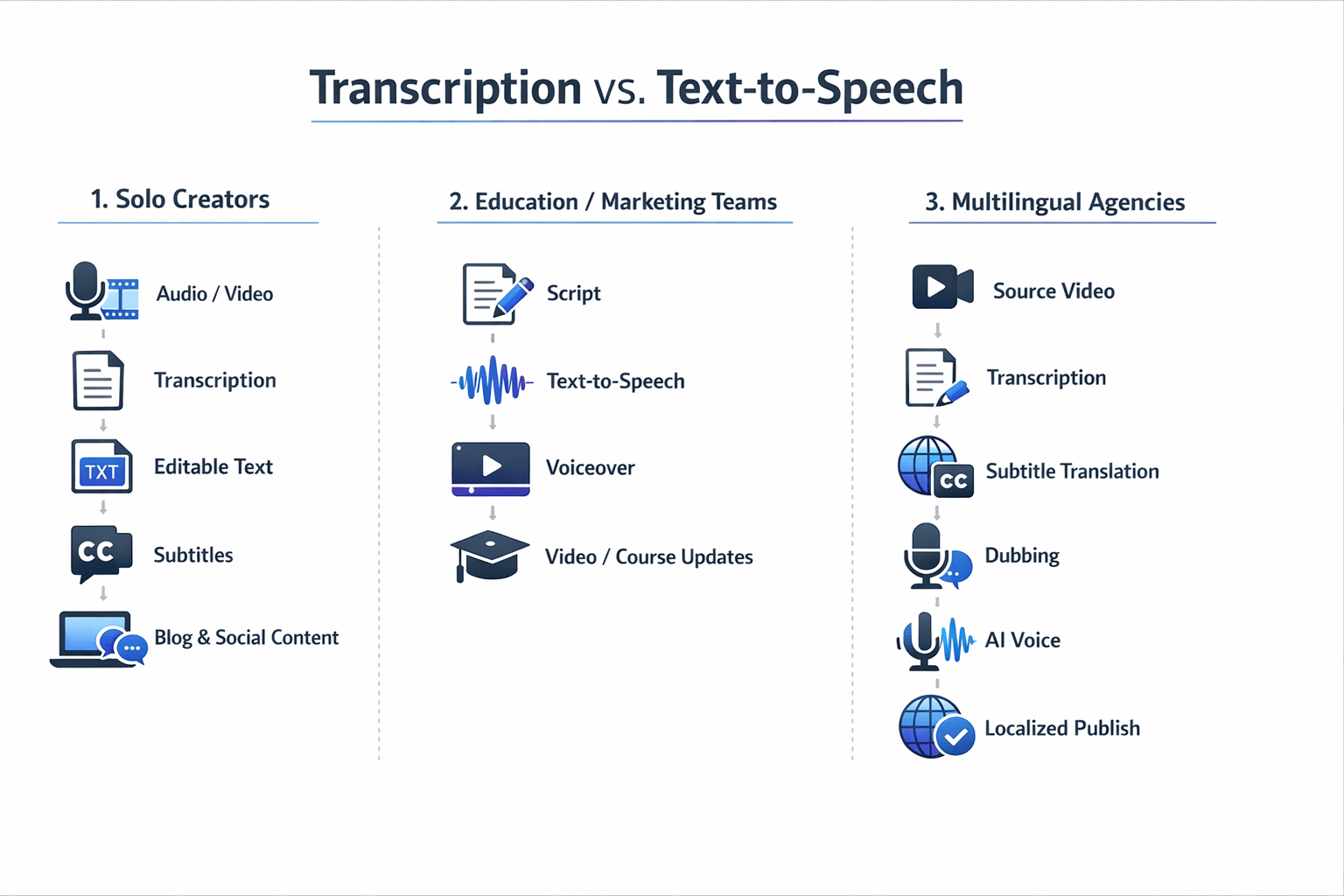
A simple way to decide:
-
Solo creator: transcription first
-
Education or marketing team: text-to-speech first
-
Multilingual team or agency: combine both
An all-in-one platform can make this easier. Instead of moving files across tools, you can transcribe, edit subtitles, dub content, and generate voices in one place. That helps cut handoff time and keeps quality more consistent.
How DupDub Combines Transcription and AI Text-to-Voice
If you want the best transcribe audio to text workflow, it helps to keep every step in one place. That’s where a platform like DupDub fits. Instead of moving files across tools, you can go from audio or video to transcript, then turn that text into voiceovers, subtitles, or dubbed versions in the same browser-based flow.
Start with transcription, then build from the script
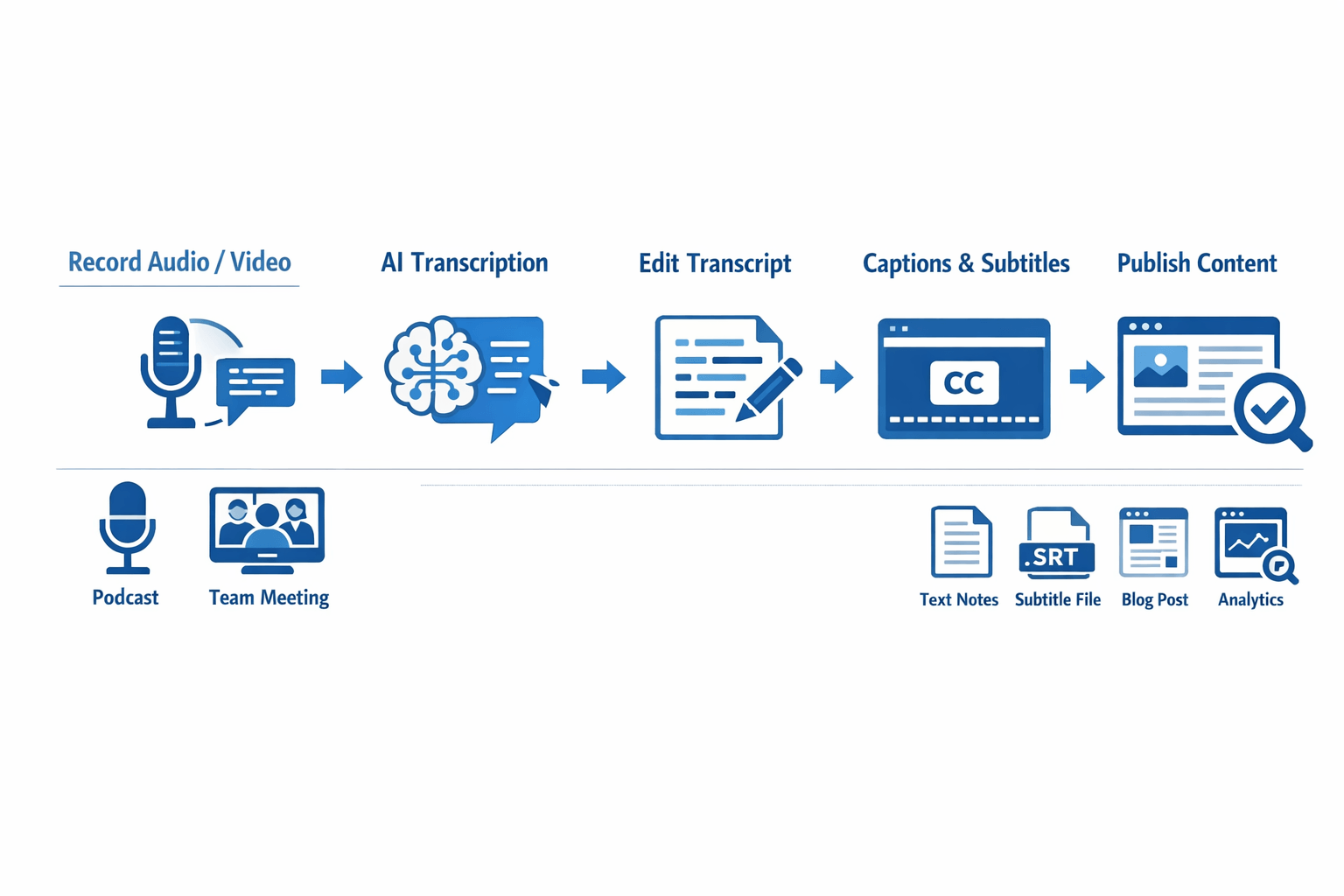
A simple workflow often looks like this:
-
Upload audio, video, or a supported link.
-
Turn speech into editable text.
-
Clean up the script and key lines.
-
Create subtitles or export captions.
-
Convert the final script into AI voiceovers.
-
Repurpose the content for new channels or languages.
That matters for small teams. You don’t have to copy text between a speech-to-text app, a subtitle editor, and a separate text to voice AI tool. You can review the transcript, polish the wording, and send it into voice generation with fewer handoffs.
Use one workflow for subtitles, dubbing, and voice cloning
DupDub also helps when your content needs more than a transcript. You can generate subtitles, align them to video, and move into dubbing for other languages. If you need a familiar sound, voice cloning can help keep the speaker identity close across versions.
This is useful for creators and marketers who repurpose one asset many ways, such as:
-
turning a podcast into a blog draft
-
adding captions to YouTube videos
-
creating a short voiceover for social clips
-
dubbing lessons or product videos for new regions
-
using ai voice text to speech for quick test reads
The bigger win is speed. A team can record once, transcribe once, and reuse that script across voice, subtitle, and localization tasks.
Because it runs in the browser, the setup is light. And if you just want to test the flow first, DupDub offers a free trial with no credit card required.
Start small and test the full workflow with DupDub.
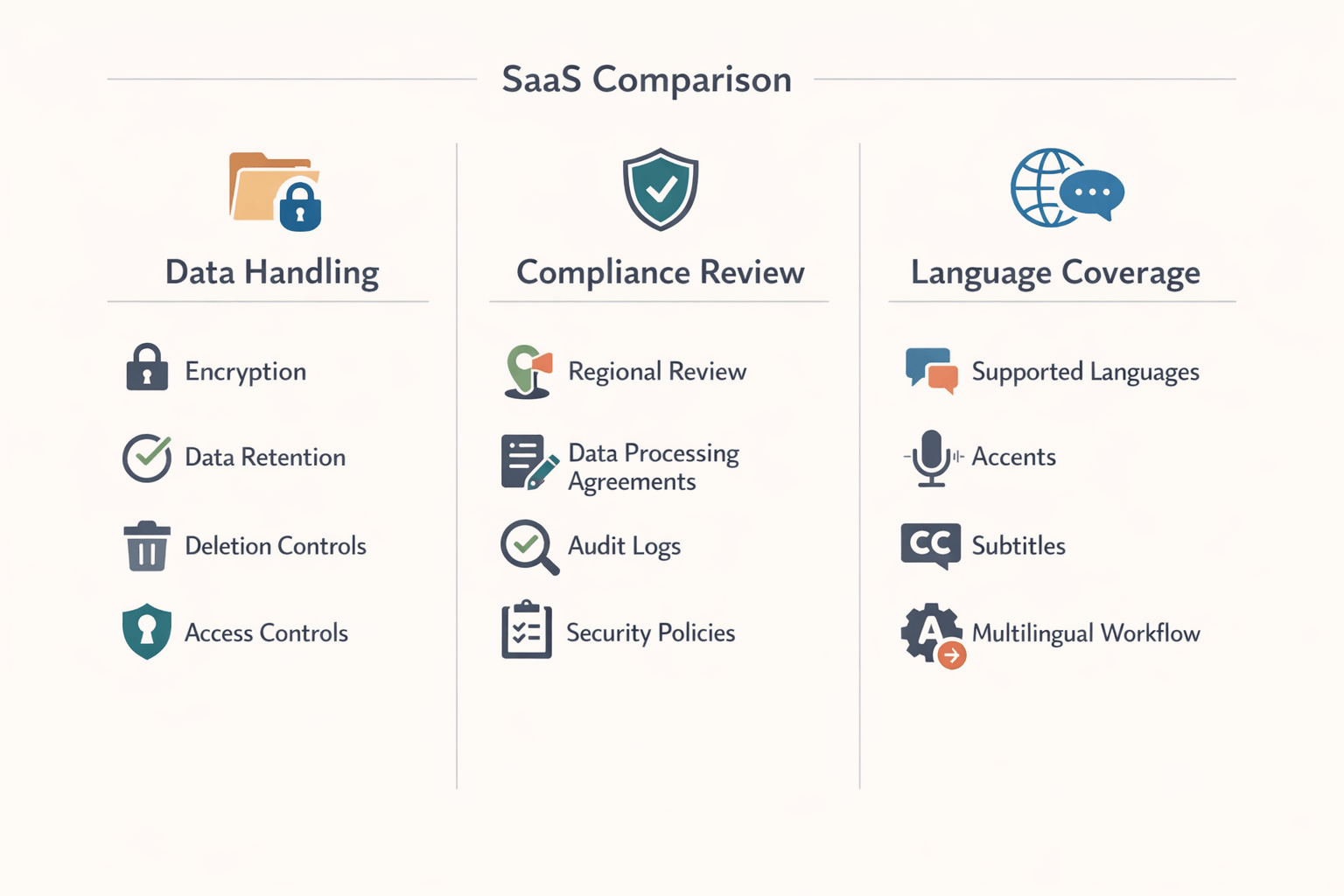
Privacy, Compliance, and Language Coverage to Check Before You Choose
If you want the best transcribe audio to text tool, don’t stop at accuracy. You also need to check how the vendor handles sensitive files, how long data stays in the system, and what language support really means in daily work. A cheap tool can create legal or brand risk fast.
Check data handling first
Start with the basics. Ask where files are processed, whether audio is encrypted, and who can access transcripts, subtitles, or cloned voices. Also ask if you can delete files on demand and whether retention settings are clear, because
Regulation (EU) 2016/679 (General Data Protection Regulation), Article 5 says personal data must be kept "for no longer than is necessary for the purposes for which the personal data are processed."
Review compliance claims with care
Many tools say they are GDPR-aligned or enterprise-ready. That’s useful, but it’s not the same as a full legal review. Check the data processing agreement, regional hosting options, access controls, audit logs, and support for accessibility needs before you buy.
Verify language depth, not just language count
A long language list can hide gaps. Ask if the tool supports your target accents, subtitle export, speaker labeling, and quality across noisy files. If you need ai text to voice later, also confirm whether the same platform supports natural voices, dubbing, and multilingual workflows without extra handoffs.
FAQ
-
Is voice-to-text the same as transcription software?
Voice-to-text is the process of turning speech into written words. Transcription is the full output you get from that process. In practice, many tools use these terms the same way, especially when people search for the best transcribe audio to text tool.
-
Is text-to-speech good enough for YouTube or training videos?
Yes, if the voice sounds clear and natural. Good text-to-speech works well for explainers, training clips, product demos, and faceless YouTube content. If you need more brand personality, ai text to voice tools with voice cloning and style controls are a better fit.
-
Can one tool handle transcription, subtitles, dubbing, and AI voice generation?
Yes. Some platforms combine speech-to-text, subtitle export, dubbing, and text to voice ai features in one workflow. That setup helps small teams move faster because they can transcribe, edit, translate, and publish without switching tools.
-
Should I choose voice-to-text or text-to-speech?
Choose voice-to-text when you need notes, captions, or searchable transcripts. Choose text-to-speech when you need narration in one or many languages. If you repurpose content often, using both usually saves the most time.




 Discord
 YouTube
 Tiktok
 Twitter
 Facebook
 Instagram