TL;DR: What this article will teach you
This guide teaches a practical, template-driven five-step workflow for article-to-audio conversion. It breaks each step into repeatable templates you can apply to any post. You’ll learn which tools and quality checks matter, so your narration sounds professional and consistent.
The guide covers prepping copy and tightening narration. It shows how to add SSML (Speech Synthesis Markup Language) to control pacing and emphasis. You’ll also see when to use TTS (text-to-speech). You’ll learn when to clone a voice for brand consistency. There are tips for turning long posts into tight scripts ideal for blog-to-audio repurposing.
You get copy-ready SSML snippets, sample scripts, and a step-by-step checklist to follow. It includes troubleshooting tips and a privacy checklist, plus export settings for MP3 or WAV. The guide ends with a feature comparison table and quick quality gates to keep voice consistent.
Why convert blog posts and articles to audio? (Benefits & use cases)
Turning written content into audio opens new audience and accessibility channels. Use an article to audio workflow to reach listeners who prefer hands-free or off-screen consumption. Podcast reach is rising, as
Pew Research Center (2025) found that in 2025, 54% of U.S. adults reported listening to a podcast in the past 12 months, up from 49% in 2022.
Benefits: accessibility, engagement, and reuse
Audio meets people where they are: commuting, exercising, or multitasking. It improves accessibility for people who are blind or have reading difficulties (assistive listening helps compliance and inclusion). Audio also boosts time-on-content and repeat consumption, because listeners return to episodes more often than they skim pages.
-
Wider reach: tap podcast platforms and smart speakers.
-
Better accessibility: supports assistive technologies and WCAG goals.
-
Higher engagement: audio keeps attention longer than short reads.
-
Content efficiency: repurpose one post into multiple audio assets.
Use cases: when to choose article to audio
Convert full posts when the piece has evergreen value or deep how-tos. Choose short-form narration for highlights, or split long articles into episodic podcast installments. Use multilingual audio to test new markets without new writing.
-
Podcast episodes: episodeize long posts into series.
-
Narrated guides: step-by-step audio tutorials or course lessons.
-
Social audio clips: 30–90 second highlights for reels.
-
Multilingual outreach: translate and voice local markets.
-
Internal training: turn docs into listenable lessons.
These moves grow audience, extend content life, and create flexible assets for marketing and learning.
DupDub at a glance: How it supports 'article to audio' workflows
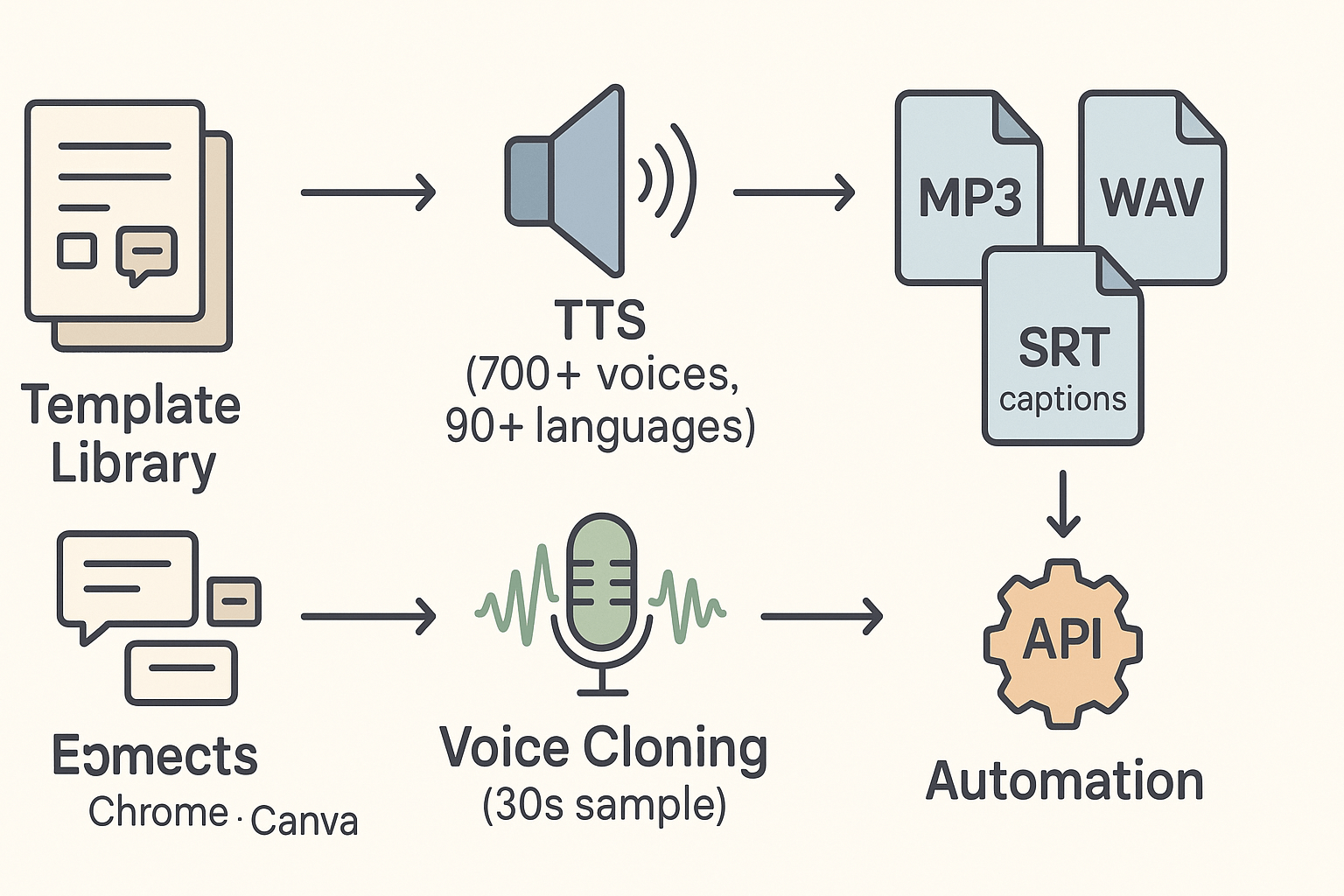
Want a fast article to audio workflow? DupDub maps each step, from script shaping to final export. It combines a Template Library, TTS (text-to-speech) voices, and voice cloning to keep narration natural and consistent.
How the features map to your workflow
-
Template Library: ready-made script shapes for intros, summaries, and sections. Pick a template to turn headings and paragraphs into narration cues, so you don't start from scratch.
-
TTS and voice cloning: access 700+ voices, 90+ languages, and 1,000+ styles for mood and pacing. Voice cloning (creates a synthetic match from a short sample) helps keep a branded voice across episodes.
-
Transcription and captions: auto-transcribe (STT, speech-to-text) to create chapter markers, editable scripts, and SRT captions for accessibility.
-
Integrations and API: Chrome and Canva plugins plus a public API let you batch convert blog to audio and automate publishing.
-
Pricing snapshot: free 3-day trial; Personal ($$11/mo billed annually), Professional $$30/mo), Ultimate ($110/mo). Pick a plan based on hours, voices, and cloning needs.
DupDub fits creators who want predictable, repeatable audio from written posts. Start with a template, pick a voice, polish the script, and export a ready-to-publish file.
Template Library: From blog post to audio in 5 steps (step-by-step)
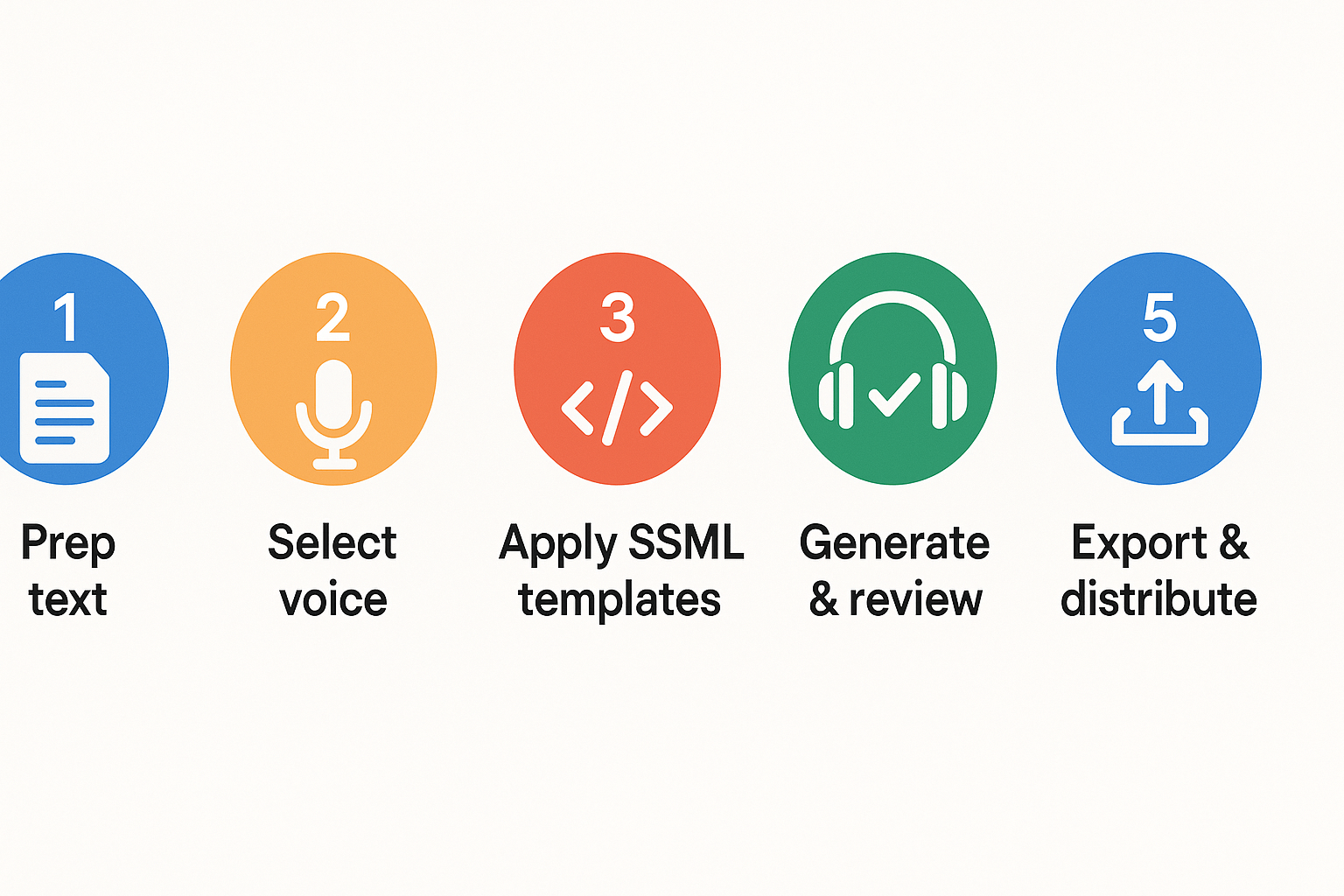
This step-by-step template takes a raw blog post and turns it into polished audio you can publish. You’ll follow five repeatable steps: prepare the text, pick voice and language, apply SSML and script templates, generate and review audio, then export and distribute. The guide links each step to DupDub tools so you can run one-off episodes or batch-produce audio at scale.
Step 1: Prepare the source text and goals
Start by clarifying the audio goal: full episode, excerpt, or short social clip. Trim the blog to the portion that fits your target duration. Long-form posts often need a 10 to 15 minute narrated version; set a target word count by using 150 words per minute as a rule of thumb.
Checklist:
-
Remove web-only elements like jump links and CTAs.
-
Convert lists and tables into short sentences.
-
Add simple narration cues like “pause” or “note” where the speaker should breathe.
DupDub tip: Use DupDub’s transcription and editor to import your blog text, then paste cleaned content into the Template Library. The library has a "Narration Prep" template that trims headings, flags links, and outputs a read-aloud draft.
Copy-ready prep template (paste and edit):
Title: [Post title] Target duration: [minutes] Audience: [beginners|intermediate|pros] Trim notes: [sections to remove]
Step 2: Pick voice, language, and brand clone
Match voice to audience and platform. For podcasts pick warm, neutral tones. For social clips choose a voice with strong presence. Choose language and accent that match your audience.
Quick rules:
-
Podcast long-form: natural mid-tempo voice, neutral accent.
-
E-learning: clear enunciation, slightly slower pace.
-
Short social: energetic style, shorter pauses.
DupDub tie-in: Open the Template Library and pick a voice profile template. If you need brand consistency, use DupDub’s voice cloning (upload a 30 second sample) to create a synthetic brand voice you can reuse across posts. Clone settings let you lock the voice to the original speaker and control language coverage.
Voice selection template:
Voice name: [built-in or clone name] Style: [calm|energetic|authoritative] Speech rate: [+0% to -15%] Pitch: [default|+1| -1]
Step 3: Apply scriptwriting and SSML templates
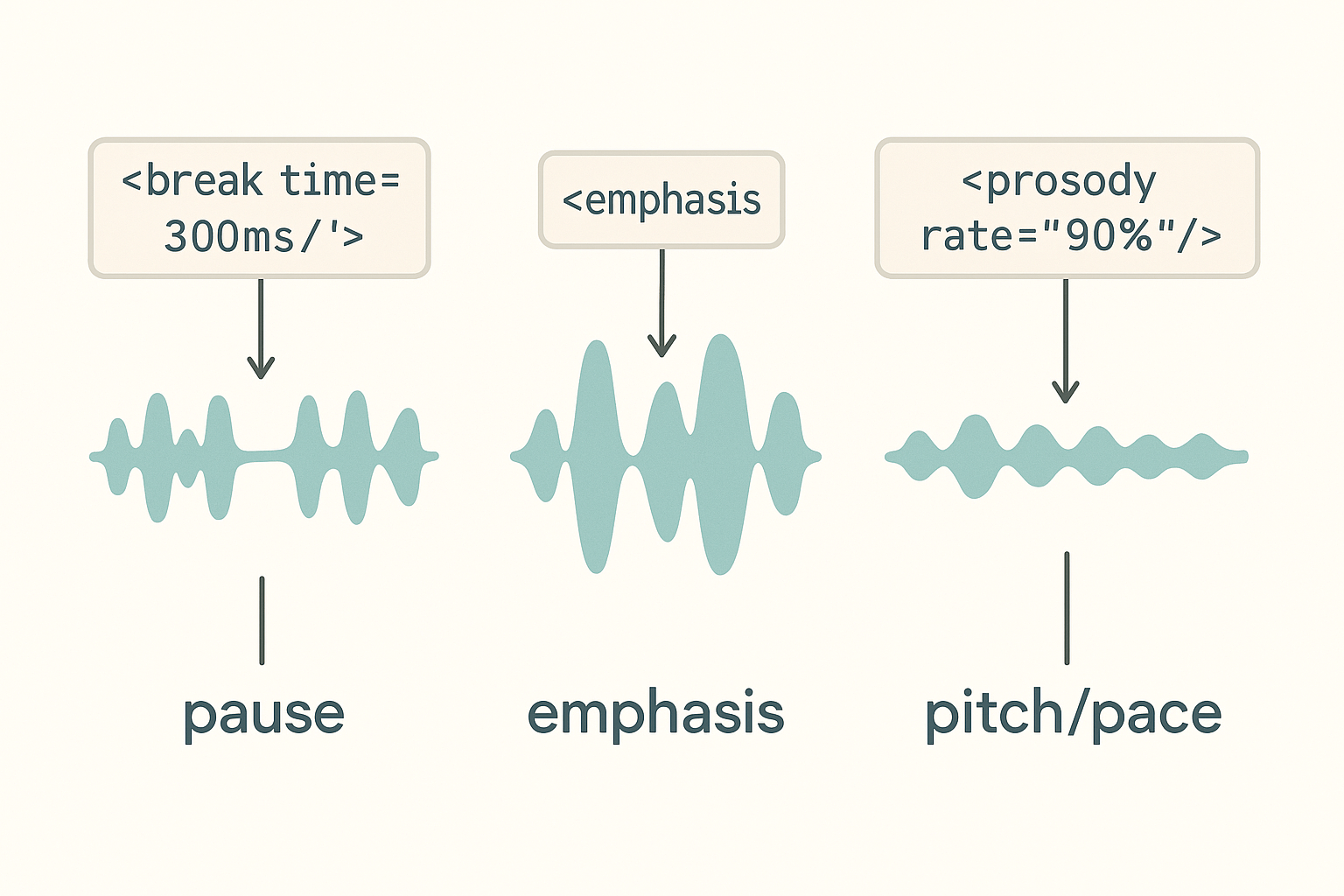
Rewrite for the ear, not the eye. Shorten sentences and add signposting: say what you’ll cover, cover it, then recap. Insert natural pauses and emphasis using SSML (Speech Synthesis Markup Language). SSML helps TTS sound less robotic by controlling pauses, emphasis, and prosody.
Keep each paragraph to two short sentences when possible. Use active voice and specific words.
Copy-ready script structure:
-
Hook: one sentence to open.
-
Lead: 1 to 2 sentences that set expectations.
-
Main points: 2 to 4 short paragraphs.
-
Call to action: one line for next steps.
Sample SSML snippets (copy and paste into DupDub script editor):
Point one.Point two.
Our most important metric is engagement.
This part is crucial.
DupDub note: Use the Template Library’s "Narration SSML" preset to auto-wrap headings and add default breaks. Advanced users can batch apply SSML across multiple posts using the API.
Step 4: Generate audio and review with quality checks
Generate a draft and review it in a quiet room with headphones. Listen for natural rhythm, mispronounced words, and pacing issues. Mark edits in the editor and re-generate only the corrected spans.
Quality checklist:
-
Pronunciation: fix names and acronyms with phonetic hints.
-
Breathing: add 200 to 500ms pauses where a sentence ends.
-
Tone: adjust prosody for lists and callouts.
DupDub workflow: Use the in-browser studio to generate a version, then open the timeline editor to tweak segments. If you cloned a voice, verify the clone matches brand tone and update the clone settings if needed.
Batch tip: Review a short 30 second excerpt from each episode first. If the excerpt is clean, apply the same pipeline to the remaining content.
Step 5: Export, package, and distribute
Choose export settings for the target platform. For podcast episodes export MP3, 128 to 192 kbps, 44.1 kHz. For high-quality archives export WAV, 48 kHz, 24-bit. For social short-form use MP3 or AAC with 64 to 128 kbps.
Distribution checklist:
-
Add chapter markers and show notes if publishing long form.
-
Include subtitles or SRT for video repurposing.
-
Tag media with metadata: title, author, episode number.
DupDub export options: DupDub supports MP3 and WAV exports and can produce subtitle SRT files for video. Use the Template Library’s "Platform Export" preset to create podcast-ready files and short social clips in one session.
Quick export settings table:
-
Podcast: MP3, 44.1 kHz, 128 kbps, ID3 tags.
-
High quality archive: WAV, 48 kHz, 24-bit.
-
Social clips: MP3/AAC, 64 kbps, 16–45 seconds.
Final workflow note
This five-step template scales. Use DupDub templates to standardize each stage: Prep, Voice, SSML, Review, Export. For teams, lock voice clones and export presets to keep a consistent brand sound across many posts.
SSML & scriptwriting tips to make your audio sound natural
Converting an article to audio works best when the script is tuned for speech. This short guide gives simple copy edits and plug-and-play SSML patterns to improve pacing, emphasis, and clarity. Use these patterns to make blog prose sound like a natural narrator.
Edit the source first, then add SSML
Fix obvious reading issues in the text before you layer SSML. Shorten long sentences, add signposts, and break dense paragraphs into 2 to 3 sentences. Then use SSML to control pauses, pacing, and small vocal cues.
When to edit the original:
-
Long compound sentences: split them. Short sentences help rhythm.
-
Ambiguous punctuation: add commas or reword for clarity.
-
Jargon or stacked lists: simplify wording.
When to add SSML instead:
-
Micro-pauses and breaths. Use SSML break tags.
-
Emphasis on single words. Use the emphasis tag.
-
Slight tempo or pitch shifts for effect. Use prosody.
SSML snippets you can copy and paste
Headline, short and punchy:
How to repurpose a blog post fast
List item with clear spacing:
Key benefits:
Faster publishingLower costsWider reach
Long paragraph, better pacing:
Many blog posts contain long sentences. Break them into two or three lines for listening. Use a soft pause before examples.
Tips on tags: use for pauses. Use word to lift a keyword. Use slower to slow a single phrase.
Quick script edits with examples
Before: "This product reduces churn, boosts growth, and saves costs by automating tasks across teams."
After: "This product reduces churn. It boosts growth and saves costs. It automates tasks across teams."
Small edits like this reduce the need for long SSML breaks.
Quick tests to judge naturalness
-
Pacing check: listen and mark any spots that feel rushed. Add 200–400ms breaks.
-
Breath check: can you inhale naturally between clauses? If not, add shorter breaks.
-
Sentence length: aim for 12 to 18 words per spoken sentence. Split longer lines.
-
Emphasis check: does the most important word stand out? Apply an emphasis tag.
-
Real-world test: play on phone speaker and headphones, then adjust.
Use these edits and snippets to level up blog to audio conversions. Small changes to copy plus targeted SSML yield much more natural narration.
How DupDub compares to other TTS & blog-to-audio tools
Converting articles into audio is a common need, and choices vary by voice quality, languages, cloning, and export options. This section compares DupDub with ElevenLabs, Murf, Play.ht, and Speechify. Read on to pick the tool that fits your use case for article to audio workflows.
Quick feature comparison
|
Tool
|
Voice quality
|
Language breadth
|
Cloning and customization
|
Export and workflow
|
|
DupDub
|
Lifelike voices with many styles
|
90+ languages and accents
|
Multilingual voice cloning, 30s sample
|
MP3, WAV, MP4, SRT; template library for batch work
|
|
ElevenLabs
|
Industry-leading naturalness
|
Limited language set focused on English
|
Strong voice editing, fewer multilingual clones
|
Good single-file export, API access
|
|
Murf
|
Studio-style voices, polished tones
|
Broad language support
|
Fine-grained voice controls for narration
|
Easy editing, team collaboration tools
|
|
Play.ht
|
Wide voice catalogue, many accents
|
Large language list
|
Custom voice creation possible
|
Web exports, embedding options
|
|
Speechify
|
Built for fast reading and accessibility
|
Focus on major languages
|
Limited cloning, tuned for speed
|
Simple MP3 export, mobile-first workflow
|
How to pick: buyer's checklist
-
Brand cloning: choose a platform with secure, high-fidelity cloning. DupDub works well for multilingual brand voices.
-
Bulk or batch export: prefer tools with template or batch features. DupDub's template library speeds large runs.
-
Simple narration: pick Speechify or Murf for quick, easy reads.
-
Multilingual reach: pick DupDub or Play.ht for many languages.
-
Fine editorial control: ElevenLabs or Murf let you tweak tone and pronunciation.
DupDub stands out when you need multilingual cloning, an end-to-end template-driven workflow, or combined audio and subtitle exports. For single-language studio narration, other vendors may be faster to set up.
Privacy, security & compliance to cover (what readers ask)
Converting a blog post to audio raises clear legal and safety questions. If you're converting article to audio, check who consented and how files are protected. Also confirm which rules apply in your region.
Consent for voice cloning
As a baseline,
General Data Protection Regulation (GDPR) states: "consent" means any freely given, specific, informed, and unambiguous indication of the data subject's wishes. Get written or recorded consent before cloning a voice. Keep a record that shows the scope and permitted uses.
Data handling and encryption
Ensure platforms process audio with encryption in transit and at rest. DupDub locks cloned voices to the original speaker. It also uses encrypted processing and limits data sharing. Ask about retention windows and deletion workflows before you upload training audio.
What EU users should check
Confirm user rights like access, rectification, and erasure. Map those rights into your consent forms and contracts. For enterprise projects, require audit logs and contractual data controls.
Checklist:
-
Obtain explicit consent and keep clear records.
-
Use encrypted transfers, secure storage, and retention limits.
-
Offer a deletion or opt-out process for cloned voices.
Troubleshooting & common issues when converting articles to audio
Converting a post from an article to audio can hit a few predictable snags. This section lists the usual problems, quick fixes you can apply now, and simple QA steps to stop them from recurring. Expect help with muddy or robotic voices, awkward pacing, SSML that breaks pronunciations, and file export errors.
Fix muddy or robotic voices
If the voice sounds flat, swap to a higher-quality or more expressive voice. Try an Ultra or neural-style voice if available, or change the voice style for more warmth. Shorten very long sentences and add commas or periods so the engine breathes. If sibilance or muffling appears, boost the bitrate or export as WAV to preserve detail.
Tame pacing, timing, and SSML issues
SSML (Speech Synthesis Markup Language) controls pauses and emphasis. Add between clauses to fix pacing, or use a word to highlight terms. If a word is mispronounced, add a phonetic spelling or use a substitution tag. Test small snippets before rendering full articles.
Solve export errors and batch QA
If export fails, check file format, bitrate, and file-size limits. For batch processing, run a 3-article pilot to catch systemic issues. Create a QA checklist: voice, pacing, pronunciation, metadata, and file integrity. Automate logs if your tool offers API access so you can retry only failed items.
FAQ — People also ask about converting blogs to audio
-
Can I create a brand voice for an article to audio?
Yes. You can create a brand voice with a short recorded sample, provided you have the speaker's consent. Voice cloning is typically locked to the original speaker and processed securely, so use cases like branded narration and consistent host voices are supported.
-
How long does processing take to turn an article to audio?
Processing time depends on length, voice quality, and export settings. Short posts convert in minutes; long articles or Ultra voices can take longer. Batch jobs and higher-fidelity outputs add queue time.
-
What are the best file formats for podcasts from blog to audio?
Use MP3 for podcast publishing, 128 to 192 kbps for a good size-to-quality balance. Use WAV for editing, mastering, or archive copies because it’s lossless. Most toolchains accept both MP3 and WAV.
-
Is SSML required to make my article to audio sound natural?
No, SSML (Speech Synthesis Markup Language) is optional but highly recommended. A few SSML tags for pauses, emphasis, and prosody will improve pacing and clarity; pair SSML with a short script edit for best results.




 Discord
 YouTube
 Tiktok
 Twitter
 Facebook
 Instagram