TL;DR, Key takeaways: create AI voice (what you’ll learn)
Learn how to create an AI voice quickly, safely, and affordably for many projects. This guide lays out a clear step-by-step workflow for text-to-speech and cloning. You’ll also get transparent pricing, competitor comparisons, and privacy checkpoints. Expect hands-on screenshots, quick checklists, and decision pointers included.
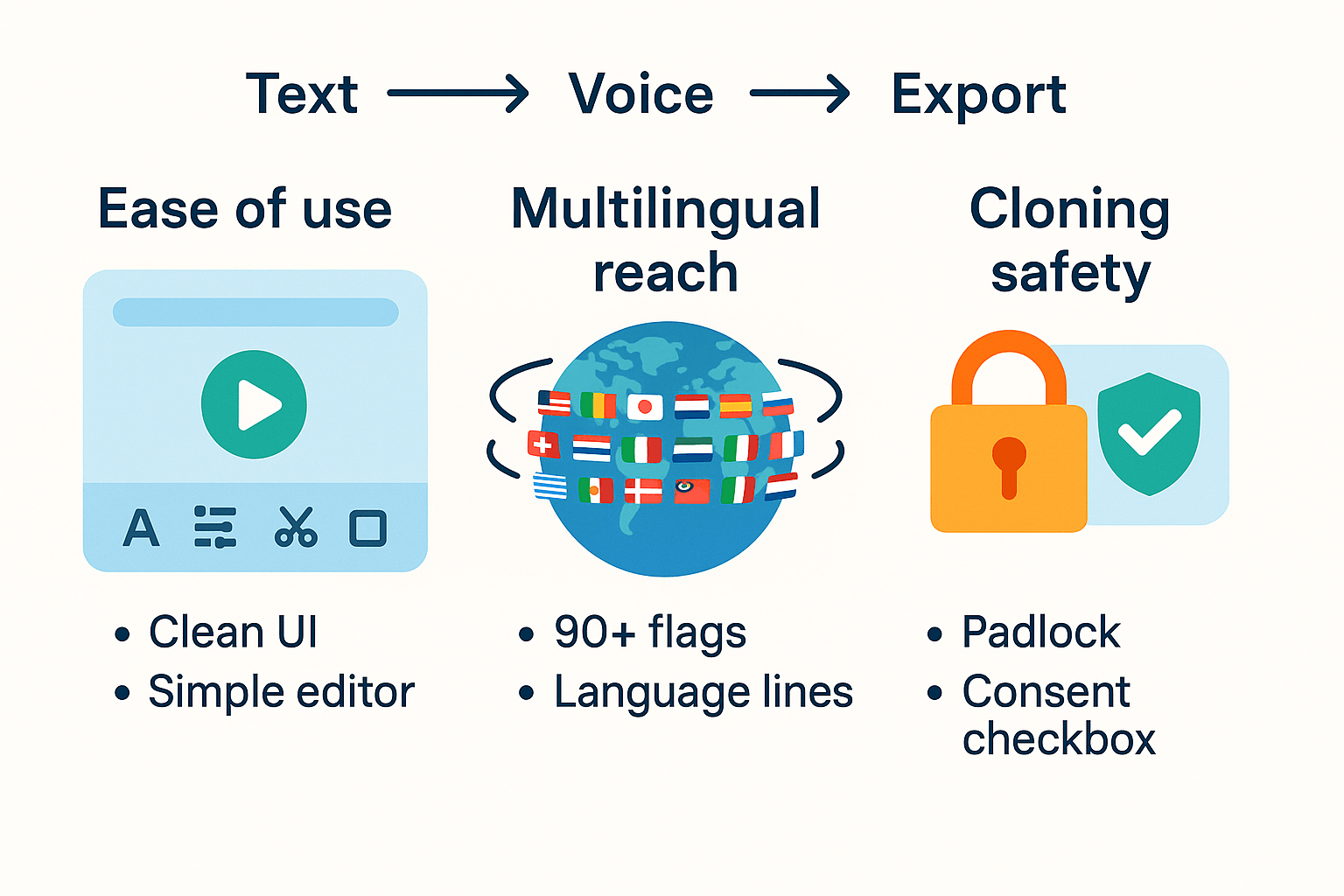
Make studio-quality narration from plain text fast, with minimal editing. Create a usable voice clone from a 30-second sample, then fine-tune it. Localize audio into over 90 languages without hiring human dubbers.
We cover editor tips, noise reduction, EQ presets, and export best practices. Troubleshoot synthetic voice problems like robotic tone, timing drift, and clipping. Learn consent rules, cloning safeguards, and how to get permission before cloning.
Who benefits: YouTubers, podcasters, course creators, localization teams, and small brands. If you need fast localization, consistent voice, or cost savings, this guide helps decide. Skim the full guide for hands-on steps, or try a quick free trial.
What is an AI voice? Quick primer and how DupDub fits the Neural TTS landscape
AI voice means synthetic speech produced by neural text-to-speech systems. If you want to create ai voice, modern tools turn written text into natural-sounding audio. Neural models learn intonation, timing, and phrasing, so output sounds human and expressive.
Voice cloning copies a real person's vocal traits from recordings. According to
Neural Voice Cloning with a Few Samples (2018), voice cloning systems can synthesize a person's voice from only a few audio samples. That makes cloning useful for narration, ads, and localized dubbing.
How modern models produce natural speech
Most systems use two stages: a text encoder that predicts speech features, then a vocoder (audio generator) that creates waveform audio. Models also learn prosody, pauses, and emphasis from real recordings. That learning yields smooth timing and realistic intonation.
Where DupDub fits in the Neural TTS ecosystem
-
Text-to-speech: fast access to 700 plus voices and many speaking styles for narration and commercials.
-
Voice cloning: quick clone creation from short samples, ideal for keeping a brand voice across languages.
-
AI dubbing: translates, aligns subtitles, and re-voices videos for global publishing at scale.
-
Supporting tools: transcription, avatar voices, and a browser studio for recording and editing.
DupDub bundles these modules so creators can localize, scale, and maintain a consistent voice across audio and video.
When to use AI voice: 8 real-world use cases for creators and businesses
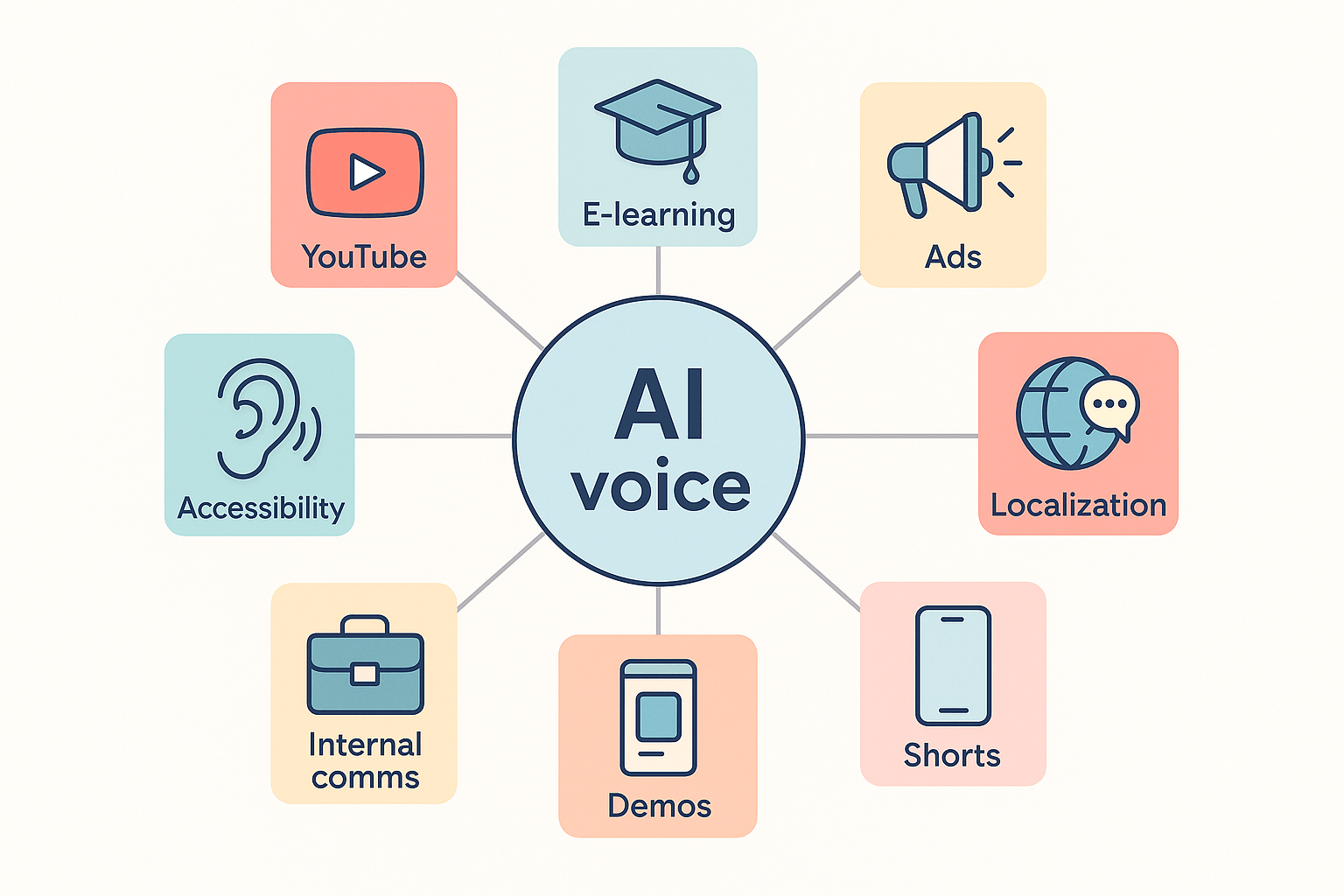
AI voice speeds up localization and voiceover work, cuts dubbing costs, and helps teams publish more often. This section shows eight practical scenarios where you might choose to create ai voice, the outcomes to expect, and a short example workflow tied to DupDub features like multilingual TTS and AI dubbing.
YouTube localization: reach global viewers fast
Expected outcome: faster uploads and consistent brand voice across languages. Example workflow: transcribe video, translate subtitles, apply DupDub dubbing, export MP4 with synced audio.
E-learning and courses: scale narrated lessons
Expected outcome: lower narration costs and uniform tone across modules. Example workflow: batch upload slides or audio, clone instructor voice, generate TTS in target languages, publish course files.
Paid ads and promos: test voice variants quickly
Expected outcome: faster A/B testing and lower studio fees. Example workflow: create multiple voice versions from one script, compare engagement, pick top performer.
Short-form social clips: localize reels and shorts
Expected outcome: more formats released per campaign, higher reach. Example workflow: repurpose long video, auto-trim clips, add localized voiceover and captions for each market.
Accessibility and captions: make content inclusive
Expected outcome: clear narration for listeners who rely on audio, plus accurate subtitles. Example workflow: transcribe, correct captions, generate high-quality TTS, attach audio and SRT files.
Internal communications and training: consistent messaging
Expected outcome: faster rollout of company updates and onboarding. Example workflow: record a 30s briefing, clone executive voice, distribute localized versions to regional teams.
Product demos and walkthroughs: speed up iterations
Expected outcome: faster editing cycles and on-brand narration. Example workflow: edit demo video in browser studio, swap voice lines with TTS, export test builds.
Multilingual marketing and localization: expand market reach
Expected outcome: lower localization costs and faster time to market. Example workflow: translate scripts, apply voice cloning where needed, generate assets per locale.
Step-by-step: How to create an AI voice with DupDub (fast tutorial)
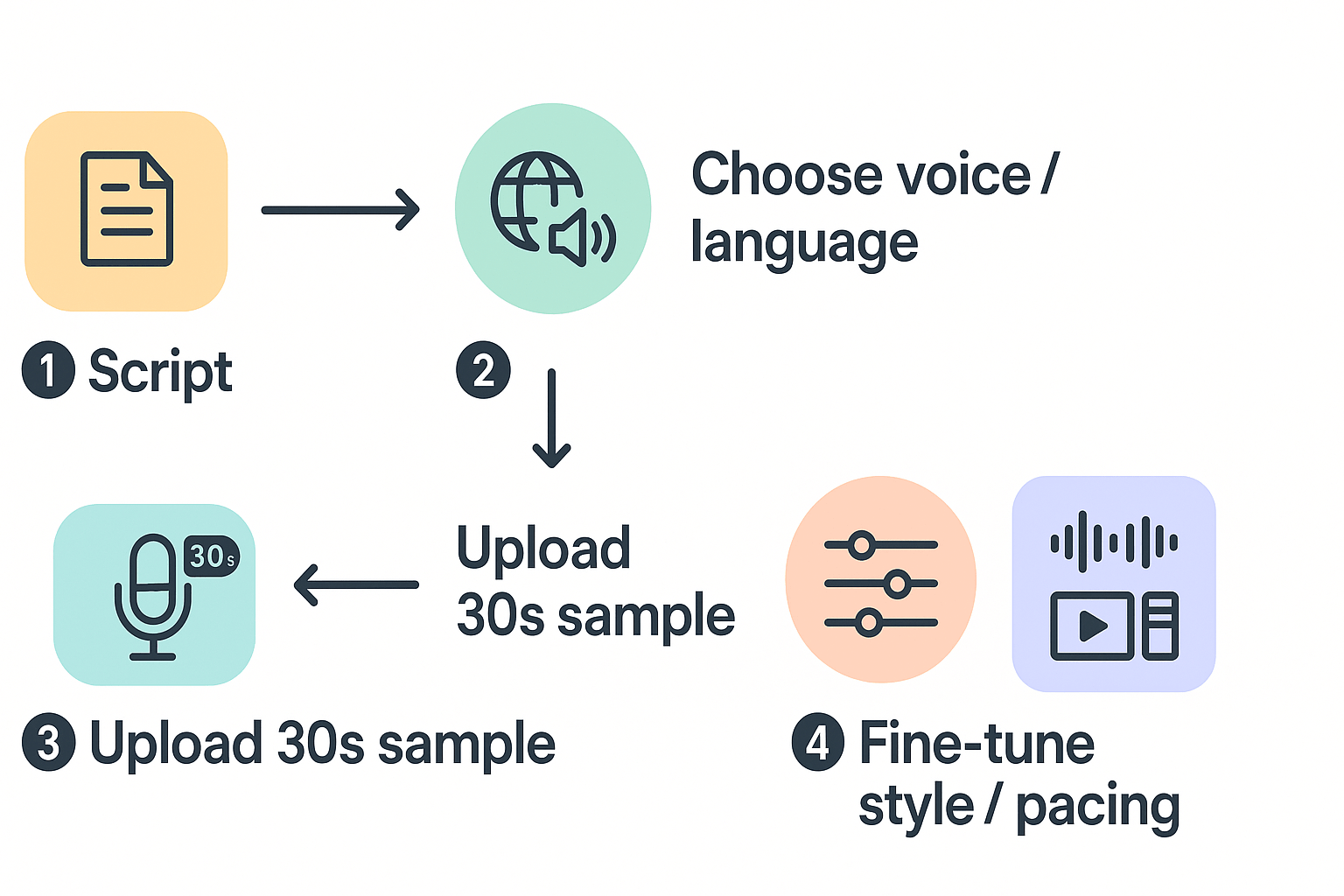
This quick guide walks you through how to create ai voice using DupDub, from script to final export. You’ll prepare a short script, choose voice and language, record a 30 second sample for cloning, tweak style and pacing, then export audio or video with subtitles.
Prepare your script
Keep lines short and natural. Aim for 60 to 150 words for a test clip. Mark pauses, emphasis, and any names or acronyms so the cloned voice reads them correctly.
Pick voice and language
Browse DupDub’s library to compare tones and accents. Try a few voices with a short read to hear differences in warmth, pace, and clarity. For deeper background on neural text to speech, see the Neural TTS deep dive.
Create a voice clone (30 second sample)
Record a clear 30 second clip in a quiet room using your browser mic or phone. Upload the sample into DupDub’s voice cloning tool. The platform locks clones to the original speaker and uses encrypted processing to protect data. Give explicit consent if you clone another person.
Follow these steps:
-
Open DupDub and choose Voice Cloning.
-
Upload the 30s sample and name the clone.
-
Wait for the short processing job to finish.
-
Preview the cloned voice in your chosen language.
-
Save the clone and add it to your project.
Fine-tune style and pacing
Use sliders to adjust speed, pitch, and expressive style. Add commas or parenthetical cues in the script to shape breathing and pauses. Test short phrases, then adjust globally for consistency across long reads.
Export and QA
Export as MP3 or WAV for audio, MP4 for video, and SRT for subtitles. Listen to the full file and check names, numbers, and timing. If something sounds off, tweak pacing or re-record a better source sample.
Quick tips
-
Use a pop filter or soft fabric over the mic to reduce plosives.
-
If a sentence sounds rushed, add a comma or short tag like [pause].
-
Prefer neutral background noise for clearer cloning results.
Compare DupDub vs top competitors: feature, language & price matrix
This quick matrix shows where each vendor shines, so you can pick the best tool for dubbing, cloning, or narration. Per
DupDub Help Detail, DupDub's AI Voiceover transforms your text into natural, expressive speech using over 700 realistic voices across 90+ languages and accents. Below you get a visual-first comparison of voices, language reach, cloning limits, and ideal use cases to guide your create ai voice decisions.
|
Vendor
|
Voices
|
Languages
|
Clone sample
|
Best for
|
|
DupDub
|
700+
|
90+
|
30s sample
|
Multilingual dubbing, brand voice cloning, video localization
|
|
ElevenLabs
|
High, expressive
|
Many languages
|
Short sample
|
Long-form narration, fiction audio
|
|
Murf AI
|
Dozens to 100s
|
20 to 30
|
Limited or no cloning
|
E-learning, marketing voiceovers
|
|
Play.ht
|
Hundreds
|
50 to 60
|
No cloning
|
Podcasts, blog audio, simple TTS
|
|
Speechify
|
Focused on clarity
|
30+
|
No cloning
|
Accessibility, personal reading tools
|
Pick by use case
If you need broad language coverage and fast video localization, DupDub is the clearer choice because of the language and voice breadth and the short 30 second cloning sample that speeds setup. For storytelling and highly expressive narration, ElevenLabs often rates higher for raw naturalness. For course modules and corporate training, Murf and Play.ht fit budgets and workflow plugins. Want a final check: consult independent MOS or naturalness studies and an analyst report to validate performance claims before you commit.
Pricing & plans explained — what you get on Free, Personal, Pro, and Ultimate
Choose a plan that matches your workflow and budget. This section breaks down DupDub’s tiers, trial limits, and pay-as-you-go options so you can create ai voice demos and scaled projects. Read the snapshot, then use the short decision guide to pick the right plan.
Quick plan snapshot
Here is a compact view of core allotments and limits. Prices below reflect monthly rates when billed annually. Pay-as-you-go options let you buy credits for one-off jobs.
|
Plan
|
Price (billed annually)
|
Yearly credits
|
Voice clones
|
|
Free (3-day trial)
|
Free
|
10 starter
|
0
|
|
Personal
|
$11 / month
|
1,800
|
3
|
|
Professional
|
$30 / month
|
6,000
|
5
|
|
Ultimate
|
$110 / month
|
30,000
|
10
|
|
Pay-as-you-go
|
One-time purchases
|
500/$$68, 1,000$$128, 6,000/$698
|
N/A
|
Which plan fits you
Match common creator profiles to the right plan.
-
Hobby creator or first-timer: Start with the Free trial to test voice cloning and TTS. Move to Personal after you outgrow starter credits.
-
Weekly YouTuber or podcaster: Personal offers steady credits, a few clones, and moderate transcription time. It keeps costs predictable.
-
Growth creator or small agency: Professional adds more credits, more clones, and higher file limits for consistent output.
-
Enterprise localization or high-volume teams: Ultimate gives large credits, unlimited file size, and the cloning scale needed for global programs.
Decision guide: pick the cheapest tier that covers your monthly export and clone needs. If you need sporadic bursts, buy pay-as-you-go credits. If you expect steady volume, annual Professional or Ultimate saves money and time.
Privacy, consent & ethical considerations when you create ai voice
Creating an AI voice can speed production, but it brings real privacy and legal responsibilities. Get consent, limit data use, and document permissions before you clone or publish any synthetic voice. DupDub helps: cloning is locked to the original speaker and processing is encrypted, which reduces misuse risk.
Obtain clear consent first
Always get recorded, written consent that names use cases and distribution channels.
European Commission guidance on consent under GDPR states: The GDPR applies strict rules for processing data based on consent. The purpose of these rules is to ensure that the individual understands what he or she is consenting to. Consent must be freely given, specific, informed and unambiguous.
Protect recordings and models
Store raw samples and cloned voices encrypted. Limit access to project members only. Use platform features that lock clones to the original speaker, and log all exports and downloads.
Reduce legal and reputational risk
Follow simple policies:
-
Require signed consent that lists languages and platforms.
-
Keep retention limits for voice data and delete on request.
-
Add clear disclaimers in published content when a synthetic voice is used.
These steps keep your projects ethical, protect talent, and reduce regulatory exposure.
Optimize voice quality: tips, common issues and troubleshooting
Quick, actionable tips to improve TTS naturalness and fix common dubbing problems. If you want to create ai voice that sounds human, focus on script style, pronunciation notes, pacing, and sync. You don’t need deep audio skills to make big gains. These steps help beginners spot and fix the usual issues fast.
Write scripts for natural-sounding TTS
Use short sentences and conversational phrasing. Add punctuation to control pauses, and write numbers and acronyms the way you want them spoken. Small edits help the model choose the right rhythm.
-
Prefer active verbs and short clauses.
-
Spell out tricky words or add phonetic hints in brackets.
-
Mark emphasis with ALL CAPS or italics where supported.
Troubleshoot pronunciation, timing, and robotic tone
Check phonetic fixes for names and places first. Slow the speech rate by 5 to 10 percent to reduce a clipped feel. For dubbing, nudge line timings to match lip movement, and trim or extend silence to improve sync. If output sounds robotic, switch voice style or add natural fillers in small doses.
If a problem persists, isolate one variable at a time: script, voice, or timing. Fixing one thing often clears other issues.
How teams scale voice workflows with DupDub (integration & API use cases)
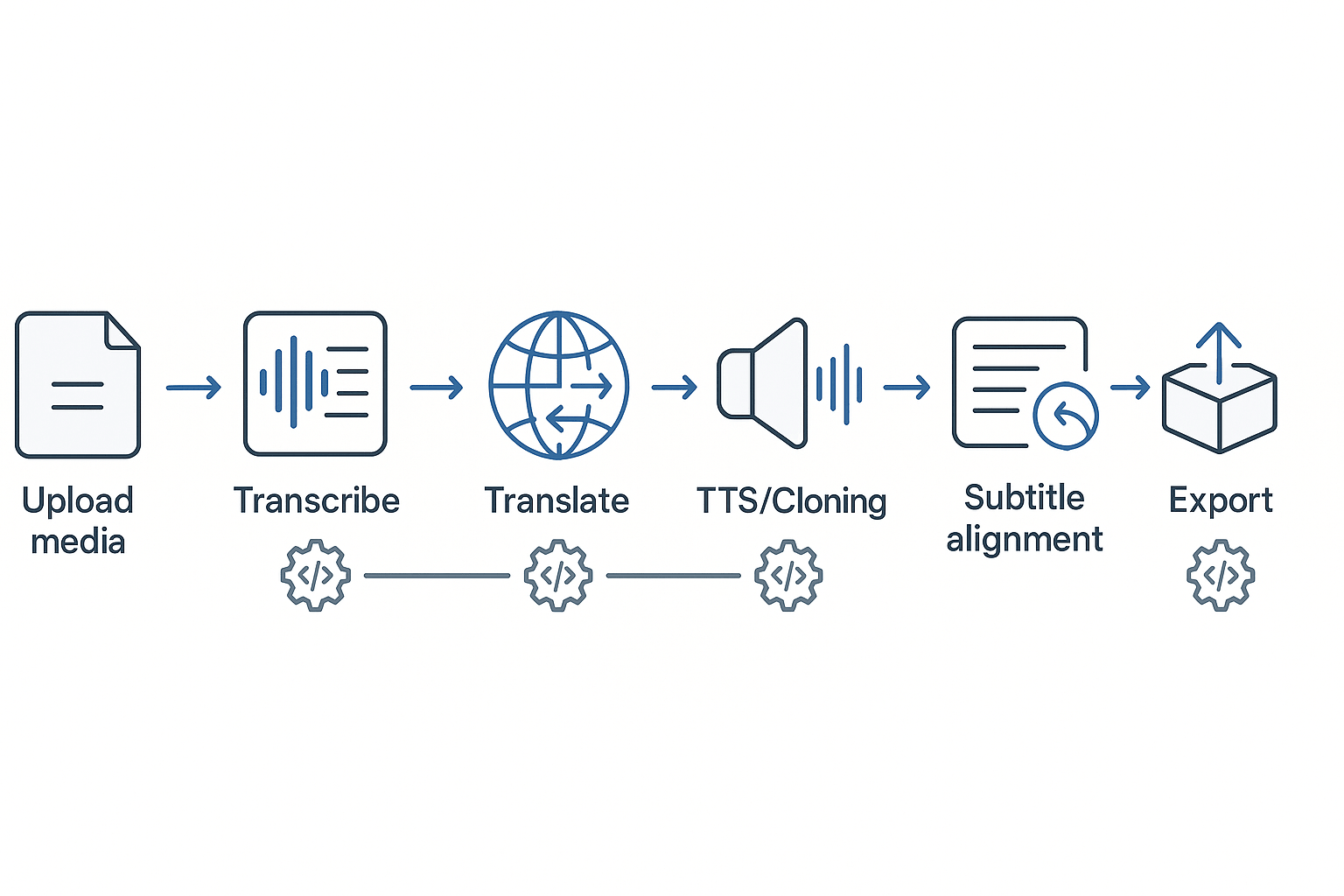
DupDub's API makes it easy for teams to automate end-to-end voice pipelines and create ai voice assets at scale. Start by sending media to the API, then chain transcription, translation, TTS or voice cloning, and subtitle alignment for repeatable multilingual output. The result: faster time to publish and consistent brand voice across markets.
Automate common patterns
-
Batch dubbing: queue folders or S3 buckets, run parallel transcribe and translate jobs, then generate TTS or clones in target languages. This removes manual uploads and speeds up bulk releases.
-
CI/CD publishing: add DupDub steps to your pipeline so new videos trigger automatic localization, subtitle checks, and staged exports for review.
-
Quality checks: use webhook callbacks to surface transcripts, diff subtitles, and run human review gates before final export.
Recommended integrations and checks
-
Integrate storage (S3, GCS), a subtitle linter, and your CMS or CDN. Use webhooks for status and automated QA sampling. Lock cloned voices to speaker consent and log audit trails for compliance.
FAQ — Answering the most-asked questions about creating AI voice with DupDub
-
Can I clone a voice in DupDub (how to clone a voice in DupDub)?
Yes. When you create ai voice projects in DupDub you can make a voice clone from about 30 seconds of clear audio. The tool guides you through uploading a sample, confirming consent, and testing the clone in multiple languages. Cloned voices are locked to the original speaker to prevent misuse.
-
How many languages does DupDub support for TTS and cloning (languages supported for AI voice)?
DupDub offers TTS in 90 plus languages and accents, while voice cloning supports 47 languages. That means you can narrate or dub content broadly and still reuse a cloned voice in many target markets. It’s a good fit for creators localizing video or audio.
-
What are plan limits for voice creation on DupDub (plan limits for DupDub voice plans)?
Free gives a short trial with starter credits so you can test cloning and TTS.
Paid tiers scale credits, clone slots, and export limits: Personal, Professional, and Ultimate add more yearly credits, voice clones, and file size allowances.
You can also buy one-time credits with pay as you go for ad hoc work.
-
Is my voice data shared or sold by DupDub (is my voice data shared)?
DupDub processes audio with encryption and says voice cloning is locked to the original speaker, and data is not shared with third parties. Still, always get explicit consent from the speaker before cloning. For enterprise use, review contract and compliance terms.
-
How do I try voice cloning or get API access (try voice cloning in-app, request API access)?
Start with the 3-day free trial to test voice cloning in the browser studio or try TTS on a sample video. If you need automation, request API access or a demo from DupDub to learn integration options. For quick testing, upload a short clip and follow the cloning flow in-app.




 Discord
 YouTube
 Tiktok
 Twitter
 Facebook
 Instagram