


TL;DR, What you’ll learn and the one-sentence action
What is a CTA-driven voiceover and why it matters
Core components
-
The ask: a short, direct instruction, for example, "Start your free trial now." Keep it under eight words.
-
The benefit line: one sentence that explains why the viewer should act, focused on value.
-
Vocal delivery: tone, pacing, emphasis, and timing (how you say it matters as much as what you say).
Why spoken CTAs change conversions
How to write CTA scripts that convert (templates & examples)
Direct template: clear ask, low friction
-
E-learning: "Start lesson two now. Sign up to track your progress." (6s)
-
SaaS: "Create your free account in 30 seconds and connect your team." (8s)
-
Ecommerce: "Add this kit to your cart for free shipping today." (7s)
-
Nonprofit: "Donate now to fund one child’s tutoring session." (6s)
Benefit-led template: show the payoff first
-
E-learning: "Master Python in weeks. Enroll free and get the first module now." (10s)
-
SaaS: "Save two hours a week with automated reports. Start your free trial." (9s)
-
Ecommerce: "See clearer skin in 14 days. Try our starter pack today." (8s)
-
Nonprofit: "Help one child read aloud, and change their year. Donate one time." (9s)
Urgency template: prompt immediate action
-
E-learning: "Enrollment closes midnight. Reserve your seat now." (6s)
-
SaaS: "Beta access ends today. Claim your free seat." (7s)
-
Ecommerce: "Flash sale, 20% off, two hours left." (6s)
-
Nonprofit: "Match ends at noon. Double your gift now." (6s)
Micro-copy bank: short lines to test fast
-
Primary buttons: "Start free trial", "Join now", "Buy now", "Give today"
-
Secondary links: "Learn more", "See features", "View impact"
-
Confirmation prompts: "Check your inbox", "You're all set"
Using SSML, TTS settings and voice cloning for persuasive CTAs
Quick SSML snippets you can copy
TTS settings and voice-cloning tradeoffs
-
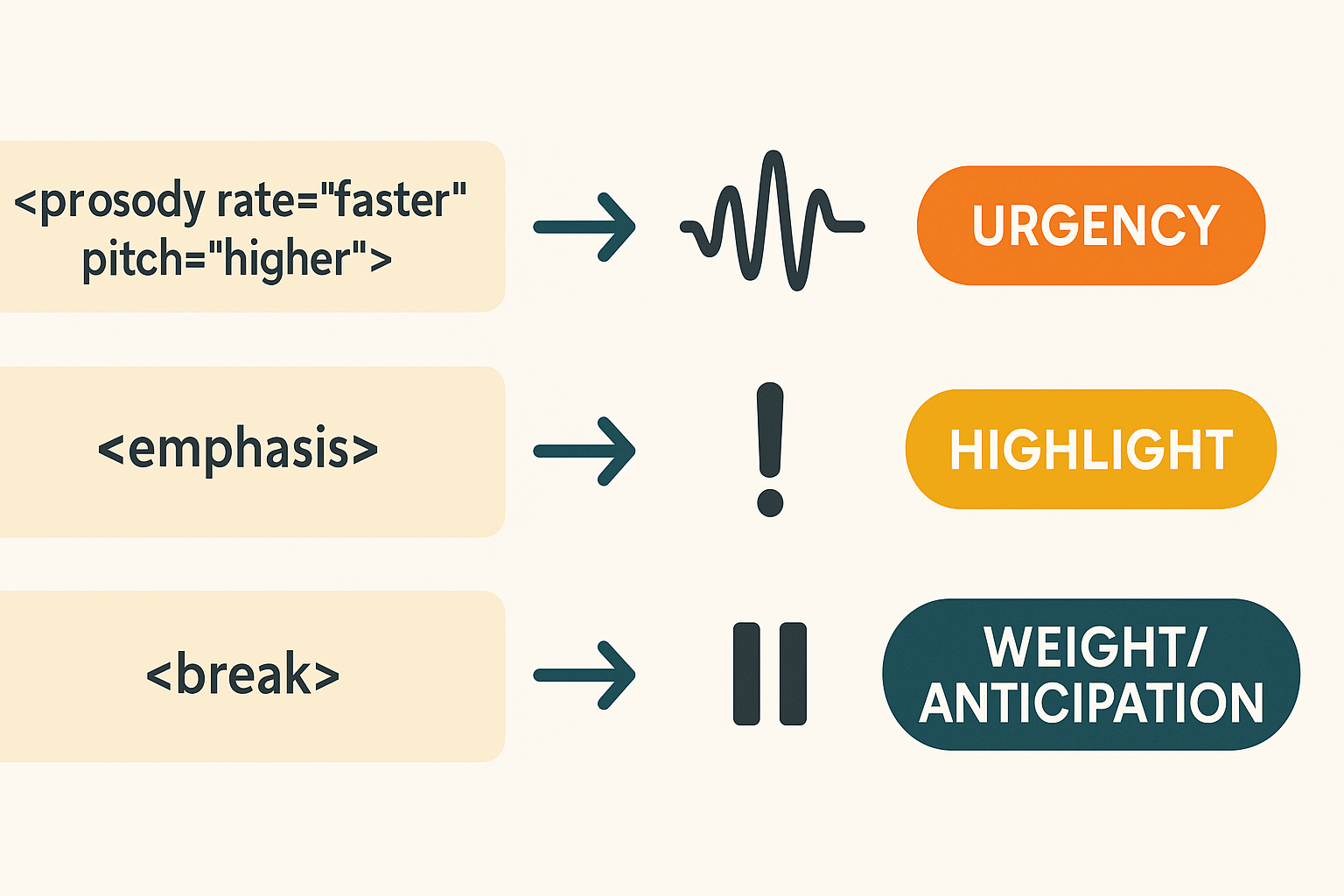
Rate and pitch: Faster, slightly higher pitch often reads as urgent. Keep changes subtle to avoid sounding synthetic.
-
Voice style: Choose a direct, friendly style for CTAs. Styles like "energetic" or "conversational" convert well in short prompts.
-
Intelligibility vs character: Heavily styled voices add personality but can lose clarity on small screens. Favor clarity for mobile-first CTAs.
-
Cloning tradeoffs: A cloned brand voice gives trust and consistency. But clones require sample audio and may be less flexible across languages. Use TTS for rapid localization and clones for flagship content.
DupDub feature map for implementation
-
TTS styles: 700+ voices and 1,000+ styles across 90+ languages, so test local tones and accents.
-
Voice cloning limits: Create a voice from a 30s sample, usable in 47 languages. Good for brand voices and repeated campaign assets.
-
SSML support: Use SSML snippets (prosody, emphasis, break) in the DupDub editor or API to control pacing and emotion.
-
Exports: MP3, WAV, MP4 and SRT for subtitles and alignment.
-
Draft CTA line and pick tone.
-
Apply SSML snippets above and test on mobile.
-
If brand voice matters, create a clone sample.
-
Run a quick A/B test with a neutral TTS and the cloned voice.
Placement, length and video best practices (mobile-first)
Put CTAs where viewers can act now
-
Endcard: best for signups after a full watch
-
Mid-roll: use for time-sensitive promos or reminders
-
Tappable overlay: highest immediate action on mobile
Keep CTAs short, scannable, and rhythmic
-
Lead with the action: "Tap to start your free trial."
-
Add a short benefit: "Save 20% today."
-
Finish with urgency or ease: "No card needed."
Mobile-first timing, captions, and platform nuance
Measuring CTA effectiveness: metrics, A/B tests and targets
Track these core metrics
-
Click-through rate (CTR): clicks divided by impressions. For context, YouTube Ads Benchmarks (2026) reports the average click-through rate (CTR) for YouTube ads is 0.65%.
-
Conversion rate: clicks that become the desired action, like a signup or purchase.
-
Play-to-CTA rate: percent of viewers who reach the CTA moment and then click. This ties voice timing to action.
-
Retention at CTA: percent of viewers still watching at the CTA timestamp. Use this to judge whether CTA placement misses dropoffs.
-
View-through conversions: users who watch then convert later, within a chosen view-through window (time after view you attribute the conversion).
Instrument tracking: UTMs, pixels, events
-
UTMs (Urchin Tracking Module): add utm_source, utm_medium, utm_campaign, and utm_content to CTA links. Use utm_content to mark voice or SSML variant.
-
Event pixels and analytics events: push events like video_cta_shown, video_cta_clicked, and video_cta_conversion to your analytics. Record timestamps and playback position.
-
View-through windows: set a window (for example 7 or 30 days) to attribute delayed conversions. Align this with your sales cycle.
A/B test ideas and statistical tips
-
Tests to run: voice A (warm) vs voice B (direct); SSML pause vs no pause; localized voice vs default.
-
Stats tips: pick a minimum detectable effect (MDE) before testing. Use a sample size calculator and a 0.05 significance level. Run until both significance and minimum sample are met, avoid early peeking.
Sample KPI targets (benchmarks for teams)
-
CTR: 0.5 to 2% for discovery videos, higher for branded placements.
-
Play-to-CTA rate: 8 to 20%.
-
CTA conversion rate: 2 to 8% depending on offer friction.
-
Retention at CTA: aim for 60%+ for short mobile ads, 75%+ for longer on-demand content.
Troubleshooting: why CTAs underperform and fixes that work
1) Unclear ask
-
Quick fixes: Use one verb, name the action, add a time or benefit. Say, “Start your free trial now, it takes one minute.”
-
Checklist: single CTA, concrete verb, benefit line.
2) Bad timing
-
Quick fixes: Add a soft CTA mid-video and a stronger CTA in the final 10 seconds. Use visual and vocal cues together.
-
Checklist: mid-roll reminder, final CTA in last 10s, pause for 1 second after the ask.
3) Mismatched tone
-
Quick fixes: Swap to a warmer or more urgent voice. Adjust pacing and pitch using SSML (speech synthesis markup language) to match emotion.
-
Checklist: tone audit, SSML style tag, compare two voice options.
4) Mobile friction
-
Quick fixes: Promote single-click links, short landing pages, or SMS codes.
-
Checklist: tap targets, 1-click link, mobile landing test.
5) Caption and accessibility issues
-
Quick fixes: Ensure captions include the entire ask and link text. Use readable font size and contrast.
-
Checklist: caption accuracy, visible CTA text, SRT verified.
Before and after: a quick script + SSML tweak
Accessibility and inclusive CTA design
Make voice CTAs perceivable and understandable
Design visuals and interactions for access
-
Provide captions and a downloadable transcript.
-
Use SSML to add breaths and short pauses for clarity.
-
Offer a slower playback or alternate voice option.
-
Localize phrasing and test idioms with native reviewers.
-
Use voice cloning only with consent, and flag synthetic voices so users know they are hearing a clone.
Platform-specific examples & industry use cases (beyond B2B)
Quick scripts by use case
-
Ecommerce demo
-
Voice: friendly, confident. Script: "Tap add to cart now and get free shipping. Limited time." (SSML: brief pause before "limited time" for urgency).
-
-
E-learning sign-up
-
Voice: warm, helpful. Script: "Join the course free for seven days. Start learning now." (add gentle rise in pitch on "Start learning now").
-
-
Nonprofit donation ask
-
Voice: calm, sincere. Script: "Help us reach one more child today. Give now, any amount helps." (soft emphasis on "one more child").
-
-
Gaming subscription
-
Voice: energetic, short. Script: "Upgrade for instant skins and perks. Tap to unlock now." (fast pace, upbeat SFX).
-
-
Localized promo
-
Voice: native accent. Script: "Get 20 percent off this week. Claim your offer in the app." (localize currency and phrasing when dubbing).
-
Platform notes and CTA placement
-
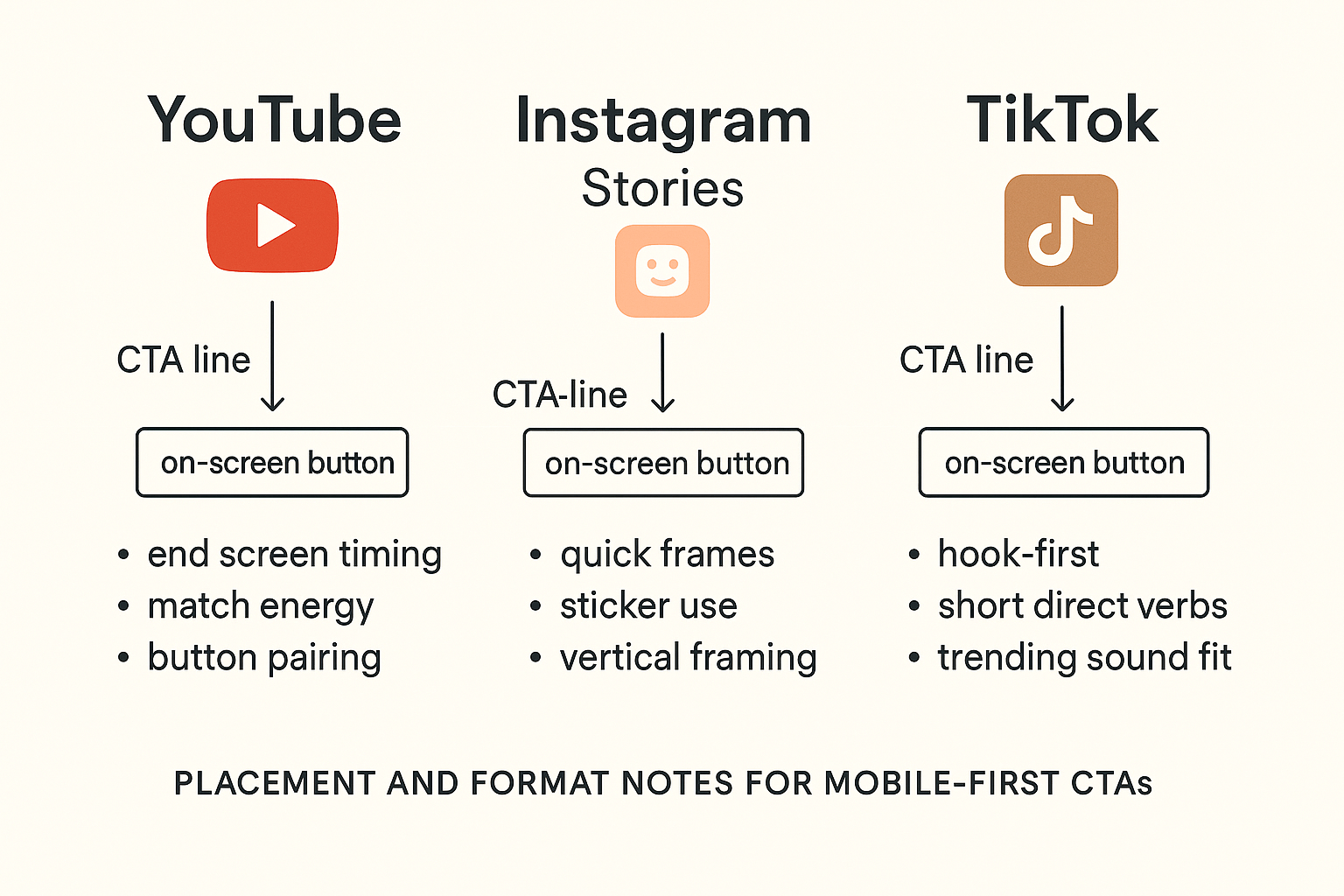
YouTube end screens: use a clear single-line CTA 2 to 5 seconds before end. Match energy to video. Pair with on-screen end-screen buttons.
-
Instagram Stories: speak quickly, keep CTAs in first two frames. Use on-screen sticker and a voice cue that repeats the action.
-
TikTok short-form: open with the hook, drop the CTA in the 2nd half. Short, direct verbs work best: "Tap follow" or "Claim now."
-
Mobile feed: expect muted auto-play. Add captions and a strong first-frame visual cue. Voice should reinforce the text label.
Fast DupDub workflow
-
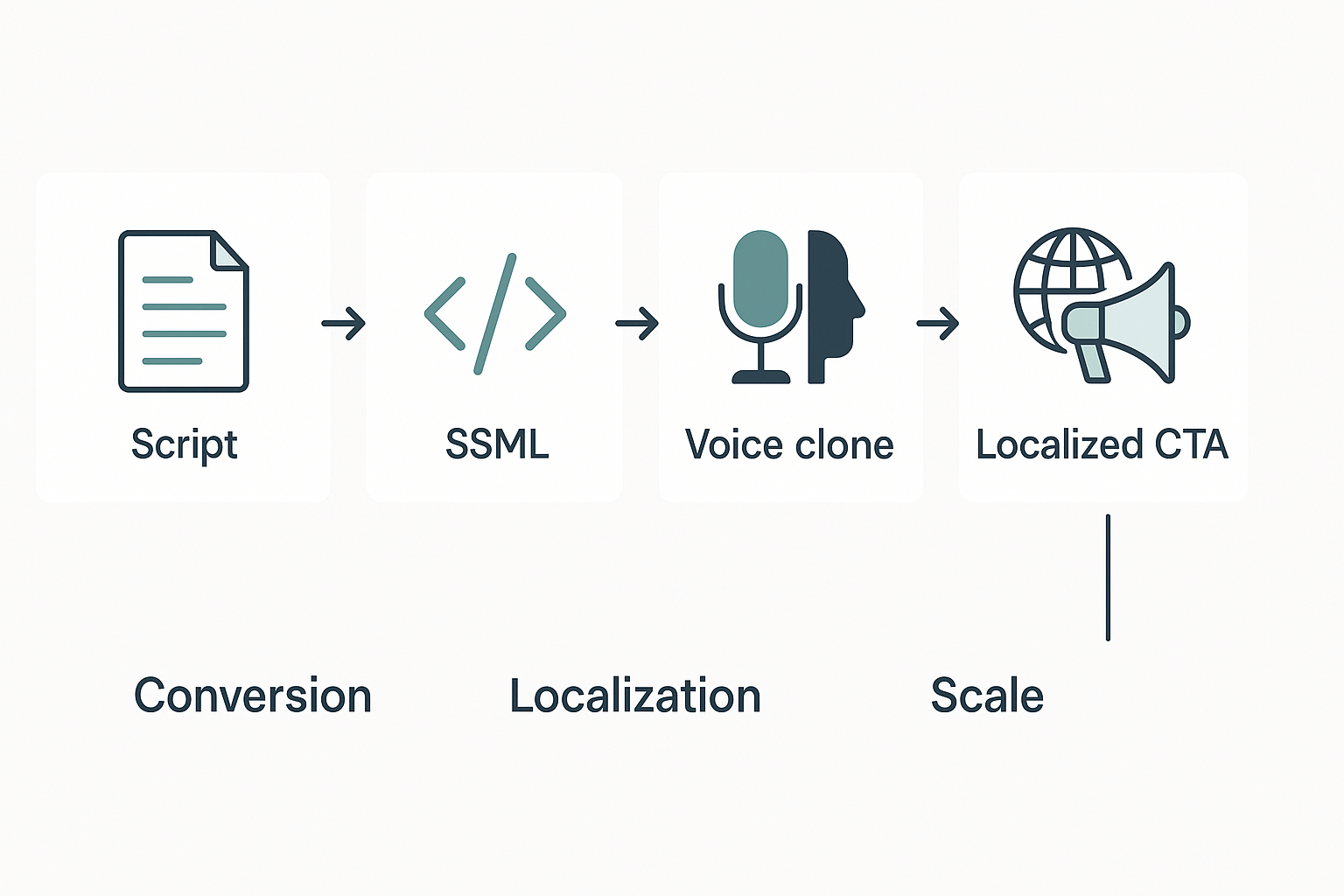
Script → 2. SSML formatting for timing and emphasis → 3. Choose or clone a voice → 4. AI dubbing and subtitle sync for locales.
FAQ — common reader questions answered
-
Ideal CTA voiceover length for short-form CTA video
Keep CTAs tight: 2 to 7 seconds for a single-line prompt, 7 to 15 seconds for a short micro-explainer. Aim for 8 to 12 words spoken so mobile viewers catch it without rewinding. Test variants with real users to find the sweet spot for your audience.
-
Ethics and legality of voice cloning for marketing voiceovers
Always get explicit consent and a signed release before cloning any voice. Use platforms that lock clones to the original speaker and encrypt processing to reduce misuse risk and comply with privacy rules. For paid ads or public distribution, document rights and keep records.
-
Is SSML necessary for high-converting CTA voiceovers and when to use it
SSML (Speech Synthesis Markup Language) isn’t mandatory, but it helps. Use SSML to add emphasis, natural pauses, or slight pitch changes on the key ask to boost clarity and urgency. For complex cadence or multilingual CTAs, add SSML and preview across voices.
-
How fast can AI dubbing localize CTAs for global CTA videos
Simple CTAs can be translated, dubbed, and aligned in minutes for short clips, and a few hours for longer content with review. Automation speeds the first pass, but plan for QA, cultural edits, and subtitle checks before final publish.

 Discord
 YouTube
 Tiktok
 Twitter
 Facebook
 Instagram