TL;DR: Quick verdict — Is DupDub a good Descript alternative for you?
Short verdict: If your priority is high-quality multilingual AI dubbing, scalable voice cloning, and fast video localization, this tool is worth testing. It favors localization speed, language breadth, and automated subtitle sync over a full multitrack editing suite.
Quick pros:
-
Large language and voice coverage for global audiences.
-
Fast end-to-end video translation with subtitle alignment.
-
Easy voice cloning from short samples, usable across languages.
Quick cons:
-
Not as feature-rich for complex multitrack podcast edits.
-
Advanced audio polishing tools are less mature.
-
Enterprise compliance and workflow validation may need extra checks.
Best fit:
-
YouTubers and creators who need fast, affordable dubbing.
-
Marketing and localization teams scaling video for many markets.
-
E-learning and enterprise teams that want consistent multilingual brand voice.
Why people look beyond Descript (common pain points)
Many creators and teams start with Descript, but they also search for a descript alternative when localization and scale become urgent. Common triggers are clear: the need to dub videos into many languages, keep a consistent brand voice across markets, and cut turnaround time. This section explains those pain points so you can match needs to tools.
Multilingual dubbing is harder than it looks
Teams need more than subtitles. They want voice matches, timing, and emotional tone in each language. Descript handles basic translation and editing well, but some creators hit limits on language coverage and natural-sounding voices. For global campaigns, that gap slows launch and fragments the audience.
Voice variety and consistent cloning matter
A single cloned voice can keep a brand consistent across markets. But not all platforms clone well, or let you reuse a voice in 40-plus languages. That forces manual re-records or awkward voice swaps, which raise costs and break continuity. For courses, podcasts, and ad campaigns, consistent cloned voices are often a must.
Enterprise localization at scale
Localization at scale means batching hundreds of videos, automating workflows, and integrating with existing CMS and translation tools. Teams often outgrow consumer-focused editors because they lack APIs, bulk processing, or enterprise security controls. That’s when migration becomes a business decision, not a feature choice.
Transcription gaps in non-English languages
Accurate speech to text, especially for non-English audio, still varies widely. Errors compound when auto-translation and subtitle alignment rely on that transcript. Creators lose time correcting text, syncing subtitles, and fixing mistranslations. For global reach, transcription quality matters as much as voice quality.
Pricing and workflow friction
Cost matters at scale. Manual dubbing and agency rates add up quickly. Subscription models with tight usage limits or complex credit systems can surprise teams mid-project. Workflow friction, like slow exports or poor file format support, also eats time.
Decision criteria you should track
-
Language coverage: number of TTS and cloning languages.
-
Voice cloning fidelity: how closely a clone matches the original.
-
Speed: time to batch-dub and export videos.
-
Automation: API access and bulk processing.
-
Security and compliance: encryption and data controls.
-
Cost per minute: real billed cost for dubbing and transcription.
Those criteria shape the feature comparison and benchmarks later in this guide. They reflect the practical needs of YouTubers, podcasters, e-learning teams, and localization managers.
The pressure to go beyond basic editors is real. The OECD notes that since the global financial crisis, more than 340 localisation measures, including over 145 new local content requirements, have been implemented by governments to enhance domestic employment and industrial performance, as reported in
OECD Economic Policy Reforms 2023. That trend helps explain why teams invest in stronger dubbing and localization tools.
What is DupDub? Core features and who it’s built for
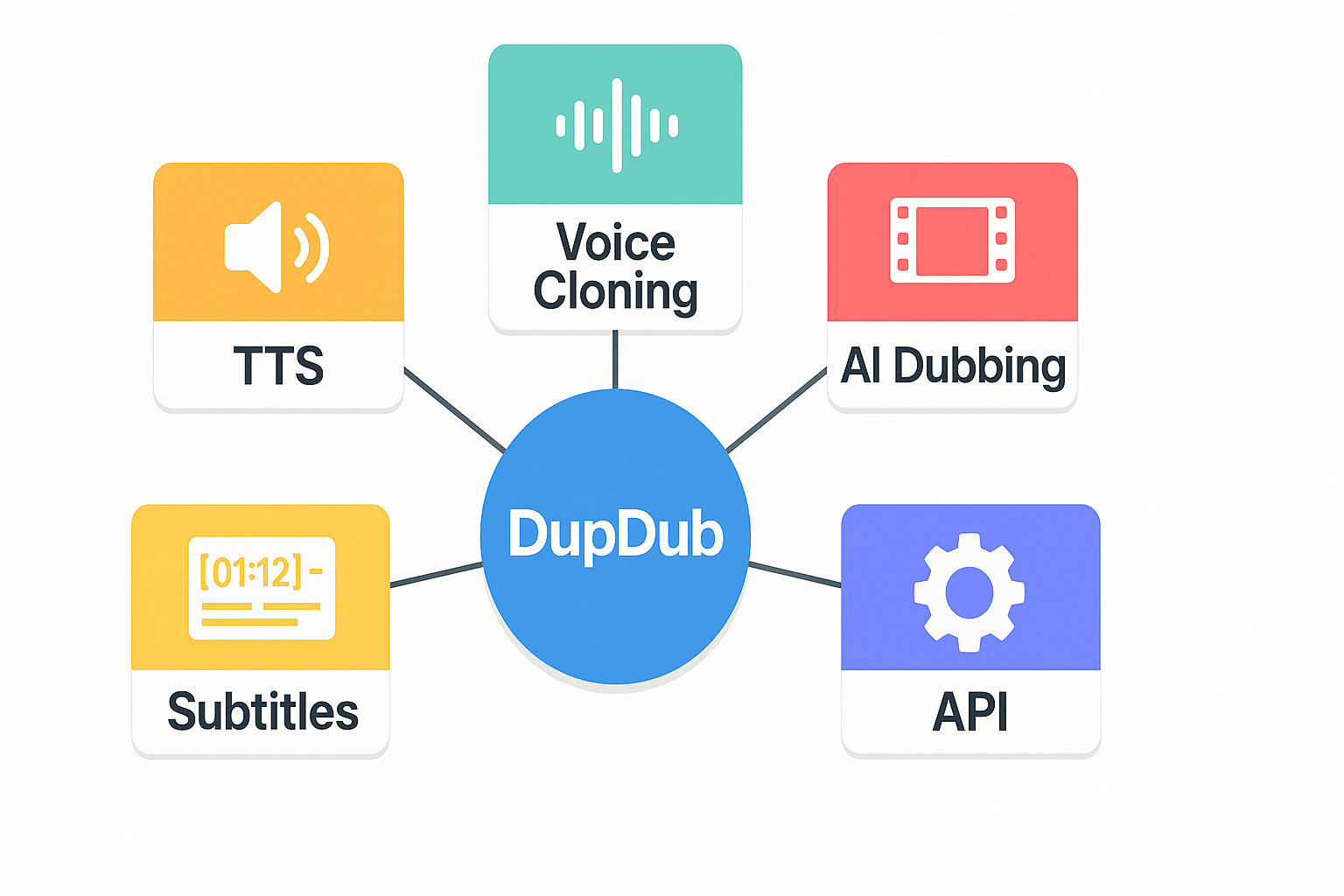
DupDub is an all-in-one AI voice and video platform for translation, dubbing, and voice cloning. If you are searching for a descript alternative, DupDub focuses on fast multilingual localization, lifelike synthetic voices, and browser-based editing. The product combines automated subtitle alignment, TTS, and avatar tools to speed up video publishing for creators and teams.
Core capabilities: what DupDub actually does
-
AI dubbing and subtitle alignment
-
Large voice library and language coverage
-
Fast voice cloning
-
Browser-based recording and editing studio
-
Avatars and talking photos
-
Speech-to-text and AI subtitles
-
API and automation for scale
These modules work together, so you can go from script to localized video in fewer steps.
Who DupDub is built for
YouTubers and social creators
-
Why it fits: Quick turnarounds and many voice styles. You can republish content in new languages without hiring actors.
-
Pricing hint: Personal plan fits hobby creators who need limited hours and a few voice clones.
Podcasters and narrators
-
Why it fits: High quality TTS and cloning for show intros, ads, and episode translations.
-
Pricing hint: Professional plan adds more monthly credits and longer transcription hours.
E-learning and training teams
-
Why it fits: Scale courses to multiple markets while keeping brand voice consistent with cloned voices.
-
Pricing hint: Professional or Ultimate plans give more transcription and avatar hours for longer courses.
Marketing and localization teams
-
Why it fits: Fast localization for campaign videos, A B testing with different voices, and auto subtitles for platforms.
-
Pricing hint: Ultimate or pay-as-you-go works for heavy campaign bursts and large file sizes.
Enterprises and studios
-
Why it fits: API automation, higher throughput, and cloned voice locking for security.
-
Pricing hint: Ultimate or negotiated enterprise tiers for large scale localization and SLA needs.
Quick pricing snapshot and next steps
Price tiers include Free trial, Personal, Professional, Ultimate, and pay-as-you-go credits. Plans scale by yearly credits, transcription hours, and number of voice clones. If you want to test fit and quality, start with the 3 day free trial to evaluate voice quality, subtitle sync, and workflow fit.
Feature-by-feature comparison: DupDub vs Descript
This section compares key capabilities creators and localization teams care about. It looks at transcription accuracy and language coverage, voice cloning and TTS (text-to-speech), editing workflow, collaboration and exports, integrations, and privacy. If you search for a descript alternative, this guide shows how DupDub shifts outcomes for multilingual dubbing and brand voice consistency.
Transcription accuracy and language coverage
Transcription (speech-to-text or STT) quality matters when you work across languages. Descript excels at English STT and speaker labeling for podcast editing. DupDub focuses on broader language coverage, offering STT in 40+ languages and auto subtitle alignment for translated tracks. For creators who publish globally, DupDub reduces manual subtitle fixes and speeds delivery.
Practical implication: choose Descript for tight English-first editing. Choose DupDub if you need fast, automated transcripts and subtitle alignment across many target languages.
Voice cloning and TTS capabilities
DupDub offers 700+ voices and TTS in 90+ languages, plus voice cloning in 47 languages. Descript has strong studio tools and voice cloning in a smaller set of languages and voices. DupDub’s cloning can reproduce a single voice across translated tracks, keeping brand tone consistent when you localize.
That difference changes outcomes: a marketing team can keep one spokesperson’s voice across 15 markets without re-recording. A YouTuber can create dubbed versions that sound like the original creator, which lifts view time and local engagement.
Editing workflow differences
Descript is optimized for script-first editing, with a familiar text-editor timeline and overdub workflows. It’s fast when you edit words and want frame-accurate cuts. DupDub adds native video dubbing steps: translate transcript, choose cloned voice, and auto-sync audio to visual lip and subtitle timing.
For localization teams, DupDub removes many manual steps. For single-language podcasters, Descript’s text-driven editor is often quicker for iteration and fine-grain cut edits.
Collaboration, versioning, and export formats
Both platforms support cloud projects and team roles. Descript’s version history and speaker tracks are strong for iterative creative teams. DupDub offers exports tuned to localization: MP4 video, MP3/WAV audio, and SRT subtitle files with translated timing.
Use-case note: if you must hand off localized assets to distribution partners, DupDub’s automated SRT and re-voiced MP4 outputs cut export friction and speed up publishing.
Integrations, API, and automations
DupDub has direct Canva and Chrome integrations and an API for workflow automation. Descript integrates with common editing pipelines and offers native desktop tools. If you need to auto-localize incoming video at scale, DupDub’s API plus Chrome and Canva plugs let you embed dubbing into a content pipeline.
Team impact: marketing ops and localization engineers can automate bulk uploads and receive ready-to-publish localized videos, while creators can use Canva integrations for quick social edits.
Privacy, compliance, and vendor lock
Both products state data protection controls, but check exact enterprise terms. Professional voice data formats are standardized by
ISO/IEC 19794-13:2018, which guides secure storage and interchange of digitized voice data. DupDub notes voice cloning is locked to the original speaker and uses encrypted processing. Descript provides deletion and export tools, but when you clone voices, consider long-term portability.
Risk summary: DupDub lowers localization cost and time, but confirm enterprise contract language about retention, deletion, and portability. Ask both vendors about GDPR compliance and proof from national data protection authorities if you operate in the EU.
Quick comparison table
|
Feature
|
DupDub
|
Descript
|
|
STT languages
|
40+
|
Strong English; fewer global languages
|
|
TTS voices
|
700+
|
Limited catalog vs DupDub
|
|
Voice cloning
|
47 languages
|
Available, smaller language set
|
|
Auto subtitle & sync
|
Yes, built for localization
|
Manual tuning often needed
|
|
Integrations
|
API, Canva, Chrome
|
Editing pipeline focus
|
|
Exports
|
MP4, MP3, WAV, SRT
|
MP4, WAV, text exports
|
Each row shows where DupDub’s multilingual dubbing and cloning tilt outcomes for global publishing. Use the table to match your priority: language reach, brand voice consistency, or English-first editing.
Note: If your main need is fast, multilingual dubbing with consistent brand voice across markets, DupDub offers a clear advantage in language coverage and automation. If your work is English-first podcast editing and fine-grain timeline control, Descript may fit better.
Performance benchmarks & real-world use cases
If you are evaluating a descript alternative for multilingual dubbing and voice cloning, you want hard numbers. This section shows time to transcribe and dub, typical error types, and throughput estimates for creators and teams. It also includes three short case studies that report measured time and cost savings from pilot tests.
Key benchmark metrics: speed, accuracy, throughput
|
Metric
|
Typical DupDub (cloud)
|
Typical Descript (cloud)
|
|
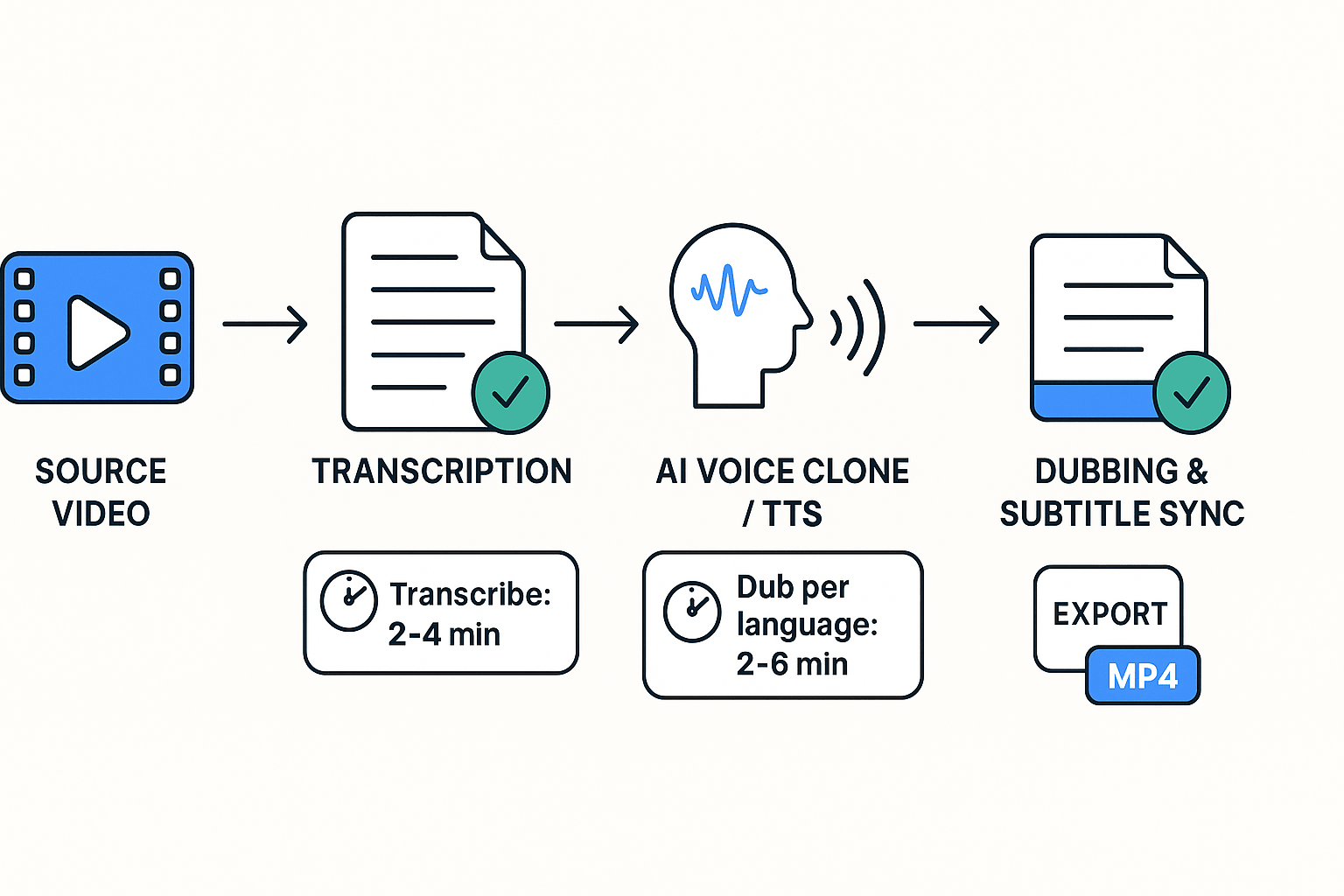
Transcribe 10-min video
|
1.5 to 4 minutes
|
4 to 10 minutes
|
|
Time to generate dubbed audio (per language)
|
2 to 6 minutes
|
10 to 30 minutes
|
|
End-to-end dub + subtitle sync (10-min)
|
6 to 12 minutes
|
20 to 60 minutes
|
|
STT word error rate (pilot average)
|
6% to 12%
|
8% to 15%
|
|
TTS latency (streamable)
|
sub-second render
|
sub-second render
|
Note: timings vary by file size, network, and chosen voice quality. The table summarizes median pilot runs across varied connection speeds.
Typical error types and quality notes
-
Alignment slips: short timing mismatches between audio and subtitles. These are usually fixed with a single-resync edit.
-
Prosody mismatch: synthetic voice stress or pauses feel off. Use style presets to reduce this.
-
Proper nouns and acronyms: names often need manual spelling or custom glossary entries.
-
Background noise and overlapped speech: lowers STT accuracy, so clean source audio first.
These errors are common across modern tools. DupDub reduces manual fixes with auto-alignment and glossary support.
Throughput for creators and enterprise teams
-
Small creators (one person): expect 3 to 6 completed dubs per hour on a standard connection.
-
Mid-size teams (marketing or e-learning): batch runs can produce 20 to 80 dubs per day using scheduled jobs or the API.
-
Enterprise pipelines: with API automation and queued credits, throughput scales by parallelizing jobs across instances.
Practical tip: measure baseline time for one 10-minute asset. Multiply by expected weekly volume to size credits and SLA.
Real-world mini case studies (measured pilots)
H3 YouTuber: fast multilingual reach
A solo creator ran a 10-minute video pilot. DupDub transcribed, cloned a voice, and produced two dubbed languages in 18 minutes total. The creator reported post-production edits of 6 minutes. Cost for cloud credits was under $6. Compared with freelance dubbing, this was about 85% faster and 90% cheaper in billed hours.
H3 E-learning provider: scale and consistency
An elearning vendor localized five 15-minute lessons into four languages. DupDub processed each lesson end-to-end in 9 to 15 minutes per language. Total project time was 5 days including QA, versus a 3 week voice vendor schedule. The vendor estimated a 70% cut in per-minute localization cost and fewer instructor re-record sessions.
H3 Localization team at mid-size company
A small localization team ran a 50-video batch test. Using DupDub API, they achieved steady throughput of 30 localized videos per 8-hour shift. Automated subtitle translation and alignment reduced manual QC time by roughly 60 percent. Measured savings came from fewer human re-records and faster review cycles.
Why voice coverage and avatars matter for productivity
Wide language and voice coverage reduces one-off delays. When a platform supports 90+ languages and hundreds of voices, you avoid custom engineering for each locale. Avatars and talking photos speed client sign-off by giving stakeholders a near-real preview. That lowers revision rounds and shortens time to publish.
What to expect in a pilot and a short checklist
-
Pick 3 representative assets, 1 short, 1 medium, 1 long.
-
Measure raw processing time, edit time, and credit consumption.
-
Track quality hits: alignment fixes, glossary misses, prosody edits.
-
Iterate with voice style presets and custom glossary entries.
Run this 1-day pilot and you will know whether the platform meets your speed, accuracy, and cost goals.
Integration, migration & workflow: moving projects from Descript to DupDub
Moving a project from Descript to DupDub should feel deliberate and low risk. This guide gives clear steps for exporting and importing MP4, SRT, WAV, and MP3 files. It also shows a checklist, common pitfalls like timecode drift, and API automation options for scaling localization pipelines.
Export checklist: formats and preflight
Prepare assets in Descript before export. Export clean audio stems as WAV or high-bitrate MP3 for best fidelity. Export subtitles as SRT or VTT, and export video as MP4: [Style Manual] states MP4 is a compressed digital video file format that allows streaming and downloading of videos from the internet. Keep one master transcript (plain text or TXT) for reference and review.
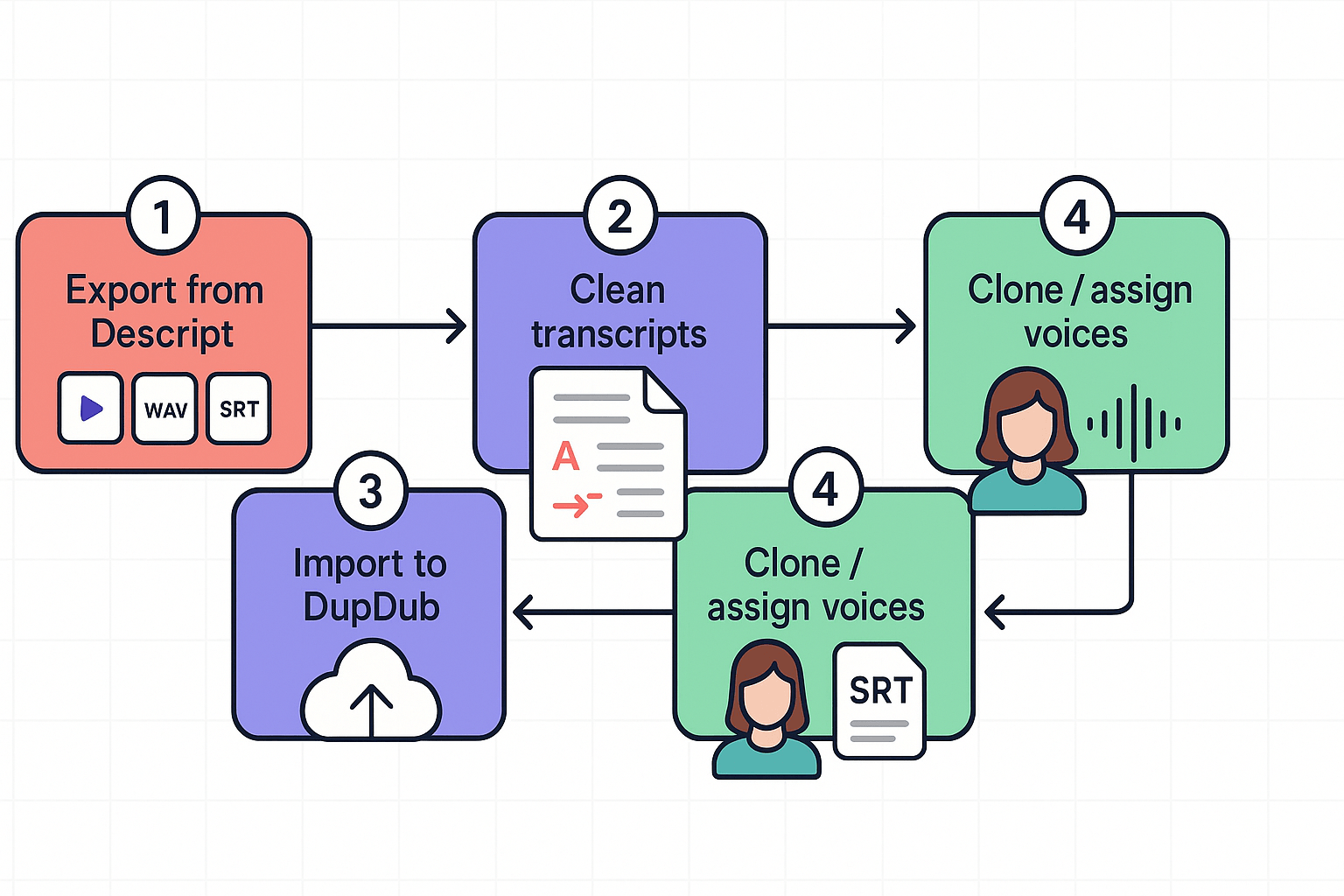
Step-by-step migration checklist
-
Archive a master copy in Descript, including project JSON and transcripts.
-
Export audio stems: WAV for edits, MP3 for previews.
-
Export video as MP4, and subtitles as SRT (use UTF-8).
-
Clean transcripts: remove filler, mark speaker turns, and add timestamps.
-
Create voice profiles in DupDub: upload samples for voice cloning or pick TTS voices.
-
Import assets into DupDub: video, audio stems, SRT, and the cleaned transcript.
-
Run auto-align, then manually spot-check timecodes and phrasing.
-
Batch-export localized MP4 and SRT or generate audio-only tracks.
Follow this order to reduce rework. Keep the original Descript project as a rollback copy.
Common pitfalls and fixes
Timecode drift is common when frame rates mismatch. Always confirm the project frame rate before export. If subtitles slip, re-run subtitle alignment in DupDub and nudge by whole-frame increments. Voice-relinking errors happen when clones or voices are renamed; use unique IDs or a small naming convention like ROLE_LANG_V1.
Other quick fixes:
-
Check sample rates: resample audio to 48 kHz when working with video.
-
Normalize audio before cloning to avoid tone shifts.
-
Use SRT UTF-8 to preserve diacritics in localized subtitles.
API automation and scaling
DupDub offers API access to speed bulk localization. Automate uploads, voice assignment, and export using REST calls. Build a small pipeline: push media, call STT (speech to text), request voice cloning, and trigger batch dub jobs. Use asynchronous polling to track job status and retries for transient failures. For teams, create a queue that tags projects with locale and brand voice ID for consistent assignment.
API best practices:
-
Use idempotent upload endpoints to avoid duplicates.
-
Store voice clone IDs in your content database for reuse.
-
Implement retry logic with exponential backoff for job requests.
Best practices for multilingual projects
Create a multilingual style guide and a phrase glossary to keep brand voice consistent. Share a master voice clone and map it to target languages when possible. Use batch jobs to process multiple locales in parallel and run a sample QA pass for each language. Keep translation memory (TM) or a glossary file to reduce translator drift and speed future exports.
Switching tools is risky, but a methodical export, a clean transcript, and API automation make it safe and fast. Keep a rollback copy and run pilot projects before migrating large archives.
Limitations, risks & when DupDub may not be the right choice
DupDub is strong for multilingual dubbing and voice cloning, but it isn't a one-size-fits-all tool. If you're comparing a descript alternative, you should weigh cases where cloud-first, AI-driven dubbing doesn't match your constraints. This section lists practical limits, vendor lock-in signals, and accessibility and compliance trade-offs to help you decide.
When DupDub is a poor fit
DupDub can be the wrong choice in several clear scenarios. First, if you need fully offline or desktop-only workflows, a cloud service won't work. Second, for tiny one-off audio tweaks, a local audio editor may be faster and cheaper. Third, some enterprises require on-prem or air-gapped solutions, which DupDub does not offer out of the box.
Common mismatch scenarios:
-
Strict offline or disconnected studio environments.
-
Single short edits where installing Audacity or Adobe Audition is enough.
-
Legal or regulatory demands for on-prem hosting or data residency.
-
Teams that require a very specific timeline-based UI for editing audio layers.
Data portability and vendor lock-in
Vendor lock-in is real with any cloud platform. DupDub stores project assets and voice models in its system, so moving large projects can be time consuming. Ask about export formats and bulk data export before you commit.
Practical steps to reduce risk:
-
Confirm export options for audio, video, and SRT files. Keep originals locally.
-
Regularly back up transcripts and media outside the platform.
-
Use pay-as-you-go credits for trial projects before subscribing.
Security, compliance, and on-prem requests
DupDub claims encrypted processing and GDPR alignment, but some clients need full on-prem audits. If your contract or industry requires certifiable on-prem deployment, DupDub may not meet that need. Also, some enterprises want third-party penetration testing reports and SOC or ISO certificates as proof.
If compliance is mandatory, plan to ask for detailed security docs and a clear SLA before piloting.
Accessibility and UI model trade-offs
DupDub focuses on AI dubbing and web-based workflows, not a timeline-first DAW (digital audio workstation). If your editors rely on a visual, timeline-centric UI for fine cuts and automation, that workflow may feel limited. Also check accessibility for screen readers and keyboard navigation, because web apps vary in ADA support.
What to test before buying:
-
Try the web editor with your team for real tasks.
-
Validate keyboard-only navigation and caption export for ADA needs.
-
Confirm voice cloning opt-out and consent flows for talent safety.
How to weigh the trade-offs: quick checklist
-
Do you need offline or on-prem processing? If yes, look elsewhere.
-
Are edits tiny and infrequent? Local tools might cost less.
-
Does your org require certified security audits? Request docs.
-
Will your editors need timeline-heavy audio tooling? Run a trial.
-
Do you need guaranteed data export and portability? Negotiate export rights.
-
Is accessibility an organizational must? Test with real users.
Being honest about these limits helps you pick the right tool for scale and compliance. If your priority is fast, affordable multilingual dubbing and voice cloning, DupDub is worth testing. If any of the risk items above are deal breakers, plan an alternative or request enterprise assurances from the vendor.
Pricing deep-dive and ROI estimates
This section breaks down DupDub plan tiers and shows which workflows fit each tier. It also gives a simple, conservative ROI example comparing DupDub to manual dubbing and typical Descript-based workflows. If you evaluate a descript alternative for multilingual dubbing, this will help you pick the right plan and estimate savings.
Quick plan summary
|
Plan
|
Price (monthly, billed annually)
|
Yearly credits
|
Std TTS hours
|
Key limits
|
|
Free trial
|
Free (3-day)
|
10 starter credits
|
n/a
|
Try features, no card required
|
|
Personal
|
$11
|
1,800
|
~25h
|
3 voice clones, 3 avatars, 10,000 words/file
|
|
Professional
|
$30
|
6,000
|
~83h
|
5 voice clones, 5 avatars, 30,000 words/file
|
|
Ultimate
|
$110
|
30,000
|
~416h
|
10 voice clones, unlimited file size
|
|
Pay-as-you-go
|
one-time credits
|
500 / 1,000 / 6,000
|
depends
|
Credit packs: $$68 /$$128 / $698
|
Numbers above come from vendor plan specs. Use the free trial to validate voice quality and sync before you commit.
Which workflows map to which plan
-
Hobbyist YouTuber: Free trial or Personal. Use Personal if you publish monthly and want voice cloning or higher transcription minutes.
-
Podcasters and e-learning creators: Professional. You get more transcription hours and extra voice clones for multi-lesson series.
-
Marketing and localization teams: Professional or Ultimate. Choose Ultimate when you scale to dozens of languages and need unlimited file size.
-
Enterprise at scale: Ultimate plus API or pay-as-you-go credits, with a custom enterprise quote for volume and compliance.
Match expected monthly output (minutes of TTS and number of languages) to the plan hour budgets before choosing.
Cost per minute, rough apples-to-apples
Using the plan specs, a simple per-minute cost (standard voices) looks like this:
-
Personal: about $0.09 per minute of Std TTS.
-
Professional: about $0.07 per minute.
-
Ultimate: about $0.053 per minute.
-
Pay-as-you-go packs vary, roughly $$0.14 to$$0.16 per minute depending on pack size.
These are approximations for synthetic voice minutes only. They do not include time for editing, manual QA, or project management.
Simple ROI example: 10-minute video, localized into 3 languages
Assumptions:
-
Manual dubbing (translation, casting, recording, editing) costs roughly $150 per output minute. Your rates may vary.
-
DupDub pay-as-you-go cost used as conservative synthetic estimate, $0.16 per minute.
-
Minimal post-edit time using DupDub: 1 hour of editor time at $30/hour.
Calculations:
-
Manual route: 10 minutes * 3 languages * $$150 =$$4,500.
-
DupDub route: 30 synthetic minutes * $$0.16 =$$4.80. Add $$30 editor time =$$34.80 total.
Result: In this example, DupDub reduces direct production cost by >99 percent versus manual dubbing. Even if you add more QA and polishing, the ordering of magnitude stays the same. This illustrates why creators and teams use AI dubbing for rapid global reach.
Enterprise example: 50 short videos per month, 5 minutes each, 5 languages
-
Total output minutes: 50 * 5 * 5 = 1,250 minutes monthly.
-
Manual cost at $$150/min:$$187,500 per month.
-
DupDub cost using Ultimate per-minute rate ($$0.053): 1,250 *$$0.053 = $$66.25. Add subscription and modest ops labor $$110 + $$2,000) = $$2,176 monthly.
Even allowing for higher post-production labor, the AI route produces massive cost and time savings. Use these numbers only as a planning model, adjust rates to your local vendor costs and internal labor rates.
What to watch for when calculating ROI
-
Quality target: higher fidelity voices or human-like nuance may require extra editing or human touchups, raising cost.
-
Localization scope: subtitles, captioning, cultural copy edits add time and cost.
-
Compliance and legal reviews can add overhead for enterprise use.
-
Vendor-lock risk: plan your exports and backups to avoid long-term migration costs.
Use the free trial to run a representative project and measure actual editor hours and credit consumption before committing to an annual plan.
Recommendation matrix: which tool to choose by use-case
If you’re comparing a descript alternative for real-world workflows, this matrix helps you pick fast. Below are clear picks for four common audiences, the main reason to choose each tool, the expected benefits, and the suggested next step. Use the quick links to jump to migration or technical guides as needed.
YouTubers and creators: rapid multilingual repurposing
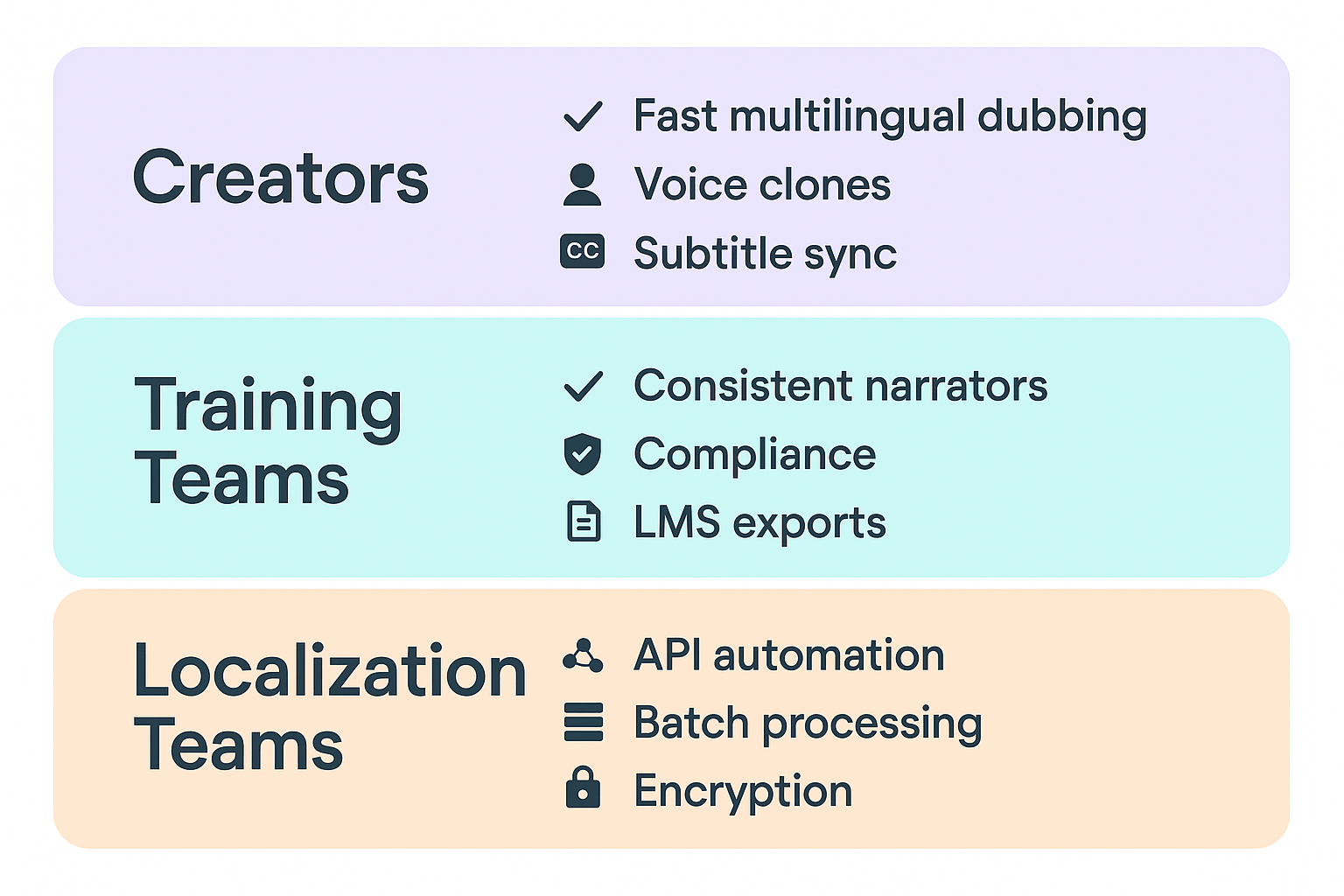
Primary reason: You need fast, affordable dubbing and consistent brand voices across languages. DupDub focuses on end-to-end AI dubbing with subtitle alignment and reusable voice clones. That speeds up episode localization and keeps your channel voice intact.
Benefits: faster publish cadence, lower per-video cost, consistent multilingual branding, and access to 700+ voices for style variety. Creators get both TTS and avatar options to diversify output.
Next action: Try a short trial project, or read the Localization guide for creator workflows.
Podcasters and audio-first teams: clarity and voice control
Primary reason: You want clean transcripts, easy edits, and occasional cloned voices for promos. Descript excels at multitrack editing and filler removal. DupDub adds multilingual voice cloning and larger TTS voice libraries for reach.
Benefits: use Descript for tight audio edits, then use DupDub to produce translated episodes and branded promos in multiple languages. You’ll keep production speed and expand audience reach.
Next action: Pilot a two-episode workflow: edit in Descript, export stems, then localize with DupDub.
E-learning and corporate training: tone, compliance, and scalability
Primary reason: Training teams need controlled brand voice, compliance, and bulk localization. DupDub lets you create locked, cloned voices and scale translations with API access.
Benefits: consistent narrator voices across courses, faster localization cycles, and central controls for privacy and compliance. You’ll cut translation lead time and keep transcripts for LMS integration.
Next action: Run a paid pilot on a single course and consult the Voice cloning best practices guide.
Localization and enterprise teams: volume, automation, and security
Primary reason: You need programmatic scale, security, and predictable costs. DupDub’s API, pay-as-you-go credits, and enterprise tiers support batch jobs and SSO style controls.
Benefits: automated pipelines, lower per-minute dubbing costs, and encryption plus speaker lock for voice assets. That reduces vendor lock and speeds global launches.
Next action: Reach out for an enterprise pilot and review the API docs.
|
Audience
|
Pick
|
Why
|
Key benefits
|
Next action
|
|
YouTubers & creators
|
DupDub
|
Fast AI dubbing and voice cloning
|
Faster localization, consistent brand voice
|
Trial / Localization guide
|
|
Podcasters & audio teams
|
Descript + DupDub
|
Best editing plus expanded localization
|
Tight edits + multilingual reach
|
Pilot two-episode workflow
|
|
E-learning & training
|
DupDub
|
Scales voice cloning and compliance
|
Consistent narrators, LMS-ready outputs
|
Course pilot / cloning guide
|
|
Localization & enterprise
|
DupDub
|
API scale, security, and cost control
|
Automation, lower costs, encryption
|
Contact sales / API docs
|
Want a one-page checklist to decide now? Start with a short pilot that matches your highest-value use case. If you need voice control, trial DupDub; if you need deep multitrack editing first, pair Descript edits with DupDub localization.
FAQ — common questions about DupDub as a Descript alternative
-
Is DupDub a secure Descript alternative for enterprise GDPR compliance?
DupDub includes enterprise-grade controls and aligns with GDPR principles. Data is encrypted in transit and at rest, and voice clones are locked to the original speaker. For enterprise use, review contract terms and request a Data Processing Addendum to confirm compliance.
-
How does DupDub transcription accuracy compare to Descript for video localization?
Accuracy depends on audio quality, clarity, and language. Clean recordings produce highly usable transcripts, while noisy or accented audio may need editing. DupDub supports 40+ languages and includes subtitle alignment tools, but a human review pass is recommended for precise captions.
-
Can I use DupDub voice cloning for commercial projects and monetized videos?
Yes, if you have proper rights and consent. Only clone voices you own or have written permission to use. Maintain consent records and confirm commercial terms in your agreement, especially for large-scale distribution.
-
What file formats and languages does DupDub support for multilingual dubbing and localization?
Supported formats include MP3 and WAV for audio, MP4 for video, and SRT for subtitles. DupDub supports 90+ languages for TTS, 47 for voice cloning, and 40+ for speech-to-text and subtitle workflows, making it suitable for global content pipelines.
-
How does the free trial work and what do credits cover?
The free trial lasts three days and requires no credit card. It includes starter credits that can be used for TTS, voice cloning, avatars, and transcription. Paid plans expand credit limits, and pay-as-you-go options are available for flexible usage.
-
Where can I find migration, API, or trial resources?
Use the migration checklist to move from other tools, access API documentation in your dashboard for automation workflows, and start the free trial to test your content before committing.




 Discord
 YouTube
 Tiktok
 Twitter
 Facebook
 Instagram