This guide shows quick techniques to write natural, localizable lines for dialogue in script writing. You’ll also get SSML basics and clear localization workflows.
Quick wins:
-
Cut exposition, keep purpose: what each line must do.
-
Read lines aloud and time them for natural delivery.
-
Write short turns for non-native clarity and dubbing fit.
-
Mark SSML cues: pauses, emphasis, breaths, and pitch hints.
-
Annotate delivery notes for each character: tone, pace, age.
Next step: run a quick read-aloud test with a TTS tool. Add delivery notes and export a short clip for review.
Why dialogue matters in script writing (and for voiceovers)
Good dialogue does three jobs at once: it tells the story, it shows who a character is, and it moves the scene. In dialogue-heavy scripts, flaws become obvious fast. That’s why thinking about how lines will sound, not just how they read, matters for writers, actors, and localization teams. Use the phrase dialogue in script writing early so searchers find this guide and know it covers craft and delivery.
Three core functions: exposition, characterization, and action
An Introduction to Drama - Charters states: Dialogue serves three primary functions in drama: to advance the plot, to establish the setting, and to reveal character. Each function needs different treatment on the page and in performance.
-
Exposition: Give facts without sounding like a lecture. Keep sentences short and embed answers in action or conflict.
-
Characterization: Use word choice, rhythm, and repeated small habits to reveal personality. Dialect, filler words, and syntax all signal background and intent.
-
Action: Let lines push scenes forward. Dialogue should create choices and reactions, not just restate what’s visible.
When you write for the ear, you avoid on-the-nose lines that read fine but sound fake when spoken. That reduces awkward ADR (additional dialogue replacement) and makes localization simpler.
Why sound planning catches problems early
Lines that look clear on paper can fail when spoken. Long noun phrases, dense clauses, and unusual punctuation slow comprehension. Audiences process spoken language differently than written text, so pacing and clarity change the moment a voice reads the line.
Short list: common early warnings
-
Overlong sentences that swallow breaths.
-
Tongue-twisting consonant clusters that trip speakers or TTS engines.
-
Culturally specific references that break in translation.
-
Rhythmless dialogue that flattens emotion.
Spotting these in table reads or mock voiceovers saves big time in post. If a line needs multiple takes to land, it’s often the wording, not the actor.
Plan for rhythm, pauses, and breath
Good speaking needs room. Mark beats and breaths in the script. Think of pauses as tools: a half beat makes a line land differently than a full stop. These tiny choices guide pacing and emotion for both human voice actors and automated TTS (text to speech).
Practical checklist for lines
-
Read each line aloud at least once. Note where you breathe. Rewrite to fit a natural breath point.
-
Trim or break long sentences into shorter turns. Keep clauses under 12 words where possible.
-
Flag tricky sounds or names, and supply phonetic notes for actors or SSML (Speech Synthesis Markup Language) prosody hints for TTS.
-
Mark intentional pauses, overlaps, and interruptions so editors know what to preserve.
Localization and clarity: why dialogue-heavy scripts expose problems
When dialogue carries the plot, every sentence matters. That makes translation and dubbing harder if a line relies on local slang, puns, or tight timing. Writing with localization in mind reduces rework. Use plain verbs, consistent register, and clear context so translators can match meaning and timing.
Quick localization tips
-
Prefer universal metaphors over highly local jokes.
-
Keep line lengths consistent to help lip-sync and subtitle timing.
-
Supply context notes for ambiguous lines or cultural references.
Wrap-up
Treat dialogue as both a narrative tool and an audio asset. Crafting for clarity, rhythm, and breath improves performances, speeds localization, and reduces costly fixes later. A short habit of reading lines aloud and marking breaths will save hours in production.
Common dialogue mistakes and quick fixes
Good dialogue moves plot, reveals character, and feels natural when read aloud. This section focuses on common traps in dialogue in script writing and fast, testable fixes you can use in a rehearsal or a voice pass. Each entry shows a short before and after, and a simple rule writers and voice actors can use on a rewrite.
Fix exposition dumps: keep the scene breathing
Before: "As you know, our company was founded in 1998 after the market crash, and we expanded into Asia in 2005 because of new trade rules."
After: "You remember the crash, right? That’s when we packed up and went east."
Rule: Cut facts the audience already knows and spray short, character-flavored reminders instead. If a line exists only to inform, turn it into subtext or a prop, and test it in a table read.
Cut on-the-nose lines: let subtext do the work
Before: "I hate you, and I’m leaving you because you lied to me."
After: "You slept in the car again. I can’t keep choosing you over sleep."
Rule: Replace blunt statements with concrete behavior or sensory detail that implies emotion. Actors can mark beats where subtext shifts and try saying the line with the opposite emotion to find truth.
Fix monotonous character voices: add specific traits
Before: (All characters use bland, neutral sentences.) "We should go now. The plan is still the same."
After: (Distinct voices) Old mentor: "We move when the moon’s up. You follow my step." Young tech: "I’ve got the map. Tell me when and I’ll light it up."
Rule: Give each character one speaking quirk: a rhythm, a favorite word, or a visual image. Use it sparingly. Actors should pick one trait and stick to it for a scene.
Remove cliché or info-heavy phrasing: be precise
Before: "At the end of the day, we all just want the same thing: peace and happiness."
After: "I want one night without sirens. That’s all."
Rule: Replace vague clichés with specific wants or small facts. Specifics read better and guide vocal choices for pacing and emphasis.
Lose stagey, directive lines: show, don’t tell the actor
Before: "(angry) I slam the door and leave."
After: "You leave the door half-open. You don’t lock it. You walk out."
Rule: Turn stage directions into actions in the line or beats. Actors prefer verbs they can play. Mark physical beats and test multiple tempos.
Fix unnatural rhythm for voice actors: short beats win
Before: A single long sentence filled with clauses and commas.
After: Break into two short sentences with a clear pause.
Rule: Read lines aloud. If a sentence runs longer than two natural breaths, split it. For TTS work, add explicit pauses or SSML breaks when needed.
This set of quick fixes helps you tighten scenes fast, whether you’re drafting or directing a read. Rehearse the rewrites with actors or a TTS demo to confirm the voice and pacing work in performance.
Genre-specific strategies: writing dialogue for comedy, action, sci‑fi, period & procedural
Good dialogue shapes tone, pacing, and meaning. This section gives clear, genre-specific tactics for writing dialogue in script writing and for voiceovers, with tiny before and after examples that show how a small edit changes tone or clarity. Follow the short lists and rewrites to adapt lines for actors and TTS systems.
Comedy: play rhythm and misdirection
Comedy lives in timing and surprise. Keep lines short and punchy, set up expectations, then flip them. Leave room for pauses when directing voiceovers, and avoid long sentences that bury a joke.
Quick tips:
-
Use a short setup, then a single-word or image swap for the punch.
-
Let the actor or TTS breathe: insert clear break points or SSML pauses.
-
Avoid heavy exposition inside jokes.
Micro-example:
Before: "I thought you were allergic to responsibility, but it seems you adopted a full-time job overnight."
After: "You allergic to responsibility? Wow, full-time job now."
The after line is shorter and keeps the surprise, so a voice actor or synthetic voice lands the gag cleaner.
Action: keep it tight and functional
Action dialogue must move the scene, not stall it. Use direct verbs, short clauses, and clear cues for sound design. Name actions plainly so editors can align SFX and hit points in post.
Quick tips:
Micro-example:
Before: "We should probably get out of here now, because the place is falling apart and I am not sure how much longer it will hold."
After: "Move. Now. Roof is coming down."
The rewrite speeds delivery and helps a voiceover actor deliver urgency without confusion.
Sci fi: balance jargon and clarity
Science fiction invites new terms, but you still need the audience to follow. Introduce jargon slowly, pair new terms with short plain-language cues, and avoid long technical monologues. For localization, include parenthetical notes to guide translators.
Quick tips:
-
Define one new term per scene by example.
-
Use short metaphors to explain tech quickly.
-
Avoid long expository blocks in spoken scenes.
Micro-example:
Before: "The quantum mesh harmonizer will invert the phase field and destabilize the reactor's containment geometry."
After: "The mesh will flip the field, and the reactor goes unstable."
The after line keeps the tech feel while staying voiceover-friendly and easier to dub.
Period pieces: sound authentic, read easily
For historical dialogue, keep authenticity, but never at the cost of comprehension. Use period diction sparingly, favoring rhythm and syntax that feel true. Trim archaic words that slow the listener.
Quick tips:
-
Use one or two period words per speech turn.
-
Keep sentence rhythm natural for modern ears.
-
If a line uses a dialect, mark pronunciation notes for VO talent.
Micro-example:
Before: "Methinks our fortunes do most grievously decline, sir."
After: "I think our luck has turned, sir."
The after line reads naturally while keeping a formal tone suitable for voice casting or cloning.
Procedural: clarity first, then pace
Procedurals need lines that convey facts fast. Use plain nouns, explicit time cues, and avoid stacked clauses. Make each line a single unit of information the listener can act on.
Quick tips:
-
Speak in short, complete sentences.
-
Call out names and times early in the line.
-
Use numbered steps if appropriate for clarity.
Micro-example:
Before: "If we look at the footage from three nights ago, we might find a clue about who left the scene earlier."
After: "Check the footage from three nights ago. Look for who left the scene."
The second version gives direct commands that an actor or TTS voice can deliver clearly.
Quick checklist to adapt lines for voiceovers and localization
-
Trim long clauses to one main idea per line.
-
Add short pauses or SSML markers where natural breaths belong.
-
Flag jargon, names, and pronunciations for localizers.
-
Test lines aloud or with TTS to hear pacing.
Use these rules to tune tone, aid actors, and speed localization. Small edits change everything when lines are voiced, so write with sound in mind from the first draft.
Writing for diverse voices, dialects and non-native speakers
Good dialogue reflects who a character is, not a list of traits to copy. This section shows how to write for diverse voices with respect, not caricature. It also covers practical techniques for lexical choice, cadence, and making lines localizable and accessible, using the lens of dialogue in script writing.
Aim for authenticity, not mimicry
Authenticity comes from detail and research, not imitation. Start with character goals, education, and region. Let those facts shape word choice and sentence length. Avoid phonetic spell-outs that mock speech.
Choose words for character, not stereotype
Small lexical shifts tell a big story. Use concrete nouns and verbs that fit a character's background. Drop in idioms sparingly, only when a character would use them. Keep contractions where natural, they help voice actors and sound human.
-
Favor clear, specific vocabulary over decorative markers.
-
Avoid invented spellings that read as mockery.
-
Use code-switching (mixing languages) only with purpose and accuracy.
Shape cadence and rhythm
Cadence affects how lines land when spoken. Short sentences speed a scene. Longer, flowing lines slow it down. Mark intended pauses in the script sparingly with beats or parenthetical direction. Let actors find natural rhythm in rehearsal.
Avoid stereotypes, call out pitfalls
Stereotypes rely on surface traits. They flatten characters and harm audiences. Watch for overused markers like exaggerated slang, broken grammar, or cartoonish accents. If a trait feels like shorthand, rewrite for depth or remove it.
Collaborate with translators and bilingual actors
Bring cultural and language experts in early. They catch nuance many writers miss. Use this simple workflow:
-
Share a character brief and raw script with the translator.
-
Ask for literal and adaptive translations, and notes on tone.
-
Invite bilingual actors to workshop lines on camera or audio.
-
Collect alternate phrasings that fit performance timing.
-
Approve localized lines with a native reviewer.
Clear communication prevents mistranslation and avoids accidental offense.
Think subtitle-first for localization and accessibility
Write lines that survive translation and closed captions. Keep sentences short and self-contained. Avoid puns and culture-bound jokes that won't translate. Use clear referents, so subtitles stay readable. This approach makes your dialogue resilient for global audiences and non-native speakers.
Quick revision checklist
-
Is the line tied to character need and history?
-
Would a native speaker call the phrasing natural?
-
Does the cadence match emotion and pacing?
-
Could this line be misread or stereotype a group?
-
Is the line short enough to subtitle cleanly?
Use these checks in draft passes and table reads. They save time later in localization and casting.
N/A
Integrating dialogue with voiceover, SSML and localization workflows
Good dialogue in script writing needs a clear delivery plan: decide who reads lines, how synthetic voices will be tuned, and how subtitles and timecodes will stay in sync. This section maps when to pick human voice, TTS, or a voice clone, then introduces practical SSML (Speech Synthesis Markup Language) tricks for pros. Finally, you get a subtitle-first workflow and a QC checklist that post teams can use to deliver clean dubs and captions.
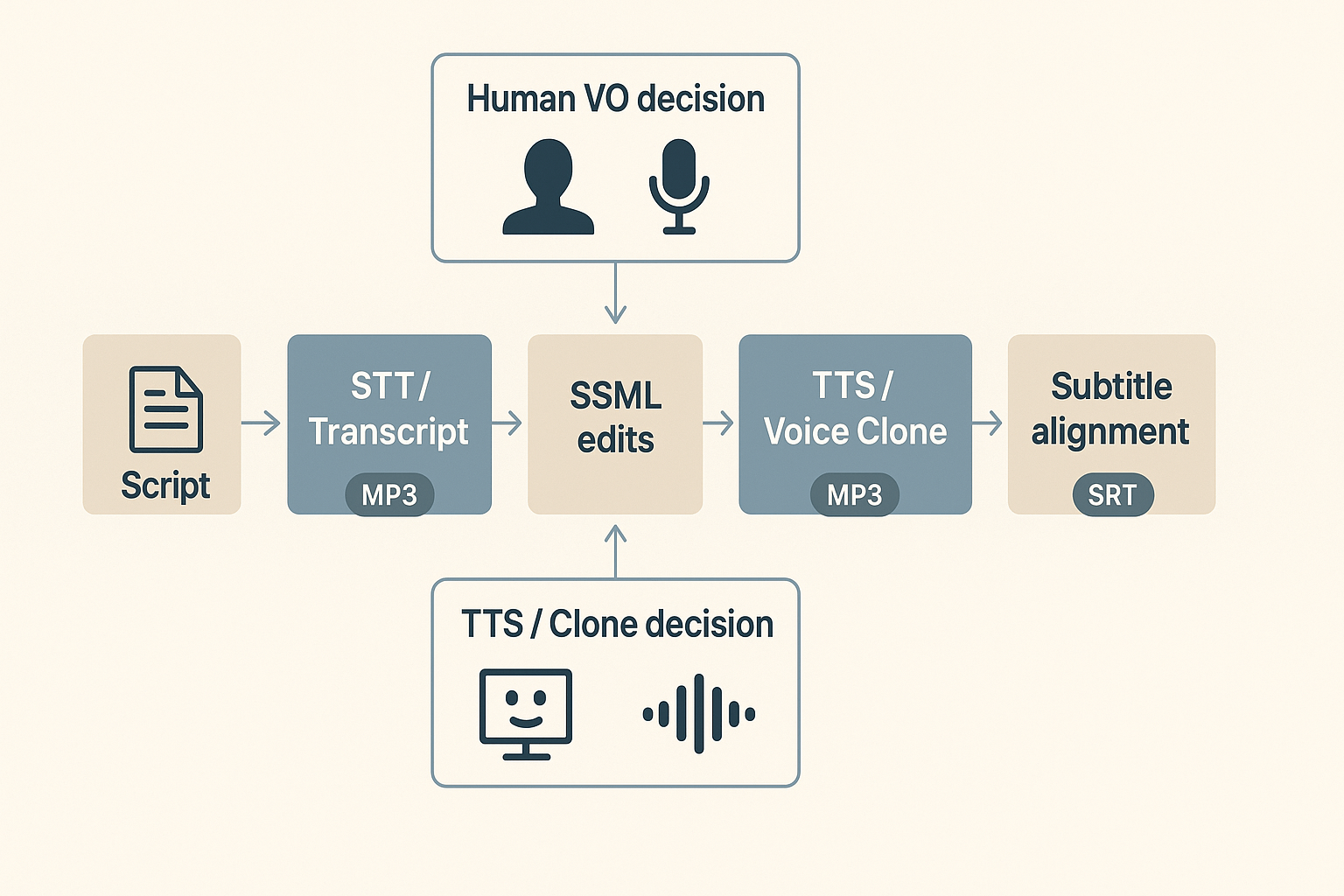
Choose human voice, TTS, or a voice clone: quick decision points
Pick human voice when performance nuance matters: complex emotional arcs, improvisation, or union rules. Choose TTS for fast, low-cost narration, consistent brand reads, and many-language scale. Use a voice clone when you need the original actor's timbre across languages or small edits that keep character identity.
Consider these tradeoffs:
-
Performance: human > clone > TTS for authenticity.
-
Speed and cost: TTS > clone > human for throughput and budget.
-
Localization scale: TTS and voice clones handle many languages quickly.
-
Legal and ethics: get explicit consent for cloning and follow data controls.
Use a brief decision rubric on every project: if lines need actor improvisation, choose human; if you need 20 languages quickly, lean on TTS or a licensed clone.
SSML basics for pros: pauses, emphasis, and phoneme fixes
SSML lets you shape synthetic speech with tags for pauses, pitch, rate, emphasis, and pronunciation. According to
Speech Synthesis Markup Language Is a W3C Recommendation (2004), SSML Version 1.0 provides authors control over pronunciation, volume, pitch, and rate. Treat SSML as a precision tool: small edits change pacing and meaning.
Practical SSML tips:
-
Pauses: insert to split run-on lines and match on-screen cuts.
-
Emphasis: use word for contrast or comedic timing.
-
Rate and pitch: apply to match actor energy.
-
Pronunciation fixes: add phoneme for names and brands.
Keep a small SSML style guide for each character: preferred pause lengths, emphasis rules, and tricky pronunciations. Store these as reusable snippets in your TTS or cloning project.
Subtitle-first workflow and aligning script lines to timecodes
Start from captions when possible: subtitles give a timebase for dubbing and cut decisions. A subtitle-first workflow reduces alignment rework and speeds handoffs between script, editor, and voice talent.
Ordered steps:
-
Transcribe video with STT (speech-to-text) and generate initial subtitles.
-
Review and clean the transcript against the master script, keeping line breaks under 42 characters where practical.
-
Map script lines to subtitle timecodes, creating one script line per subtitle block when possible.
-
Apply SSML to each line to fix pacing and pronunciation, then run TTS or clone test renders.
-
Adjust timecodes to match rendered speech, and export final SRT and stems.
Notes: keep subtitle segments short for read speed and lip sync. For long monologues, split at natural breaths and test with real viewers for comprehension.
Deliverables and QC points for post teams
Standard outputs to deliver:
-
Final audio stems for each language and character.
-
Master SRT/ASS files with verified timecodes.
-
SSML stylesheet and character pronunciation list.
-
A short log of edits and consent records for voice clones.
QC checklist:
-
Lip sync and timing: verify dialogue aligns within 150ms for major cuts.
-
Naturalness: spot-check key emotional beats with human listeners.
-
Pronunciation: test names, brands, and acronyms across languages.
-
Accessibility: ensure subtitles meet line length and reading speed guidelines.
Use a shared project board for these checks so creatives and post engineers can sign off quickly.
How DupDub fits dialogue-heavy scripts — practical workflows & anonymized case studies
Dialogue drives character, pacing, and audience connection. This section shows a clear DupDub workflow that takes a script from raw audio to localized, synced deliverables. It also presents two anonymized case studies, so you can see time and cost wins in real scenarios.
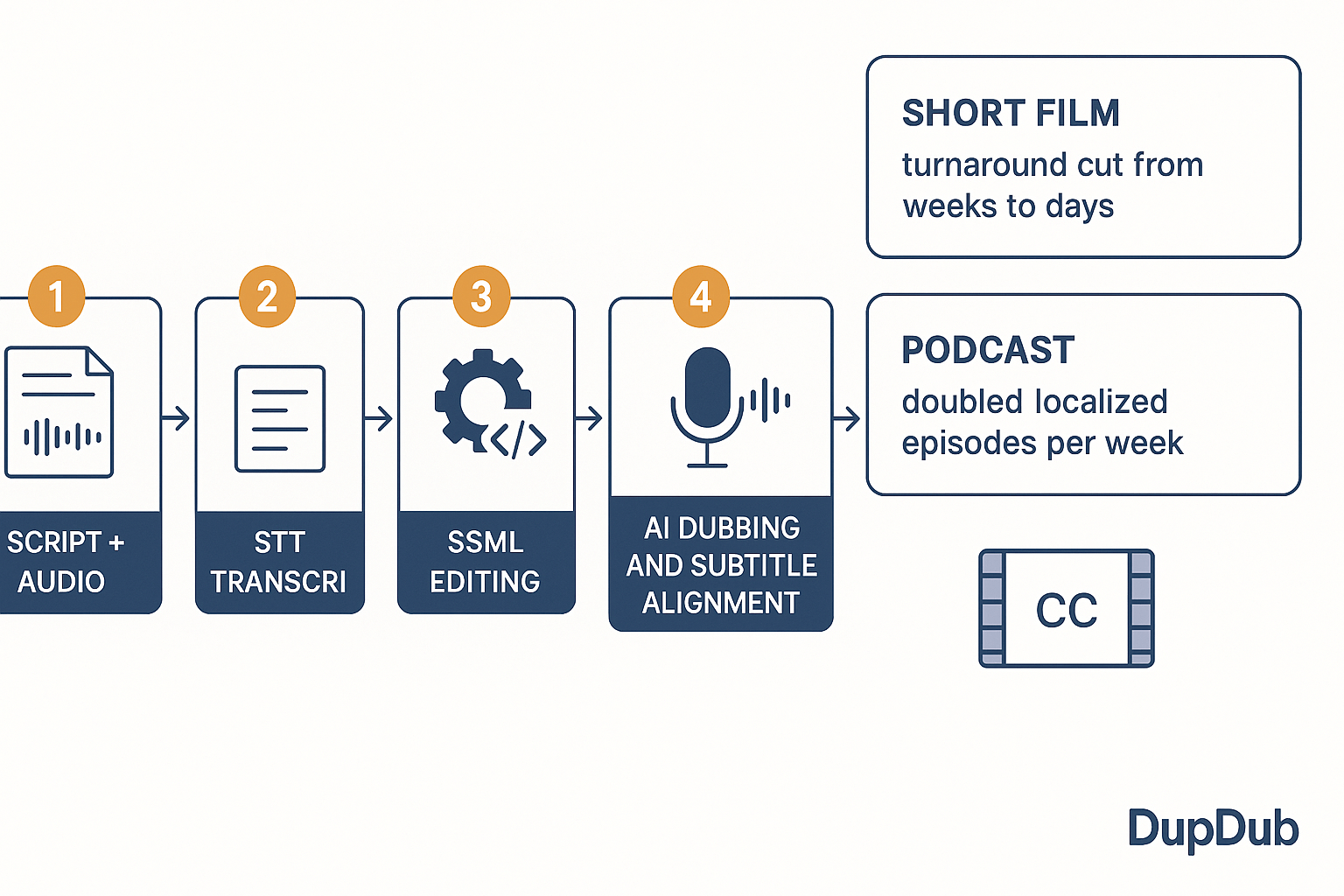
Rapid step-by-step DupDub workflow
Use this ordered workflow for dialogue-heavy projects. It maps the common tasks and the DupDub modules that solve them.
-
Script and raw audio intake: collect the master script, footage, and reference audio. Confirm speaker turns and scene markers. Prepare a clean transcription brief if you have special pronunciations.
-
Speech to Text (STT): upload audio or video to DupDub for transcription and speaker diarization (who spoke when). The transcript gives a frame-accurate timeline to start alignment.
-
Clean and mark dialogue for SSML: edit the transcript, add emotion notes, pronunciations, and pacing markers. Export this as SSML-ready text (Speech Synthesis Markup Language explained here). SSML lets you tune pauses, emphasis, and breaths.
-
Choose voice strategy: pick TTS from DupDub or create a voice clone. For original talent reuse, clone a short sample for multilingual output. For new localized voices, pick a matching regional voice.
-
Render TTS or voice-clone tracks: generate target-language audio with SSML controls applied. Review prosody and character traits, and iterate quickly in the studio.
-
Subtitle and alignment: use DupDub AI subtitles and alignment tools to create SRT files and burn-in timing. Verify lipsync and adjust split lines for readability.
-
Final QA and delivery: run an internal pass with native speakers or the original director. Export MP3/WAV or MP4 and deliver localized assets.
This workflow reduces manual handoffs and keeps dialogue intent intact from script to final file.
Case study 1: Short film localization
Problem: An independent short film needed dubs in three languages. The budget and schedule were tight. The director wanted voice nuance preserved across locales.
DupDub workflow: The team used DupDub STT for accurate transcripts and speaker separation. They prepared SSML notes for emotional beats. They cloned the lead actor voice from a 30 second sample to keep character tone, then generated renders for each language. Subtitles were auto-generated and adjusted inside the platform.
Outcomes: Turnaround dropped from weeks to days. Voice consistency and emotional intent held up across languages. The team avoided expensive studio sessions and kept the director in the loop during each iteration.
Case study 2: Character-driven podcast
Problem: A serialized fiction podcast had many recurring characters. The producer wanted international versions without recasting every role.
DupDub workflow: Episodes were transcribed with DupDub STT. Producers annotated SSML to preserve comedic timing and character quirks. They created a small set of voice clones for recurring characters. TTS renders were made per episode and aligned with show notes and published audio.
Outcomes: Monthly localization costs fell significantly. Consistent character voices improved listener recognition in each language. Production scaled from one episode per week to two localized episodes per week.
Recommended DupDub plans and where ROI appears
Which plan to pick depends on volume and cloning needs. For trial and low volume use, start with the Free 3-day trial. For continuous solo creators, Personal fits typical needs. For growing teams doing regular localization, Professional brings more credits and clones. For enterprise scale, Ultimate unlocks large quotas and unlimited file size.
Where teams see ROI:
-
Faster time to publish, since automated STT and dubbing cut studio scheduling.
-
Lower per-minute cost versus manual dubbing, especially at scale.
-
Consistent brand and character voice using voice clones and presets.
-
Fewer review cycles thanks to SSML control and integrated subtitles.
Align plan choice to monthly episode count, number of clones needed, and languages. For many teams, savings in studio time and translation QA pay back the subscription within a few projects.
Advanced editing & SSML tips for seasoned writers and pros
Start with intent: this section gives pro SSML patterns and advanced editing tactics for dialogue in script writing, and for voiceover delivery. You’ll get concrete SSML snippets, mixing strategies for overlapping lines and group scenes, and practical checks producers must run. Expect clear, testable rules you can drop into workflows and voice-clone pipelines.
Use SSML patterns that shape pace and meaning
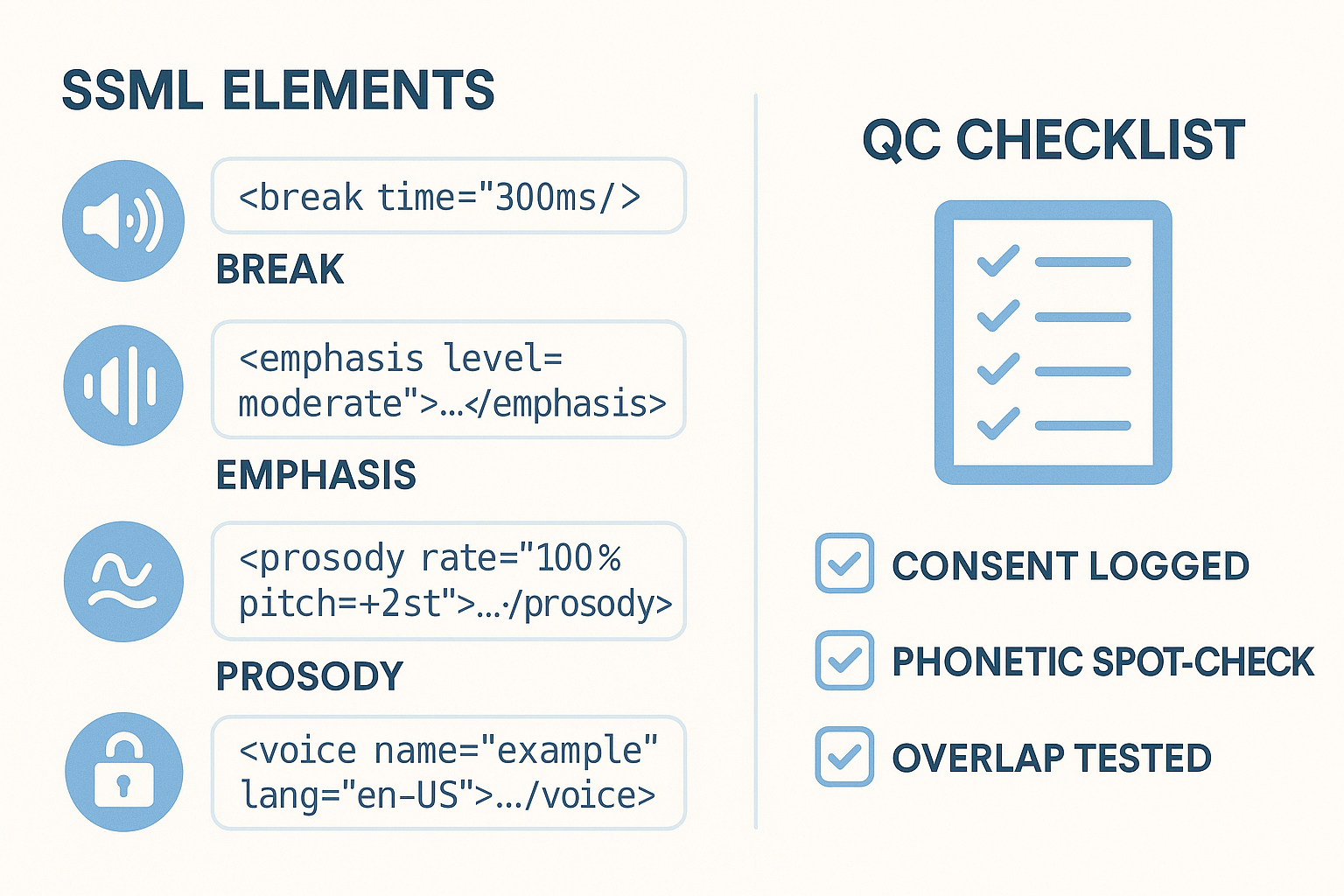
SSML (Speech Synthesis Markup Language) is your surgical tool for delivery. Use these patterns to influence pace, stress, and pitch without re-recording actors.
-
Short pause control: for natural breath, for scene beats.
-
Emphasis for contrast: word to stress conflict or surprise.
-
Prosody adjustments: slower, lower to convey tiredness.
-
Voice and language tags: text or texto for language switching.
Keep snippets small, test in-context, and prefer many short tags over huge prosody blocks. That gives you fine control and fewer side effects.
Handle overlapping dialogue without sounding messy
Overlaps ruin intelligibility if you don’t mix them. Treat overlaps like layers, not collisions.
-
Separate into tracks: place each speaker on its own track for timing edits.
-
Stagger entries: shift the trailing word by 50ms to 150ms to avoid clipping.
-
Use low-level pauses: insert before key words to create space.
-
Reduce competing frequencies: apply a mild high-pass filter to one track.
When using TTS or voice clones, simulate overlap with short tail fades and carefully timed SSML breaks. Always audition with headphones.
Group scenes and multi-language clones: keep identity clear
Group scenes need distinct timbres so the listener can follow. For multi-language casting, clone the actor then tune per language.
-
Create a primary voice clone for the actor, then build language-specific variants with small prosody and formant tweaks.
-
Use tags where appropriate, and test for phoneme mismatches that change meaning.
-
For crowds, use one cloned voice plus two synthetic variants to preserve uniqueness while saving cloning credits.
Label every clone asset with language, locale, and intended use. That reduces miscasting during localization.
Quality control checklist for producers
-
Compare original intent to final audio, note mismatches in emotion or timing.
-
Run a phonetic spot-check for localized lines, listen for mispronunciations.
-
Test overlaps on headphones and low-volume devices.
-
Verify SSML tags rendered as expected in target engines.
-
Confirm clone provenance and consent records are stored with the asset.
-
Do a final human read-through for cultural or idiomatic errors.
Use this checklist as a gate before sign-off. Keep a short revision log for each pass.
Ethics, consent, and legal guardrails
According to
Answer for question E-001819/2025, under the General Data Protection Regulation (GDPR), consent is one of the six legal grounds for lawful personal data processing. Record explicit, auditable consent before creating or deploying voice clones. Store consent metadata with each clone, include scope and expiry, and never share clones without permission.
Avoid deceptive use: label synthetic output clearly, and keep an approvals chain for sensitive public releases. When in doubt, get written release from the talent and legal sign-off.
Final pro tips and workflow notes
-
Automate SSML templates for recurring character types, then tweak per episode.
-
Keep a short SSML style guide for a project: preferred break sizes, emphasis rules, and prosody ranges.
-
Run blind A/B checks between original and synthetic lines with unbiased listeners.
These habits speed delivery and keep quality high, whether you’re mixing a two-person scene or scaling multilingual dubs.
Mini-workshop: exercises to rewrite and test dialogue (with revision checklist)
This mini-workshop gives three tight rewrite drills and fast test steps you can run in a single afternoon. It focuses on brevity, subtext, and dialect so you can tune lines for performance and localization. Use a TTS (Text-to-Speech) engine or a voice clone to run micro-tests and hear each revision immediately.
Rewrite prompts: three practical drills
Start with a short scene, then rewrite to hit a single goal. Do each rewrite aloud or in TTS to check rhythm and naturalness.
-
Brevity drill
-
Original: "I was wondering if you might have a moment to talk about what happened yesterday at the office?"
-
Rewrite: "Can we talk about yesterday?"
-
Goal: cut filler, keep intent clear, keep subtext that the topic is heavy.
-
Subtext drill
-
Original: "I’m fine, really, there’s nothing wrong with me."
-
Rewrite: "I’m fine." (pause) "Do you need something?"
-
Goal: imply tension by adding a beat, not more words.
-
Dialect and clarity drill
-
Original: "I couldn't get the report done on account of the delays from upstream."
-
Rewrite (localized): "I couldn’t finish the report. The delays upstream held me up."
-
Goal: keep meaning intact while simplifying regional phrasing for voice actors and TTS.
Quick micro-tests: how to audition rewrites fast
Run each test in five focused steps. Timebox each pass to 10 minutes.
-
Paste the original line into TTS or your voice-clone tool.
-
Export a short MP3 or play it in-browser to check pacing and pitch.
-
Paste the rewritten line and compare side by side.
-
Record a human read if available, and compare timing and natural pauses.
-
Note mismatches, then tweak wording or add SSML (Speech Synthesis Markup Language) tags for pauses and emphasis.
Revision checklist: score readiness before production
Use a simple 0 to 2 score for each item, 0 needs work, 1 okay, 2 production-ready. Aim for a total of 14 or higher out of 18.
-
Clarity: Does the line convey the core fact in one pass?
-
Emotional intent: Does the delivery match the desired feeling?
-
Subtext preserved: Is what’s unsaid still present?
-
Voice actor friendly: Can a human deliver this naturally?
-
TTS-friendly: Does it avoid pronunciation traps or awkward punctuation?
-
Localization-ready: Can this be translated without losing tone?
Run one final micro-test after edits. If the line scores 2 on clarity, emotion, and localization, move it to production rehearsal. Good rehearsal saves the director time and localization costs.
FAQ — People Also Ask and practical answers
-
Can AI voices replace actors in dialogue-heavy scripts?
AI voices work well for drafts, temp tracks, previs, and fast localization. They usually can’t replace a trained actor’s full range—improvisation, emotional nuance, timing adjustments, and on-set direction still matter. A common workflow is to use synthetic voices to block performances and pacing, then cast or refine with human actors for final delivery.
-
How accurate is voice cloning for accents and dialects in production workflows?
Accuracy depends on source audio quality, language support, and how strong the accent or dialect is. With clean samples in supported languages, cloning captures timbre and rhythm well. Very strong regional features may need tuning with delivery adjustments or SSML. Iterative testing is key before locking a voice for production.
-
Best SSML tips for natural voiceovers and character dialogue
Use short breaks to mimic natural breaths, adjust prosody (rate and pitch) for emotion, and apply emphasis sparingly to key words. For names or tricky terms, use phonemes or phonetic spellings. Make one change at a time and A/B test a few lines to hear the impact.
-
What to include in a dialogue pass before localization and dubbing?
Do a focused dialogue pass before localization: confirm intent and subtext, mark emotional beats and tempo, note pauses or breathing for sync, flag slang and cultural references, and trim or split long lines for subtitle and dubbing fit. Run samples through TTS or a voice clone to validate flow and timing early.
-
What to include in a dialogue pass before localization and dubbing for dialogue in script writing?
Do a focused dialogue pass to clean intent and timing before localization. Confirm intent and subtext for each line, mark emotional beats and tempo (fast, measured, staccato), add breathing or pause notes for sync, and flag slang, names, and culture-specific references for localization. Trim or split long lines so they fit subtitles and dubbing constraints. Finally, run the dialogue through a sample TTS or voice clone to validate flow, pacing, and timing.




 Discord
 YouTube
 Tiktok
 Twitter
 Facebook
 Instagram