TL;DR: What v1.3 Delivers
v1.3 adds new API endpoints and updated rate limits. Migration tooling helps cut integration time.
-
New endpoints: batch TTS, voice cloning export, avatar render, subtitle alignment.
-
Rate limits: tiered quotas, predictable per-minute and burst controls, retry headers.
-
Migration helpers: compatibility headers, deprecation window, SDK and sample updates.
Quick migration tip: run compatibility checks in the sandbox. Test high-volume flows first, then roll out in stages. Watch rate-limit headers to tune retry backoff.
What’s New in DupDub API v1.3 (Quick Overview)
DupDub API v1.3 delivers focused changes that let engineering teams move faster and reduce integration friction. Key dupdub v1.3 features include several new endpoints, clearer rate limit rules, and richer response metadata and error codes that make debugging and billing predictable. This short overview helps you decide whether to upgrade now or slot the migration into your next sprint.
New endpoints: add batch, avatar, and voice controls
-
Batch dubbing endpoint for multi-file jobs with progress tokens.
-
Streaming avatar endpoint for low-latency avatar playback.
-
Voice-clone management and multilingual clone export endpoints.
-
Subtitle alignment and batch translation endpoints for workflows.
Rate limits and quotas: clearer, per-endpoint rules
v1.3 splits limits by endpoint type and client tier, and returns informative headers for remaining quota and reset time. Expect separate quotas for TTS, STT, avatars, and batch jobs so high-volume dubbing won’t unexpectedly throttle your transcription calls.
Developer-facing improvements: faster debugging
Responses now include request_id, processing_ms, and credit_cost fields. Error codes map to remediation steps, and webhooks include retry-after headers and idempotency support.
When to prioritize this upgrade: move now if you rely on batch dubbing, avatar streaming, or need tighter billing visibility. Otherwise schedule it for the next sprint to test idempotency and quota behavior.
Endpoint-by-Endpoint Breakdown (New & Updated)
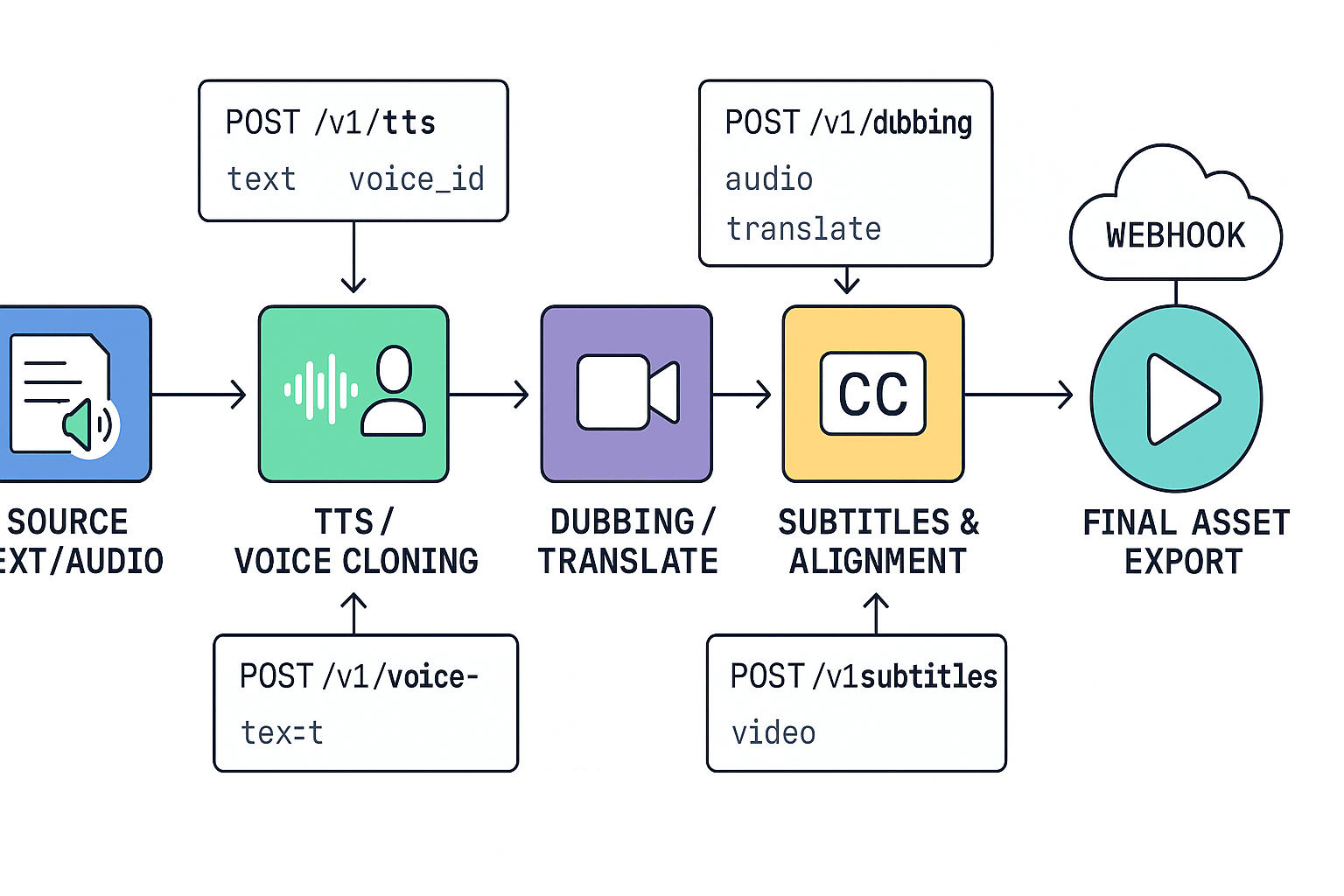
This section gives a developer-first walk through each new or updated endpoint, with example headers, request and response shapes, and where each fits in a production pipeline. It covers the core dubbing, TTS, voice cloning, STT, avatars, subtitles and webhook flows, and mentions dupdub v1.3 features that reduce integration friction.
Dubbing and Translate
POST /v1/dubbing creates async dub jobs. Required headers: Authorization: Bearer <API_KEY> and Content-Type: application/json. Typical body: {"input_url":"https://...mp4","target_lang":"es","voice":"aria","clone_id":null}. Response returns job_id, status, and outputs array with asset URLs. Use polling GET /v1/jobs/{job_id} or register a webhook.
TTS (text-to-speech)
POST /v1/tts converts text to audio. Required params: text, voice, format, optional style. Response: audio_url or audio_base64 plus duration_seconds. TTS supports voice clones and ultra voices for higher fidelity.
Voice Cloning
POST /v1/voice-clones accepts a 30s sample and metadata. Body: {"name":"MarketingVoice","sample_url":"...","language":"en"}. Response: clone_id, status. Use clone_id in TTS and dubbing calls to reuse a multilingual clone.
STT (speech-to-text)
POST /v1/stt uploads audio or points to input_url. Params: language_hint, punctuate. Response includes transcript, confidence, and segments with timestamps for alignment.
Avatars
POST /v1/avatars/speak ties an avatar and voice. Payload: {"avatar_id":"av_123","script":"Hello world","voice":"clone_45"}. Response: video_url, thumbnail.
Subtitles and Alignment
POST /v1/subtitles aligns transcript to audio. Input may be raw transcript or stt_job_id. Response: srt, vtt, and segment timing for caption burn-in.
Webhooks and Async Jobs
Register a webhook URL in project settings. Events send job_id, type, status. Verify X-DD-Signature header. Common pattern: 1) upload asset, 2) create job, 3) wait for webhook, 4) download output.
Common call patterns and headers:
-
Authorization: Bearer <API_KEY>
-
Content-Type: application/json
-
Poll with GET /v1/jobs/{job_id} if webhooks are not available
Rate Limits, Quotas & Best Practices (with Examples)
DupDub v1.3 features add clearer, tiered request limits and richer rate headers to help teams avoid throttling. This section shows how to read those headers, apply safe retry and backoff patterns, and estimate quota needs for batch jobs.
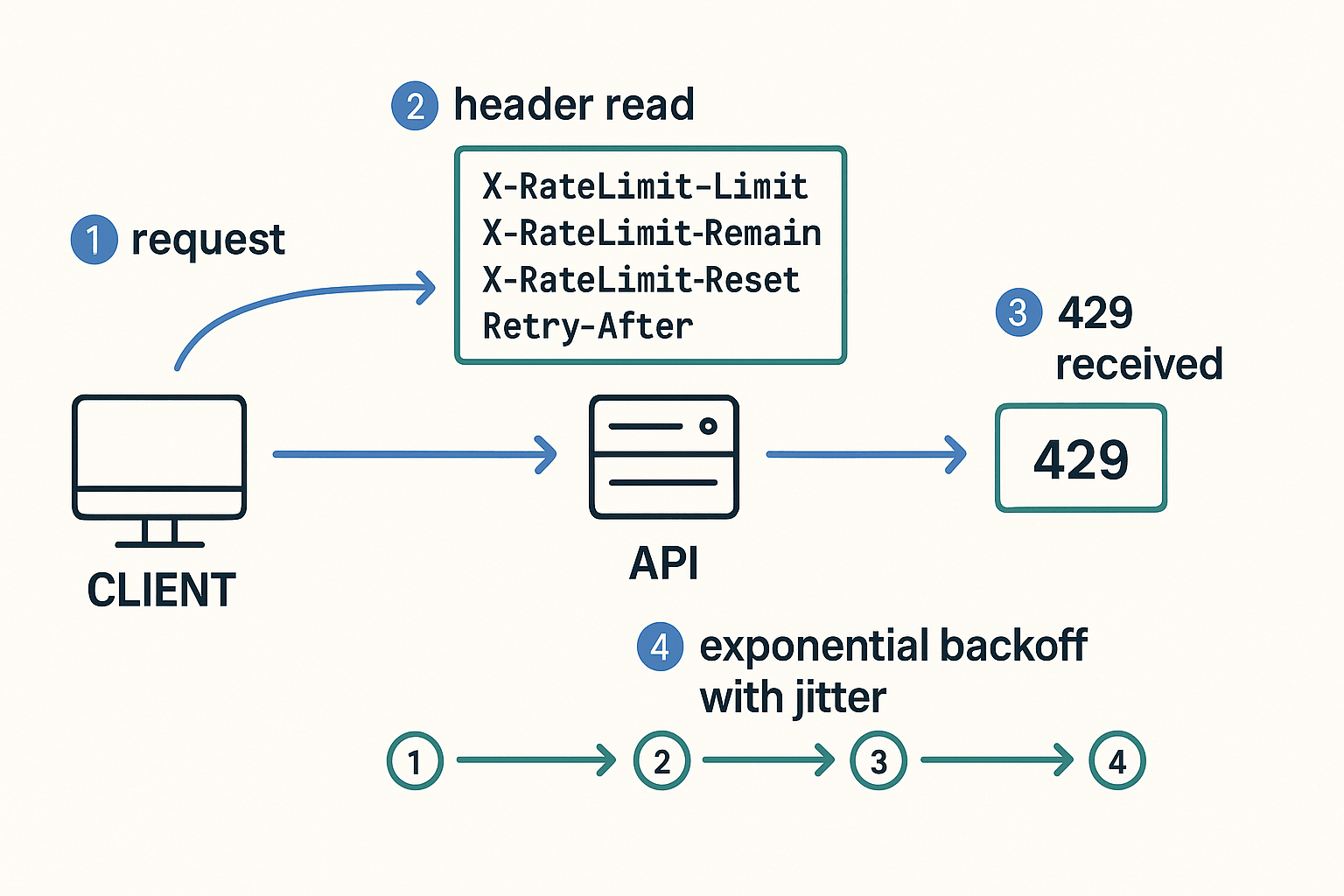
Read and act on rate-limit headers
DupDub responses include headers like
X-RateLimit-Limit,
X-RateLimit-Remaining, and
X-RateLimit-Reset. Parse them on every response and stop sending parallel work when
Remaining is low. The 429 (Too Many Requests) status code indicates that the user has sent too many requests in a given amount of time, as defined in
RFC 6585 (2012).
Example header parse (Python style): limit = int(response.headers.get('X-RateLimit-Limit', 0)) remaining = int(response.headers.get('X-RateLimit-Remaining', 0)) reset = int(response.headers.get('X-RateLimit-Reset', 0))
Retry and backoff pattern
Use exponential backoff with jitter. Keep retries small and honor Retry-After when sent.
-
initial = 0.5 seconds
-
factor = 2x
-
max = 8 seconds
-
max_retries = 5
Quick pseudo retry logic: if response.status_code == 429: wait = min(max, initial * (2 ** attempt)) wait *= random.uniform(0.8, 1.2) sleep(wait)
Worked calculator: 100 videos/month
Assume 4 API calls per video (upload, transcribe, translate, synthesize). That is 400 calls per month, about 13 calls per day. If you run a single batch hour for 100 videos, spread work over time or limit concurrency to avoid bursts that trigger 429. Monitor X-RateLimit-Remaining and back off when remaining < 10%.
Best practices: use small worker pools, respect Retry-After, add jitter, and profile real traffic during a trial.
Pricing & Plan Impact for API Users (Transparent Examples)
This section turns credits and limits into clear, usable examples so you can estimate real workloads. It highlights how dupdub v1.3 features map to starter credits, subscription tiers, and pay-as-you-go bundles, and it shows quick cost math you can reuse.
How credits map to workloads
Credits buy voice minutes, avatar hours, and transcription time. For example, the Personal plan gives 1,800 yearly credits, which the provider maps to about 25 hours of Standard TTS and 5 hours of Ultra voices. That implies roughly 1.2 credits per minute for Standard TTS and about 6 credits per minute for Ultra voices.
Sample cost breakdowns
-
10-minute Ultra TTS: 10 minutes × 6 credits = 60 credits, pay-as-you-go cost about $$7.68 at a$$0.128/credit rate.
-
10-minute Standard TTS: 10 minutes × 1.2 credits = 12 credits, roughly $1.54 on the same per-credit rate.
-
1-hour transcription: 60 minutes × 1.2 credits = 72 credits, estimate $9.22 pay-as-you-go.
-
Monthly creator bundle (10× 10-min Ultra clips): 600 credits, roughly $76.80 on pay-as-you-go, or fit inside a Professional or Ultimate tier for lower effective cost.
Use these patterns to plug your numbers into the online pricing and credit calculator for tailored estimates. The calculator helps choose between subscription credits and one-time bundles based on volume and voice type.
Security, Privacy & Compliance — What v1.3 Changes Mean
dupdub v1.3 features tighten security and privacy around voice cloning, data transport, and storage. The release adds voice-clone safeguards, end-to-end encryption in transit and at rest, and admin controls for retention and deletion. That combination lowers integration risk for localization teams and product owners.
For enterprise reviews,
ISO/IEC 27001:2022 is the world's best-known standard for information security management systems (ISMS), so ask vendors to map controls to it. v1.3 keeps voice clones locked to the original speaker, enforces TLS for transport, and stores data with encryption. Engineering leads should request audit logs, deletion APIs, role-based keys, and a data processing addendum to support GDPR-aligned workflows.
Actionable engineering requests
-
Verify voice-clone safeguards and explicit opt-in controls (samples locked to source speakers).
-
Confirm encryption in transit (TLS) and at-rest (customer-visible key management and rotation).
-
Require retention configuration, deletion endpoints, audit logs, and subprocessors list for reviews.
Migration Guide & Quickstart (First 5 Steps)
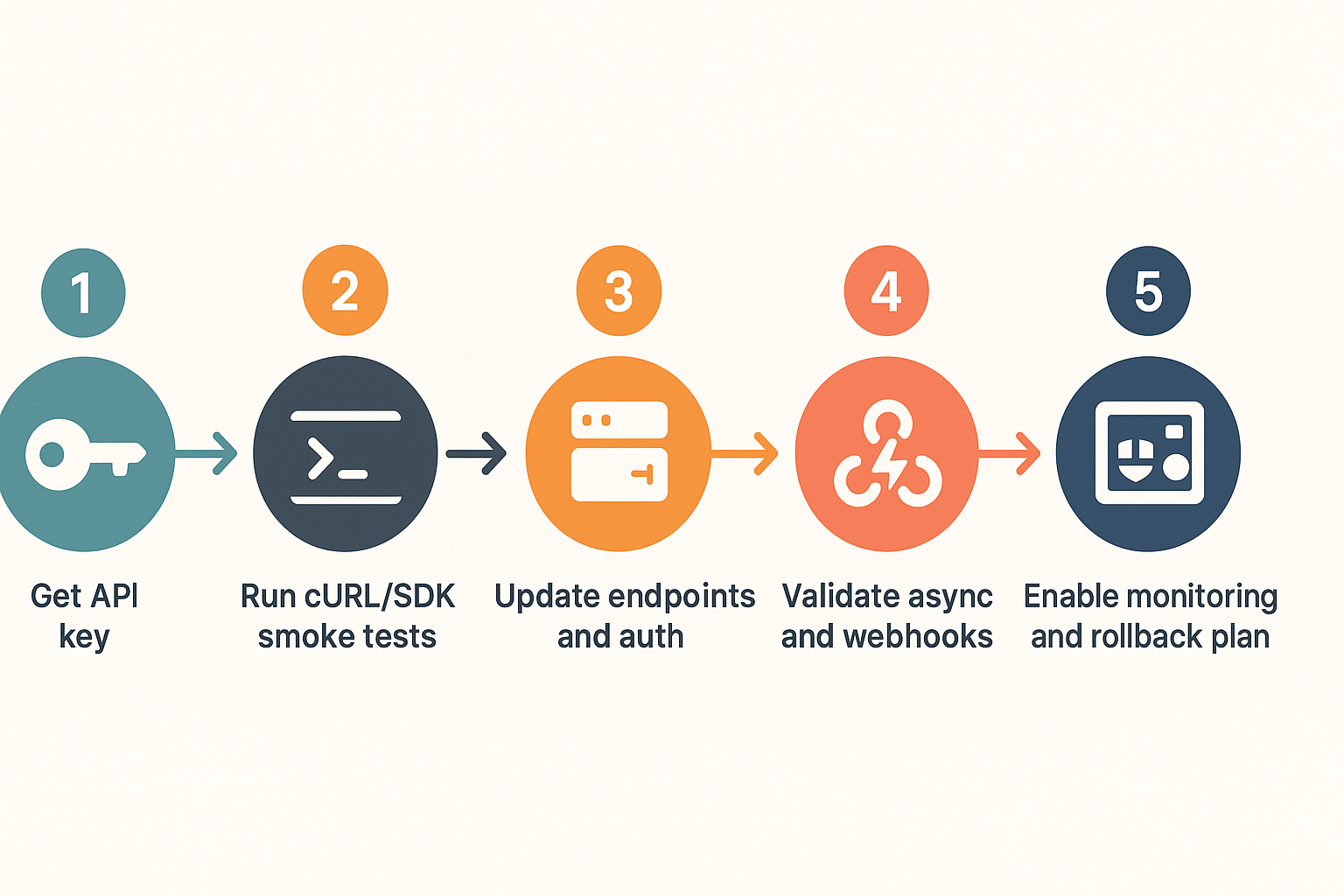
Start here to upgrade with minimal downtime. This five step checklist gets your team an API key, runs smoke tests, updates endpoints and auth, validates async flows, and adds monitoring. It also highlights dupdub v1.3 features that matter for integration and rollout.
Five quick steps
-
Get credentials and test credits: create a v1.3 API key in your dashboard, export it to your secrets store.
-
Run smoke tests: use cURL to verify auth and a small TTS call.
Or Node SDK:
-
Switch endpoints and headers: replace /v1/ with /v1.3/ and confirm header names remain the same. Update any base-url constants and CI secrets.
-
Validate async and webhooks: replay a few real jobs, verify webhook signatures, and handle duplicate delivery. Log request IDs for traceability.
-
Enable monitoring and rollback plan: add rate-limit alerts, success/failure dashboards, and a rollback toggle to switch back to v1 for 30 minutes.
Webhook handling tips
Always verify signatures, ack fast, and use idempotency keys for retry safety. Store webhook events until post-migration audits clear them.
Real-World Use Cases & Measurable Outcomes
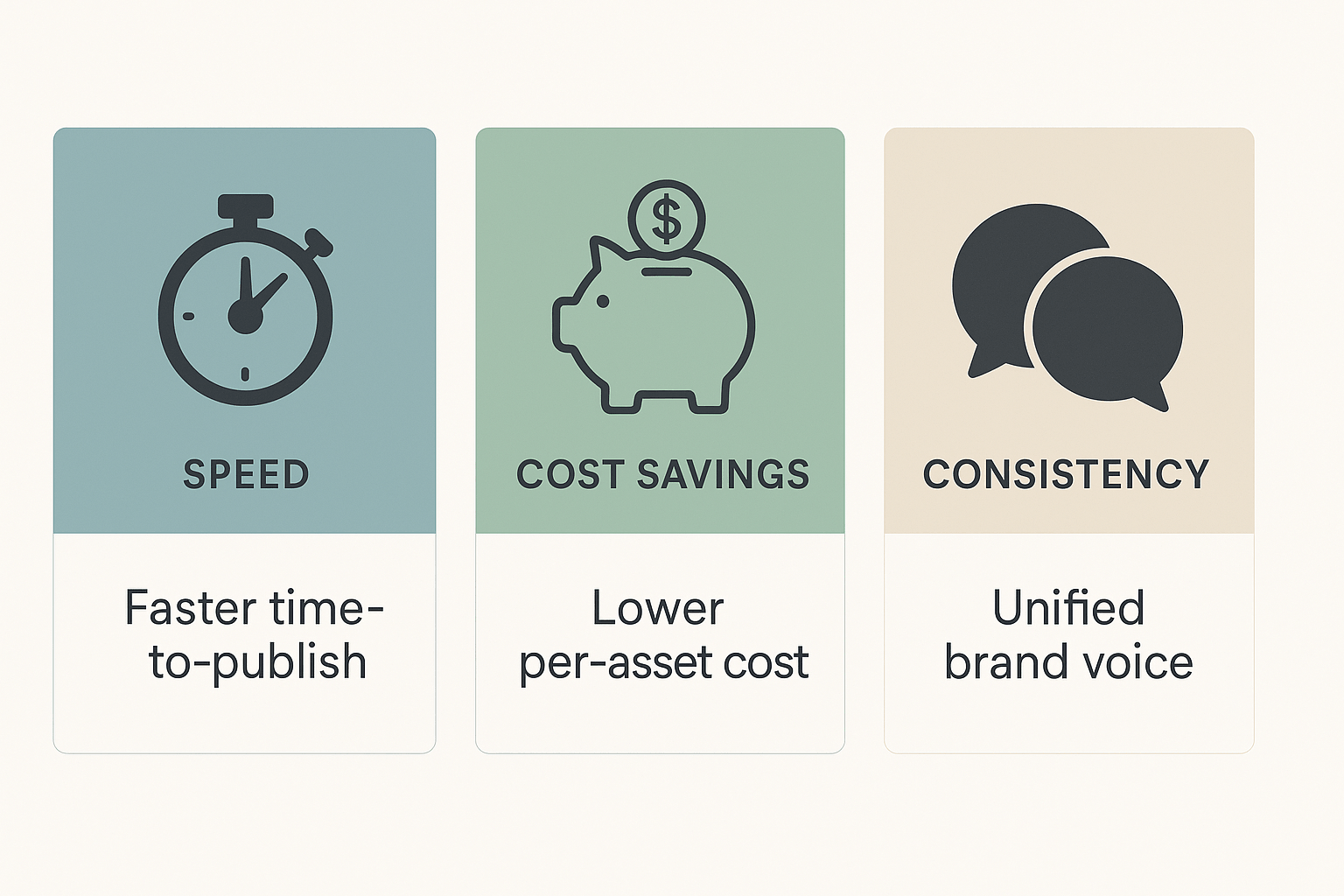
Teams across e-learning, marketing, and support use DupDub to cut localization time, keep brand voice, and scale content globally. This section shows three anonymized examples where dupdub v1.3 features speed up TTS, voice cloning, avatars, and SRT alignment to deliver faster time-to-publish and better consistency. Each mini-case includes measurable outcomes and a short testimonial-style summary.
E-learning localization: cut turnaround from days to hours
A corporate training team used SRT alignment and multilingual TTS to localize 120 minutes of course video in under a day. They kept one cloned voice across languages, so narrators sounded consistent worldwide. Review cycles shrank, and course launches moved from weeks to hours.
Marketing repurposing: create more variants, lower cost
A content ops team turned long webinars into short promos using avatars and batch TTS. They shipped five language variants per asset without studio bookings or extra voice talent. That increased publish cadence and reduced per-asset production overhead.
Support and training: faster fixes, consistent tone
A product support team used voice cloning and quick SRT fixes to roll out updated help videos in hours. The identical voice and synced subtitles kept messaging consistent across regions. Support saw fewer escalations and faster resolution of content issues.
How v1.3 Compares to Competitors (Developer Lens)
DupDub v1.3 features sharpen the API story for developers, focusing on higher endpoint density and unified dubbing workflows. This release balances generous rate limits with ergonomic endpoints for TTS, voice cloning, avatars, and STT (speech-to-text). It keeps request patterns simple, so integration time drops.
API limits and ergonomics
v1.3 offers per-endpoint rate caps and predictable quotas that favor batch localization. Endpoints use consistent headers and JSON bodies, so retries and backoff are easier to implement. Some rivals optimize for streaming latency, for example
ElevenLabs - Best overall Cartesia alternative reports ElevenLabs offers sub-300ms streaming latency via WebSocket API.
When DupDub is faster for localization
If you need combined dubbing, cloning, and avatar output in one pipeline, DupDub reduces network hops and code glue. That lowers end-to-end latency and simplifies orchestration, making v1.3 a strong choice for production localization.
FAQ — Common Questions About v1.3
-
Do existing API keys keep working with DupDub v1.3 features?
Yes. Existing API keys continue to function during the migration window. However, you should rotate keys to take advantage of v1.3 scopes and new features. Refer to the API docs, pricing page, and changelog for guidance.
-
How do v1.3 rate limits affect batch jobs and bulk dubbing?
Rate limits are enforced per endpoint and per account. For batch workflows, implement throttling, retries, and exponential backoff to avoid 429 errors. Review documentation for recommended handling patterns.
-
What are the multilingual voice-clone rules in v1.3?
Voice clones remain tied to the original speaker for security and consent compliance. You can generate speech in supported languages, depending on licensing and sample requirements. Check documentation for detailed rules.
-
How do I request quota increases or report bugs in DupDub v1.3?
You can request quota increases through the account console or by contacting support. Provide details such as expected concurrency, usage patterns, and monthly credit needs. Use official channels to report bugs and track updates.




 Discord
 YouTube
 Tiktok
 Twitter
 Facebook
 Instagram