Create a publish-ready faceless podcast episode in hours, not days. This summary gives the fastest path to a finished episode, the key outcomes to expect, and immediate actions to test an AI narrator. Expect a consistent synthetic narrator, accurate timestamps for subtitles, and a version ready for simple localization.
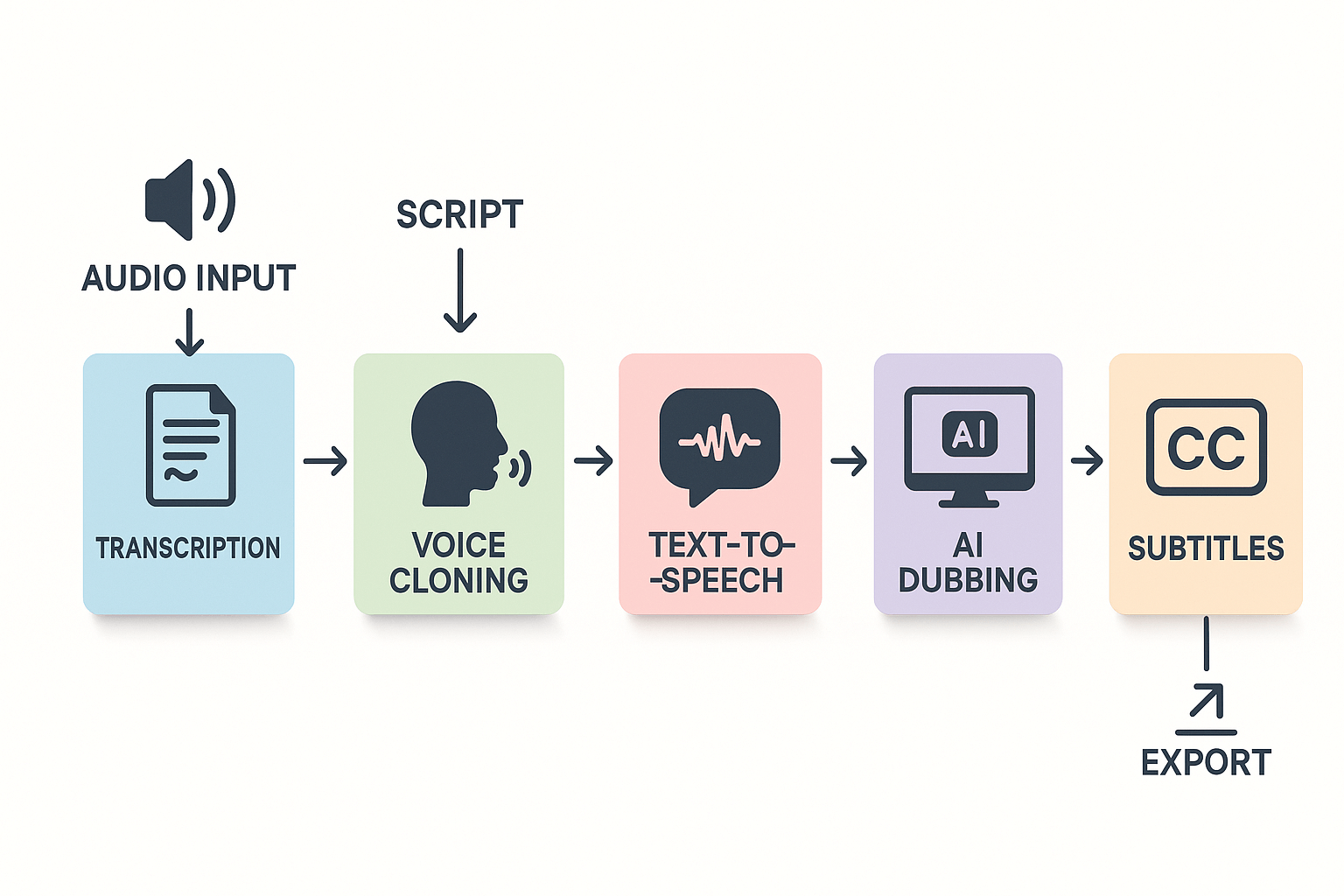
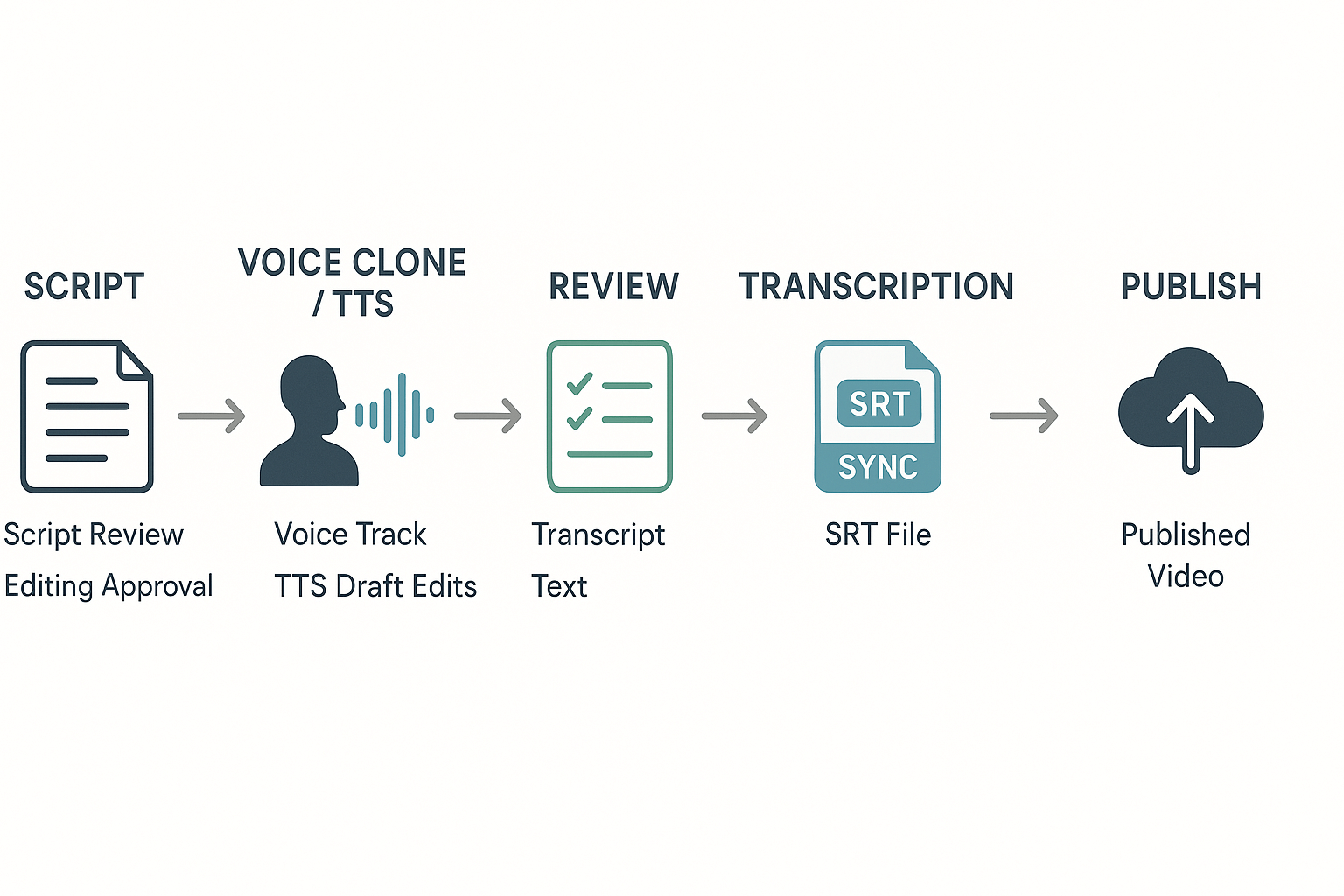
Recommended workflow: write or tighten your script, clone a sample voice or pick a natural TTS voice, and generate the narration. Auto-transcribe the file to get timestamps and subtitles, then proofread and adjust pacing. Export a final audio file, add metadata, and publish to your host.
Immediate next steps: sign up for a free trial of an AI voice or dubbing platform, upload a 1- to 5-minute clip, and create a 30–60 second voice demo. Listen critically for cadence, pronunciation, and emotional tone, then tweak prompts or choose a different voice. If the demo feels natural, convert one full episode as a pilot.
Quick outcomes to expect: faster production, lower localization effort, and a repeatable workflow that scales. Start small, measure listener feedback, and iterate on scripts and voice prompts for a stable, brand-safe faceless show.
What is a 'faceless podcast' and who is making them?
A faceless podcast is a show that has no on-air host on mic, or that uses synthetic narration instead of a visible personality. Creators use scripted voice tracks, text-to-speech, or cloned voices to tell stories, share tips, or report news. This section explains common formats, who makes these shows, and what to watch for when you narrate sensitive topics with AI voices.
Common formats and why they work
Many popular faceless formats rely on clear scripts and strong sound design. True crime and investigative series run on archival audio, narration, and interviews. Short story and fiction pods use voice actors or TTS for every role. Daily news briefings and microlearning shows automate narration to publish faster. Interview compilations and narrated clips repurpose public interviews with added context. Each format trades personal presence for scale, speed, or consistent tone.
-
True crime and narrative nonfiction: heavy editing, layered audio, cinematic music.
-
Fiction and audio drama: character voices, ambient sound, and chapter structure.
-
News briefs and explainers: tight scripts, consistent pacing, rapid release.
-
Repurposed clips and highlight reels: stitched segments with narrator glue.
Who is building faceless shows now
-
Solo creators: low budget, high output, experimenters.
-
Agencies and brands: repurposing marketing content at scale.
-
Educators and trainers: scalable lesson narration and transcripts.
Where faceless shows fit in the podcast ecosystem
Faceless shows sit beside traditional host-led podcasts. They often excel when the content is structured, repeatable, or legal to narrate without original talent. Use cases that favor faceless production include high-frequency updates, evergreen explainers, and localized versions of the same episode. Listeners trade the host relationship for reliable formatting and fast releases.
|
Format type
|
Ideal creator profile
|
|
Daily briefs
|
Solo creators, news teams
|
|
Evergreen explainers
|
Educators, niche publishers
|
|
Fiction series
|
Small studios, audio producers
|
|
Localized content
|
Brands, networks, global creators
|
Creator skills and tooling
You don’t need a radio background to launch a faceless show, but some skills help. Scriptwriting, sound editing, and metadata management make episodes cleaner. Basic voice design and subtitle skills improve accessibility. Tooling matters: a platform that combines transcription, TTS, voice cloning, and subtitle syncing compresses steps and reduces rework.
-
Must-have skills: clear scripting, basic audio editing, tagging.
-
Helpful tools: automated transcription, multilingual TTS, subtitle alignment.
-
Production tip: batch scripts and record in blocks to save time.
Cultural sensitivity and narration safety
Narration with AI needs ethical guardrails. Don’t impersonate a living person without documented consent. Avoid using synthetic voices to speak for communities you don’t represent. When covering trauma, use content warnings and source verification. Tone and pacing can change how listeners interpret sensitive material, so test scripts with real listeners when possible.
Practical rules to follow:
-
Get explicit consent before cloning or imitating a real voice.
-
Use content warnings for graphic or triggering material.
-
Attribute sources and avoid invented quotes.
-
For cultural topics, consult a subject expert or community reviewer.
Faceless formats let creators scale audio work in new ways. They also bring responsibility for consent, accuracy, and context. If you pair clear scripts with respectful practices, faceless shows can reach more listeners without losing credibility.
Why go faceless? Benefits, trade-offs, and best-fit use cases
Many creators choose a faceless podcast because it speeds production, lowers cost, and makes it easier to reach listeners in other languages. A hostless show lets you export scripted episodes, swap voices, and scale output without booking studio time. This section breaks down the practical gains, the obvious trade-offs, and the formats that benefit most from AI narration and localization.
Move faster, produce more
A big reason teams go faceless is workflow speed. Scripted narration, text-to-speech, and voice cloning cut the recording and editing cycle. You can batch-produce several episodes in the time it used to take to record one.
Benefits at a glance:
-
Faster turnaround: reduce recording and clean-up hours.
-
Predictable voice and tone across episodes.
-
Easier repurposing into short clips and translated editions.
|
Task
|
Manual workflow
|
AI-assisted workflow (example)
|
|
30-minute episode production time
|
6–10 hours
|
1–2 hours
|
|
Per-episode transcription cost
|
$$20$$60
|
$$0$$10 equivalent credit
|
|
Multilingual dubbing for one language
|
3–5 hours
|
10–30 minutes
|
This table gives a simple comparison. Your mileage will vary, but the gap grows for shows that need many translated versions.
Reach more listeners with localization
If global reach matters, faceless formats pay off fast. Translating and dubbing a single episode multiplies its audience without re-recording. And automation lowers the marginal cost per language.
According to
The Podcast Consumer 2025, since 2015, the total time spent with podcasts among those ages 13+ has grown by an astounding 355% to 773 million hours per week. That growth makes localization an effective scaling lever for creators who want non-English markets.
Keep brand voice consistent
Using a single cloned or TTS voice helps maintain a uniform sound. That matters for branded series, serialized nonfiction, and courses where the listener expects the same tone.
Practical wins:
-
Easy voice updates for rebranding.
-
Consistent pacing and pronunciation across episodes.
-
Centralized control for franchised or multi-host networks.
Trade-offs to weigh
A faceless show changes perception. Some listeners prize the human touch of a host. AI narration can feel less spontaneous, especially in interview-based or personality-driven shows. You should weigh the gains in scale against possible losses in audience loyalty.
Common trade-offs:
-
Perceived authenticity: Listeners may miss ad-libs, genuine emotion, and host chemistry.
-
Trust signals: Audiences value transparency; undisclosed synthetic voices can backfire.
-
Editing limits: AI handles scripted reads well, but unscripted banter and complex timing still favor humans.
When a human host still wins:
-
Interview shows where rapport and follow-ups matter.
-
Live or community-driven formats with spontaneous interaction.
-
Personality-first podcasts built on the host's unique perspective.
Best-fit formats for AI narration and cloning
Not every show is a fit. These formats tend to get the best ROI from a faceless approach:
-
Educational or explainer series, where scripts are tight and factual.
-
News roundups and daily briefings that prioritize speed and translation.
-
Fiction audio drama that uses multiple consistent voices and needs localization.
-
Repurposed content, like converting video episodes into audio-only shows.
-
Ad reads and sponsored segments, where consistency and compliance matter.
Each format has different needs. For example, a serialized documentary can use a cloned narrator to preserve tone, while a conversational interview should keep a human host.
How to decide, fast
Use this quick checklist:
-
Is the content mostly scripted? If yes, faceless is a strong fit.
-
Do you need many language versions? If yes, AI localization saves time and money.
-
Is host personality the main draw? If yes, keep a human in the mix.
Final call: faceless podcasts are powerful when your goals are scale, consistency, and rapid multilingual reach. Human hosts remain essential where authenticity, live chemistry, or improvisation drive listener loyalty. Start small: test one season or a repurposed episode with AI narration, measure retention and feedback, then expand if it meets your audience standards.
How DupDub enables faceless podcasts — feature-driven overview
This section maps DupDub's core modules to real podcast tasks. You’ll see how AI dubbing, voice cloning, TTS, transcription, and subtitles plug into a repeatable production flow. The aim is practical: which feature to use, when to use it, and which plan fits solo creators versus teams.
Match each DupDub module to a podcast task
Start with the raw asset, then pick the tool that saves the most time.
-
Transcription (speech to text): Use this first for every episode. It creates a searchable script and timestamps. That helps editing, chapter markers, and translation prep.
-
Script editing and rewrite: Clean the transcript or paste a new script. DupDub’s editor makes quick line edits. You can export the draft to your show notes.
-
Voice cloning: Create a synthetic host voice from a 30 second sample. Use it to keep a consistent character voice across episodes and languages. Clones are locked to the original speaker for privacy.
-
TTS (Text to Speech): Choose from 700 plus voices and 90 plus languages. TTS is ideal when you don’t have a clone or need many language variants. Pick a voice style that matches your show tone.
-
AI Dubbing: Re-voice full episodes for other languages. It aligns speech to original timing and adds subtitle sync. Use it to publish a localized version fast.
-
Subtitle and subtitle alignment: Auto-generate SRTs and translate them. Use these for show notes, video versions, and platform metadata.
-
Record and edit studio: Record new segments in the browser. Edit audio trims without switching apps.
-
Export: Download MP3 or WAV for audio platforms, MP4 for video versions, and SRT for captions.
Each module cuts a specific bottleneck. Transcription speeds editing. Cloning and TTS cut recording time. AI dubbing scales reach.
Step-by-step from episode to faceless version
-
Upload audio or video to DupDub. The platform auto-transcribes. Review and correct the text.
-
Finalize the script in the editor. Mark timing or add scene notes for emphasis.
-
Choose voice approach: clone or TTS. Clone if you want the same personality. TTS if you need many languages or quick variants.
-
Render narration. Use Ultra voices for premium realism when available.
-
Run AI Dubbing for translated versions. DupDub aligns speech and subtitles automatically.
-
Export files: MP3/WAV for podcast feeds, MP4 for social cuts, and SRT for captions and hosting platforms.
This flow keeps a single source of truth: the transcript. That reduces rework and keeps voice quality consistent.
Which features matter for indie creators versus teams
Use this quick comparison to match features to needs.
|
Feature
|
Best for solo creators
|
Best for teams or agencies
|
|
Free trial & starter credits
|
Yes, test drive production fit
|
Good for proof of concept
|
|
Voice cloning (3 to 10 clones by plan)
|
Useful if you’re the show personality
|
Useful for branded voices across shows
|
|
TTS hours and voice variety
|
Enough for many solo shows
|
Teams need higher hours and Ultra voices
|
|
Transcription hours
|
Good for editing a few episodes per month
|
High-volume teams need larger quotas
|
|
AI Dubbing & subtitle sync
|
Great for one-off localizations
|
Essential for scaling to many languages
|
|
API access
|
Not always needed
|
Useful for automated publishing pipelines
|
Notes: personal plans give enough credits for regular indie shows. Professional and Ultimate plans suit teams that batch localizations and publish at scale.
Practical tips for choosing cloned voice versus TTS
-
Use cloning if you want a single, recognizable host voice. Provide explicit consent from the speaker. Keep samples clean and noise free.
-
Use TTS when you need speed and many voices. Pick a voice closest to your brand tone and tweak pacing.
-
Combine both: clone the host for primary episodes, use TTS for translations and promos.
Small production realities to plan for
-
Credits: plan how many minutes you’ll generate each month. Cloning training, Ultra voices, and long dubs cost more credits.
-
File formats: export MP3 for feeds, WAV for editing masters, MP4 for video. SRT files power subtitles and discoverability.
-
Sync and polish: AI alignment is fast, but always listen to the rendered file. Adjust timing or emphasis where automated models misplace pauses.
Example before and after: one episode repurposed
Before: a hosted 40 minute interview, recorded live. Manual editing took hours. Translators were expensive.
After: upload the original, auto-transcribe, clean the script, clone the host voice, render a new narrated edit, and run AI dubbing to five languages. Subtitles and MP4 social cuts were exported in one session. Overall time dropped from days to a few hours.
This shows where DupDub saves time: fewer recording sessions, fewer vendor handoffs, and fast localization.
Quick compliance and workflow safeguards
-
Always record consent for voice cloning. Store permission records alongside the voice sample.
-
Lock cloned voices to the owner, and rotate access for team members.
-
Use subtitles and transcripts to improve accessibility and SEO.
DupDub maps naturally to each step of a faceless podcast workflow. It reduces manual dubbing time, keeps voice consistency, and makes multilingual publishing practical for small teams and indie creators.
Step-by-step production workflow (planning to publish)
This playbook walks you from episode planning to a published faceless podcast episode you can reuse and localize. Follow each step and use the checkpoints to keep quality high. It pairs a reproducible DupDub workflow with practical actions you can run on day one.
1) Plan the episode, goal, and format
Start with outcome, not tech. Pick one clear goal: educate, entertain, or convert. Decide length, episode type (solo script, interview, or montage), and reuse paths like short clips or translated versions. Create a simple episode brief with audience, tone, target languages, and a publish date.
Checkpoint: one-line episode brief and a publish date on your calendar.
2) Write and format the script for synthetic narration
Write for the ear, not the page. Use short sentences and conversational language. Mark pauses, emphasis, and pronunciation hints in brackets. If repurposing an interview, create a condensed narrative script and add timestamps for long quotes.
How to format: use a two-column doc or Markdown. Left column: final spoken text. Right column: notes for pacing, SFX, and emphasis. Keep each spoken block to 1 to 2 sentences.
Checkpoint: read the script aloud once. If it sounds natural, move on.
3) Create or clone the voice in DupDub
Decide if you need a brand synthetic voice or a cloned host voice. For a cloned voice, prepare a clean 30 second sample with neutral read and clear enunciation. In DupDub, upload that clip and follow voice cloning steps. For a new TTS voice, audition multiple presets and accents until one fits the brief.
Practical steps in DupDub:
-
Log in and open Voice Cloning or TTS module.
-
Upload sample or pick a voice preset.
-
Set language and speaking style.
-
Generate a short test clip from a 1–2 sentence snippet.
-
Save the voice and label it by show and character.
Checkpoint: compare two test takes. Pick the one with the right tone and intelligibility.
Quality control tip: ensure consent for cloning. Keep consent records and store the original sample securely.
4) Generate narration with TTS, then review takes
Break your script into short blocks. Generate TTS per block in DupDub so fixes are local and fast. Export WAV for higher fidelity. For tricky names or industry terms, add phonetic spellings in parentheses.
Review process:
-
Listen to each block back-to-back.
-
Flag timing or unnatural prosody.
-
Regenerate with small prompt tweaks, not entire rewrites.
Keep versions. Name files like ep01_intro_v1.wav and ep01_intro_v2.wav.
Checkpoint: consistent speaking rate and clear diction across all blocks.
5) Transcribe, translate, and sync subtitles
Upload the final narration to DupDub or use the platform to transcribe the assembled episode. Use the auto subtitle tool to create SRT timestamps. For multilingual releases, translate the transcript within DupDub and generate dubbed audio tracks using the cloned voice or suitable TTS voice.
Syncing tips:
-
Use sentence-level alignment for tight lips or caption timing.
-
Edit translated lines to keep timing close to the original.
-
Export both SRT and translated transcripts for repurposing.
Checkpoint: open the SRT file in a player and scrub through the episode to check alignment.
6) Edit, layer SFX, and master
Bring narration into your DAW or DupDub editor. Assemble blocks in order. Add intro music, levelers, and subtle room tone if you need continuity. Use light compression and an EQ roll-off below 80 Hz for clarity.
Mix checklist:
-
Normalize peaks to -1 dBFS.
-
Set overall loudness to -16 LUFS for podcasts.
-
Check mono compatibility and mobile playback.
If you have multiple language tracks, export each as its own mastered file with matching loudness and metadata.
Checkpoint: quick listening test on headphones and phone speakers.
7) Publish assets and versions
Package these assets before publishing: final audio file, episode transcript, SRT files, translated audio tracks, and a short show notes document. Write episode descriptions that mention languages available. Tag files with language and voice name.
Distribution checklist:
-
Create cover art and chapter markers if needed.
-
Upload primary audio to your host with the transcript in the show notes.
-
Attach SRT and translated audio to platform pages where supported.
Checkpoint: check the RSS episode entry for correct metadata and file size.
8) Post-publish checks and reuse strategy
After publishing, run a quick QA. Verify the episode plays on common podcast apps. Check one translated version on a regional player or share it with a native speaker for a quick review.
Repurpose plan: clip three short segments for social, make a translated episode page, and create a blog post from the transcript.
Checkpoint: confirm social clips are scheduled and the translated episode file is live.
Quick cost and time comparison table
|
Task
|
Manual workflow time
|
DupDub workflow time
|
Notes
|
|
Script prep
|
2-4 hours
|
1-2 hours
|
DupDub speeds voice tests and reuse
|
|
Voice recording
|
2-6 hours
|
30 minutes
|
cloning or TTS removes studio time
|
|
Transcription
|
1-3 hours
|
10-30 minutes
|
automatic options cut manual editing
|
|
Subtitle sync
|
2-4 hours
|
20-60 minutes
|
auto alignment reduces manual work
|
|
Mixing & mastering
|
1-3 hours
|
30-90 minutes
|
faster when narration is consistent
|
This table shows typical task times. Your mileage will vary, but DupDub tends to compress recording and localization time.
Final checkpoints before you hit publish
-
One-line episode brief matches final audio.
-
Voice and tone match across every block.
-
Transcript and SRT files align with audio.
-
Loudness is consistent across languages.
-
Consent and voice licensing stored in a project folder.
If any check fails, loop back to the small step that fixes it. Small fixes are faster than a full redo.
Quick tips and sample prompts
-
For natural prosody, add short cues like [pause 300ms] or [emphasize: keyword].
-
Use phonetic spelling for names like Jose or Nguyen in parentheses.
-
Keep each TTS block under 20 seconds for easier re-runs.
Sample voice prompt for DupDub: "Casual, friendly, clear. Read at 150 wpm. Slight pause before lists. Avoid whistles or breath sounds."
Checkpoint: run that prompt on a short paragraph and compare variants.
Voice cloning & TTS best practices for believable narration
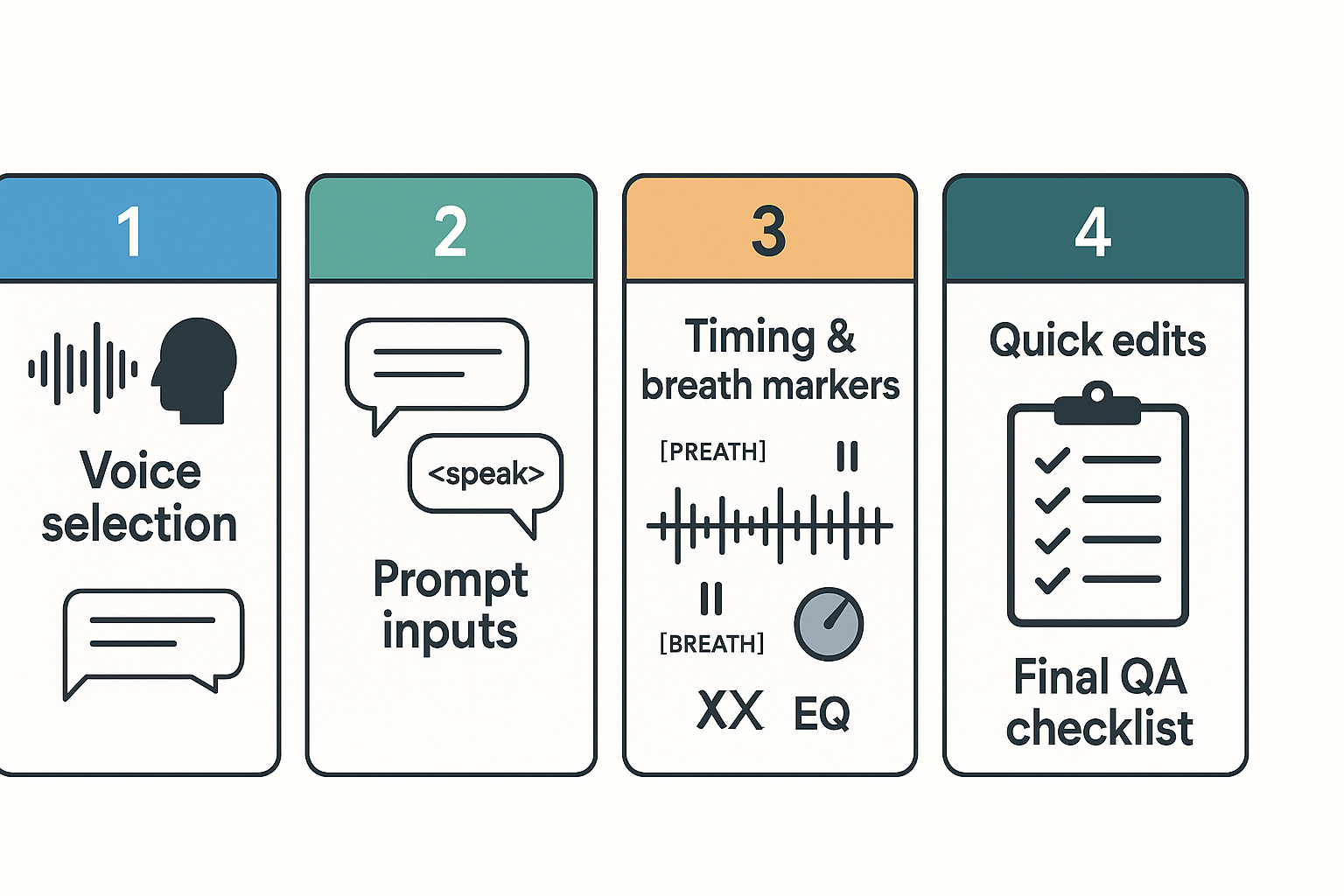
Good synthetic narration sounds like a human telling a story, not a machine reading lines. This section gives concrete tips on choosing or cloning a voice, writing prompts and narration briefs, marking timing and breaths, and quick edits that cut robotic artifacts. If you plan a faceless podcast, these practices help listeners stay engaged and trust the show.
Choose a voice that matches your show and audience
Match voice age, timbre, and energy to the show format and listener expectations. If your episodes are deep-dive interviews, pick a calm, measured narrator. If you do short daily updates, pick a friendly, brisk voice that keeps pace.
Use these selection criteria when testing voices:
-
Naturalness: prefer voices with varied pitch and tempo.
-
Clarity: good consonant articulation helps transcription and comprehension.
-
Emotional range: pick voices that can convey subtle emphasis.
-
Accent and locale: match your target market or localize later.
-
Consistency: choose a voice you can reuse across episodes to build brand recognition.
If you can clone a host, weigh the trade-offs. Cloning preserves a unique identity, but a well-tuned TTS voice can sound equally natural and avoids consent complexities.
Write short, directive narration briefs and prompts
Start with a one-line voice brief: role, mood, and pace. Then add a three-sentence narration brief that shows intent and examples. Keep prompts short and explicit so the synth knows how to deliver words.
Sample voice brief and prompt for an episode opener:
-
Voice brief: Neutral male, mid-30s, warm, slightly brisk, confident but friendly.
-
Narration brief: Say this like a quick welcome. Emphasize names and facts, pause after each intro sentence, and finish with a softer close.
Example prompt and script with timing cues:
-
"[VOICE: neutral-male-warm][PACE: 0.95x] Welcome to Episode 12 of Clear Signal. [PAUSE 0.4s] Today we look at making audio sound alive. [BREATH] Let's start with the core tip."
-
"Intro fact: 'Over 60 percent of listeners prefer short episodes.' [PAUSE 0.5s][EMPHASIS: short episodes]"
Use simple tags like [PAUSE 0.4s], [BREATH], [EMPHASIS], and [SOFT]. If your platform supports SSML (Speech Synthesis Markup Language), add equivalent SSML tags for pauses and emphasis.
Time, breathe, and mark phrasing for natural cadence
Good timing keeps sentences from sounding clipped or robotic. Mark natural phrase breaks and where the narrator should breathe. Use a small set of consistent tags and keep them inside the script so they’re not lost in production.
Recommended timing rules:
-
Short pause after commas in lists: 0.2 to 0.3 seconds.
-
Medium pause for clause breaks: 0.4 to 0.6 seconds.
-
Full pause for sentence ends or scene shifts: 0.7 to 1.0 seconds.
-
Insert [BREATH] where you want an audible inhale, especially before a long sentence.
Test a few variants and listen at normal volume. If the voice still runs phrases together, increase pause lengths by 0.1 seconds until it breathes like a human.
Quick edit techniques to remove robotic artifacts
Small edits go a long way. Often the fix is a short manual step rather than re-cloning.
Try these fixes in your editor:
-
Insert natural breaths: add a soft inhale under 200–400 ms at phrase starts.
-
Manual micro-pauses: slice and insert 0.1 to 0.4 second gaps at phrase boundaries.
-
Crossfade joins: use 5–15 ms crossfades to smooth cuts.
-
EQ and de-essing: reduce harsh high frequencies and sibilance for softer consonants.
-
Slight pitch or timing randomness: apply tiny, imperceptible pitch or tempo variations to reduce flatness.
-
Replace problem words: export a single word or sentence and re-synthesize it with a different emphasis prompt.
Don't overprocess. Subtlety wins. The goal is human imperfection, not glitches that call attention to the voice.
Voice cloning and TTS tuning checklist
Before you publish, run this short checklist:
-
A/B test clips with target listeners for naturalness.
-
Confirm transcription accuracy for show notes and SEO.
-
Verify consistent voice levels across segments.
-
Check emotional matches on key lines like calls to action.
-
Confirm subtitle alignment if you provide captions.
Consent and voice ownership checklist
Cloning voices has ethical and legal duties. Follow a clear consent workflow so you avoid claims and preserve trust. As a warning, research shows untrustworthy conversational agents present a significant threat for manipulation of the user, as found by
Dark Patterned Voices Manipulate Users (2024). That risk makes consent and transparency essential.
Use this actionable consent checklist:
-
Written permission: get signed consent for voice use and clones, with dates.
-
Scope: define languages, durations, reuse rights, and platforms allowed.
-
Revocation terms: state how a speaker can revoke permission and what happens after.
-
Payment and credit: agree compensation and credit lines up front.
-
Identity checks: verify the speaker is who they say they are, and confirm age.
-
Third parties: confirm no third-party rights apply to the voice sample.
-
Security: store samples encrypted and document who can access them.
-
Public disclosure: plan a short episode note stating a synthetic voice was used when appropriate.
-
Legal review: for commercial shows, get a lawyer to check contracts and local regulations.
Small scripts and voice prompts you can copy
Use these short prompt templates to start quickly:
-
Friendly host: "Voice: warm, conversational, paced. Read naturally, pause after clause breaks, friendly close."
-
News bulletin: "Voice: neutral, crisp, brisk. Emphasize stats. Pause 0.4s after each sentence."
-
Storyteller: "Voice: expressive, varied pitch. Slow for suspense, quicken for action. Include soft breaths."
Replace the bracketed tags with your platform's SSML or the cloning tool's directive language.
Practical final tip: always do a listener test before a full release. A five-person blind test finds awkward spots fast. Run two rounds: one for naturalness, one for factual clarity.
Localization & multilingual dubbing: reach global listeners
A faceless podcast can reach far more listeners when you localize, not just translate. Localization adapts wording, tone, and cultural context. Dubbing keeps timing and emotion aligned so episodes feel natural in another language.
When to localize versus translate
Translate when you need a literal conversion of facts or short-form captions. Translate for show notes, metadata, or summaries. Localize when you want the episode to land emotionally with a new audience. Localization changes idioms, examples, and cultural references so the story reads like it was made for that market.
Why it matters: literal translation can sound stiff, which reduces engagement. Dubbing with localized scripts keeps pacing and the feeling of a live read. That improves listen time and share rates.
How aligned dubbing preserves timing and emotion
Aligned dubbing means matching the new voice to the original timing and emotional beats. That includes sentence length, pauses, and breath cues. When you keep those elements, the episode keeps its rhythm. Listeners sense a natural flow, not a translation pasted over audio.
Practical signals to match:
-
Sentence length and pause points. Match natural breaths.
-
Emphasis and intonation. Preserve strong words and climaxes.
-
Timing of jokes or reveals. Keep the same gaps.
AI tools can produce aligned audio by mapping timestamps from the original transcript to the new narration. This keeps subtitles and audio in sync, and helps editors spot where cultural edits are needed.
Pick languages and accents for impact
Start with data, then add business sense. Look at your analytics, email list, and ad markets. Ask three questions: which countries already listen? Where do ad dollars come from? Which markets share my niche?
A simple selection process:
-
Rank top three countries by current listens and growth potential.
-
Pick a primary language for each country (for example, Spanish for Mexico, English or Spanish for parts of Latin America, Brazilian Portuguese for Brazil).
-
Choose an accent that matches your target persona: neutral mid-Atlantic English for global business; regional accents for local authenticity.
Small tests help. Localize one episode per language, push it to a landing page, and measure listens and subscribes for four weeks.
Cultural adaptation checklist
-
Replace idioms with local equivalents.
-
Swap references to local brands, laws, or holidays when relevant.
-
Check humor and metaphors for sensitivity.
-
Validate examples with a native reviewer.
Use a three-tier review: machine pass, bilingual editor pass, and a final native cultural check. That keeps costs lower while avoiding missteps.
Manual workflow versus DupDub: side-by-side comparison
|
Task
|
Manual workflow
|
DupDub end-to-end workflow
|
|
Transcription
|
Send audio to human transcriber, wait days
|
Auto transcribe in minutes, 40+ languages
|
|
Script translation
|
Hire translator, adapt phrasing, time edits
|
Auto translate, then human-edit in studio
|
|
Voice casting
|
Record remote voice actor, retakes, sync
|
Clone voice or pick TTS voice, set timing
|
|
Dubbing alignment
|
Manual timecode editing, audio engineering
|
Auto subtitle alignment, re-voicing tools
|
|
QA & cultural review
|
Multiple passes, separate tools
|
In-app review, edit, and re-render
|
|
Turnaround
|
Days to weeks per language
|
Hours to a day, depending on review
|
|
Cost example
|
$$200$$1,000 per episode per language
|
Predictable credits-based pricing
|
Notes: left column is general manual steps. Right column summarizes how an integrated platform speeds the chain: transcription, voice cloning, TTS, subtitle sync, and export.
Time and cost trade-offs
Manual dubbing gives control but costs more and scales poorly. Expect higher per-episode fees, long lead times, and variable voice consistency. A DupDub-style workflow lowers hourly costs and keeps one voice consistent across languages. You trade some bespoke nuance for speed and scale.
Estimate factors to compare:
-
Episode length and complexity.
-
Number of target languages.
-
Need for native actors or exact emotional match.
-
Budget and speed requirements.
Tip: For serial shows, invest in a high-quality voice clone once. It pays off after just a few episodes when you scale.
Practical localization steps with an AI-first workflow
-
Transcribe the original episode. Export timestamps and A/V markers.
-
Create a localization brief: target country, tone, taboo topics, and preferred voice.
-
Auto-translate the transcript, then edit for cultural fit.
-
Choose voice: voice clone, TTS voice, or local actor. Match cadence to timestamps.
-
Generate aligned audio and auto-sync subtitles. Review and tweak lines that lose nuance.
-
Run a native cultural check, apply edits, and finalize.
-
Export audio and subtitle files, and publish with localized metadata.
This workflow minimizes back-and-forth while keeping control over cultural changes.
Measuring ROI for localization
Track these KPIs per language: listens, completion rate, subscriber growth, and revenue per thousand listens. Compare to the original language baseline. Small wins often come from longer listen time and better social shares in local markets.
Final practical tips
-
Localize titles and episode descriptions first, to test market interest. That’s cheap and fast.
-
Keep a single brand voice across languages by reusing a voice clone or a chosen TTS palette.
-
Use subtitles and show notes to boost discoverability in new markets.
-
Keep a glossary of brand terms to ensure consistent translations.
N/A
Production, distribution, and monetization strategies for faceless shows
Producing and monetizing a faceless podcast takes less time than you think. Start with clean audio, an RSS feed, and a repeatable repurposing plan. This section covers publishing logistics, turning episodes into social clips and translated versions, and practical revenue paths you can use while tracking the metrics that prove impact.
Prepare your RSS and hosting
Pick a podcast host that supports custom RSS feeds and episode-level metadata. Your host pushes episodes to directories like Spotify and Apple Podcasts. Add ID3 tags, episode images, and a short summary. Attach a full transcript (text) so search engines can index the episode content.
Publish to major directories correctly
Submit your RSS to Apple Podcasts, Spotify, and Google Podcast Manager. Each directory reads the same feed, so correct metadata matters. Use MP3 or WAV audio depending on your host requirements. Validate your feed and check episode dates, show artwork, and category tags before you publish.
Repurpose episodes into video and social clips
Turn audio into short videos and captioned clips for social platforms. Create 30 to 90 second highlight clips for reels, carousels, and short-form feeds. Use transcripts to pull quotable lines and create caption overlays. Translate clips to other languages to expand reach.
Use AI tools to speed this up. For example, automated transcription gives exact timestamps. AI dubbing and TTS generate translated spoken audio. Voice cloning can keep a consistent host voice across languages. Subtitle alignment helps you produce captioned video files in minutes instead of hours.
Common repurposed formats:
-
Short social clips with captions.
-
Full-length translated video episodes.
-
Quote images and audiograms for feeds.
-
Blog post or newsletter versions of transcripts.
Quick comparison: manual vs AI-assisted repurposing
|
Task
|
Manual time
|
Manual cost
|
AI-assisted time
|
AI-assisted cost
|
|
Create captions
|
|
High
|
10-30 minutes
|
Low
|
|
Translate + dub clip
|
3-6 hours
|
High
|
15-45 minutes
|
Medium
|
|
Produce social edit
|
1-3 hours
|
Medium
|
10-40 minutes
|
Low
|
This table shows typical relative effort, not exact prices. AI tools cut time and lower per-clip cost, letting you publish more versions and languages.
Monetize with ads, sponsors, and memberships
Mix revenue streams rather than rely on one source. Programmatic ads (dynamic ad insertion) scale with downloads. Direct sponsors pay higher CPM for niche audiences. Memberships and paid subscribers create steady monthly income.
Common monetization paths:
-
Programmatic ad networks for broad reach.
-
Direct sponsor deals with episode reads.
-
Affiliate links and product tie-ins.
-
Premium episodes behind a paywall.
-
Membership tiers for early access and bonus content.
Faceless shows can use synthetic voice for ad reads. If you use a cloned voice, disclose that the read is synthetic. Transparency keeps trust and meets advertiser expectations.
Sponsor pitch and delivery checklist
Make sponsor outreach simple and repeatable. Provide a short media kit, audience demographics, and past episode performance. Offer deliverables like one 30-second mid-roll, one 15-second pre-roll, and branded social clips. Track click-throughs and conversion codes for each sponsor.
Localization and new-audience monetization
Localization opens new markets and ad pools. Translate show notes and create dubbed versions for high-value languages. Test a translated episode as a pilot in a few markets to measure lift. If downloads and engagement rise, package localized sponsorships by region.
Measurement: metrics that show audience lift
Track a small set of clear KPIs. Focus on those that tie to revenue and reach. Here are the core metrics to watch:
-
Downloads per episode, first 7 and 30 days.
-
Listener retention and completion rate (how much people listen).
-
Subscribers or follower growth over time.
-
Click-through rate on episode links and sponsor codes.
-
Revenue per episode and RPM (revenue per thousand downloads).
-
Views and completion on video and translated clips.
-
New listeners by language or region.
Set a baseline before you change anything. Run a three-episode test when you localize or increase cadence. Compare downloads, retention, and conversion against the baseline. That gives a clean signal about the lift from localization or faster publishing.
Operational tips for scaling cadence
Batch production into focused sessions: record, edit, and export multiple episodes on one day. Automate transcription and subtitle generation immediately after export. Use templates for episode metadata and social assets. These steps reduce friction and let you publish more often.
Keep an episode checklist. Include audio quality, ID3 tags, transcript upload, subtitle sync, and social clips. Repeatable checklists cut mistakes and speed up publishing.
Final notes on revenue and reuse
Repurposing and localization let you reach new listeners and unlock more revenue. Programmatic ads give scale, sponsors add premium dollars, and memberships lock recurring income. Measure everything, run small tests, and iterate quickly. With tighter workflows, a faceless podcast can scale more rapidly than a traditional, host-driven show.
Ethics, legal, and crediting best practices
Producing a faceless podcast means you can skip an on-air host, but you cannot skip ethical and legal checks. This section lists the must-do steps for voice cloning, anonymous narration, source audio rights, and sensitive-content handling. Follow these rules to protect creators and keep listener trust.
Get clear, recorded consent for every voice clone
Always get written consent before creating or using a cloned voice. Store the consent file and a short audio confirmation. According to
When is consent valid? - European Commission, Under the GDPR, consent must be freely given, informed, specific, and unambiguous, provided via a clear affirmative act. If you plan to sell, commercialize, or distribute internationally, note consent scope and time limits in the agreement.
Disclose synthetic narration and credit appropriately
Be transparent in show notes and episode descriptions when a voice is synthetic or cloned. A short disclosure reduces listener confusion and meets many platform expectations. In credits, list the voice clone name, the original speaker (if they consent), and a line about the cloning process. If you use a neutral synthetic voice, offer a link to a policy or FAQ that explains how the voice was produced.
Verify copyright and clear source audio
Check ownership for any recorded interviews, music, or clips you plan to reuse. If you didn’t record it, ask for a license or written permission. For short clips, don’t assume fair use applies, especially for commercial projects. Keep a simple record: file name, owner, license terms, and timestamped proof of permission.
Handle real-person stories with care
If an episode recounts private or traumatic experiences, get consent from the person being discussed. When anonymity is required, avoid identifiable details that could reveal identity. Consider using a neutral synthetic voice and explicit consent that covers sensitive retellings. For vulnerable people, an ethics review or legal counsel can prevent harm and liability.
Minimize misrepresentation risks
Do not use a cloned voice to impersonate someone without clear consent. That includes public figures and private individuals. Add a prominent disclaimer if an episode recreates or dramatizes a real person’s words. Misleading uses damage trust and can trigger legal exposure.
Protect biometric and personal data
Voice samples are biometric-like data in many jurisdictions. Limit storage, encrypt files, and set retention schedules. Use access controls so only authorized producers can pull raw voice data. If a contributor asks for deletion, have a clear process to remove their data and confirm it in writing.
When to consult legal counsel
Consult an attorney for cross-border releases, commercial licensing, or when you plan to monetize content using cloned voices. Complex cases include estates of deceased people, minors, and voice likeness issues in advertising. A short legal memo can save time and money later.
Quick checklist to reduce legal risk and keep trust
-
Get written consent, record an audio confirmation, and store both.
-
Specify scope: use cases, geography, duration, and monetization rights.
-
Disclose synthetic narration in show notes and episode descriptions.
-
Credit the voice source and list cloning method in credits.
-
Clear copyright for any reused audio or music before publishing.
-
Redact or anonymize identifying details for sensitive stories.
-
Encrypt and restrict access to raw voice samples.
-
Keep deletion and revocation procedures documented and fast.
-
Review local laws when publishing internationally or monetizing.
-
Consult legal counsel for high-risk or commercial projects.
Follow these steps to lower legal exposure and preserve audience trust. Ethical production helps your show scale, and transparent credits protect both contributors and listeners. If you adopt voice cloning, pair good process with clear documentation and routine audits of permissions and data handling.
FAQ — Practical quick answers (for SEO-rich PAA & snippet chance)
-
How fast can I create a faceless podcast episode?
You can produce a basic faceless episode in a few hours. With a prepared script, AI narration, and auto-synced subtitles, going from draft to publish typically takes 2–6 hours depending on length and editing needs.
-
How long does voice cloning take for podcasts and narration workflows?
Voice cloning usually processes within minutes after uploading a clean sample. A 30-second recording can often produce a usable test clone in under 30 minutes, including basic tuning.
-
Is voice cloning legal for podcast use in my country?
Voice cloning is generally legal when you have proper permission from the speaker. Laws vary by country, so always secure written consent and review local regulations—especially if you plan to monetize or distribute widely.
-
Do I need explicit consent before cloning someone’s voice?
Yes. Always obtain explicit written consent. Treat a cloned voice like a recorded performance and keep a signed release that defines languages, distribution channels, duration, and commercial use rights.
-
Which DupDub plan fits podcasters with different production needs?
Select a plan based on volume and features. Personal plans suit hobby podcasters, Professional plans support frequent creators, and higher tiers are designed for scale. A free trial lets you test cloning, TTS, and transcription before committing.
-
How do I keep AI narration sounding natural and human?
Write shorter sentences and build in natural pauses. Break scripts into short lines, add light delivery cues (e.g., “pause” or “smile”), and blend cloned lines with occasional human takes if needed for realism.
-
How fast is localization and multilingual dubbing for episodes?
Once your script and voice settings are configured, you can auto-translate and re-voice a 20-minute episode in under an hour for one language. Batch processing accelerates multi-language releases.
-
How accurate is speech-to-text for episode transcripts?
Modern speech-to-text systems achieve roughly 90–98% accuracy for clear audio. Clean recordings, minimal background noise, and proper speaker labeling improve transcript quality.
-
How do I estimate costs per faceless episode using AI tools?
Estimate based on runtime and usage credits. Short episodes require fewer TTS and transcription credits; longer shows consume more. Test a sample episode during a trial to calculate realistic per-episode costs.
-
Can faceless podcasts be monetized like traditional shows?
Yes. Monetization options include ads, sponsorships, subscriptions, and global repurposing. Maintain transparency about synthetic narration to build audience trust.




 Discord
 YouTube
 Tiktok
 Twitter
 Facebook
 Instagram