


TL;DR: What this guide covers and the bottom line
-
Track watch time, retention curves, clickthrough rate, and conversion goals.
-
Add aligned subtitles and dubbed audio to test versions for new markets.
-
Instrument event tags to compare variants and run short experiments.
Why faceless video performance metrics matter
Tie creative choices to revenue and retention
Customize metrics for faceless formats
Top metrics to measure for faceless video performance (and benchmarks)
Must-track KPIs and quick benchmarks
-
Average view duration (AVD). Why it matters: AVD shows how long people stay with your narrative. Benchmarks: short clips (under 60 seconds) should aim for 40% to 70% of length, longer videos should target 30% to 60% of runtime. Early-life signal: a strong first 24 to 72 hour AVD means your hook works. Long-tail signal: steady AVD over weeks shows evergreen value.
-
Audience retention (retention curve). Why it matters: retention tells where viewers drop off, and where they re-engage. Benchmarks: keep a high relative retention in the first 10 to 30 seconds for short formats. Early-life: look for big drop points in the first minute and fix the hook. Long-tail: recurring spikes mean people rewatch parts, so note repeatable moments.
-
Click-through rate (CTR). Why it matters: CTR measures how well your thumbnails and open frames convert impressions into views. Benchmarks: 2% to 10% is a common range on major platforms. Early-life: CTR drives initial distribution. Long-tail: sustained CTR keeps impressions turning into views.
-
Watch time (total minutes watched). Why it matters: platforms favor videos that accumulate watch time. Benchmarks vary by channel size, but rising watch time in the first 48 to 72 hours is ideal. Early-life: fast watch-time growth signals algorithmic boost. Long-tail: slow steady growth means discovery and shelf life.
-
Engagement rate (likes, comments, shares). Why it matters: engagement shows active interest beyond passive views. Benchmarks: combined engagement of 0.5% to 2% of views is a useful test window. Early-life: high engagement signals strong community response. Long-tail: conversations and shares drive discovery.
-
Conversion and CTA clicks. Why it matters: these metrics show real audience action, like signups or product clicks. Benchmarks: 0.5% to 3% click-through on CTAs is common but niche dependent. Early-life: initial CTR reveals landing relevance. Long-tail: sustained conversions prove funnel fit.
-
View velocity (views per hour or day). Why it matters: velocity predicts short-term momentum and distribution. Benchmarks: compare to similar past uploads on your channel, look for 20% to 50% faster velocity than baseline for a breakout. Early-life: velocity in hours 1 to 48 matters most. Long-tail: slower velocity with steady accrual means organic discovery.
-
Revenue metrics, RPM and CPM. Why it matters: revenue shows direct monetization per view. Understand ad revenue analytics - YouTube Help states: Revenue Per Mille (RPM) represents how much money you've earned per 1,000 video views, encompassing revenue from ads, channel memberships, YouTube Premium, Super Chat, and Super Stickers. Benchmarks: RPM and CPM vary widely by niche, geography, and format. Early-life: RPM may start low then rise as longer watch sessions attract better ads. Long-tail: mature RPM reflects audience mix and content category.
-
Cohort-level demographics and retention. Why it matters: cohorts reveal which audiences stay and convert. Benchmarks: compare retention and conversion across top 3 geos and traffic sources. Early-life: early cohorts show who responds to the initial cut. Long-tail: demographic shifts over time hint at growth opportunities or localization needs.
How to instrument analytics for faceless videos (tools, tags, workflows — including DupDub & scale)
Track the right signals: what to collect in YouTube and GA4
-
video_id: canonical video identifier
-
variant_id: thumbnail or localization variant
-
language: locale code, like en-US
-
progress_percent: numeric, 0 to 100
-
watch_time_seconds: total watch time per session
-
source_utm: full UTM string
-
publish_origin: platform, e.g., youtube, tiktok
Capture retention curves and heatmaps
-
Use YouTube retention exports for platform comparisons.
-
Use a player SDK to capture granular progress events for on-site pages.
-
Aggregate progress into percentile buckets to make charts fast to query.
Tag cross-posts and run controlled A/B tests
-
Create two variants, assign variant_id A and B.
-
Publish controlled slices of traffic to each variant.
-
Collect at least 1,000 views per variant or a precomputed sample size.
-
Compare view rate, watch time per view, and conversion rate.
Scale with naming, batch localization, and DupDub API
-
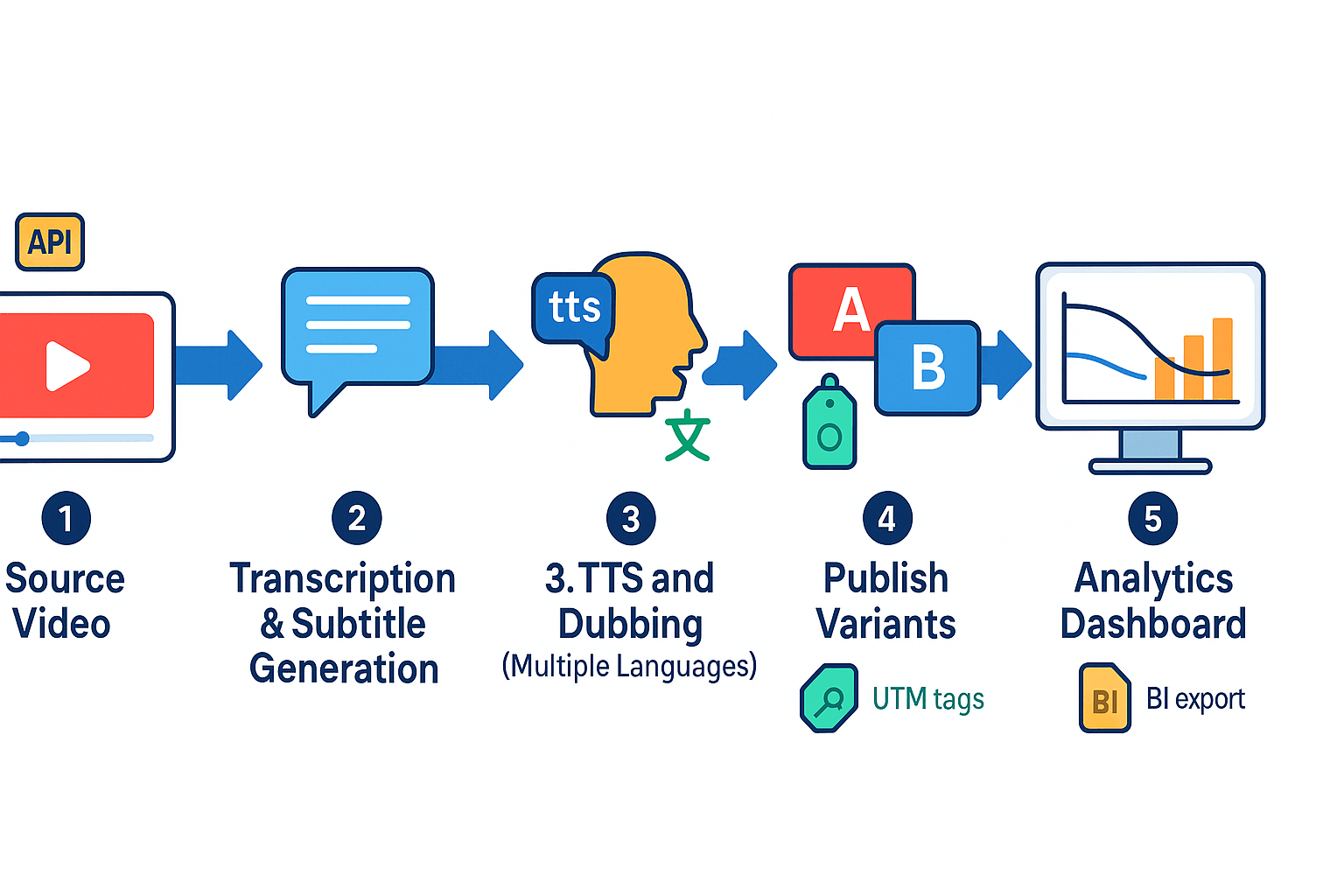
Push source video_id to DupDub job queue.
-
Auto-transcribe and generate SRT files.
-
Create TTS voice clones and produce dubbed MP4s per locale.
-
Tag each output with variant_id and language metadata.
-
Call publish webhook with UTM and variant_id.
Sample event plan to send to BI
-
video_id
-
variant_id
-
language
-
publish_timestamp
-
platform
-
utm_source, utm_medium, utm_campaign, utm_content
-
view_count
-
unique_viewers
-
watch_time_seconds
-
retention_buckets (json or array)
-
conversions (type and count)
-
revenue_usd
-
dubbing_credits_used
Anonymized case study: faceless channel performance before & after optimization
Baseline and interventions
-
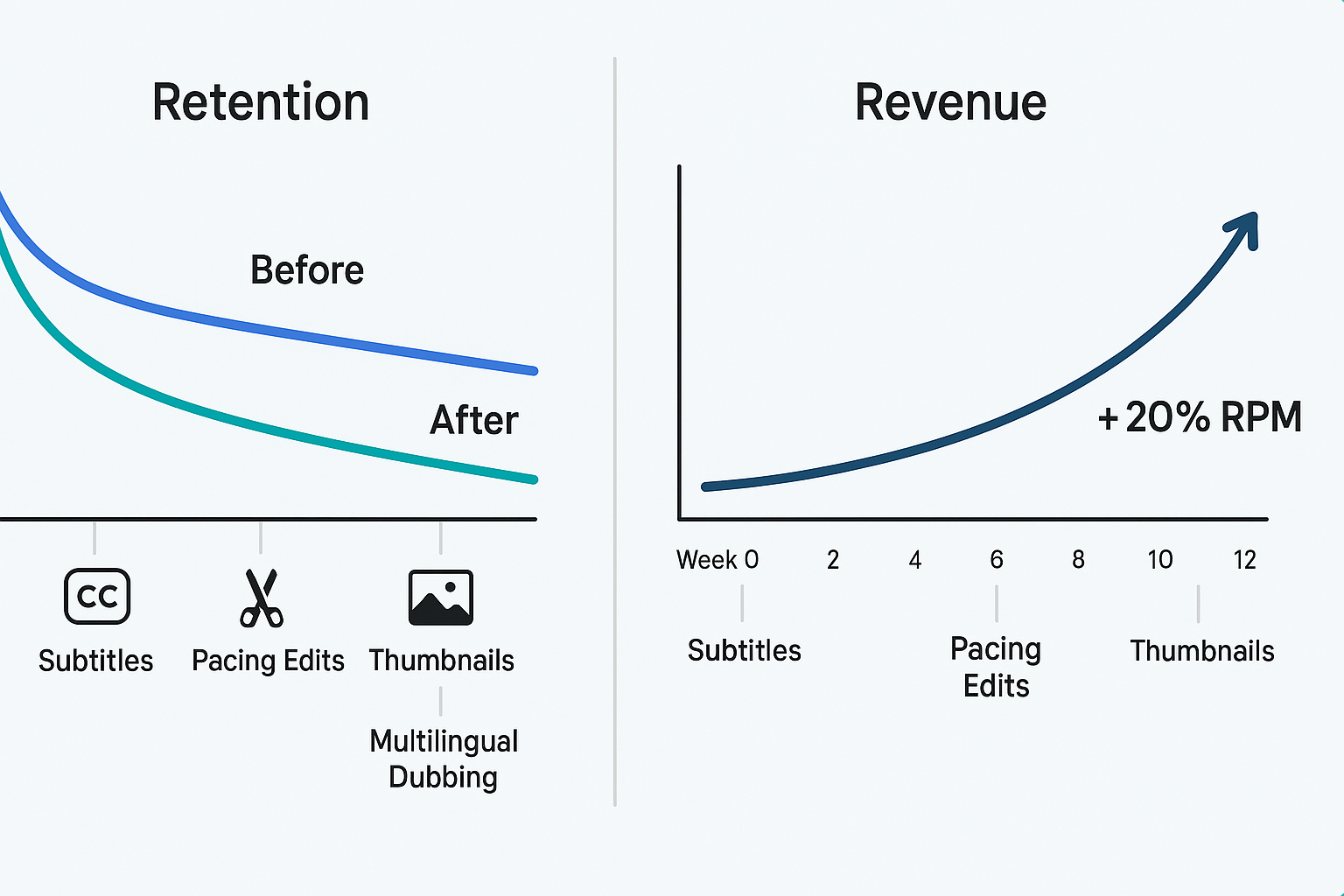
Subtitle localization to Spanish, Hindi, and Portuguese. (auto-transcript then human spot-check)
-
Shorter intros and pacing edits, trimming 8 to 12 seconds from each video.
-
Thumbnail experiments, three variants per video in an A/B holdout.
-
Multilingual dubbing using DupDub TTS and voice cloning, localized titles and SRT exports.
Results, attribution, and lessons
Faceless vs talking-head — metric-level comparison and when to choose each format
Metric-level comparison
-
Retention: Faceless videos often keep attention in short clips with tight edits and subtitles. Talking-heads create longer session retention for deep, instructional videos.
-
Engagement: Talking-heads draw more comments and personal responses. Faceless content gets repeat views and saves when visuals match platform habits.
-
Conversion: Talking-heads convert better for trust-based offers and long-form funnels. Faceless scales conversions when localized and paired with clear CTAs.
-
Production cost: Faceless lowers per-video cost at scale through templates, TTS, and voice cloning. Talking-heads need filming, lights, and more post-production.
When to choose each format
-
Choose faceless if you need scale, fast localization, or brand-neutral content. It’s ideal for listicles, explainers, and multilingual reach.
-
Choose talking-head when authority and personal connection matter. Use it for courses, testimonials, and high-ticket offers.
-
Mixed approach: start faceless to test topics, then add talking-heads for top performers.
Decision checklist
-
Audience: If viewers value personality, pick talking-head. If they want quick answers, pick faceless.
-
Topic: Complex, trust-heavy topics favor talking-heads. Broad how-tos favor faceless templates.
-
Localization potential: Faceless wins when you can use TTS, dubbing, and subtitles to reach new markets.
-
Production capacity: If you can’t film often, use faceless workflows and DupDub tools to localize and voice content at scale.
Production & optimization tactics to improve faceless video performance
Audio and narration first
Visual pacing and retention edits
Subtitle quality and localization
-
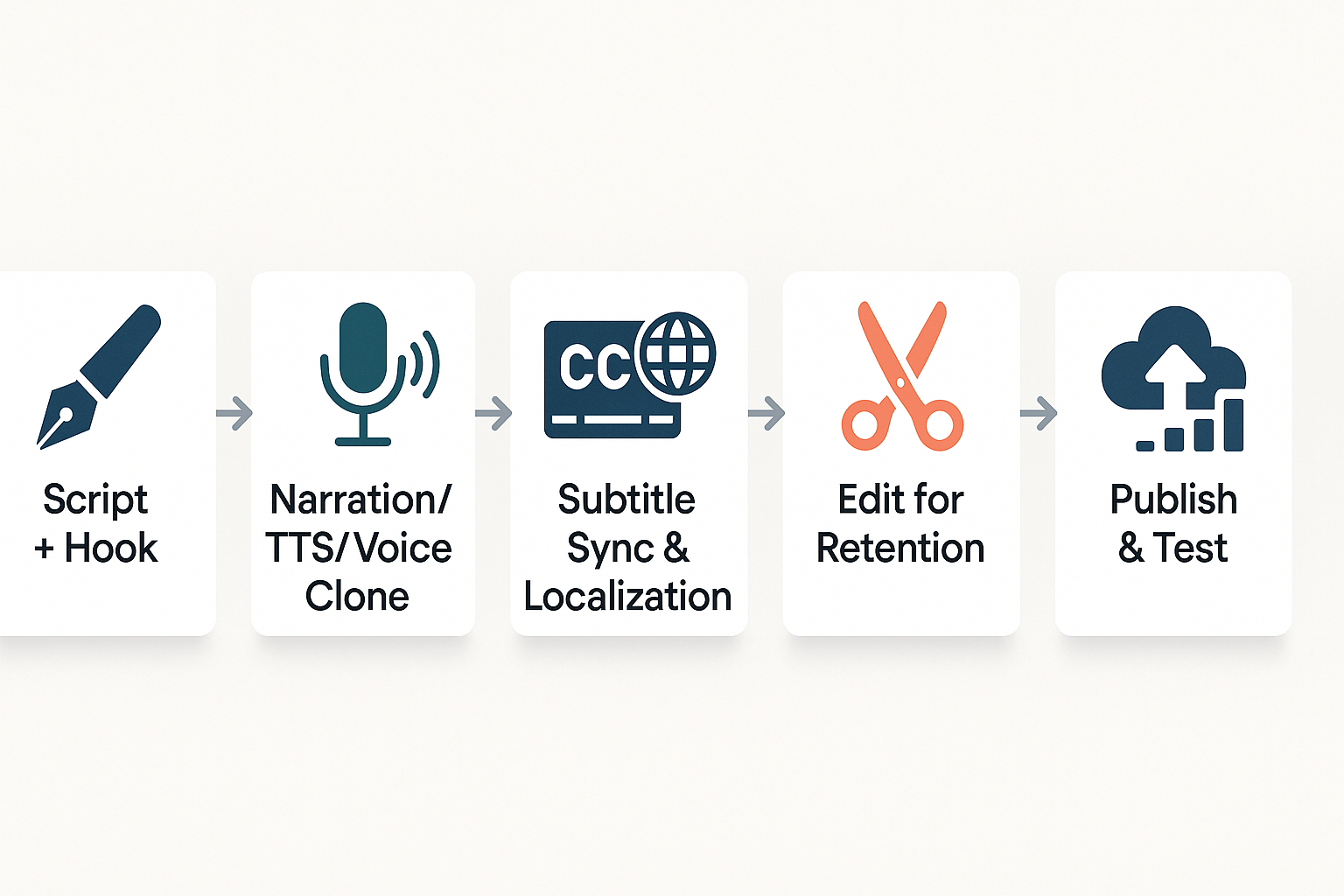
Script and hook
-
Record narration or generate TTS/voice clone
-
Auto-generate and localize subtitles
-
Edit for retention, add chapters and CTAs
-
Publish and A/B test thumbnails and hooks
Legal, copyright & ethical checklist for faceless creators using AI voices and stock assets
Consent and disclosure
Licenses and copyright
-
Verify commercial rights for stock footage and music, including sync and master rights.
-
Avoid repurposing third party clips without license or permission.
-
Keep records of purchases and license terms.
Privacy, data and platform policy
-
Use GDPR-aligned processing for personal data.
-
Store consent records and audio samples securely.
-
Check platform rules for synthetic voices and monetization.
Quick checklist
-
Signed voice consent.
-
Clear on-screen disclosure.
-
License proof for assets.
-
Privacy logs and retention policy.
FAQ — common questions about measuring faceless video performance
-
How do I measure retention for short faceless videos?
Focus on completion rate and average view duration. Track percent watched, per-second retention curves, rewinds, and replays. Use these signals to refine hooks and pacing.
-
How should I measure retention for long faceless videos?
Prioritize watch time per view and retention at chapter markers. Combine retention heatmaps with event tags to identify specific drop-off points and content fatigue triggers.
-
What is good retention for faceless content?
For short-form videos, 60–80% completion is a strong benchmark. For longer uploads, aim for 40–60% average watch time. Performance improves when you continuously test hooks, pacing, and structure.
-
Can localization boost engagement?
Yes. Subtitles, TTS, and voice cloning can expand audience reach and increase watch time. A/B test different languages and measure lift in views, retention, and RPM.
-
Are voice clones legal on monetized channels?
Use voice clones only with written consent and in compliance with platform policies. Follow copyright and publicity-right rules, and disclose synthetic voices where required.
-
How long does it take to see earnings improve after optimizing faceless videos?
Expect measurable improvements within 6–12 weeks with consistent uploads and testing. Faster gains often come from scaling localization and optimizing retention metrics.

 Discord
 YouTube
 Tiktok
 Twitter
 Facebook
 Instagram