TL;DR — Quick answer: Is DupDub the right LOVO alternative for you?
Short answer: It’s a strong choice when you need fast, scalable video localization. It bundles dubbing, subtitle alignment, and avatar options in one workflow.
Key trade-offs: you get speed, many languages, and easy workflows, but you may trade off some studio-level voice nuance and deep audio engineering control. For most creators and teams, the time savings outweigh small drops in ultra-high-fidelity tuning.
Who should read on: creators, localization teams, and e-learning or marketing teams that must publish global video quickly. If you need bespoke voice acting, bespoke audio mixing, or fully custom on-prem solutions, dive into the full comparison below.
Why search for a LOVO AI alternative?
Many teams outgrow a single-vendor TTS workflow as needs shift. If you're evaluating a lovo ai alternative, it usually comes down to language coverage, cost at scale, or missing dubbing features. This section explains the common limitations buyers run into, and how those limits map to real buying needs.
Common limitations that force a switch
-
Language gaps, limited accents, or poor regional coverage, which block global reach.
-
Pricing surprises and unclear cost-per-hour, which break content budgets.
-
Limited dubbing features, like subtitle alignment or video-aware timing, which add manual work.
-
Weak API support or export formats, which stop automation and pipeline integration.
These limits show up in real projects. A channel with frequent international uploads needs broad languages. An enterprise needs predictable spend. A localization team needs automated alignment and subtitles.
How these limits map to buyer needs
Teams want four things in plain terms. First, broad language and accent coverage so the audience feels local. Second, clear pricing and credits so teams can forecast monthly spend. Third, robust API access for CI/CD and batch processing. Fourth, end-to-end dubbing tools that sync audio, subtitles, and video timing.
In some markets, the problem is bigger than a missing feature. According to
Rethinking Localization In The Age Of AI (2025), "Traditional localization management has passed the point of obsolescence and is now impeding growth." That shows why teams move from single-vendor setups to platforms built for scale.
Quick checklist buyers use when switching
-
Language matrix: Does the vendor support your priority languages and accents?
-
Pricing model: Can you estimate cost per published hour, and does pricing scale linearly?
-
Dubbing workflow: Are subtitles, alignment, and re-voicing integrated or manual?
-
API and formats: Are exports MP3, WAV, MP4, SRT, and is there a stable API?
-
Voice ownership and security: Are voice clones protected and data encrypted?
Choosing an alternative is less about brand and more about fit. Map your top pain points to the checklist above. Then evaluate vendors on language depth, predictable pricing, and real dubbing features. That approach saves time and avoids swapping vendors twice.
At-a-glance comparison: DupDub vs LOVO (and where each wins)
If you're evaluating a lovo ai alternative, this quick snapshot helps you compare trade-offs fast. It focuses on voice quality, language coverage, core features, and which tool fits common workflows. Read this to pick quick tests that prove fit for your team.
Quick summary: where each shines
-
DupDub wins for end-to-end video localization, subtitle alignment, and multilingual dubbing. It also offers avatars and a large voice catalog, which speeds translation workflows.
-
LOVO wins for polished single-language narration, tight voice control, and a mature TTS voice studio. Its voices often sound tuned for podcasts and narration out of the box.
Side-by-side snapshot (quick reference table)
|
Category
|
DupDub
|
LOVO
|
|
Voice quality
|
Natural across many accents, strong for dubbed video
|
Very natural for single-language narration and long reads
|
|
Language coverage
|
90+ TTS, 47-language cloning, 40+ STT/subtitles
|
Wide TTS coverage, fewer cloning languages
|
|
Core features
|
AI dubbing, subtitle sync, avatars, voice cloning
|
TTS studio, voice cloning, API for audio-first apps
|
|
Video support
|
Built-in video upload, MP4 export, subtitle alignment
|
Audio export first, video workflows via integrations
|
|
Team & scale
|
Plans and credits for video hours, enterprise controls
|
Team sharing, voice shops, good for audio teams
|
|
Best for
|
Video creators, localization teams, e-learning
|
Podcasters, audiobook producers, voice-first content
|
Feature-by-feature snapshot
Voice quality and style control DupDub offers many ready voices and styles that fit dubbing needs. LOVO focuses on highly polished narration voices, which can sound warmer on long reads. If your primary need is a natural narrator, LOVO often has the edge.
Languages and dubbing DupDub stands out for multilingual workflows and subtitle alignment. It lets you translate and re-voice video in dozens of languages with synced subtitles. LOVO supports many languages, but DupDub targets video localization specifically.
Avatars, video, and presentation DupDub includes avatars and talking-photo tools that help create localized video quickly. LOVO is more audio-first, so you may need external tools to reattach voiceovers to video.
Workflow, team features, and speed DupDub is built for fast republishing: upload video, auto-transcribe, translate, and dub. Teams get credits and voice-clone controls. LOVO offers solid collaboration for audio projects, with studio presets and fine-grain voice tuning.
API, formats, and exports Both platforms provide APIs and common audio formats like MP3 and WAV. DupDub adds direct MP4 export and subtitle formats like SRT, which simplifies video workflows. LOVO integrates well into audio pipelines.
Pricing snapshot DupDub uses a credit and tier model that targets video hours and avatars. LOVO typically prices around voice minutes and cloned voice seats. For heavy video localization, DupDub often gives better cost per localized hour.
How to test fast
-
Run the same short video through each tool, keeping the script identical.
-
Compare sync, naturalness, and how subtitles align.
-
Test cloning with a 30 second clip and play samples across target languages.
This table and checklist should help you pick which tool to trial first. If your goal is scalable video localization, start with DupDub; if you need a polished single-language narrator, test LOVO next.
Deep dive: DupDub features that matter for creators and teams
This section examines the DupDub features that change day to day workflows for YouTubers, localization teams, and e learning producers. If you're evaluating a lovo ai alternative, focus on what speeds translation, keeps brand voice consistent, and lowers per video cost. Below we break features into practical benefits, limits to test in a trial, and quick tactics to validate quality.
Ship translated video faster with end to end AI dubbing
DupDub automates video translation, subtitle generation, and voice revoicing. That removes manual steps like separate transcription, syncing, and voice casting. For a YouTuber, that can cut publish time from days to hours. For localization teams, it reduces coordination across tools and vendors.
What to expect: automatic subtitle alignment (SRT), language-specific timing adjustments, and exported MP4 with new audio track. Test to watch for: lip sync tolerance on fast speech, handling of overlapping dialogue, and punctuation preservation in subtitles.
Clone voices from a 30 second sample, then scale multilingual output
DupDub builds a synthetic voice from about 30 seconds of clean audio. You can then generate the same voice in up to 47 languages. That keeps brand tone across markets without re-recording.
Benefit: saves casting time and the cost of native voice actors. Limitation: cloned voices may sound less natural on long emotional takes. During trial, try a 60 second narration and a short dialogue piece. Listen for breath placement, sibilance, and consistency across languages.
Browser editing studio cuts iteration loops
The web studio lets you edit transcript text, adjust timings, and preview audio inside the browser. No round trips to DAWs or separate subtitle tools.
How that helps teams: editors can fix timing and phrasing without audio engineers. Creators can test alternate phrasing iteratively, then export MP4 or WAV. Test file size limits and large project responsiveness during trial.
Avatars and talking photos for social repurposing
Built in avatars turn voice tracks into short speaking clips for social. For marketers and e learning producers, that creates attention grabbing promo assets fast. Avatars also reduce the need to schedule on camera shoots.
Practical limits: avatar lip sync is good for short clips. For long lessons, validate expressiveness and eye movement realism.
Integrations that plug into existing workflows: YouTube, Canva, and API access
DupDub connects to YouTube transcripts and offers a Canva plugin. That stops you from downloading raw files, editing elsewhere, and reuploading. The API enables batch localization for large libraries.
For developers, the API supports programmatic upload, language selection, voice assignment, and export retrieval. For teams, the Canva and Chrome integrations speed social repurposing.
What to test: API latency for large files, webhook reliability, and export format fidelity (MP4, WAV, SRT).
Time and cost trade offs: where feature choice matters
-
Use AI dubbing when you have many short to medium videos and need speed. It beats manual dubbing on per minute cost and time.
-
Use cloned voices when you need consistent brand tone across languages. Avoid for high emotional acting.
-
Use avatars for promos and micro learning content, not for long-form immersive courses without human review.
Quick trial checklist: what to test in your 3 day trial
-
Upload a 3 minute video, auto transcribe, and generate dubbed MP4. Check sync.
-
Create a cloned voice from a 30 second sample. Generate a 60 second narration in two languages. Listen for artifacts.
-
Export SRT and check punctuation and timestamp accuracy.
-
Push one file through the API, note processing time and returned formats.
-
Try avatar export for a 15 second social clip and inspect lip sync.
These hands on checks reveal the real-world savings and limits. They also let you map which DupDub features replace which parts of your current workflow.
Pricing and value: real-world examples and cost-per-hour estimates
This section converts DupDub plan tiers into real, usable costs for creators and training teams. If you’re comparing a lovo ai alternative, you need clear per-hour math for TTS, cloning, and pay-as-you-go credits. Below are plan-level cost rates, two common project examples, and quick ROI context versus human localization.
Plan-level cost per hour
According to
Coherent Market Insights (2026), the average cost for professional human translation ranges from
0.10 to 0.20 per word for common language pairs, while specialized translations (legal, medical, technical) can cost between
0.18 and 0.35 per word.
|
Plan
|
Yearly price
|
Approx Std TTS hours included
|
Std cost per hour
|
Approx Ultra hours
|
Ultra cost per hour
|
|
Free trial
|
$0
|
0.14 (10 credits)
|
$0.00
|
0.03
|
$0.00
|
|
Personal ($11/mo billed yearly)
|
$132
|
25
|
$5.28
|
5
|
$26.40
|
|
Professional ($30/mo billed yearly)
|
$360
|
83
|
$4.34
|
16
|
$22.50
|
|
Ultimate ($110/mo billed yearly)
|
$1320
|
416
|
$3.17
|
83
|
$15.90
|
|
Pay-as-you-go (example 6,000 credits $698)
|
$698
|
83
|
$8.38
|
16
|
$43.63
|
Notes: Std is standard TTS quality, Ultra is higher-fidelity. Pay-as-you-go gives flexibility but higher per-hour rates.
Sample project math, simple and repeatable
H3: YouTube episode, 12 minutes, localized to 3 languages
-
Runtime: 12 minutes (0.2 hours). Localize into 3 target languages, total TTS time 0.6 hours.
-
If you’re on Personal, Std rate 5.28 per hour. TTS cost = 0.6 *5.28 = $3.17.
-
Add auto-subtitles and alignment included in plan. So incremental cloud cost stays under $5 per episode.
Compare that to human workflows: a 12-minute transcript is ~1,800 words (at 150 wpm). Using the human translation range from
Coherent Market Insights (2026), pure translation alone could cost
180 to 360 per language. Voice actor rates and studio time often push total to $300+ per language. The AI route can compress that to a few dollars per language.
H3: E-learning module, 60 minutes, localized into 5 languages
-
Runtime: 60 minutes. Localize into 5 languages, total TTS time 5 hours.
-
On Professional plan, Std rate 4.34 per hour. TTS cost = 5 * 4.34 = $21.70.
-
If you need Ultra voices for brand fidelity, Ultra rate 22.50 per hour, total Ultra cost = 112.50.
This shows subscriptions scale better for high-volume localization. Ultimate lowers Std cost to ~$3.17 per hour once you hit volume.
How to compare landed costs and ROI
-
Include non-AI costs: project management, revision cycles, QA, and specialized translations for legal or technical content.
-
Use subscription if you publish often, because per-hour cost drops as you scale. Use pay-as-you-go for one-off jobs or audits.
-
Factor in speed: AI workflows cut turnaround from weeks to hours. Faster time to market often justifies subscription fees.
If you want hands-on experience, try the platform with a free trial and run a short episode through the pipeline to measure real landed costs and quality.
Real-world use cases & mini case studies
If you’re comparing a lovo ai alternative, seeing real workflows helps. Below are three short case studies that show the baseline manual process, the DupDub workflow, estimated time saved, and the qualitative outcome. Each example is concrete so you can judge likely impact on your projects.
YouTuber: Localizing weekly episodes
Baseline workflow:
-
Transcribe each episode manually or with basic speech-to-text.
-
Send transcript to translators, get translated script back.
-
Hire voice talent, schedule recording, upload audio to editor, align audio to video.
DupDub workflow:
-
Upload episode, auto-transcribe and auto-translate inside the platform.
-
Generate dubbed audio using a cloned voice or select a close synthetic voice.
-
Export dubbed MP4 with burned or separate SRT subtitles.
Time saved: Roughly 70 to 85 percent per episode. For a 20-minute show, manual dubbing meant 2 to 3 full production days including casting and studio time. With DupDub, the same episode can be dubbed, synced, and exported in 3 to 6 hours.
Qualitative result: Faster episode cadence and consistent voice across languages. The creator keeps brand tone and reaches more regions without the scheduling headaches of remote voice sessions.
E-learning provider: Localizing a 50-hour course library
Baseline workflow:
-
Batch transcribe thousands of minutes, then split transcripts by module.
-
Use multiple translators, then local voice talent for each language and module.
-
Integrate new audio into slide decks or video timelines, review for sync and terminology.
DupDub workflow:
-
Bulk upload course videos, run batch STT and translation.
-
Create a single cloned instructor voice and apply it across modules and languages.
-
Export completed modules with captions and matching audio files.
Time saved: 80 to 90 percent of hands-on production time. A 50-hour library that used to take months with a 4–6 person team can be localized in weeks with a small reviewer group.
Qualitative result: Consistent instructor voice across courses, lower per-hour localization cost, and faster time to market for new language releases. Review cycles focus on quality checks, not re-recording.
Marketing agency: Enforcing a brand voice across regions
Baseline workflow:
-
Define brand voice guidelines, then brief multilingual voice actors per campaign.
-
Manage many freelancers, reconcile timing, and fix mismatches in tone across assets.
-
Re-run edits as campaign messaging shifts.
DupDub workflow:
-
Clone a preferred brand voice and apply it to ad cuts, product videos, and onboarding clips.
-
Translate scripts, batch-generate regional variations, and export deliverables to MP4 or WAV.
Time saved: 60 to 75 percent in coordination and revision work. Campaigns that required weeks of coordination now ship in days for new markets.
Qualitative result: Unified sonic identity at scale. The agency keeps creative control and reduces revision cycles, making A/B testing across languages practical.
Summary checklist (quick read)
-
Small creators: big time wins per episode, lower casting costs.
-
E-learning teams: major scale and consistency gains across large libraries.
-
Agencies: brand control and faster campaign rollout.
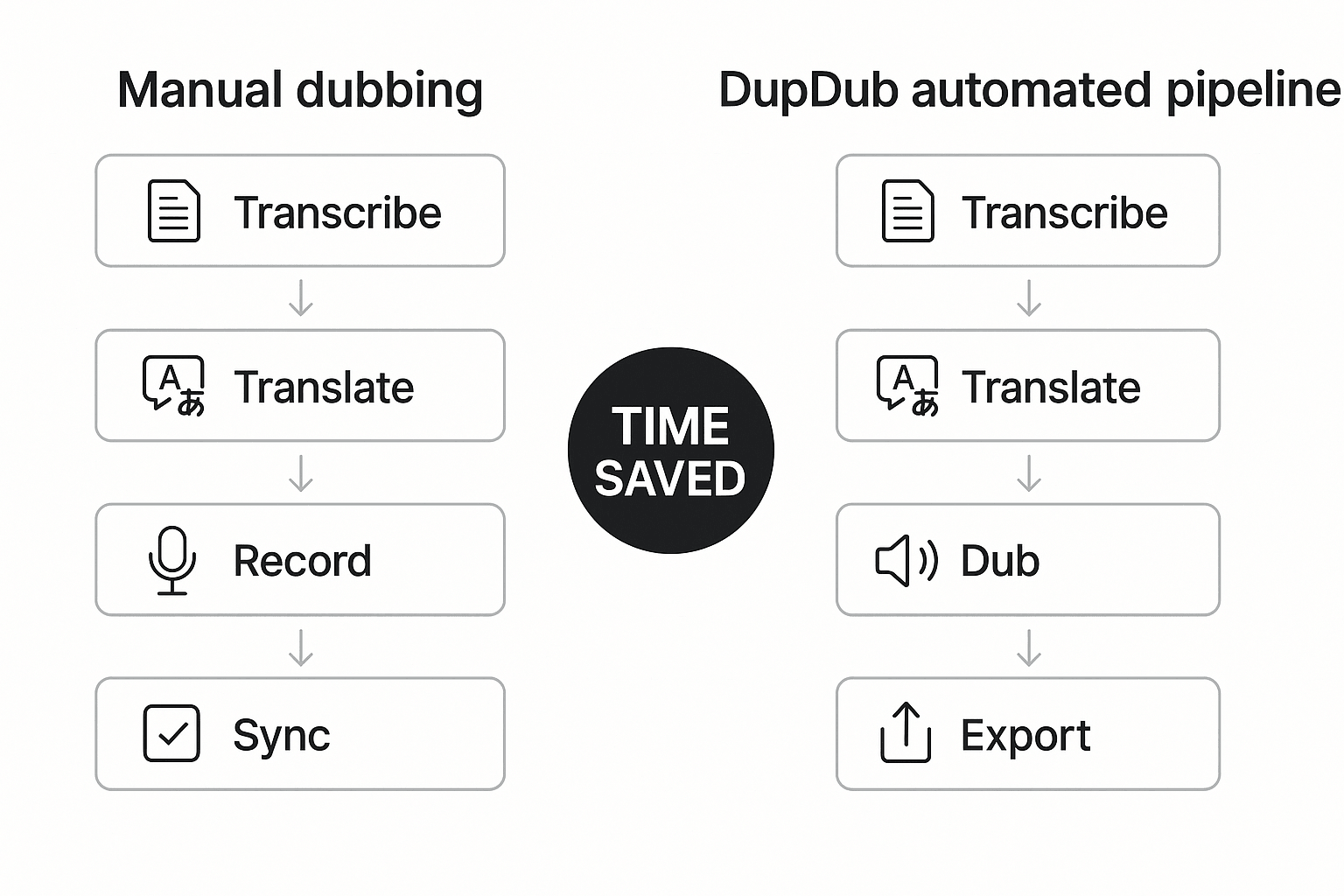
Image prompt: Create a clean 16:9 workflow diagram comparing two lanes. Left lane labeled "Manual dubbing" with four stacked steps: Transcribe, Translate, Record, Sync. Right lane labeled "DupDub automated pipeline" with three stacked steps: Transcribe, Translate, Dub, Export. Use arrows to show step reduction and a bold time-saved badge between lanes. Use neutral corporate colors, simple icons for each step, and space for short labels.
Image alt: Diagram comparing manual dubbing steps (Transcribe, Translate, Record, Sync) to DupDub pipeline (Transcribe, Translate, Dub, Export), showing fewer steps and time saved.
Technical & accessibility considerations (APIs, formats, mobile)
When you evaluate a lovo ai alternative, APIs, export formats, and accessibility determine real-world fit. DupDub provides REST API access and a browser editor built for creators and teams. This section explains integration points, expected outputs for LMS and CDN workflows, and how captions and transcripts meet accessibility needs.
API and automation points
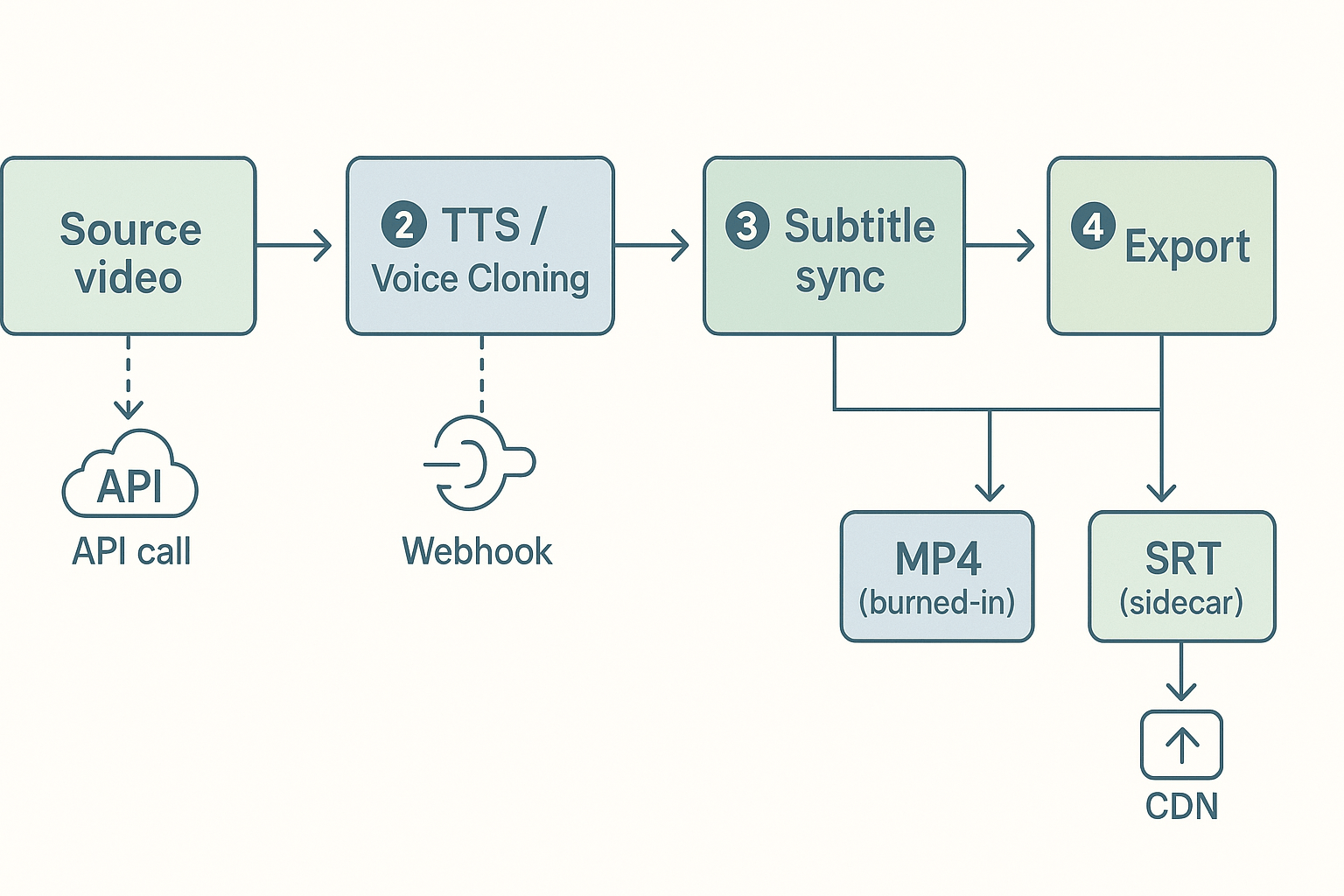
DupDub offers a REST API plus webhooks to automate batch dubbing, cloning, and transcription. Developers can call endpoints to upload source media, request STT (speech to text), invoke TTS or voice cloning, and fetch aligned subtitles. For enterprise privacy, DupDub cites GDPR alignment and privacy controls consistent with
ISO/IEC 27701:2025. Expect JSON responses with job IDs, progress states, timestamps, and download URLs.
Supported export formats and expected outputs
Key export formats are MP3, WAV, MP4, and SRT. Know how each is used:
-
MP3, WAV: audio-only delivery for podcasts or audio tracks. WAV keeps full fidelity, MP3 saves bandwidth.
-
MP4: video exports with either dubbed audio tracks or burned-in subtitles for platforms that need single-file delivery.
-
SRT: sidecar subtitle files with timecodes for CMS, LMS, or CDN ingestion.
Also expect transcript JSON (word-level timestamps) and optional speaker labels for multi-speaker content.
Mobile and browser editor notes
The browser studio supports recording, quick edits, and previewing dubs. Heavy projects with many avatar renders or long videos work best on desktop. On mobile, the editor can playback and make small edits, but file upload and export may be limited by device memory and browser codecs. Use wired networks for large uploads and consider server-side API calls for batch jobs.
Accessibility and captions best practices
Captions and transcripts improve reach and compliance. Provide SRT sidecars for captioning, and include full transcripts for search and assistive tech. Follow WCAG and W3C guidance for caption accuracy, speaker labeling, and reading order when creating subtitles. For learning platforms, attach both SRT and searchable transcripts so screen readers and keyboard users can access content.
Integrating with LMS or CDN workflows
A simple automated flow works well:
-
Upload source video via API, receive job ID.
-
Run STT to get transcript JSON with timestamps.
-
Apply TTS or clone voice, generate dubbed audio assets (WAV/MP3).
-
Sync subtitles, export SRT and MP4 with embedded audio.
-
Push final files to CDN or LMS using the returned URLs.
This keeps sidecar files separate for accessibility, while MP4 files serve platforms that need single-file delivery.
In short, DupDub maps to common developer needs: REST APIs, sidecar SRTs, high-fidelity audio, and browser editing for quick iterations. Plan heavy work for server-side automation and use sidecar captions to meet accessibility standards and LMS/CDN requirements.
Limitations & honest trade-offs: when NOT to pick DupDub
If you’re comparing a lovo ai alternative, DupDub will fit many dubbing and localization needs. Still, there are clear cases where another tool or a hybrid workflow is a better choice. This section lists those scenarios, notes known product gaps, and gives practical workarounds.
When you need ultra-low-latency or live streaming TTS
DupDub is built for batch dubbing, translated narration, and video workflows. It is not optimized for sub-second streaming TTS used in live voice agents or interactive voice apps. If your use case needs real-time audio with minimal jitter, pick a streaming-first provider or a dedicated low-latency TTS API.
When you require custom neural voice engineering
DupDub offers fast voice cloning from short samples. But it does not provide full custom neural voice R&D or deeply fine-tuned proprietary voice models for exclusive brand licensing. Enterprises needing bespoke model training, advanced voice morphing, or on-premises model control should evaluate specialist vendors or build a custom pipeline.
When studio-grade audio chain or advanced mastering matters
Exports include MP3, WAV, and MP4, which cover most needs. Still, DupDub lacks an advanced multitrack DAW, sample-accurate ADR tools, and native support for broadcast-level stem delivery. For final mastering, use a dedicated audio workstation or an audio post house.
Other practical gaps
-
Voice cloning language coverage is limited compared to TTS coverage: plan for fallback voices when cloning isn’t supported.
-
Avatars and talking photos are useful, but not yet a replacement for full-motion localization.
-
Enterprise compliance notes are self-reported: validate contracts and data handling in procurement.
Quick mitigations and hybrid patterns
-
Use DupDub for first-pass localization, then human post-edit for nuance.
-
Export WAV stems and run final mastering in a DAW.
-
For real-time needs, route text to a low-latency TTS and keep DupDub for batch dubbing.
DupDub is strong for scalable, cost-effective dubbing and cloning. Don’t pick it when you need live streaming, bespoke neural engineering, or final studio mastering without a hybrid workflow.
How to choose the right LOVO alternative: decision checklist
Choosing a lovo ai alternative means matching your workflow to features, cost, and scale. This compact checklist helps creators, localization teams, e-learning producers, and developers map priorities to product features so you can pick the right tool fast.
Match your use case to the priority
-
Creator (YouTuber, podcaster): Fast turnaround, affordable per-hour pricing, easy editor, built-in avatars and export to MP4. You care about voice quality and simple subtitle sync.
-
Localization team: Bulk translation, subtitle alignment, quality review workflows, and many target languages. Look for automated alignment and team access controls.
-
E-learning producer: Consistent cloned voices, SCORM or LMS-friendly exports, long-form narration pricing, and proofreading tools. Voice cloning fidelity and stability matter more than flashy avatars.
-
Enterprise / API buyer: Scalability, usage-based billing, SSO, SLA, and a robust API (formats, callbacks, and binary exports). Security and compliance are top checks.
Quick scoring method (5 minutes)
-
List your top three priorities, e.g., dubbing speed, voice cloning accuracy, API access.
-
Assign 3 points for must-have, 2 for important, 1 for nice-to-have.
-
For each vendor, mark whether they meet the priority and add points.
-
If a vendor scores 70% or higher, shortlist it for a hands-on test.
Decision matrix
|
Primary priority
|
Key check
|
Score threshold
|
When to try DupDub
|
Alternate if not DupDub
|
|
Dubbing-first workflows
|
Auto subtitle alignment, 90+ languages, video export
|
7
|
Recommend trying DupDub trial for dubbing and avatar dubbing
|
Use a TTS-first tool if cloning fidelity is the only need
|
|
Voice cloning for courses
|
Multilingual clone support, long narration pricing
|
6
|
Consider DupDub for cloned voices across languages
|
Try ElevenLabs or specialized cloning vendors
|
|
API & enterprise scale
|
REST API, webhooks, SSO, SLA
|
8
|
Good if API supports required formats and SLAs
|
Use enterprise-focused providers with proven SLAs
|
If your checklist points to dubbing, subtitles, and video exports as core needs, DupDub’s trial is a short, low-risk way to validate quality and throughput.
FAQ — common questions about DupDub vs LOVO and other alternatives
-
Is DupDub the right LOVO AI alternative for pricing and affordability?
DupDub can be a cost-effective option for creators and teams needing fast, repeatable dubbing. Start with the 3-day free trial to test workflows, then compare pricing tiers and per-hour costs against manual dubbing or competing tools.
-
What are DupDub voice cloning limits and security controls?
DupDub can create a voice clone from about a 30-second sample and supports multilingual usage. Cloned voices are locked to the original speaker and processed with encryption to reduce misuse risk and protect data.
-
How many languages does DupDub support for dubbing and subtitles?
DupDub supports 90+ languages and accents for TTS, around 47 languages for voice cloning, and 40+ languages for speech-to-text and subtitle workflows.
-
Does DupDub offer APIs and team plans for localization workflows?
Yes. DupDub provides API access for automation and tiered plans for individuals and teams. Enterprise customers can request custom SLAs, compliance features, and volume-based pricing.
-
How can I test DupDub voice quality quickly when comparing LOVO alternatives?
Sign up for the free trial, upload a 30-second sample, and generate TTS or a cloned voice in your target language. Export the result as MP3 or WAV, review naturalness and timing, and compare cost efficiency before scaling.




 Discord
 YouTube
 Tiktok
 Twitter
 Facebook
 Instagram