TL;DR: What this guide covers and the quick wins
This guide gives audio pros practical steps to make ai sound more human, and it fits studio pipelines. You get one-line outcomes, a short checklist of technical wins, and quick guidance on whether to build or buy. Read this if you need production-ready tactics that move from dataset to final mix.
Quick technical wins:
-
Capture varied takes with clean room tone and consistent mic placement.
-
Use lossless files, 48 kHz WAV, and conservative gain staging.
-
Tag prosodic targets (pitch, stress, timing) in training metadata.
-
Add short breath and mouth noise models for realism.
-
Fine-tune on multi-speaker data for natural variability.
-
Train duration and energy predictors, not just spectral features.
-
Use small expressive prompts or style tokens at inference.
-
Apply light saturation, de-essing, and corrective EQ post-synthesis.
-
Render at high bit depth then dither for final delivery.
-
Validate voices in context, not isolated clips.
Should you build or trial a vendor first? If your team has studio-grade data, ML resources, and time, implement these steps in-house. If you lack clean datasets or need fast validation, run a vendor trial first to test voice fit and pipeline compatibility. Either way, aim to lock the recording and prosody stage before heavy model work.
Why many TTS voices still sound robotic (the core problems)
If you want to make ai sound more human, start by diagnosing the failure modes that make synthetic speech feel flat or artificial. This section breaks down the core technical causes audio pros can test for. Understanding these problems helps you pick the right fixes and compare vendor outputs on measurable audio quality.
Prosody and phrasing: limited intonation modeling
Most TTS engines use coarse prosody representations (pitch, energy, duration) that flatten natural variation. Models often predict average contours, so emphasis, sentence-level phrasing, and expressive timing get lost. The result is speech that reads correct, but does not feel alive.
Narrow speaker datasets: missing expressive range
Training sets skew toward neutral, clean read speech, which limits voice expressivity and style transfer. When models try to generalize across many speakers, they average idiosyncrasies and remove character. You end up with technically accurate audio that lacks identity and nuance.
Vocoder and upsampling artifacts: audible tonal errors
The study
Upsampling Artifacts In Neural Audio Synthesis (2021) identifies tonal and filtering artifacts introduced by problematic upsampling operators as primary sources of upsampling artifacts in neural audio synthesis. Poorly matched vocoders and aggressive upsampling create metallic resonances, high-frequency noise, and phase smearing. Those artifacts are often the quickest way listeners tag a voice as synthetic.
Weak contextual conditioning: missing discourse cues
TTS that ignores broader linguistic or visual context misses pragmatic cues like contrastive stress or uncertainty. Without semantic or dialog-level conditioning, sentences lose their pragmatic timing and expressive micro-pauses. That harms intelligibility in long-form narration and dramatic reads.
How these failures show up in vendor comparisons:
-
Flat pitch and uniform timing, even on expressive scripts.
-
Vocale artifacts: ringing, aliasing, or brittle highs.
-
Context errors: wrong emphasis or unnatural pauses.
Test for these with short ABX listening tests, MOS scores, and spectrogram checks when comparing vendors.
Key components that make AI voices sound human
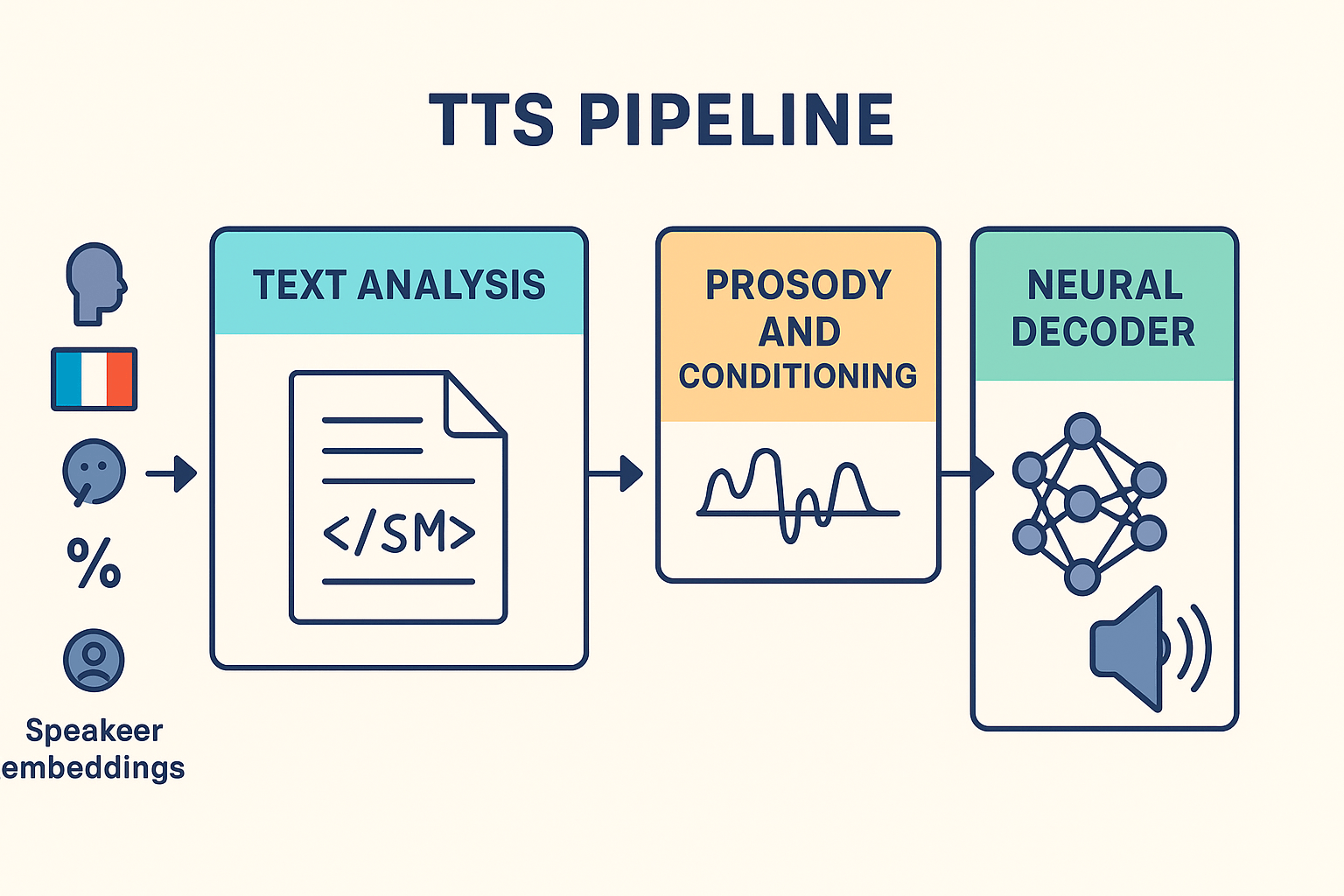
Making synthetic speech feel human starts with a few core building blocks. Get the front end right, model expressive prosody, use modern neural decoders and vocoders, and keep tight speaker and style control across languages. If you want to make ai sound more human, focus on how text, conditioning, and audio rendering work together.
Front end text analysis: SSML, punctuation and context
Good TTS starts with text. Use SSML (Speech Synthesis Markup Language) to mark up pauses, emphasis, and pronunciation. Sentence segmentation and punctuation normalization matter, because wrong breaks cause flat or clipped delivery. Add domain-specific lexicons for names, acronyms, and timing cues.
Model prosody and expressive conditioning
Prosody is the main cue listeners use to judge naturalness. Train models to predict pitch, energy, and durations, or condition them on style tokens and emotion labels. Use multi-scale prosody inputs, like phrase-level and sentence-level features, so the voice breathes and groups phrases like a human. Include small amounts of expressive data rather than only neutral speech.
Neural decoders and vocoders
Choose decoders that produce high-quality mel spectrograms, and pair them with modern neural vocoders for clean waveform synthesis. Neural vocoders such as GAN or diffusion-based models reduce artifacts and preserve micro-prosody. Latency, compute cost, and artifact profile guide the choice for production.
Speaker and style control across languages
Robust speaker embeddings and style libraries let you preserve identity while changing language or mood. For multilingual output, add language ID conditioning and cross-lingual voice-mapping. Platforms with easy voice cloning and multi-style libraries speed experiments and A/B tests in production.
Practical checklist
-
Verify SSML support and fine-grained pause controls.
-
Inspect prosody targets: pitch, energy, durations.
-
Test vocoder outputs for artifacts at target bitrates.
-
Confirm speaker locking and language consistency for clones.
DupDub exposes voice and style controls plus multilingual assets for quick experiments, making it simple to validate these components in real projects. Experimentation lets you find the right balance of data, model, and post processing for natural results.
Recording & training-data best practices for natural voices
Making synthetic speech sound natural starts with how you capture reference audio. If you want to make ai sound more human, focus on clean, consistent recordings, diverse speaking styles, and rich metadata. The tips below cut cloning artifacts and improve style transfer, whether you fine-tune a model yourself or submit samples to DupDub.
Capture setup: mic, room, and levels
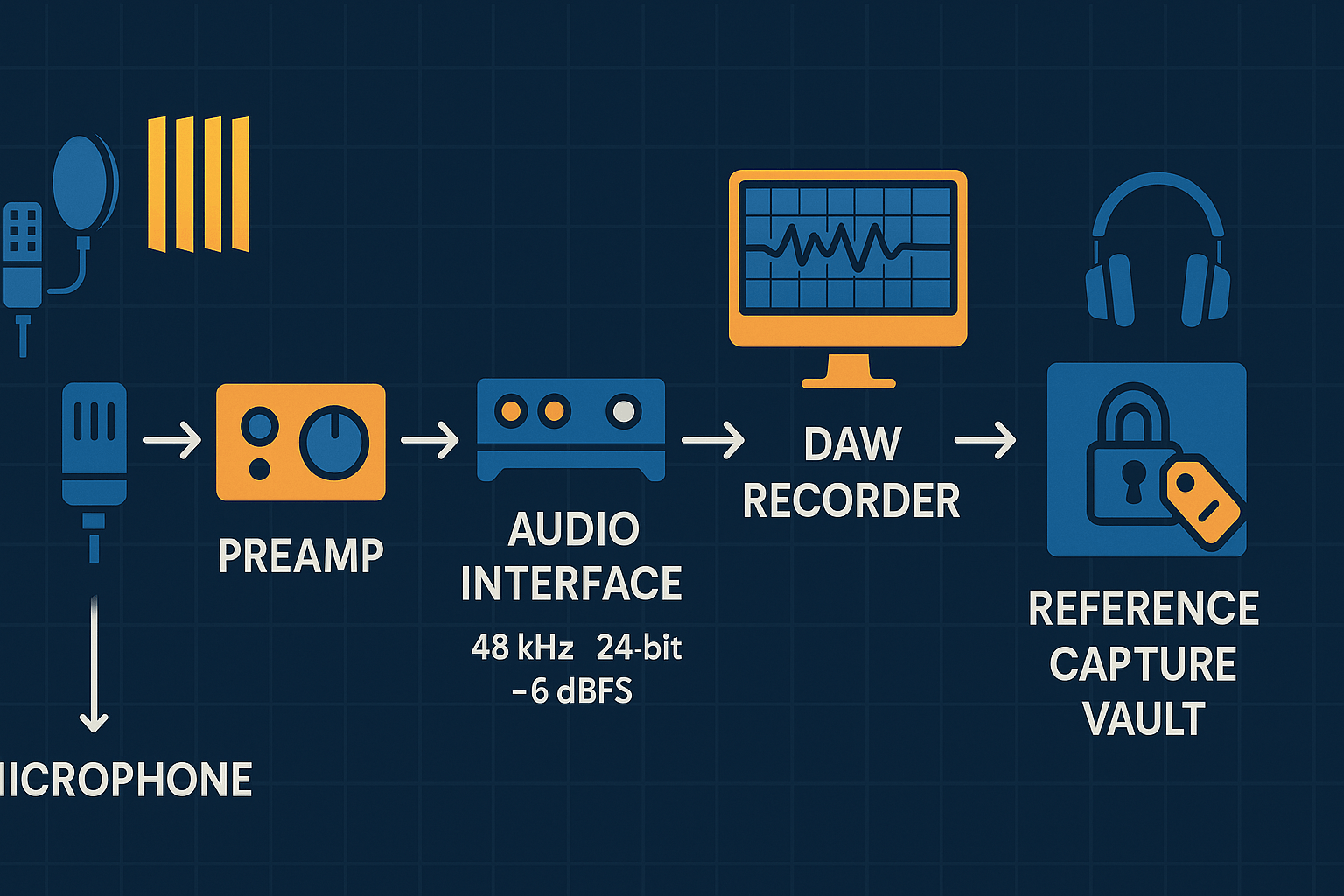
Choose a stable cardioid or small-diaphragm condenser mic and a quiet, treated room. Keep levels consistent, aim for peaks around -6 dBFS, and monitor for clicks and breaths. Follow capture distance guidance from
Georgetown University Library Guide, "The appropriate distance between your mouth and the microphone is 8 to 12 inches." Use the same chain for all reference takes: mic, preamp, interface, and a fixed sample rate (48 kHz recommended).
Record for diversity, not just volume
Include multiple speaking rates, pitch ranges, and emotional intensities. Record neutral narration, short emphatic lines, questions, and conversational reads. Capture controlled prosody sweeps: same sentence spoken flat, rising, and relaxed. Label each file with style tags so models learn conditional outputs.
Metadata and annotation that matter
Annotate timestamps, emphasis, pauses, breath markers, and emotion labels. Use a simple schema: speaker_id, session_date, mic_model, room_notes, take_type, and transcript. This lets teams filter training subsets for cloning or style transfer.
Consent, versioning, and quality gates
Collect written consent tied to recorded files, and store a hashed ID with metadata. Keep raw, edited, and normalized versions in separate folders. Run a quality gate: silence removal, DC offset, consistent loudness, and a visual waveform check.
Pre-submit checklist for cloning
-
10+ minutes of varied speech, same chain and levels. 2. Clean transcripts and style tags. 3. Signed consent and speaker ID. 4. Normalized WAV files, 48 kHz, 24-bit.
These steps reduce artifacts and speed iteration when you fine-tune a model or upload voice samples for DupDub cloning. They also make post-processing simpler and more predictable.
Modeling techniques and feature engineering (high-level, implementable)
Make ai sound more human by combining fine-grained prosody control, robust speaker representations, and careful regularization. This section gives hands-on modeling patterns you can ask vendors for or implement in-house. Expect short lists of features, trade-offs, and practical knobs you can tune.
Core patterns to implement
Start with prosody conditioning, which feeds pitch, energy, and duration as explicit features. Use frame- or phoneme-level prosody tokens so the model learns local timing and emphasis. Add style or global tokens to capture speaking style, like "informal" or "warm".
Use speaker embeddings (a learned vector per voice) to control voice identity. Speaker embeddings let multi-speaker models share data, which reduces overfitting to one speaker's quirks. Pair embeddings with vocal tract features or pitch normalization for cleaner swaps.
For prosody transfer, use a reference encoder that maps an audio sample to prosody vectors. Note that
Do Prosody Transfer Models Transfer Prosody? (2023) found that prosody transfer models may not effectively learn transferable representations of prosody, as they perform significantly worse when trained with different but prosodically related utterances compared to using identical reference and target utterances, so validate transfer on held-out pairs.
Augmentation and regularization
Prevent overfitting by mixing many speakers and using dropout on speaker and prosody vectors. Augment data with pitch shifting, time stretching, and noise injection. Train with multi-task losses, for example phoneme prediction plus prosody reconstruction.
Trade-offs: speech-to-speech versus text-to-speech
Speech-to-speech (S2S) keeps original timing and inflection, so it often needs less prosody modeling. It can inherit recording artifacts though. Text-to-speech (TTS) is cleaner and more controllable, but it needs stronger prosody predictors to avoid sounding flat.
Practical knobs to request or expose
-
Prosody strength slider (0–1) to blend reference prosody with model prediction
-
Global style token selector: choose persona or emotion
-
Speaker interpolation control for hybrid voices
-
Vocoder choices: neural vocoder (waveform generator) vs. Griffin-Lim
-
Pitch/key correction toggle
-
Fine-tune endpoint latency vs. quality
Implement these building blocks to raise naturalness while keeping models robust to new speakers and use cases.
Post-processing and the production audio chain (make it sit in the mix)
Start by treating synthetic narration like a recorded vocal. This short checklist shows how modest EQ, de-essing, compression, spatialization, and loudness work together to make ai sound more human and sit naturally with music and room tone.
Quick production checklist
-
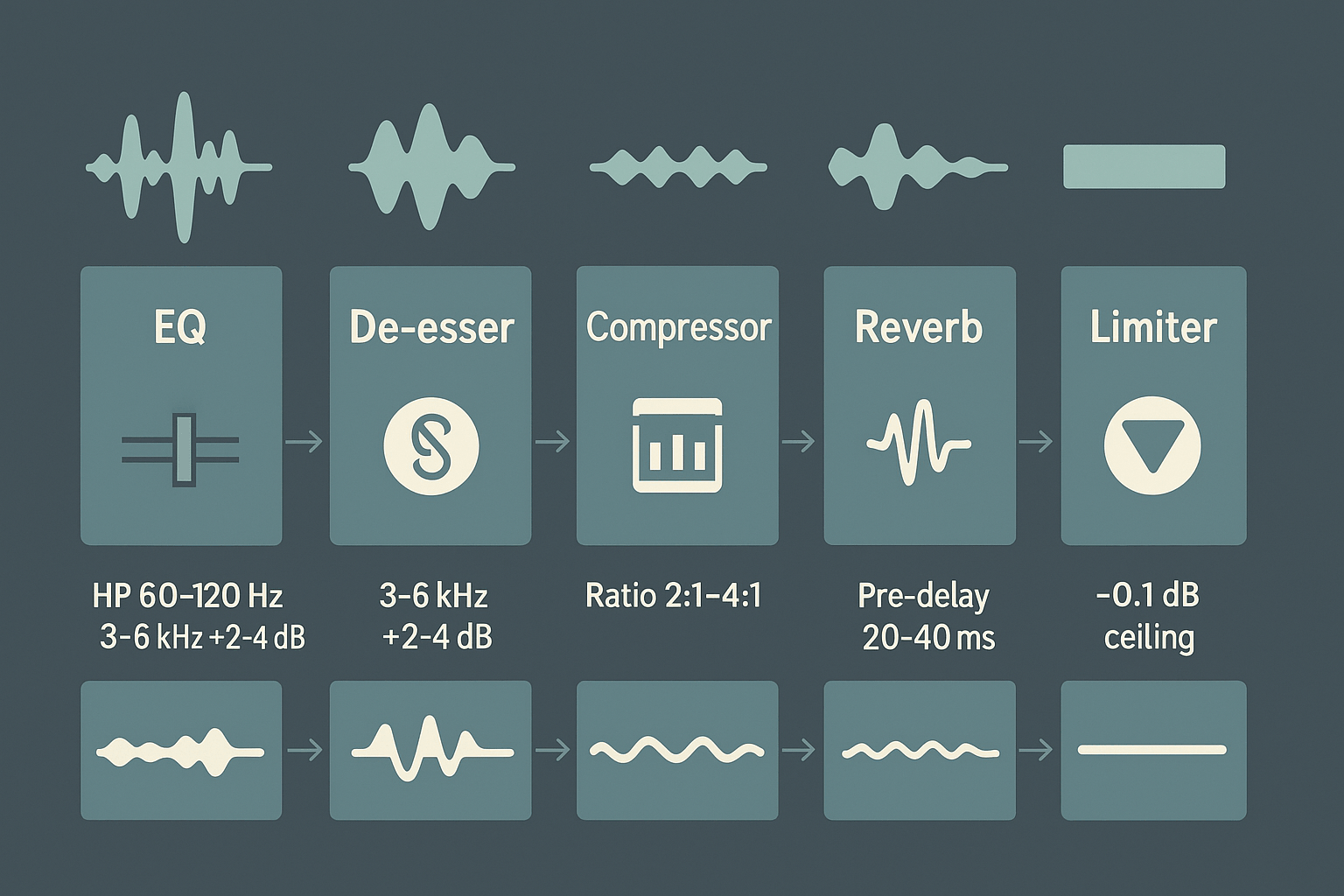
Import format and session match: use WAV, 48 kHz or 44.1 kHz, 24-bit when possible. If you only have MP3, convert to WAV before heavy processing.
-
EQ: correct spectral balance. Cut 300–500 Hz by 2–4 dB to reduce boxiness. Slight presence boost at 3–6 kHz of 2–4 dB adds intelligibility. High-pass at 60–120 Hz to remove rumble.
-
De-essing (sibilance reducer): threshold around -24 to -12 dB, ratio 4:1, focus 5–8 kHz to tame harsh "s" sounds without dulling speech.
-
Compression/leveling: gentle ratios 2:1 to 4:1. Attack 5–20 ms, release 50–200 ms. Aim for 2–6 dB of gain reduction for steady presence.
-
Spatialization: use convolution reverb (impulse response of desired room) or algorithmic small-room reverb. Pre-delay 20–40 ms, decay 0.8–1.8 s. Wet/dry 10–25% keeps voice forward.
-
Limiter & loudness: ceiling -0.1 to -1.0 dBFS. Normalize to target loudness: around -16 LUFS for streaming, -14 LUFS for louder platforms.
Practical example: small tweaks, big impact
A typical fix: cut 3 dB at 350 Hz, boost 3 dB at 4 kHz, apply a de-esser with a -18 dB threshold, gentle compression 3:1 with 4 dB gain reduction, then add a matched small-room impulse response at 15% wet. That chain often converts an acceptable TTS render into a mix-ready human-sounding track by restoring warmth and placing the voice in a realistic acoustic space.
Where DupDub exports fit in your DAW chain
DupDub exports (WAV/MP3) slot directly into a vocal track as the source file. Treat them the same as recorded takes: align to grid, match sample rate, then run the checklist above. Use WAV for best headroom when you plan heavy processing.
Production workflows & real-world use cases (how teams ship it)
This section lays out repeatable pipelines teams use to deliver natural-sounding AI voice for different projects. It shows common end-to-end workflows, and a concrete two-step DupDub example you can copy into your DAW. Use these patterns to make ai sound more human in real productions while keeping review and localization predictable.
Common end-to-end workflows
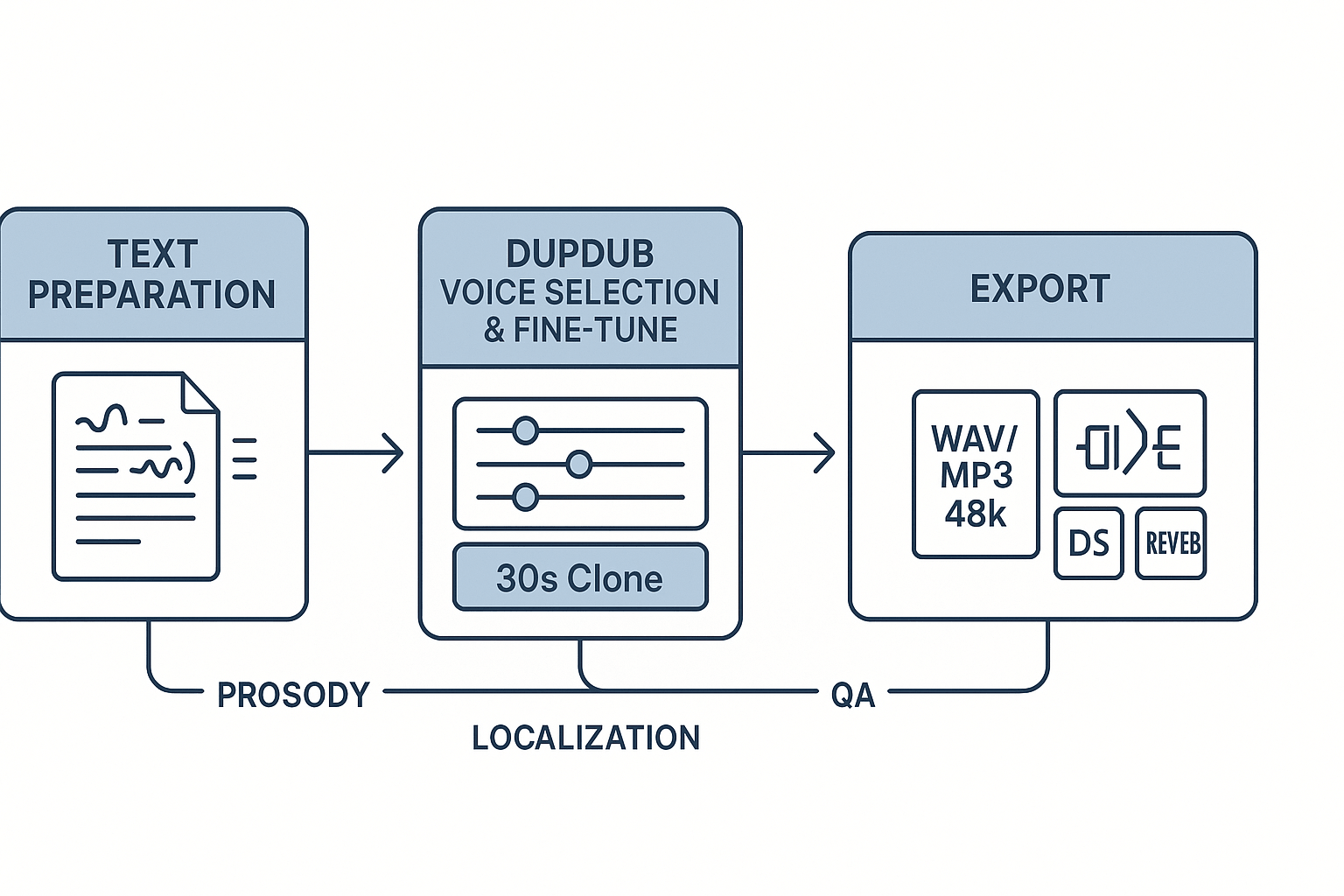
Teams follow the same high-level stages for most projects: script prep, voice/style selection, synthetic render, QA, and final mix. Below are four typical project types and the main checks at each stage:
-
Short-form video voiceover: rapid text-to-speech drafts, A/B style tests, light EQ and de-essing in the final pass.
-
E-learning narration and localization: centralized script source, per-language voice clones, subtitle alignment and spot QA.
-
ADR-like dialogue replacement: phoneme alignment, per-line emotion tags, batch renders for editorial sync.
-
Game audio with latency constraints: low-buffer real-time API calls, trimmed phrases, fallbacks for low-bandwidth sessions.
Two-step DupDub example you can run today
Start with a short prep pass: normalize the script, mark emphasis and pauses, and select a target style in DupDub (choose a close reference voice and pick prosody settings). Export a reference SRT and notes for voice talent or automation.
Then fine-tune and export: upload a 30s sample if cloning, run DupDub fine-tune or pick a preset voice, render WAV at 48k, and import into your DAW. Apply your usual post chain: high-pass, subtle compression, de-esser, and matching reverb for context.
Two mini case studies from sound designers
A podcast sound designer swapped manual reads for DupDub cloning. They report cutting turnaround from two days to three hours while keeping a consistent host tone across languages.
A studio used DupDub for localized training modules. The team saved weeks on voice casting, and editors praised the clean, mix-ready exports for immediate DAW placement.
Ethical, legal & licensing checklist
When you make AI sound more human in production, legal guardrails matter. This compact checklist helps teams confirm consent, licensing, retention, and disclosure before cloning or monetizing voices. Follow each item to reduce legal risk and speed approvals.
Consent and documentation
According to
European Commission (2026), consent must be freely given, specific, informed, and unambiguous. Capture signed release forms that name permitted uses, territories, commercial rights, and time limits. Store identity proof and timestamps alongside each release.
Licensing and commercial use
Verify vendor terms permit the intended commercial use and redistribution. Ask for a written license summary, including any limits on cloning, avatars, or sublicensing. Retain the vendor agreement in your project folder.
Retention, deletion, and cross-border transfer
Define clear retention windows and deletion SLAs. Log processing, backups, and export locations for audits. If transfers cross borders, confirm legal bases and controls.
Checklist:
-
Signed consent with scope, duration, and permitted channels.
-
Identity proof and opt-in timestamp for each speaker.
-
Written commercial license from the vendor, with redistribution terms.
-
Retention policy and deletion procedure, with SLA dates.
-
Data transfer map and cross-border legal basis.
-
Public disclosure note on published content using synthetic voices.
-
Archived logs for audits, takedowns, and claims.
When using vendors like DupDub, confirm voice-locking, encryption, and export rights before production.
FAQ — People Also Ask + integration questions about DupDub
-
How to make AI sound more human in short steps
Use clean, expressive training audio and fine-tune prosody and pause placement to make AI voices feel more natural. Add subtle pitch and timing variation, measured breaths, and realistic room characteristics in post-processing. Helpful steps include preserving slight background texture, adding micro-pauses around punctuation, and using gentle EQ and compression for warmth.
-
Is voice cloning with short samples production ready?
Yes, modern systems can create usable voice clones from 20–60 second samples, though results depend on the task. Short clips capture timbre well, but additional prompts or targeted recordings may be needed for emotional range and natural cadence. For important projects, record several directed lines to improve consistency.
-
What audio chain settings reduce robotic artifacts in TTS?
Use a transparent processing chain that includes light de-essing, gentle multiband compression, subtle saturation, and short room reverb. A high-pass filter around 60–80 Hz helps remove rumble, while soft harmonic enhancement restores warmth and presence without sounding artificial.
-
How does DupDub compare to competitors for naturalness?
DupDub focuses on multilingual voice cloning, broad voice variety, and end-to-end dubbing workflows. It offers more than 700 voices and fast cloning from short samples, making it strong for media localization and avatar syncing. Other vendors may specialize in specific expressive styles, but DupDub emphasizes scalable production workflows.
-
How do I integrate DupDub and where are the API docs?
DupDub supports browser tools, API automation, and export formats such as WAV, MP3, MP4, and SRT. Developers can push transcripts, create voice clones, and retrieve aligned audio through the API. Documentation and SDKs are available in the developer portal and dashboard.
-
Where can I read more and what are the next steps?
Explore Neural TTS resources, technical appendices, and workflow examples to learn more about modeling and audio pipelines. A practical next step is to clone a short narrator sample, apply a basic post-processing chain, and compare the result against a human recording.




 Discord
 YouTube
 Tiktok
 Twitter
 Facebook
 Instagram