We built a batch pipeline to send short-form videos to an AI dubbing API. It returns aligned subtitles and localized audio tracks.
Key outcomes are faster time to publish and lower per-video dubbing costs. Teams also get predictable throughput for operations.
Who should read this? Creators, video ops, and engineers who need a replicable automation blueprint. It also gives a low-risk path to test an AI dubbing API.
Why this case study matters for creators and ops teams
Short-form creators and ops teams struggle to scale dubbing and localization without slowing the publishing pipeline. Manual steps create duplicated work, inconsistent voice quality, and longer time to global viewers. This case study shows how n8n batch processing can automate repeatable dubbing tasks while keeping creators in the loop.
Pain: slow, fragmented localization
Teams still copy transcripts, run one-off edits, and manually swap voice files. That adds hours per clip and causes brand voice drift across languages. Ops teams need predictable throughput and measurable output.
Why an automation-first stack works
n8n plus DupDub gives predictable, API-driven runs, with retries, quotas, and cost controls. Use cases include batch translate-and-dub, subtitle alignment, and multi-voice exports. Benefits:
-
Faster turnaround: process hundreds of shorts in parallel.
-
Consistent quality: single voice clones and templates for brand voice.
-
Measurable ops: logs, retry policies, and cost per minute tracking.
This approach keeps creators focused on creative choices, and ops on throughput and cost efficiency.
Project overview: goals, scope, and KPIs
This pilot used n8n batch processing to automate dubbing for 500 short-form clips per week. The aim was simple: cut human dubbing time by 90% and lower per-video voice costs. We measured real production gains, not just theoretical wins.
Goals and KPIs
Primary goals focused on throughput and cost. We tracked videos per hour to measure throughput, cost per minute of dubbed audio to measure efficiency, time-to-publish to measure cycle time, and error rate to measure reliability. Targets included 500 clips weekly, a 90% drop in manual dubbing hours, and a meaningful per-video cost reduction.
Inputs and outputs
Inputs were CSV manifests, source MP4 files stored on S3 or Google Drive, and a list of target languages. Outputs were final dubbed MP4s, isolated MP3 stems for mixing, and SRT subtitle files for captioning. Workflow templates were documented in internal blog posts for easy replication, and engineering teams should consult DupDub API docs for integration details, quotas, and parameter choices.
Operational note: capture KPIs in a dashboard during the pilot. That way you can prove time and cost savings to stakeholders quickly.
n8n workflow architecture — end-to-end flow (conceptual diagram + steps)
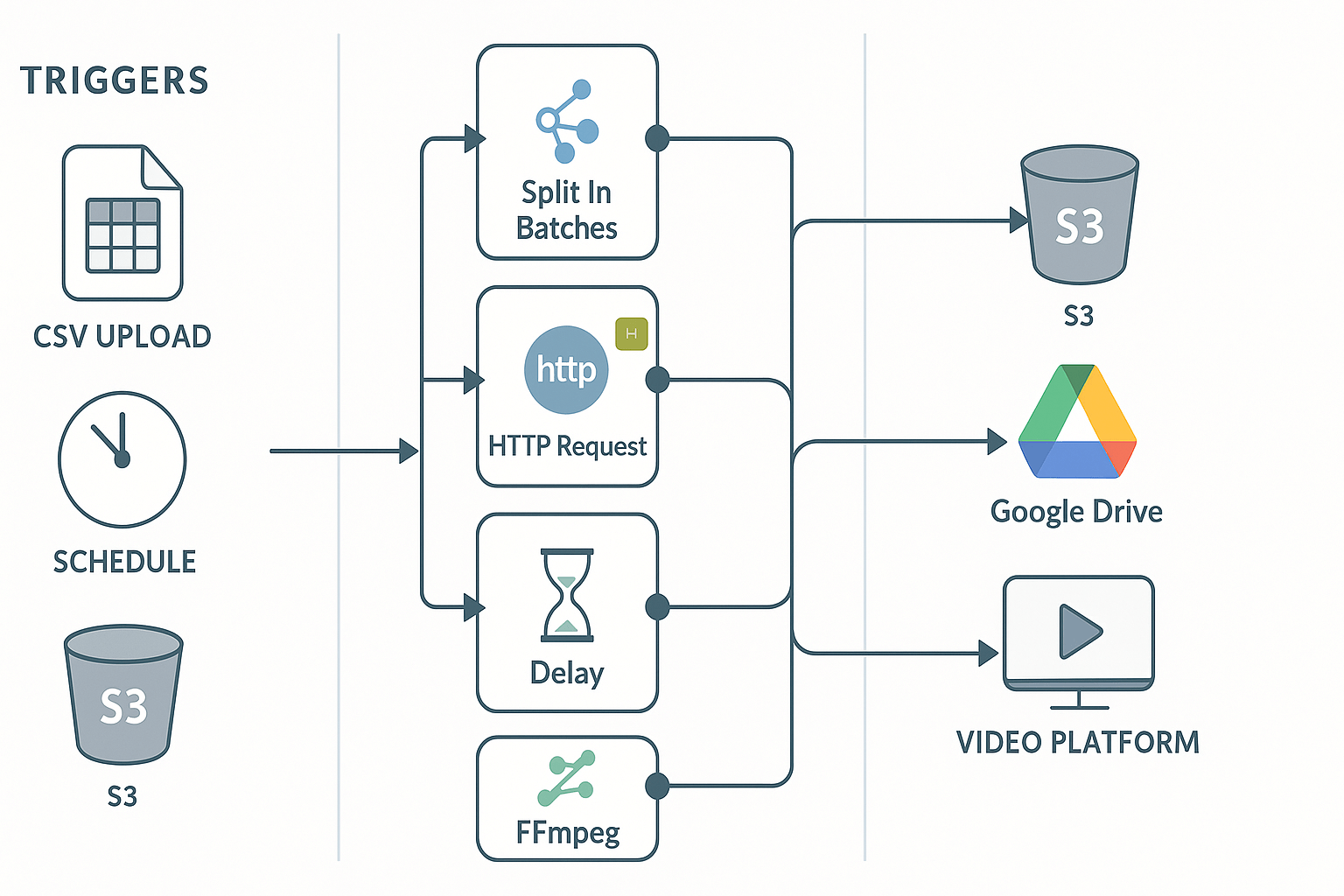
This section maps a node-by-node n8n architecture for scalable short-form dubbing. It shows triggers, a batch chunker, HTTP calls to DupDub, post-processing steps, and final storage. The goal is a repeatable, idempotent pipeline you can run on cron or from a CSV, and that scales with n8n batch processing best practices.
Trigger: scheduled or CSV upload
Start with a scheduler or a file trigger. The scheduler runs regular exports. A CSV upload trigger reads a list of source clips and target languages. Example n8n trigger snippet (compact JSON-like view):
{"name":"ScheduleTrigger","type":"n8n-nodes-base.cron","parameters":{"cronExpression":"0 0/30 * * * *"}} {"name":"ReadCSV","type":"n8n-nodes-base.readBinaryFile","parameters":{"filePath":"/data/uploads/batch.csv"}}
Batch split and loop chunking
Split large lists into fixed-size chunks to control parallelism and costs. Use an n8n SplitInBatches node set to 5 or 10 items per batch. This prevents bursts of HTTP calls and eases retry logic.
{"name":"SplitInBatches","type":"n8n-nodes-base.splitInBatches","parameters":{"batchSize":5}}
HTTP request to DupDub, auth, and response parse
Place rate-limit control just before the HTTP node. Use Delay or an executionLimiter node to match DupDub quota. The HTTP POST should send transcript text, language, and voice. Example HTTP node body and auth header:
{"name":"HTTP Request","type":"n8n-nodes-base.httpRequest","parameters":{ "url":"https://api.dupdub.com/v1/dub", "method":"POST", "options":{"bodyContentType":"json"}, "body": {"input":"={{$json.transcript}}","voice":"{{ $json.target_voice }}"}, "headers":{"Authorization":"Bearer {{$credentials.dupdub.apiKey}}","Content-Type":"application/json"} }}
Parse the JSON response and write out audio URL, SRT path, and job id. Keep response parsing minimal and predictable.
{"name":"ParseResponse","type":"n8n-nodes-base.function","parameters":{"functionCode":"return [{ audioUrl: $json.result.audio, srt: $json.result.srt, jobId: $json.result.id }];"}}
Post-processing: merge and normalize
After download, run an FFmpeg node to merge audio with the original video or replace audio. Normalize audio gain and ensure sample rates match. Generate final SRT and burn-in if needed.
- Merge audio track using FFmpeg. - Normalize to -1 dBFS. - Validate SRT timings.
Storage: S3, Drive, or archival bucket
Use an S3 node to save artifacts. Include metadata: job id, source id, language, voice, and checksum. Example move-to-bucket snippet:
{"name":"S3 Upload","type":"n8n-nodes-base.s3","parameters":{"operation":"upload","bucket":"localized-videos","key":"{{ $json.sourceId }}-{{ $json.language }}.mp4","binaryData":"file"}}
Idempotency, rate limits, and safe retries
Make jobs idempotent by using a stable job id and by checking the target key before running heavy steps. Insert a pre-HTTP check that queries S3 for an existing key. Add a Delay node between batches to respect rate limits. For retries, log failures to a table and retry only failed items, not whole batches.
Practical checklist:
1. Use SplitInBatches for controlled parallelism. 2. Add Delay or execution limits before HTTP calls. 3. Store jobId and check S3 for existing outputs. 4. Validate SRT and audio levels before upload.
Integrating DupDub: API usage, quotas, and cost-optimization
This section shows how to connect DupDub into n8n batch processing pipelines. It covers auth patterns, the TTS and dubbing endpoints, payloads for batching multiple clips, and practical ways to cut credit use. Expect concrete header examples, payload templates, and quota-aware batching tips you can copy into an n8n HTTP request node.
Quick auth and core endpoints
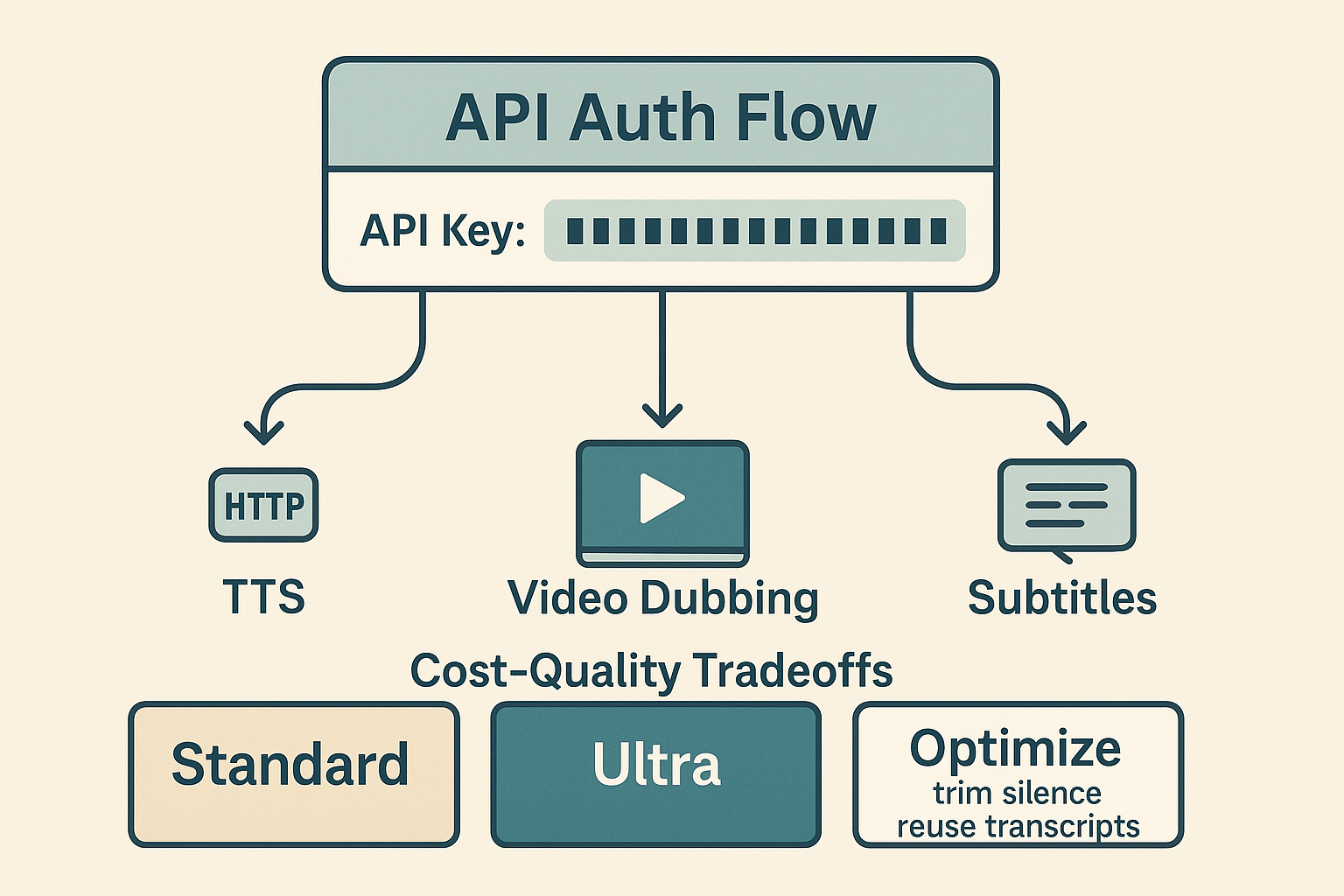
Use an API key in the Authorization header: Authorization: Bearer YOUR_API_KEY. Key endpoints you’ll call from n8n are typically:
-
POST /v1/tts for text-to-speech requests.
-
POST /v1/dub for video dubbing and re-voicing.
-
POST /v1/subtitles for subtitle generation and alignment.
A simple batch payload example (JSON) you can send to a batch endpoint looks like:
{ "clips": [ {"id": "clip1", "start": 0, "end": 12, "text": "Hello world"}, {"id": "clip2", "start": 12, "end": 28, "text": "Next segment"} ], "voice": "standard-01", "language": "es-ES" }
Rate limits, quota-aware batching, and retries
Treat quota as a first-class constraint. Query your account endpoints for remaining credits before large batches. Send smaller chunks and use n8n's concurrency controls to keep parallel jobs below the rate limit. Retry transient 5xx errors with exponential backoff and idempotency keys in payloads.
Cost and quality levers
Use Standard voices for bulk runs and Ultra for high-value clips. Trim silence before TTS to avoid wasted credits. Reuse transcriptions rather than re-transcribing the same asset. Consider pay-as-you-go credits for spikes and subscribe to a plan for steady volume. See DupDub's pay-as-you-go and subscription tiers on the pricing page, and try the DupDub API docs for endpoint details.
For privacy and PII handling, follow standards like
ISO/IEC 27701:2025, which provides a structured, internationally recognised framework that helps organisations show accountability, manage risks around personally identifiable information (PII), and continually improve their privacy practices.
Batch processing best practices and scaling with n8n
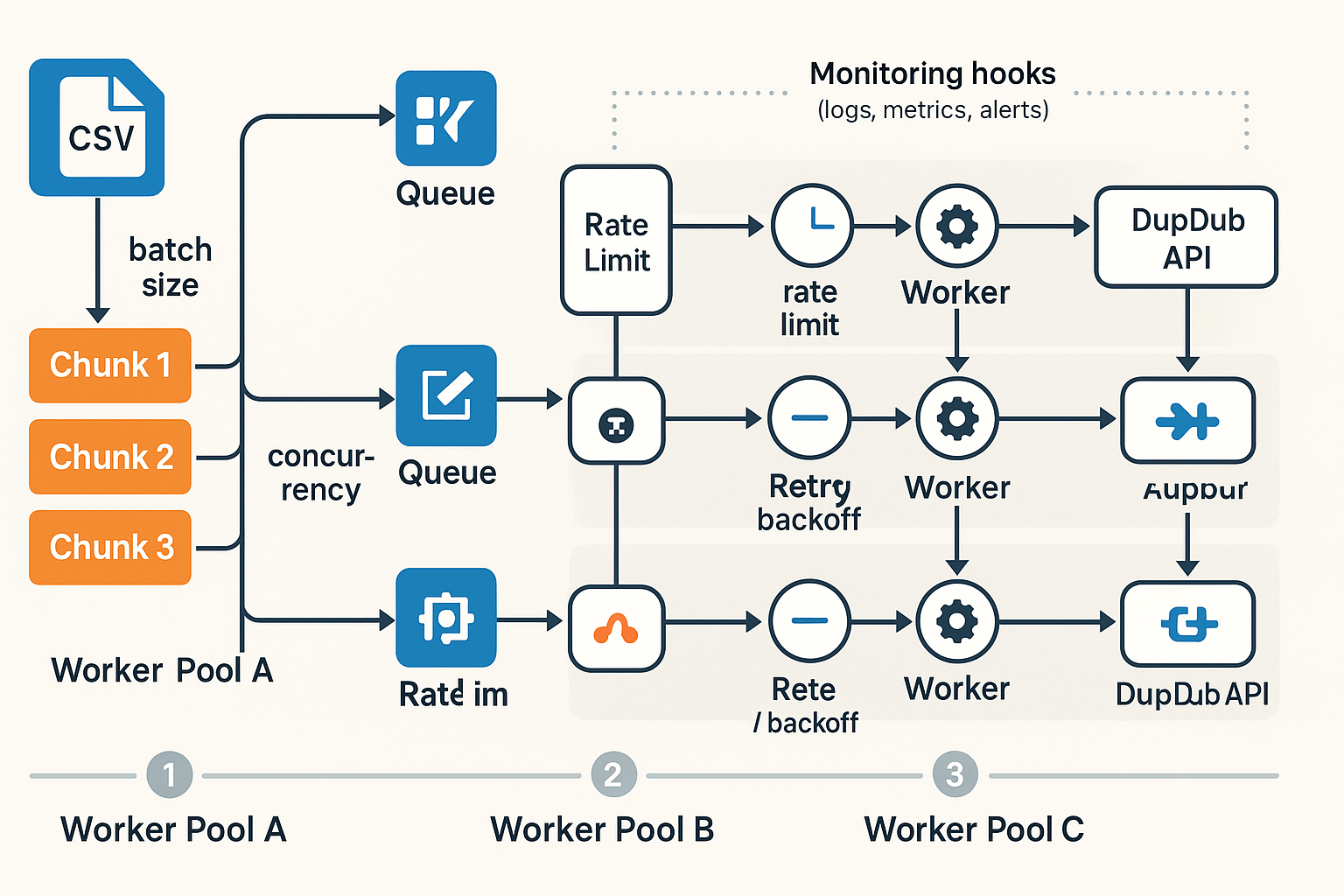
Start with batch size and concurrency as your two knobs. n8n batch processing works best when batch sizes match your DupDub quota and the number of n8n workers. Smaller batches cut the retry blast radius, while larger batches raise throughput and lower per-item overhead.
Pick batch sizes to match quotas and workers
Choose a target batch size based on DupDub credits per minute and your worker CPU. If DupDub limits voice or transcription throughput, lower batch size. Example chunking for a CSV manifest:
-
Split the CSV into N-row files, where N equals your ideal batch size (start at 10).
-
Validate rows and prefetch media URLs.
-
Upload each chunk as a single queue message or job payload.
This gives predictable credit usage and makes retries simpler.
Enforce concurrency and backpressure
Use n8n Rate Limit and Queue nodes to throttle requests inside a workflow. For heavier loads, push jobs to an external queue like AWS SQS or Google Pub/Sub and let a fixed pool of n8n workers pull jobs. For example, Amazon SQS batch actions let you send, receive, and delete up to 10 messages in a single API call, which reduces API calls and associated costs, per
Amazon SQS batch actions.
Suggested knobs:
-
Worker concurrency: 2–10 workers per queue shard.
-
Rate limit: X requests per second per worker, tuned to DupDub quotas.
-
Batch size: 5–50 items, tune for error rates and cost.
Monitor, retry, and protect credits
Add monitoring hooks: job start, success, and failure events sent to logs or a metrics endpoint. Use exponential backoff for retries and record credit usage per job. If a batch fails, requeue only failed items to avoid reprocessing good work.
Follow these rules and you can scale predictably without burning credits or overloading n8n workers.
Advanced customizations & post-processing (captions, multi-voice, localization)
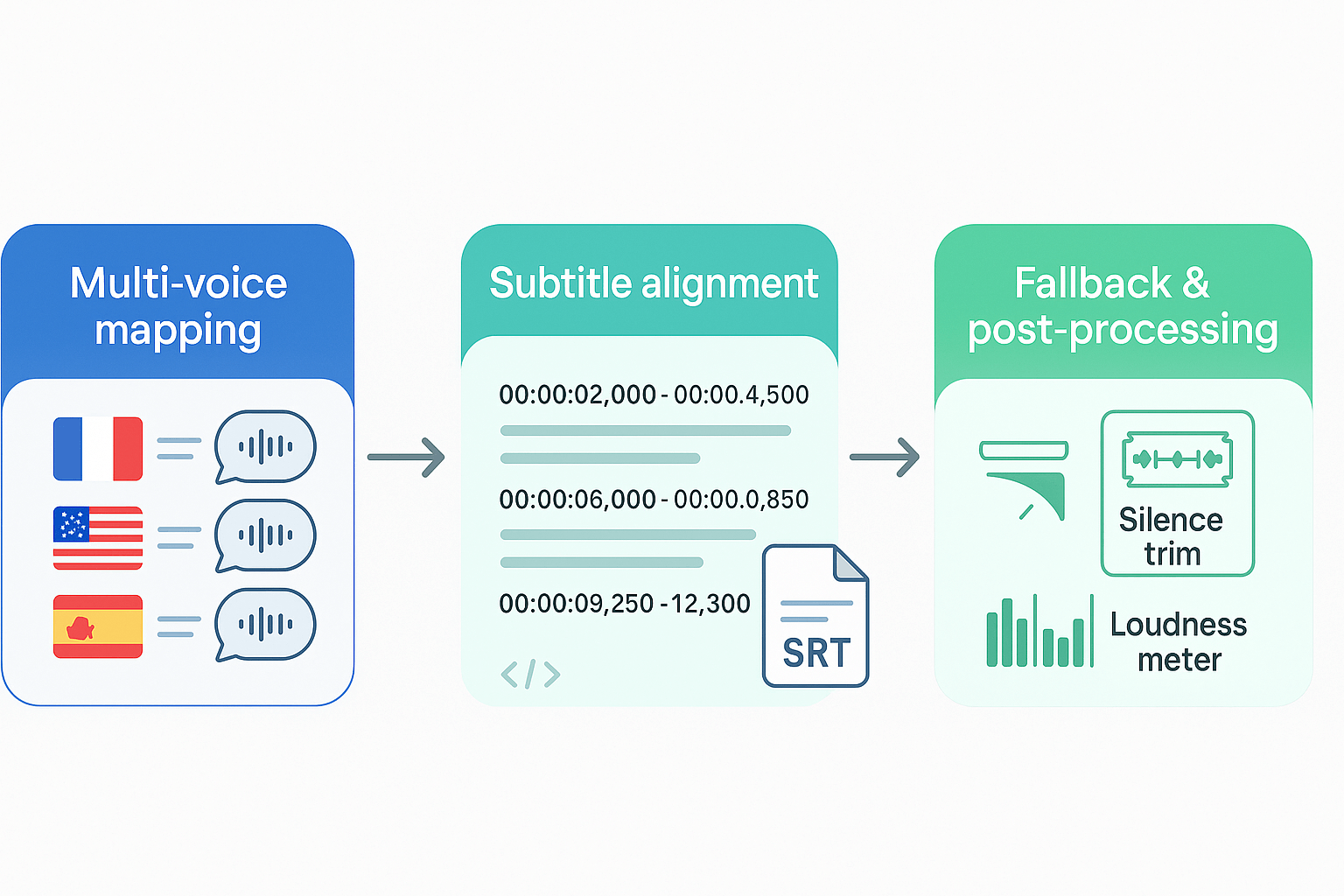
Start by auto-generating aligned subtitles from DupDub metadata so your SRTs match dubbed audio. For n8n batch processing, pull the DupDub segments array and map timestamps to SRT blocks. That keeps speech and captions in sync after voice replacement.
Auto-subtitles and alignment
Use the returned timing fields to build SRT entries. The flow is simple: fetch segments, format times, then write .srt. Example mapping in JS: segments.map(s =>$${s.start} -->$${s.end}\n${s.text}).
Multi-voice mapping and fallbacks
Create a small language to voice style table to keep brand tone consistent. If a voice is missing, fall back to a neutral voice in the same language family.
|
Language
|
Preferred voice style
|
|
en-US
|
Brand_Friendly_Male
|
|
es-ES
|
Brand_Warm_Female
|
|
fr-FR
|
Brand_Clear_Mid
|
Example multi-voice API payload: {"calls":[{"lang":"es","voice":"Brand_Warm_Female","file":"vid1.mp4"},{"lang":"fr","voice":"Brand_Clear_Mid","file":"vid1.mp4"}]}.
Post-processing tips
Trim silence, normalize loudness to -14 LUFS, and re-encode for Shorts or TikTok. A compact ffmpeg chain: ffmpeg -i in.mp4 -af silenceremove=1:0:-50dB,loudnorm=I=-14:TP=-2 -c:v copy -c:a aac -b:a 128k out.mp4.
These steps keep dubbed audio, captions, and brand voice consistent across markets, and they slot into n8n workflows as post-job nodes.
Troubleshooting & robust error-handling for failed batch jobs
n8n batch processing runs hit three common failure types: auth errors, 429 rate limits, and oversized file rejections. You’ll also see transient network failures and malformed manifests in production. This section shows how to retry safely, preserve minimal re-run state, and route bad jobs for manual review.
Retry with exponential backoff and jitter
Set retries on transient errors, add jitter to avoid thundering herds, and cap total attempts. Example n8n retry JSON snippet: {"retry": {"enabled": true, "count": 6, "delay": 1000, "strategy": "exponential", "jitter": true}}. Treat 429s as retryable with increasing delays.
Use idempotency keys and dead-letter queues
Attach an idempotency key (unique job token) so retries don’t duplicate work. Send persistent failures to a dead-letter queue (DLQ) for manual ops review. Store only required re-run fields: job id, source URL, manifest checksum, and last response code.
Log, resume, and checklist for ops
Log request and response pairs, timestamps, and short error notes. Keep a small resume payload so jobs can restart from the last succeeded step. Manual intervention checklist:
-
Verify API keys and token expiry.
-
Inspect manifest checksum and file size.
-
Replay job with saved idempotency key.
-
Escalate to engineering if retries fail.
This approach cuts rerun time and keeps the queue healthy.
Results: real-world outcomes and metrics from the pilot
The n8n batch processing pilot delivered clear, repeatable gains for short-form localization. Time-to-publish dropped from four days to under eight hours for localized shorts. Per-video dubbing costs fell roughly 60 to 80 percent, depending on voice tier and transcript reuse.
Key metrics
Below are the headline numbers from the pilot:
|
Metric
|
Before
|
After
|
|
Time to publish
|
4 days
|
< 8 hours
|
|
Per-video dubbing cost
|
baseline
|
60–80% lower
|
|
Typical batch size
|
single file
|
5–10 files per job
|
These results came from automating transcription, reuse of transcripts, and parallel DupDub API calls orchestrated by n8n.
Qualitative wins
Teams reported consistent brand voice across languages, faster market tests, and less manual QA. "We cut publish time and kept quality high," said the lead producer. Faster experiments let the team try new languages with low risk.
Lessons learned
-
Monitor quotas and error logs early. Small failures compound in large runs.
-
Start with small batch sizes, then scale up safely.
-
Reuse transcripts to save credits and speed jobs.
FAQ — common questions about n8n batch processing with DupDub
-
How do I start with a CSV manifest for n8n CSV batching and DupDub?
Start with a simple CSV manifest, one test clip, and a DupDub trial. Build a minimal n8n flow that reads a single CSV row, uploads or references the source clip, and sends it to the dubbing endpoint. Include columns for source file, target language, voice ID, and callback URL. Run one row end to end to validate responses and subtitle output before scaling to full batches.
-
How should teams handle security and privacy for DupDub voice cloning workflows?
Store API keys securely in n8n credentials and never hardcode them in workflows. Use encrypted storage for media files and apply least-privilege access to processing roles. For voice cloning, confirm regional compliance requirements and disable features if legal review requires stricter controls.
-
What batch sizes and pricing practices work for DupDub credits at scale?
Begin with small batches, such as 1–5 clips per job, and measure credit usage per audio minute. Track per-minute cost and average clip length to forecast monthly credit needs. As throughput grows, upgrade plans or switch to pay-as-you-go, and request enterprise pricing for high-volume workloads.
-
How do I set up retries and error handling in n8n bulk job workflows?
Use status polling or webhook callbacks to confirm job completion. Implement exponential backoff with a retry cap and idempotency keys to prevent duplicate processing. Persist manifest state in a database or object store so failed items can be retried independently without rerunning successful jobs.




 Discord
 YouTube
 Tiktok
 Twitter
 Facebook
 Instagram