This import-ready n8n workflow automates transcription, AI dubbing, and subtitle generation. It then publishes localized files so you can reach global audiences faster.
Quick outcome summary: a zero-to-run pipeline that pulls source media and transcribes audio. It calls an AI dubbing API to create dubbed tracks and aligned subtitles. The workflow uploads final files and metadata to CMS or cloud storage.
Deliverables you can import and run today:
-
Importable n8n JSON with preconfigured nodes and comments.
-
HTTP Request nodes for auth and API calls.
-
Function node snippets for payload assembly and parsing.
-
Retry logic and error handling using built-in nodes.
-
Environment variable examples and run instructions.
Key trade-offs: latency and cost rise with file length and voice quality. Plan for API limits and include a quick human QA pass for accuracy.
Why choose n8n for content pipelines (and where DupDub fits)
n8n is a practical choice for content pipeline automation because it blends visual, low-code orchestration with real developer-level control. If you want a repeatable system that ties content sources, editors, and AI dubbing together, an n8n workflow gives you visible flow logic and easy re-use. Automation adoption is accelerating: according to
Gartner (2021), By 2025, 70% of new applications developed by organizations will use low-code or no-code technologies, up from less than 25% in 2020.
Low-code orchestration, with real control
n8n uses nodes that represent services, transforms, and decisions. That visual model makes it fast to design a content flow, test it, and hand off to non-developers. At the same time n8n exposes raw JSON and JavaScript in code nodes, so engineers can add custom parsing, error handling, or rate-limit logic. This mix gives teams speed without locking them out of advanced fixes.
-
Visual mapping for content steps: fetch, transcribe, translate, dub, publish
-
Node re-use: duplicate a branch to handle new languages or channels
-
Inline code nodes let you add custom logic without a full app
Extensible and open, avoid vendor lock-in
Because n8n is open source, you can self-host or extend it with custom nodes. That matters for content ops where file sizes, privacy, or custom storage rules matter. You keep control over data flow and can add API calls for services like DupDub without waiting on closed integrations.
Hosted or self-host: pick based on scale and compliance
Choose n8n Cloud for fast setup, or self-host to meet security needs and integrate with on-prem storage. Self-hosting reduces per-call costs and gives you full access to logs and VPC controls. Hosted options speed up proof of concept work, which is useful when building n8n workflow examples for stakeholders.
Where DupDub fits: a specialized dubbing API module
DupDub plugs into the pipeline as the media transformation engine: text-to-speech, voice cloning, transcription, and subtitle alignment. Use DupDub at two clear points: after transcription for translated dubbing, and after copy editing to generate final voice tracks. Treat DupDub like a service node that accepts media and returns localized audio and SRT files. That modular approach keeps your orchestration clean, and lets you swap providers if needed.
Key DupDub automation touch points:
-
Transcription (STT) node: send raw audio to get text and timestamps
-
Translation & subtitle node: produce localized SRT files
-
TTS/voice-clone node: produce dubbed audio per language
-
Asset export node: push MP4/MP3 and subtitles to CDN or CMS
Quick comparison: mapping strengths and trade-offs
|
Capability
|
DupDub
|
ElevenLabs
|
Murf
|
Play.ht
|
|
Best for
|
End-to-end dubbing, avatars, API
|
Natural-sounding TTS, voices
|
Studio-like voice design
|
Simple TTS + hosting
|
|
API & automation
|
Strong API, video support
|
API focused on TTS
|
API + studio features
|
API for TTS, fewer video features
|
|
Price profile
|
Trial + tiered monthly or PAYG
|
Mid to high
|
Mid
|
Entry to mid
|
|
Use case fit
|
Video localization pipelines
|
Podcast narration, audio apps
|
E-learning voice design
|
Lightweight apps and narration
|
Use this table to map trade-offs: DupDub runs deep on video and subtitle workflows, while some competitors focus on raw TTS quality or studio tooling.
How teams usually wire it together
A common pipeline looks like: ingest file, run STT, translate and edit text, call DupDub TTS for each language, attach subtitles, then publish. n8n handles branching, retries, and notifications. Start small with one language and add nodes for cloning, voice selection, and cost control.
Final practical tips
-
Start with n8n Cloud to prototype, then move to self-host when you need compliance.
-
Treat DupDub calls as billable operations: add a cost-estimate node to track credits.
-
Version your n8n workflow so changes in voice selection or subtitle rules are auditable.
DupDub overview: features, pricing tiers, and API capabilities relevant to automation
DupDub is an end to end AI dubbing and TTS platform built for scale. This section summarizes the features n8n builders will use most, and it explains plan limits and the API calls you’ll automate. If you’re building an n8n workflow, read this to map features to nodes and quota needs.
Key features that matter for automation
DupDub bundles several capabilities you’ll call from automated pipelines. Each feature below includes the automation benefit and a quick note on typical usage.
-
AI dubbing: translate and revoice video, with subtitle alignment and synced audio. Use it to create localized MP4s automatically after a transcode step.
-
Multilingual TTS (text to speech): 700 plus voices across 90 plus languages and accents. Useful for batch content generation and voice variants per locale.
-
Voice cloning: create a synthetic voice from a 30 second sample. Ideal for brand consistency when producing large volumes.
-
Speech to text (STT): transcribe audio and video in 40 plus languages. Transcripts feed translation and subtitle jobs in a pipeline.
-
Subtitle alignment: auto generate, translate, and align subtitles to audio timestamps. This reduces manual sync work in localization flows.
-
Talking avatars and AI video editing tools: optional, for talking head content and simple visual exports.
These are the APIs you will orchestrate with n8n HTTP nodes to automate end to end processing.
Pricing tiers and quota considerations
DupDub offers a free trial and four main purchase options. Each plan matters for automation because limits affect throughput and cost.
|
Plan
|
Key automation quota notes
|
|
Free (3-day trial)
|
10 starter credits, no card required, good for proof of concept
|
|
Personal ($11/mo billed yearly)
|
1,800 credits yearly, modest TTS and transcription hours
|
|
Professional ($30/mo billed yearly)
|
6,000 credits yearly, higher monthly throughput for teams
|
|
Ultimate ($110/mo billed yearly)
|
30,000 credits yearly, best for large batch jobs and unlimited file size
|
|
Pay as you go
|
One time credit packs for burst needs
|
For pipelines, watch both credits and per request size limits. Trials let you test webhooks and endpoints, but run small batches. If you plan daily bulk dubbing, budget for Professional or Ultimate, or combine a subscription with pay as you go credits for spikes.
API capabilities you’ll call from n8n
DupDub exposes REST endpoints suitable for HTTP nodes and webhook workflows. Typical calls include:
-
Authentication: pass an API key in headers for each request. Keep keys in n8n credentials for safety.
-
Upload media: POST media files or file URLs to create an input asset.
-
Transcribe: start a speech to text job and return a job id.
-
Translate or localize transcript: request target languages and voice preferences.
-
Create dubbing job: submit audio/video plus voice selection and output settings.
-
Poll or webhook for job status: check job state, or register a callback for completion.
-
Download assets: fetch MP3, WAV, MP4, or SRT when job finishes.
In n8n, use the HTTP Request node to chain these calls, add short waits or a Polling Trigger, and handle retries for transient failures.
Export formats and integration notes
DupDub exports standard media and subtitle formats. For pipelines, these are essential interoperability points:
-
Audio: MP3, WAV, ideal for podcasts and audio-only deliverables.
-
Video: MP4, usable for finalized localized videos.
Security and privacy are built into the platform: voice cloning is locked to the original speaker and processing is encrypted. When automating, pass minimal PII in requests and use scoped API keys per environment.
Automation tips
-
Chunk long videos before dubbing to reduce timeout risk.
-
Cache transcripts to avoid repeat charges.
-
Monitor credits and set alerts in n8n to pause batches when quotas near limits.
This overview gives you the feature map and the API surface you’ll orchestrate in an n8n workflow. Next, we’ll show a node by node example you can import and run in minutes.
High-level architecture: a sample DupDub-enabled n8n content pipeline
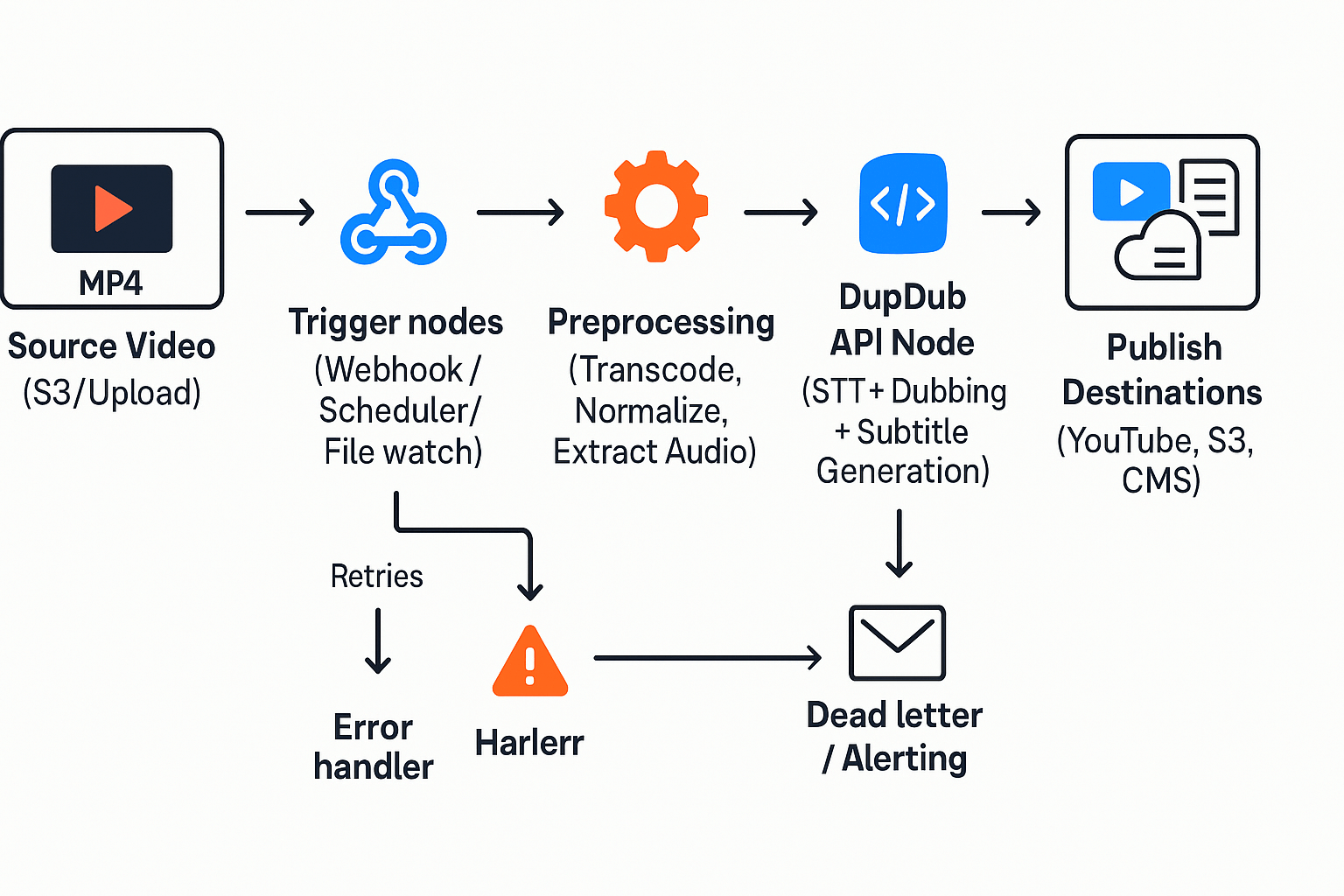
This section shows a full, production-ready architecture for an n8n workflow that ingests source video, runs preprocessing, calls DupDub for transcription and dubbing, and publishes final assets. The goal is a resilient pipeline you can import, monitor, and scale, with clear places to handle retries, errors, and observability for real-world workloads. Use this as a blueprint for n8n workflow examples or to adapt into your CI/CD pipelines.
Trigger layer: where jobs start
Start with one or more triggers: a webhook for uploads, a scheduler for batch jobs, or a file watch on cloud storage. Keep triggers small: accept a job manifest (JSON) with source_url, language, voice_id, callback_url, and job_id. Validate input early and return 202 Accepted for async flows. If you need idempotency, require an optional client_provided_id in the manifest.
Example minimal manifest:
-
source_url: string (S3 or HTTPS)
-
job_id: string
-
source_lang: string (ISO 639-1)
-
target_langs: array[string]
-
voice: string (DupDub voice id)
Preprocessing: normalize and prep media
Preprocess to a consistent format before sending to DupDub. Typical steps:
-
Transcode source to MP4 30fps and audio to 16-bit WAV, 48 kHz.
-
Normalize volume and remove long silence.
-
Extract audio and generate a short checksum for idempotency.
Use n8n nodes that invoke FFMPEG in a container, or call a media service. Attach metadata (duration, sample_rate, codec) to the workflow context to guide downstream choices.
Transcription and DupDub API calls
Call DupDub for STT (speech-to-text) and for AI dubbing or TTS (text-to-speech). Use two distinct calls: one to transcribe and one to request dubbing plus subtitle alignment. Keep payloads small and paginated if transcripts are long.
Payload shapes (JSON) you’ll send to DupDub:
-
Transcription request: {"file_url":"...","language":"en","callback_job_id":"..."}
-
Dubbing request: {"transcript_id":"...","target_languages":["es","fr"],"voice":"voice_123","format":"mp4"}
-
Subtitle export request: {"transcript_id":"...","format":"srt"}
Make each API call idempotent by sending job_id. Track DupDub job ids in a database or n8n credentials store.
Post-processing and publish
After DupDub returns assets, run post-processing: mux audio into final MP4, burn or attach SRT files, and produce delivery checksums. Then push outputs to destinations like YouTube, S3, Vimeo, or a CMS. Use signed URLs for upload and a callback to the original callback_url when done.
Recommended publish steps as ordered list:
-
Validate returned file checksums and durations.
-
Tag metadata (language, voice, transcript_id).
-
Upload to CDN or storage, set access control.
-
Notify downstream systems via webhook or message queue.
Errors, retries, and observability
Surface errors early in the workflow. Route failed nodes to a dedicated error workflow that logs the failure, notifies a Slack channel, and sets a retry ticket. Implement exponential backoff for transient HTTP 5xx errors and a short circuit for repeated failures. Use idempotency keys to avoid double-processing on retries.
-
Metrics: job_count, success_rate, avg_latency, retry_count
-
Logs: structured JSON including job_id, node, and error_code
-
Traces: link DupDub call ids with your job_id for end-to-end debugging
Use an external monitoring tool (Prometheus, Grafana, or Sentry) and send enriched logs from n8n. For high-volume pipelines, add a rate limiter on outgoing DupDub calls and a local queue to smooth bursts.
Design checklist for production
-
Validate manifests and require idempotency keys
-
Normalize audio to a DupDub-supported format (WAV/MP4)
-
Persist DupDub job ids and callback states
-
Implement retry with exponential backoff and a dead letter path
-
Emit structured metrics and link logs to job_id
This architecture keeps responsibilities clear, and it maps directly to import-ready n8n workflows and node-based logic. It gives you traceable jobs, predictable retries, and a clean path to publish localized media.
Step-by-step n8n workflow example (node-by-node)
This section walks you through an import-ready, node-by-node n8n workflow so you can automate AI dubbing and content publishing. It shows prerequisites, trigger options, content fetch and normalization, the HTTP Request node calling DupDub, handling transcription and subtitles, post-processing, and publishing nodes. You’ll get configuration tips, security notes, and quick-check items to make the workflow reliable and repeatable.
Prerequisites and checklist
Before you start, confirm these items: an n8n instance (cloud or self-hosted), a DupDub API key, storage credentials (S3 or similar), and target CMS or YouTube credentials. Also gather source content links or IDs, a default voice or voice clone ID, and a fallback language code. Quick checklist: test API key via curl, ensure S3 write permissions, and set environment variables for secrets.
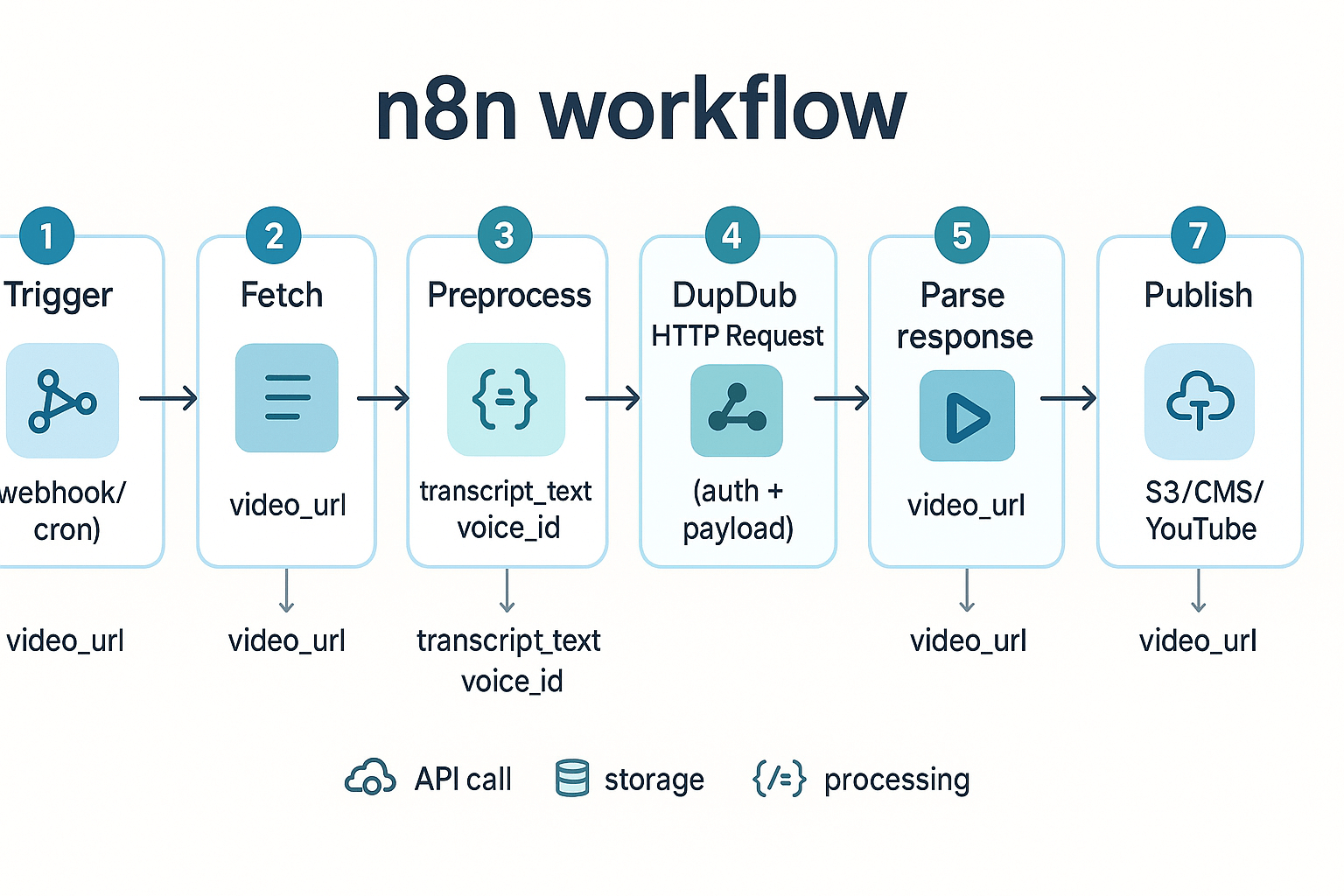
Choose a trigger node
Pick a trigger based on your workflow frequency and source. Use Webhook to process uploads in real time, or Cron to batch files hourly or daily. For CMS-driven flows, use an HTTP Request polling node or a webhook from the CMS. Tip: start with a webhook in dev to reduce accidental re-runs.
Fetch and normalize content
Add an HTTP Request or S3 node to fetch the source video and transcripts if available. Normalize metadata into a single JSON object with keys like title, language, file_url, and transcript_text. Use a Function node to trim long titles, set default language, and split long transcripts into segments. Quick-check: ensure file_url resolves and file size is within DupDub plan limits.
DupDub HTTP Request node: auth and payload examples
Use an HTTP Request node to call DupDub API for dubbing or STT (speech-to-text). Set Authentication to Header and add Authorization: Bearer YOUR_DUPDUB_API_KEY from environment variables. Example JSON payload for TTS: {"input_text":"{{ json.transcript_text }}","voice_id":"VOICE_ID","language":"{{ json.language }}","format":"mp3"}. For video dubbing, include the video URL and subtitle flags: {"video_url":"{{ $json.file_url }}","translate":true,"target_language":"es"}. Security note: never hard-code keys in nodes, use n8n credentials or variables instead.
Parse the DupDub response
DupDub returns job IDs for async tasks or direct URLs for synchronous calls. Use a Set node to extract job_id or output_url from the response. If the API uses async processing, add a Wait node then poll the job status using HTTP Request until status is success. Quick-check: log response status and sample file URL before continuing.
Handle transcription and subtitles
If you requested STT, parse the returned transcript and convert timestamps to SRT or VTT. Use a Function node to map segments into SRT format: index, start --> end, text. For translated subtitles, keep source and target files as separate artifacts. Tip: include a fallback language mapping when translations fail.
Post-processing and format conversion
Use FFmpeg nodes or a shell exec node to convert audio to desired bitrate and to mux dubbed audio into the original video. Use an S3 node to upload final assets with clear folder structure, e.g., /published/{language}/{title}/. Add a node to generate a lightweight metadata JSON for each asset containing duration, language, voice, and credits.
Publish nodes: S3, CMS, and YouTube
Add S3 or FTP nodes to store files. For CMS publishing, transform metadata into the CMS API payload and push via HTTP Request. For YouTube, use the YouTube node to upload the dubbed video, attach the translated subtitles file, and set description and tags. Quick-check: verify file visibility and subtitle sync on a short sample before scaling.
Troubleshooting and quick checks
Common problems include auth errors, wrong content types, and failed subtitle sync. Quick fixes: rotate the API key, re-run only the failing segment, and validate timestamps against video duration. Add retry logic around network calls and a dead-letter channel to capture failed jobs.
Node list summary (ordered)
-
Trigger (Webhook or Cron)
-
Fetch content (HTTP Request or S3)
-
Preprocess (Function, Set)
-
DupDub HTTP Request (auth & payload)
-
Poll/Parse response (Wait, HTTP Request, Set)
-
Subtitle / STT processing (Function)
-
Post-process (FFmpeg or Exec)
-
Publish (S3, CMS, YouTube)
Include logging at each step and keep secrets in n8n credentials. This node-by-node pattern gives you a reusable pipeline for AI dubbing and localization with measurable checkpoints.
Code snippets & n8n JSON snippets you can copy into your workflow
This section gives you ready to paste n8n workflow pieces, a sample DupDub API request, and small Set/Function node snippets to parse responses and attach SRT or MP3 files. Use these to jump-start an n8n workflow that calls DupDub, saves output files, and pushes them to storage or a CMS. The phrase n8n workflow appears here so search engines and readers know this is an integration-focused how-to.
Quick edit notes before you paste
Keep values you must edit in ALL_CAPS so you can find them fast. Replace DUPDUB_API_KEY, VOICE_ID, and LANGUAGE_CODE. If the API returns file URLs instead of base64, swap the download step for an HTTP Request node that fetches the file as binary.
Sample DupDub HTTP request body (JSON)
Headers to set in the HTTP Request node:
This content is only supported in a Feishu Docs
Example POST payload, change voice, language, and content:
This content is only supported in a Feishu Docs
Notes: voice_id maps to DupDub voices, target_language uses ISO codes like en, es, fr. format and subtitle_format set outputs. If you need avatars or cloning, add the relevant param as documented in your API reference.
Minimal n8n HTTP Request node JSON snippet
This is a trimmed node config you can insert into an n8n export. Edit name, URL, and credentials.
This content is only supported in a Feishu Docs
If your n8n environment stores the API key in credentials, replace the header with the credential expression.
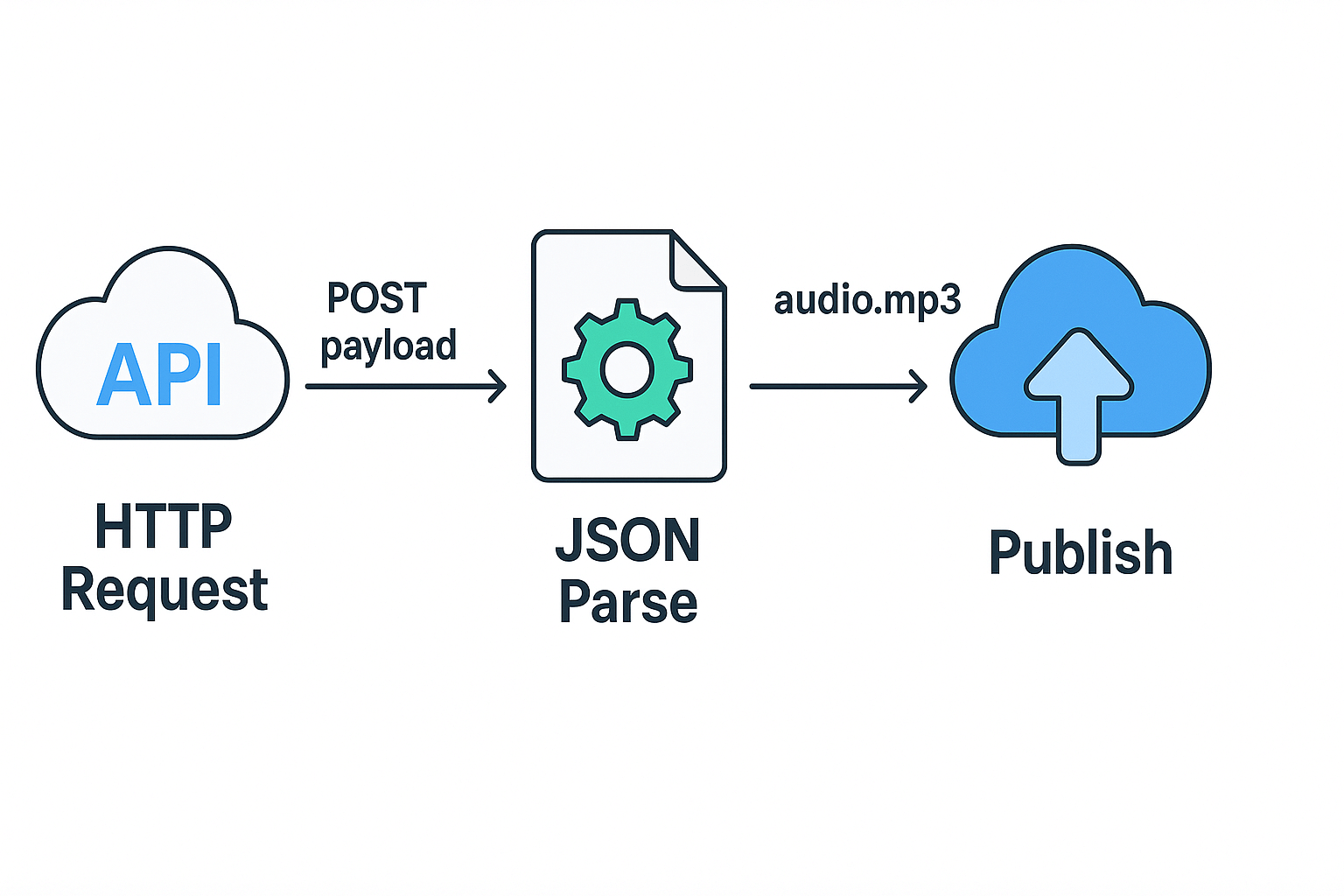
Example Function node to parse response and prepare binary files
This Function node assumes DupDub returns base64 strings for audio and SRT fields. If the API returns URLs, change this to download the files using an HTTP Request node with the response set to file.
This content is only supported in a Feishu Docs
Notes: n8n expects binary properties to be Buffers when using Function nodes. For large files, prefer a binary HTTP Request download so n8n handles streaming and file size efficiently.
Simple Set node to attach metadata before upload
Use a Set node to add friendly names and destination info. Example fields to set:
This content is only supported in a Feishu Docs
Quick troubleshooting checklist
-
If the HTTP Request fails with 401, check DUPDUB_API_KEY and credential mapping.
-
If audio is missing, inspect raw response fields, the API may return URLs instead of base64.
-
For large jobs, use polling: submit job, then poll a status endpoint until ready.
Clean copyable checklist of places to edit
-
DUPDUB_API_KEY: your API key
-
VOICE_ID: voice identifier or clone id
-
LANGUAGE_CODE: ISO code, eg en, es, fr
-
API endpoint URL: replace with the stable endpoint from your DupDub account
These snippets let you test fast. Tweak the field names if DupDub returns differently, and use a separate download HTTP Request node for file URLs to avoid memory pressure.
Troubleshooting & common mistakes (with quick fixes)
When you build an n8n workflow that calls AI dubbing or transcription APIs, small issues cause big slowdowns. This checklist lists the most common errors, a quick diagnosis, and a one-line fix you can apply during development or in CI. Use it as a fast reference when a job fails, a node times out, or audio quality looks wrong.
Authentication failures: token expired or wrong scope
Diagnosis: Requests return 401 or 403, or API docs show missing scopes. Tokens often expire, or environment variables point to a dev key instead of a production key. Services sometimes require both an API key and a project ID. Quick fix: Rotate the key, confirm the key environment variable in n8n credentials, and test with a curl request.
Wrong content-type or payload shape
Diagnosis: API replies with 400 or complains about JSON, form data, or multipart. Common culprit: sending JSON when the endpoint expects multipart/form-data for file uploads. Quick fix: Match the endpoint docs, set Content-Type exactly, and use n8n's HTTP Request node multipart option for files.
Missing or malformed JSON fields
Diagnosis: The API accepts the request but returns validation errors. This happens when required fields are nested or use snake_case vs camelCase. Quick fix: Validate the payload against the API example, or paste the request into a JSON validator before sending.
Transcription mismatches: timing, language, or poor text output
Diagnosis: Transcripts are inaccurate, misaligned, or in the wrong language. Common causes are wrong language codes, low-quality audio, or missing sample rate metadata. Quick fix: Provide the correct language code, use 16 kHz or 44.1 kHz PCM audio, or run a noise reduction step before transcription.
Audio format issues: codec, sample rate, and channel count
Diagnosis: Exported audio sounds distorted or the API rejects the file. Some endpoints accept only WAV or MP3, and others require mono audio. Quick fix: Convert files to the required format and mono channel using ffmpeg in a pre-process node or a Function node.
Large-file timeouts or partial uploads
Diagnosis: Requests time out or the API returns a 413 error for payload too large. Uploads may stall on unstable networks. Quick fix: Chunk large files, use resumable upload endpoints, or store the file on a signed URL and send the URL to the API.
Rate-limit responses and throttling
Diagnosis: You see 429 responses, or throughput drops during batch jobs. This often appears during bulk localization runs. Quick fix: Implement exponential backoff with jitter and respect the Retry-After header in n8n HTTP node error handlers.
Unexpected schema changes from the API
Diagnosis: Suddenly failing fields or new response shapes after a provider update. Your parsing logic breaks in downstream nodes. Quick fix: Add defensive checks in Function nodes and fail fast with clear logging for schema mismatches.
Credential scoping and multi-tenant mistakes
Diagnosis: Jobs for one client use another client’s voice clone or model. This happens when credentials are reused across tenants. Quick fix: Use separate n8n credentials per tenant and tag executions with tenant IDs.
CI/CD regressions and environment drift
Diagnosis: Workflow works locally but fails in CI or staging. Environment variables, node versions, or secret storage differ. Quick fix: Lock node and runtime versions, store secrets in the same vault, and run a smoke test job in CI.
Logging and observability blind spots
Diagnosis: Failures give generic errors with no request or response body. This makes root cause analysis slow. Quick fix: Enable structured logs, capture request IDs, and persist responses to a debug storage bucket for failed runs.
Quick troubleshooting checklist (copy-paste):
-
Confirm API key, scope, and expiry. Rotate if unsure.
-
Verify Content-Type and payload structure against docs.
-
Convert audio to required format and sample rate using ffmpeg.
-
Use resumable uploads or signed URLs for large files.
-
Implement exponential backoff and honor Retry-After headers.
-
Add defensive parsing and schema validation in Function nodes.
-
Separate credentials per client and tag runs with tenant IDs.
-
Run smoke tests in CI with the same runtime and env vars.
-
Capture full request/response for failed runs in secure debug logs.
Use this checklist during development and when adding new dubbing or transcription endpoints. Small fixes save hours when pipelines scale.
Measuring success: KPIs, cost & time savings, and sample before/after metrics
Start with clear numbers, not hope. This section shows which KPIs to track after you deploy an n8n workflow for AI dubbing, how to run a simple before and after calculation, and what to monitor to prove ROI. Use these metrics to decide when to scale, raise quotas, or ask for enterprise terms.
Key KPIs to track
Track five core measures. Each maps to a business question and a way to measure it.
-
Time to publish: how long from raw file to localized asset. Measure in hours per video. This shows speed gains from automation.
-
Cost per localized minute: all tooling, credits, and ops labor divided by localized minutes. This shows unit economics.
-
Error rate: percent of files needing manual rework after automated dubbing. Track rework reasons and time to fix.
-
Throughput: number of localized videos per day or month. This shows scale improvements.
-
Conversion in new locales: view rate, watch time, or lead conversions from localized markets. Tie these to distribution metadata.
Each KPI should have a clear owner, a data source, and an update cadence. Owners keep metrics clean and actionable.
Simple before and after sample calculation
Use this stepwise example to make a quick business case.
-
Baseline assumptions.
-
Video length: 10 minutes.
-
Manual process time: 8 hours per video.
-
Manual cost: $330 per video (talent and editing).
-
Automated pipeline time: 1.5 hours per video (ops review included).
-
Automated cost: $20 per video (DupDub credits and cloud runtime).
-
Time saved per video.
-
8 hours manual minus 1.5 hours automated equals 6.5 hours saved.
-
Monthly projection for 20 videos.
-
Manual monthly cost: 20 × $$330 =$$6,600.
-
Automated monthly cost: 20 × $$20 =$$400.
-
Monthly savings: $6,200 and 130 hours saved.
-
Breakeven and scale signal.
-
If you pay fixed engineering or orchestration costs, factor them in.
-
Use saved hours to increase output or reduce headcount cost.
Call out assumptions up front. Replace numbers with your true rates and credits usage. This keeps the calculation defensible.
Monitoring and reporting: how to keep score
Design a lightweight dashboard and a short alert plan.
-
Technical metrics: build a dashboard that shows job duration, API latency, success rate, and error rate per node. Alert if error rate exceeds 5 percent for more than 1 day.
-
Cost metrics: daily credit usage, cost per job, and projected monthly spend. Tag costs by environment and campaign.
-
Business metrics: localized views, watch time lift, and leads from localized pages. Link records back to the originating workflow run.
-
Quality checks: sample 5 percent of outputs weekly. Track reasons for manual fixes.
Tooling tip: push workflow logs and metrics to a central place like Grafana, DataDog, or your BI dashboard. Correlate spikes in errors to recent template changes, voice model updates, or third party API rate limits.
Presenting ROI to stakeholders
Start with two numbers: monthly savings and increased reach. Use the simple calculation above. Add a productivity citation to support your case: According to
U.S. Census Bureau (2022), firms adopting advanced technologies experience an 11.4% increase in labor productivity. Show how that uplift compounds with scale.
Also include nonfinancial outcomes. Faster time to publish increases topical relevance. Consistent voice cloning improves brand trust in new markets. These outcomes help justify enterprise quota increases.
Quick checklist to quantify ROI
-
Instrument time and cost at job start and end.
-
Track rework and label reasons.
-
Map localized asset IDs to campaign metrics.
-
Run a 30 day pilot with 20 videos.
-
Present savings, productivity boost, and locale conversion lift.
Use these steps to move from pilot to scaled quota requests. Keep the math transparent and the metrics repeatable.
Comparison: n8n + DupDub vs other automation + dubbing combos
This section compares practical combos for automated dubbing and content pipelines. It focuses on cost, voice quality, language coverage, API flexibility, and integration effort. If you plan to automate media localization, this helps you pick the right stack and trade offs for engineering time and voice cloning needs. The phrase n8n workflow appears here because this guide centers on reusable automation patterns.
Quick comparison table
|
Solution
|
Cost profile
|
Voice quality
|
Languages
|
API flexibility
|
Integration effort
|
|
n8n + DupDub
|
Low to mid (trial + subscription)
|
High, many lifelike voices + cloning
|
90+ TTS, 47 cloning
|
Full REST API, webhook friendly
|
Low to medium with n8n nodes
|
|
n8n + ElevenLabs
|
Mid to high
|
Very high naturalness for speech
|
~50+ languages via models
|
Strong API for TTS only
|
Medium, needs custom handling for video
|
|
n8n + Murf
|
Mid
|
Good commercial voices
|
30–50 languages
|
API available, more focused on voice
|
Medium, UI-centric product flows
|
|
n8n + Play.ht
|
Low to mid
|
Good, many voices
|
50+ languages
|
Simple API for audio generation
|
Low, easy to script
|
Pros and cons of n8n plus DupDub
Pros:
-
Covers end to end: dubbing, subtitles, transcription, avatars. You can replace multiple point tools.
-
Strong language coverage and cloning, useful for global content.
-
API first: actions map cleanly to n8n HTTP or community nodes.
-
Cost options: free trial and tiered plans fit teams that scale.
Cons:
-
Video-centric features add complexity for simple audio-only flows.
-
Advanced avatar work may need manual review for lip sync.
-
Very large enterprise workflows may need rate limit planning.
Pros and cons of major alternatives
ElevenLabs
Murf
-
Pros: polished commercial voices and studio features for marketing content.
-
Cons: fewer cloning options, and less depth for video localization.
Play.ht
-
Pros: cost efficient, easy scripting, good for scaled audio generation.
-
Cons: less emphasis on video dubbing and avatars.
How to choose by need
If you need full video localization at scale
-
Pick n8n plus DupDub. It covers transcription, subtitle alignment, TTS, cloning, and output MP4 or SRT. Use n8n for orchestration so tasks run reliably.
If voice naturalness is the single priority
If you want a low-code studio experience
If you need low cost and simple audio pipelines
Integration effort and engineering bandwidth
-
Low engineering bandwidth: n8n plus DupDub works well. n8n handles retries, error trapping, and transformation for API calls. Templates accelerate adoption.
-
Medium bandwidth: ElevenLabs needs custom steps for subtitle alignment and video container handling.
-
High bandwidth: If you combine narrow TTS engines with separate subtitle tools, you’ll maintain more custom code and monitoring.
Practical recommendation and outcome framing
For teams building repeatable content pipelines, n8n plus DupDub offers the best balance of automation, language reach, and cloning. Expect faster time to publish and fewer vendor hops. Here is a quote placeholder from an engineer: "[Engineer Quote Placeholder]".
Real user case outline: Marketing team automates weekly explainer videos. They use n8n to fetch segments, call DupDub for translation and dubbing, then push localized MP4s to CDN. Result: 70% faster turnarounds and consistent brand voice across regions.
FAQ — common questions about n8n workflows and DupDub integration
-
How do I manage authentication and API keys in an n8n workflow for DupDub integration?
Use encrypted credentials in n8n’s Credentials manager, not hard-coded nodes. Create an API key in DupDub, paste it into an HTTP Request or a custom DupDub credential in n8n, and scope keys to the minimum permissions you need. Rotate keys regularly and store them in a secrets store (Vault or environment variables) for CI/CD. Test a key with a single small request before wiring full automation.
-
What are typical rate limits and quotas for the DupDub API and how should I handle them?
DupDub enforces per-account quotas and request limits, so treat the API as rate limited. Implement exponential backoff, jitter, and retry rules in n8n (use the Function or Wait nodes). For large batches, chunk jobs into smaller requests and schedule them with Cron nodes to avoid bursts. Monitor 429 responses and surface alerts so you can increase plan limits or add backpressure.
-
How is voice cloning handled in automation, and what are the best practices?
Voice cloning requires a short speaker sample and privacy consent. Use DupDub’s voice clone creation endpoint once, store the clone ID, and reuse it for subsequent TTS jobs to save credits. Keep clone files and metadata in your asset store and tag clones by brand or locale. Test clones with short phrases first to validate tone and pronunciation before batch dubbing.
-
What privacy and security concerns should I watch for when automating dubbing workflows?
Treat audio and transcript data as sensitive. Encrypt files in transit and at rest, minimize retention, and use role-based access control in n8n and your cloud storage. Verify that voice cloning has explicit consent and that cloned voices are locked to the original speaker. Add logging and an approval step for any public publish action to prevent accidental leaks.
-
Quick troubleshooting shortcuts for n8n workflow examples with DupDub: common failures and fixes
401 Unauthorized: recheck API key and credential type, then regenerate if needed.
429 Too Many Requests: add Wait nodes and reduce batch size.
Audio mismatch or sync issues: enable subtitle alignment on the DupDub job and test with a known SRT file.
Unexpected file formats: convert inputs to MP4 for video or WAV/MP3 for audio before the upload step.
Debugging tip: enable execution logging in n8n and replay a single failing item using a sample payload.
-
Where can I test billing, credits, and the DupDub trial before scaling?
Use DupDub’s free 3-day trial to validate end-to-end workflows without a credit card. Start with short clips and track credit usage per job so you can estimate monthly needs. If you need more headroom for automation tests, use pay-as-you-go credits while you tune batching and retries.




 Discord
 YouTube
 Tiktok
 Twitter
 Facebook
 Instagram