This release adds a fresh set of multilingual voices, faster TTS (text-to-speech) pipelines, and higher-fidelity voice cloning. The update cuts localization time and gives teams more natural styles to match brand tone, so you can publish translated video and audio faster with less editing.
Who should read this: creators repurposing content, localization and marketing teams, e-learning producers, and product managers evaluating AI voice platforms.
Quick highlights:
-
Dozens of new voices across expanded languages and accents, plus more natural speaking styles.
-
Voice cloning improved: professional-quality clones from short samples, usable across 47 languages.
-
Faster end-to-end workflows, lower latency TTS, and streamlined avatar/export options for quicker publishing.
-
Better subtitle alignment and lip-sync for dubbed video.
-
Built-in safeguards and encrypted processing to protect speaker data.
If you localize video or scale narrated content, this update is worth testing now.
What’s in the March 2026 release (new voices, languages, styles)
The March 2026 release adds a broad set of new multilingual voices, fresh voice clones, and more expressive avatars. If you want to evaluate the new voices dupdub for a project, this section maps updates to common workflows and shows how to try them quickly. Read on to see which languages, styles, and tools changed, and what to test first.
TTS expansions: more languages and styles
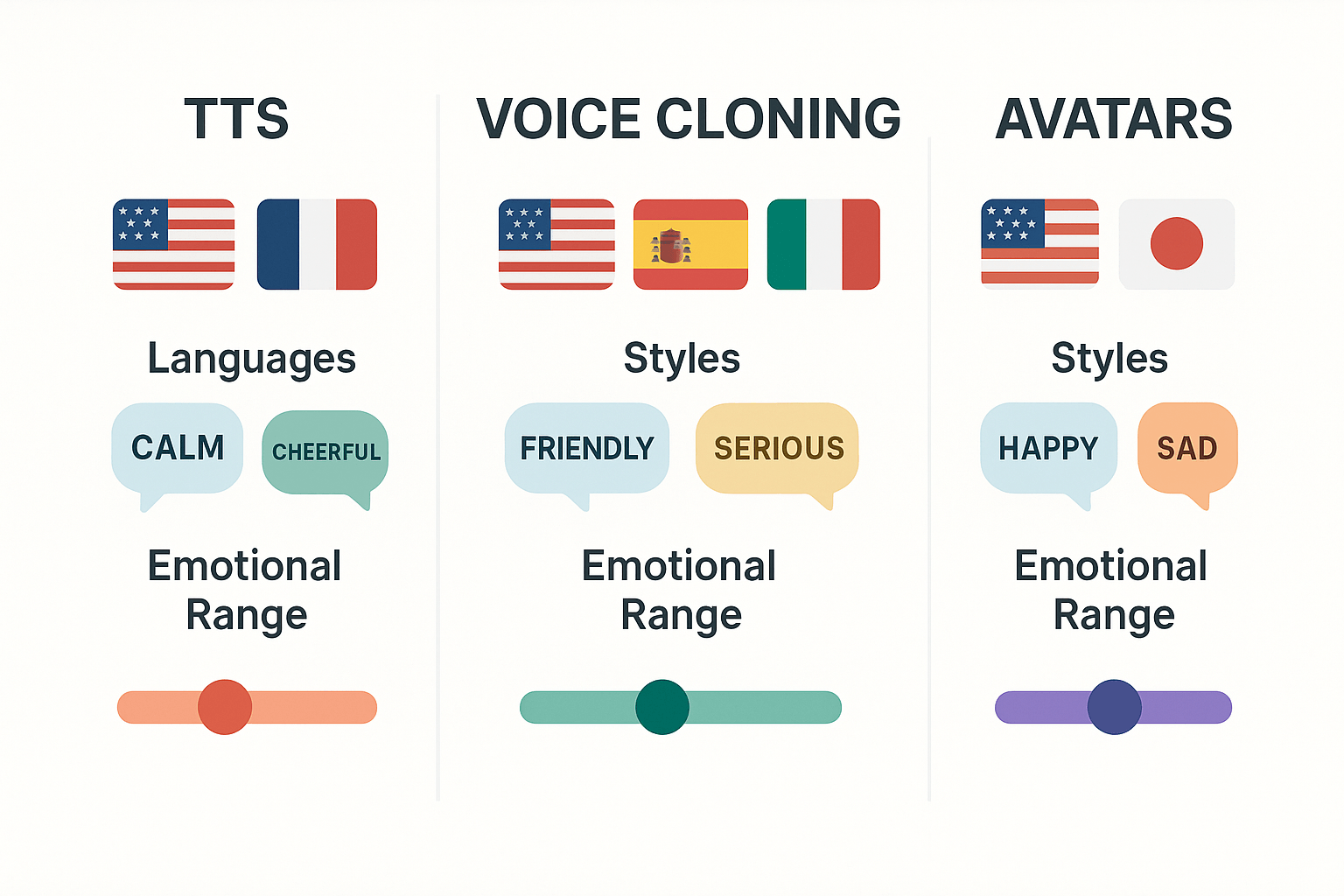
New text to speech (TTS) voices include 12 additional languages and regional accents, plus 30 new style presets for tone and pacing. Highlights:
-
European and Asian regional variants, useful for marketing and e-learning localization.
-
New expressive presets: warm narration, energetic host, and calm explainer.
-
Faster synthesis options for long-form audio, and higher-fidelity Ultra mode for short clips.
Voice cloning updates: faster, smaller samples
Voice cloning now supports cleaner clones from 30 second samples and adds cross-language rendering for 15 languages. Key points:
-
Multilingual clones let a single voice speak in several languages while keeping timbre.
-
Improved safety checks: cloning requires explicit consent and is locked to the original speaker.
-
More clone management tools for teams: name, tag, and share voice profiles.
Avatars and style packs
Avatars gained new lip-sync models and emotion controls for more natural delivery. Notable changes:
-
5 new talking avatars tuned for corporate and course content.
-
Emotion sliders to dial joy, seriousness, or neutrality.
-
Export presets for MP4 and SRT aligned to audio.
Quick trial flow for product teams
Try these updates in three steps:
-
Upload a 60 second file or paste script.
-
Pick a new TTS voice or clone, set style preset.
-
Export MP4 or audio, and review captions.
Test the new voices with short modules first, then scale to longer assets once tone matches.
Why these new voices matter: practical benefits for creators and teams
The new voices dupdub released in March 2026 do more than sound better. They speed up localization, protect brand tone across languages, and make content easier to access for diverse audiences.
Speed up localization and publish faster
These voices cut the editing cycle. Teams can translate, clone, and generate final audio in hours instead of days. That means faster time to market for videos, courses, and campaigns. For creators, quicker turnaround lets you test language variants fast and iterate on messaging.
Keep a consistent brand voice across markets
Use voice cloning and fine-tuned TTS (text-to-speech) to keep tone uniform. Once you set a cloned voice, every team can reuse it for ads, narration, and tutorials. That reduces re-record costs and avoids subtle tone drift between regions.
Improve accessibility and learner comprehension
Clear multilingual narration helps learners who rely on spoken audio. Native-like intonation and regional accents increase comprehension and retention. Subtitles plus matched synthetic audio make content usable for people with visual or reading impairments.
Key practical outcomes
-
Time saved: repurpose a 30-minute module into 10 languages in a fraction of the manual dubbing time.
-
Cost savings: lower per-language spend by using clones and TTS instead of studio sessions.
-
Scale reliably: store and deploy approved voice variants for campaigns and courses.
These improvements translate into measurable gains: faster launches, steadier brand messaging, and better accessibility for global audiences.
How DupDub built these voices (tech, data, and safeguards)
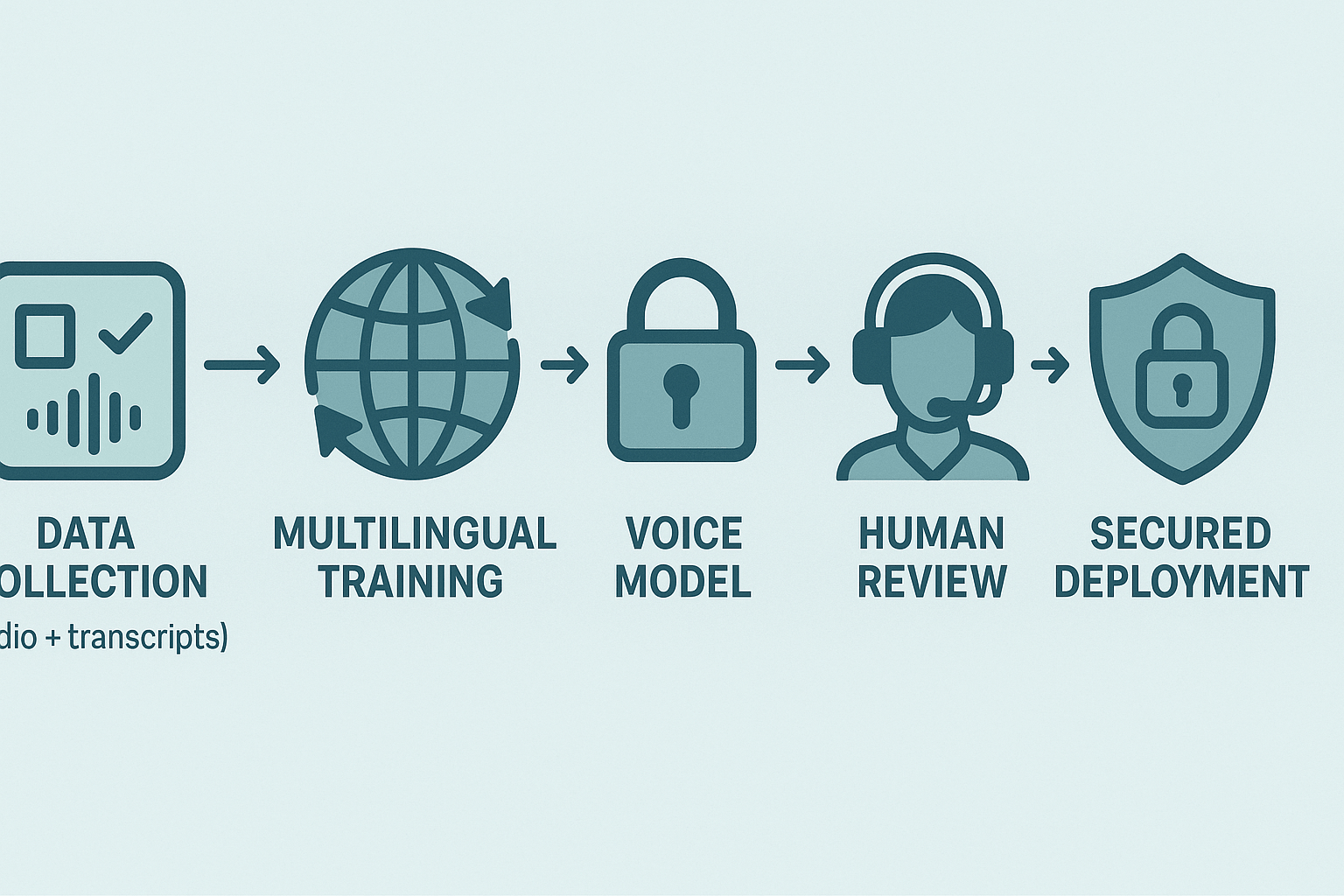
DupDub built these new voices with a clear, practical approach: train multilingual models, apply transfer learning for low-resource tongues, and layer in human checks for naturalness. The result is faster, more consistent dubbing with voice cloning you can trust. This section explains the core pipeline and the protections around cloning.
Training approach: large multilingual model, aligned data
DupDub trains a single multilingual text to speech (TTS) model that shares core speech representations across languages. That lets similar sounds and prosody transfer between languages. Training uses aligned transcripts, audio augmentation, and style tokens (to control tone and pacing).
Pipeline steps:
-
Collect and clean parallel and mono-lingual audio/text data.
-
Extract self-supervised speech features for robustness.
-
Train a shared encoder and language-specific decoders.
-
Fine-tune voices with style and prosody tokens.
-
Run automated QA and human review before release.
Transfer learning for low-resource languages
We apply transfer learning, where high-resource language models seed training for low-resource targets. This speeds learning and improves voice match for scarce data. For example, the study
IEEE ICASSP 2022 Conference Proceedings demonstrates that augmenting data from four languages enabled training a multilingual TTS system for a native English speaker to speak five languages: English, French, German, Italian, and Spanish.
Human-in-the-loop checks for naturalness
Automated metrics catch timing and intelligibility issues. Human raters then score naturalness, emotion, and prosody. Edge cases, like idioms or noisy audio, get manual fixes and re-tuning.
Consent, encryption, and cloning safeguards
Voice cloning requires explicit consent and a verified sample. Cloned voices are locked to the original speaker profile and logged. All processing is encrypted in transit and at rest, with retention controls and audit trails. DupDub also enforces usage limits and provenance metadata to prevent misuse and to support takedown requests.
Side-by-side comparison: DupDub’s new voices vs leading alternatives
This quick vendor comparison focuses on voice quality, language coverage, cloning licenses, and pricing. It highlights practical trade-offs so teams can pick the best option for localization, narration, or branded voice work. If you want the short take, read the table first then the guidance below on when to choose each vendor; this page also references one industry benchmark for context.
Quick comparison table
The table below summarizes core differences. TTS means text-to-speech (converting written text to spoken audio).
|
Feature
|
DupDub
|
ElevenLabs
|
Murf
|
Play.ht
|
|
Voice quality
|
High naturalness, Ultra voices with expressive styles
|
Very high naturalness, strong prosody control
|
Strong naturalness in multi-language tests
|
Good clarity, fewer expressive controls
|
|
Language coverage
|
90+ TTS languages, 47 cloning languages
|
Broad English dialects, expanding languages
|
Multi-language support tested in benchmarks
|
Wide TTS set, fewer cloning languages
|
|
Voice cloning licensing
|
Cloning locked to speaker, consent workflow, enterprise controls
|
Paid cloning with usage terms, opt-in voice tools
|
Commercial options and team plans
|
Consent-based cloning, tiered license terms
|
|
Pricing tiers
|
Free trial; Personal $$11/mo; Professional$$30; Ultimate $110; pay-as-you-go
|
Subscription + usage fees; higher cost for long-form
|
Credits/subscription model
|
Subscription tiers; pay-as-you-go options
|
|
Avatars & TTS styles
|
Built-in avatars, 1,000+ styles and avatar exports
|
Limited native avatars; partner integrations
|
Focus on voices, fewer avatar features
|
Strong style presets, limited avatars
|
|
API & automation
|
Full API, integrations, studio and export workflows
|
Robust API, SDKs for devs
|
API available, integrations vary
|
API and plugin ecosystem
|
Notably, in a competitive benchmarking study, Murf's text-to-speech technology was evaluated against five leading competitors, AWS, Azure, ElevenLabs, Google, and OpenAI, covering four English variants and eight additional languages
TTS SOTA model Benchmarking & Evaluation - Murf AI, which gives one useful cross-vendor snapshot.
When to pick DupDub
-
Choose DupDub when you need fast, multi-language localization and built-in avatars. It saves time versus stitching tools together.
-
Pick DupDub for teams that want both cloning and large language coverage under one platform.
-
Use it when you want studio features, API automation, and export formats in the same workflow.
Trade-offs to consider
-
If ultra-expressive English narration is the single priority, ElevenLabs may edge out others for nuance.
-
If a third-party benchmark or specific language has priority, review vendor test results and language lists.
-
For simple TTS with many style presets but no avatars, Play.ht or Murf can be cost-effective.
Mini case study: Localizing an e-learning module with new DupDub voices
A learning team needed a quick, affordable way to localize a 20 minute e-learning module. They wanted natural narration, synced subtitles, and a consistent brand voice across three languages. To test the new voices dupdub, they ran a pilot that replaced studio rerecording with AI cloning and TTS.
Project goals and constraints
Keep tone consistent across languages, complete localization in two workdays, and limit vendor cost. The source assets were a 20 minute MP4 and an editable script. The team could spend up to four hours on review per language.
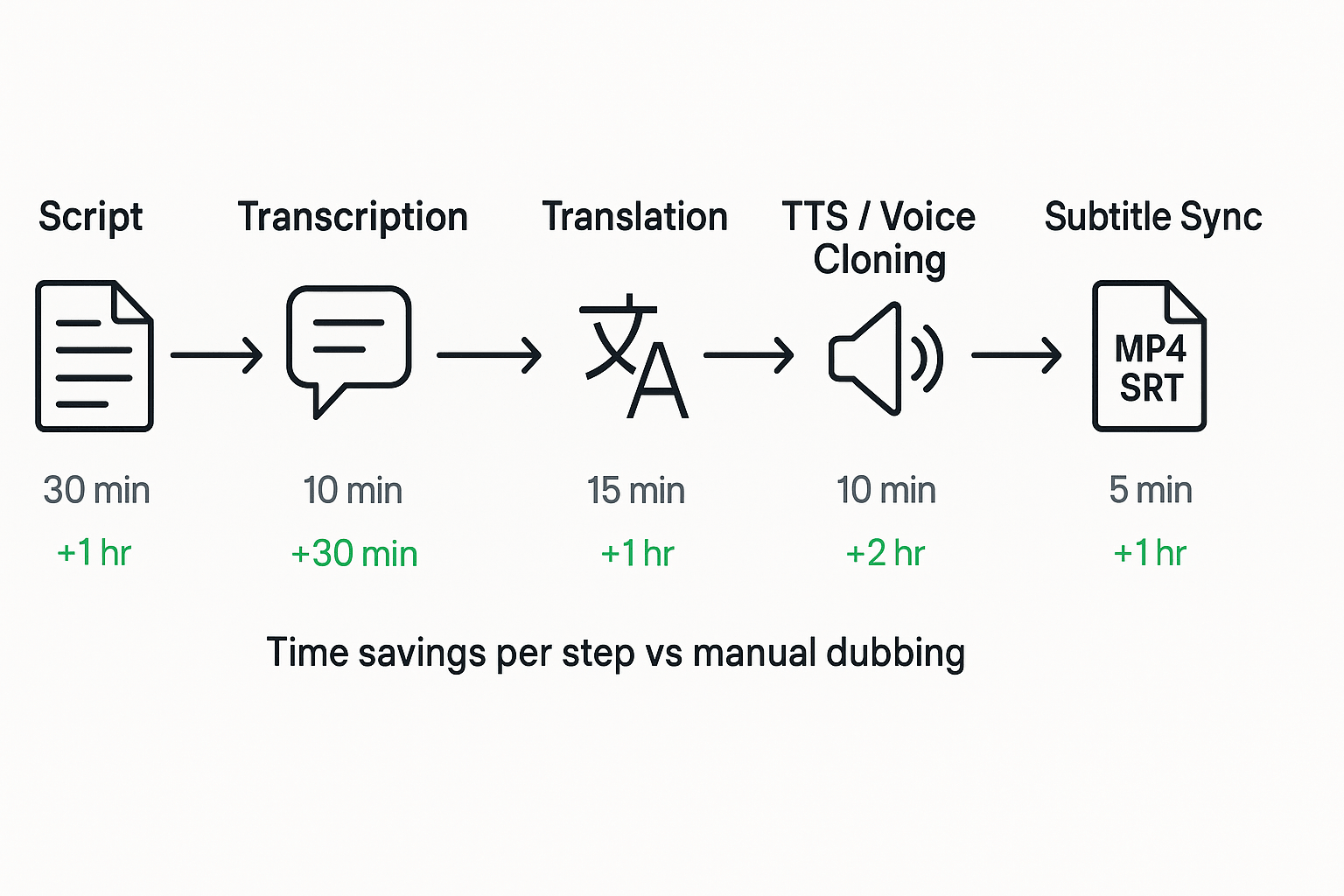
Step-by-step workflow and savings
-
Transcribe source audio, auto-correct obvious errors. Time: 20 minutes with DupDub, 3 hours manual, saved 2.7 hours.
-
Translate the script into Spanish and Portuguese, using DupDub draft then light human edit. Time: 1 hour versus 5 hours for full human translation, saved 4 hours.
-
Create or clone voice for narrator (30 second sample). Time: 15 minutes setup, versus scheduling studio sessions over days, saved 1+ day.
-
Generate TTS tracks with matched pacing and style controls. Time: 30 minutes render, versus 8 hours studio editing, saved 7.5 hours.
-
Auto-sync subtitles and captions, export SRT and burned-in options. Time: 10 minutes, versus 4 hours of manual syncing, saved 3.8 hours.
-
Quick QA pass and minor timing tweaks, 45 minutes per language.
Outcome and ROI estimate
Result: three localized versions delivered in 36 hours of calendar time, with about 8 total production hours. For a comparable studio approach the team estimated 40 production hours and $$2,400 in voice talent and studio fees. Using DupDub (subscription credits plus 2 hours editor time), estimated cost was$$320. That means roughly 80% time saved and an 87% cost reduction in this pilot.
The pilot showed fast turnaround, consistent narrator tone, and easy subtitle exports. Teams should run a short A/B test to confirm voice fit, then scale with DupDub credits or a plan that matches output needs.
Best practices: getting the most from the new voices
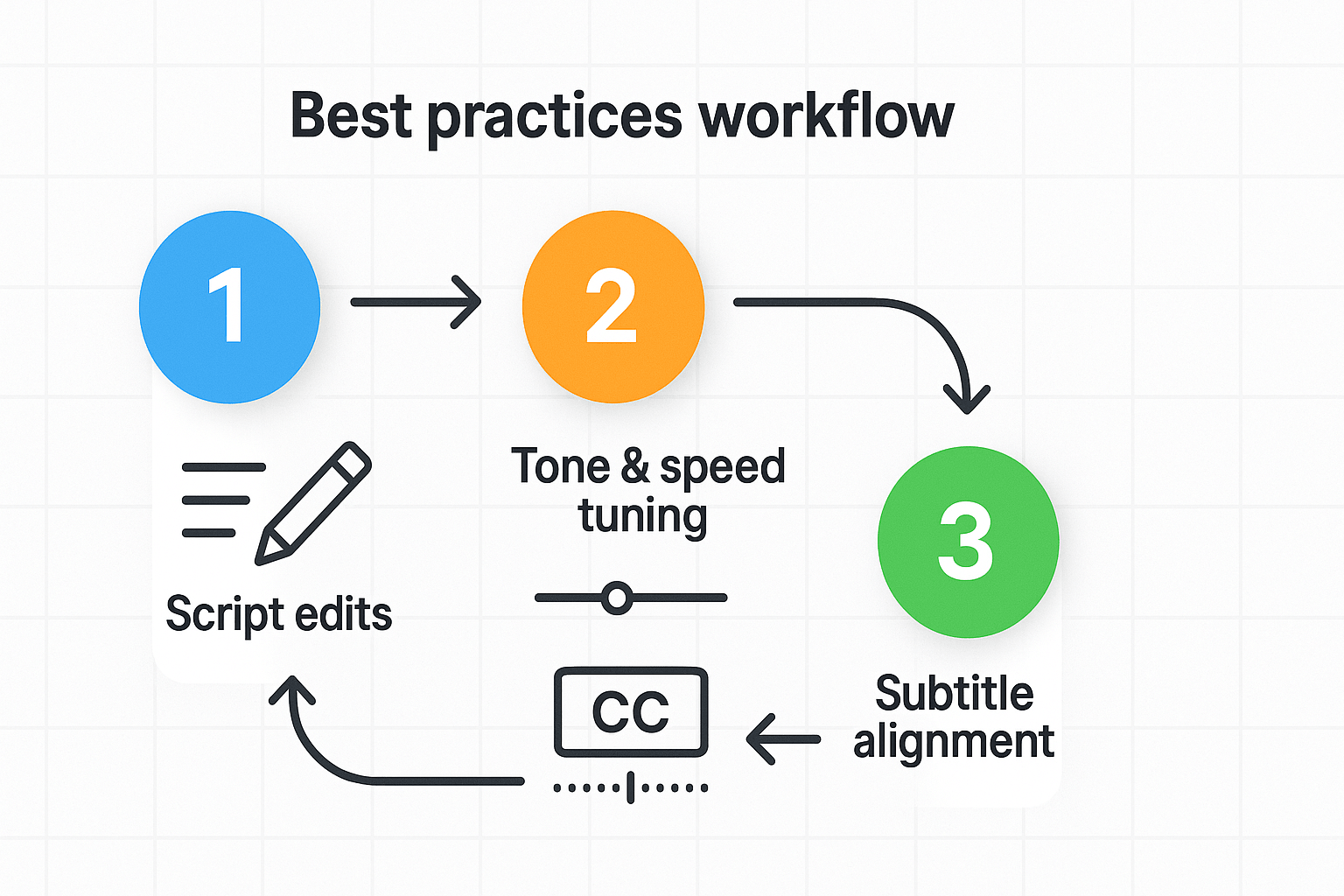
This short guide gives clear, hands-on tips you can apply immediately when working with the new voices dupdub release. Focus on small script edits, quick tone and speed tweaks, and tight subtitle alignment to boost naturalness and accessibility. Use these steps whether you’re using TTS, voice cloning, or avatars.
Edit scripts for clarity and flow
Keep sentences short and concrete. Read scripts aloud and cut filler words. Replace long clauses with two short sentences to improve pacing. Use parenthetical notes for emotional cues, like (warm), (matter-of-fact), or (slower).
-
Avoid jargon and idioms that don’t translate well.
-
Spell names and brands phonetically in brackets when needed.
-
Mark pauses with ellipses or [pause 0.5s] for emphasis.
Tune tone and speed with small changes
Start with default voice settings, then tweak in 5 to 10 percent steps. If a voice feels rushed, lower speed by 5 to 10 percent and add short pauses. Use pitch sparingly to indicate questions or excitement. Test a 20 to 30 second clip before committing to a whole file.
Align subtitles for reading speed and accessibility
Keep captions to one or two short lines. Time each subtitle to display at least 1.5 seconds per reading chunk. Use this quick checklist:
-
Split long sentences at natural breaks.
-
Match subtitle start to audio start within 200 ms.
-
Include speaker labels for multi-voice files.
Final quick tips: batch similar clips to keep consistent tone, save custom voice presets, and document the exact settings you used for each language. Small, repeatable steps save time and make dubbed content feel native.
Legal, ethics, and accessibility considerations
When you adopt new voices dupdub for localization or cloning, you must balance creativity with clear legal and ethical guardrails. This section covers consent, voice rights, GDPR-aligned handling, and how accurate TTS and subtitles improve accessibility. Follow these practices so teams can scale safely and keep stakeholders protected.
Obtain clear consent for voice cloning
Always get written, time-stamped consent from the speaker before creating a clone. The consent should state where the cloned voice will be used, for how long, and whether it can be modified or used commercially. If the speaker is a minor or legally represented, get guardian approval and keep records.
Document consent, retention, and usage
Keep a simple, searchable record for each clone or paid voice license. Include:
-
Speaker identity and contact info, plus the consent form version.
-
Date of consent and permitted languages or regions.
-
Retention period for source audio and clones, and deletion triggers.
-
Purpose of use, owners, and any licensing terms.
These items support audits and strikes against misuse.
Protect data and follow GDPR-aligned handling
Encrypt voice data at rest and in transit, and limit access to named employees. According to
EU Artificial Intelligence (AI) Act: first worldwide rules on AI (2024), the AI Act categorizes AI systems into four risk levels: unacceptable, high, limited, and minimal. Treat high-risk voice use with stricter controls, and follow GDPR principles like purpose limitation and data minimization. Also follow FTC guidance on transparency and disclosures to avoid deceptive claims.
Accessibility gains and practical tips
Accurate TTS and synced subtitles make content usable for people who are deaf, hard of hearing, or have low literacy. Add clear captions, speaker labels, and readable subtitle timing to meet accessibility goals. Test outputs with screen reader tools and user reviewers to catch naturalness and timing issues.
Pricing, plans, and a quick ROI checklist
This section maps DupDub plan tiers to typical teams and gives a short checklist for estimating ROI. The March batch and new voices dupdub make automated dubbing cheaper and faster for common workflows. Read this to pick a plan that fits your volume and to run a quick cost check.
Map plans to common use cases
Pick the plan that matches your volume, team size, and risk tolerance. Below are practical matches you can use as a starting point.
-
Free trial: Try 3 days, 10 starter credits. Best for solo creators testing voice quality and a single short video.
-
Personal ($11/mo): Small channels or solo course creators. Low monthly cost, limited voice clones and avatar hours.
-
Professional ($30/mo): Marketing teams and growing e-learning teams. Balance of credits and voice clones for frequent monthly output.
-
Ultimate ($110/mo): Enterprise localization or agencies. High credits, more clones, unlimited file size for batch projects.
-
Pay-as-you-go: Sporadic projects or pilots. Buy credits for one-off localization without a monthly plan.
Quick ROI checklist
-
Project minutes: count final dubbed minutes.
-
Manual cost: get a vendor quote per minute.
-
AI cost: estimate credits needed and map to plan pricing.
-
Time saved: estimate hours saved on coordination and revisions.
-
Payback: divide manual savings by monthly plan cost or credits bought.
Compare the numbers, run a 1-video pilot, and adjust assumptions. This gives a quick, defensible case to test AI dubbing against full manual workflows.
FAQ — Answers to common questions about the new voices
-
How do I try the new voices on DupDub?
You can test new voices using the 3-day free trial. Sign up, upload a short clip or paste text, and select a voice to preview. No credit card is required, so you can experiment with TTS, avatars, and voice cloning features بسهولة.
-
Can I clone my voice on DupDub?
Yes. DupDub allows voice cloning from about a 30-second sample, and cloned voices can be used across multiple languages. Clones are locked to the original speaker and processed securely. For commercial use, complete the consent flow and follow the platform’s cloning guidelines.
-
What languages and accents are supported for new voices and dubbing?
DupDub supports 90+ TTS languages and 47 voice cloning languages, including many regional accents. You can export audio in MP3 or WAV formats and use SRT files for subtitle synchronization. Browse available options in the voice picker within the studio.
-
What privacy and security steps should I take for voice data?
Get written consent before cloning any voice, use encrypted uploads, and delete raw samples after processing if needed. Review account privacy settings and configure data retention policies, especially for enterprise use cases.




 Discord
 YouTube
 Tiktok
 Twitter
 Facebook
 Instagram