
DupDub vs Play.ht — A Practical Play.ht Alternative, Pricing & Migration Checklist

Apr 27, 2026 18:4411 mins read
Share to
Contents
TL;DR: Is DupDub the best Play.ht alternative for you?
Short verdict: DupDub is a practical, cost-focused AI dubbing option. It’s a solid play ht alternative for creators who need quick, multilingual dubbing.
Best for YouTubers, podcasters, and localization teams moving fast. Also a good fit for e-learning producers and small businesses on tight budgets.
  • AI dubbing with subtitle sync for fast multilingual publishing.
  • Voice cloning from short samples, keeping speaker identity.
  • Credit-based pricing lowers cost versus manual dubbing and speeds scale.

Why people search 'play ht alternative' right now

Many creators and teams search for a play ht alternative when they hit platform limits, face sudden pricing changes, or need better dubbing tools for video. They want clearer costs, true dubbing (not just TTS (text to speech)), faster localization, and stronger privacy for voice cloning. This section explains common triggers and what a modern alternative must deliver.

Top triggers driving the search

  • Platform limits and surprise fees: fixed export quotas or overage charges break budgets and timelines.
  • Feature mismatch: some tools focus on narration, not synced video dubbing or subtitle alignment.
  • Voice cloning and brand control: teams need private, consistent cloned voices across languages.
  • Compliance and data privacy: unclear handling of voice data scares enterprises and localization teams.
  • Speed and scale: weak APIs and slow workflows stop large batch projects.
DupDub positions itself as a practical option by combining end-to-end AI dubbing, voice cloning, subtitle alignment, and enterprise privacy controls for global creators.

Quick side-by-side: DupDub vs Play.ht (features at a glance)

If you’re hunting for a practical play ht alternative, this quick comparison helps you scan key differences. Read fast, then test the areas that matter to your workflow: video dubbing, voice cloning, subtitle alignment, and exports. The goal is clarity, so you can spot savings and hidden gaps before you switch.

At a glance comparison table

For context, Best AI Text to Speech Tools Compared 2026 notes ElevenLabs' v3 model supports 74 languages with both instant and professional voice cloning.
Feature
DupDub
Play.ht
Languages & accents
90+ TTS languages, 47 cloning languages
Broad TTS language support; confirm exact counts
Voices
700+ voices, 1,000+ styles
Large voice library, fewer avatar-style voices
Dubbing & subtitle alignment
End-to-end video dubbing, subtitle sync, re-voicing
Strong TTS, limited built-in video localization tools
Voice cloning
30s sample, multilingual cloning (47 languages)
Offers voice cloning, check language parity
Export formats
MP3, WAV, MP4, SRT
MP3, WAV, SRT; video export varies by plan
Integrations & API
Canva, Chrome, YouTube plugin, API
TTS plugins and API, verify direct video tools
DupDub adds explicit video localization tools, avatars, and an emphasis on subtitle alignment. Before you migrate, verify language parity for your target markets, cloning language coverage, file size limits, and enterprise compliance. Test a short file on both platforms to compare audio quality and sync speed.

Pricing breakdown — How DupDub stacks up on cost and value

If you're searching for a play ht alternative, this quick pricing guide shows where DupDub saves money and when one-time credits make sense. Read on for tier basics, credit math, voice clone limits, and export caps so you can pick the right plan for your workflow.
DupDub plans at a glance:
  • Free 3-day trial: 10 starter credits, no card required.
  • Personal $11/mo (annual): 1,800 yearly credits; ~25 hours standard TTS; 3 voice clones; 10,000 words per file.
  • Professional $30/mo (annual): 6,000 credits; ~83 hours standard TTS; 5 clones; 30,000 words/file.
  • Ultimate $110/mo (annual): 30,000 credits; 10 clones; unlimited file size.
  • Pay-as-you-go: one-time credits (500 for $$68, 1,000 for$$128).

When to pick subscription vs one-time credits

If you localize weekly, a subscription usually cuts per-hour costs. If you dub rarely, one-time credits avoid wasted monthly fees. Human dubbing can be expensive; according to Forrester Total Economic Impact™ study, the average cost per hour for professional services from Noggin is $155, so automated dubbing often lowers cost per video significantly. Choose subscription for steady volume, or pay-as-you-go for occasional projects and testing.

Key DupDub features Play.ht users will care about

If you’re hunting for a play ht alternative that focuses on video and multilingual workflows, DupDub groups the tools creators actually use. This section quickly shows the modules that speed up YouTube localization, podcast repurposing, and e-learning translation.

Core modules creators rely on

  • TTS: 700+ voices across 90+ languages, with styles for narration and character reads. Use it to make region-specific audio without hiring actors.
  • AI Dubbing with subtitle alignment: automatically match translated audio to on-screen subtitles. That saves hours of manual timing for videos.
  • Voice Cloning: create a usable clone from a 30 second sample (simple voice upload), then reuse it across languages for a consistent brand voice.
  • Transcription and SRT export: fast speech-to-text, editable transcripts, and downloadable SRT files ready for upload to platforms.
  • Avatars and integrations: talking avatars plus Canva and Chrome plugins to add voices directly into your editing and publishing flow.
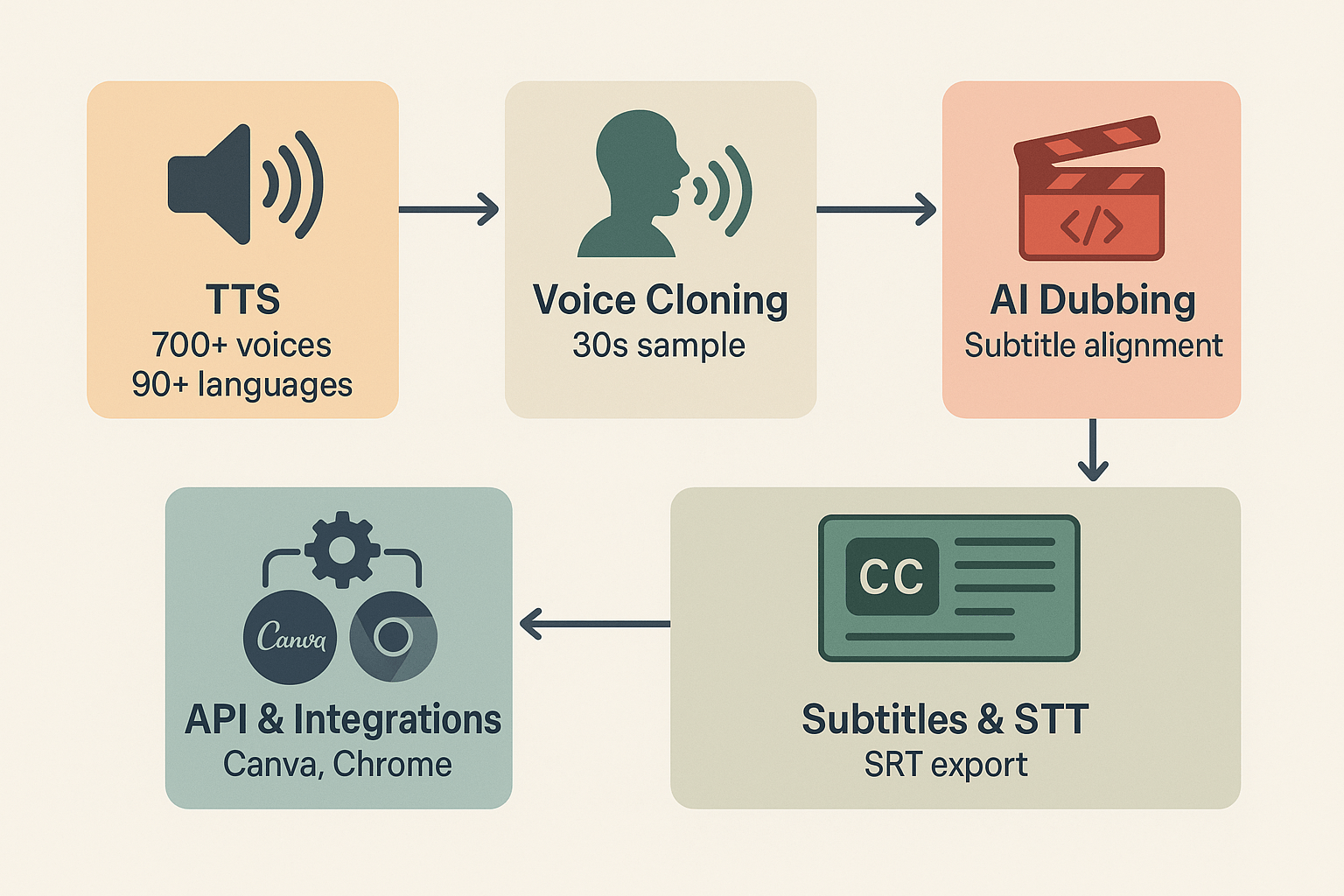
Diagram of DupDub modules as connected icon blocks: TTS, Voice Cloning, AI Dubbing, Subtitles and API Integrations.

Data privacy & security: what to check before switching

If you're evaluating a play ht alternative, run a short security checklist before you migrate. Focus on voice cloning consent, encryption, retention, and enterprise compliance. These checks cut risk and keep your team and audience safe.

Voice cloning safeguards

Start by confirming how the vendor handles voice cloning (synthetic voices). Ask for explicit consent workflows and a technical lock that prevents cloned voices from being reused without permission. Verify these items in writing:
  • Consent capture and auditable logs.
  • Voice lock (prevents reuse) and strict access controls.
  • Clear deletion or revocation options for cloned models.

Encryption in transit and at rest

Confirm encryption for uploads, processing, and exports, plus key management policies. Check cryptographic controls, since ISO/IEC 27001:2022 Annex A.8.24 mandates that organizations establish policies for the use of cryptographic controls to protect the confidentiality, integrity, and availability of information. Ask for encryption scope and algorithm details in the security appendix.

Retention, access and enterprise review

Request the data retention policy, data processing agreement, and audit reports. DupDub states voice cloning is locked to the original speaker, processing is encrypted, and the platform is GDPR-aligned, but verify with a DPA, SOC2 or penetration test summary. For enterprise deals, insist on contract terms for breach notification, data subject rights, and regional data residency.

Migration checklist & troubleshooting for Play.ht users

Switching from Play.ht? Use this checklist to move voices, transcripts, and workflows with minimal downtime when evaluating a play ht alternative. It covers auditing, exporting, mapping voice and language pairs, running a test batch, and updating your publishing flow. Try DupDub's free 3-day trial on a few real assets to confirm voice matches and subtitle sync.

Step-by-step migration

  1. Audit assets: list source files, voices, languages, and use cases.
  2. Export from Play.ht: download transcripts, audio, SRTs, and originals.
  3. Map voices: pick DupDub equivalents for each voice and language pair.
  4. Import a sample batch: upload clips with timestamps and metadata.
  5. Test and QA: compare audio, subtitles, timing, and lip-sync side by side.
  6. Update workflows: swap API keys, templates, and automated exports.
  7. Rollout: migrate remaining assets in staged batches, monitor errors.

Common gotchas and quick fixes

  • Voice mismatch: tweak pitch or speed, or try a closer DupDub style.
  • Subtitle drift: regenerate SRTs, then realign timestamps.
  • File errors: convert to MP4 or WAV before upload.
  • Clone quotas: confirm voice clone limits early to avoid delays.
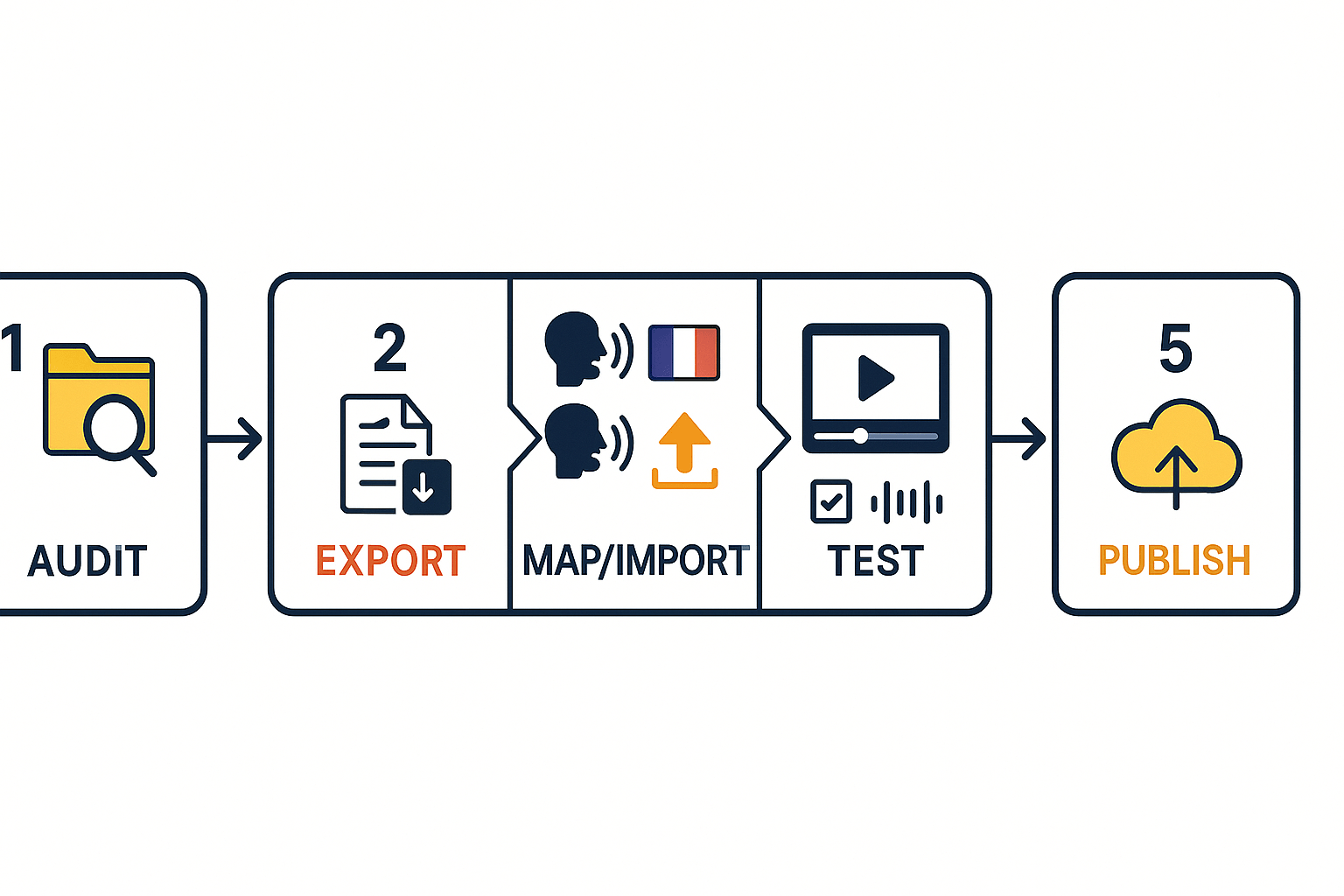
Start small and keep originals for rollback. Schedule short QA windows per batch to catch sync issues before full rollout.
Numbered migration workflow: audit, export, map/import, test, publish with arrows connecting each step

Use-case scenarios & mini case studies

These three short case studies show practical workflows, outcomes, and module choices when switching to DupDub as a play ht alternative. You’ll get step by step paths for a YouTuber, an e-learning producer, and a marketing team.

YouTuber: scale international uploads

Workflow: export the raw video, upload to DupDub, auto-transcribe, choose a voice or clone, auto-sync subtitles, then export localized MP4s. Outcome: faster publishing and wider reach with fewer editing hours. When to pick modules: use AI Dubbing and avatars for personality, or pay-as-you-go credits for occasional uploads.

E-learning producer: keep courses consistent

Workflow: batch upload lessons, run STT (speech to text), create a voice clone for a branded narrator, export SRT and localized video files. Outcome: consistent narration across languages, faster course rollouts, and accessible captions. When to pick modules: voice cloning and SRT export are crucial, add API for LMS automation.

Marketing team: cut campaign costs

Workflow: centralize scripts, generate multilingual TTS and avatars, run batch renders via API, then distribute ad assets. Outcome: lower localization costs, faster launch times, and uniform messaging worldwide. When to pick modules: API for scale, avatars for hero spots, and Ultimate or bulk credits for high volume.
Quick module pick list:
  • Fast tests: pay-as-you-go credits.
  • Regular creator: Personal or Professional plan.
  • Scale or automation: API plus Ultimate or bulk credits.
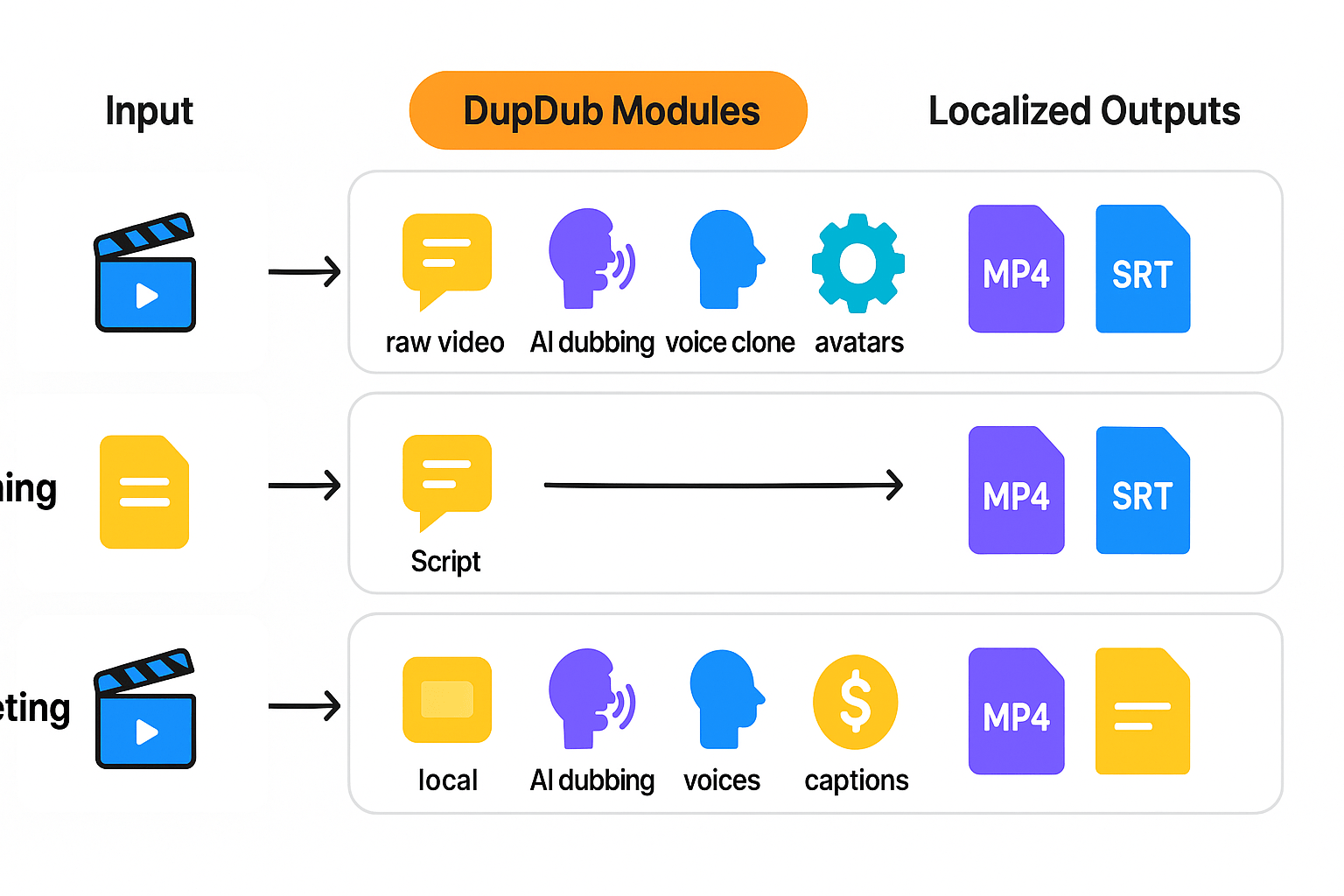
Workflow diagram mapping three scenarios: YouTuber, E-learning, and Marketing, showing input to DupDub modules to localized outputs.

FAQ — common questions Play.ht users ask when switching

  • Can I clone my voice when switching from Play.ht?

    Yes. DupDub can create a voice clone from about a 30-second sample and supports multiple languages. The cloned voice is locked to the original speaker, and you can refine it in the browser studio before scaling usage.

  • How does pricing compare for creators looking for a Play.ht alternative?

    DupDub offers tiered plans, including a 3-day free trial, Personal (about $11/month annually), Professional (about $30/month), and Ultimate (about $110/month), plus pay-as-you-go credits. Match your usage (minutes of TTS or dubbing) to estimate costs, then validate with a trial.

  • Is my data safe when switching providers?

    DupDub uses encryption for audio processing and restricts voice clones to the original speaker. For enterprise-level security or compliance needs, request documentation or a data processing agreement from the vendor.

  • How long does migration take from Play.ht to DupDub?

    Small projects can migrate in a few hours, while larger libraries may take several days. A typical workflow includes exporting transcripts and subtitles, uploading media, mapping voices, running test batches, and completing QA before final export.

Experience The Power of Al Content Creation

Try DupDub today and unlock professional voices, avatar presenters, and intelligent tools for your content workflow. Seamless, scalable, and state-of-the-art.