


TL;DR — Key takeaways from DupDub Q1 2026
-
Run a 3-day trial with representative videos to measure quality.
-
Test the API for latency, file formats, and subtitle sync.
-
Schedule a demo to review consent, security, and enterprise controls.
What’s new in DupDub Q1 2026: Feature overview
Platform-wide changes and rollout schedule
-
AI Dubbing engine upgrade: improved phrase-level timing, better pause preservation, and more natural intonation for longer sentences. These changes reduce manual post-editing.
-
Multilingual TTS improvements: new Ultra voices with finer style controls, faster batch rendering, and richer prosody options for narration and ads.
-
Faster voice cloning: reduced sample requirements and expanded language coverage for cloned voices, plus clearer warnings and consent flows.
-
Avatar and studio updates: higher frame-rate lip-sync, faster avatar rendering, and improved browser-based editing tools.
-
API and webhook improvements: bulk job endpoints, progress webhooks, and more predictable retry behavior for large jobs.
-
Plugin updates: Dify plugin and the Chrome/Canva connectors now support direct avatar import and one-click publish from the editor.
-
Web app: most features are live now for all users. Expect staged feature flags for some studio tools to allow gradual access.
-
API: new endpoints are documented and available, with SDK updates pushed to npm and PyPI inside the first two weeks of the release.
-
Plugins: Dify and Chrome updates follow the web release by 1–2 weeks to ensure parity and stability.
Why these changes matter for localization and automation
Admin, billing, and rollout notes
Feature deep dive: AI Dubbing & Multilingual TTS improvements
What changed in the dubbing pipeline
Subtitle alignment and timing improvements
Expanded language and voice coverage
Sample workflows: creators and L&D teams
-
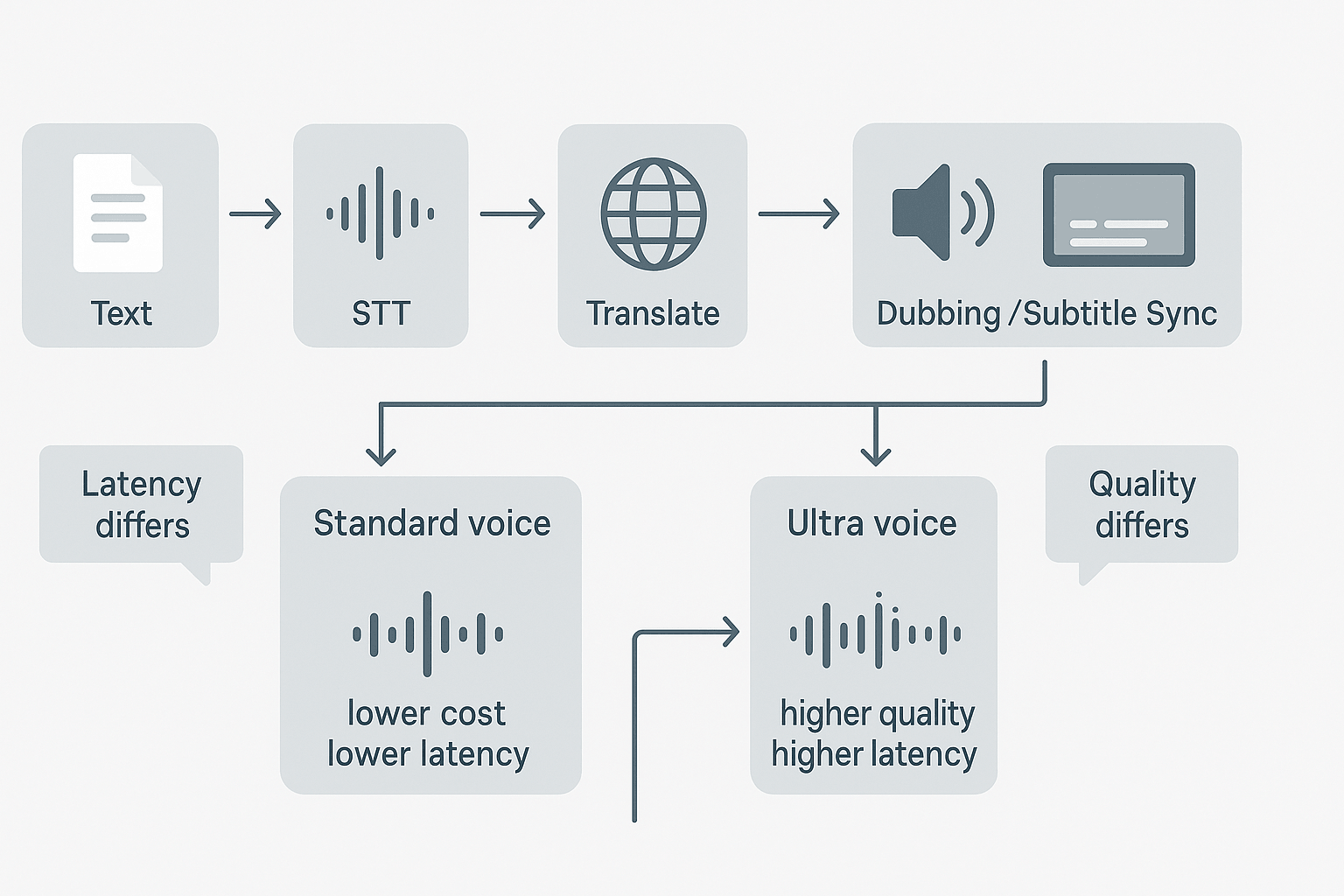
Creator workflow, fast publish:
-
Upload video, auto transcribe.
-
Auto-translate chosen target languages.
-
Pick Standard or Ultra voice per language.
-
Generate TTS and run subtitle-sync.
-
Review flagged low-confidence lines, export MP4 and SRT.
-
-
L&D workflow, high fidelity:
-
Batch upload course modules.
-
Use professional voice clones for instructor consistency.
-
Run automated QA pass for subtitle alignment.
-
Human review for 5% low-confidence segments, finalize exports.
-
Choosing Standard vs Ultra voices: quick guidance
-
Standard voices: lower cost, faster render, excellent for bulk localization or internal training.
-
Ultra voices: higher quality, richer prosody, best for customer-facing marketing and high-stakes learning.
-
Voice clones: use when brand or instructor consistency matters across languages; they cost more per minute but reduce review cycles.
|
Attribute
|
Standard
|
Ultra
|
|
Cost
|
Lower
|
Higher
|
|
Latency
|
Shorter
|
Longer
|
|
Naturalness
|
Good
|
Best
|
|
Best use
|
Bulk localization, drafts
|
Marketing, high-fidelity learning
|
Practical trade-offs and final tip
Feature deep dive — Voice Cloning, Avatars & Studio tools
What improved in voice cloning accuracy and limits
-
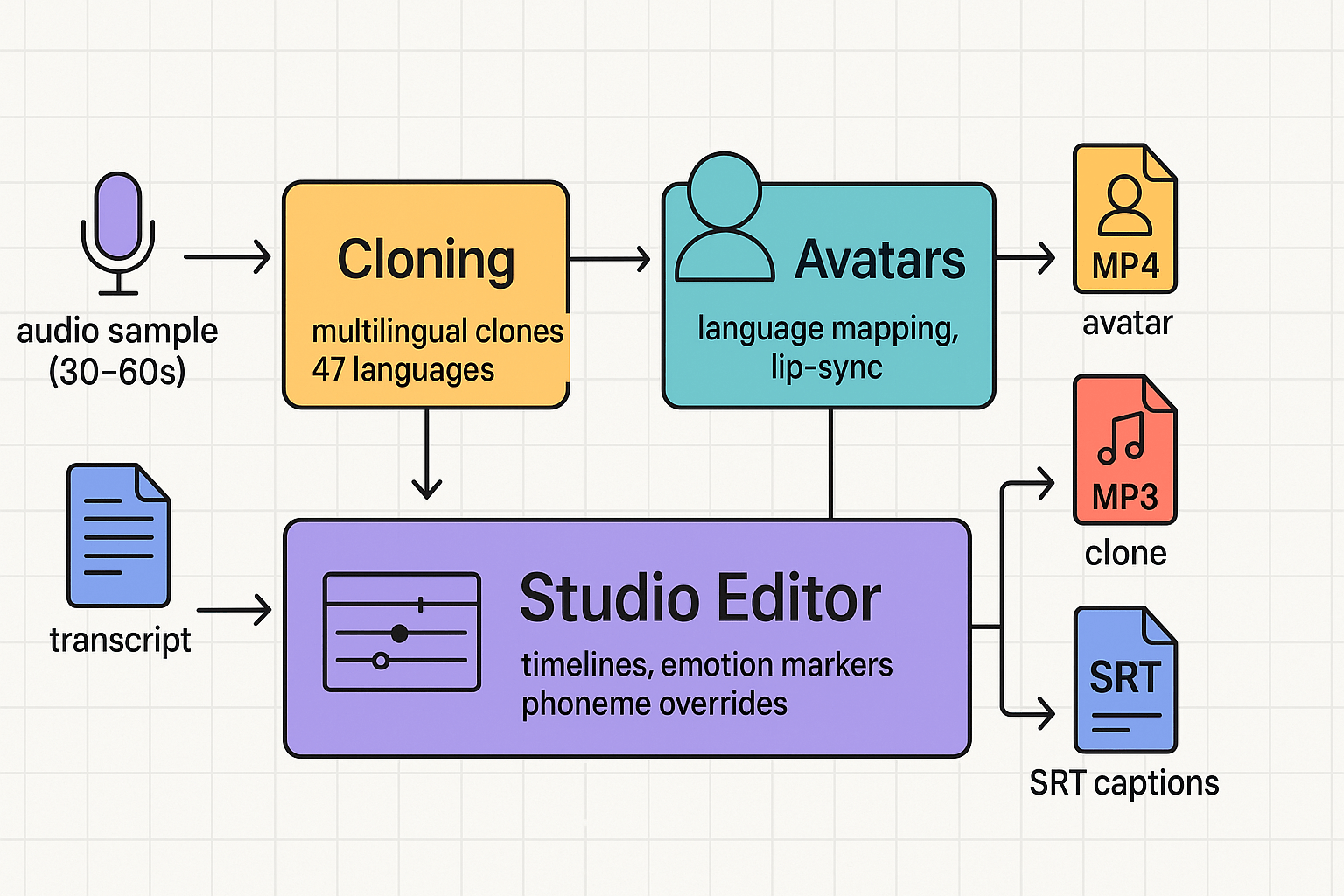
30 to 60 seconds of clear, neutral speech, recorded at 44.1 kHz or higher.
-
Two emotional reads: neutral and expressive, each 15 seconds.
-
A short transcript aligned to the audio.
Avatar behavior and language mapping
-
Let the system auto-map for most languages.
-
Manually set mapping for idiomatic lines or branded terms.
-
Use phoneme overrides for names, acronyms, or invented terms.
Studio editor best practices for lip-sync and emotion
-
Upload clean audio and transcript.
-
Generate clone and run a 30-second preview with an avatar.
-
Add emotion markers and phoneme overrides where needed.
-
Render a short MP4 and review with captions.
Weigh fidelity against privacy and risk
-
Does the voice need cross-language consistency? If yes, test a 30s clone sample.
-
Are legal releases and consent in place? If no, delay cloning.
-
Do you need phoneme-level control? If yes, budget extra editing time.
Integrations & developer workflows: Dify plugin and API usage
Install and connect: Dify plugin quick steps
Run quick API tests locally
-
Request health and version: GET /v1/status. Confirm 200 and version string.
-
List voices: GET /v1/voices. Verify expected languages and formats.
-
Upload small audio for STT: POST /v1/transcribe with a short file.
Example end-to-end pipeline: CMS to publish
-
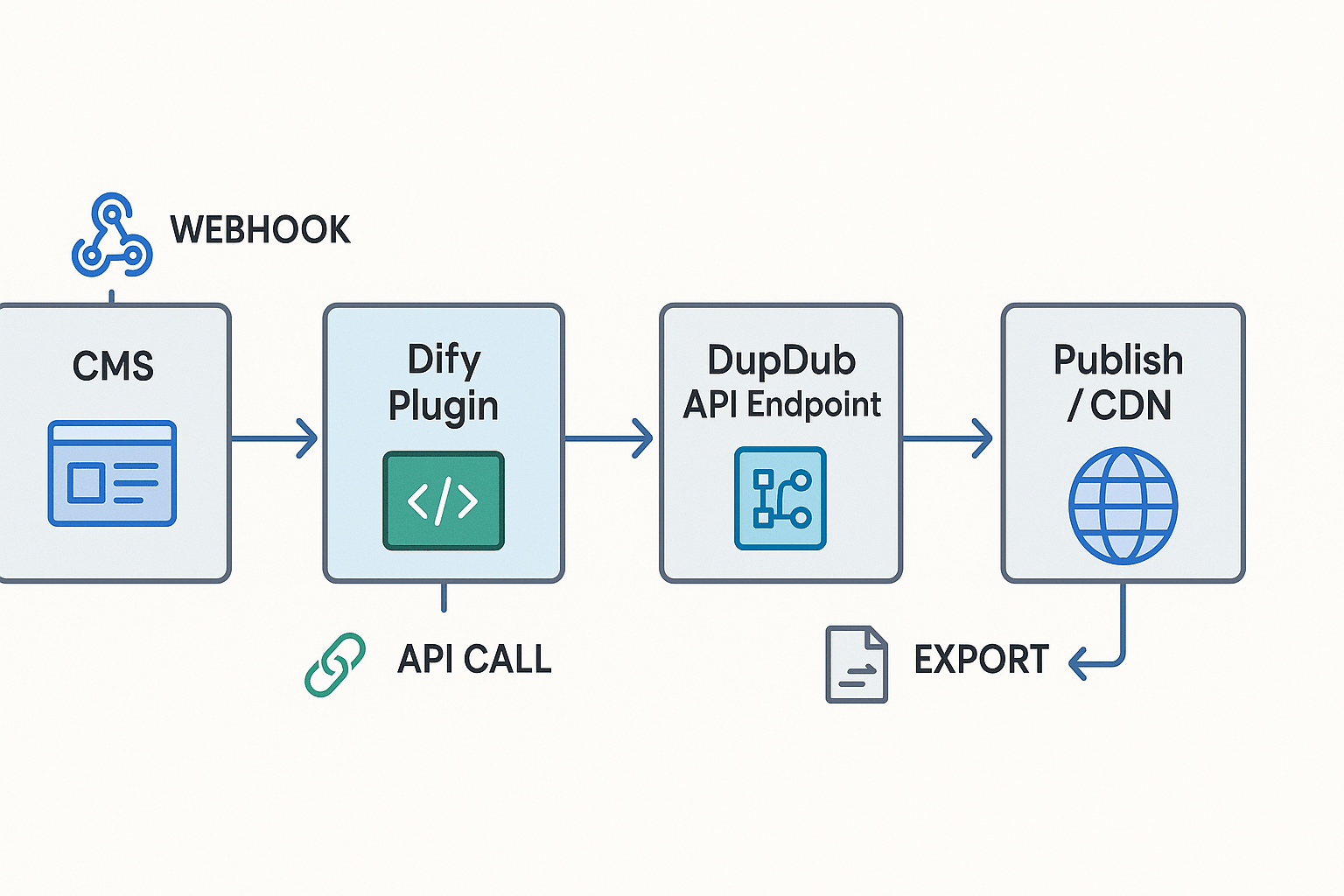
Content export: CMS triggers webhook with video URL and transcript file.
-
Translate: POST /v1/translate with target language list.
-
Generate dubbing job: POST /v1/dub with voiceId and alignment options.
-
QC and human review: webhook to review UI, accept or request redo.
-
Publish: on approval, export assets via /v1/exports and push to CDN or LMS.
API patterns, batching, and rate handling
CI/CD and LMS connector pitfalls
-
Secrets in pipelines: store API keys in vaults or CI secret stores.
-
Open redirectors: avoid dynamic redirect URIs in OAuth flows.
-
File size limits: split very large videos before sending.
-
Race conditions: use job IDs and webhook confirmations, not polling.
Requesting API keys and trial access
Pricing & plan guidance with cost examples
Quick plan snapshot
|
Plan
|
Price (annually billed)
|
Yearly credits
|
Approx Std TTS hours
|
Voice clones
|
Avatars
|
|
Free trial
|
Free, 3 days
|
10 starter credits
|
small test only
|
0
|
0
|
|
Personal
|
11/mo 132/yr)
|
1,800
|
~25 h
|
3
|
3
|
|
Professional
|
30/mo 360/yr)
|
6,000
|
~83 h
|
5
|
5
|
|
Ultimate
|
110/mo 1,320/yr)
|
30,000
|
~416 h
|
10
|
10
|
|
Pay-as-you-go
|
One-time credits
|
500:68 1,000128 6,000:$698
|
variable
|
n/a
|
n/a
|
Which plan fits which team
-
Individual creators: Personal or Free trial for pilot projects and YouTube dubbing. Personal covers most occasional creators.
-
SMB marketing teams: Professional fits small teams that repurpose weekly content. Add PAYG credits for bursts.
-
Enterprise localization teams: Ultimate for high-volume runs and simpler procurement. Ask sales for enterprise terms and data processing agreements.
How credits map to runtime
Three cost scenarios
-
Individual creator, low monthly use: 2 hours standard TTS per month is 24 hours yearly. Personal at 11/month 132/yr) covers this comfortably. Start with the 3-day trial to test voice cloning.
-
SMB marketing team, steady output: 10 hours TTS per month equals 120 hours yearly. Professional covers about 83 hours, so either buy PAYG top-ups, or pick Ultimate if you prefer predictable cost and more clones.
-
Enterprise localization, high volume: 400+ hours yearly and large files point to Ultimate. Ultimate reduces billing complexity for procurement and simplifies compliance reviews because it bundles capacity and support.
Security, privacy, compliance & ethical safeguards
How voice locking and encryption protect identity
Consent, opt-in/out, and retention controls
-
Signed consent capture and an audit trail for each voice clone.
-
Per-voice opt-in and opt-out toggles in the admin console.
-
Retention policies that auto-delete raw audio after a set period.
-
Immediate revocation and deletion workflows on request.
Enterprise review checklist and contractual safeguards
Practical mitigations for deepfakes and misuse
Competitive comparison, limitations & troubleshooting tips
Side-by-side comparison: language, cloning, avatars, API
|
Feature
|
DupDub
|
ElevenLabs
|
Murf
|
Play.ht
|
|
Language coverage
|
90+ TTS, 47 cloning languages
|
Strong English-first; growing multilingual set
|
50+ TTS-focused languages
|
60+ languages, emphasis on variety
|
|
Voice cloning policy
|
Cloning locked to original speaker, encrypted
|
Developer-focused cloning, consent rules vary
|
Studio cloning for creators, stricter limits
|
Cloning via uploads, consent required
|
|
Avatar support
|
Talking photos, lifelike avatars, 40+ languages
|
Limited avatar tooling
|
No avatar rendering, voice only
|
Basic avatar/visual pairing via integrations
|
|
API suitability for scale
|
Full API, batch dubbing, enterprise options
|
Designed for text-to-speech APIs, high fidelity
|
API for voice and studio, moderate scale
|
API for TTS, good for web apps
|
|
Practical limits
|
Noise sensitivity; medium latency for long jobs
|
Exceptional voice fidelity, limited avatars
|
Best for narrated content, less for video
|
Fast TTS, fewer avatars
|
Common technical issues and fixes
-
Check source audio, aim for 16 kHz or 44.1 kHz WAV/MP3 with low background noise. 2. Run a noise gate or simple denoise in your DAW before upload. 3. If cloning quality drops, re-record a clean 30 second sample.
-
Confirm file type: MP4 for video, WAV/MP3 for audio, SRT for subtitles. 2. Convert files with a tool like FFmpeg using linear PCM WAV for best results. 3. Retry upload and inspect server error messages for codec hints.
-
Open SRT in a subtitle editor and confirm frame rate and timecodes. 2. Use the platform's resync tool to align speech and captions. 3. If drift continues, export a fresh transcript and re-run alignment.
Accessibility: captions and screen-reader best practices
FAQ — common questions about the Q1 2026 update
-
Is voice cloning safe and private in DupDub Q1 2026?
Yes. DupDub locks voice clones to the original speaker and requires explicit consent. Processing is encrypted, and data is stored per account without sharing with third parties. To remove or revoke a clone, use the dashboard settings or contact support.
-
What are exact costs for common AI dubbing workflows in DupDub Q1 2026?
Standard TTS typically uses about 1.2 credits per minute, while Ultra voices use around 6 credits per minute. At roughly $0.13 per credit, a 10-minute standard dubbing job costs about $1.60. Exact pricing depends on your plan and credit pack.
-
Which file formats are supported for export and import in DupDub Q1 2026?
Supported formats include MP3 and WAV for audio, MP4 for video, and SRT for subtitles. File size and duration limits depend on your plan tier, so check your account settings before uploading large files.
-
How do I use the Dify plugin with DupDub for developer workflows?
Install Dify and connect your DupDub account in plugin settings. Submit a video URL, transcript, or audio file to create a job, and use your API key for automation, callbacks, and exports. Refer to API docs for detailed request examples.
-
How can enterprise customers request an enterprise compliance review for DupDub Q1 2026?
Contact the sales team with your data protection requirements, certifications, and legal contacts. Request a Data Processing Agreement and security documentation. A compliance call will be scheduled to review needs and next steps.

 Discord
 YouTube
 Tiktok
 Twitter
 Facebook
 Instagram