


TL;DR — Quick takeaways
Why radio still works (and how it’s changed)
Where radio outperforms other channels
-
Mass reach: large, regular audiences across demos.
-
Local affinity: listeners trust local DJs and stations.
-
Simplicity: short spots work well and scale affordably.
How streaming and podcasts change creative needs
-
Write modular scripts with swappable lines.
-
Prioritize natural pacing and conversational reads.
-
Prepare localized versions for key markets and languages.
When to pick radio versus OTT and podcasts
-
Choose radio for broad local awareness, store traffic, and time-sensitive promos.
-
Pick streaming or podcast buys for precise targeting, audience affinity, and storytelling.
-
Combine both when you want mass reach plus targeted follow-up.
Radio commercial script basics: formats, timing, and formatting
Spot lengths: what fits where
-
15 seconds: quick and sharp. Open with a one-line hook in the first 2 to 3 seconds. Use 6 to 8 seconds for the offer or benefit, and finish with a short CTA of 3 to 4 seconds. Keep language direct and active.
-
30 seconds: the most flexible option. Start with a 3 to 5 second attention grabber. Use 12 to 16 seconds for the body, showing the offer and proof. Reserve 6 to 8 seconds for the CTA and legal tag (if any). Add a brief sound bridge if it improves clarity.
-
60 seconds: tell a mini-story. Give 5 to 8 seconds to set the scene. Spend 30 to 40 seconds on details and reasons to act. Close with a 10 to 12 second CTA, repeat the brand name, and add any required disclaimers.
Timing, pacing, and read speed
-
Read a line aloud while timing it, then cut words if it runs long.
-
Use shorter sentences for radio clarity and listener retention.
-
Leave 0.5 to 1 second of silence after the CTA to let the message settle.
Formatting a clean script for actors and producers
Quick production tips
-
Number each script line for easy reference in sessions.
-
Provide the estimated read time next to long paragraphs.
-
Supply a phonetic guide for tricky names or URLs.
-
Include a one-line director note at the top with tone and pace.
.png)
Voice, tone, and casting: choosing the right voice for your message
Define persona attributes and match to audience
-
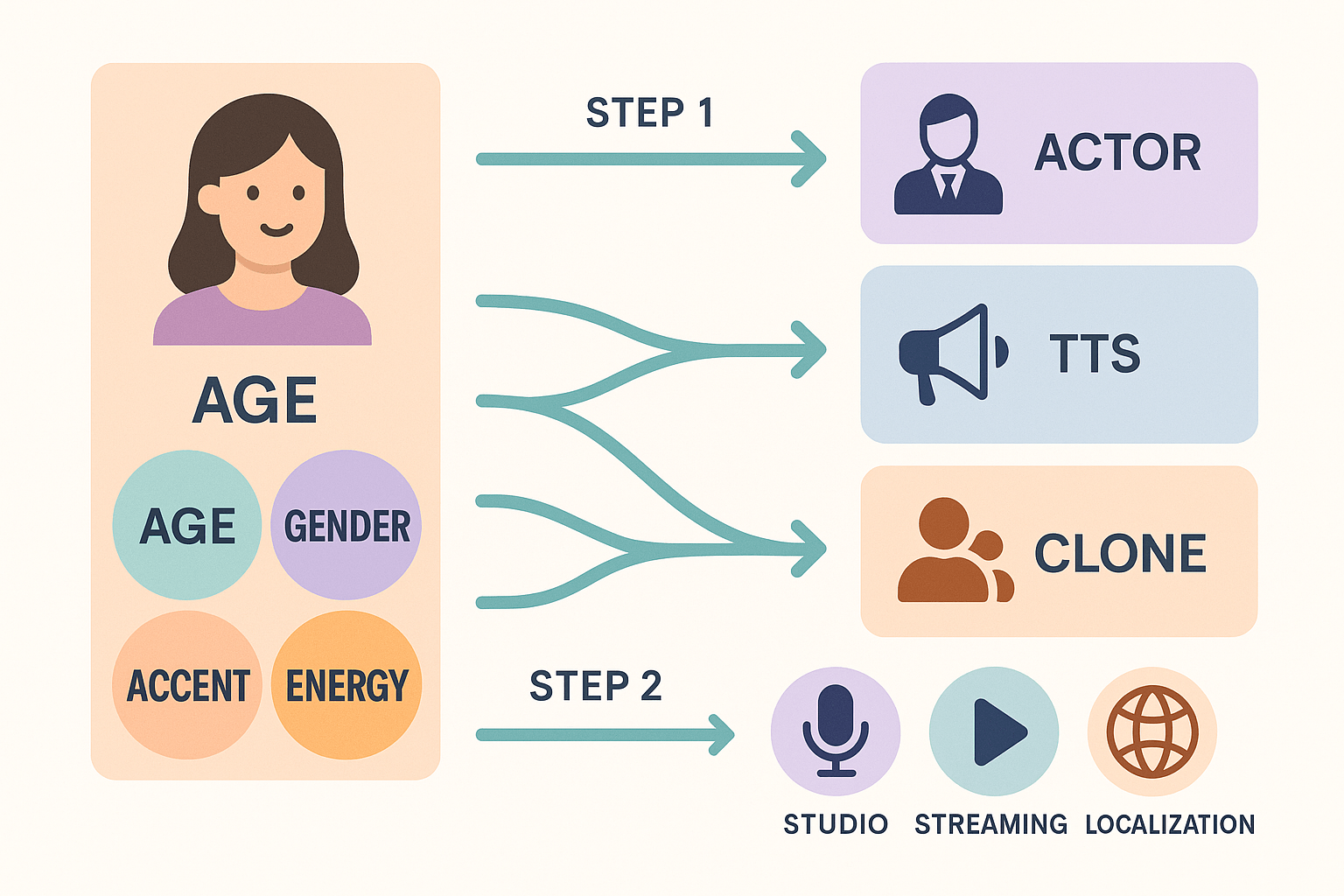
Brand fit: Does this voice match the brand personality, friendly or authoritative?
-
Channel fit: Is the spot for drive-time radio, streaming, or a podcast ad?
-
Audience fit: Does the voice mirror the listener in age, region, or lifestyle?
Write direction notes and a tight voiceover brief
-
One-line role: who is speaking and why.
-
Desired tone: two adjectives, for example warm and brisk.
-
Pacing and pauses: mark beats after hooks or before the CTA.
-
Pronunciations and local terms: list brand names, places, and tricky words.
-
Deliverables and file specs: format, length, and stem tracks if needed.
Practical tips for AI voice matching and cloning
Industry-specific script templates and annotated examples
Hospitality / Resort: 30-second sample
-
Hook: Immediate imagery, two short phrases to paint the scene.
-
Offer: Clear stay incentive, promo code for tracking.
-
Social proof: Short testimony idea, "Families love our kids club." Use actual brief reviews when available to comply with truth-in-ad advertising.
-
CTA: Website plus promo code, easy to say and remember.
-
Voice: Warm, mid-40s female or neutral mid-30s male with calm pacing.
-
Accent: Use local accent for regional radio, or neutral national accent for syndicated spots.
-
DupDub tips: Use TTS for rapid A/B voice tests, clone a brand spokesperson for consistent reads, and export SRT if you add subtitled social clips.
Retail / Flash Sale: 15-second punch
-
Hook: Urgency and the word today create immediate action.
-
Offer: Short, numeric discount works best.
-
Social proof: Use scarcity instead, for a faster spot.
-
CTA: Street location and website for omnichannel conversions.
-
Voice: Energetic, younger male or female, faster tempo.
-
Localization: Swap store name and city for each market; use localized promo codes.
-
DupDub tips: Generate market-specific voice variants using cloning, and batch localizations with multi-language TTS for diverse demographics.
Automotive / Service: 30-second trust builder
-
Hook: Safety-focused lead, relevant to car owners.
-
Offer: Free add-on service increases perceived value.
-
Social proof: Credibility from years in market, can include ratings.
-
CTA: Phone plus online booking, two contact paths.
-
Voice: Authoritative, mid-40s male, steady pace.
-
Localization: Mention local landmarks or years in market to boost trust.
-
DupDub tips: Use voice cloning for the owner voice, and TTS for quick localized read variations.
Nonprofit / PSA: 30-second empathy spot
-
Hook: Emotion first, brief scene.
-
Offer: Clear action, simple text-to-donate keyword.
-
Social proof: Peer framing, "neighbors helping neighbors."
-
CTA: Text shortcode for low friction donations.
-
Voice: Calm, compassionate female or male, slower cadence.
-
Localization: Use local charity names and shortcodes where permitted. Verify legal requirements for fund-raising disclosures.
-
DupDub tips: Use TTS for multilingual PSAs, and voice cloning for consistent campaign tones across languages.
-
Hook: TTS and voice cloning to test multiple tones quickly.
-
Offer: Use variants in cloned voices and export audio files for split tests.
-
Social proof: Transcribe real testimonials with STT, then clean and synthesize with TTS.
-
CTA: Localize CTAs and phone numbers with DupDub localization, and export SRT for captioned social cuts.
Adapting scripts for traditional radio vs streaming & programmatic audio
Tune the technical mix first
-
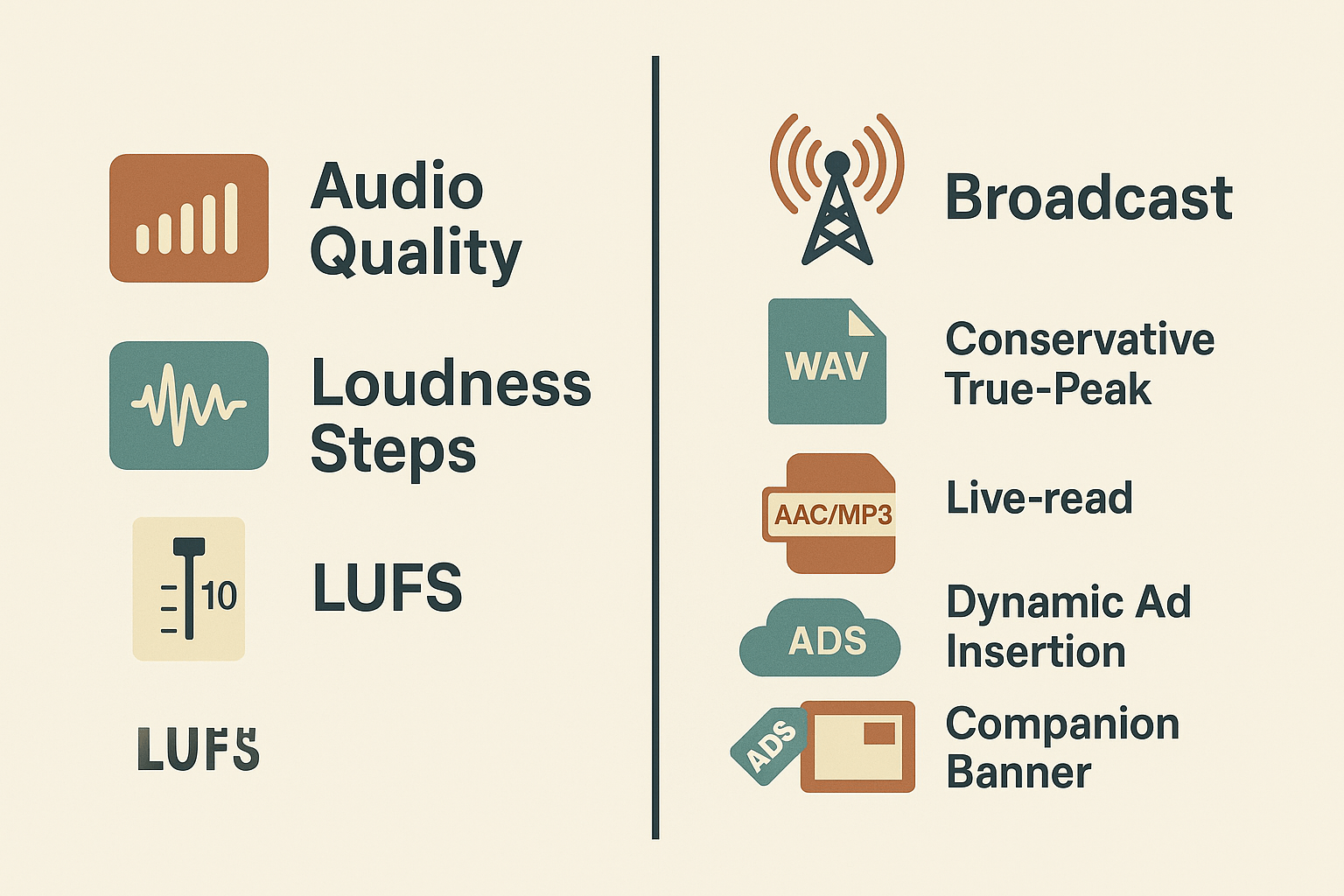
Loudness target: match broadcaster spec or platform LUFS range.
-
True-peak: keep under the station or platform limit (avoid clipping).
-
File format: high-bitrate WAV for broadcast, MP3/AAC for programmatic if requested.
-
Metadata: include ad ID, campaign tags, and companion banner tags for programmatic buys.
Make the script work creatively in both lanes
-
Trim the opening hook by 1 to 2 seconds for live read slots.
-
Add an optional personalized line flagged with [DNI] for dynamic insertion.
-
Provide a station mix and a streaming mix, label both in the deliverables.
-
Supply a clean voice track (no music) for programmatic stitching.
-
Include companion banner copy and image tags in the ad metadata.
Measuring ROI and attribution for radio campaigns
Pick KPIs that map to business outcomes
-
Calls: Track inbound calls with session- or spot-specific phone numbers. Call duration and IVR paths add quality signals.
-
Site visits: Use UTM-tagged landing pages to separate radio traffic from other channels.
-
Promo codes: Give each station, daypart, or creative its own code to tie sales directly to spots.
-
Foot traffic: Measure store visits with POS attribution, loyalty check-ins, or beacon/mobile panels.
Attribution methods that actually work
-
UTM-tagging: Create unique UTMs per creative, station, or flight. Route these to a dedicated landing page that records conversions.
-
Promo codes and vanity URLs: Use short spoken codes and track redemptions in your CRM.
-
Call tracking: Provision dynamic numbers that rotate by ad or region, then feed call records into your analytics.
-
Holdouts and geo tests: Hold some markets back from radio, then compare lift across matched areas.
Run a simple creative lift test (5 steps)
-
Define the outcome, for example phone leads or checkout conversions. 2. Pick two creatives and one control market. 3. Send creative A to market A, creative B to market B, and keep market C as a holdout. 4. Run for a fixed period, then compare lift per market using per-impression or GRP-adjusted rates. 5. Confirm with call recordings, form timestamps, or promo code redemptions.
How to produce and localize radio scripts with DupDub (workflow mapping)
Map tasks to DupDub features
-
Script drafting and polishing: Use DupDub's AI Writing assistant to draft and tighten copy. Export the final script as plain text or a timestamped transcript.
-
Casting and voice selection: Use TTS for category voices, or create a voice clone (30 second sample) to match a brand voice. Test age, accent, and speaking style in the studio UI.
-
Record review and notes: Upload or record a read in DupDub, then use Speech-to-Text (STT) to generate editable transcripts for line-level edits.
-
Localization and translation: Auto-translate the script and generate aligned subtitles or SRT files to match timing.
-
Final audio render: Export MP3 or WAV from the project, with optional AI sound effects and normalization.
End-to-end sample workflows
-
Single-market 30 second ad
-
Write and lock the script in your doc.
-
Pick a DupDub TTS voice and test two tones.
-
Generate a draft MP3 and run quick STT to confirm timing.
-
Apply SFX and export WAV for delivery.
-
-
Multilingual 30 second campaign
-
Source the English master script.
-
Use DupDub AI translate to produce local scripts.
-
For brand consistency, clone a principal voice and synthesize each language.
-
Generate aligned SRT files for review and QA.
-
Export MP3s or WAVs per market and bundle SRT files.
-
Recommended settings and asset exports
-
File type: WAV 48kHz, 24-bit for delivery to stations. Use MP3 192–320 kbps for streaming and ads platforms.
-
Voice quality: Use Ultra voices for high-fidelity ads, Standard for drafts.
-
Localization: Enable subtitle alignment and export SRT for captioned platforms.
-
Transcription: Set STT confidence threshold to 0.8 for cleaner edits.
Privacy, compliance, and approvals
Simple timeline for iterative testing and approvals
-
Day 0: Brief and script lock.
-
Day 1 to 2: Voice tests and draft TTS outputs.
-
Day 3: Internal review with STT transcripts.
-
Day 4: Localization pass and SRT export.
-
Day 5: Final renders and delivery.
Checklist: dos, don’t, legal notes, and technical deliverables
Pre-production checklist
-
Confirm objective and KPI for the spot.
-
Select running time (15, 30, 60 seconds) and timestamp beats.
-
Tag lines, legal copy, and required disclosures.
-
Cast voice options and back-up takes.
-
License music and SFX, or prepare production stems.
Script QA and recording checks
-
Read with stopwatch to confirm final runtime.
-
Mark pauses, breaths, and overlaps for engineers.
-
Flag any brand or product claims that need proof.
-
Produce reference MP3s for localization teams.
Legal notes
Technical deliverables for engineers
FAQ — common questions about radio commercial scripts and AI voices
-
Are AI voices allowed on broadcast radio and terrestrial stations? (AI voices allowed on broadcast radio)
Most stations accept synthetic voices, but rules vary. For a radio commercial script, check your broadcaster, network contracts, and union rules. If an endorsement or talent likeness is involved, disclose as required. See the legal notes in the checklist section.
-
How do I format a 30-second radio script for production? (format a 30-second radio script)
Use a two-column layout in prep, or a single-column readable copy: time stamps, VO lines, SFX cues. Keep copy tight: 6 to 8 lines, 55 to 70 words. Refer to the timing and formatting section for templates and exact timings.
-
Should I choose live VO or TTS for my campaign? (choosing between live VO and TTS)
Pick live VO for high emotion and subtlety. Use TTS to scale, localize, and A/B test quickly. Consider hybrid: live for brand hooks, TTS for localized CTAs. See voice, tone, and casting for guidance.
-
What are DupDub voice cloning limits and privacy controls? (DupDub voice-cloning limits)
DupDub clones from short samples and supports 47 languages. Clones are locked to the original speaker and processed with encryption. Check the product workflow mapping for quota and plan options.
-
How long does production and localization typically take? (expected production timelines)
Simple 30-second edits can be done in a day. Full localization across multiple languages takes days to a week depending on revisions and approvals. Use the DupDub workflow chapter to speed up iterations.
-
Do I need to disclose AI voices in ads and endorsements? (disclose AI voices in ads)
Disclosure rules depend on jurisdiction and platform policies. When a material connection or likeness is present, add a clear note. See legal notes and the checklist for sample copy and compliance tips.

 Discord
 YouTube
 Tiktok
 Twitter
 Facebook
 Instagram