This guide shows how to repurpose content ai. Turn one master script into a podcast, a long video, dubbed versions, and short social clips. Learn transcription, voice cloning, dubbing, and TTS workflows that scale. Keep timing, voice, and subtitles consistent across languages.
Inside you'll find platform recipes for podcasting, dubbed video, and social clips. Find quick time and cost heuristics. See a competitor comparison and two mini case studies. You get visual workflow diagrams and a clear troubleshooting checklist.
Read this if you're a YouTuber, podcaster, e-learning lead, localization manager, or growth marketer. It's for teams that want repeatable, scalable repurposing workflows. Use cases cover e-learning, marketing, and global localization. Sections point to trials and demo pages so you can test fast.
Why repurpose scripts with AI? Benefits & common outcomes
Repurposing scripts with AI opens fast paths to new audiences and formats. If you want to repurpose content ai, AI tools help you translate, dub, and revoice scripts at scale. That means more viewers, listeners, and learners with less manual work.
What you get: reach, speed, and consistency
Localization increases reach by making content native in other languages. AI dubbing and TTS (text to speech) let you publish faster, often in hours instead of days. Voice cloning and consistent styles keep your brand voice steady across formats.
Common business outcomes
-
Faster publishing cadence: more videos and episodes per month.
-
Lower localization cost: fewer studio hours and editors.
-
Improved engagement: native audio and captions boost watch and listen time.
-
Scalable experimentation: test formats and markets without big upfront spend.
Set realistic goals before you buy
Start with clear metrics: new-language launches per month, cost per localized minute, and engagement lift targets. Expect initial setup time for voice tuning and subtitle QA. A small pilot over one or two episodes will show real cost and speed gains.
AI repurposing pays off when you treat it like a production system. Measure cadence, cost, and engagement. Then scale the workflows that hit your ROI targets.
Quick primer: How DupDub fits into a repurposing workflow
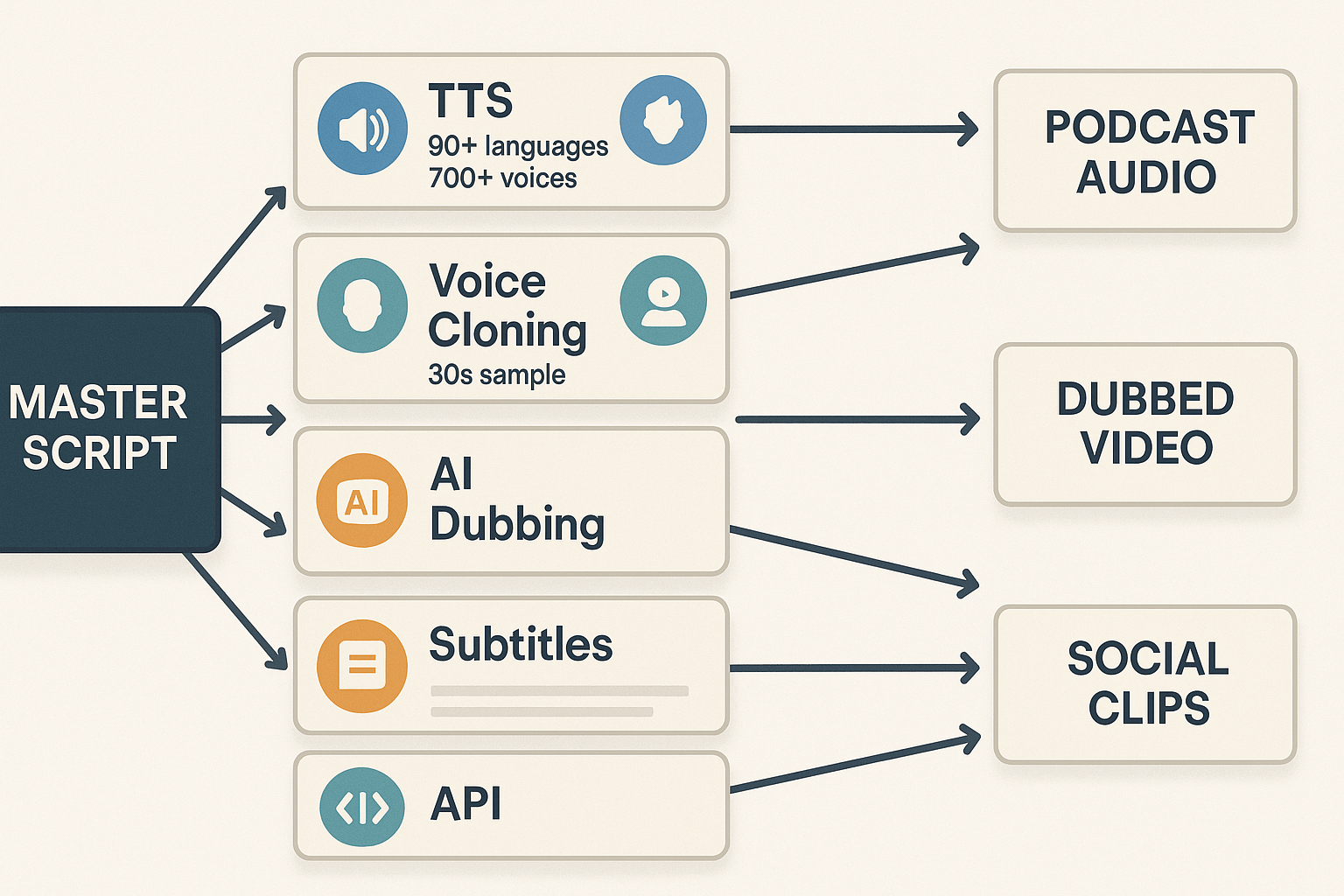
This primer explains how DupDub’s modules map to each step when you repurpose scripts with AI. Use DupDub to turn a single master script into a podcast, a dubbed long-form video, and short social clips. The goal is clarity: which tool to use, and when, so teams can scale fast.
How each DupDub module maps to a script step
-
Master Script to Speech: Text-to-Speech (TTS) generates natural narration from your master script. Use TTS for podcasts, narration tracks, or quick voiceovers without studio time.
-
Voice Consistency: Voice Cloning creates a reusable brand voice from a short sample. Clone once, reuse across episodes and languages for consistent tone.
-
Full video localization: AI Dubbing (video translation and re-voicing) replaces on-screen speech while keeping timing and emotion. That gives you a dubbed YouTube or course video ready for new markets.
-
Subtitles and captions: Speech-to-Text (STT) and AI subtitles produce transcripts, auto-translate them, then align SRT files for publish-ready captions.
-
Short-form clips: Use the editor and TTS or cloned voices to create snackable social clips, with aligned subtitles and optional AI sound effects.
-
Automation and scale: The API and batch export let you automate jobs, spin multiple languages, and pipeline repurposed assets into publishing tools.
Languages, voice counts, and privacy snapshot
DupDub supports TTS in 90+ languages and 700+ voices, voice cloning in 47 languages, and STT/subtitles in 40+ languages. Voice cloning is locked to the original speaker, and processing uses encrypted transfers. Under the GDPR, consent must be freely given, specific, informed, and unambiguous, with clear and plain language used in the request (
Data protection under GDPR - Your Europe). That rule guides how you collect voice samples and consent across the EU.
Want to try one step now? Use DupDub to clone a voice or generate TTS from your master script to test timing and tone.
Quick primer: How DupDub fits into a repurposing workflow
DupDub acts as an all-in-one module set for teams that want to repurpose content ai at scale. It bundles AI dubbing, multilingual TTS, voice cloning, speech-to-text, subtitle alignment, avatars, and an API. This section explains how each module maps to a step in a script repurposing pipeline, so you can pick the pieces you need.
Module mapping: script to output
Start with a single master script, then send pieces to these modules:
-
AI Dubbing: Revoice and translate finished video files, keeping timing and lip sync alignment for dubbed videos.
-
Multilingual TTS: Narrate a script in 90 plus languages with 700 plus voices for podcasts and narrated video versions.
-
Voice Cloning: Create a synthetic brand voice from a 30 second sample, then reuse it across languages for consistent tone.
-
Speech-to-Text (STT): Turn raw audio or uploaded video into a master transcript for editing and timecode-ready subtitles.
-
Subtitles and Alignment: Auto-generate, translate, and sync SRT files for every output format.
-
Avatars and Talking Photos: Add short talking visuals for social clips and localized promos.
-
API and Integrations: Automate bulk jobs, integrate with CMS, or trigger batch dubbing from your pipeline.
Quick flow you can run today
-
Transcribe source audio with STT and clean the master script.
-
Choose voice: clone the host or pick a TTS voice for each language.
-
Run dubbing or TTS, add subtitles, export podcast audio, long video, and short clips.
Privacy and compliance notes for localization managers
DupDub supports TTS in 90 plus languages, voice cloning across 47 languages, and STT and subtitles in 40 plus languages. Voice cloning is locked to the original speaker, processing is encrypted, and the platform states data is not shared with third parties. The service says it is GDPR aligned, but verify enterprise controls during procurement.
Step-by-step workflow: From master script to podcast, long-form video, and social clips
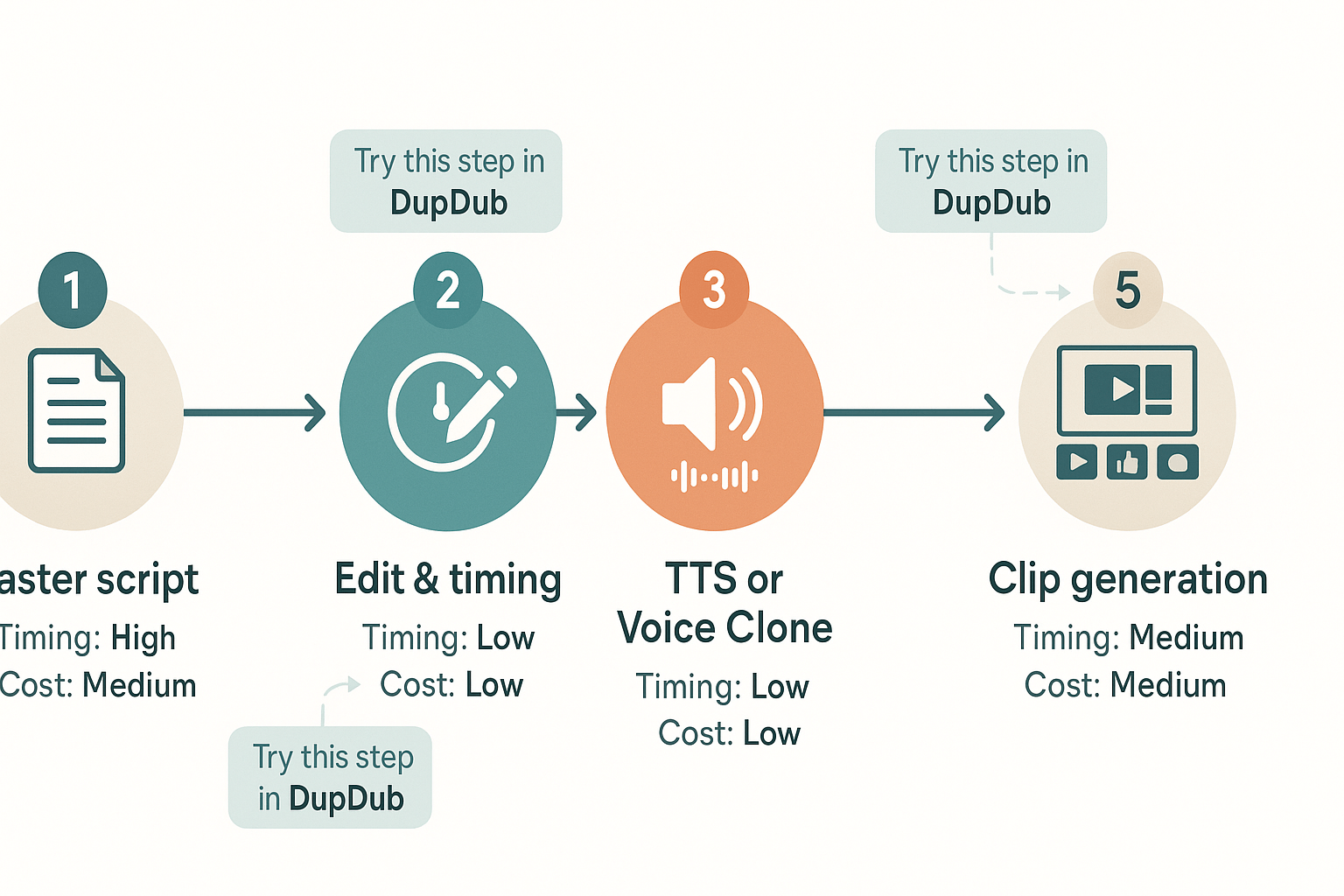
Start with one canonical script and treat it as the single source of truth. This keeps messaging consistent while you repurpose content ai across audio and video formats. Below is a compact, repeatable recipe that covers preparing the master script, picking TTS or a voice clone, making dubbed video with synced subtitles, and batch-creating short social clips.
1) Prepare the master script: canonical, timed, and tagged
Write a clean, spoken-word version of your script. Keep sentences short and mark natural pauses and emphasis as [PAUSE:0.8s] or (soft emphasis), so voices and captions read naturally. Time the script roughly to your target: note the average speaking rate (140–160 wpm for narration). Tip: add visual cue tags for cuts, B-roll, or on-screen text.
Timing heuristic: 1,000 words ≈ 6–7 minutes of spoken audio. Cost heuristic: minor editing only costs human time, not processing credits. Try this step in DupDub to import and align transcripts early.
2) Choose voice: TTS or voice clone
Decide if you need brand continuity or speed. Use TTS for fast, multi-language output and many voice styles. Pick voice cloning when you need the original host’s tone and persona (requires a short sample). Actionable tip: test both on a 30–60 second excerpt to compare emotion and clarity.
Timing heuristic: voice test takes 5–15 minutes. Cost heuristic: TTS is faster and cheaper; cloning has an upfront sample but scales well. Try this step in DupDub to preview TTS and clone options.
3) Create dubbed video with subtitles and alignment
Generate a synced dubbed track from your master script and existing video. Upload your video, map the master script to the transcript, then apply the chosen voice. Auto-generate subtitles, translate if needed, and check alignment visually.
Practical tips: keep subtitle lines to 35–45 characters for readability, and use sentence-case for captions. Timing heuristic: a 10-minute video takes 10–30 minutes to process and quick QA. Cost heuristic: allow small per-minute processing credits for dubbing and subtitle translation. Try this step in DupDub to export MP4 plus SRT files.
4) Batch-generate short social clips with captions
Break the master script into 15–60 second highlight clips. Create templates: intro hook, core idea, CTA. For each clip, export the dubbed audio and auto-caption file, then render with a simple visual layout.
Action tips: prioritize moments with strong hooks or visuals, add captions burned into video for silent autoplay, and vary formats for Reels, Shorts, and TikTok. Timing heuristic: batch export 10 clips in 20–40 minutes. Cost heuristic: short clips reduce per-clip processing time and cost.
5) Quick QA and publish checklist
Listen for pronunciation, check subtitle timing, and verify speaker consistency across clips. Run one full-publish test to the channel you use most, then scale.
Try this full workflow in DupDub for a fast, repeatable experiment.
SEO & distribution best practices for repurposed scripts
Start by treating your master script as the canonical asset and plan repurposed pieces as derived versions. If you repurpose content ai, you still need one canonical source to avoid duplicate-content issues and to concentrate ranking signals. Use clear metadata, chapter timestamps, and descriptive captions to make each format discoverable on YouTube, podcast directories, and short-form platforms.
Set one canonical source, then publish derivatives
How to specify a canonical URL with rel="canonical" and other methods To specify a canonical URL for duplicate or very similar pages to Google Search, you can indicate your preference using a number of methods. These are, in order of how strongly they can influence canonicalization: Redirects: A strong signal that the target of the redirect should become canonical. rel="canonical" link annotations: A strong signal that the specified URL should become canonical. Sitemap inclusion: A weak signal that helps the URLs that are included in a sitemap become canonical.
Practical steps: pick one landing page (your site’s longform post or transcript hub) as canonical. Add rel="canonical" tags on derivative pages, and use redirects when you permanently move content. Keep full transcripts and original timestamps on the canonical page so search engines and humans find the source.
Platform checklist: titles, descriptions, captions
-
YouTube: Include the canonical page URL in the top 1–2 lines of the description. Add chapter timestamps, a concise SEO title with target keywords, and translated subtitles for localized uploads.
-
Podcast directories: Put full show notes and the canonical article URL in the episode notes. Use timestamps in notes to mirror chapters and add a short transcript for indexing.
-
TikTok / Instagram / Shorts: Lead with a keyword-rich one-line caption, then add a pinned comment with the canonical link. Use 2–3 relevant hashtags and a short descriptive caption that matches video subtitles.
Localized metadata and quick wins
Translate titles, descriptions, and tags for each target region. Use language and country tags where supported, and upload localized subtitles tied to the audio language. Small wins: consistent filename conventions, a single content hub with rel="canonical", and timecoded transcripts. Those three moves improve indexability and help you reach new markets fast.
Comparison: DupDub vs. competing AI repurposing tools
This section compares DupDub with other AI repurposing vendors. It shows where DupDub shines and where niche tools have an edge. If you want to repurpose content ai across formats and languages, this quick guide helps you pick the right tool for quality, cost, and scale.
Where DupDub excels
DupDub is built for end-to-end dubbing and localization. It combines AI dubbing, voice cloning, subtitle alignment, and TTS in one platform. That reduces handoffs and speeds up global releases. Key strengths include:
-
Full video translation and auto subtitle sync. This saves editing time.
-
Multilingual voice cloning (many languages). You get consistent brand voice.
-
Large voice/TTS catalog and avatar options for diverse formats.
-
API and automation for batch workflows and enterprise scale.
Trade-offs and when niche tools win
No product is perfect for every use case. DupDub focuses on breadth and workflow speed. Some competitors excel at deep voice tuning, ultra-retail pricing models, or novel voice expression. Consider these trade-offs:
-
Advanced voice sculpting: Some specialist vendors offer more fine-grain control.
-
Pricing at very high volume: Pay-as-you-go stacks may beat subscription plans in rare cases.
-
Sample limits: Voice clone creation needs a short sample, and limits vary by plan.
Feature decision guide
-
Prioritize speed and end-to-end automation: choose DupDub for dubbing plus subtitles and API.
-
Need many languages and brand voice parity: DupDub is a strong pick.
-
Want extreme voice customization: evaluate niche TTS or voice studios.
-
Shopping purely on lowest per-minute cost at massive scale: compare pay-as-you-go vendors.
-
Building audio-first podcasts from scripts: pick the tool with best TTS naturalness and workflow integration.
Use this guide to match needs to features. For teams that need dubbing, cloning, subtitle alignment, and automation in one place, DupDub is a practical choice.
Two mini case studies: Real workflows and outcomes
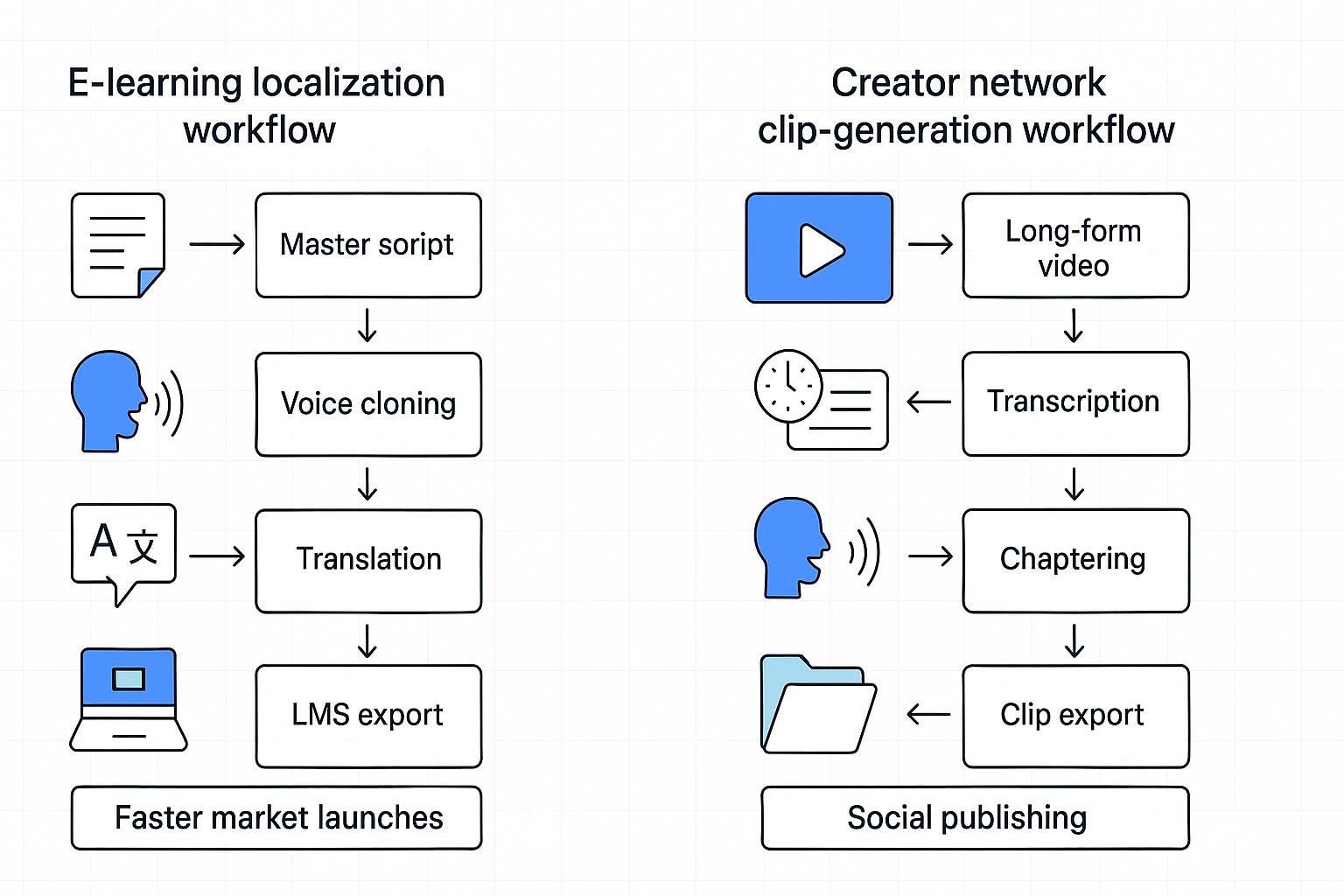
These two short case studies show how teams used repurpose content ai workflows to get more reach with less manual work. Each example lists inputs, the exact steps taken, a simple time and cost heuristic, and measurable operational outcomes. Read them to copy the workflow that fits your team.
E-learning localization: course to three regional markets
Challenge and inputs: A mid-sized e-learning provider needed fast localization for a 10-hour course. Inputs were the master script, source video files, and one brand voice reference.
Steps taken:
-
Transcribe and clean the master script in DupDub for accuracy.
-
Clone the instructor voice with a 30 second sample and generate localized TTS in three target languages.
-
Auto-sync translated subtitles and export dubbed MP4s for LMS upload.
Time and cost heuristics:
-
Setup and voice cloning: 1.5 hours.
-
Per language dubbing and QA: about 4 hours.
-
Credits cost roughly aligned with mid-tier subscription use.
Outcome: The team cut per-course localization time by two thirds, and removed a vendor bottleneck. Localization moved from weeks to days, so the team launched three markets in a single sprint.
Creator network: long video to short clips at scale
Challenge and inputs: A creator network wanted 60 short clips per month from weekly 30-minute episodes. Inputs were episode transcripts and highlight timestamps.
Steps taken:
-
Auto-transcribe episodes and create a master chaptered script.
-
Generate voiced short clips using branded voice clones and add contextual SFX.
-
Export clip batch and publish with platform-specific captions.
Time and cost heuristics:
Outcome: The network increased clip output 3x while keeping a single editor team. Publishing cadence rose, and audience growth became predictable.
"Moving chores like alignment and dubbing into an automated pipeline freed us to focus on quality and reach," says Maya Chen, Localization and Content Ops Manager. Want deeper metrics and source files? Fill our follow-up request form to get the full playbooks and export samples.
Challenges, limitations & troubleshooting checklist
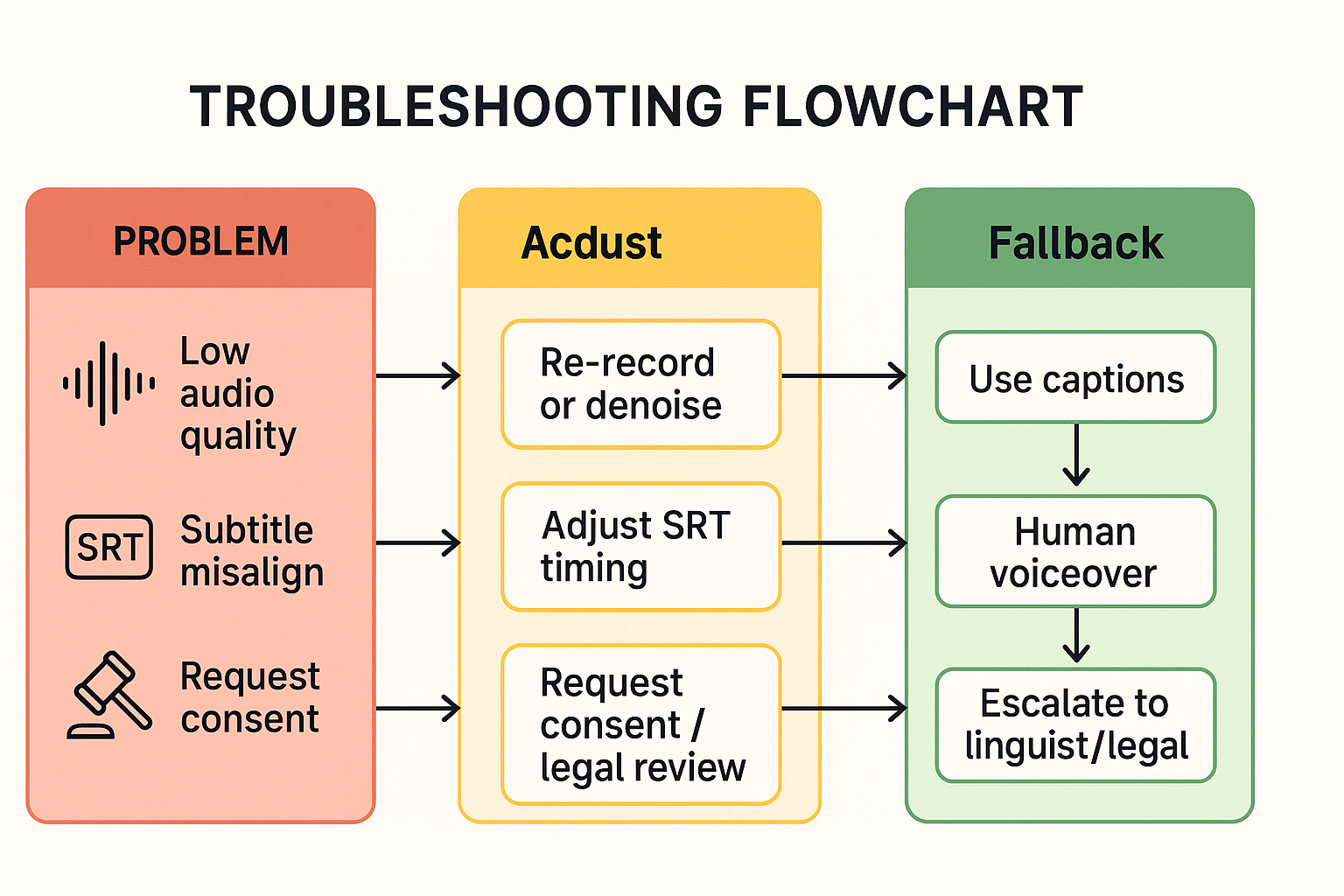
When you repurpose content ai, quality and compliance issues often surface fast. This section lists common pitfalls like bad audio, subtitle drift, and voice-cloning limits. Use the checklist below to verify results, fix problems, and know when to escalate to linguists or legal review.
Common pitfalls to watch for
Audio quality problems, such as hiss or clipping, will break TTS and dubbing. Accent or pronunciation mismatches can make clones sound off-brand. Subtitle alignment errors cause timing gaps that confuse viewers. Voice-clone ethics and legal limits require consent and careful use, especially for public figures.
Quick troubleshooting checklist
-
Verify source audio: check sample rate, clipping, and signal-to-noise ratio. Re-record if SNR is below acceptable levels.
-
Run a shadow listen: compare original and generated audio back-to-back. Flag sections where prosody or timing feels wrong.
-
Fix subtitles: adjust SRT timing in 100–300 ms steps and resync key frames.
-
Tweak TTS settings: change speed, pitch, or style; insert punctuation to influence pauses.
-
Use phonetic edits: add IPA or respell problematic words for correct pronunciation.
-
Fallbacks: fall back to on-screen captions, use human voiceover, or publish original audio if quality is critical.
When to escalate
Route files to linguists for cultural or dialect issues. Send suspicious cloning requests to legal for consent checks. For enterprise scale, ask for a customized workflow or SLA.
Image idea: troubleshooting flowchart mapping triggers to actions and fallbacks.
FAQ — Common questions about repurposing scripts with AI
-
How do I preserve brand voice when I repurpose content in AI workflows?
Maintain one master script and a concise style guide that defines tone, pacing, and vocabulary. Use voice cloning or TTS with approved reference samples and consistent phrasing. Apply curated SSML (speech markup) where supported for pacing and emphasis. Test one pilot episode first, refine settings, then batch apply templates and voice profiles.
-
Is voice cloning legal for repurposing scripts with AI?
Only clone a voice you own or have explicit written permission to use. Keep signed release forms and log usage rights, especially for public figures. Choose tools that lock clones to the original speaker and use encrypted processing. Maintain a clear consent and revocation policy for compliance.
-
How do I measure ROI for AI-repurposed scripts and formats?
Track reach, engagement, and production efficiency. Measure minutes produced per hour, localization cost per language, and incremental views or listens. Compare manual production costs and turnaround time against AI credits and staff hours saved to calculate ROI accurately.
-
How do I avoid duplicate content penalties when repurposing scripts across platforms?
Add unique intros, platform-specific descriptions, and tailored CTAs. Use canonical tags where applicable, include chapter markers, and enrich subtitles to add value. Rewrite headlines and meta descriptions to target distinct search intent for each format.




 Discord
 YouTube
 Tiktok
 Twitter
 Facebook
 Instagram