Text to AI voice means turning written words into spoken audio with software. In simple terms, you paste a script, pick a voice, and get a voiceover file. It’s a fast way to create narration for videos, lessons, ads, podcasts, and support content.
It helps creators, marketers, educators, podcasters, and teams that need more content in less time. It’s also useful for localization, which means adapting content for other languages and regions. If you need clear voiceovers at scale, ai voice text to speech can be a strong fit.
The main benefits are speed, lower production cost, and easier updates. You can test new scripts, swap voices, and publish in multiple languages without booking new recording sessions. That said, voice quality still matters, and so do usage rights, privacy, and commercial terms.
A good tool should sound natural, support your target languages, and fit your workflow. All-in-one platforms can save time by combining text-to-speech, dubbing, transcription, subtitles, and voice management in one place.
What Is Text to AI Voice?
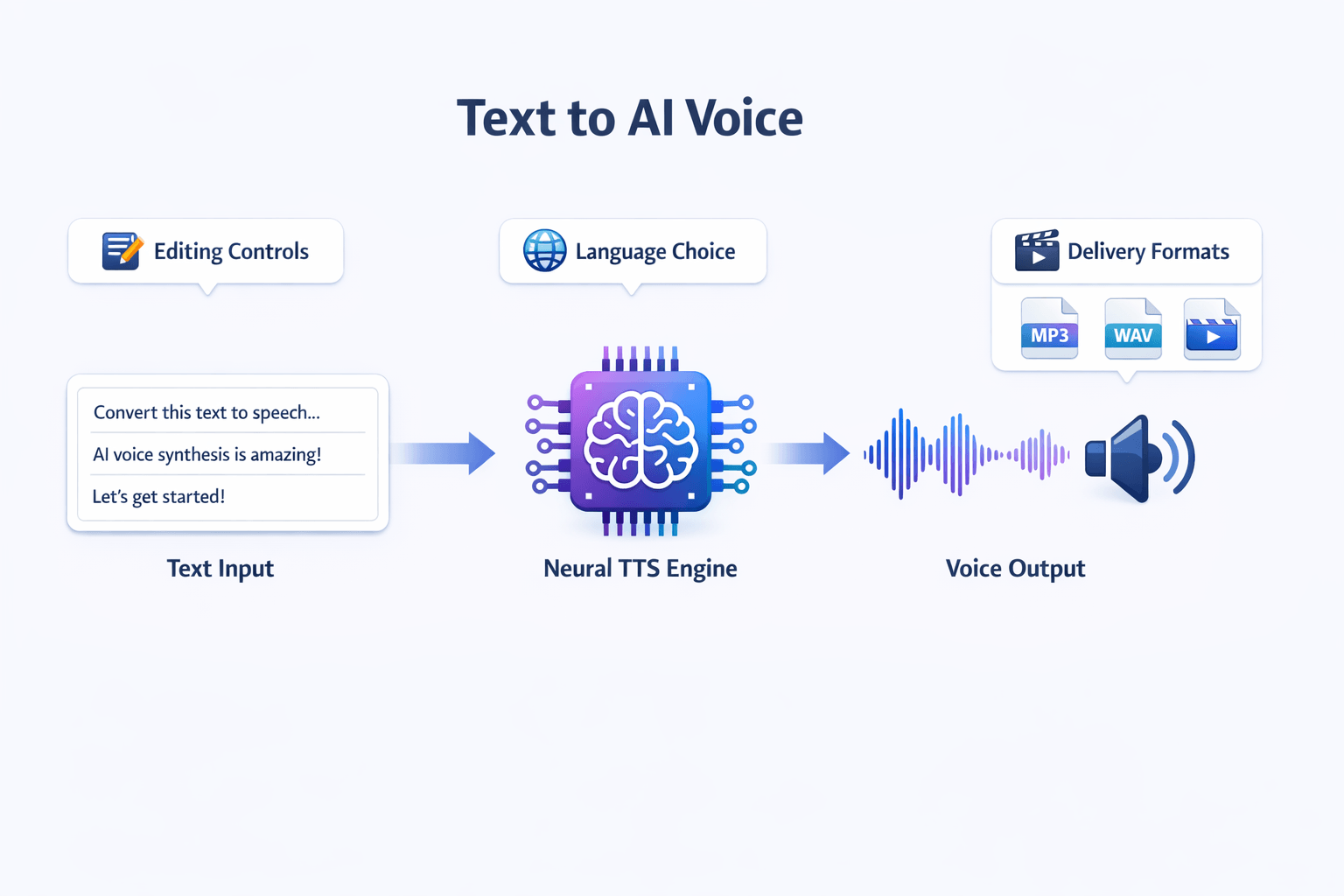
Text to AI voice means turning written words into spoken audio with software. In simple terms, you type a script, pick a voice, and the tool reads it out loud. That’s why people also call it ai text to voice or ai voice text to speech.
It’s different from a normal voiceover. A traditional voiceover needs a human to record each line. With AI, you can edit the text, change the voice, and export a new file in minutes.
Know what powers the voice
Modern tools often use neural TTS, which means neural text-to-speech. It uses deep neural networks, a type of AI model, to turn text into speech. According to the
NIST Computer Security Resource Center Glossary: Neural Text-to-Speech (NTTS), Neural Text-to-Speech (NTTS) uses deep neural networks to generate synthetic speech from text and can produce “higher quality and more natural sounding synthesized speech than prior technologies.”
That’s the big shift. Older systems often sounded flat or robotic. Neural systems do a better job with pauses, tone, and rhythm.
Ask buyer-side questions early
Not all tools sound the same. Some are best for quick social clips. Others fit training, podcasts, dubbing, or multilingual content.
As you compare options, check these points:
-
voice quality and natural pacing
-
language and accent choices
-
editing controls for tone and pauses
-
export formats like MP3 or WAV
-
commercial rights, privacy, and cloning rules
Those details shape whether a tool saves time or creates more cleanup later.
How AI Voice Text to Speech Works
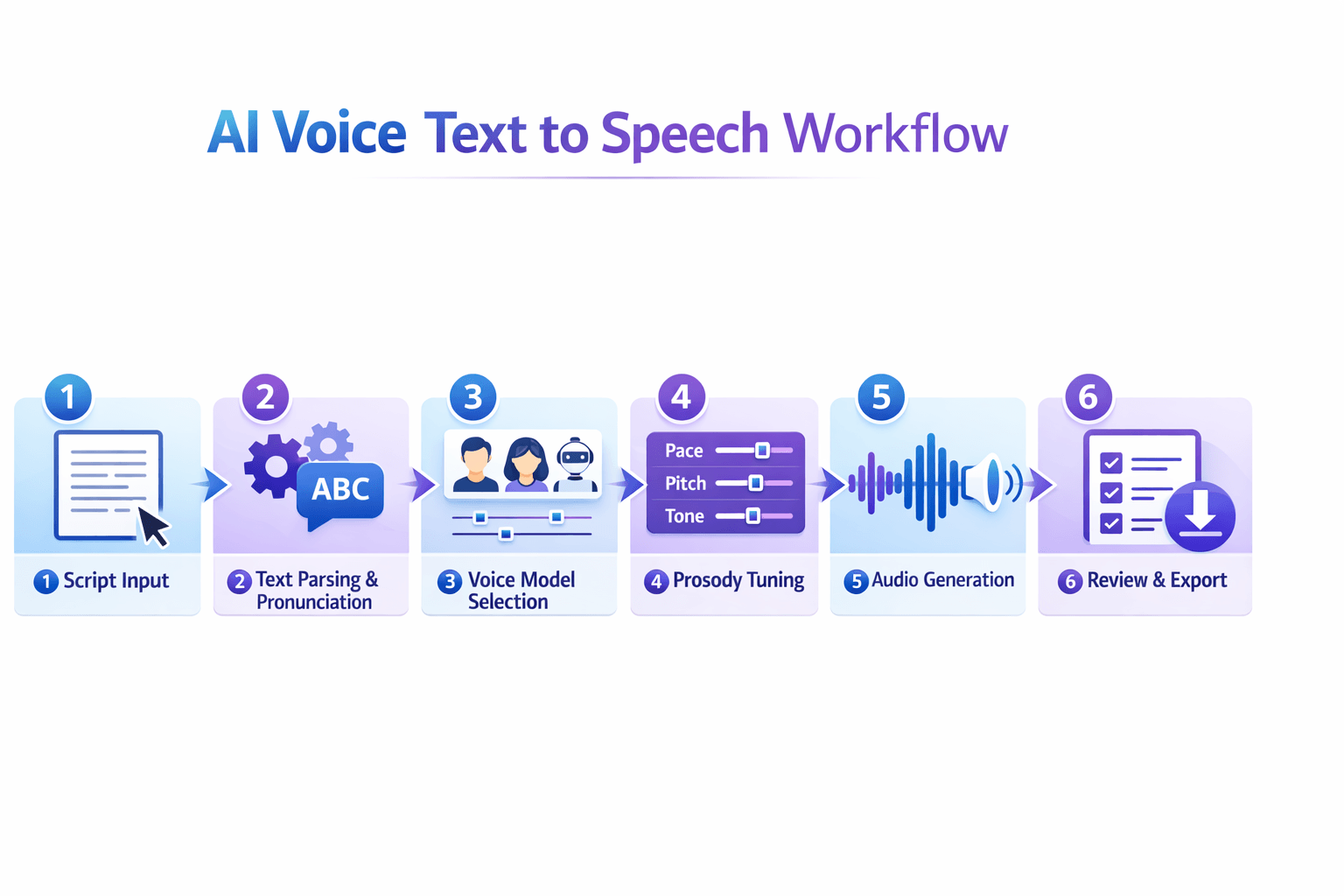
To create text to ai voice, a tool turns written words into spoken audio in a few steps. First, it reads the script, breaks it into parts, and predicts how each word should sound. Then it picks a voice model and renders speech that matches the script, pace, and tone.
Start with script parsing
The system begins by parsing the text. That means it looks at sentences, punctuation, numbers, dates, and abbreviations. This step matters because “Dr.”, “2025”, and “read” can sound different based on context.
Next, the tool handles pronunciation. Good platforms use language rules, phonemes (sound units), and custom dictionaries to say names and brand terms right. Some also let you change pauses, stress, and emphasis by hand.
Shape the voice and delivery
After that, the software applies a voice model. This model controls accent, age, style, and speaking tone. In ai voice text to speech, better models usually sound smoother and more natural.
Prosody tuning comes next. Prosody means rhythm, pitch, and pacing. A strong tool lets you adjust speed, pauses, emotion, and sentence flow before export.
Render, review, and export
Last, the system generates the final audio file, often as MP3 or WAV. You review it, fix weak lines, and export the version that fits your video, podcast, lesson, or ad.
Results vary by tool for a few reasons:
For quality testing,
ITU-T Recommendation P.85 (11/2023) includes methods for subjective performance assessment of speech-based conversational systems with verbal response messages synthesized by text-to-speech systems.
Benefits of Using Text to Voice AI
Text to AI voice helps teams make more content in less time. You can turn a script into audio in minutes, not days. That means faster videos, lessons, ads, and podcasts. It also cuts the back-and-forth that slows most voiceover work.
Speed up production
Traditional voiceover often needs casting, recording, retakes, and editing. AI voice text to speech removes many of those steps. You paste in text, pick a voice, and export. If the script changes, you update the line instead of booking a new session.
Lower costs and keep your voice consistent
Hiring voice talent for every short update gets expensive fast. Text to voice AI lowers that cost, especially for repeat content like product videos, training, and social clips. It also helps brands keep the same tone across channels. That matters when you want every video, lesson, and ad to sound aligned.
-
Fewer production handoffs
-
Faster script updates
-
More consistent voice output
-
Easier content reuse across formats
Publish in more languages
AI text to voice makes multilingual content easier to scale. Teams can create voiceovers for new markets without rebuilding each project from scratch. And when TTS works with subtitles, transcription, and dubbing in one workflow, you save even more time. One script can become audio, captions, translated versions, and localized video with fewer tools and fewer delays.
Where AI Text to Voice Works Best: Real Use Cases
Text to ai voice works best when you need speed, scale, and a clear voice across many formats. It helps solo creators and busy teams turn one script into ads, lessons, videos, and support content without booking voice talent for every update. The biggest win is simple: you create once, then reuse that same message in more places.
Create more content from one script
For marketers, AI voice text to speech is useful for short ads, product demos, and social clips. You can test new hooks fast, swap offers, and update lines without a full re-record. That makes campaign changes easier when timing matters.
For YouTubers and video teams, it speeds up explainers, list videos, and channel trailers. Add subtitles, export clean audio, and reuse the transcript for descriptions or blog posts. If you want to reach more viewers, you can also localize the same video into other languages.
Fit the workflow to the job
Some of the best use cases include:
-
E-learning lessons that need clear, steady narration
-
Podcasts that need intros, ads, or short bonus segments
-
Customer education videos for onboarding and product walkthroughs
-
Sales explainers for websites, demos, and email campaigns
-
Multilingual content for global launches and support libraries
Educators and trainers also get strong value from text to voice ai. They can update a lesson, quiz, or training module in minutes. No need to bring back the same speaker for every small fix.
Support and localization teams can go even further. They can pair ai text to voice with transcription, subtitle translation, and dubbing tools to turn one source script into voiceovers, captions, and regional versions. That saves time, keeps the message consistent, and helps content stay useful longer.
What to Look for in an AI Voice Generator Text to Speech Tool
The best text to ai voice tool should sound natural, but that’s only the start. You also need strong editing, clear rights, fair pricing, and support for your workflow. If you compare tools the right way, you can avoid costly limits later.
Check voice quality first
Start with realism. Listen for smooth pacing, clean pauses, and natural stress on key words. A good ai voice text to speech tool should not sound flat, robotic, or overly dramatic.
Then test control. Look for tools that let you adjust pace, pitch, pronunciation, pauses, and emotion. These small edits matter a lot when you make lessons, ads, podcasts, or product videos.
Match language depth to your needs
Don’t stop at the language count. Check accent range, regional voice options, and how well the tool handles local names and slang. If you publish for global viewers, subtitle support and translation options can save hours.
For teams, workflow features matter too. Look for:
-
MP3, WAV, and video export options
-
Subtitle files such as SRT
-
Shared projects or brand voice controls
-
API access for larger content pipelines
-
Voice cloning with consent checks and locks
Review rights, privacy, and pricing
Before you buy, read the terms for commercial use. Some tools allow business use on paid plans only. Others restrict cloned voices, ads, or client work.
Finally, compare pricing by output, not headline cost. A solo creator may want simple credits and fast exports. A team may need dubbing, transcription, subtitles, and admin controls in one place.
Why DupDub Stands Out for Text to AI Voice
If you want more from text to ai voice than a simple audio file, DupDub stands out. It connects voice creation with dubbing, transcription, subtitles, avatars, and writing tools in one place. That matters when you need to move fast and keep your content consistent across formats.
Instead of jumping between separate apps, you can build one workflow from script to publish. Write or polish a script, turn it into speech, add subtitles, translate video, and repurpose the final content for new channels. For busy creators and teams, that saves time and cuts friction.
Get more than basic text-to-speech
DupDub is a strong fit for creators, marketers, teachers, podcasters, and localization teams that need more than a standalone ai voice text to speech tool. It offers 700+ voices, and
DupDub Text-to-Speech supports 90+ languages and accents. You also get 1,000+ styles, which helps match the voice to the content, like ads, lessons, explainers, or short social clips.
Key modules work together:
-
Text-to-speech for voiceovers
-
AI dubbing for translated video audio
-
Voice cloning for brand or creator voice use
-
Transcription for turning audio into editable text
-
Subtitles for access and localization
-
Avatars and talking photos for face-to-camera content
-
AI writing for drafts, rewrites, and script polish
Match the plan to your workload
DupDub also makes plan choice simple. There is a 3-day free trial with no credit card required, which is helpful if you want to test voice quality first. Paid plans scale from light use to high-volume production, with Personal for solo work, Professional for growing teams, Ultimate for larger output, plus pay-as-you-go credits for flexible needs.
That mix is useful if your needs change month to month. A YouTuber may start with TTS and subtitles. A training team may later add dubbing, cloning, and avatar videos without moving to a new platform.
DupDub vs Typical AI Voice Tools
Most text to ai voice tools sound similar on the surface. But the real gap shows up in the workflow. A basic tool may only turn script into audio. A deeper platform helps you write, edit, dub, subtitle, transcribe, and reuse that content across channels.
Compare the full workflow
When you review any ai voice text to speech tool, look past the voice demo. Ask what happens before and after the audio file is made. That’s often where teams lose time.
|
Need
|
Typical AI voice tool
|
DupDub
|
|
Text to speech
|
Yes
|
Yes
|
|
Voice styles and language range
|
Often limited
|
700+ voices, 90+ languages and accents
|
|
Video dubbing
|
Sometimes missing
|
Built in
|
|
Subtitles and transcript tools
|
Often separate
|
Built in
|
|
Voice cloning
|
Sometimes extra
|
Included across plans
|
|
Content repurposing
|
Manual
|
Writing, transcription, avatars, and dubbing in one place
|
Match the tool to your job
The best fit depends on your goal. Solo creators may do fine with a simple generator if they only need short voiceovers. Marketers, educators, and podcast teams often need more control, better editing, and faster reuse.
Multilingual teams usually need the deepest stack. That means language coverage, subtitle sync, dubbing, and voice consistency in one workspace. If your work includes localization or multi-format publishing, an all-in-one setup will usually save more time than a single-purpose app.
How to Turn Text Into AI Voice With DupDub
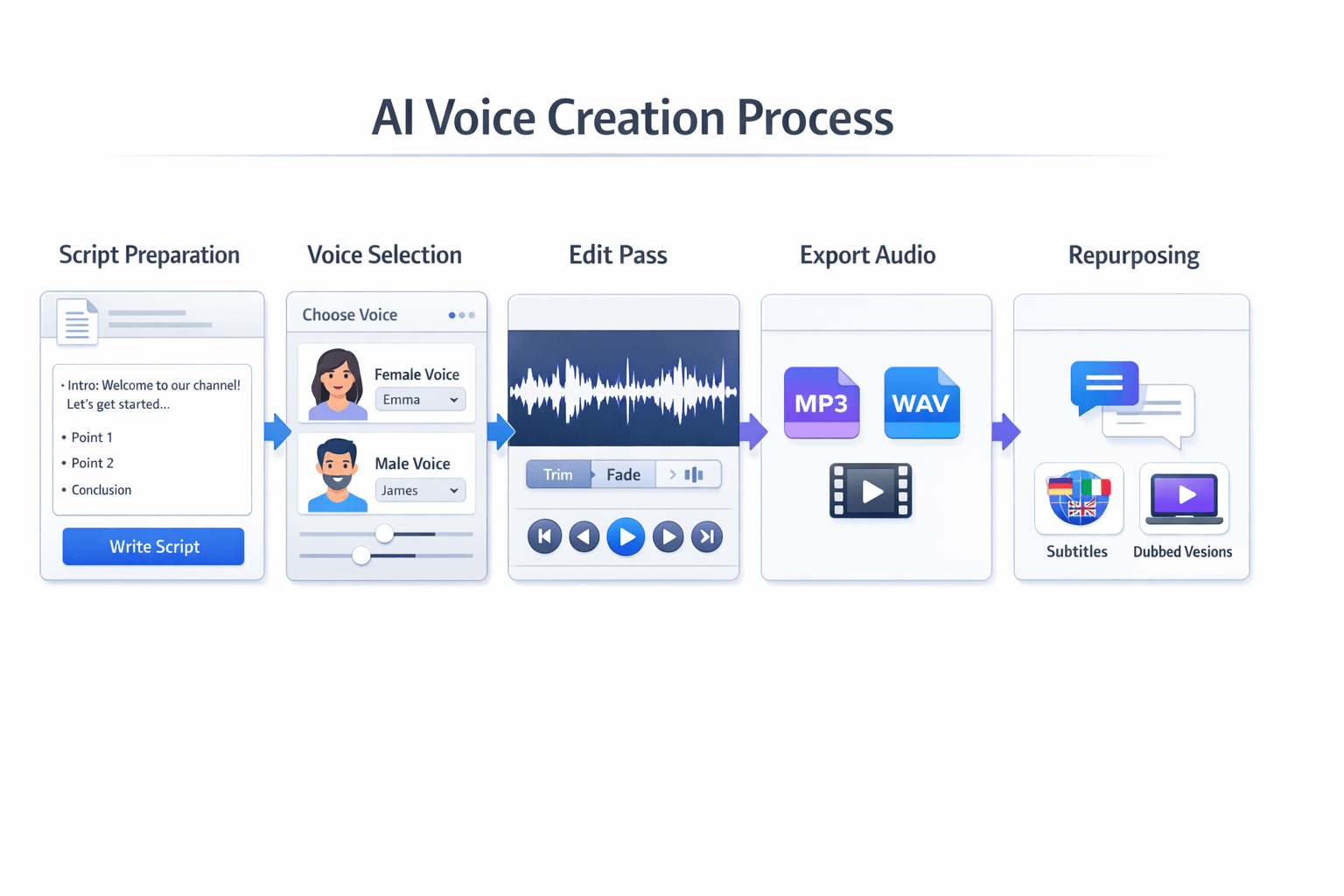
If you want to turn text to AI voice, the process is simple once your script is ready. In DupDub, you can go from plain text to a clean voiceover in a few steps. Then you can reuse that same audio for video, subtitles, and multilingual versions.
Start with a clean script
First, paste in your script and break it into short lines. This helps the AI voice text to speech engine read pauses, tone, and pacing more naturally. Fix hard-to-read names, numbers, and acronyms before you generate audio.
A quick prep pass helps a lot:
-
Split long sentences into shorter ones
-
Add punctuation where you want pauses
-
Spell out tricky words if needed
-
Remove filler or repeated phrases
Pick a voice and tune the delivery
Next, choose a voice that fits your goal. DupDub offers a large voice library across many languages and styles, so you can match a YouTube video, course lesson, ad, or podcast intro.
Then test the delivery. Adjust speed, tone, or style until it sounds right. Listen for pacing, emphasis, and clarity, especially on key lines.
Export and repurpose the result
Once the voiceover sounds good, export it in the format you need, such as MP3 or WAV. You can drop it into a video, pair it with subtitles, or use dubbing tools to create more language versions from the same base script.
That makes one script more useful across channels. You can also add transcription and subtitle files to support editing, accessibility, and reuse later.
FAQ
-
Can I use text to AI voice for commercial projects?
Usually, yes, if the tool gives commercial rights on your plan. Always check the license terms before you publish ads, courses, client work, or paid videos. Some tools limit commercial use on free plans, so read the usage rules first.
-
Is voice cloning allowed in an ai voice text to speech tool?
It can be, but you need clear permission. You should only clone your own voice or a voice you have written consent to use. This helps avoid legal, ethical, and platform trust issues.
-
What file formats should an ai text to voice tool support?
Most users need a few core export types:
MP3 for quick sharing and web use
WAV for higher-quality audio editing
MP4 if the tool also handles video
SRT for subtitles and captions
If you make videos, podcasts, or courses, these formats cover most workflows.
-
How many languages do I need from a text to voice ai platform?
That depends on your audience. If you only publish in one market, one strong voice may be enough. If you localize content, look for broad language support, accent options, and natural pacing across regions.
-
Is there a free way to test output quality before I buy?
Yes, many tools offer a free trial or limited credits. That’s the best way to test voice quality, pronunciation, speed control, and editing flow. DupDub offers a free 3-day trial with no credit card, which is useful if you want to compare features and hear real output before you commit.




 Discord
 YouTube
 Tiktok
 Twitter
 Facebook
 Instagram