


TL;DR, What this guide covers and the quickest path to launch
This guide shows how to wire a text to speech api into automation platforms and node-based orchestrators, and into learning management systems like open-source and hosted LMSs. You’ll get step-by-step recipes, copy-ready code snippets (cURL, JavaScript), node configurations, and SCORM and LTI integration patterns to go live fast. The focus is practical: build a working TTS automation in minutes, then scale with security, rate limits, and cost controls.
Who gets the most value: developers, automation engineers, LMS administrators, e-learning teams, and creators who need scalable narration, localization, or automated audio workflows. Product managers and technical evaluators will find plan comparisons and pricing trade-offs to match credits and quotas to real use cases. A short case study shows pragmatic outcomes for creators and training teams.
One-minute checklist to launch now:
-
Create a free trial account and note your API key (no credit card for trial).
-
Install an automation platform or node-based orchestrator, or access your LMS admin panel.
-
Run the provided cURL example to synthesize a short clip and confirm audio output.
-
Wire the API key into a webhook or HTTP node, then test with a sample text file.
After the quick test, follow the guide sections for production settings, including API key rotation, encrypted storage, and per-workflow rate limiting. Use the cost mapping to pick a plan for ongoing automation. Troubleshooting steps and a short FAQ help resolve common errors fast.
Why choose DupDub's text to speech API for automation and LMS workflows
DupDub's text to speech api gives automation and LMS teams a fast, production-ready way to add natural voice to content. It combines broad language and voice coverage, voice cloning, and scalable API access so you can automate narration, dubbing, and on-demand audio generation in pipelines. This section explains the core capabilities and where DupDub sits in Zapier, n8n, and LMS stacks.
Core capabilities that matter
DupDub focuses on features that teams actually use: high-quality voices, many languages, and flexible output formats. That matters because LMSs and automation systems need reliable audio that matches brand tone and supports many learners.
-
Large voice and language coverage: 700+ voices in 90+ languages and accents, so courses and content sound native to local audiences.
-
Voice cloning: Create a consistent brand or instructor voice from a short sample (useful for course updates and localization).
-
Multiple formats and styles: MP3 and WAV exports, speaking styles, and subtitle-aligned dubbing for video workflows.
-
API-first design: REST endpoints and predictable JSON responses make DupDub easy to script and call from Zapier, n8n, or custom LMS middleware.
-
Security and privacy controls: Encrypted processing and voice-clone protections to reduce data risk.
Where DupDub fits in Zapier, n8n, and LMS stacks
Use DupDub as the TTS engine in three places: lightweight automation, orchestrated workflows, and LMS content delivery. For Zapier, DupDub is the API you call from a webhook or HTTP step to produce quick audio assets. In n8n, it becomes a node in multi-step transformations, handling batch conversion and storing output files. In LMSs like Moodle or Canvas, DupDub generates narrated MP3s, localized videos, or SCORM-ready assets during content build or CI pipelines.
Demand for voice automation is rising; Text-to-Speech Strategic Industry Report 2024 projects the global text-to-speech market will reach USD 9.3 billion by 2030, growing at a CAGR of 13.4% from 2023 to 2030. That growth means teams should pick an API that scales, secures data, and supports many locales.
Compared to alternatives, DupDub balances voice quality, cloning, and localization features with practical automation hooks. If you need a TTS option that fits both Zapier-style recipes and full n8n orchestration, DupDub is a strong candidate for building scalable, multilingual learning experiences.
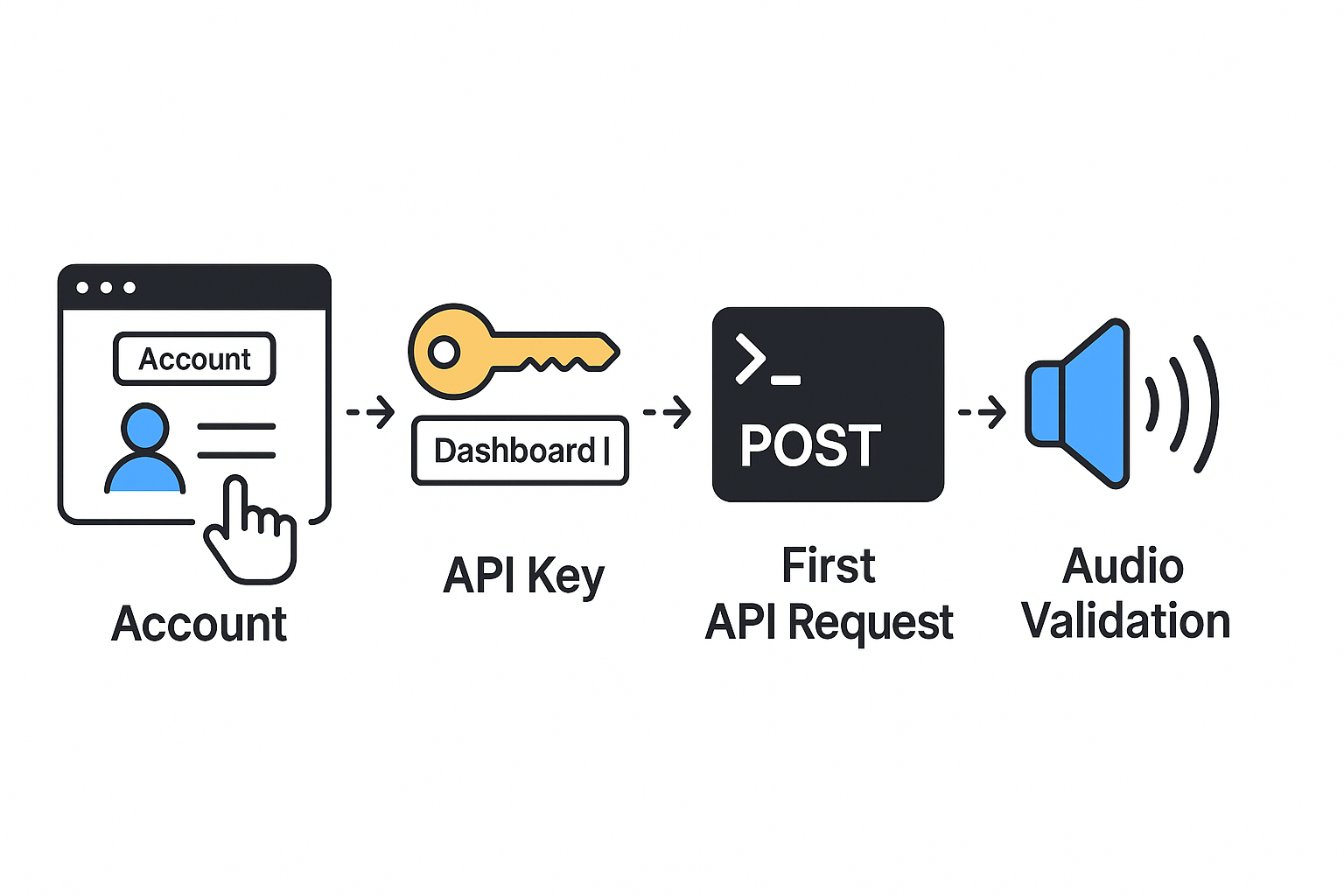
Get an API key, make one request, and confirm audible output in minutes. This quickstart shows exact prerequisites, where to request a DupDub API key, and two copy-ready requests you can paste and run right now. If you want to test a text to speech api fast, this is the fastest path to hear audio from DupDub.
Create your DupDub account and get an API key
-
Sign up for the 3-day free trial on DupDub, no credit card required. The trial includes starter credits so you can test voices and localization.
-
After sign-up, open the dashboard and go to API or Developer settings.
-
Click Create API Key, give it a name (eg. zapier-test), and copy the secret token to a secure place.
Prerequisites before your first request
-
An active DupDub account and API key.
-
curl installed for terminal testing, or Node 18+ for fetch.
-
A short test text, for example: "Welcome to DupDub testing."
-
A writable folder to save the returned audio file.
First request: copy-ready cURL
Use this cURL command, replacing YOUR_API_KEY and the text value. The request returns an MP3 audio file.
curl -X POST "https://api.dupdub.com/v1/tts/speak" -H "Authorization: Bearer YOUR_API_KEY" -H "Content-Type: application/json" -d '{"voice":"en_us_standard_1","format":"mp3","text":"Welcome to DupDub testing."}' --output test-tts.mp3
Run the command, then play test-tts.mp3.
Node (fetch) example
Save and run this in Node 18+ as tts-test.js. Replace YOUR_API_KEY.
const fs = require('fs'); const res = await fetch('https://api.dupdub.com/v1/tts/speak', { method: 'POST', headers: { 'Authorization': 'Bearer YOUR_API_KEY', 'Content-Type': 'application/json' }, body: JSON.stringify({ voice: 'en_us_standard_1', format: 'mp3', text: 'Welcome to DupDub testing.' }) }); const arrayBuffer = await res.arrayBuffer(); fs.writeFileSync('test-tts.mp3', Buffer.from(arrayBuffer)); console.log('Saved test-tts.mp3');
Quick validation checklist
-
File saved: test-tts.mp3 exists in your folder.
-
Playable: it opens and plays in any media player.
-
Voice match: the voice matches the requested voice name.
-
Latency: request completes in a few seconds for short text.
-
HTTP status: 200 OK for successful responses, check JSON error body otherwise.
If you see an error, verify the API key, content-type header, and request body JSON.
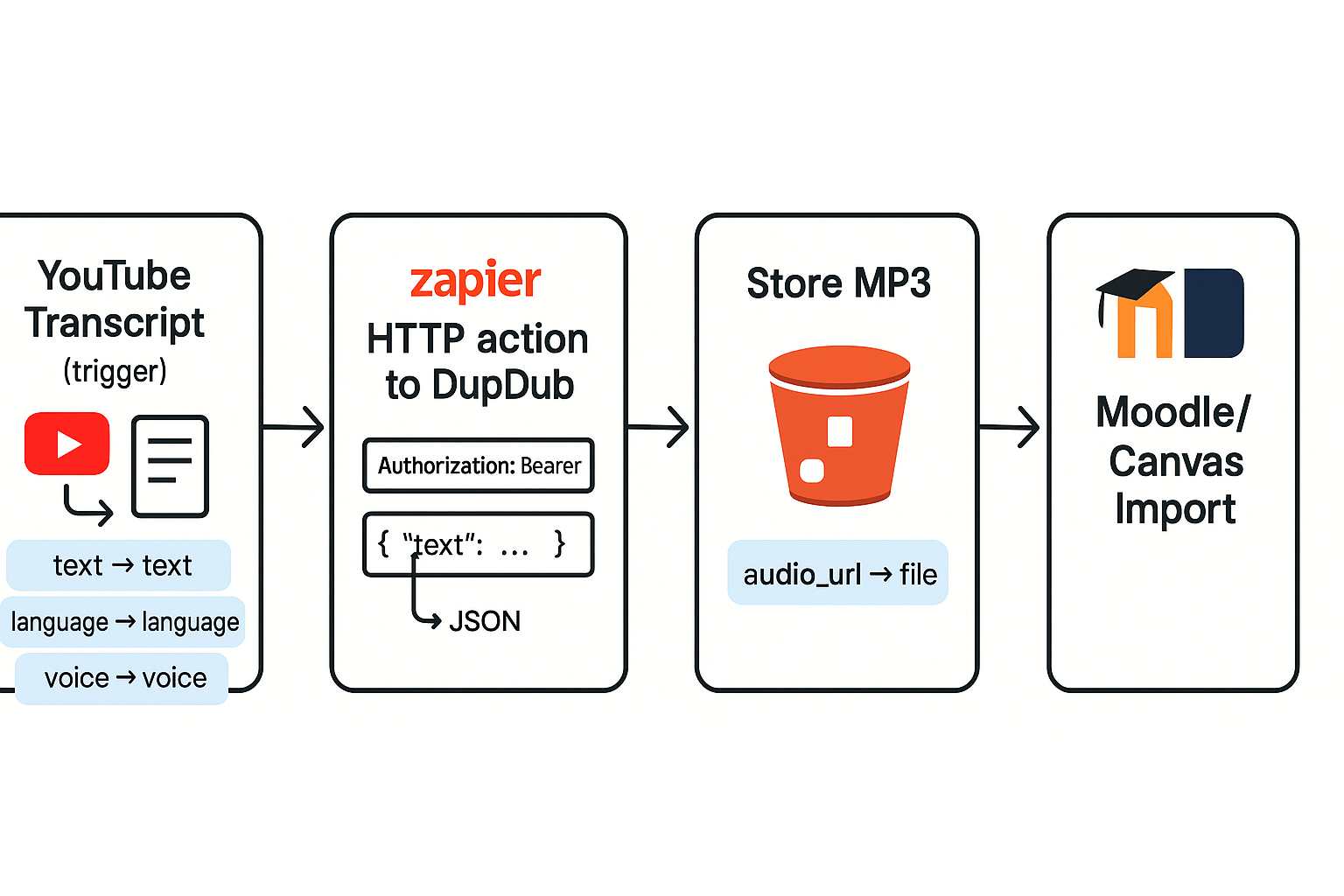
Integrating DupDub into Zapier lets you turn any text source into ready-to-publish audio with minimal work. This recipe shows a practical six-step Zap that converts a YouTube transcript into a narrated audio file. You’ll see how to pick a trigger, call DupDub’s text to speech api, map voice and language, then store the audio for LMS ingestion.
What this Zap does and why it helps
The Zap grabs a new transcript or a new video subtitle, sends the text to DupDub, and saves the returned MP3 to cloud storage. That audio can then be auto-imported into your LMS or used in course pages. This cuts manual recording time and ensures consistent voice across courses.
Six-step Zapier recipe for automated TTS
-
Choose a trigger: new YouTube transcript item, new podcast episode, or form submission. Keep the trigger to the field that contains the raw text.
-
Add a Formatter step if you need to clean or join text segments. Combine paragraphs, remove timestamps, or trim length.
-
Add an HTTP action, method POST, to call DupDub’s TTS endpoint. Use JSON body and set the Authorization header with your DupDub API key.
-
Map fields: map the transcript text to the
textparameter, setlanguage(egen-US), and pick avoiceorstyle. You can also passspeedorssmlmarkup if supported. -
Stream or receive the audio URL from DupDub. Parse the response and extract the
audio_urlor base64 audio payload. -
Save the audio: add an S3 action to upload the file, then add a final step to create or update a course entry in your LMS via its API.
Concrete Zap example: YouTube transcript to LMS
Example flow: YouTube Transcript trigger → HTTP POST to DupDub → S3 upload → LMS import. In the HTTP action, set headers:
Authorization: Bearer YOUR_DUPDUB_KEY and Content-Type: application/json. Body example (single line): {"text": "{{TranscriptText}}", "voice": "en_us_warm_1", "language": "en-US", "format": "mp3"}. Map the Zapier variable that contains the transcript into {{TranscriptText}}.Mapping screenshots explained: in the HTTP action mapping pane, drag the transcript token into the
text field. For voice and language, use static text inputs. In the S3 upload step, map the HTTP response audio_url to the File URL field, or convert a base64 response using a code/utility step.Troubleshooting tip: if audio is missing, check the HTTP response body and Zap history for error codes. If you hit rate limits, add a delay or use batching.
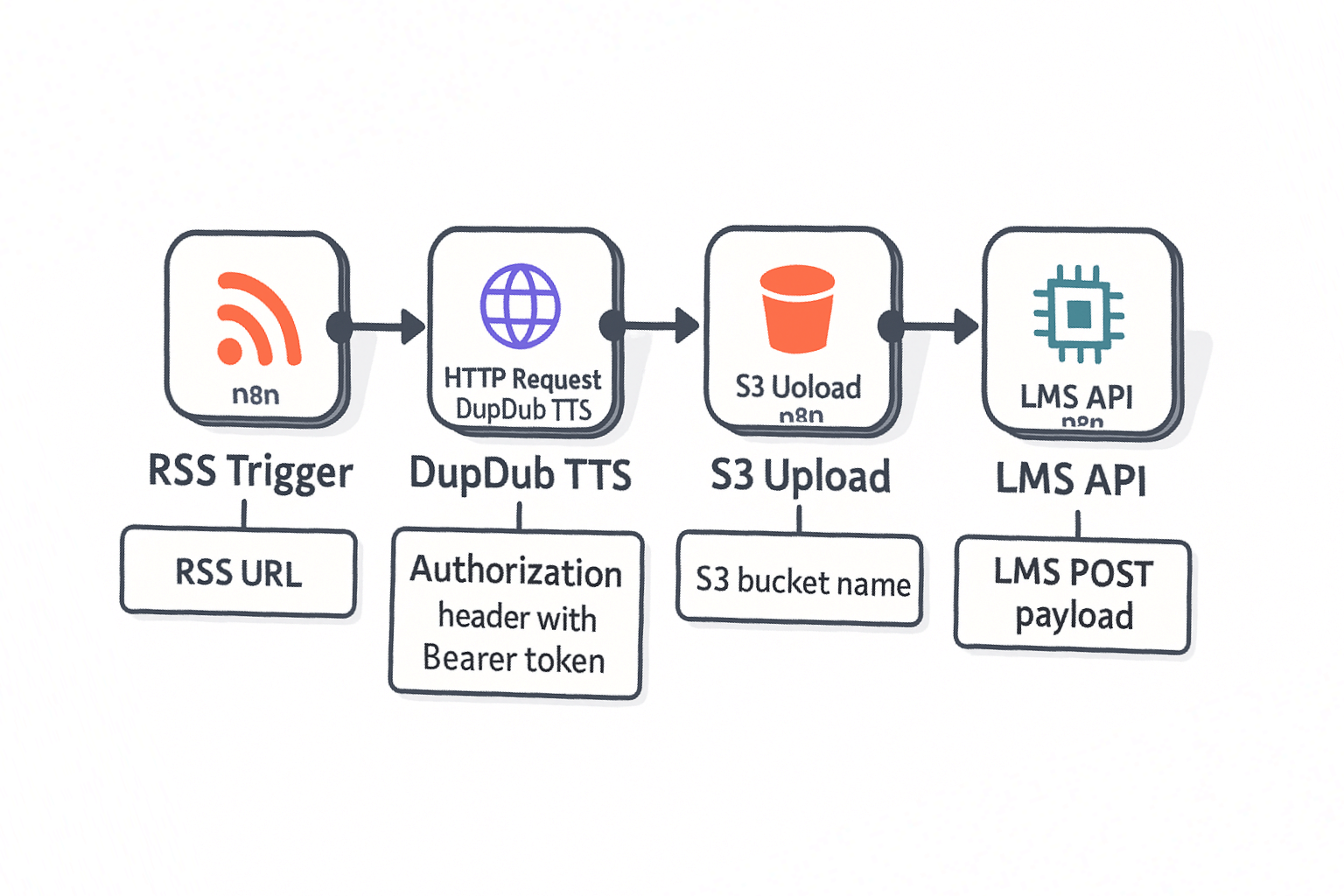
Integrating DupDub into n8n is ideal when you need self-hosted control, complex branching, or advanced error handling in automation. Use n8n for multi-step ETL, on-prem workflows, or when you want open source extensibility. This section shows the exact HTTP Request node setup for DupDub, plus an importable RSS to TTS to S3 to LMS workflow you can reuse.
When to pick n8n over Zapier
n8n gives you more control. It runs on your infra or a private cloud, so you can meet strict security or compliance needs. You also get custom JavaScript nodes, conditional flows, and granular retry logic. Choose Zapier for quick, low-code integrations; choose n8n when you need full control and complex branching.
HTTP Request node: exact DupDub settings
Use the HTTP Request node to call DupDub's TTS endpoint. Set these fields in n8n:
-
Resource: HTTP Request
-
Operation: POST
-
URL: https://api.dupdub.com/v1/tts
-
Authentication: None (pass API key in header) or Credential object mapped to headers
Headers (key: value):
-
Authorization: Bearer {{ $credentials.dupdubApiKey }}
-
Content-Type: application/json
-
Accept: application/json
Body (JSON, raw): { "voice": "en_us_female_01", "language": "en-US", "format": "mp3", "text": "={{ json["title"] + ": " + json["summary"] }}", "speed": 1.0 }
Notes: map text from a previous node using n8n expressions. For large payloads use a multipart upload node or send a reference to stored text.
Reusable RSS -> TTS -> S3 -> LMS workflow
This minimal import snippet shows the core nodes and fields to export from n8n and import into another instance. Replace credential names with your local ones.
{ "nodes": [ {"name":"RSS Trigger","type":"n8n-nodes-base.rssFeedRead","parameters":{"url":"https://example.com/feed.xml"}}, {"name":"DupDub TTS","type":"n8n-nodes-base.httpRequest","parameters":{"url":"https://api.dupdub.com/v1/tts","method":"POST","headers":[{"name":"Authorization","value":"Bearer {{credentials.dupdubApiKey}}"},{"name":"Content-Type","value":"application/json"}],"body":"={{ JSON.stringify({text:json["content"],voice:'en_us_female_01',format:'mp3'}) }}"}}, {"name":"S3 Upload","type":"n8n-nodes-base.s3","parameters":{"operation":"upload","bucket":"course-audio","fileName":"={{node[\"DupDub TTS\"].json[0].id}}.mp3","binaryPropertyName":"data"}},{"name":"LMS API","type":"n8n-nodes-base.httpRequest","parameters":{"url":"https://lms.example.com/api/courses/123/media","method":"POST","headers":[{"name":"Authorization","value":"Bearer {{credentials.lmsApiKey}}"}],"body":"={{ JSON.stringify({title:json[\"title\"],audioUrl:node["S3 Upload"].json[0].location}) }}"}} ] }
Import tip: save the TTS node response to binary data (set Response Format to File) so S3 Upload uses binary input. Replace sample fields with your LMS schema.
Error handling and retries
-
Use a separate Error Trigger to capture failed executions. Log failures to a database or Slack.
-
Wrap the HTTP Request call in a Function node to validate payload size before sending.
-
Configure the Retry option on the HTTP Request node: 3 attempts with exponential backoff.
-
For rate limit responses (429), parse the Retry-After header and schedule the job using the Wait node.
Want to import this workflow or get an API key to test it in your environment? Start your 3-day free trial or request an API key to import this workflow.
Integrating DupDub into LMS (SCORM/LTI): practical approaches for Moodle & Canvas
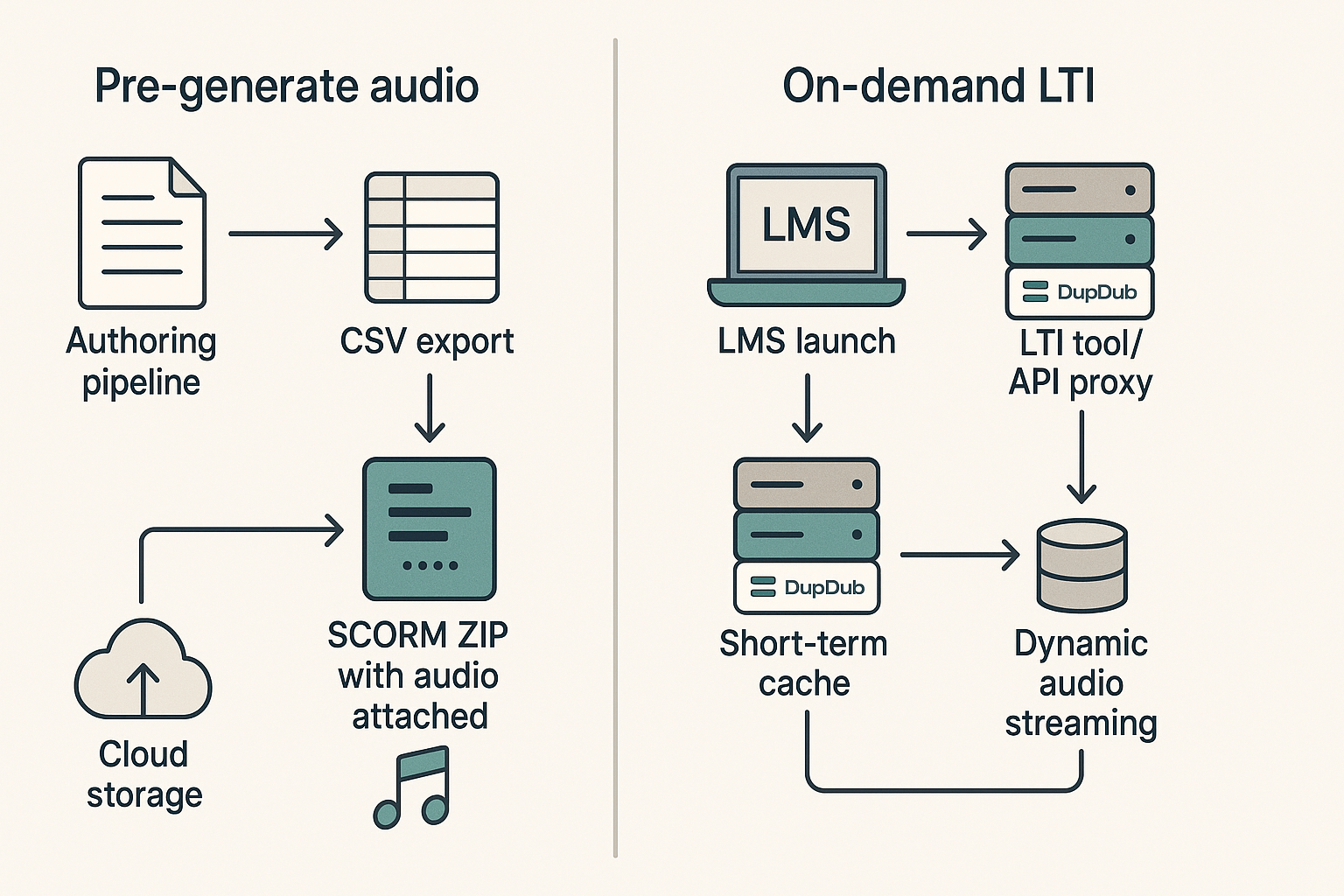
If you need narrated courses fast, there are two clean patterns: pre-generate audio and bundle it with SCORM, or serve audio on demand via an LTI tool or API proxy. The first reduces runtime latency and relies on storage. The second cuts storage needs and lets you personalize audio at play time. Both patterns work well with a text to speech api and map to clear trade-offs: cost, latency, and maintainability.
Pre-generate narration and embed in SCORM
Pre-generating is the simplest route for course teams. Generate all narration files ahead of time using DupDub’s API, then attach MP3 or WAV assets to your SCORM package. For Moodle and Canvas, create a single SCORM ZIP that references audio files per slide or SCO (shareable content object).
Batch-generation tips:
-
Export your course script or slide text as CSV with IDs and language codes.
-
Use a small worker script that calls DupDub in parallel but respects rate limits, outputting filename = courseID_slideID_lang.mp3.
-
Store audio in cloud object storage, then reference public or signed URLs in the SCORM manifest.
Where to place calls to DupDub: run them during authoring or CI/CD. This minimizes run-time latency and avoids per-play API costs. The trade-off: more storage and a need to regenerate when content changes.
On-demand audio via LTI or API proxy
On-demand delivery suits dynamic personalization and multi-language selection. Use an LTI 1.3 tool or a small proxy service that accepts LMS launch requests, fetches the script or captions, calls DupDub, and returns audio or a streaming URL.
Typical workflow for Moodle and Canvas:
-
LTI tool receives launch and user context.
-
Tool looks up the content ID and preferred language.
-
Tool requests audio from DupDub and caches short-term.
Best placement for calls: the proxy or LTI backend. Don’t call DupDub from client-side JS, it exposes keys and increases security risk.
Trade-offs and recommendations
-
Pre-generate: low latency, predictable cost, higher storage.
-
On-demand: lower storage, flexible personalization, variable run-time cost and slight latency.
For most courses, pre-generate core narration and add on-demand variants for localized or personalized segments. For large catalogs, use incremental regeneration and short-term caches.
Best practices: Security, compliance, rate limiting & performance
Start with secure key handling and clear data rules. Treat your DupDub API key like a password. Store keys in a secrets manager (cloud KMS or vault), never in source control, and load them from environment variables at runtime.
Rotate keys, limit scope, and audit access
Rotate keys on a regular cadence (for example every 90 days) and revoke old keys immediately. Grant least privilege to API tokens, use per-project keys, and limit allowed IPs or CIDR ranges when possible. Log and alert on failed auth or unusual usage so you catch leaks fast.
Handle voice data, consent, and GDPR
Collect explicit consent before creating voice clones or storing samples. Keep raw voice files encrypted at rest and retain them only as long as needed. Remember that the European Data Protection Board clarifies in EDPB adopts pseudonymisation guidelines (2025) that pseudonymised data, which could be attributed to an individual by the use of additional information, remains personal data under the GDPR. Make data subject access and deletion easy for users.
Rate limits, retries, and backoff
Handle 429 responses gracefully with exponential backoff and jitter. Example strategy:
-
Wait baseDelay = 500ms, then double on each retry.
-
Add random jitter up to 250ms to avoid thundering herds.
-
Stop after 5 retries and surface an error to the user.
Respect Retry-After headers when present and prefer asynchronous jobs for bulk TTS.
Cache audio, use CDNs, and optimize cost
Cache generated audio keyed by text, voice, and parameters. Serve immutable assets via CDN and set long Cache-Control headers for stable files. For dynamic or personalized audio, use short-lived signed URLs from object storage. Batch small TTS requests into single jobs when possible to reduce per-request overhead and save credits.
Follow secure TLS for transport, enable role-based access, and document retention policies. These steps make integrations with DupDub resilient, compliant, and cost efficient.
Pricing, quotas and cost optimization for automation and LMS use cases
Start by mapping expected hours and calls to credits, then pick the tier that keeps per-unit cost low. This section shows which DupDub plan fits common automation and LMS patterns, and quick ways to cut runtime and request costs. Use the text to speech api sparingly where quality gains matter, and cheaper options where they do not.
Map plans to automation and LMS scenarios
-
Free trial: Explore voices and test flows. Best for proofs of concept and short pilot courses.
-
Personal ($11/yr): Good for single creators and small course libraries with light automation.
-
Professional ($30/yr): Fits teams that run scheduled Zaps or n8n workflows and moderate course exports.
-
Ultimate ($110/yr): Choose this for heavy localization, batch dubbing, and enterprise LMS pipelines.
-
Pay-as-you-go credits: Use for burst workloads, seasonal localization, or one-off large migrations.
Cost saving tactics to use today
-
Shorten SSML markup, remove long pauses, and trim redundant audio. Fewer characters mean fewer credits.
-
Cache generated audio for repeated playback instead of re-requesting.
-
Batch requests for chapters or lessons in one job, not per line.
-
Reserve Ultra or cloned voices for hero content only, use standard voices elsewhere.
-
Lower sample rates for spoken-only lessons, and reuse voice clones across courses.
Choosing subscription or credits
Estimate monthly hours, then map to credits. Keep infrastructure costs in mind; according to ProsperOps 2024 Report on Cloud Cost Optimization, Approximately 50% of the average AWS bill is comprised of compute services, like Elastic Compute Cloud (EC2), Fargate, and Lambda. If you have steady monthly demand, a subscription usually wins. For spikes, buy one-time credits and combine with caching and batching to flatten spend.
Quick checklist:
-
Start with a trial to measure per-minute credit use.
-
Cache aggressively, batch often, and reserve high-quality voices for core content.
-
Re-evaluate every quarter and shift plans as volume stabilizes.
First, a quick view of where a text to speech api adds real value. Developers and creators use it to cut vocal production time, scale language reach, and keep a single brand voice across channels. This section shows three focused use cases and a compact case study, with concrete next steps you can try today.
YouTube creators: translate and dub at scale
Creators want fast, low-cost dubbing that still sounds human. DupDub's multilingual TTS and voice cloning let you replicate a channel voice in many languages from one short sample (voice cloning meaning generating a synthetic voice from a real speaker). Benefits include faster publishing, consistent tone, and higher reach.
How teams use it:
-
Batch generate localized audio for existing transcripts.
-
Swap voices per market using cloned presets.
-
Auto-sync captions and audio for upload.
Quick wins:
-
Export video transcript.
-
Send text to DupDub API for target voices.
-
Replace audio track and upload.
E‑learning: narration, accessibility, and consistency
Course teams need clear narration and accessible audio alternatives. TTS reduces cost versus live voice overs and keeps module updates cheap. Use cases include entire course narration, accessible audio for PDFs, and A/B testing different narrator styles.
Practical tips:
-
Use consistent cloned voices per instructor to keep brand voice.
-
Produce both high and low bitrate audio for LMS delivery.
-
Include short samples for learner preference testing.
Enterprise localization pipelines
Large teams require automation, audit trails, and compliance. DupDub integrates into CI/CD and asset pipelines so content managers can trigger TTS as part of localization runs. This removes manual vendor coordination and cuts time to publish.
Recommended pipeline pattern:
-
Source text pulled from CMS.
-
Translation step (human or machine) outputs per-locale scripts.
-
DupDub API produces audio artifacts.
-
Automated QA checks replace or flag clips for human review.
Mini case study: a course launch localized to five markets
Scenario: an L&D team must localize a 10-hour course into five languages in three weeks. Manual dubbing would take months. They used DupDub voice cloning to keep a single instructor voice and automated the workflow.
Workflow summary:
-
Exported master captions and course slide text.
-
Ran machine translation, then light human editing.
-
Sent final scripts to DupDub via API for cloned voices.
-
Replaced audio tracks in the LMS and ran a quick QA pass.
Outcomes and benefits:
-
Time to publish fell from 12 weeks to 3 weeks.
-
Consistent instructor tone across locales.
-
Lower per-language cost versus studio dubbing.
Next steps: pick one pilot video or module, get a free DupDub trial, and run a single language pass to measure quality and cycle time. Try cloning a short sample voice, then test audio in your target LMS.
FAQ — common questions, troubleshooting steps, and next actions
Why pick DupDub over other TTS APIs for automation (best text to speech api for automation)
DupDub focuses on scalable, automation-friendly TTS and voice cloning. It fits Zapier, n8n, and LMS workflows easily. The text to speech api offers 700+ voices and privacy controls. It also includes voice cloning and avatars for fast localization.
How do I fix low audio quality in TTS outputs (fix low audio quality in tts)
Check sample rate, bitrate, and export codec in your pipeline. Pick higher-quality voices or Ultra mode for clarity. Apply light normalization and reduce transcoding steps. Run A/B tests with voices to pick the best fit.
What causes authentication errors and how to fix them (fix auth errors with DupDub API)
Most auth errors come from wrong keys or header format. Store keys in environment variables and rotate them regularly. Also verify clock sync and correct bearer header syntax. Test with a curl call to isolate the issue.
How can I increase limits and request higher quotas (increase TTS API limits)
To raise quotas, map your expected calls and bursts. Upgrade plans or contact support with usage samples. Enterprises can request custom rate limits and SSO options. Share logs and peak times when you request increases.
Next steps, docs, templates, and trial access (request API key or start free trial)
Next steps: try these resources to move fast. - Read the API docs for endpoints and samples. - Import Zapier and n8n templates to get started. - Start the 3-day free trial or request an enterprise demo. If you need help, contact support from your dashboard.

 Discord
 YouTube
 Tiktok
 Twitter
 Facebook
 Instagram