Concise summary for IT teams evaluating tts lms options: expect a one to three day setup for a pilot if LMS admin access and an LTI 1.3 tool are available. Budget extra time for domain allowlisting, OAuth configuration, and API key provisioning.
Core technical needs: LTI 1.3 (LTI Advantage) with OAuth 2.0 for secure launches, a service account or API key for content uploads, and storage for generated audio files. Verify gradebook and content mapping workflows so audio links appear in the right modules.
Deployment priorities: enforce privacy and voice consent, enable accessible playback controls, and capture detailed launch logs for troubleshooting. Test with screen readers and multiple languages before wider rollout.
Pilot checklist: pick one course, enroll 8 to 12 testers, run a two week trial, gather accessibility and engagement metrics, and review error logs to iterate on config and permissions.
Why TTS matters in LMS: accessibility, engagement, and compliance
Text to speech in learning platforms is no longer optional. For IT teams, adding tts lms features reduces barriers, improves content reach, and lowers support overhead. This section explains the legal drivers, measurable learning gains, and the scenarios that should push TTS to the top of your roadmap.
Compliance drivers, plain and simple
Engagement and learning outcomes
TTS increases content access for students with print disabilities, language learners, and anyone who benefits from multi-modal input. Studies show audio narration can improve comprehension and retention when paired with text. For IT, that means fewer accommodation tickets and clearer evidence of impact when you report to curriculum leaders.
When to prioritize TTS
-
Large populations of students with IEPs or 504 plans
-
High ESL populations or multilingual programs
-
Heavy use of asynchronous content and video
-
Districts aiming for faster accessibility compliance
Who to involve and where to spend resources
Include IT, accessibility coordinators, procurement, and instructional designers. Start with pilot courses and capture usage metrics: time-on-task, accommodation requests, and support volume. Use those numbers to build a simple ROI case and expand from pilots to full rollout.
How DupDub fits into an LMS ecosystem (architecture & modules)
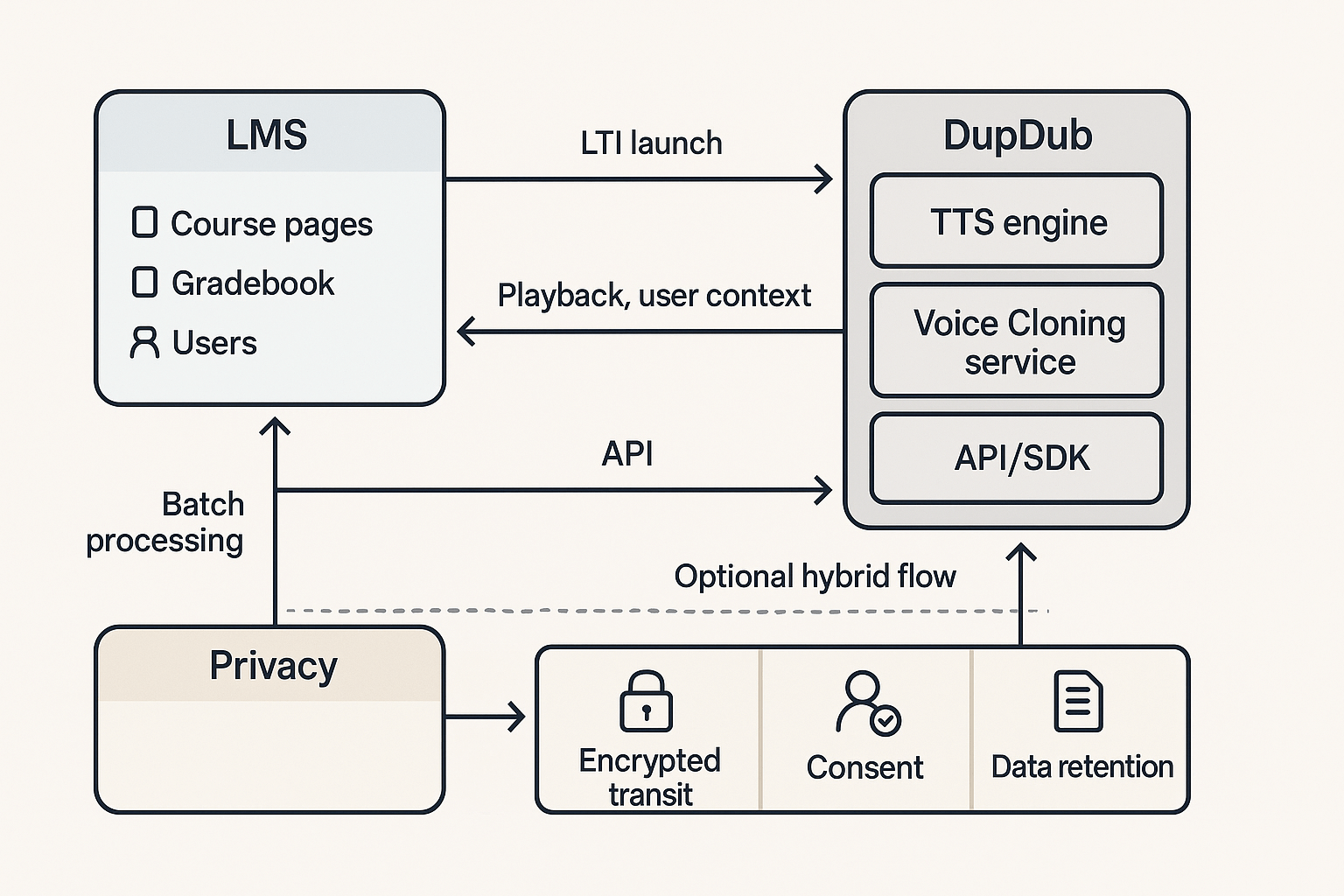
DupDub maps to common LMS patterns by offering three focused modules that IT teams can plug in quickly. This section shows where DupDub's TTS, voice cloning, and API/SDK sit in typical LMS deployments and explains the main integration choices for tts lms use cases.
Core modules and integration choices
-
TTS (text-to-speech): a real-time playback engine you can expose via an LTI (Learning Tools Interoperability) tool or embed with a client-side widget. It handles playback, language selection, and captions.
-
Voice cloning: a managed service that creates speaker models from short samples. Clones are stored with safeguards (locked to the original speaker) and used only with explicit consent.
-
API / SDK: server-to-server endpoints and client SDKs for batch audio generation, automated workflows, and transcript alignment.
Choose LTI launch when you need single sign-on (SSO), user context, and an in-course UI. Pick API embedding when you need backend processing, bulk generation, or deeper automation. A hybrid approach pairs an LTI front end with API processing for scale.
High-level data flows and privacy controls
Typical data flows include LTI launches that pass minimal user context, OAuth tokens for secure calls, and media uploads to DupDub for processing. Encryption in transit and at rest protects files. Voice cloning is opt-in and tied to retention policies so institutions can meet their data governance and accessibility rules.
Integration notes for IT
-
Map data retention to your policy and disable cloning where rules forbid synthetic voices.
-
Use scoped OAuth credentials for LTI tools and API keys for server jobs.
-
Log events for audits and expose consent flows in the LMS UI.
Step-by-step: LTI setup for Canvas, Moodle, and Blackboard (technical guide)
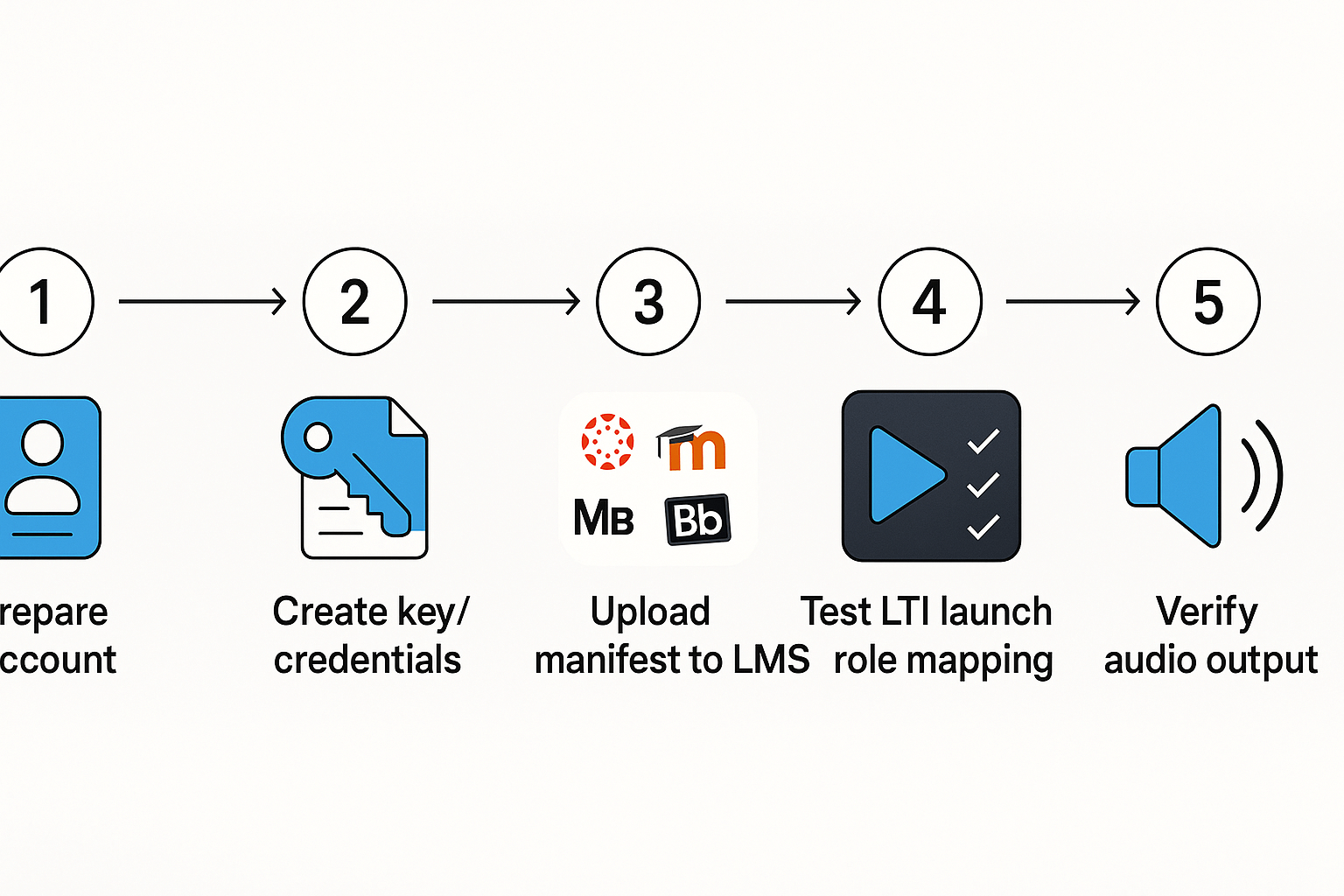
This concise guide walks an IT team through LTI 1.3 deployment for adding DupDub TTS into an LMS. It covers prerequisites, a copy-ready LTI manifest, and exact steps for Canvas, Moodle, and Blackboard. The goal is a fast, repeatable install you can paste and test.
Prerequisites and security checklist
Prepare before you start. Confirm the LMS supports LTI 1.3 and OIDC (OpenID Connect). Generate an RSA key pair for JWT signing and keep the private key secure. Use TLS on all endpoints and publish a valid OIDC configuration URL. The spec notes
RFC 7636: Proof Key for Code Exchange: PKCE (RFC 7636) is an extension to the Authorization Code flow to prevent CSRF and authorization code injection attacks. Map LMS roles to your DupDub app roles (instructor, learner, admin) and decide whether deep linking is required.
Copy-ready LTI 1.3 manifest (annotated)
{ "@context": "http://purl.imsglobal.org/ctx/lti/v1/ToolProvider", "@type": "LtiResourceLink", "title": "DupDub TTS", "description": "TTS and voice cloning for course content", "public_jwk": { /* paste public RSA JWK here */ }, "oidc_initiation_url": "https://your-dup-dub-service/.well-known/openid-configuration", "extensions": [ { "platform": "canvas", "settings": {"privacy_level": "public"} } ] }
Replace public_jwk with your tool key and update oidc_initiation_url to the DupDub LTI endpoint.
OAuth and key example
-
Create an RSA key pair. Save the private PEM securely.
-
Publish the public key as a JWK entry in the manifest.
-
Example OAuth client registration payload for LMS admin console (JSON):
-
{ "client_name": "DupDub LTI Client", "redirect_uris": ["https://your-dup-dub-service/lti/launch"], "token_endpoint_auth_method": "private_key_jwt", "jwks": { /* your public JWK set */ } }
Platform-specific steps
Canvas (developer key)
-
Admin > Developer Keys > +New LTI Key.
-
Choose LTI 1.3, paste the manifest JSON public_jwk and oidc URL.
-
Save and add to an account or course. Test with one instructor account.
Moodle (external tool / filter)
-
Site administration > Plugins > Manage tools > Configure new tool.
-
Upload manifest or paste JSON and set privacy to public.
-
Enable role provisioning and deep linking if needed.
Blackboard (LTI provider entry)
-
Administrator > Building Blocks > LTI Advantage.
-
Register a new tool, enter OIDC URL and JWK set URL.
-
Assign to courses and verify role mapping.
Quick test and validation
-
Launch from a course as an instructor.
-
Verify id_token claims and role mappings in your logs.
-
Check audio generation with a small sample and confirm file export.
For protocol details consult IMS Global LTI 1.3 docs and your OIDC provider.
Common integration pitfalls & troubleshooting checklist for IT admins
A concise, action-first checklist to diagnose and fix common LTI and TTS integration failures. This section covers failed launches, OAuth and JWT issues, CORS and content security problems, role and roster mismatches, and performance or throttling symptoms for tts lms deployments. Each item includes quick commands, typical log entries, and prioritized fixes.
Failed LTI launches and OAuth errors
Symptoms: LMS shows a launch error, blank iframe, or 401/403 response. Check LMS logs for entries like "Invalid client_id" or "JWT verification failed." Quick checks:
-
Run a test POST to the tool launch URL: curl -v -X POST "https://your-dupdub-endpoint/lti/launch" -d "client_id=XXX". Look for 200 versus 401.
-
Inspect the JWT (LTI id_token) locally to verify iss, aud, and exp fields. Use jwt debugging tools or jwt-cli.
Priority fixes:
-
Verify client_id and deployment_id match the LMS record.
-
Confirm LTI keyset URL and public keys in the LMS. Rotate keys if expired.
-
Sync system clocks (NTP) to avoid exp/nbf token failures.
CORS, CSP, and mixed content issues
Symptoms: Browser console shows CORS blocked, Refused to frame, or mixed content errors. Typical messages: "Access to XMLHttpRequest has been blocked by CORS" or "Refused to display '...' in a frame." Quick checks:
Priority fixes:
-
Add dupdub domains to LMS allowed origins and frame ancestors in the CSP.
-
Serve all resources over HTTPS and update any HTTP assets.
Role mapping and provisioning mismatches
Symptoms: Users lack expected capabilities, or rosters do not sync. Logs show missing role claims or invalid scope.
Checks and fixes:
-
Verify LTI roles claim contains expected values (Instructor, Student, etc.).
-
Update the LMS role map to match DupDub expected role strings.
-
Re-run a provisioning sync and confirm group IDs match.
Performance, throttling, and timeouts
Symptoms: Audio generation times out, 429 rate limits, or long cold starts.
Checks and fixes:
Quick troubleshooting checklist (ordered)
-
Reproduce and capture browser console and LMS logs.
-
Validate client_id, tool URL, and keyset.
-
Confirm time sync and JWT claims.
-
Fix CORS/CSP and enforce HTTPS.
-
Validate role mapping and roster sync.
-
Monitor API quotas, add retries, and cache audio outputs.
Comparing TTS options for LMS: DupDub vs competitors (matrix & decision factors)
Choosing a text solution for an LMS means balancing support, privacy, languages, and cost. This section compares the vendor factors that matter for tts lms deployments, and shows how districts and universities should weight them. You’ll get a short matrix and practical guidance for decision making.
Key vendor factors to compare
Focus on five items that drive integration success and total cost. First, LTI support: you need a stable LTI tool for single sign on and grade passback. Second, language and voice coverage: more languages mean better access for diverse learners. Third, voice cloning policy: look for speaker consent and locked clones for privacy. Fourth, API access and automation: this matters for bulk workflows and LMS syncs. Fifth, pricing and licensing: watch per-seat limits, credit models, and district discounts.
|
Factor
|
Why it matters
|
How DupDub compares vs typical competitors
|
|
LTI support
|
Enables easy install and LMS tool management
|
Offers LTI readiness; competitors vary in maturity
|
|
Language & voices
|
Accessibility and multilingual content
|
90+ languages and 700+ voices vs narrower catalogs
|
|
Voice cloning policy
|
Privacy and consent controls
|
Cloning locked to speaker, reduces reuse risk
|
|
API & automation
|
Bulk workflows, rostering, analytics
|
Full API and SDKs, suited for automated pipelines
|
|
Pricing & licensing
|
Budget predictability for districts
|
Tiered plans plus pay-as-you-go credit options
|
Weighting factors: districts vs universities
Districts often value privacy and predictable pricing more. Give higher weight to voice cloning policy and district licensing. Universities may prioritize language coverage and API access for research and global programs. Both need strong LTI support for campus LMS stability.
When combined features matter
If your deployment needs many languages, locked voice clones, and automated workflows, a platform that bundles all three reduces integration work. That makes evaluation simpler and can cut admin effort and vendor overhead. In those cases, the combined capabilities tip the balance toward a single vendor offering strong multilingual TTS, responsible cloning, and robust APIs.
Cost, licensing, and ROI considerations for districts & departments
Choosing a TTS for your LMS means comparing license types, per-use costs, and expected time savings. This section explains common pricing models, summarizes DupDub's trial and tiered plans in neutral terms, and shows a simple district ROI example that you can adapt. It also gives a short procurement checklist for IT buyers working with accessibility and finance teams.
Pricing models and supplier tradeoffs
Most vendors offer three patterns: a free trial, subscription tiers, and pay-as-you-go credits. DupDub offers a 3-day free trial (no card) and tiered plans named Personal, Professional, and Ultimate, plus pay-as-you-go credit packs. Subscriptions give predictable monthly costs and higher included minutes. Pay-as-you-go is flexible for irregular use, but per-minute unit costs can be higher and budgeting is less predictable. Check voice cloning limits, API access, and file-size caps when comparing plans.
ROI example for a district
Example assumptions: 2,000 hours of staff captioning and narration work per year. Staff time to caption or narrate one hour: 2 hours. Average loaded staff cost: $$45 per hour. Automated TTS replaces manual work for 70 percent of that time. For planning, [Ellucian Colleague SaaS Delivered 133% ROI for Higher Education Institutions According to Total Economic Impact](https://www.educause.edu/about/corporate-participation/member-press-releases/ellucian-colleague-saas-delivered-133-roi-for-higher-education-institutions) reported a three-year 133% ROI, which supports cloud edtech savings assumptions. Savings math: 2,000 hours * 2 staff hours per hour *$$45 = $$180,000 total annual labor. If TTS saves 70 percent, annual labor savings =$$126,000. Subtract subscription or credits to get net savings and payback months.
Budgeting and procurement checklist
-
Confirm LTI and SSO support, and API access for automation
-
Verify voice cloning consent and data retention policies
-
Check encryption, GDPR alignment, and SLA terms
-
Estimate annual minutes and pick subscription or credits
-
Plan a 6-12 week pilot, with success metrics (time saved, accessibility tickets closed)
-
Include training and support costs in the purchase order
Rollout & adoption: training, admin workflows, and user feedback
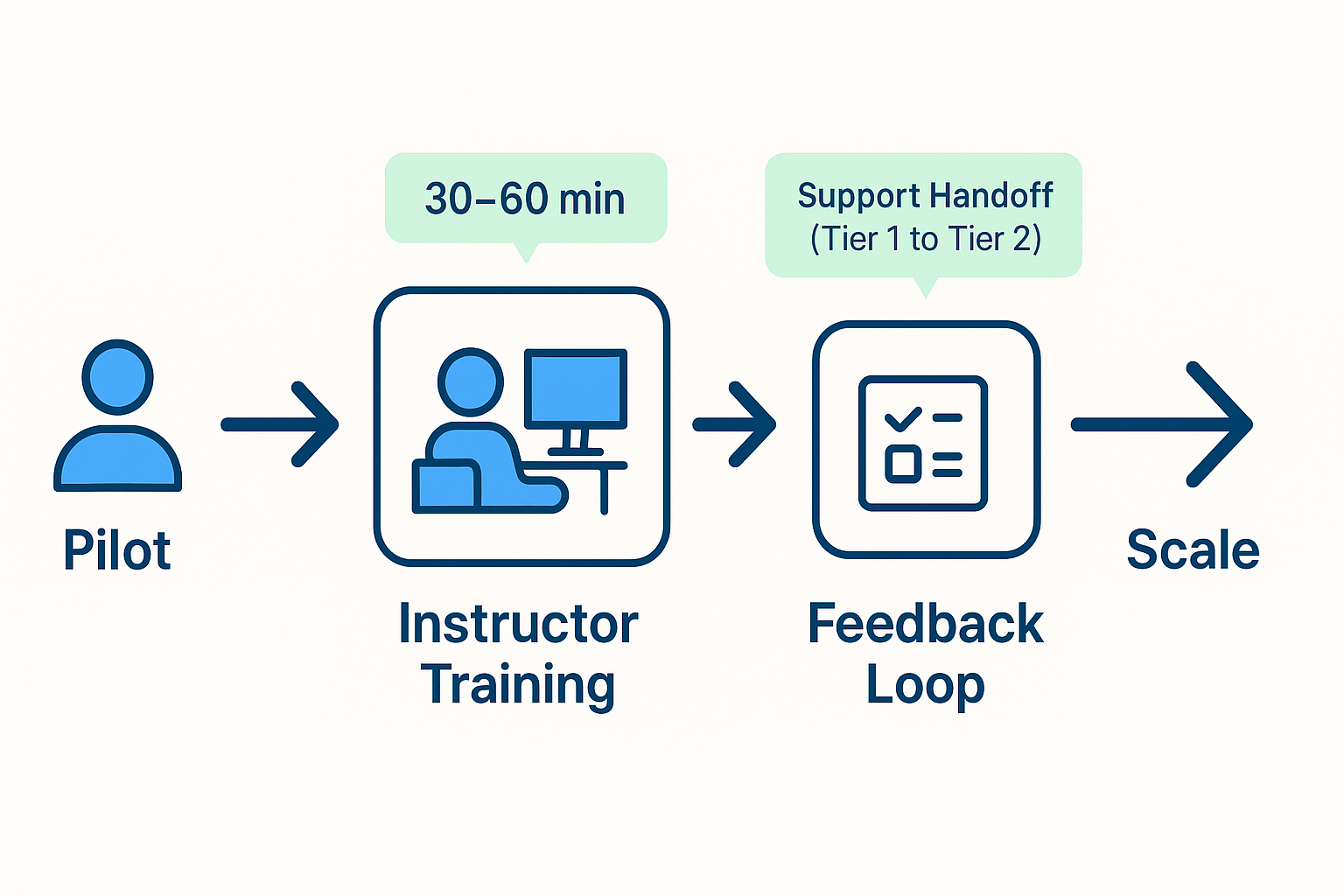
Start with a staged pilot before a district or campus-wide rollout. A small pilot shows how tts lms changes instructor workflow, student access, and support needs.
Pilot design and success metrics
Run a 6–8 week pilot with 3 to 6 classes or one department. Measure instructor uptake, student engagement, time saved on content prep, accessibility compliance, and support tickets. Use simple targets: 60% weekly use by instructors, a 10% rise in student task completion, and under five new support tickets per month.
Training modules for instructors and support staff
-
Instructor intro, 30 minutes: core TTS features, LTI access, and classroom use cases.
-
Lesson builder demo, 45 minutes: creating narrated lessons and captions.
-
Accessibility clinic, 30 minutes: mapping TTS to IEP/504 needs (explain these acronyms once).
-
IT & help desk bootcamp, 60 minutes: LTI provisioning, SSO, error triage, and rollback steps.
Admin workflows and escalation
-
Provisioning: bulk-create accounts via SIS sync or CSV, then map roles (admin, instructor, student).
-
LTI registration: register the tool, set scopes, enable deep linking and user_id privacy.
-
Role-based access: restrict voice cloning and export by role.
-
Support: tier 1 help desk, tier 2 LMS admin, vendor escalation with logs and LTI request IDs.
Feedback loops and iteration
Collect short weekly surveys and a 4-week usage report. Run one-hour instructor focus groups after the pilot, close the loop by publishing fixes and quick how-to notes.
Real-world mini case studies (anonymized): K-12 district & university
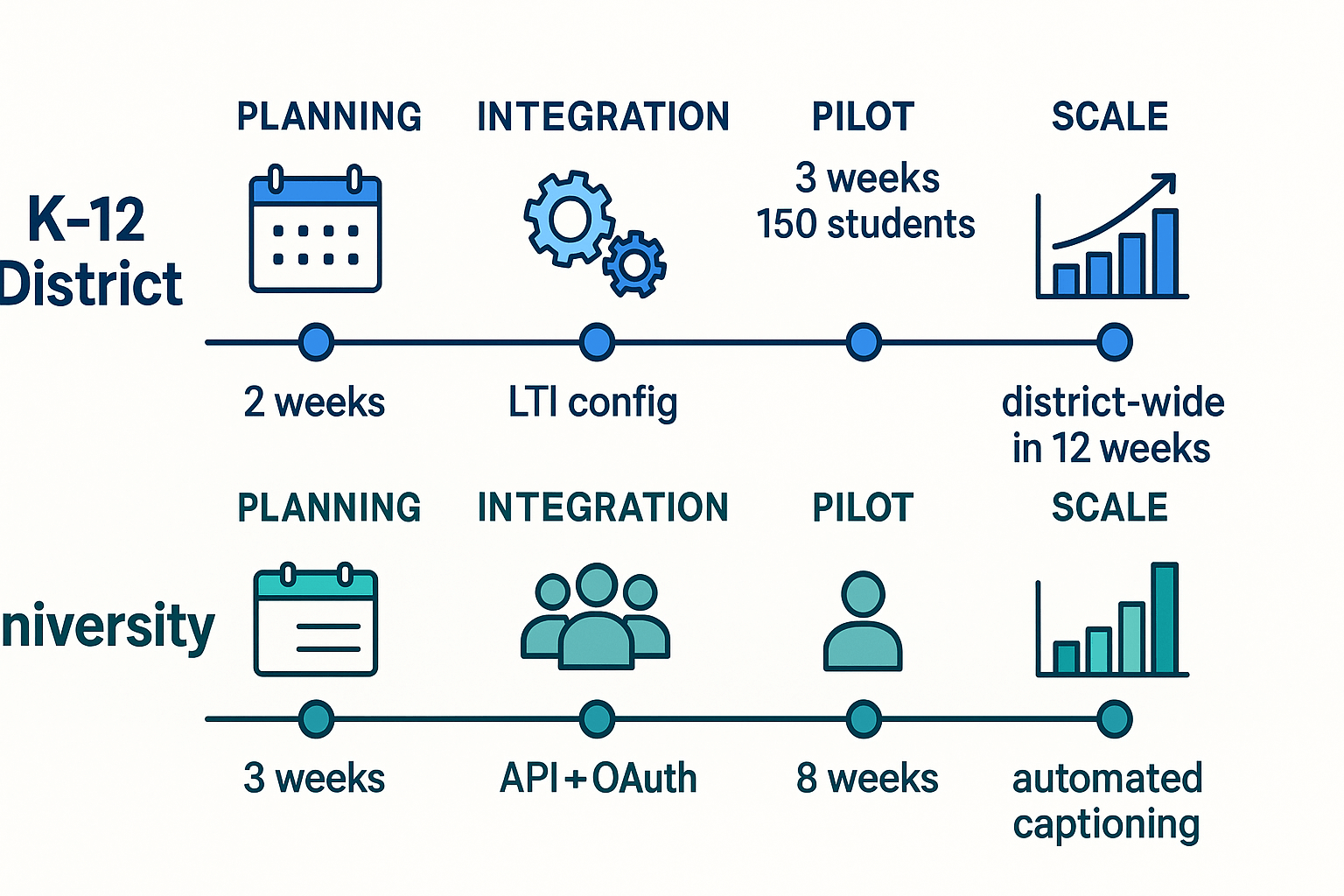
Two short anonymized case studies show scope, chosen path, measured outcomes, and practical lessons for IT teams adopting tts lms features. Each example names the integration approach, deployment times, usage patterns, and an accessibility win. Read these to see what to reuse and what to avoid.
K-12 district: fast LTI rollout
A mid-sized district picked LTI to add DupDub TTS to its Canvas courses. Planning took two weeks, pilot launched in week three, and district-wide rollout finished in 12 weeks. Measured outcomes included rising student engagement and faster IEP accommodations.
-
Pilot metrics: 150 students, average 18 minutes of TTS use per week.
-
Deployment time: pilot in 3 weeks, full roll in 12 weeks.
-
Accessibility win: 60% faster alt-text and read-aloud accommodation fulfillment.
Lesson learned: use LTI for speed, pre-create role mappings, and train teachers in week-one micro-sessions.
University: API-first custom workflow
A research university chose DupDub API for server-side processing and custom caption workflows. Integration required eight weeks, including OAuth and automated media jobs. Outcomes tracked were instructor adoption, request turnaround, and ADA compliance improvements.
-
Usage: 1,200 recorded requests first semester, 85% instructor opt-in for core courses.
-
Turnaround: average 24 hours for processed audio and captions.
-
Accessibility win: notable drop in manual accommodation requests.
Lesson learned: allocate developer time for automation, and log every request for audit and privacy checks.
FAQ — Common questions about tts lms and DupDub LTI integration
-
Typical LTI setup duration for TTS LMS integration
Most basic LTI 1.3 installs take one to three hours: register the tool, exchange keys, and test launches. Full production rollouts with SSO, roster sync, and admin policies usually take one to three business days.
-
What exact data is passed during an LTI launch for TTS LMS?
An LTI launch typically sends OAuth claims and context data: user ID, name, email (if allowed), role, course ID, and context label. DupDub supports minimal scopes so you can restrict PII; review your LMS LTI settings and DupDub LTI docs for scope options.
-
DupDub GDPR and student data posture for TTS LMS deployments
DupDub states encrypted processing and voice cloning locked to the original speaker, and notes GDPR alignment for enterprise reviews. For student data, request a Data Processing Addendum and confirm retention and deletion policies during procurement.
-
Voice cloning usage policies and consent controls for TTS LMS
Voice cloning requires explicit recorded consent and admin approval, and cloned voices are account-bound. Enable consent logs and disable cloning at the tenant level if policy forbids synthetic voices.
-
Enterprise support and SLAs for DupDub LTI integration
Enterprise plans include onboarding, priority support, and SSO configuration help. Ask your DupDub account rep about SLA tiers, dedicated onboarding hours, and training options in the enterprise agreement.




 Discord
 YouTube
 Tiktok
 Twitter
 Facebook
 Instagram