
How to Plan, Produce, and Scale Video Audio Description with AI

Dec 31, 2025 10:1012 mins read
Share to
Contents

TL;DR: What this guide delivers
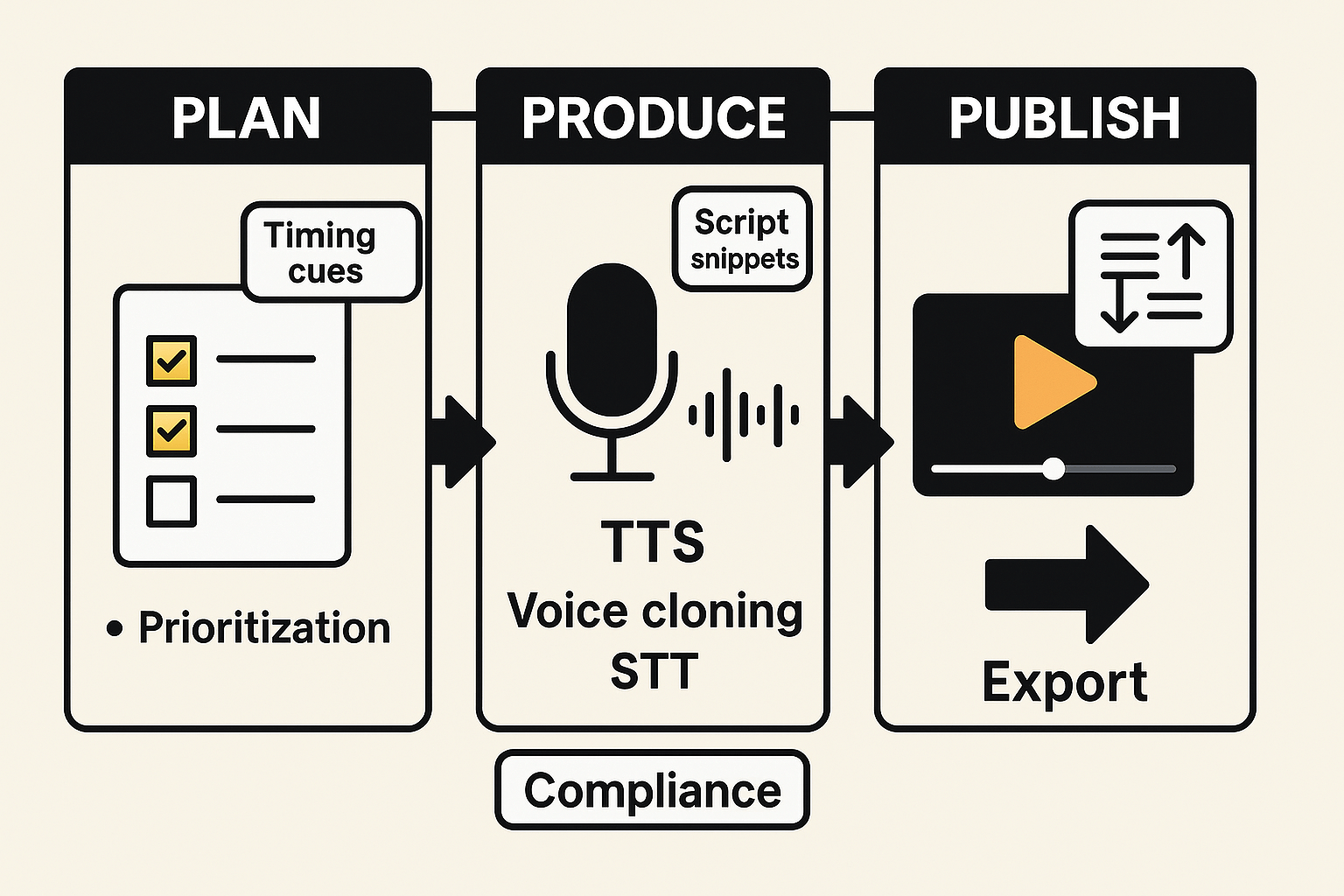
This guide gives a clear, step-by-step AI workflow to plan, produce, and scale video audio description. It includes sample AD scripts with exact timing cues, a practical vendor comparison, and a short case study showing time and cost improvements.
You’ll see how TTS (text to speech), voice cloning, STT (speech to text), and subtitle alignment plug into one repeatable pipeline for creators, accessibility teams, and e learning managers. Expect checklists, timing tables, and production ready script templates.
Use the guide to prioritize videos, run a fast pilot, and embed descriptions in players and LMS without breaking sync. Pilot a small batch and measure cost and compliance before scaling.
Infographic showing a three-step AI audio description workflow: Plan, Produce, Publish, with callouts for TTS, voice cloning, STT, and subtitle sync.

Why audio descriptions matter (accessibility, law, and business case)

Good audio description helps people who are blind or have low vision follow video content. It also improves clarity for learners, drivers, and anyone who watches without sound. This section explains who benefits, why it is a legal requirement in some contexts, and the clear business upside of doing AD well. It uses plain terms and short steps you can act on.

Who benefits from audio description

Audio description (AD) adds short narrated scenes and visual details into gaps in dialogue. People who are blind or have low vision get the clearest gain. So do older viewers, multitaskers, and people learning in noisy places. Accessible AD also helps training programs, e-learning courses, and video catalogs reach more users.
  • Blind and low vision viewers, who rely on spoken context.
  • Learners and trainees, who need clear visual cues in audio form.
  • Mobile and commute audiences who watch with no sound.

Law, standards, and the business case

Many regions expect accessible media, and standards guide good practice. For example, WCAG (Web Content Accessibility Guidelines) defines how to make audio and video usable. According to Movie Captioning and Audio Description Final Rule (2016), the ADA requires movie theaters to provide audio description for digital movies that are produced or distributed with such features. That kind of legal baseline shows why teams must plan for AD early.
Short term, AD adds production time and cost. Long term, it grows reach, improves SEO by creating richer transcripts and metadata, and reduces legal risk. Practical wins include higher watch time, deeper learner retention, and broader audience access. Start by scoring your video inventory and adding AD where it lifts both compliance and audience impact.

Why audio descriptions matter (accessibility, law, and business case)

Audio description gives voice to visual information so people who are blind or have low vision can follow video content. It improves usability for many viewers and reduces legal risk for organizations that publish multimedia. Teams that add audio description gain reach, better user experience, and stronger compliance posture.

Who benefits from audio description

Audio descriptions help a wide range of people, not only those who are blind. They support low-vision users, people with cognitive disabilities who need clearer visual context, and viewers in low-bandwidth situations who listen rather than watch. Content teams also benefit, because described videos perform better in training, courses, and public services.
  • Blind and low-vision viewers
  • People with cognitive or learning disabilities
  • Older adults with reduced sight
  • Users in hands-busy or eyes-busy contexts
  • Instructional designers and compliance teams

Law, standards, and obligations

Audio description is part of accessible media under major guides and regulations. Standards such as WCAG set clear criteria for non-text content and timed media, while regional laws like ADA, Section 508, and the European Accessibility Act require accessible public-facing media. Meeting these expectations reduces legal exposure and aligns content with procurement and accessibility policies.

The business case: reach, SEO, and UX

Described videos reach new audiences and improve engagement metrics like watch time and completion. They support SEO by increasing time on page and enabling richer metadata and captions. For e-learning and corporate training, audio description lowers rework and support costs, and it makes content usable across devices and contexts.

What is AI-generated audio description and when to use it

AI-generated audio description is narrated scene text created by machine tools. It turns visual cues into spoken lines so blind and low-vision viewers understand the action, setting, and nonverbal detail. Modern pipelines use speech-to-text (STT), text-to-speech (TTS), voice cloning, and subtitle alignment to auto-generate and place descriptions in a video.

AD styles: standard and extended

Standard audio description uses short, spare lines placed in natural pauses. It describes key actions, labels speakers, and keeps timing tight so it never overlaps dialog. Extended audio description, sometimes called XAD, adds fuller narration and runs into dialog gaps. Use XAD for long-form media or when visuals need more context, like complex how-to scenes or film with rich visual storytelling.

When AI fits and when humans still win

Use AI when you need scale, speed, or many language versions. Good fits include:
  • Large video catalogs that need consistent description at low cost
  • Iterative edits where descriptions must update quickly
  • Multilingual runs that reuse a single script across voices
Humans should handle nuance, legal risk, or creative judgment. Prefer human narrators for:
  • Legal, medical, or regulatory content that needs exact language
  • High-stakes creative work where tone and timing matter deeply
  • Sensitive scenes that require cultural or ethical judgment
AI and human workflows can combine: auto-generate drafts with AI, then have an editor refine timing and phrasing. This approach saves time while keeping quality high.

Prioritize videos for audio description — checklist & scoring matrix

Start with a fast, repeatable method to triage your library so teams focus on high-impact work first. Use a simple scorecard that balances audience need, legal or compliance risk, and technical effort. This process flags videos for immediate AD (audio description), scheduled production, or low-priority batching.

Quick triage checklist

  • Impact: Does this content reach many users or key customers? Rate 1 to 5.
  • Audience need: Is the video educational, required, or core to a workflow? Rate 1 to 5.
  • Compliance risk: Is it covered by accessibility laws or contracts? Rate 1 to 5.
  • Usage metrics: Views, enrollments, or support tickets. Rate 1 to 5.
  • Technical complexity: Scene cuts, on-screen text, or speaker overlap. Rate 1 to 5.
  • Reusability: Can the AD be reused or templated across content? Yes or No.

Scoring matrix and sample prioritization

Score each video across the five numeric criteria. Sum for a priority score, then apply a complexity multiplier to estimate effort.
Video type
Impact (1-5)
Audience need (1-5)
Complexity (1-5)
Priority score
Short promo clip
4
2
1
7
Short social tutorial
3
4
2
9
Long e-learning module
5
5
4
19
Full training course
5
5
5
20
Use thresholds: 15+ = high priority, 8–14 = schedule, <8 = batch. This helps assign AD resources quickly and predict time per asset.

Step-by-step workflow: Create AD with DupDub (process, sample scripts, timing)

This practical pipeline shows how to plan, produce, and export a video audio description using DupDub. It walks through ingest, transcription, tight AD script drafting with timing cues, synthetic voice generation or cloning, subtitle alignment, and final export. The guide uses the phrase video audio description once to match search intent and keeps each step actionable.

1) Ingest and transcribe

Start by uploading the master video to DupDub or providing a URL. Use DupDub's speech-to-text (STT) to generate a timecoded transcript. Review the transcript for speaker labels and scene notes, and correct any misheard words. Export a clean transcript to use as the base for AD draft.

2) Draft concise AD scripts with timing cues

Write short, descriptive lines that fit natural pauses in dialogue. Aim for 8 to 20 words per AD cue. Use clear timing brackets like [start --> end] to mark when an audio description should play. Keep descriptions concrete, for example colors, actions, and important expressions.
Example AD script snippets with precise timing:
  1. [00:00:03 --> 00:00:07] Woman in red jacket walks to the window, looks out slowly.
  2. [00:00:12 --> 00:00:15] Close-up on map, finger traces a route to the coast.
  3. [00:01:02 --> 00:01:06] Two children laugh and run across the playground, sunlight flares.
These short cues match typical subtitle timing and leave space for spoken AD.

3) Generate voice: TTS or voice clone

Choose DupDub TTS for new synthetic voices or use voice cloning to match an on-brand narrator. Upload a 30 second sample to create a clone, or pick from 700 plus built-in voices. Render the AD lines as MP3, matching the pacing from your timing cues.

4) Align AD audio with subtitles

Import AD audio back into DupDub and use subtitle alignment tools to place AD as a separate track. Adjust millisecond offsets where needed to avoid speech overlap. Export sidecar SRT for the AD track and burn-in MP4 versions when a single-file deliverable is required.

5) Export and QA

Export MP3 for audio-only, SRT for subtitle tracks, and MP4 for video masters. Run a quick accessibility check in a media player and an LMS to confirm sync. Document any tempo changes or reflows for future batches.
How DupDub modules map to each step
  • STT: fast, timecoded transcripts you can edit.
  • Script drafting: use the transcript to build AD cues.
  • Voice cloning and TTS: produce consistent narration across languages.
  • Subtitle alignment: sync AD track and export SRT/MP4.
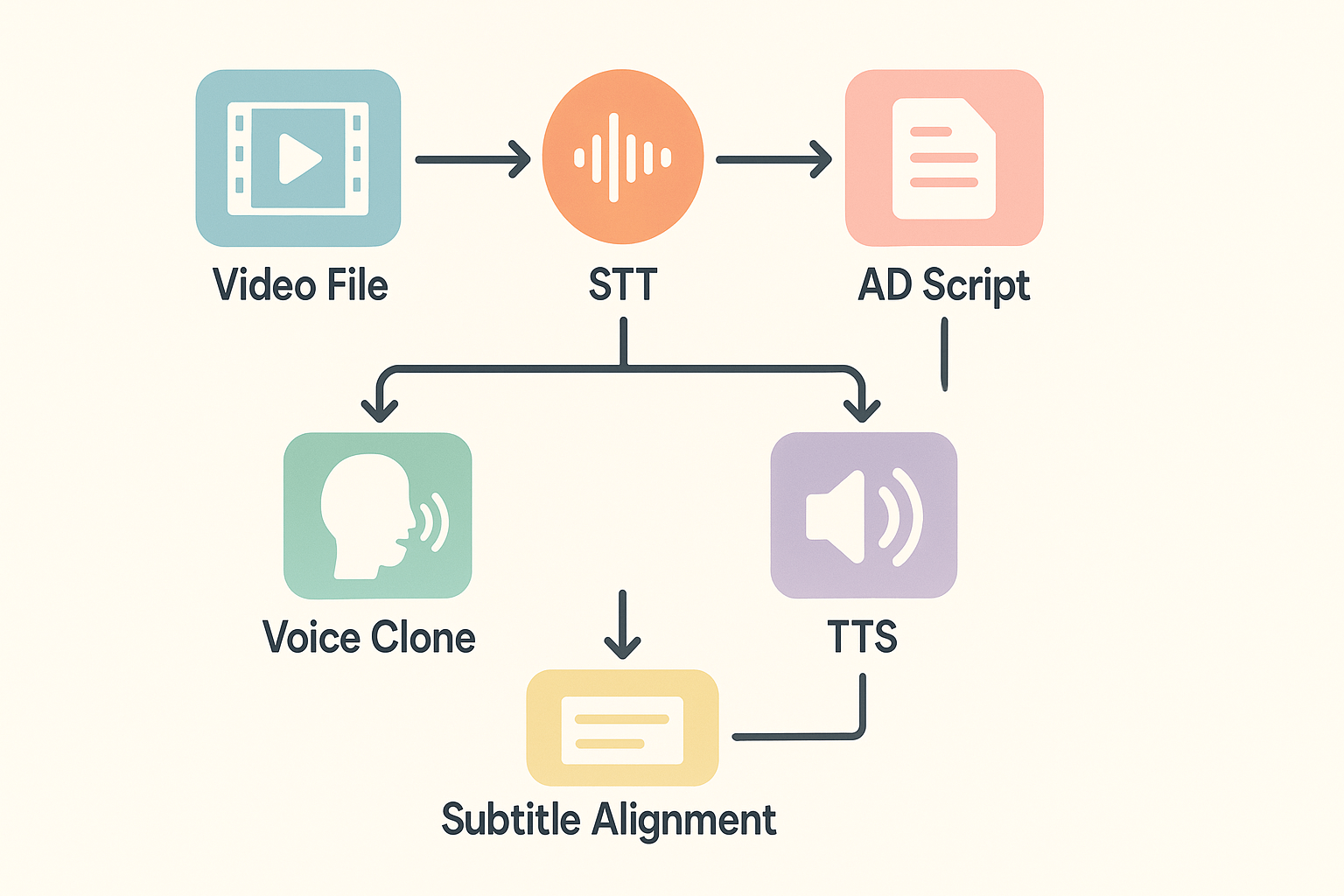
Pipeline diagram showing nodes: video to STT to AD script to voice clone/TTS to subtitle alignment to export, in a clean 16:9 layout.

Tools comparison: DupDub vs common alternatives for AD production

This side-by-side helps accessibility teams pick a tool for video audio description production. It focuses on the vendor features that matter most for scalable, compliant AD. Below you'll find a clear checklist and an RFP starter to run a fast proof of concept.

Key comparison criteria

Focus on real outcomes, not buzzwords. Prioritize these capabilities when evaluating vendors: accuracy and naturalness of TTS (text to speech), voice cloning fidelity, subtitle alignment and timing, language coverage, export formats, and predictable pricing. Also check automation, API access, data privacy, and enterprise support.
  • TTS voice quality: naturalness, prosody, and style controls.
  • Voice cloning fidelity: likeness and multilingual cloning coverage.
  • Subtitle alignment: auto-sync, manual adjust, and SRT support.
  • Language support: number of languages for TTS and STT.
  • Export formats: audio and timed subtitle exports.
  • Pricing predictability: clear per-minute or tiered plans.

Side-by-side feature checklist

Feature
DupDub
ElevenLabs
Murf
Play.ht
TTS voice quality
High, many styles
Very high, voice nuance
Good, studio-like
Good, large voice library
Voice cloning fidelity
High, 47 langs
High, English focus
Limited cloning
Limited cloning
Subtitle alignment & sync
Built-in auto align
None native
Manual only
Minimal auto-align
Language support (TTS/STT)
90+ / 40+
40+ (strong EN)
30+
50+
Export formats
MP3, WAV, MP4, SRT
MP3, WAV
MP3, WAV, SRT
MP3, WAV, SRT
Pricing predictability
Clear tiers, trial
Usage-based tiers
Subscription
Subscription
API & automation
Yes
Yes
Limited
Yes

How to pick and validate

Run a 1-2 video proof of concept. Test STT accuracy, AD insertion timing, and cloned voice likeness. Measure time saved versus manual scripts and quality acceptability with real users.

RFP checklist for audio description

  • Provide files for STT and alignment tests, and ask for timecode accuracy.
  • Request sample AD scripts generated automatically, and sample timing cues.
  • Ask for voice clone samples in target languages if you need a brand voice.
  • Confirm SRT/SCC export and SMPTE timecode support.
  • Verify privacy, voice consent, and enterprise data controls.
  • Request clear per-minute costs and overage rules for scaling.
  • Check API endpoints for batch automation and subtitle workflows.

Case study & results: hypothetical/anon real-world example

A small corporate training team needed to add audio description to 120 short e-learning videos. They wanted to meet accessibility goals, reach multilingual learners, and cut production time. Using an AI-centered pipeline let them produce compliant video audio description faster and at lower cost than manual workflows.

Problem

The team had limited budget and two accessibility specialists. Outsourcing AD (audio description) would take weeks per course and cost thousands. They also needed aligned subtitles and voice consistency across eight target languages.

DupDub-centered workflow used

  1. Batch transcribe original videos with DupDub STT for a time-coded transcript.
  2. Auto-generate concise AD scripts timed to pauses, then edit one representative video.
  3. Use DupDub TTS and a cloned brand voice to render descriptions across languages.
  4. Auto-sync AD audio to subtitle cues and export MP4 and SRT files.

Results

  • Time to localize a 10‑video module dropped from 28 days to 6 days.
  • Per-module AD production cost fell by about 70 percent versus hiring vendors.
  • Release cadence increased from one module per month to three per month, enabling faster learner access.
User quote: "We went from backlog to steady deliveries in weeks, while keeping a single, consistent voice across languages."

Lessons learned

  • Start with a representative video to lock script length and timing.
  • Use auto-alignment tools to avoid manual frame-by-frame syncing.
  • Keep AD scripts concise, prioritize descriptive verbs and clear pauses for natural timing.
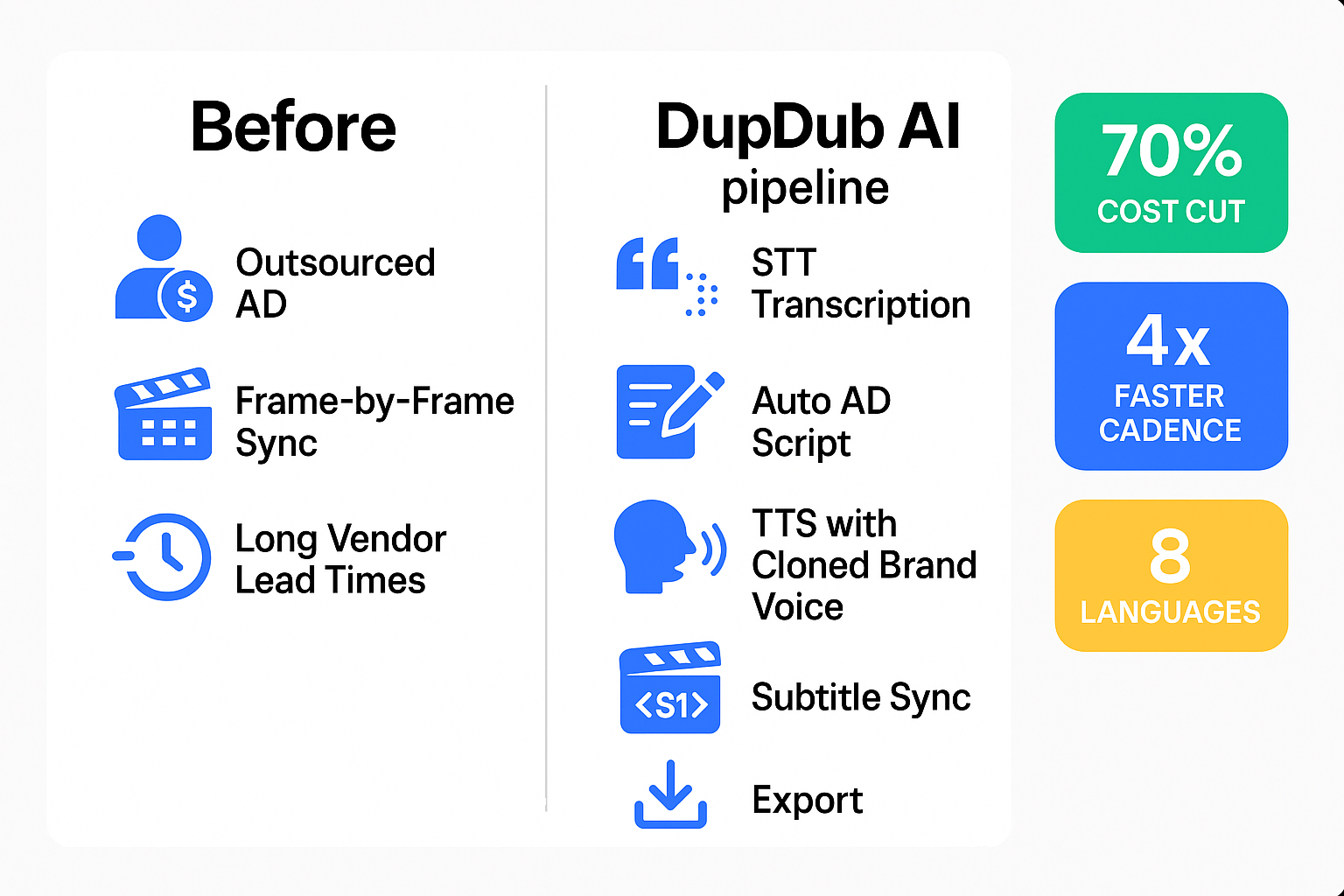
Before-and-after workflow schematic showing manual AD steps on the left and an AI-driven DupDub pipeline on the right, with outcome badges for reduced time, lower cost, and expanded language reach.

Integration, troubleshooting & best practices (players, LMS, subtitle sync)

Start by planning how audio description will live in your delivery stack. This section lists common integration pitfalls and fixes for players and LMSs, explains how to align AD tracks with video timelines, and gives maintenance and version control best practices. It also points to API automation for scale and next steps for enterprise teams.

Fix common player and LMS breakages fast

Many issues come from file format mismatches or player defaults. Test before rollout and check these common problems and quick fixes:
  • No AD toggle in player: add a secondary audio track (AAC or WAV) and enable alternate track selection in the player settings.
  • AD out of sync after export: confirm framerate and timeline offsets match the master video, then re-export with identical timebase.
  • LMS strips alternate audio: use the LMS native media player that supports multiple audio tracks, or provide an SRT-based fallback (see below).
  • Browser autoplay or CORS blocking tracks: host audio on same domain or set correct CORS headers, and require user gesture to enable playback.

Align AD tracks with the video timeline

Precise alignment prevents overlaps with dialog, and keeps descriptions useful. Follow this step checklist:
  1. Generate a transcript and timecode map from the master audio (speech-to-text). Start from a frame-accurate SRT or VTT.
  2. Create AD cues that fit natural pauses, keeping descriptions under 10 seconds where possible. Mark start and end times in milliseconds.
  3. Mix the AD audio on a duplicate timeline, aligning cue start times to the transcript timecodes. Export as a separate audio track or as timed SRT for players that support narration tracks.
  4. Run a frame check: scrub key scenes to verify descriptions don’t overlap speech or key sound cues.

Automation, maintenance, and version control
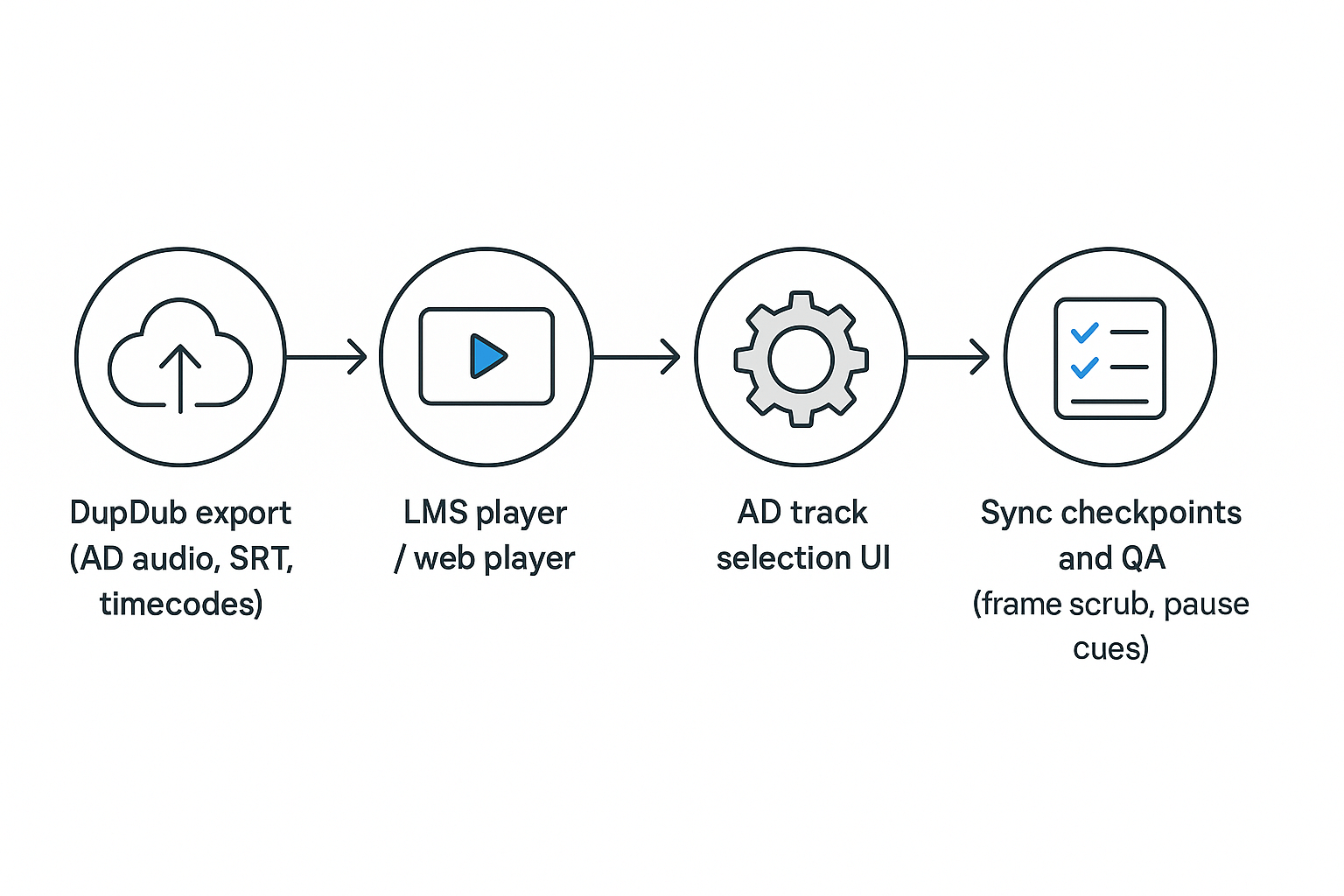
Automate at scale via an API that exports timecoded transcripts, AD audio, and aligned SRTs. Use semantic filenames and a version tag, like v2025-03-01, so rollbacks are simple. Keep a changelog with tester signoffs and include an accessibility checklist in each release. Schedule quarterly audits and retain original masters.
Process schematic showing DupDub export flowing to LMS player, AD track selection, and sync checkpoints

Measuring success and maintaining compliance

Start with clear KPIs and a simple audit routine so teams can prove accessibility over time. Track usage, quality, and legal risk for video audio description to show impact and find gaps quickly. These measures help product, accessibility, and legal teams agree on priorities.

Key KPIs to track

  • Coverage: percent of priority videos with published AD tracks.
  • Access uptake: unique viewers who enable AD and session frequency.
  • Engagement: watch time and completion rate with AD on.
  • Alignment accuracy: subtitle/AD sync errors in seconds per minute.
  • STT/TTS error rate: transcription or TTS mismatches per hour.
  • User feedback: CSAT score, complaint volume, and qualitative notes.
  • Compliance incidents: recorded accessibility complaints or legal notices.

Periodic AD audit checklist

  1. Sample 10% of videos each quarter for full QA.
  2. Compare AD to WCAG success criteria and use the Department of Veterans Affairs checklist Checklists - Section 508 to verify structure, text alternatives, form fields, and use of accessibility checkers.
  3. Verify timing: AD inserts fit natural pauses within 250–500 ms.
  4. Confirm voice clarity, language labels, and caption parity.
  5. Run lightweight user tests with screen reader users.
  6. Record remediation steps and re-audit.

Document decisions for legal review

Keep a single records folder with versions, timestamps, and sign-offs. Store source transcripts, final AD audio, QA reports, and user complaints. Keep a short decision log explaining why edits were made, who approved them, and retention dates for audits.

FAQ — common questions about AI-generated audio descriptions

  • AI-generated audio description accuracy?

    AI tools are good at describing visible action and objects, but they miss nuance and intent. Expect 80 to 95 percent literal accuracy for simple scenes, lower for complex visual context. Always review and edit generated scripts for clarity and accessibility.

  • Ethical AI audio description practices?

    Use human review to catch bias, stereotyping, and sensitive content. Label synthetic voices clearly when required. Keep choice and consent in mind for voice cloning and identifiable people.

  • Cost of AI audio description production?

    AI cuts cost versus full manual narration, often by 60 to 90 percent depending on scale. Budget for review time, QC, and license or voice-clone fees.

  • Typical turnaround time for video audio description projects?

    Short clips can get a draft in minutes. Edited, review-ready AD tracks usually take hours per episode, not days, when you use automated STT, timing, and TTS.

  • Legal risk for audio description compliance?

    Follow WCAG, ADA, Section 508, and local laws. AI won't guarantee compliance, so retain audit logs, transcripts, and human sign-off to reduce risk.

  • Use cases for AI audio description vs human AD?

    Use AI first for drafts, bulk content, and localization. Use humans when artistic nuance, legal sensitivity, or precise timing matter.

  • Subtitle sync for audio descriptions?

    Auto-alignment tools match AD narration to subtitle timecodes. Always spot-check key scenes and long pauses to prevent overlap with dialog.

  • Voice cloning for audio description rights?

    Get written consent before cloning a speaker. Keep clones locked to the original voice and document permissions for audits.

  • Scalable audio description integration with LMS and players?

    Export AD as separate audio tracks, SRT, or sidecar files for players and LMS. Automate uploads and metadata to simplify deployment.

  • How DupDub helps with scalable AD production?

    DupDub bundles STT, subtitle alignment, TTS, and voice cloning into one workflow so teams can draft, edit, and export AD faster. Try a 3-day free trial on DupDub to test a full AD pipeline. Sign up for accessibility updates and review internal resources on captioning and localization for implementation tips.

Experience The Power of Al Content Creation

Try DupDub today and unlock professional voices, avatar presenters, and intelligent tools for your content workflow. Seamless, scalable, and state-of-the-art.