


TL;DR: Key takeaways
Why voice automation tools matter in 2025
Why it’s strategic right now
Primary business outcomes to expect
-
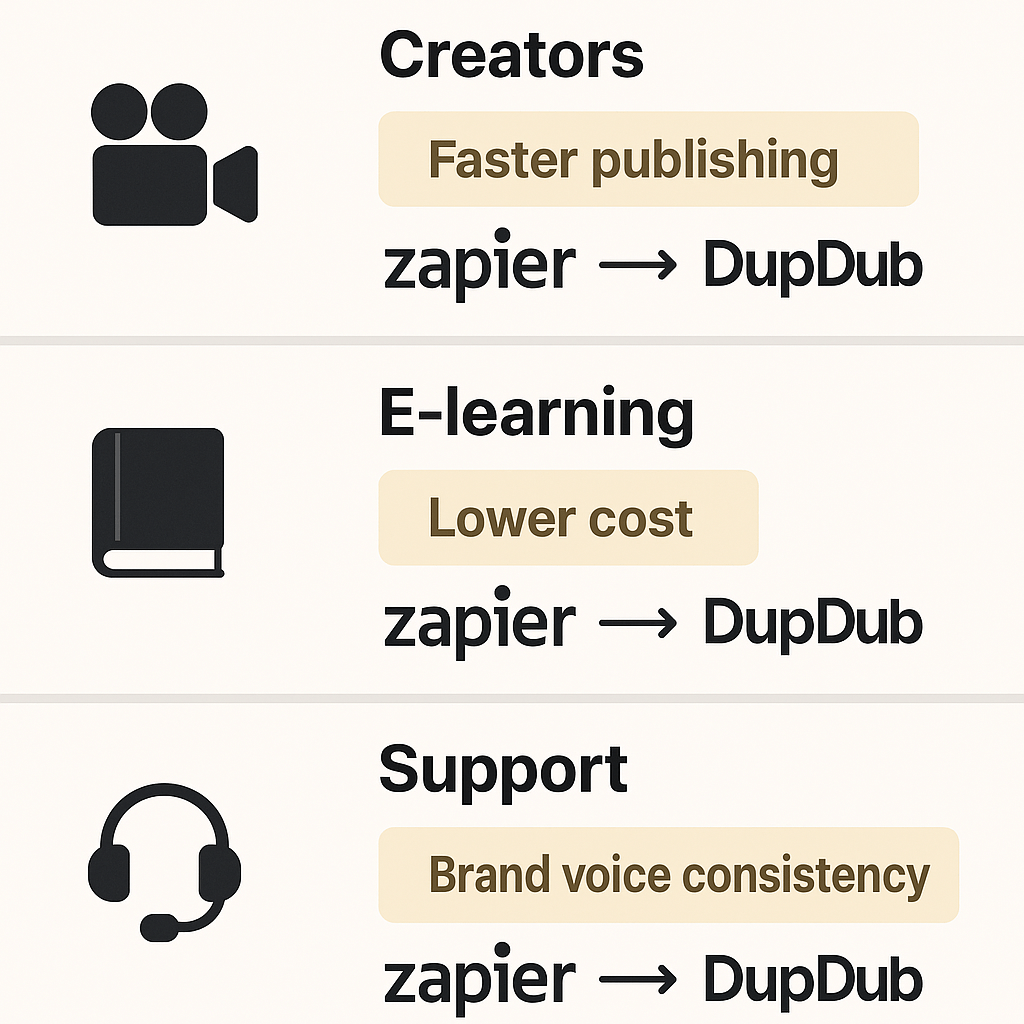
Lower localization costs: Replace studio sessions and freelance rates with predictable per-minute pricing. Automation reduces review cycles and staffing overhead.
-
Faster time-to-publish: Automate subtitle alignment, voice rendering, and file export so teams publish sooner. Faster cycles increase content velocity and campaign agility.
-
Scale without linear headcount growth: Reuse voice clones, templates, and batch processing to localize hundreds of hours per month. That creates repeatable assets and saves time on handoffs.
Common automation goals by team
-
Sales: Send personalized voice messages and localized demo narrations to prospects. Automate follow-up voicemails transcribed into CRM notes.
-
Support: Triage inbound voice messages into tickets with automated transcriptions and priority flags. Deliver short audio answers or voice-based knowledge snippets.
-
Global content teams: Localize video lessons, podcasts, and ads into many languages with consistent brand voice. Automate subtitle translation and re-syncing for multiple markets.
-
Marketing and growth: A/B test voice creatives across languages and measure lift quickly. Use synthetic variants to scale ad creative without long voice sessions.
Quick automation wins to prioritize
-
Automate transcription to searchable text, then tag and route tickets. This reduces manual triage and speeds response.
-
Build a localization pipeline: transcribe, translate, synthesize, and export in a single workflow. Start with high-traffic content.
-
Create a voice cloning library for brand consistency across channels and regions. Lock clones to consented samples.
-
Use TTS for short-form audio assets, like alerts, onboarding, and microlearning. It’s cheaper than recording every update.
-
Route voicemail to a knowledge-base writer via Zapier, then auto-generate a summary and publish.
What decision-makers should ask for
-
Measurable KPIs: cost per localized minute, time-to-publish, and error rate in transcripts.
-
Integration options: Zapier, API, LMS and CMS connectors.
-
Governance: How voice consent, retention, and deletion are handled.
-
Language coverage and voice quality across priority markets.
Market momentum and near-term trends
-
Wider language coverage: Providers now support 40 to 90 languages, so global reach is practical.
-
Modular APIs and no-code connectors: Zapier and similar platforms make automation accessible to non-developers.
-
Voice cloning at scale: Short sample-based cloning reduces the need for studio re-records.
-
Real-time and batch workflows: Teams can pick live routing or scheduled content repurposing.
Primary business outcomes you can measure
-
Lower localization costs: Synthetic voices replace expensive human dubbing for most content types. You cut per-minute spend and avoid multiple studio sessions.
-
Faster time-to-publish: Automated speech-to-text (transcription), translation, and TTS (text-to-speech) pipelines reduce turnaround from days to hours. Faster publishing increases view velocity and campaign agility.
-
True scale and reuse: Once you create a cloned voice or a translated subtitle track, reuse is cheap. That lowers marginal cost as volume grows.
Common automation goals by team
-
Sales: Automate voice-based lead qualification and routing. Example: transcribe voicemail, extract intent, and create a CRM lead.
-
Support: Triage inbound calls and convert them to searchable tickets. Example: auto-transcribe calls, create knowledge base drafts, flag urgent issues.
-
Global content: Localize video and courseware quickly. Example: translate transcripts, generate localized voiceovers, and publish region-specific versions.
Why no-code plus Zapier is a big deal
-
Faster experiments: Teams can prototype a workflow in a day and iterate.
-
Lower operational cost: Fewer developer hours means lower project overhead.
-
Cross-team ownership: Marketing or operations can own the flow end-to-end.
-
Built-in integrations: Connectors to storage, CMS, and CRM make end-to-end automation practical.
Quick implementation checklist
-
Pick a core use case, like podcast localization or voicemail-to-ticket.
-
Map inputs and outputs, including file formats and metadata.
-
Prototype with Zapier or a similar connector.
-
Measure cost per minute and time-to-publish.
-
Decide whether to keep the no-code flow or migrate to an API.
Quick overview: What DupDub does (product snapshot)
Core modules mapped to buyer needs
-
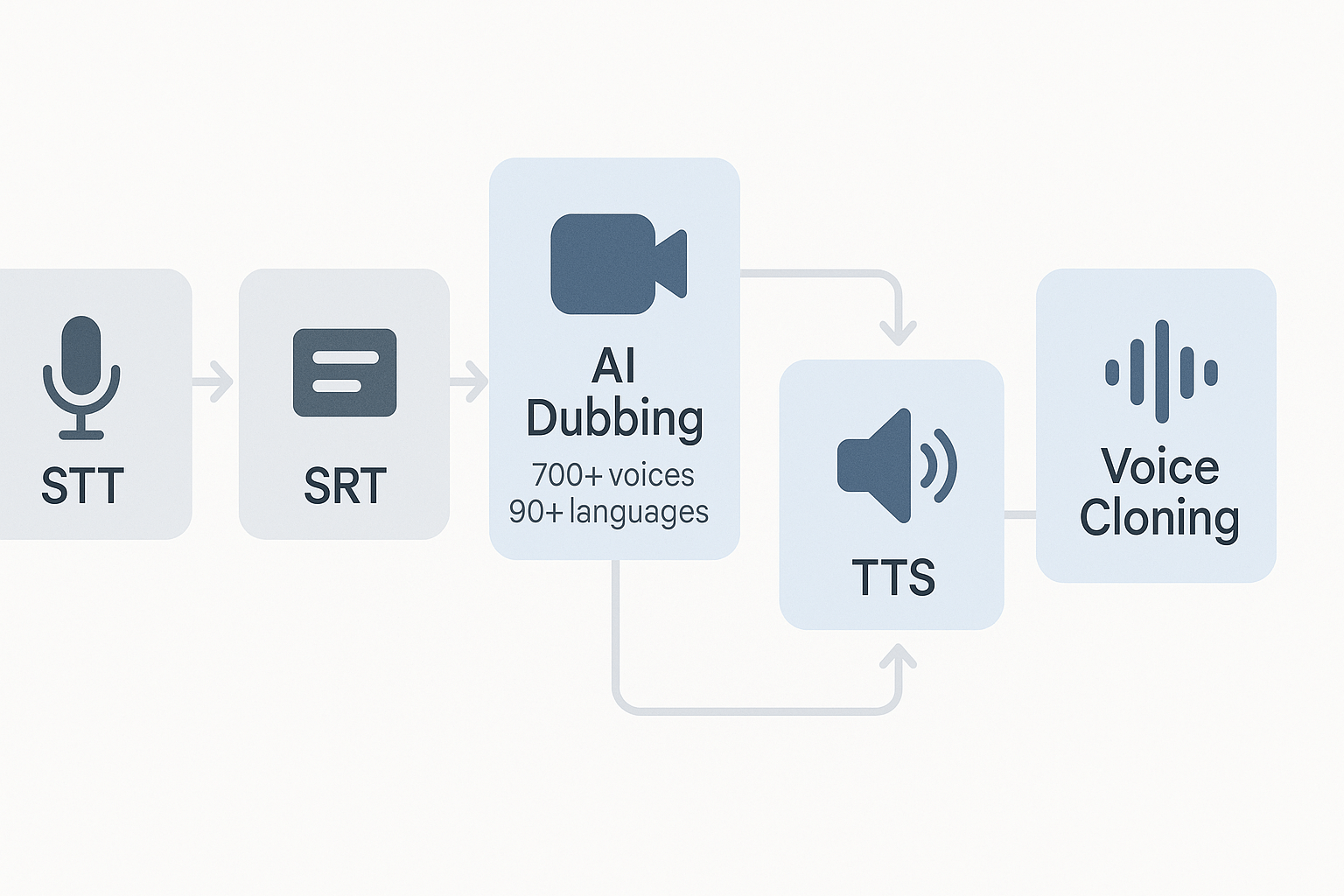
AI dubbing (video translation and re-voicing): Translates and re-voices video with subtitle alignment. Use it to localize marketing videos, training, and course content without re-shoots.
-
Text-to-speech (TTS): 700+ voices across 90+ languages and accents, with style options for narration or brand voice. Ideal for automated narration, IVR prompts, and dynamic audio generation.
-
Voice cloning: Create a custom synthetic voice from about 30 seconds of audio, usable in 47 languages. Helpful for brand consistency, multi-language spokespersons, and localized presenter voices.
-
Speech-to-text (STT) and subtitles: Transcribes audio into captions and aligned SRT files in 40+ languages. This is the backbone for search, repurposing audio to text, and creating transcripts for moderation.
Pricing tiers at a glance
|
Plan
|
Price (annual)
|
Notable allocation
|
|
Free trial
|
Free, 3 days
|
10 starter credits, no card needed
|
|
Personal
|
$11/month billed annually
|
~1,800 credits, ~25h Std TTS, 25h transcription
|
|
Professional
|
$30/month billed annually
|
~6,000 credits, ~83h Std TTS, 83h transcription
|
|
Ultimate
|
$110/month billed annually
|
30,000 credits, ~416h Std TTS, 416h transcription
|
|
Pay-as-you-go
|
One-time credits
|
500 credits $$68; 1,000$$128; 6,000 $698
|
Ideal customers and typical workflows
-
Content creators: YouTubers and podcasters repurposing episodes into other languages.
-
Marketing and e-learning teams: Mass-localizing course or ad creatives.
-
Customer support and operations: Automated voicemail-to-article pipelines and IVR generation.
-
Enterprises piloting AV localization at scale: Teams that need API access and compliance features.
Limitations and quick fit checklist
-
Voice cloning scope: Cloning supports 47 languages, so confirm specific target languages first.
-
STT and subtitle coverage: STT handles 40+ languages, which may miss niche locales.
-
Cost at scale: Credit consumption for Ultra-quality voices or long-form audio can add up; model your minutes per month before committing.
-
Data residency and compliance: DupDub states GDPR alignment and encrypted processing, but enterprise buyers should validate contractual terms and any HIPAA needs.
How DupDub stacks up vs. other voice automation tools
What we measure and why
Quick comparison table
|
Vendor
|
Language coverage
|
Voice quality
|
Cloning fidelity
|
API & integrations
|
|
DupDub
|
90+ languages (TTS), 47 cloning
|
High, many styles & avatars
|
Good, 30s sample, multilingual cloning
|
Full web studio, API, Zapier and Canva integrations
|
|
ElevenLabs
|
40+ languages (primarily focused on English variants)
|
Very high naturalness for speech synthesis
|
Strong cloning fidelity for English voices
|
Robust API, SDKs, limited low-code integrations
|
|
Murf
|
20+ languages
|
Good voice quality for narration
|
Limited cloning, focus on studio voices
|
Integrations for LMS and common workflows, API available
|
|
Play.ht
|
50+ languages
|
Good, wide voice catalog
|
Moderate cloning, limited languages for clones
|
API, WordPress and CMS plugins
|
Quick takeaways from the table
Strengths and weaknesses
-
DupDub: Strengths are broad language support, built-in dubbing, avatars, and practical Zapier hooks. Weaknesses include slightly higher costs for ultra voices and cloning limits per plan. DupDub is tuned for creators who need end-to-end video localization and a single platform to manage dubbing, subtitles, and avatars.
-
ElevenLabs: Strengths are voice fidelity and lifelike speech. Weaknesses are fewer languages and fewer built-in video tools. It’s ideal when you need the most natural narration in a small set of languages.
-
Murf: Strengths are ease of use for narration and education content, plus a predictable pricing model. Weaknesses are limited cloning and fewer languages, so it’s not the first choice for global localization.
-
Play.ht: Strengths are CMS integrations and a large voice catalog. Weaknesses are cloning limitations and fewer enterprise dubbing features compared to DupDub.
Which vendor fits common use cases
-
Localization at scale: DupDub. Pick it when you need wide language coverage, subtitle sync, and video re-voicing. It reduces handoffs and speeds time to publish.
-
Long-form narration and podcasts: ElevenLabs or Murf. Choose ElevenLabs when voice naturalness is the priority, and Murf when you need quick studio workflows and LMS integration.
-
High-fidelity cloning: ElevenLabs for best fidelity in supported languages, DupDub when you need multilingual clones with avatar and video support.
Final recommendation
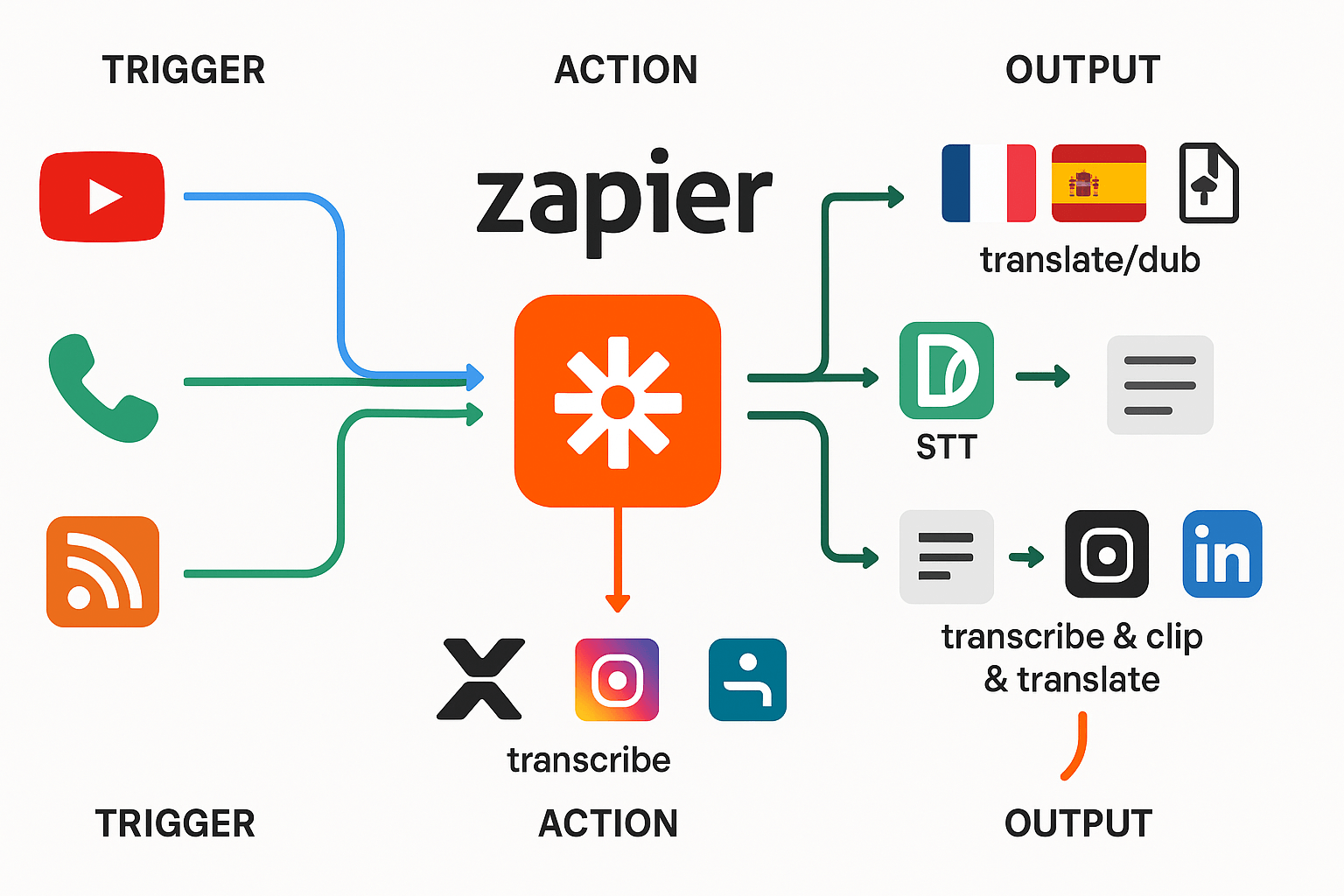
Recipe 1: Auto-dub new YouTube uploads into three languages
-
Zap Trigger: YouTube, New Video in Channel.
-
Formatter by Zapier, Extract: Pull video URL and title.
-
DupDub API (via Webhooks by Zapier) or DupDub Zap action: Create transcription (STT) from the video audio.
-
DupDub: Translate + AI Dubbing, target languages: Spanish, French, German.
-
YouTube (or CMS): Upload dubbed MP4s and attach localized SRT files.
-
YouTube.video_url -> DupDub.create_transcription.source_url
-
DupDub.transcription_text -> DupDub.create_dub.source_text
-
DupDub.create_dub.target_language -> "es, fr, de"
-
DupDub.create_dub.voice -> "neutral-multi" (pick a voice per language)
-
DupDub.dubbed_video_url -> YouTube.upload.video_file
-
DupDub.subtitles_srt -> YouTube.upload.subtitles_file
-
If transcription is inaccurate, increase STT language model or send higher quality audio only (download original MP4 first).
-
For subtitle sync issues, enable DupDub alignment when creating the dub.
-
If Zap times out, break the flow: first transcribe, wait for completion, then run dubs in parallel Zaps using the transcription ID.
Recipe 2: Transcribe voicemails into CRM notes and generate follow-up voice messages
-
Zap Trigger: Twilio or your phone system, New Voicemail (audio file saved to cloud storage).
-
Cloud Storage (e.g., Google Drive) -> New File triggers Zap.
-
DupDub: Speech-to-Text, language auto-detect.
-
CRM (e.g., HubSpot, Salesforce): Create a note, map transcription_text to Note Body; include link to audio.
-
Formatter: Generate a templated follow-up message using CRM fields.
-
DupDub: Text-to-Speech (TTS) to render the templated reply in the agent's cloned brand voice (use voice cloning if available).
-
Twilio: Send TTS MP3 as an outbound voicemail or SMS with audio link.
-
Cloud.file_url -> DupDub.stt.source_url
-
DupDub.stt.transcript -> CRM.create_note.body
-
CRM.contact.phone -> Formatter.template_vars.to_number
-
Formatter.template_text -> DupDub.tts.input_text
-
DupDub.tts.audio_url -> Twilio.call.media_url
-
If caller language is unknown, enable DupDub STT auto-detect or run a quick language-detect step first.
-
For compliance, store original audio encrypted and mark CRM notes with data retention tags.
-
If the cloned voice sounds off, re-record a 30 second sample and recreate the clone at DupDub, then re-run TTS.
Recipe 3: Repurpose podcast episodes by clipping, translating, and posting
-
Zap Trigger: RSS Feed, New Episode.
-
Download episode audio to cloud storage.
-
DupDub: Create chapter timestamps and transcribe full episode (STT).
-
Formatter: Identify highlight segment timestamps (use regex or manual tags in show notes).
-
DupDub: Clip audio segment, translate text, then render translated clip via TTS or AI dubbing for short social clips.
-
Buffer or social scheduler: Post audio clip with translated caption and SRT for video snippets.
-
RSS.enclosure_url -> Cloud.download.url
-
DupDub.transcript_and_chapters -> Formatter.select_chapter.timestamp
-
Formatter.clip_start/end -> DupDub.clip.start_end
-
DupDub.clip.audio_url -> Social.post.media
-
DupDub.clip.translated_text -> Social.post.caption
-
If auto chaptering misses segments, add manual timestamps in the episode show notes and parse them with Formatter.
-
For louder/softer clip levels, use DupDub’s audio normalize option before export.
-
Rate-limit API calls if you process many episodes, or queue clips in a Zapier storage step.
Performance, cost & scaling considerations
Estimate cost per minute from credits
|
Feature
|
Credits per minute
|
Notes
|
|
Standard TTS
|
1.2
|
rough rate from plan allocations
|
|
Ultra voice (higher quality)
|
6
|
about 5x standard rate
|
|
AI avatar (rendered speaking avatar)
|
12
|
heavier compute per minute
|
|
Transcription (STT)
|
1.2
|
similar to standard TTS
|
-
Standard TTS: 1.2 credits × $$0.128 = $$0.15 per minute.
-
Ultra voice: 6 credits × $$0.128 = $$0.77 per minute.
-
Avatar: 12 credits × $$0.128 = $$1.54 per minute.
Throughput and rate-limit notes: API vs UI
-
Respecting documented API concurrency limits, and using a client-side semaphore.
-
Sending batched requests (one file per job) rather than high-frequency small calls.
-
Using parallel workers with conservative thread counts, then ramping up while monitoring errors.
Scalability patterns for bulk localization
-
Chunk large media into scenes. Smaller files parallelize easily.
-
Precompute transcripts and subtitles once, reuse for multiple target languages.
-
Cache cloned voices and reuse IDs across jobs to avoid repeated training credits.
-
Use a queue system (SQS, Pub/Sub) to smooth spikes.
-
Stagger exports and host final assets on a CDN to reduce repeated downloads.
Implementation checklist (apply during rollout)
-
Data prep
-
Normalize audio levels and file formats (WAV/MP3).
-
Ensure high-quality source transcripts where possible.
-
Segment videos into scene-sized clips.
-
-
Batching strategy
-
Define batch size (for example 5–10 clips per worker).
-
Use file-level batching, not per-second calls.
-
Reuse voice clone IDs and asset IDs across batches.
-
-
Retry and idempotency
-
Make jobs idempotent: include a job ID and check for completed outputs.
-
Implement exponential backoff for retryable errors.
-
Log and surface non-retryable failures for manual QA.
-
-
Monitoring and cost control
-
Track minutes processed, credits burned, and error rates.
-
Set budget alerts and daily credit caps.
-
Monitor latency, success rate, and queue depth.
-
-
Security and governance
-
Encrypt assets at rest and in transit.
-
Restrict API keys, rotate secrets, and limit scopes.
-
Keep voice clones tied to verified speaker consent.
-
-
Rollout plan
-
Start with a pilot on a small catalog.
-
Measure cost-per-minute and quality, then scale operations.
-
Keep a rollback path and manual QA checkpoints.
-
Compliance, security & enterprise readiness
Data residency, encryption, and logging
Voice cloning: consent, locking, and verification
Short GDPR and HIPAA checklist
-
Data protection agreement (DPA) and subprocessors list, signed and current.
-
Ability to demonstrate data protection practices: the GDPR provides businesses and organizations with tools such as codes of conduct and certification mechanisms to help demonstrate compliance with data protection principles, see European Commission (2025).
-
Data residency controls, region selection, and export restrictions.
-
Encryption in transit and at rest, and key management options.
-
Retention and deletion policies for raw audio, transcripts, and cloned models.
-
Audit logs, access controls, and role based access control (RBAC).
-
For HIPAA: signed Business Associate Agreement (BAA), PHI handling policy, and breach notification timelines.
-
Privacy impact assessment or records of processing activities (ROPA).
Contract and SLA questions for security and legal teams
-
What is the vendor’s data retention default, and can we set custom retention?
-
Where is data stored and processed by default, and can we require region locking?
-
Which encryption standards are used in transit and at rest, and do you offer customer-managed keys?
-
Do you provide a DPA and a subprocessors list? How do you notify customers of subprocessor changes?
-
Is a signed BAA available for customers who handle PHI?
-
What are the SLAs for uptime, data restores, and incident response?
-
Describe your breach notification process and maximum notification window.
-
Do you publish SOC 2, ISO 27001, or equivalent audit reports, or can you provide an independent audit under NDA?
-
What logging, monitoring, and forensics access will you provide during an incident?
-
Are voice clone models reversible, and can you demonstrate how clone locking prevents unauthorized reuse?
Implementation notes for procurement and security reviewers
Real-world use cases & mini case studies
Creator workflow: localize 100+ videos per month
-
Zap watches new YouTube upload for channel X.
-
Zap sends transcript to DupDub for STT and translation.
-
DupDub runs AI dubbing, applies the brand voice clone, and returns MP4 and SRT.
-
Zap uploads localized video to regional channel and adds metadata.
-
Time to publish localized video dropped from 5 days to 8 hours.
-
Per-video dubbing cost fell by about 70 percent.
-
Start with short, high-traffic videos to validate translated voice tone.
-
Keep a small set of cloned voices for brand consistency across markets.
E-learning workflow: scale narrated courses across languages
-
Course manager uploads source audio or slides to LMS.
-
Zap sends files to DupDub for transcription, translation, and TTS.
-
DupDub returns MP3 narration and SRT files, which Zap attaches to course modules.
-
Zap notifies QA and schedules live review.
-
Localization throughput increased fivefold, letting the team translate entire courses in weeks not months.
-
Learner engagement rose, with longer watch time in localized modules.
-
Build a short QA pass for voice tone in each language.
-
Use ultra voices sparingly for hero content to control cost.
Support workflow: voicemail triage to knowledge base
-
New voicemail lands in cloud telephony, Zap triggers on new file.
-
Zap sends audio to DupDub for STT and intent parsing.
-
If urgent, Zap creates a ticket and attaches transcript; otherwise Zap drafts a KB article and assigns an editor.
-
Editor reviews, publishes, and Zap notifies relevant Slack channel.
-
Average ticket response time dropped by 40 percent.
-
Support team reused draft KB articles to reduce repeat tickets.
-
Train quick intent rules to avoid misrouted tickets.
-
Keep a human review step for sensitive or complex calls.
Cross-case takeaways
-
Automate high-volume, low-risk workloads first. This builds confidence.
-
Use cloned voices for brand continuity, and reserve premium voices for key assets.
-
Always add a short human QA pass after automated TTS or dubbing.
FAQ — Common reader questions answered
-
Is DupDub secure for enterprise voice automation tools and compliance?
DupDub supports enterprise controls and encrypted processing, so you can use it in regulated workflows. For higher-risk data, enable account-level restrictions and role-based access, and require audit logging. Enterprises should request a data processing addendum and verify GDPR alignment when needed.
Action checklist:
• Turn on tenant or team SSO and strong password policies.
• Enforce least privilege roles and enable audit logs.
• Ask sales for the enterprise compliance packet and DPA. -
How accurate is voice cloning and TTS for production use and voice cloning accuracy for enterprise?
DupDub produces high quality synthetic voices from a 30-second sample, suitable for narration and localization. Realistic output depends on source audio quality, the language, and the voice style you pick. For brand-critical or customer-facing audio, validate with a short pilot run and compare human references.
Quick accuracy tips:
• Use clean, noise-free voice samples of 30 seconds or more.
• Test across target languages and accents before scaling.
• Run A/B listening tests with stakeholders to lock the right voice. -
Can I run bulk automation with DupDub and Zapier, and how does bulk automation via Zapier with DupDub work?
Yes, you can automate large batches with Zapier using no-code Zaps and DupDub credits. Common flows include converting transcripts to localized voice files, or routing voicemails into a content pipeline. Make sure you batch jobs and monitor credit consumption to avoid surprises.
Recommended Zap pattern:
• Trigger: New file in cloud storage or new support ticket.
• Action: Send audio to DupDub for transcription or cloning, use a single Zap for each batch type.
• Action: Save outputs to storage and update tracking sheets or CMS. -
How do I estimate cost and performance for voice workflows and voice automation tools cost estimation?
Estimate cost from minutes processed and the voice tier you choose, then add platform credits and integration overhead. DupDub pricing tiers give a predictable baseline, and pay-as-you-go credits help for spikes. To build a reliable budget, run a 1-week pilot, measure average minutes per file, and multiply by planned monthly volume.
Budgeting steps:
• Measure average content length in minutes across samples.
• Map minutes to the voice type—standard or ultra—and to transcription time.
• Add a 15 to 30 percent buffer for rework, retries, and quality checks. -
Where do I find technical resources, API docs, and Zapier recipes for DupDub and DupDub API and Zapier recipe library?
For automation and scaling, link your engineering or ops team to the API docs and the automation hub. The API page shows endpoints for uploading files, creating clones, and batch jobs. The automation cluster pages and the Zapier recipe library contain step-by-step no-code recipes for common workflows like content localization and voicemail-to-article.
Next steps for technical follow up:
• Review the API docs for endpoints, rate limits, and examples.
• See the Automation cluster for enterprise workflow patterns.
• Browse the Zapier recipe library for no-code recipes and templates.

 Discord
 YouTube
 Tiktok
 Twitter
 Facebook
 Instagram