TL;DR: Key takeaways
Quick summary in one minute. Voice cloning AI free trials let creators synthesize a speaker from a short recording. Expect limits on fidelity, accent coverage, and short sample durations.
Privacy and consent matter. Always get clear permission before cloning a voice. Keep cloned assets encrypted and check local likeness and copyright laws.
Validate with a short trial before scaling. Test multiple clips, noisy recordings, and export limits. Focus on language support, file formats, and team access controls.
What is AI voice cloning? A simple explainer
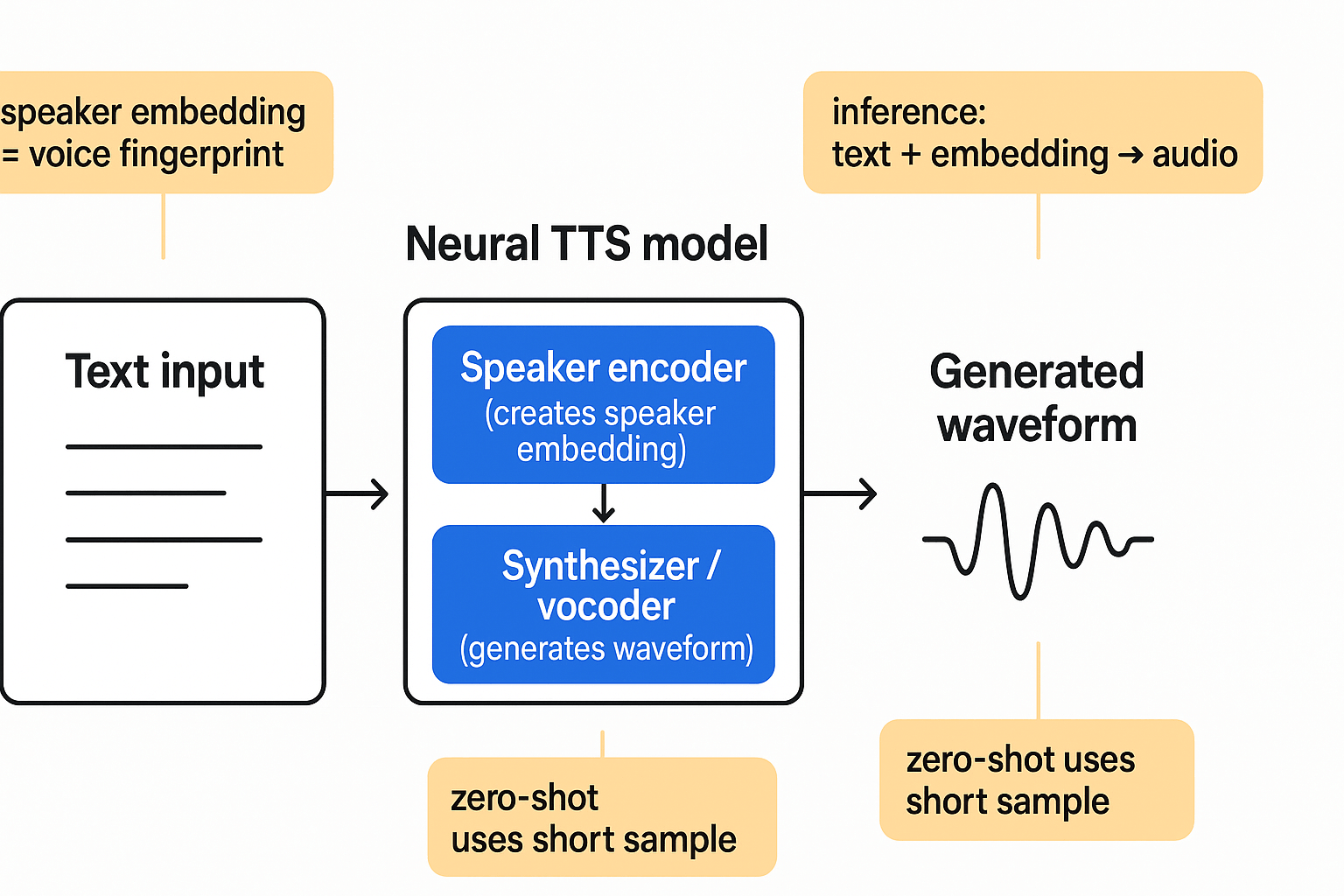
If you're searching for voice cloning ai free options, start here: AI voice cloning uses neural networks to copy a person's voice from short audio samples. Unlike classic text-to-speech, cloning captures a speaker's tone, timing, and identity so generated speech sounds like that person. This makes cloning useful for localization, narration, and accessibility work.
Core concepts in plain language
Cloning systems split into two main parts. A speaker encoder creates a compact speaker embedding, a numeric fingerprint of timbre and style. A synthesizer or vocoder then combines text with that embedding and produces a waveform. Modern systems use speaker adaptation to tune a base model to one voice from small samples. Zero-shot approaches skip extra training by extracting embeddings from a short clip. Multilingual cloning maps one embedding to many output languages so a cloned voice can speak in different tongues.
Key differences versus classic TTS:
-
Classic TTS uses fixed, pre-trained voices and style controls.
-
Voice cloning adapts a model to match an individual, often from 10 to 30 seconds of audio.
-
Output quality depends on sample length, recording quality, and model size.
This simple picture prepares you for the technical deep dive and the hands-on DupDub tutorial that follows.
How DupDub’s voice cloning works — technical deep dive
This section walks through DupDub's cloning pipeline and the engineering choices behind it. You'll get clear guidance on required sample quality and length, the difference between model training and inference, latency expectations, and how DupDub maintains voice fidelity across 47 languages. If you are evaluating voice cloning ai free trials, this will help technical leads and compliance owners assess fit.
Pipeline overview: ingestion to export
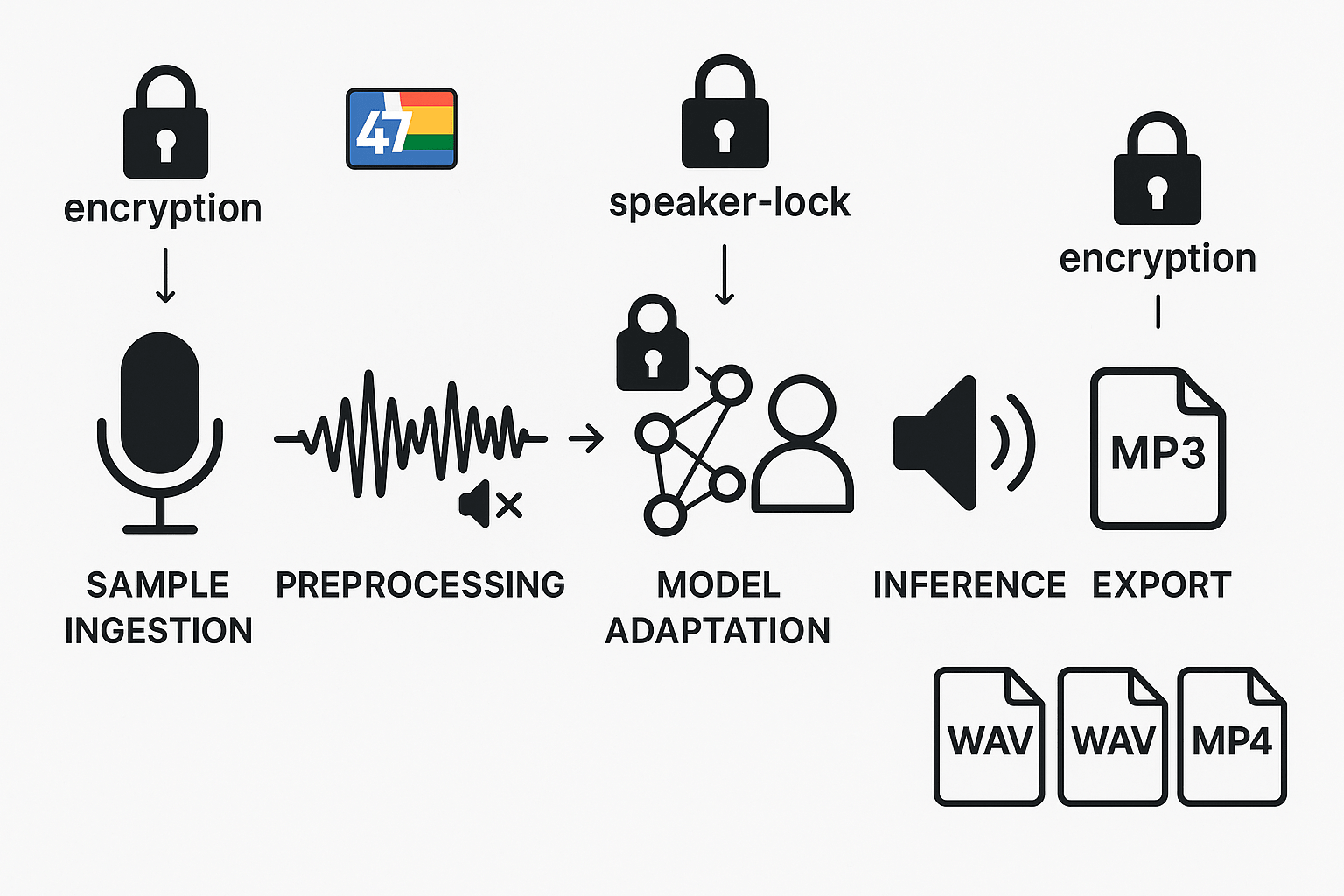
DupDub uses a staged pipeline to turn a recorded sample into a reusable synthetic voice. The core stages are:
-
Sample ingestion: user uploads a voice clip. DupDub prefers 30 seconds of clean speech. Use a quiet room, flat gain, and WAV or high-bitrate MP3.
-
Preprocessing: noise suppression, silence trimming, and loudness normalization. The system checks sample speech ratio and flags low-quality recordings.
-
Model adaptation: the system adapts a base multilingual voice model to the speaker. This is fast adaptation, not full retraining.
-
Inference: run-time synthesis (inference) uses the adapted voice to render text or dubbed audio.
-
Export and alignment: outputs to MP3, WAV, or MP4 with subtitle alignment.
Security checkpoints appear at ingestion, adaptation, and export. Data is encrypted in transit and at rest, and the cloning artifact is locked to the original speaker identity.
Audio sample, training, and latency
Required audio: a 30 second sample with mostly speech and little background noise. Higher sample rates help, but 16 kHz minimum is fine. If audio is noisy, the pipeline applies enhancement, but outcomes drop.
Model training vs inference: DupDub uses fast speaker adaptation to map speaker characteristics onto a shared neural TTS model. Adaptation is quicker and cheaper than full model training. Inference is optimized for low latency so synthesis of short phrases completes in real time or near real time, while longer files use batch rendering for quality.
Latency expectations: expect adaptation to finish in minutes, depending on queue and sample length. Live synthesis latency for short text is typically under a second; full exports depend on file length and selected voice quality.
Cross-language fidelity and compliance controls
DupDub supports 47 languages by using a multilingual phoneme backbone. That helps preserve timbre while rendering phonemes in a target language, improving cross-language fidelity for translated dubbing.
Privacy and compliance: cloning is speaker-locked, processed with encryption, and designed to align with GDPR controls. Admins can revoke clones, limit sharing, and audit usage logs.
Step-by-step: Clone a voice with DupDub (practical tutorial)
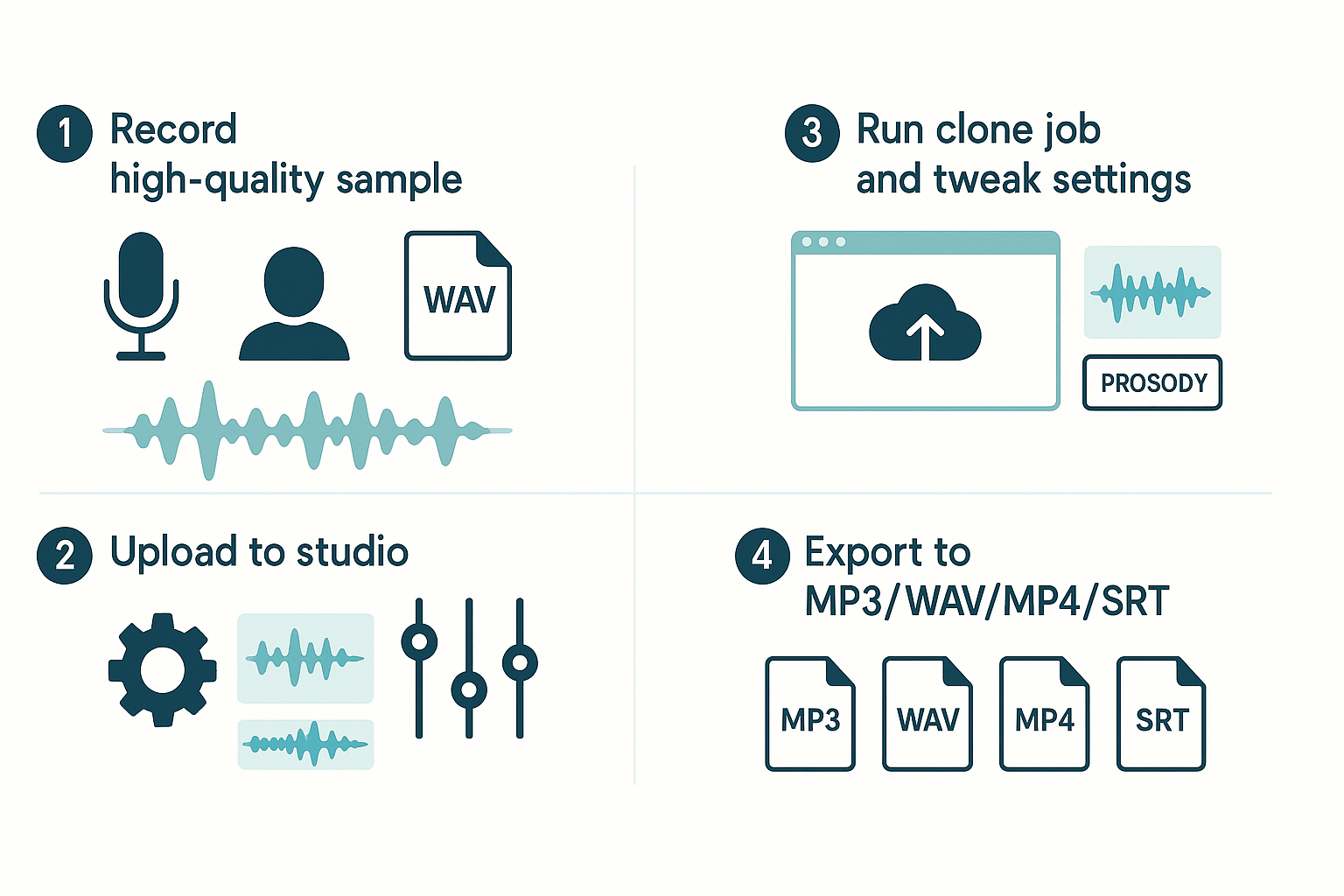
Get a working clone fast, and test it in real projects. This short guide shows how to prepare a clean voice sample, upload it in the DupDub studio, run the clone job, and tweak prosody (intonation and rhythm) for natural results. If you want to try voice cloning ai free, these steps get you from raw recording to export in minutes.
1) Prepare a clean sample
Record 30 seconds of clear, steady speech. Use a quiet room, a good mic, and a pop filter. Speak at a natural pace and include some short and long sentences. Save as WAV or high-bitrate MP3.
2) Upload and create the clone in DupDub Studio
Open the DupDub studio and choose Voice Cloning. Upload your sample and add a short speaker name and consent note. Start the clone job and wait for processing, it usually completes quickly.
3) Tweak quality and prosody settings
Use the studio controls to adjust voice quality, pitch, and prosody. Prosody means how the voice stresses words and uses pauses. Test short phrases, then tweak until timing and emotion match your content.
4) Export and test
Export the result as MP3 or WAV for audio, MP4 for video, and SRT for subtitles. Try the clone in a short video or podcast segment to check sync and naturalness. If something sounds off, revise the sample or fine-tune prosody.
Quick checklist:
-
Clean recording environment
-
30s sample, WAV preferred
-
Upload, run clone, preview
-
Adjust quality, export chosen formats
Suggested downstream uses: voiceovers, localized videos, podcast intros, e-learning narration, and accessibility audio tracks.
Best practices, ethical & legal considerations
If you plan to test voice cloning ai free options, start with rock-solid consent and clear record keeping. Treat synthetic audio like any personal data, and build a simple consent workflow before you clone a voice. Keep transparency top of mind when you publish, so teams avoid legal trouble and brand damage.
Get informed consent, and document it
Ask for explicit, recorded permission from every speaker. Use a short form that lists intended uses, duration, and revocation steps. The
ACM Code of Ethics and Professional Conduct states computing professionals should "establish transparent policies and procedures that allow individuals to understand what data is being collected and how it is being used, to give informed consent for automatic data collection, and to review, obtain, correct inaccuracies in, and delete their personal data." Keep consent records stored securely and link them to each cloned voice.
Label synthetic audio clearly
Be transparent when content uses synthetic voices. Recommended label examples:
-
"This audio contains a synthetic voice created with consent."
-
On platforms, add a short disclosure in the description and metadata.
Clear labels reduce user confusion and protect publishers.
Banned or high risk uses
-
Impersonating public figures without consent
-
Deepfake scams or fraud
-
Content aimed at minors without guardian consent
-
Medical, legal, or emergency advice presented as real voice
Treat these as absolute no go areas.
Practical mitigation checklist
-
Limit access to voice models and keys
-
Use watermarks or brief audible disclaimers
-
Keep retention short, delete raw samples on request
-
Run periodic audits with legal and compliance
Follow local law and industry guidance, and consult counsel for regulated projects. This reduces reputational and legal risk while letting teams innovate safely.
Comparison: DupDub vs competitors (features, pricing & fit)
Start here if you want a clear choice between platforms. This section compares core features, trials, and typical fits so you can pick the right vendor. If you’re evaluating voice cloning ai free options, read on to see when DupDub’s dubbing, cloning, and avatar capabilities matter.
Feature fit: where DupDub shines
DupDub is built for end-to-end localization and narration. It combines AI dubbing, browser-based studio tools, and voice cloning across 47 languages, plus talking avatars. TTS (text-to-speech) and cloning are in one workflow, so teams save time and keep a consistent brand voice.
Key DupDub advantages:
-
All-in-one dubbing and subtitle alignment for video localization.
-
Voice cloning in 47 languages, locked to the original speaker for privacy.
-
Avatars and a web studio, plus integrations with Canva and Chrome.
Competitors at a glance
For focused voice variety, Murf is strong:
Murf AI Product Information (2025) reports Murf AI offers over 200 AI voices across more than 20 languages. ElevenLabs tends to lead on expressive, fine-grained voice control, while Play.ht is a budget-friendly choice for simple TTS needs.
Quick strengths:
-
ElevenLabs: high-fidelity, expressive voice modeling.
-
Murf: large voice catalog and ready-to-use styles.
-
Play.ht: straightforward pricing and simple TTS workflows.
Pricing, trials and practical fit
DupDub offers a 3-day free trial with starter credits and no card required, ideal for testing dubbing workflows. Competitors often give free tiers or demos, but trial lengths, credit systems, and cloning limits vary. Check each vendor for language and commercial use caps.
Which vendor should you pick?
-
Choose DupDub if you need video dubbing, avatars, and multilingual cloning in one platform.
-
Pick Murf for the widest ready-made voice catalog and quick narration projects.
-
Pick ElevenLabs when you need the most natural expressive voices.
-
Pick Play.ht for low-cost, simple TTS deployments.
Real-world use cases & industry examples
AI voice cloning (synthetic reproduction of a real voice) helps creators scale narration, localize content, and improve accessibility across formats. Many teams test voice cloning ai free trials to check voice match and turnaround before buying credits. Below are concise examples for podcasters, e-learning creators, and marketing teams, with short blurbs and practical privacy steps.
Podcasters: faster production, archived localization
Podcasters use cloned voices for episode intros, corrections, and translated back catalogs. "Saved weeks of revoice work and kept our host's tone," says a show producer. Best practice: get written consent, limit clone usage to agreed scripts, and encrypt stored samples. If you allow re-use, log permissions and expiration dates.
E-learning producers: consistent instructor audio at scale
Course creators clone subject experts to produce multi-language narration and updates quickly. "Learners value a single instructor voice across modules," reports an instructional designer. Protect learners and talent by anonymizing transcripts, enforcing retention limits, and using secure processing environments.
Marketing teams: localized brand voice without reshoots
Marketers keep a consistent brand tone while swapping languages and regions. "We launched localized ads across five markets in days," says a localization lead. Disclose synthetic voice when required and keep audit trails for approvals.
Quick privacy and consent checklist:
-
Obtain signed consent specifying use cases and duration.
-
Store original samples encrypted and restrict access.
-
Record audit logs for each cloned output and approval.
-
Set sample retention and automated deletion policies.
-
Watermark or label synthetic audio in consumer-facing content.
Troubleshooting, limitations & performance tips
This section gives fast fixes for noisy samples, low fidelity, and language mismatch. It also lays out when to re-record, expected failure modes, and practical performance tips. If you plan to try voice cloning ai free, use these rules to get reliable results fast.
Fix noisy or low-fidelity samples
Start by improving the recording chain: quiet room, close mic technique, and a simple pop filter. Prefer WAV or high-bitrate files, and avoid heavy compression. If a clone sounds thin or distorted, re-record with a cleaner signal and steady mouth-to-mic distance.
Quick rules of thumb:
-
Aim for 20 to 60 seconds of clear speech, delivered naturally.
-
Use 44.1 or 48 kHz WAV if possible, or high-bitrate MP3 as fallback.
-
Remove background music and reduce breaths in editing, not at source.
-
Re-record when noise, clipping, or compressed artifacts appear.
Solve language mismatch and re-record rules
If the target language differs from the sample, provide language-specific recordings. One clone can handle many tongues, but accents shift. Re-record when pronunciation or prosody is consistently wrong.
Expected failures and performance tips
Short samples limit expressiveness and style range. Aggressive voice editing can add artifacts, so prefer clean source audio. For multilingual projects, record short samples per language when fidelity matters, and always test with canonical phrases to check pronunciation and timing.
How to get started & recommended next steps
Start with DupDub's 3-day free trial, no credit card required, to test voice cloning ai free. Use the trial to run a few short experiments, confirm consent, and check audio quality before you scale.
1. Sign up and claim the trial
Create an account and activate the 3-day trial. The dashboard includes starter credits so you can clone a voice and export results quickly.
2. Prepare samples and a privacy checklist
Use a clean 20 to 40 second recording from one speaker. Checklist:
-
Quiet room and a good mic.
-
Single speaker, steady pace, minimal breaths.
-
Written consent or release for cloning.
-
Label language and intended use.
3. Test integrations and automation
Clone a voice, export audio, then try the Canva or Chrome plugin for direct dubbing. For scale, call the DupDub API to batch process files.
FAQ — quick answers to common questions
-
Is voice cloning AI free with DupDub's trial?
Yes. DupDub offers a 3-day free trial with starter credits and no credit card required. You can test voice cloning, TTS, and dubbing workflows before upgrading to a paid plan.
-
What are voice cloning sample requirements?
You typically need about 30 seconds of clean audio for a usable voice clone. Record in a quiet environment with consistent pacing and minimal background noise to improve matching quality.
-
How does data protection work for voice cloning samples?
DupDub processes voice samples with encryption and locks cloned voices to the original speaker. Audio files are not shared with third parties and are managed under the platform’s privacy and security controls.
-
Can I use a cloned voice commercially with DupDub?
Yes, commercial use is allowed when you have explicit consent from the speaker and comply with DupDub’s terms of service. Keep written permission records for legal protection.
-
How much will I pay after the trial ends?
DupDub offers multiple plans ranging from Personal to Ultimate, along with pay-as-you-go credit options. Pricing and usage limits vary by tier, so choose a plan that matches your production volume and feature needs.
-
Where can I find deeper privacy and API documentation?
You can access privacy policies, API keys, integration guides, and developer documentation directly from your DupDub account dashboard and developer portal.




 Discord
 YouTube
 Tiktok
 Twitter
 Facebook
 Instagram