This guide shows how to use emotion and style controls in a voice design toolkit to create lifelike AI voices. You’ll learn hands-on workflows, copy-ready transcript examples, and a troubleshooting matrix. It’s for creators and product teams who need consistent, emotional speech across formats.
Key takeaways:
-
Core features: tone, pace, intensity, timbre, and style tokens.
-
Who benefits: YouTubers, podcasters, marketers, e-learning teams, and product managers.
-
Quick workflow: upload or paste script, pick voice, tweak emotion sliders.
-
Sample outputs: side-by-side transcripts showing emotional variations.
-
Troubleshooting: common artifacts, fixes, and a short test checklist.
-
Integration notes: export WAV/MP3, subtitles, and API hooks.
-
Safety basics: voice consent, encrypted processing, and usage limits.
-
Accessibility: captions, language support, and neutral reads.
Skim this to get a fast checklist and a short test plan. It also covers privacy, accessibility, and competitor comparisons. By the end, you’ll have a repeatable testing plan for pilots.
What is DupDub's Voice Design Toolkit: Emotion & Style Controls?
DupDub's voice design feature dupdub gives creators fine-grained control over how synthetic voices feel and behave. It sits alongside DupDub's voice cloning, TTS, avatar, and dubbing modules, so you can clone a voice, tune its emotion, and use it across videos and languages. The goal is natural, reusable voices you can tweak without re-recording.
Core controls at a glance
The toolkit bundles sliders and presets for quick iteration. Key controls include:
-
Emotion intensity, to dial joy, sadness, or anger up or down.
-
Style presets, like conversational, formal, or narrator tones.
-
Prosody controls: pitch, pace, and emphasis.
-
Texture tweaks: breathiness and crispness.
-
Reuse settings, which lock a voice profile for exports.
Cloning flow and reuse
A simple 30 second cloning flow captures voice characteristics. After cloning, emotion and style sliders attach to that synthetic voice. That makes it easy to produce variants, like upbeat intros and calm explanations, from one clone. Exported profiles keep tone consistent across TTS, avatars, and dubbed videos.
Why emotion & style controls matter for creators and brands
Voice and delivery shape how an audience feels. The voice design feature DupDub gives creators fine control over emotion and speaking style, so narrated content lands the right way across videos, podcasts, and courses. That control raises engagement and keeps tone consistent, even when you localize.
Quick use cases
-
YouTubers: add subtle warmth for personal vlogs, or brighter energy for trailers.
-
Marketers: keep a steady brand persona across ads, demos, and landing pages.
-
E-learning teams: use calm, clear tones for lessons and upbeat tones for quizzes.
Measurable benefits
Controlled synthetic voices boost watch time and comprehension. You cut re-records and speed up localization by reusing the same voice with style tweaks. Typical benefits include:
-
Higher engagement: emotion-tuned lines hold attention.
-
Faster localization: match style across languages without new recordings.
-
Brand consistency: one voice, steady tone across channels.
-
Lower cost and faster production: fewer studio sessions and edits.
How teams measure impact
Teams watch simple metrics to prove value. Short A/B tests and completion rate checks show which styles work best. Common signals to track:
-
Play rate and completion rate
-
A/B test lift on conversions or clicks
-
Learner feedback and support volume
Start by mapping three brand tones to presets and test short clips in your workflow.
How the feature works: step-by-step guide + troubleshooting
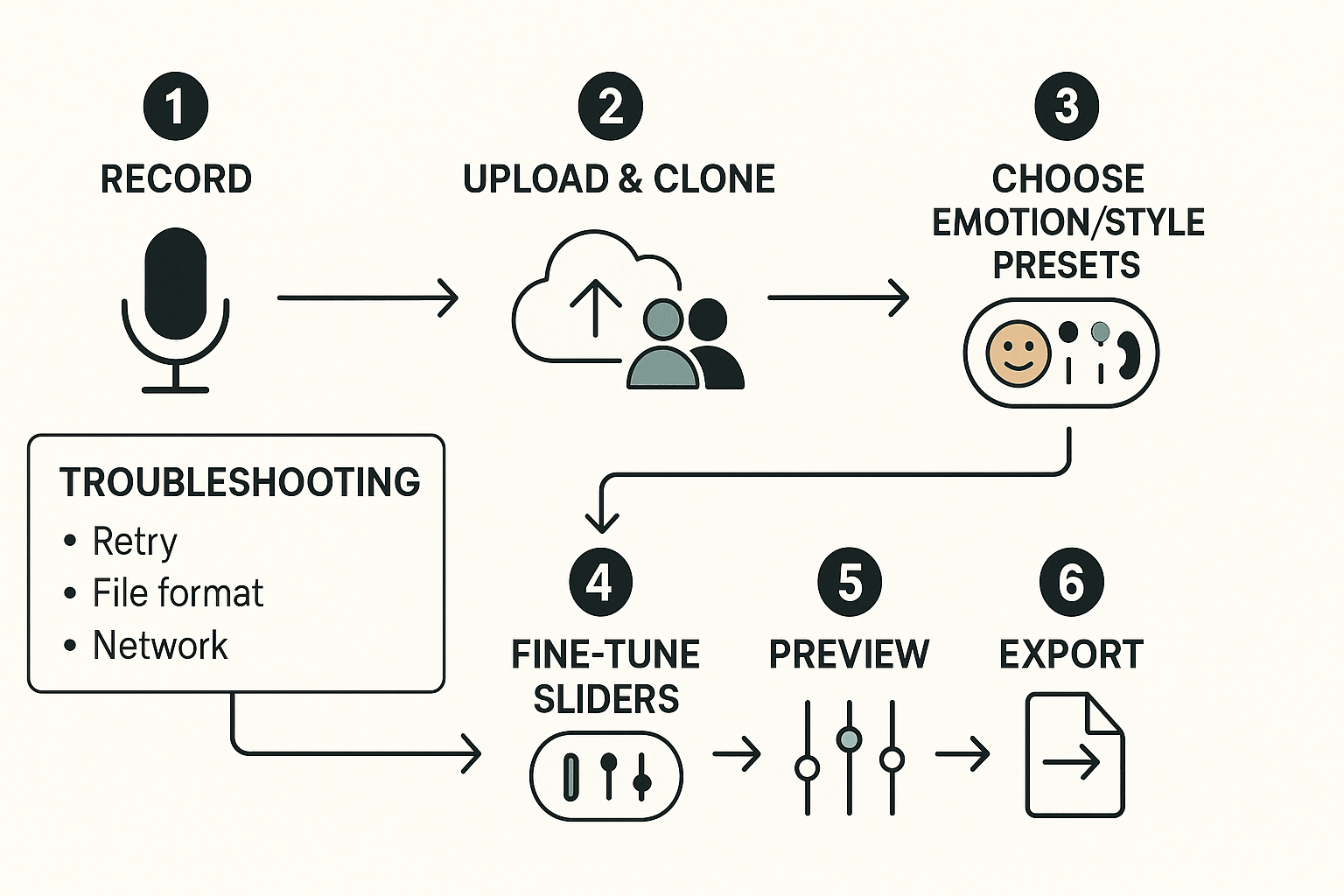
This hands-on walkthrough shows how to prepare a recording, upload a 30-second sample, and build a voice clone with emotion and style presets. It also covers fine-tuning sliders for pitch, pace, breath, and emphasis, plus multilingual cloning notes and export tips. You’ll see common fixes for failed uploads, robotic output, and clarity artifacts so you can finish a clean export.
Prepare your recording first
Record in a quiet room with a clear microphone. Aim for a 30-second sample that captures natural inflection and consistent volume. Save as WAV or MP3 and trim silence at the start and end.
Upload, clone, and choose emotion and style
-
Open the Voice Cloning or Voice Design tool in your DupDub workspace.
-
Upload the 30-second sample and confirm speaker consent where required.
-
Start cloning, then pick an emotion preset like neutral, warm, excited, or calm.
-
Choose a style preset for narration, conversational, or commercial tones.
-
Wait for processing, then load the new voice into the editor for fine-tuning.
Fine-tune sliders for natural results
Use sliders to shape micro-timing and character. Pitch adjusts high or low tones without changing words. Pace controls speed, useful for subtitles or timed dubs. Breath adds natural inhalations; set low for formal speech and higher for intimate reads. Emphasis boosts stress on selected words for clearer intent. Move sliders in small steps and preview after each change.
Preview, export, and multilingual notes
Preview in the editor with your original video or script. For multilingual clones, choose the target language and test accent settings; cloning supports many languages but accents vary. Export as WAV or MP3 and include SRT subtitles when timing matters.
Troubleshooting quick matrix
-
Upload failed: retry with a different browser or smaller file, check network, clear cache.
-
Robotic output: increase breath and reduce pitch range, pick a warmer emotion preset.
-
Clarity artifacts: re-upload a cleaner sample or normalize audio levels, then re-clone.
-
Timing mismatch: adjust pace and re-sync subtitles in the editor.
Advanced tips, workflows & API integration
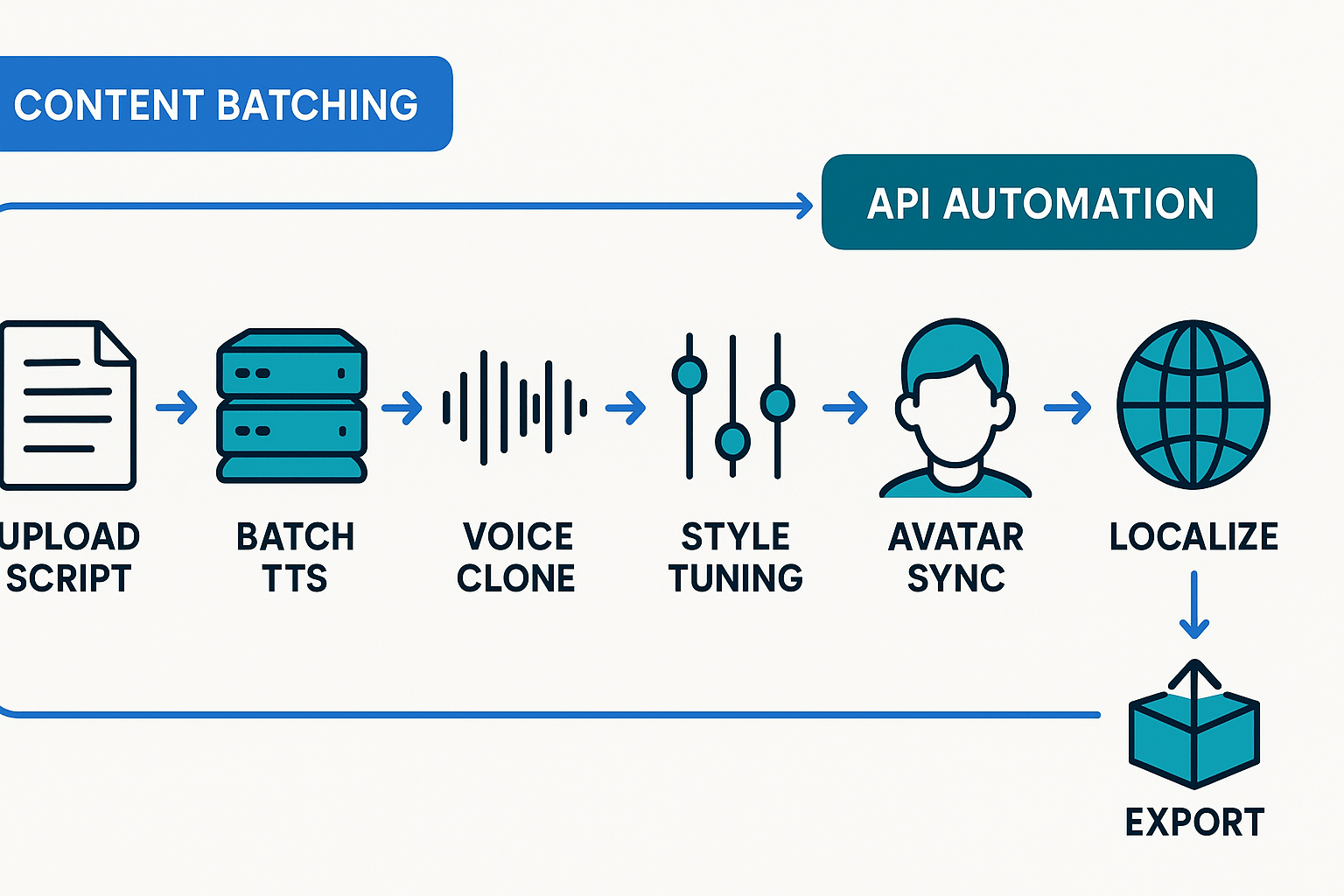
This section shows power workflows to pair avatars, batch content, and automate cloning. Use practical steps to save time and keep voice quality. The voice design feature dupdub fits into every step of a localization pipeline.
Combine avatars with voice design
Match avatar emotion and voice style for natural delivery. Start with a neutral base voice, then apply a style preset. Adjust timing and mouth-sync in the avatar editor.
-
Pick avatar and voice clone.
-
Apply style preset, then tweak intensity sliders.
-
Export a short sample and iterate.
Batch workflows for series and localization
Prepare a CSV with language, style, and metadata tags. Use consistent voice clones across episodes to keep a brand voice. Run batch TTS for drafts, then QC a master file.
-
Upload scripts with tags.
-
Run batch TTS or cloning jobs.
-
Review, tweak, and export localized outputs.
Automate with the API and tuning advice
Use the API to create clones, assign styles, and queue jobs. For large volumes use presets for speed, then do slider-level tuning for flagship episodes. Tag jobs with episode IDs to track versions.
Sample transcripts showing emotional variations:
-
Neutral: "Welcome back. Today we look at goal setting."
-
Warm: "Welcome back. I’m glad you’re here with me today."
-
Urgent: "Act now. This step is time sensitive."
Privacy, ethics, and legal considerations
When teams use the voice design feature dupdub, they must follow clear consent and data rules. Start with written consent that lists uses, rights, and retention. Keep records and make it easy for speakers to revoke permission.
Collect explicit consent and scope use
Get consent before you clone a voice. Consent should include who will use the voice, where it will run, and whether it can be used commercially. Store signed records and link them to the cloned asset.
Use speaker locking and support revocation
Lock clones to the original speaker and log all generation events. Offer an easy revoke path, and honor takedown requests fast. If you need to remove a voice, follow these steps:
-
Identify the clone and linked content.
-
Disable new generations and expire active keys.
-
Remove files from public buckets and notify partners.
Encrypt, retain minimally, and check contracts
Encrypt voice data in transit and at rest, and limit retention to what you need. For legal risk, treat voiceprints as sensitive data:
Biometric data guidance: Biometric recognition states "Under the UK GDPR, biometric data is defined as 'personal data resulting from specific technical processing relating to the physical, physiological, or behavioural characteristics of a natural person, which allow or confirm someone’s unique identification of that natural person, such as facial images or dactyloscopic [fingerprint] data.'" Review contracts for permitted uses, liability, and data handling in enterprise reviews.
Adopt clear internal policies before publishing any cloned voice. Train teams on consent, revocation, and secure storage. That will cut legal risk and protect speakers.
Accessibility and multilingual support
DupDub’s voice design feature dupdub can help make audio accessible and natural across accents and languages. This section explains accent coverage, the 47-language limit for voice cloning, and how to use emotion and style controls to boost clarity for diverse listeners.
Support for accents and voice cloning limits
Voice cloning currently supports 47 languages for creating a custom voice, while TTS covers 90-plus languages and accents. Use regional accent settings and neutral pace so the clone reads naturally in the target language. Test short phrases in context to find the best match for tone and pronunciation.
Tips to improve comprehension and accessibility
Practical checklist:
-
Keep sentences short and neutral for nonnative speakers.
-
Favor clear intonation, modest emotion, and slightly slower speech.
-
Always add captions and localized subtitles for full access.
By combining emotion controls, careful accent selection, and captions, you make localized content both lifelike and accessible.
Side-by-side comparison: DupDub vs. competitors
This neutral comparison covers cloning limits, language support, emotion controls, API features, and pricing for creators choosing an AI voice platform. The voice design feature DupDub bundles voice cloning, TTS, avatars, and end-to-end dubbing in one workflow, which helps teams avoid stitching tools together. According to
AI Adoption Across Regions, 2025, generative AI continues to reshape enterprise AI agendas in North America, Europe, and Asia Pacific.
Key differences at a glance
-
Cloning limits: DupDub offers multiple clone slots by plan, while some competitors limit clones or charge per project. This matters when you need brand voices across teams.
-
Language coverage: DupDub supports 90+ TTS languages and 47 cloning languages, giving broader localization than many rivals.
-
Emotion and style controls: DupDub exposes fine-grained style parameters for emotional nuance; some tools offer presets only.
-
API and automation: DupDub provides API access for batch dubbing and avatar workflows, matching enterprise needs.
-
Pricing and packaging: DupDub groups dubbing, avatars, and transcription in tiered plans, which can be more cost effective for creators who localize at scale.
For a detailed feature matrix and pricing, see the comparison table or pricing page.
Case studies & short user stories
These mini case studies show creators using the voice design feature dupdub to repurpose audio, localize narration, and launch multilingual ads. Each story highlights the workflow, the emotion and style choices, and the time or cost advantage gained. Read the steps and quick outcomes to see practical, repeatable setups.
Podcast to social shorts
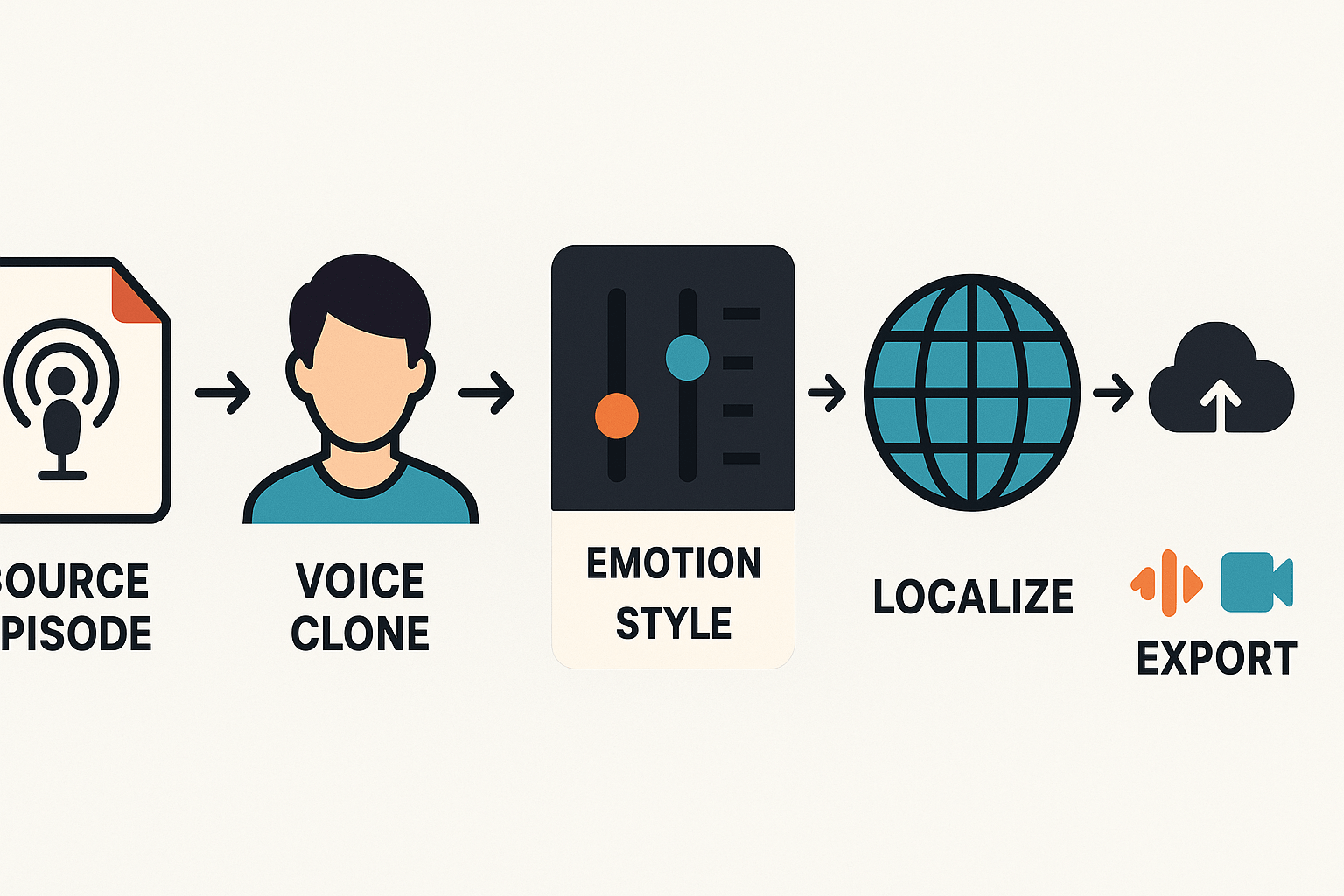
A host cloned their voice, then produced upbeat, punchy hooks for socials and a calm summary for show notes. Workflow: source episode, clone voice, apply lively or neutral style, export trimmed clips. Result: repurpose time fell from days to hours, and no studio re-records were needed.
eLearning narration localization
An L&D team used a single cloned voice with an authoritative, steady style and subtle warmth for translated modules. Workflow: clone, adjust pace and emphasis per language, batch export. Result: consistent brand tone across locales and faster turnarounds.
Multilingual ad campaigns
A marketing team generated three emotional variants, energetic, friendly, and sincere, then A/B tested voice tones across markets. Workflow: write one script, create style variants, localize, publish. Result: faster creative iterations and lower production costs than hiring multiple voice actors.
FAQ — quick answers
-
How long does cloning take with the voice design feature in DupDub?
Voice cloning typically completes within minutes. A 30-second sample usually processes in about 2 to 10 minutes, depending on system load. You’ll receive a dashboard notification when the cloned voice is ready.
-
How do I revoke a cloned voice in DupDub?
Go to your account dashboard, open the Voice Clones section, select the clone, and choose Revoke or Delete. This prevents further use and can remove stored data. For enterprise-wide controls, contact support.
-
How is voice privacy handled in DupDub?
Voice data is encrypted both in transit and at rest. Cloned voices are locked to the original speaker, and data is not shared with third parties. You can request deletion of samples directly from the dashboard.
-
Which languages are supported for cloning and TTS in DupDub?
DupDub supports over 90 languages and accents for TTS and about 47 languages for voice cloning. Speech-to-text and subtitle tools cover more than 40 languages for transcription and alignment.
-
How do I start the 3-day free trial or access API docs in DupDub?
Sign up on the DupDub website to begin a 3-day free trial with starter credits. For development, access API documentation in your dashboard and follow the provided quickstart guides.




 Discord
 YouTube
 Tiktok
 Twitter
 Facebook
 Instagram