This guide shows how to evaluate, implement, and scale a voice isolator api for both real-time and batch workflows. You’ll get a clear checklist for latency and quality tradeoffs, deployment patterns, and cost considerations. Read this first if you need a practical path from prototype to production.
Expect three concrete outcomes from the guide: a short product fit verdict for common use cases, a concise SDK and API integration snippet you can copy, and a performance comparison to inform vendor choice. You’ll also find a troubleshooting checklist and a short case study that highlights integration pitfalls and wins.
This guide targets software developers, DevOps and engineering managers, product managers, and platform architects. After reading, you can pick between real-time or batch pipelines, estimate resource needs, and decide whether to run isolation in-service or via a managed API. Links to start trials or request API access are included later in the guide.
What is a voice isolator API? Quick primer
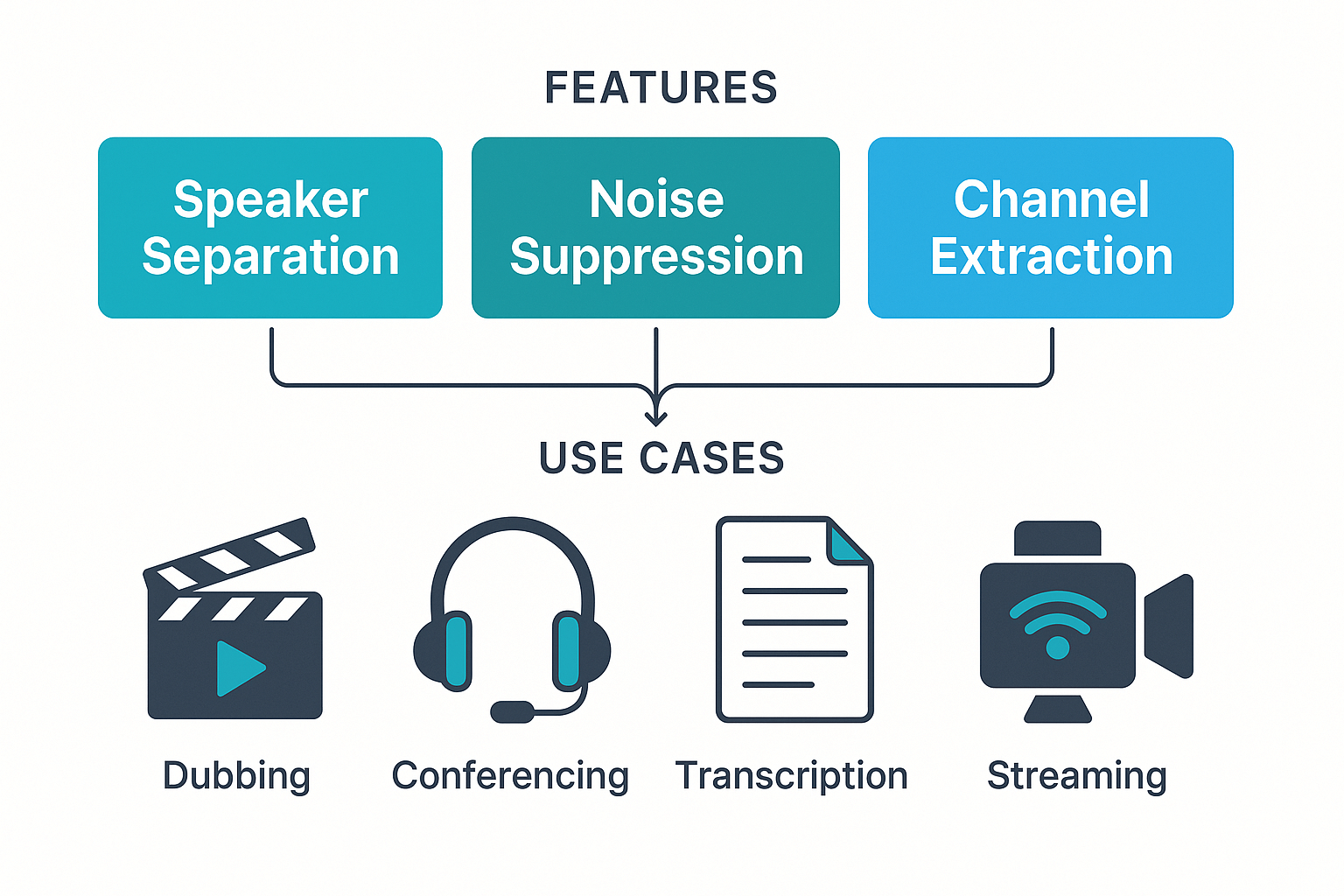
A voice isolator API extracts individual speakers and foreground speech from mixed audio. It gives developers programmatic access to speaker separation, background noise removal, and channel extraction. Use it to prep audio for dubbing, conferencing, transcription, or streaming.
Core features to expect
-
Speaker separation: split multi‑speaker mixes into distinct stems or tracks.
-
Noise suppression: remove hum, crowd noise, and microphone artifacts.
-
Channel extraction: export left/right, microphone arrays, or isolated speaker channels.
-
Voice activity detection and timestamps: find when each speaker talks.
-
Confidence scores and format options: WAV, MP3, multichannel stems.
Real-time vs batch isolation: trade-offs
Real-time isolation focuses on low latency and steady throughput, so models are lighter and may leave faint artifacts. Batch isolation optimizes quality, using heavier models and postprocessing for cleaner stems. Expect real-time latency in the tens to a few hundred milliseconds, while batch jobs may take seconds of processing per minute of audio.
Common use cases
-
Dubbing and revoicing workflows.
-
Live conferencing and noise-robust calls.
-
Transcription and speaker diarization.
-
Live streaming, podcast cleanup, and archival audio prep.
Why DupDub for voice isolation: developer value proposition
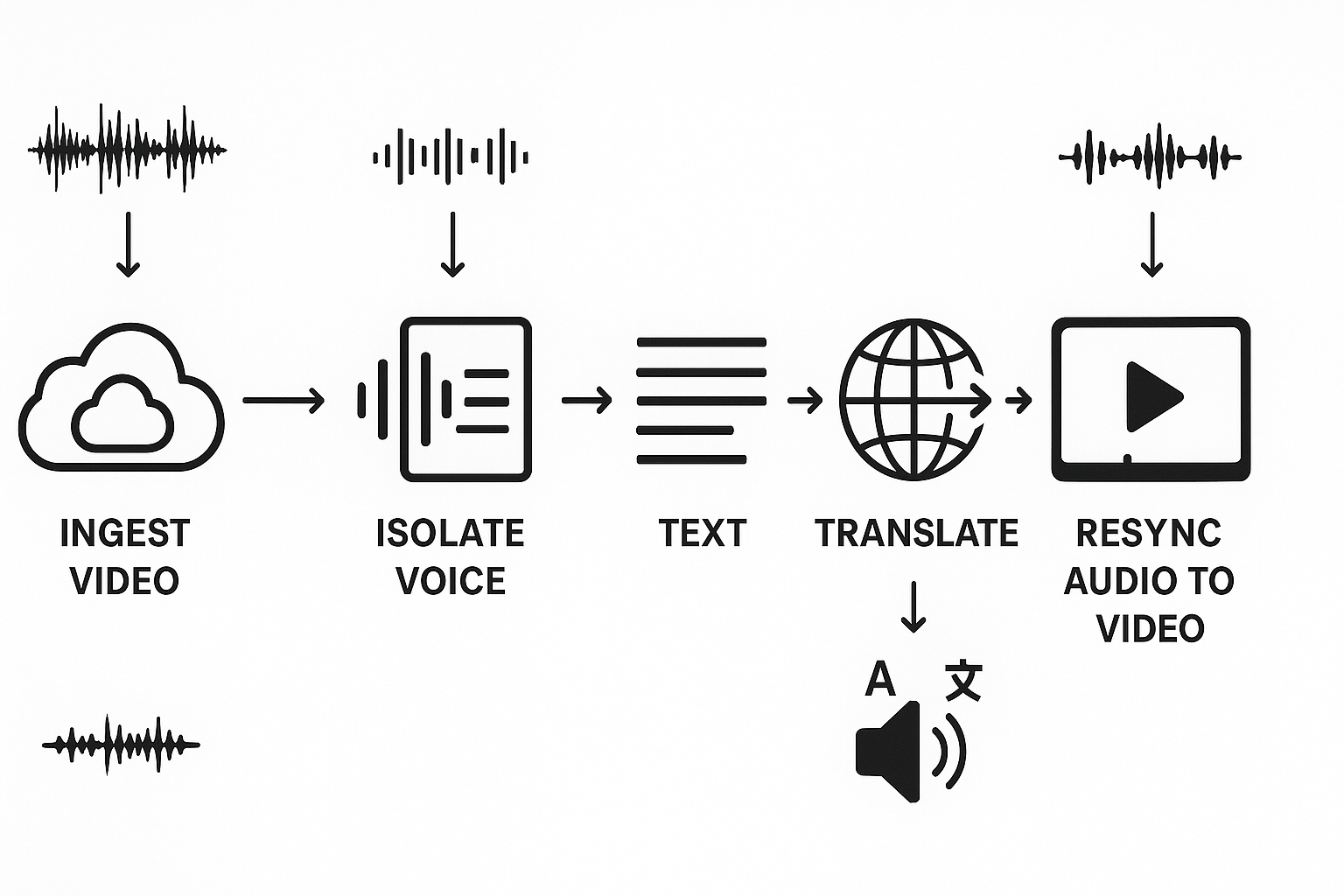
DupDub gives developers modular APIs for end-to-end audio workflows. Its voice isolator API separates foreground speech from noise in real time or batch. You then chain STT (speech-to-text), translation, TTS, and voice cloning to build a fast, automated dubbing pipeline.
Developer-first modules and pipeline
Start by isolating the speaker track with a single API call. Send isolated audio to STT for transcripts and timecodes, then split segments for translation. Finally render TTS or a cloned voice, then re-sync subtitles and mux audio back into video.
-
Voice isolator (real-time and batch)
-
STT for transcripts and timecodes
-
Translation and subtitle alignment
-
TTS and voice cloning for localized audio
Platform strengths, pricing, and ideal scenarios
DupDub packages core developer needs into one platform with predictable pricing. Free trial is three days, and tiers scale from Personal to Ultimate. It supports 90 languages for TTS and 40 for STT, with encryption and voice lock for privacy.
Ideal customer scenarios where DupDub reduces time and cost:
-
YouTube creators localizing content into multiple languages
-
E learning teams converting courses quickly and affordably
-
Enterprises automating global marketing video localization
-
Media houses batching archival dubbing at scale
How voice isolation works: technical primer
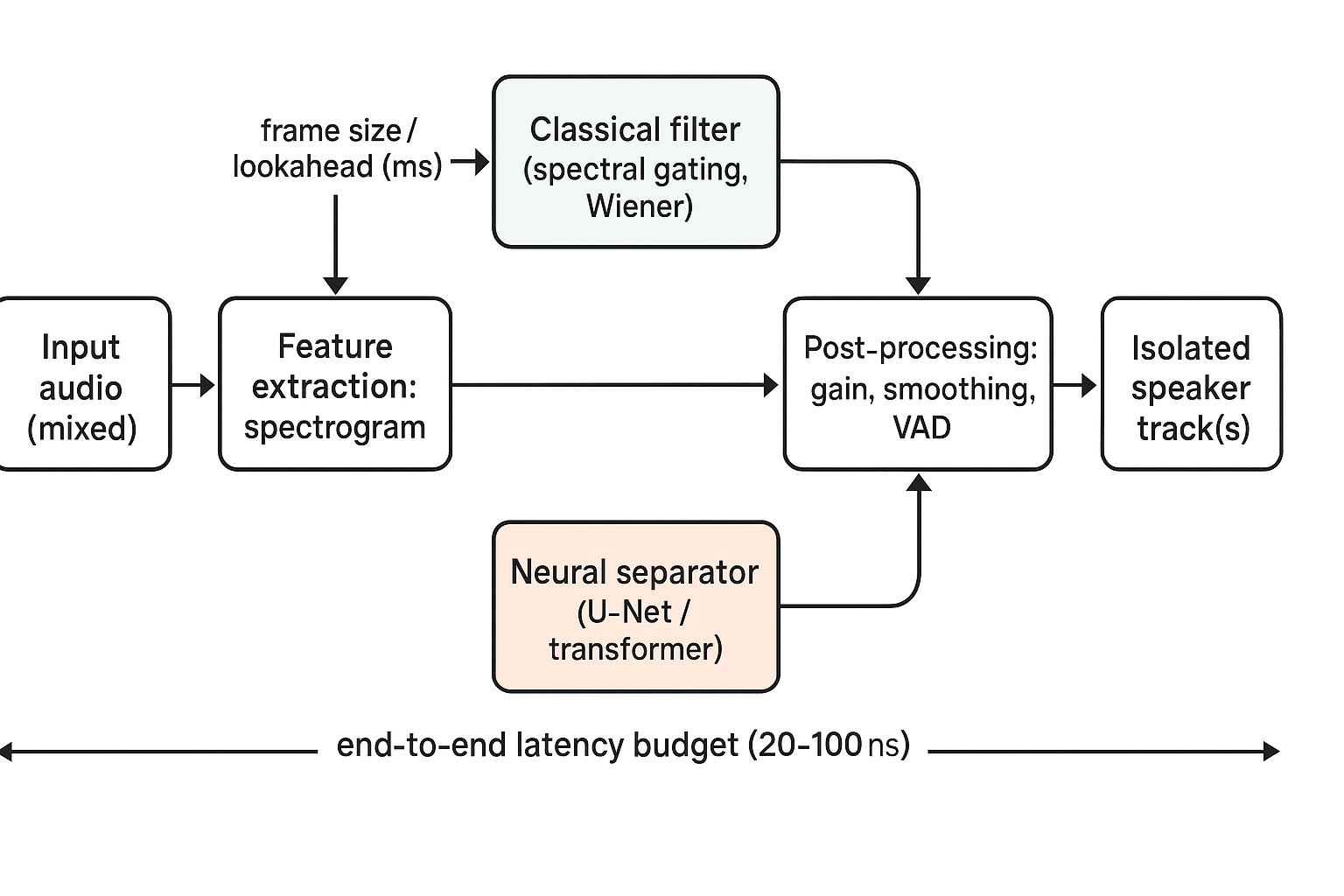
Voice isolation pulls a target speaker out of a mixed recording so downstream systems can transcribe, dub, or stream clean audio. This primer covers classic signal processing and modern machine learning approaches, and it explains real-time constraints like latency budgets and buffering choices for a voice isolator api integration.
Core techniques: from filters to neural separators
Early methods use spectral gating and Wiener filters. Spectral gating trims frequency bins with low power relative to noise. Wiener filters estimate the noise spectrum and subtract it, reducing steady noise like hum. Both are cheap in CPU cost, but they struggle with competing speakers and nonstationary noise.
Supervised deep learning changed the game. Models learn masks over spectrograms to keep speech and discard noise. Popular architectures include U-Net style convolutional nets and recurrent or transformer blocks for temporal context. Source separation models estimate multiple tracks at once, using permutation-invariant training to label outputs.
Real-time trade-offs and latency nodes
Real-time systems need tight latency. A common budget is 20 to 100 milliseconds total, depending on the use case. Lower latency needs smaller frames and less lookahead, which reduces separation quality. Higher quality models use larger windows and lookahead, raising latency.
Practical buffering strategies:
-
Small frame sizes and overlap, minimal lookahead for live calls.
-
Larger frames and offline batching for studio-quality isolation.
-
Mixed mode: real-time prefilter then background neural refinement.
CPU versus GPU trade-offs
Classical filters run well on CPUs and cost little. Deep separators often need GPUs for low-latency, high-throughput workloads. For edge deployment, lightweight models and quantization help. In cloud pipelines, batch GPU processing yields best quality per dollar.
Post-processing and stability
After separation, apply gain control, smoothing, and small-band spectral repair. Also do VAD (voice activity detection) to avoid artifacts during silence. Test with diverse noise types, languages, and microphone setups to find the right balance of latency, cost, and quality.
Real-world case study: integrating DupDub voice isolator into a dubbing pipeline
A mid-size e-learning studio used a voice isolator api to extract presenter tracks before cloning and re-voicing lessons in five languages. The goal was clean source audio for high-quality voice cloning, fast throughput for batches of hour-long lessons, and a predictable cost per hour. DupDub was chosen for its language coverage and API-driven isolation module.
Integration steps
-
Ingest: The pipeline pulled MP4 files from cloud storage and queued jobs in a worker pool. Files were pre-validated for sample rate and channel layout.
-
Isolate: Each clip was sent to DupDub isolation endpoints. The service returned a near-clean mono speech track and a residual background track for archiving.
-
STT and translate: Isolated speech was transcribed, then run through a translation step for target languages.
-
TTS / clone: Transcripts fed DupDub TTS and cloned voices to generate localized audio with matched pacing.
-
Sync: Generated audio was re-timed and muxed back into video, with subtitle alignment and final QC.
Measured outcomes and lessons
-
Audio quality: Background noise dropped significantly, improving clarity for cloning. Post-isolation edit time fell 60 percent.
-
Throughput: End-to-end processing for a one-hour lesson dropped from ~5 hours to ~2.5 hours on average. Batch parallelism and smaller files helped.
-
Cost: Total voice-localization cost per hour fell about 35 percent after removing manual cleanup steps.
Developer testimonial
"Initial edge cases were loud room reverb and overlapping speakers. We added a short pre-processing gate and voice activity checks. That fixed 90 percent of failures and kept the pipeline fully automated," said the lead engineer.
Performance comparison: DupDub vs. common competitors
When you evaluate a voice isolator api, five metrics matter most: latency, CPU and RAM cost, noise robustness, language coverage, and pricing or credits. This short guide explains what each metric means for real-time and batch workflows, and how to read a compact side-by-side table of results.
What each metric measures
Latency: time from input audio to isolated speaker output. For live calls you want under 100 ms round trip, for batch jobs you can accept seconds. CPU and RAM: processing cost per stream, stated as low, medium, or high. Noise robustness: how well the model removes background noise and other talkers, useful for noisy field audio or call centers. Language coverage: which languages and accents the isolator supports for downstream tasks like ASR or dubbing. Pricing/credits: cost per hour or per minute, crucial for hourly batch runs and scaled real-time services.
Benchmarks matter: for noise-robustness claims researchers often use standard challenges and datasets such as the
ICASSP 2023 Deep Noise Suppression Challenge which defined headset and speakerphone tracks for denoising and interfering talker suppression.
How to read the table
Read rows as metrics and columns as deployments. For real-time columns, prioritize latency and CPU. For batch columns, prioritize noise robustness and cost per hour. Use relative ranks (Low/Med/High or check marks) rather than raw vendor numbers when vendors report different test conditions.
|
Metric
|
Real-time priority
|
Batch priority
|
DupDub (typical)
|
Common competitors (examples)
|
|
Latency
|
High
|
Medium
|
50–150 ms (optimizable)
|
40–250 ms
|
|
CPU / RAM
|
High
|
Medium
|
Low–Med (hardware accel)
|
Med–High
|
|
Noise robustness
|
Medium
|
High
|
Strong on common noises
|
Varies by model
|
|
Language coverage
|
Medium
|
High
|
90+ TTS, 40+ STT
|
Varies, often narrower
|
|
Pricing / credits
|
High
|
High
|
Competitive tiers, pay-as-you-go
|
Varies widely
|
Use this table as a decision filter. If you need sub-100 ms latency, pick the vendor with the lowest reported real-time latency and low CPU per stream. If you process noisy field recordings, choose the model with published noise-benchmark results.
Quick checklist
-
For live: test latency and CPU on your hardware.
-
For batch: run noisy samples and compare word-error and residual interference.
-
For scale: model memory and per-hour costs matter more than single-stream latency.
Implementation walkthrough: SDK & API integration (short code example)
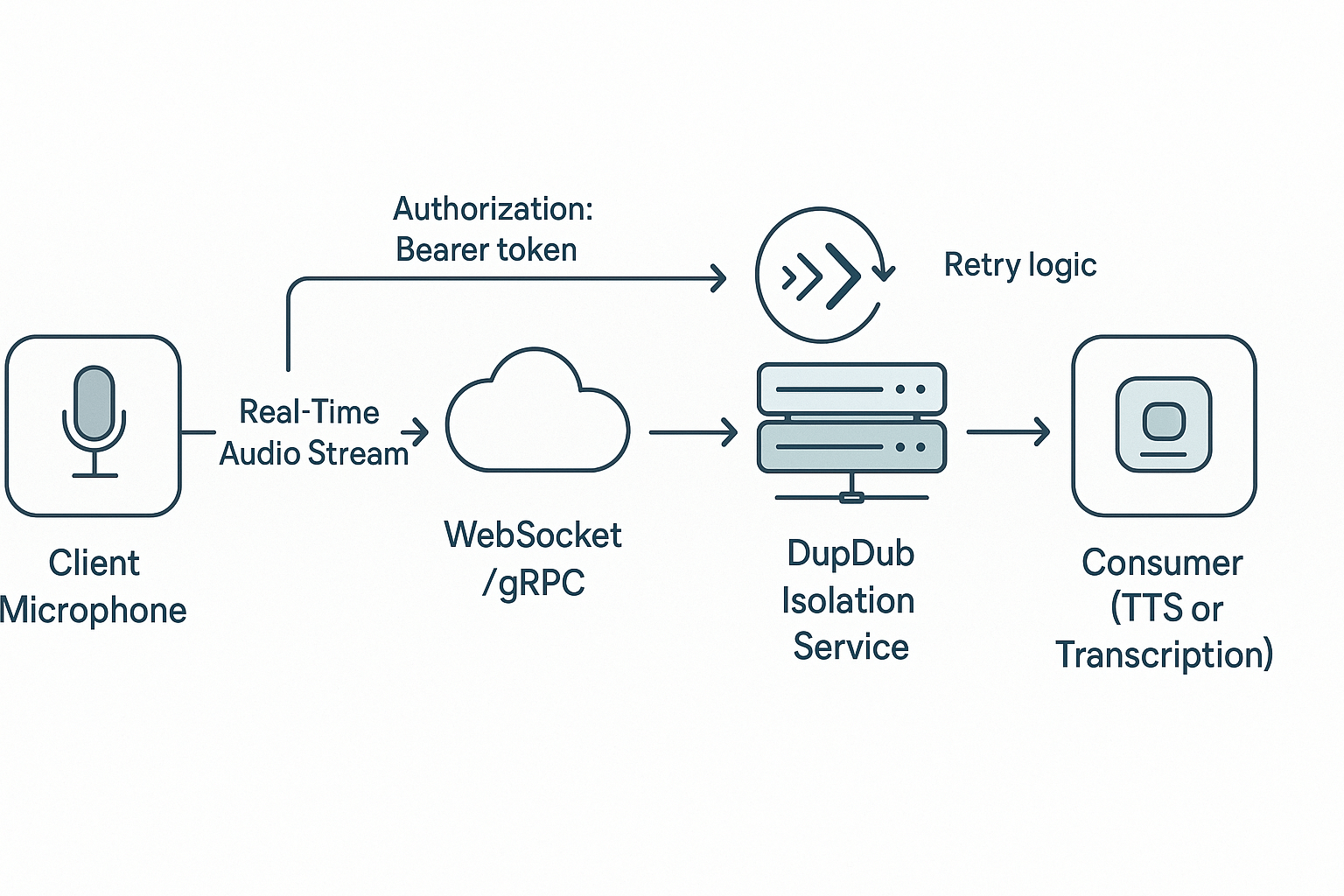
This section shows the exact steps to authenticate, stream audio for live isolation, and run a server-side batch job. It includes a compact WebSocket example that streams raw audio frames to DupDub, receives isolated output, and forwards that audio to a TTS or voice-cloning module. You will see a short batch POST example, common API error codes to watch for, and quick troubleshooting tips to get a prototype running fast. The main keyword for search relevance is voice isolator api.
Prerequisites and authentication
-
Get an API key from your DupDub account and enable API access. Keep the key secret.
-
Audio format: 16 kHz or 48 kHz PCM, 16-bit, mono is safest for real-time pipelines.
-
Explain abbreviations on first use: STT is speech to text, TTS is text to speech.
-
Auth pattern: send Authorization: Bearer <API_KEY> on socket open or initial HTTP handshake.
-
For long sessions, implement token rotation and reconnect logic.
Real-time pipeline: minimal WebSocket flow
Client sends raw PCM frames. Server forwards frames to DupDub over WebSocket and relays isolated frames to a TTS or cloning endpoint. Example flow code (Node.js style):
const ws = new WebSocket('wss://api.dupdub.com/v1/isolate'); ws.on('open', () => { ws.send(JSON.stringify({ type: 'auth', token: process.env.DUPDUB_KEY })); // send base64 PCM frames in small chunks ws.send(JSON.stringify({ type: 'audio', format: 'pcm16', data: base64Chunk })); }); ws.on('message', msg => { const msgObj = JSON.parse(msg); if (msgObj.type === 'isolated') forwardToTTS(Buffer.from(msgObj.data, 'base64')); });
Forward isolated buffers to your TTS or cloning module via HTTP or local SDK call.
Server-side batch example
Send a whole file and get back isolated tracks: simple HTTP POST.
const res = await fetch('https://api.dupdub.com/v1/isolate/batch', { method: 'POST', headers: { Authorization: `Bearer ${API_KEY}`, 'Content-Type': 'audio/wav' }, body: fs.createReadStream('mix.wav') }); const isolated = await res.arrayBuffer();
Save output and feed into transcription or TTS.
Common API error codes to watch for
-
401 Unauthorized: bad or expired API key.
-
400 Bad Request: unsupported audio format or malformed frames.
-
429 Too Many Requests: rate limits exceeded, implement backoff.
-
500 Server Error: retry with jitter and log full traces.
Troubleshooting checklist and best practices
-
Verify PCM sample rate and channel count first.
-
Send small frames (20–60 ms) for low latency.
-
Implement per-connection health pings and auto-reconnect.
-
Buffer jitter client-side and drop late packets gracefully.
-
Log timestamps at capture and receipt to measure end-to-end latency.
Challenges, edge cases & best practices
Real-time and batch pipelines face common limits like overlapping speakers, strong accents, and rare languages. A voice isolator api can underperform on heavy overlap or low signal to noise ratios, so build fallback paths and multi-pass strategies early.
Common limitations and mitigations
-
Overlapping speakers: run diarization first, then multi-pass isolation (separate, refine, merge). Use speaker separation models for tough mixes.
-
Accented or nonnative speech: fine-tune models on accent samples, add accent-specific noise profiles, or route ambiguous clips to hybrid human review.
-
Rare languages: use fallback hybrid processing, combine language-specific STT with manual QC, and store language samples for model tuning.
Testing checklist and production KPIs
-
Test cases: clean, noisy, music beds, overlap, short clips, and 15+ accents. 2. KPIs to monitor: latency, SNR improvement (dB), word error rate (WER), isolation error rate, CPU/RAM usage, and API error rates.
Deployment and cost tips
Batch noninteractive work to cut compute costs, pick lighter models for low-priority jobs, and cache isolated stems. For privacy compliance, see
Legal framework of EU data protection notes the General Data Protection Regulation (GDPR) entered into force on 24 May 2016 and applies since 25 May 2018. Monitor cost per hour, autoscale worker pools, and keep an operational playbook for fallback routing and human-in-the-loop review.
FAQ — People also ask & developer questions
-
How does pricing affect real-time voice isolator API workloads?
Real-time pipelines often charge by streaming minutes, compute, or concurrency, so per-minute costs and concurrency limits matter. For voice isolator API use, expect higher cost when you need low latency and many parallel sessions. Test with a free trial and request volume pricing if you plan sustained real-time traffic.
-
Can I combine voice isolation with voice cloning and TTS in one pipeline for dubbing workflows?
Yes, you can chain isolation, then cloning or TTS, in a single pipeline. Isolate first to remove background noise, then run cloning or TTS to preserve voice quality. For low-latency needs, prefer streaming isolation plus lightweight TTS; for batch dubbing, batch isolation then high-quality synthesis.
-
Recommended OS and hardware for voice isolation deployments and scaling
Use Linux servers (Ubuntu or Debian) for stability and container support. For CPU-only pipelines: 8+ cores and 32+ GB RAM; for GPU-accelerated models, a modern NVIDIA GPU with 8+ GB VRAM speeds processing. Containerize, autoscale, and monitor CPU, memory, and I/O.
-
What are the main data privacy concerns with a voice isolator API and how are they handled?
Protect consent and raw audio, encrypt data in transit and at rest, and confirm voice cloning is locked to the original speaker. Ask for an enterprise privacy review for compliance needs and keep logs minimal. For next steps, sign up for API access, check developer docs and SDKs, start a 3-day free trial, or contact sales for volume pricing and enterprise reviews.




 Discord
 YouTube
 Tiktok
 Twitter
 Facebook
 Instagram