This guide shows how to add browser text-to-speech, when to prototype with the web speech api, and when to pick a production TTS service. You’ll get hands-on code, best practices, accessibility notes, and a short checklist for prototyping and scaling.
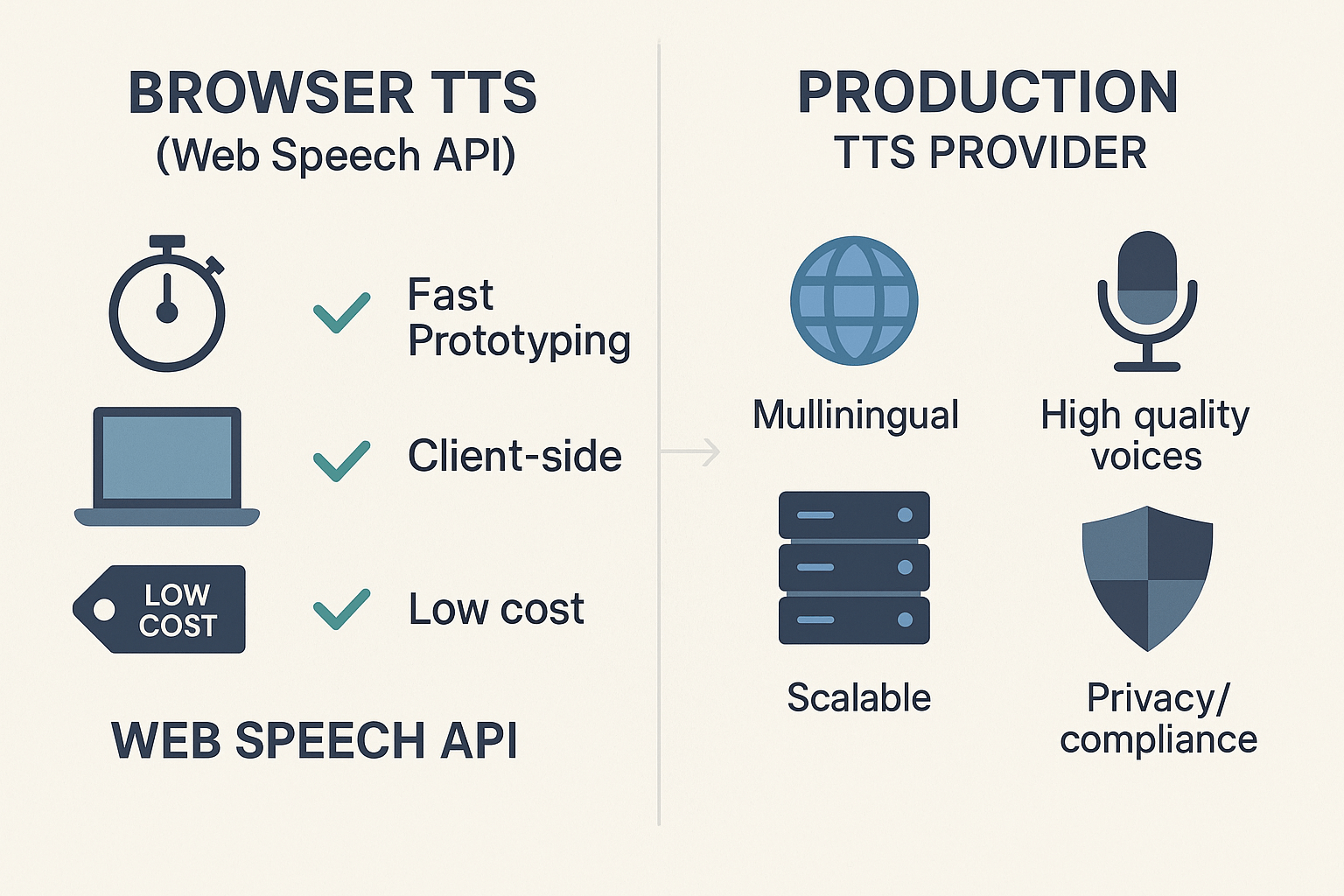
When to prototype with browser TTS:
-
Quick demos and low-risk UIs that need simple narration.
-
Offline or client-only features, where server calls aren’t wanted.
-
Fast experiments to validate UX and timing.
Signals you should switch to a production TTS provider:
-
Need diverse, lifelike voices or many languages.
-
Strict audio quality and consistency across platforms.
-
High volume, batch processing, or automated localization.
-
Legal, privacy, or enterprise compliance needs.
Quick prototyping checklist:
-
Test speechSynthesis voices on target browsers.
-
Confirm pause/resume behavior and events.
-
Log failures and add server-side fallbacks.
-
Measure latency and audio quality early.
Why add voice (TTS) to your web app? Use cases & benefits
Accessibility and broader reach
Voice unlocks your product for people with low vision, reading disabilities, or limited literacy. It also helps older adults and non-native speakers who understand audio better than text. Meeting accessibility standards (WCAG) with TTS reduces legal risk and expands market reach.
Keep users longer, hands-free
Audio increases time-on-task for long content like articles, tutorials, and lessons. Users can listen while commuting, cooking, or exercising, so they consume more of your content. A hands-free UI also enables voice-first features for smart devices.
When teams add TTS: common use cases
-
Narrated articles, blog posts, and documentation
-
Learning platforms and audio-first courses
-
Notifications, onboarding flows, and voice assistants
-
Multilingual product tours and localized marketing
Business benefits and ROI
Voice often raises engagement and retention, which can lift conversions and lifetime value. TTS cuts time-to-localize by letting you reuse a single script across languages. For teams that need production-grade voices or massive language coverage, a scalable TTS partner can accelerate localization and keep brand voice consistent.
The Web Speech API exposes two browser primitives for voice features: speechSynthesis for text to speech and SpeechRecognition for speech to text. Read this section to learn the core objects, lifecycle events, and the simple event flow you need before you write code. Keep these basics in mind, they avoid common pitfalls and make debugging faster.
speechSynthesis: the TTS primitive
speechSynthesis is the browser interface that speaks text. Create a SpeechSynthesisUtterance (the spoken message) and pass it to speechSynthesis.speak(). Key objects:
-
SpeechSynthesisUtterance: holds text, lang, rate, pitch, and voice.
-
speechSynthesis: the controller, with methods like speak, pause, resume, cancel, and getVoices.
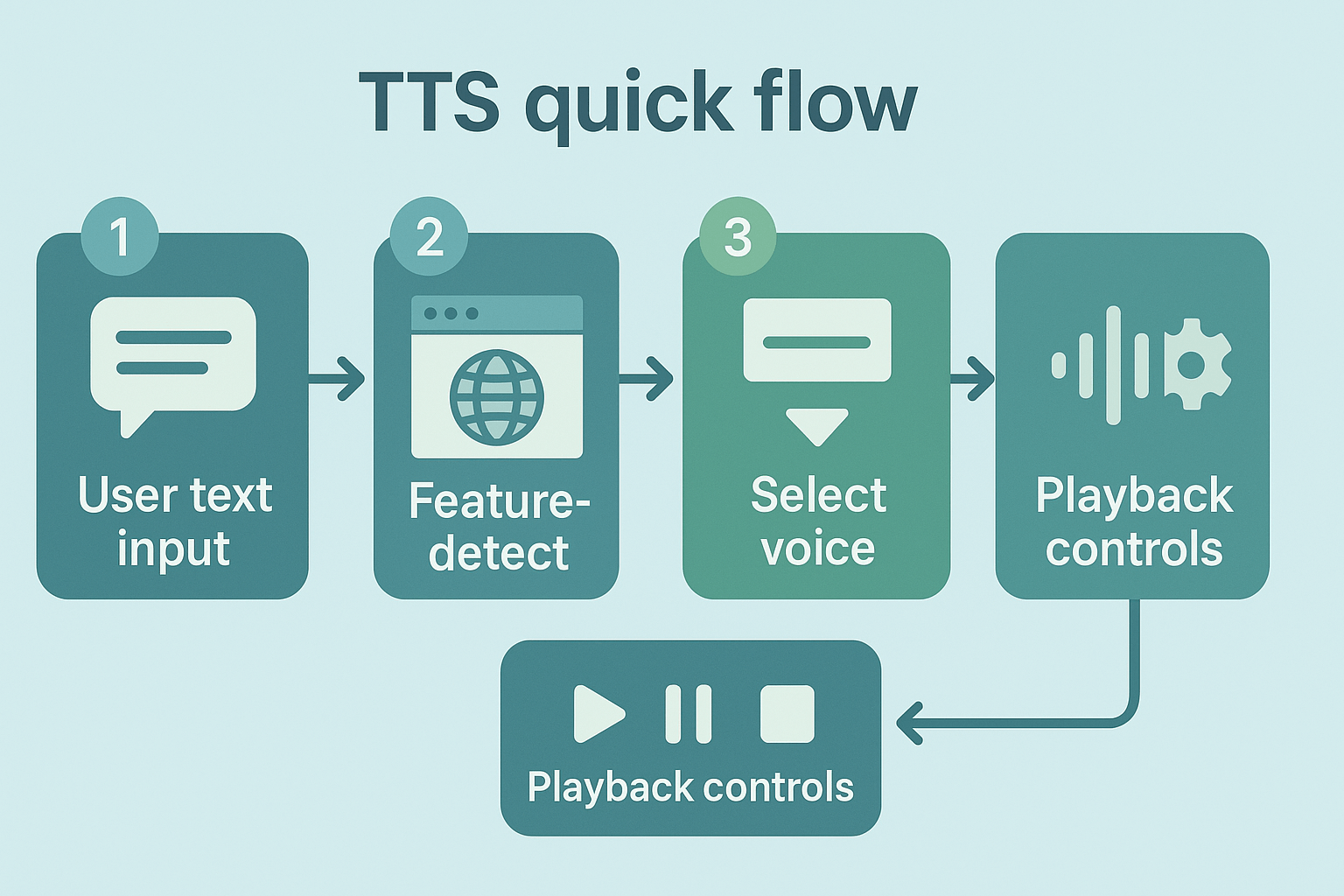
Important events to watch: start, end, error, pause, resume, and boundary (word or sentence). Typical flow:
-
new SpeechSynthesisUtterance(text)
-
set voice and options
-
speechSynthesis.speak(utterance)
-
listen for events to update UI or sync captions
SpeechRecognition: speech to text
SpeechRecognition provides live transcription in the browser. Note, browser support varies and vendor prefixes may be required. Key parts:
Events to handle: start, result, end, error, nomatch, audiostart, audioend. Basic flow:
-
create recognition and set lang and interim settings
-
recognition.start()
-
onresult fires with transcript chunks
-
onend or onerror determines retry or cleanup
Understanding these objects and events helps you build reliable demos. Next, you’ll see a short code-first example that wires these events into a simple UI.
Step-by-step: Implementing basic TTS with Web Speech API (code-first)
This short, copy-paste tutorial shows a minimal Text to Speech flow using the Web Speech API so you can prototype voice features fast. It includes feature detection, a complete speak example, how to pick voices, and practical UX tips for play, pause, and focus. If you need higher-quality voices or batch rendering for production, you can pair this with DupDub later.
Quick example: feature-detect and speak
Feature-detect first, then create and speak a SpeechSynthesisUtterance. Paste this into the browser console or a small page script.
if ('speechSynthesis' in window) { const utter = new SpeechSynthesisUtterance('Hello from the browser. This is a quick demo.'); // optional events utter.onstart = () => console.log('started'); utter.onend = () => console.log('ended'); utter.onerror = (e) => console.error('tts error', e); // set voice, rate, pitch below window.speechSynthesis.speak(utter); } else { console.warn('No TTS available in this browser'); }
Select voices, rate, and pitch
Voices may arrive asynchronously, so call getVoices and re-run when the list loads. Example:
const loadVoices = () => { const voices = speechSynthesis.getVoices(); return voices; }; speechSynthesis.onvoiceschanged = () => { const voices = loadVoices(); const voice = voices.find(v => v.lang.startsWith('en')) || voices[0]; const u = new SpeechSynthesisUtterance('Voice selection test'); u.voice = voice; u.rate = 1.0; // 0.1 - 10 range, keep near 0.9-1.2 for natural speech u.pitch = 1.0; // 0-2 speechSynthesis.speak(u); };
UX tips and accessibility
-
Provide Play, Pause, Resume, and Stop controls using speechSynthesis.pause(), resume(), and cancel().
-
Keep text chunks short for better control and responsiveness. Long utterances can be hard to interrupt.
-
Manage focus: move focus to status elements and update an aria-live region with "Playing" and "Stopped" messages.
-
Ask for consent and explain what audio the app will make, especially on shared devices.
Quick note on scaling: the Web Speech API is great for prototyping and simple apps. For multi-language, studio-grade voices, or batch rendering of many files, DupDub offers 700+ voices, voice cloning, and exportable audio suitable for production workflows.
Advanced patterns & multi-language support (continuous speech, streaming, and fallbacks)
The Web Speech API can handle short prompts, but real apps need patterns for long narration, language switching, and resilience. This section shows how to stitch utterances, run continuous playback, switch languages mid-session, and fall back when the browser lacks a voice. It also explains when to offload TTS to a server for consistent multilingual output.
Continuous playback and stitching multiple utterances
For long text, split content into sentence or paragraph chunks. Create a queue of SpeechSynthesisUtterance objects and play them back-to-back. Listen for the end event on each utterance, then call speechSynthesis.speak on the next item. This avoids browser timeouts and gives control over pauses and emphasis.
Practical tips:
-
Use short chunks, 200 to 800 characters each. Short chunks reduce memory use.
-
Add small pauses by inserting empty utterances or using setTimeout between speaks.
-
Keep state in a controller so you can pause, resume, or jump to a timestamp.
Switching languages mid-session
Change utterance.lang to the BCP 47 code you need, for example en-US or es-ES. Before speaking, pick a voice from speechSynthesis.getVoices that matches the lang. If no exact voice exists, choose a close locale and lower the pitch or rate to compensate.
Streaming, long-form narration, and when to offload
Browsers do not stream high-quality audio reliably for hours. If you need consistent voices, exact timing, or long recordings, generate audio server-side or via an API. Server-side TTS keeps tone and timing stable, and makes it easy to cache or deliver files.
Fallback strategies
-
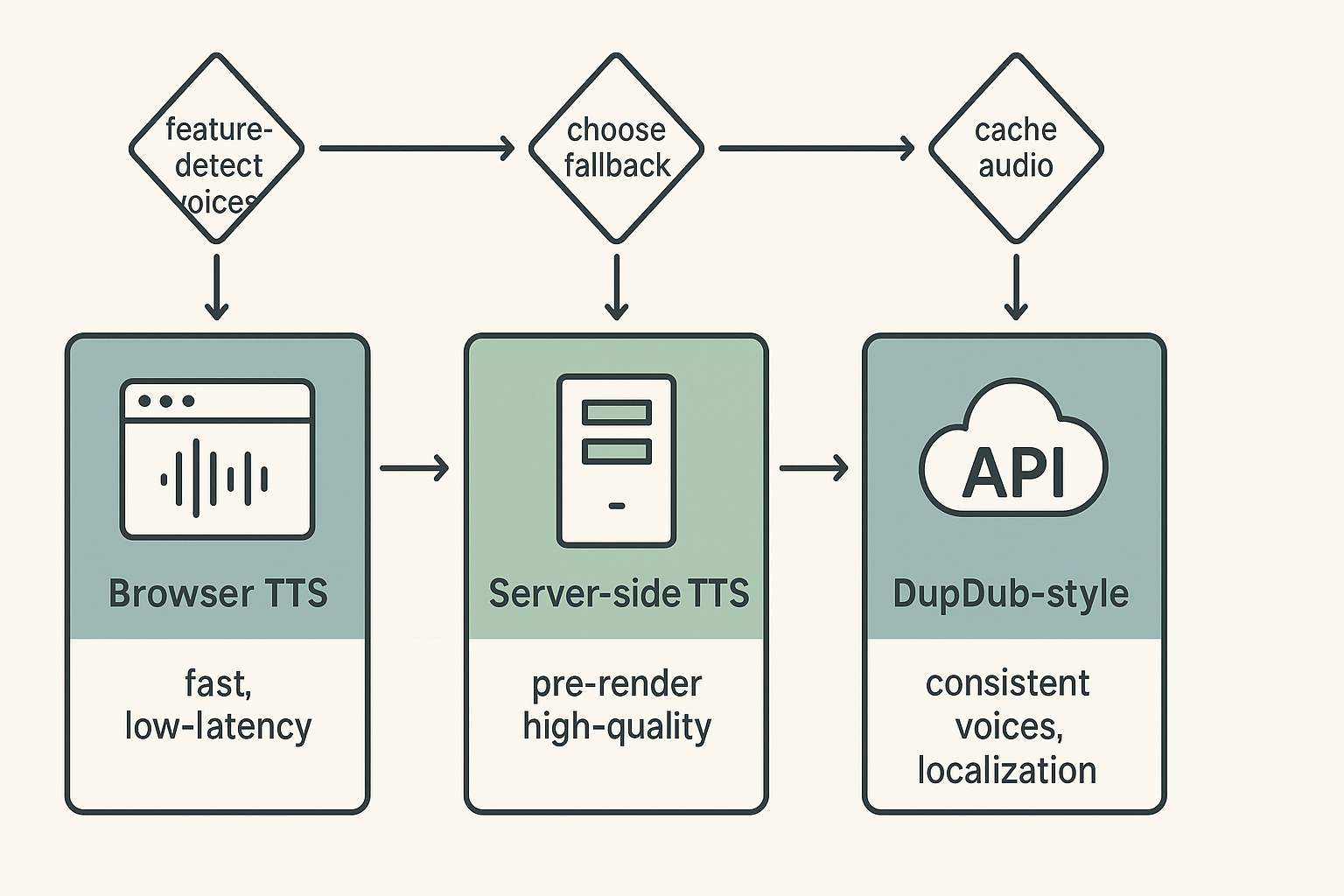
Feature detect voices and language support first. Fall back to a local locale voice if needed.
-
If quality or availability is poor, request pre-rendered audio from a server TTS.
-
For brand consistency and large scale localization, use a dedicated service like DupDub for consistent voices across languages.
Use these patterns together: prefer browser TTS for instant feedback, and fall back to server-side or an API when you need consistent, multi-language output.
Cross-browser compatibility & known issues (with a compatibility table)
Adding voice can work in many browsers, but support is uneven. This section maps which engines support speechSynthesis (text to speech) and SpeechRecognition (speech to text). It gives practical fixes, testing tips, and a copyable table for QA teams to paste into checklists.
Quick compatibility table
MDN Web Docs (2025) states As of December 2025, the Web Speech API's speech synthesis is supported in Firefox desktop and mobile starting from Gecko 42+ (Windows)/44+, and in Chrome for Desktop and Android since version 33.
|
Browser / Platform
|
speechSynthesis
|
SpeechRecognition
|
Notes
|
|
Chrome Desktop
|
Yes (33+)
|
Experimental (via webkitSpeechRecognition)
|
Best overall support on desktop
|
|
Chrome Android
|
Yes (33+)
|
Partial
|
Use Chrome for consistent mobile behavior
|
|
Firefox Desktop
|
Yes (Gecko 42+)
|
No (limited)
|
Recognition not implemented in many builds
|
|
Firefox Android
|
Yes (Gecko 44+)
|
No
|
SpeechRecognition gaps on Android
|
|
Safari Mac
|
Partial
|
Partial
|
Requires user gesture and iOS/macOS-specific quirks
|
|
Safari iOS
|
Partial
|
No
|
iOS webviews often block mic access
|
|
Edge (Chromium)
|
Yes
|
Experimental
|
Matches Chrome behavior closely
|
|
Opera
|
Yes
|
Experimental
|
Follows Chromium support
|
|
Android WebView
|
Varies
|
Varies
|
Test on Android system webview versions
|
|
Internet Explorer
|
No
|
No
|
Deprecated platform, avoid in QA
|
Common platform quirks and workarounds
Browsers differ on triggers for audio and mic. Mobile often blocks autoplay without a user gesture. Also, recognition APIs are often vendor-prefixed or missing. To work around these issues:
-
Use feature detection: check window.speechSynthesis and window.SpeechRecognition before use.
-
Require a user tap to start TTS or request microphone access to avoid autoplay blocks.
-
Provide a server-side TTS fallback when speechSynthesis is absent.
-
Prefix checks for webkitSpeechRecognition on Chromium-derived browsers.
Testing tips and live checks
Test on real devices and not only emulators. Include desktop, iOS, Android, and the in-app webview used by your product. Add these steps to your QA checklist:
-
Automated feature detection script that logs capabilities and versions.
-
Manual test: start TTS from a user tap, then confirm audio output and volume.
-
Manual test: trigger recognition and confirm interim/final transcripts.
-
Check browser console for security and permission errors (autoplay, mic denied).
Copy the table above into your QA plan and update it before each release. For live reference on engine support, consult the browser docs linked above.
Security, privacy & accessibility considerations
Adding voice features changes your app's privacy and security surface. Whether you use the web speech api or a hosted service, be upfront about permissions and data handling. Below are practical, developer-focused steps to keep user data safe and make voice features accessible.
Privacy first: ask, minimize, document
Ask for microphone access with a clear purpose and a simple opt-in prompt. Avoid unnecessary recording or storing of raw audio, and prefer on-device or ephemeral processing when possible. Keep a published retention policy that states what you store, why, and how long.
Key actions:
-
Show clear permission text and in-app explanations.
-
Store only derived data (text, timestamps), not raw audio, unless required.
-
Use short retention windows and provide an export/delete option.
Secure your audio flow: validate and harden
Treat audio inputs like any user input: validate, sanitize, and rate limit. Watch for voice injection (unauthorized audio played to trick the system) and replay attacks (recorded audio reused). Mitigations include origin checks, authentication tokens, signed requests, server-side verification, and logging for unusual patterns.
Accessibility: follow WCAG and add controls
For captions and subtitles,
Captions/Subtitles | Web Accessibility Initiative (WAI) | W3C states: Captions are required in WCAG at Level A for pre-recorded audio content and at Level AA for live audio content. Also add language tags, keyboard controls, adjustable playback rate, and readable transcripts. Use proper ARIA labels for play/pause and expose text alternatives so screen readers and translators work reliably.
Reference standards like WCAG and regional privacy laws when you document policies and tests. Keep logs, run accessibility audits, and invite user testing from diverse language speakers.
When Web Speech API isn't enough: How DupDub complements TTS in web apps (mini case study)
The Web Speech API can get you running fast, but client-side TTS often hits hard limits. Browser voices vary, audio quality differs across platforms, and scaling to many languages or long video catalogs becomes tedious. This section shows where a managed service fits and how teams speed localization while keeping a consistent brand voice.
Client-side limits that slow production
Running TTS purely in the browser creates predictable constraints. Voices are limited to what each browser ships, so variety and consistency suffer. Cross-browser quirks mean voice timbre and timing change between Chrome and Safari. Finally, bulk localization and dubbing need automation and assets that client-only setups can’t handle well.
How DupDub fills the gaps
-
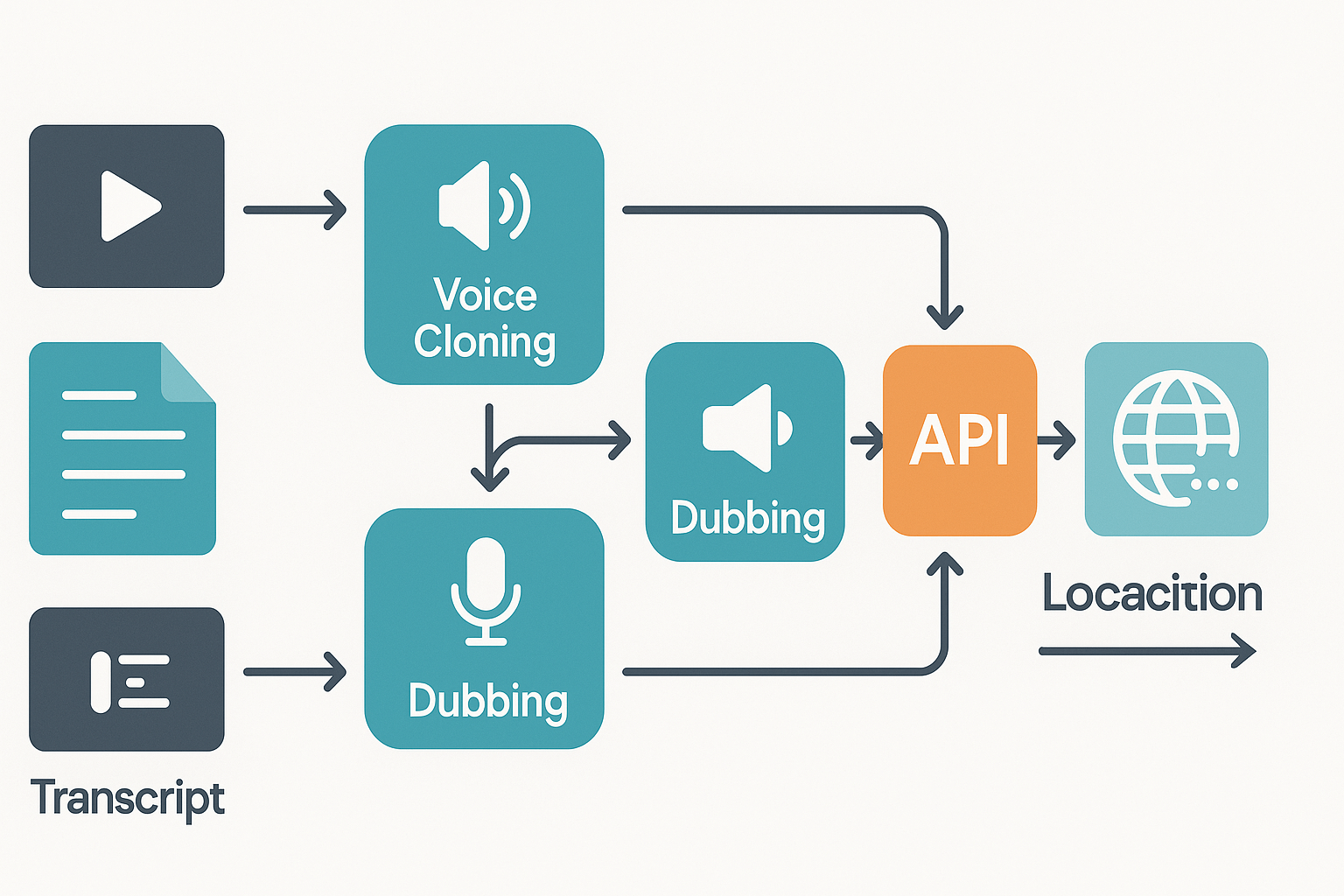
Broad voice library, many accents, and production-grade audio outputs.
-
Voice cloning (create one brand voice and reuse it across languages).
-
API automation for batch dubbing, subtitle alignment, and export formats.
-
End-to-end video dubbing workflow, so audio, subtitles, and assets stay synced.
Mini case study: e-learning publisher
A mid-size e-learning team used the Web Speech API for prototypes. They switched to a managed platform for localization work. With cloning and batch dubbing, they cut turnaround from weeks to days and kept one consistent voice across 12 locales. The workflow also removed manual subtitle syncing and lowered review cycles.
Troubleshooting common errors & developer FAQ
web speech api no audio: quick checks
If speak() runs but you hear nothing, check browser autoplay and user gesture rules. Test with a click handler that calls window.speechSynthesis.speak(utterance) and log window.speechSynthesis.speaking. In the console run: console.log(window.speechSynthesis.getVoices()) and console.error if no voices appear.
web speech api permission denied: how to reproduce and fix
If getUserMedia or SpeechRecognition fails with PermissionDenied, log the error in the catch: navigator.mediaDevices.getUserMedia({audio:true}).catch(e => console.error(e.name, e.message)). Ask users to check site-level microphone permissions in browser settings and test navigator.permissions.query({name:'microphone'}).
speech recognition empty results: fast repro steps
If onresult returns empty, enable interim results and log events: recognition.interimResults = true; recognition.onresult = e => console.log(e.results). Also log recognition.onstart and recognition.onend to confirm the session ran.
language mismatch in web speech api: what to verify
Compare utterance.lang and chosen voice.lang, and recognition.lang. Run console.log(utterance.lang, voice.lang, recognition.lang) and if voices list lacks the desired locale, use a fallback voice or server TTS.
tts latency issues: where to measure
Measure timing with performance.now(): log before and after speak() and onvoiceschanged. If getVoices is async, wait for onvoiceschanged. For long texts, chunk output or use a server-side TTS for faster starts.
quick checklist for reproducible debugging
-
Reproduce in an incognito window to avoid extensions. 2. Test in Chrome and Firefox and log console errors. 3. Record timestamps with console.time/console.timeEnd. 4. Capture media permission state with navigator.permissions.
developer FAQ: one-line answers
Q: Why different voices across browsers? A: Each browser uses platform voice sets; log getVoices to see available options. Q: How to test cross-language recognition? A: Set recognition.lang, speak sample audio, and log results; if poor, try cloud STT.
Conclusion + Next steps (how to prototype vs scale)
Prototype checklist
-
Spin up a quick Web Speech API demo using speechSynthesis to test voices and latency. Keep samples short and test multiple browsers and OSes.
-
Pick a clear voice and language tag (lang). Use SSML (Speech Synthesis Markup Language) for pauses and emphasis when supported.
-
Add a simple fallback: detect speechSynthesis support, then show a download or server TTS option.
-
Measure real user metrics: time to first audio, interruptions, and user feedback on naturalness.
-
Test accessibility: add captions, expose a play/pause control, and ensure keyboard focus order.
Scaling checklist
-
Choose a production TTS API for consistency, quotas, and SLAs. Plan for API keys, retries, and rate limits.
-
Lock brand voice: use voice cloning or fixed voice IDs so audio matches across locales.
-
Build a localization pipeline: content source, automated translation, subtitle alignment, and voice assignment per locale.
-
Stream and cache: pre-generate high-traffic audio, use CDN caching, and support streaming for long content.
-
Add monitoring: audio quality checks, error logs, latency dashboards, and user-reported feedback loops.
-
Review privacy and compliance: consent flows, retention policies, encrypted storage, and auditable logs. Consider enterprise options like DupDub API and DupDub pricing for voice cloning and large-scale localization.
FAQ
-
Is the web speech API production ready for high-traffic apps?
It’s great for prototypes and low-scale features. Browser TTS is inconsistent across devices and lacks voice cloning and SLAs. For reliable brand voice and high volume, use a production TTS service.
-
How do I handle multilingual TTS in production for multilingual TTS web apps?
Tag content with locales and pick voices per locale. Automate translation and subtitle syncing. For many languages and consistent voice quality, use a platform with wide language coverage and cloning.
-
What are best practices for voice privacy and data protection for TTS?
Get explicit consent, minimize stored raw audio, encrypt data in transit and at rest, and keep clear retention rules. If you use cloning, ensure speaker consent is recorded and models are access controlled.
-
When should I choose DupDub over browser TTS?
Use DupDub when you need consistent, scalable voices, voice cloning, many languages, or batch video dubbing. Browser TTS is quick to prototype, but DupDub handles production SLAs, localization pipelines, and team workflows.




 Discord
 YouTube
 Tiktok
 Twitter
 Facebook
 Instagram