
DupDub TTS API Quick-start: Python & Node Guide for Developers

Dec 16, 2025 18:2014 mins read
Share to
Contents

TL;DR — What you'll learn and the expected outcome

This quick-start gives developers a hands-on path to integrate a modern TTS API using Python and Node. You'll get copy-paste code, example workflows, and deployment tips so you can authenticate, synthesize, and save audio in minutes.
Expected outcomes:
  • Make authenticated API calls and handle responses (token and key patterns).
  • Generate and download TTS audio files in MP3 or WAV formats.
  • Try a simple voice cloning flow with short sample inputs.
  • Apply cost-saving tips, credit optimization, and batching strategies.
  • Follow links to the free trial and developer docs to continue learning.
Read the Python and Node quick-starts next for full end-to-end examples.
DupDub packages high quality text to speech, quick voice cloning, speech to text, and subtitle alignment into a single API platform for automating voice workflows. This section gives a developer view of each capability, the common endpoints you’ll call, and why language breadth matters for global dubbing. You’ll leave knowing which API calls to add to your pipeline and what each one actually does.

Core API capabilities

  • Text to speech (TTS): Convert text into natural audio, with dozens of voices and style controls. Common endpoint names you’ll see are /synthesize or /v1/tts, which return MP3 or WAV audio and metadata for timing.
  • Voice cloning: Create a reusable synthetic voice from a short sample. Typical endpoints are /clone or /v1/voices, which give you a voice ID to use with TTS calls.
  • Speech to text (STT): Turn audio or video into text, useful for transcripts and subtitle seeds. Look for /transcribe or /v1/stt, which return timecoded transcripts.
  • Subtitle alignment and export: Align transcripts to audio for SRT output and timed captions. Endpoints often include /subtitles or /v1/alignment and export SRT or JSON timing tracks.
  • Orchestration and webhooks: Use an API gateway for batch jobs, job status, and webhooks that notify your app when syntheses finish.

Why this matters for automation
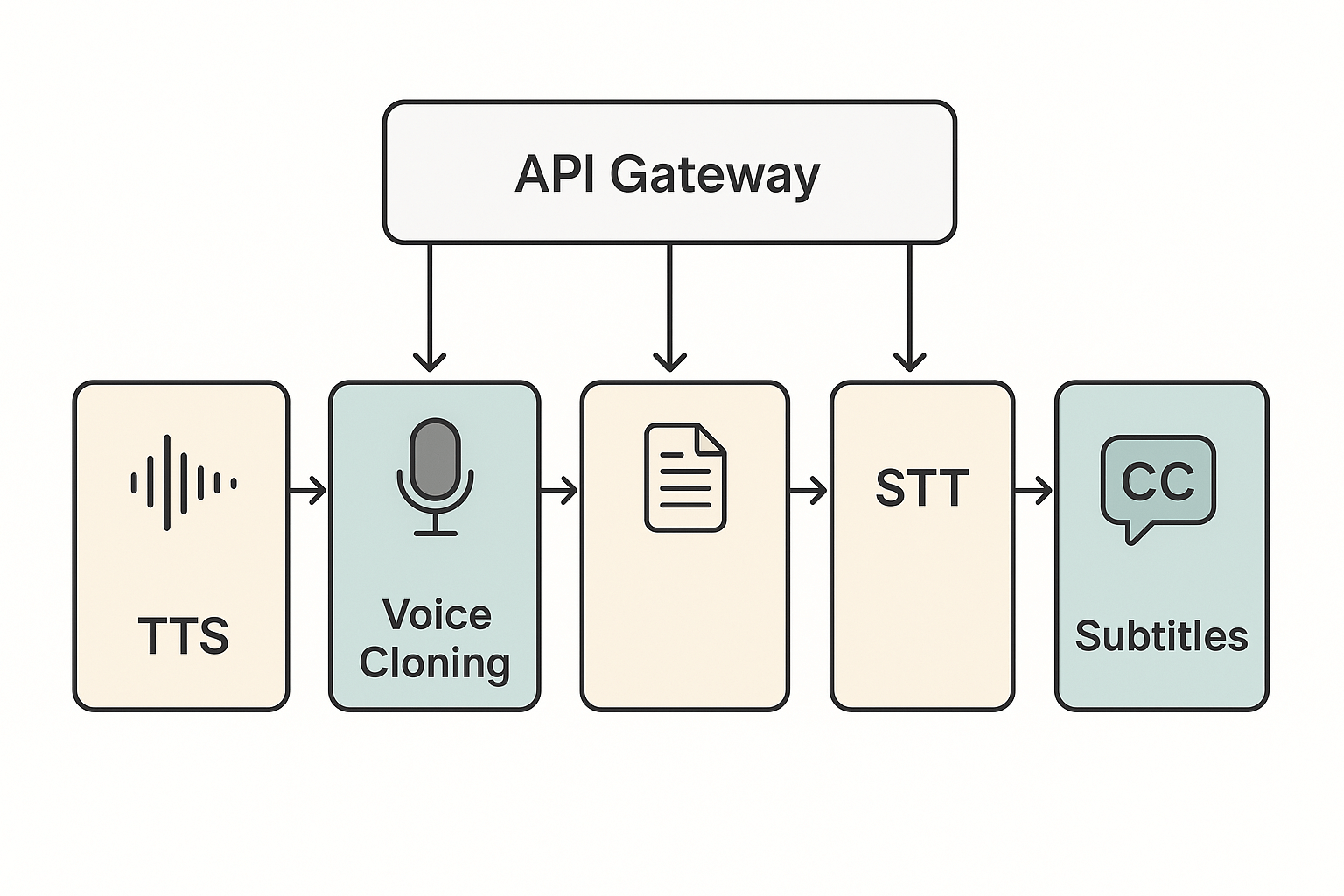
A unified API saves you glue code. You can transcribe, create a voice clone, then synthesize dubbed audio with aligned subtitles in one automated flow. For global reach, voice cloning scale is key: according to DupDub Voice Cloning DupDub's voice cloning technology supports 47 languages and over 50 accents, so you can reuse a brand voice across markets without manual re-records. That language coverage reduces manual fixes and speeds localization pipelines.
Block diagram showing API gateway connected to modules: TTS, Voice Cloning, STT, and Subtitles in a left-to-right flow
Start here: when to pick the DupDub TTS API for a project. Developers use the dupdub tts api when they need fast, programmable voice output, multi language support, or automated workflows that scale. This section shows practical scenarios and a short checklist to help you choose between simple TTS, a voice clone, or full dubbing with subtitles.

Common developer use cases

YouTube dubbing: Use full dubbing when you need translated narration, synced subtitles, and native sounding voices. The workflow converts a transcript, runs translation and TTS or a clone, then outputs MP4 and SRT for upload. This speeds global publishing and keeps timing accurate.
E learning narration: Choose high quality TTS or a voice clone to keep a consistent instructor voice across courses. Cloning is great when you want the same persona in many languages. Use subtitle exports for accessibility and review.
Automated IVR and voice assistants: Pick standard TTS for short prompts and dynamic responses because it is fast and cost effective. Use SSML (speech markup) and caching for frequent phrases. Security and latency are the top concerns here.
Multi language marketing localization: Full dubbing plus subtitles gives the best brand experience for video ads and landing pages. Use voice cloning when you have a signature presenter voice to preserve brand identity. Batch processing and A/B testing help optimize spend.

Pick simple TTS, clone, or full dubbing

Simple TTS for dynamic, low cost text output. Voice clone for brand fidelity and repeatable persona. Full dubbing when you need translated audio, precise subtitle alignment, and final video exports.

Decision checklist

  1. Content length and budget: short prompts use TTS, long videos may justify a clone.
  2. Brand voice required: clone if you need the same speaker.
  3. Language coverage: pick full dubbing for translation plus subtitles.
  4. Sync needs: choose dubbing with subtitle alignment for frame-accurate timing.
  5. Latency and scale: TTS for low-latency IVR and high QPS.
  6. Privacy and consent: ensure speaker consent before cloning.
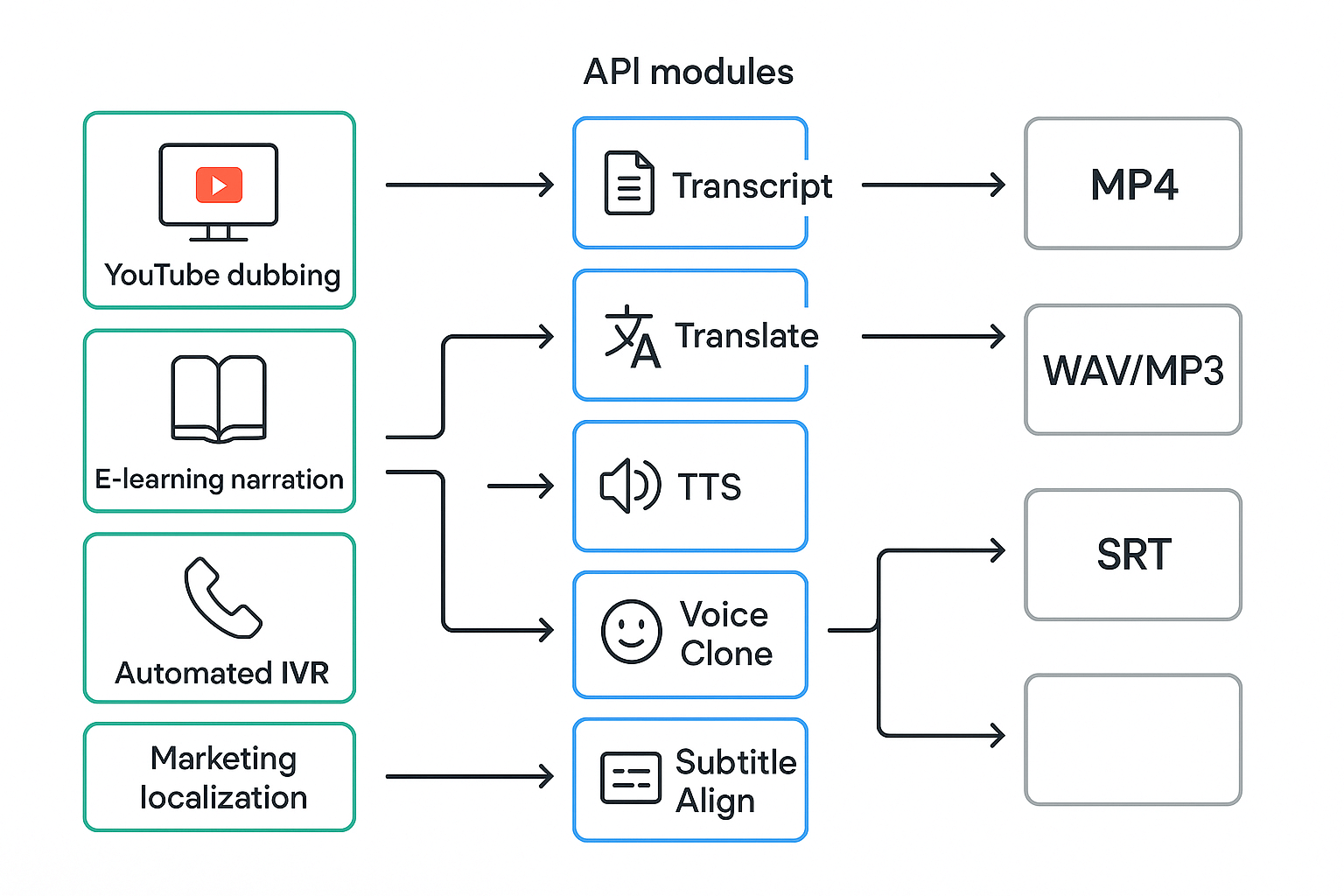
Workflow diagram linking YouTube dubbing, e-learning, IVR, and marketing localization to TTS, voice cloning, and subtitle modules with arrows from input to output (MP4, audio, SRT).

Start by creating a DupDub account, then copy the API key from your dashboard. This section shows the minimal steps to authenticate calls from a server or CI runner, how Bearer tokens work, and key security basics you should follow before going to production. You’ll also get a quick note on checking rate limits and quotas.

Create an account and find your API key

Sign up on the DupDub dashboard and complete email verification. Open the developer or API section in the dashboard to reveal your API key. Treat that key like a password: it grants access to your usage and billing.

Use Bearer tokens in headers

Most calls use a simple Bearer token in the HTTP Authorization header. For example, set the header Authorization: Bearer <YOUR_API_KEY> when you call the DupDub TTS API from your backend. Keep calls server-side or from trusted CI to avoid exposing keys to browsers or public repos.

Security best practices

  • Store keys in environment variables or a secrets manager, not in code.
  • Rotate keys regularly and revoke unused keys immediately.
  • Apply least privilege, use scoped API keys if available.
  • Mask or redact keys in logs and error reports.
  • Don’t embed keys in client apps or public containers.

Rate limits and production checks

Review your plan quotas and any documented rate limits before launch. Implement retries with exponential backoff for transient 429 or 5xx errors. Add monitoring for auth failures so you catch revoked or expired keys quickly.

Python Quick-start: end-to-end example (auth, synthesize, download)

This copy-paste guide gets you from zero to a saved MP3 or WAV in minutes using the dupdub tts api. You’ll install the client, set a secure API key, call the synthesize endpoint, and write the audio to disk. A short voice-clone example and troubleshooting tips follow, so you can run end-to-end quickly.

Install dependencies

Install the minimal tools. Use pip and requests, or the official client if available. Example commands:
pip install requests python-dotenv
Save your API key in an environment file, never hard-code it in source.

Authenticate simply

Load the key from the environment and add it to requests headers. Keep keys out of repos and rotate them regularly.
from dotenv import load_dotenv import os import requests load_dotenv() API_KEY = os.getenv('DUPDUB_API_KEY') HEADERS = { 'Authorization': f'Bearer {API_KEY}', 'Content-Type': 'application/json' }

Synthesize and save an MP3 or WAV

Make a POST to the synthesize endpoint with text, voice, and format. The example below writes an MP3 file. Adjust payload fields to select voice, language, or style.
url = 'https://api.dupdub.com/v1/tts/synthesize' payload = { 'text': 'Hello, this is a test from my app.', 'voice': 'en_us_standard', 'format': 'mp3' } resp = requests.post(url, headers=HEADERS, json=payload, stream=True) if resp.status_code == 200: with open('output.mp3', 'wb') as f: for chunk in resp.iter_content(chunk_size=8192): if chunk: f.write(chunk) else: print('Error', resp.status_code, resp.text)

Stream versus file output

Use stream=True for large audio, writing chunks to disk as they arrive. For small clips, you can decode base64 in JSON and write a full file. Streaming lowers memory use and supports progressive download.

Short voice-clone example (when permitted)

If you have permission to clone a voice, pass a voice_clone_id. Keep cloning legal and secure. Example payload addition:
payload['voice_clone_id'] = 'vc_123abc'
The rest of the flow is identical: POST, then save the returned audio.

Error handling and quick troubleshooting

Use try/except and inspect response JSON for an error code. Common causes:
  • Missing or invalid API key: check env and headers.
  • Wrong endpoint path or region: verify base URL.
  • Unsupported format: request mp3 or wav.
  • Large text or rate limits: batch requests or pause between calls.
  • SSL or network errors: confirm TLS and proxy settings.
If you see unexpected binary in a JSON response, print resp.text to debug. For chunked hangs, reduce chunk_size to 2048.

Expert tips

  • Cache generated audio for repeat text to save credits.
  • Use short prompts and SSML (if supported) to control pacing.
  • Rotate keys and audit logs for security.

Image idea
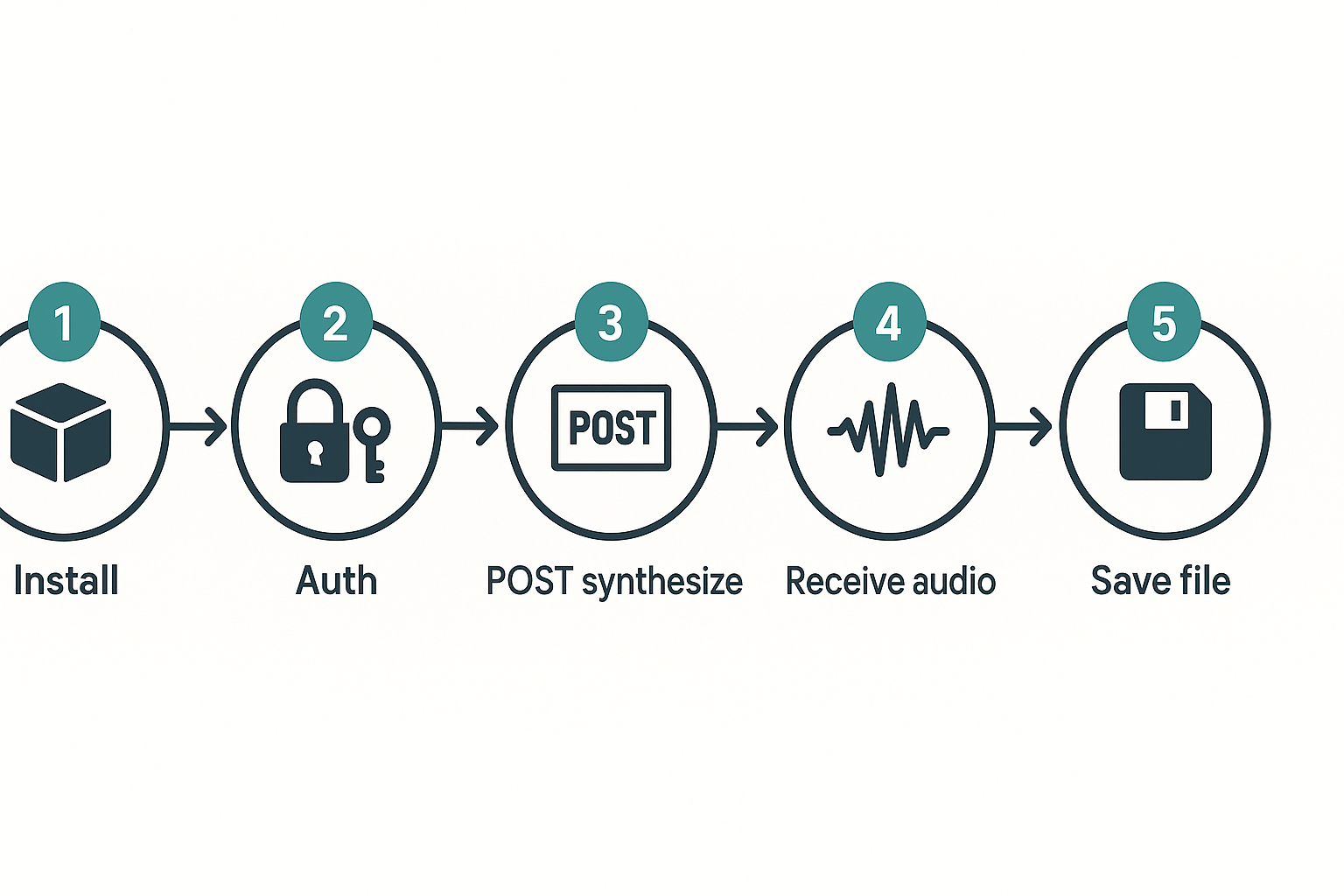
A simple numbered workflow diagram showing: install → auth → POST synthesize → receive audio → save file.
Step-by-step schematic: Install → Auth → POST synthesize → Receive audio → Save file, shown as five numbered nodes with arrows.

Node Quick-start: end-to-end example (auth, synthesize, download)

This short guide shows how to call the DupDub TTS API from Node, authenticate with a Bearer token, synthesize audio, and save an MP3. You get a copy-paste example that writes a file, plus a voice cloning example when your account allows it. The goal is a working local script you can adapt to automation pipelines or serverless functions.

Install and authenticate

Start a small project, install a client, and store a token in an env file. Run npm init -y then npm install axios dotenv to add a simple HTTP client and env loader. Put your API key in a .env file like DUPDUB_API_KEY=sk_... and never commit that file.
// .env DUPDUB_API_KEY=sk_YourSecretToken // install npm init -y npm install axios dotenv

Synthesize to a file (MP3)

This example posts text, sets a voice, and streams the MP3 to disk. It uses axios with responseType: 'stream' so Node handles backpressure and writing efficiently. Save this as tts.js, run node tts.js, and check the out.mp3 file.
// tts.js require('dotenv').config() const fs = require('fs') const axios = require('axios') const API_URL = 'https://api.dupdub.com/v1/tts' const API_KEY = process.env.DUPDUB_API_KEY async function synthesize() { const res = await axios.post(API_URL, { text: 'Hello from Node, this is a DupDub TTS test.', voice: 'standard-en-us-1', format: 'mp3' }, { headers: { Authorization: `Bearer ${API_KEY}`, 'Content-Type': 'application/json' }, responseType: 'stream' }) const writer = fs.createWriteStream('out.mp3') res.data.pipe(writer) writer.on('finish', () => console.log('Saved out.mp3')) writer.on('error', err => console.error('Write error', err)) } synthesize().catch(err => console.error('Request error', err.response?.status, err.message))

Voice cloning example when allowed

If your account supports voice cloning, reference the cloned voice id instead of a built-in voice. The call shape is the same, replace voice: 'standard-en-us-1' with voice: 'cloned-voice-id'. Always obey consent and legal rules before cloning a speaker.

Stream versus file output

Use file output when you want a finished asset to store or serve. Use streaming or websocket output when you need low latency playback, live TTS, or progressive processing. For streaming, handle backpressure by pausing the source when the writable is busy and resume on drain, and always attach error handlers on sockets and streams.

Quick debugging and common Node errors

If a request fails, first re-run the minimal curl command to check the network and key. Example curl: curl -X POST -H "Authorization: Bearer $DUPDUB_API_KEY" -H "Content-Type: application/json" -d '{"text":"hi","voice":"standard-en-us-1","format":"mp3"}' https://api.dupdub.com/v1/tts -o out.mp3
Common issues include 401 unauthorized, 429 rate limit, ECONNRESET, and EPIPE on broken pipes. Fix by validating env vars, adding retries with exponential backoff, logging response.status and response.data, and testing with curl. Use node --trace-warnings and small sample texts to isolate problems quickly.

Quick checklist

  • Store API keys in env vars and never commit them.
  • Use responseType: 'stream' and pipe to fs.createWriteStream for files.
  • Use websockets for low latency, and implement backpressure handling.
  • Add retries and log status codes for production systems.
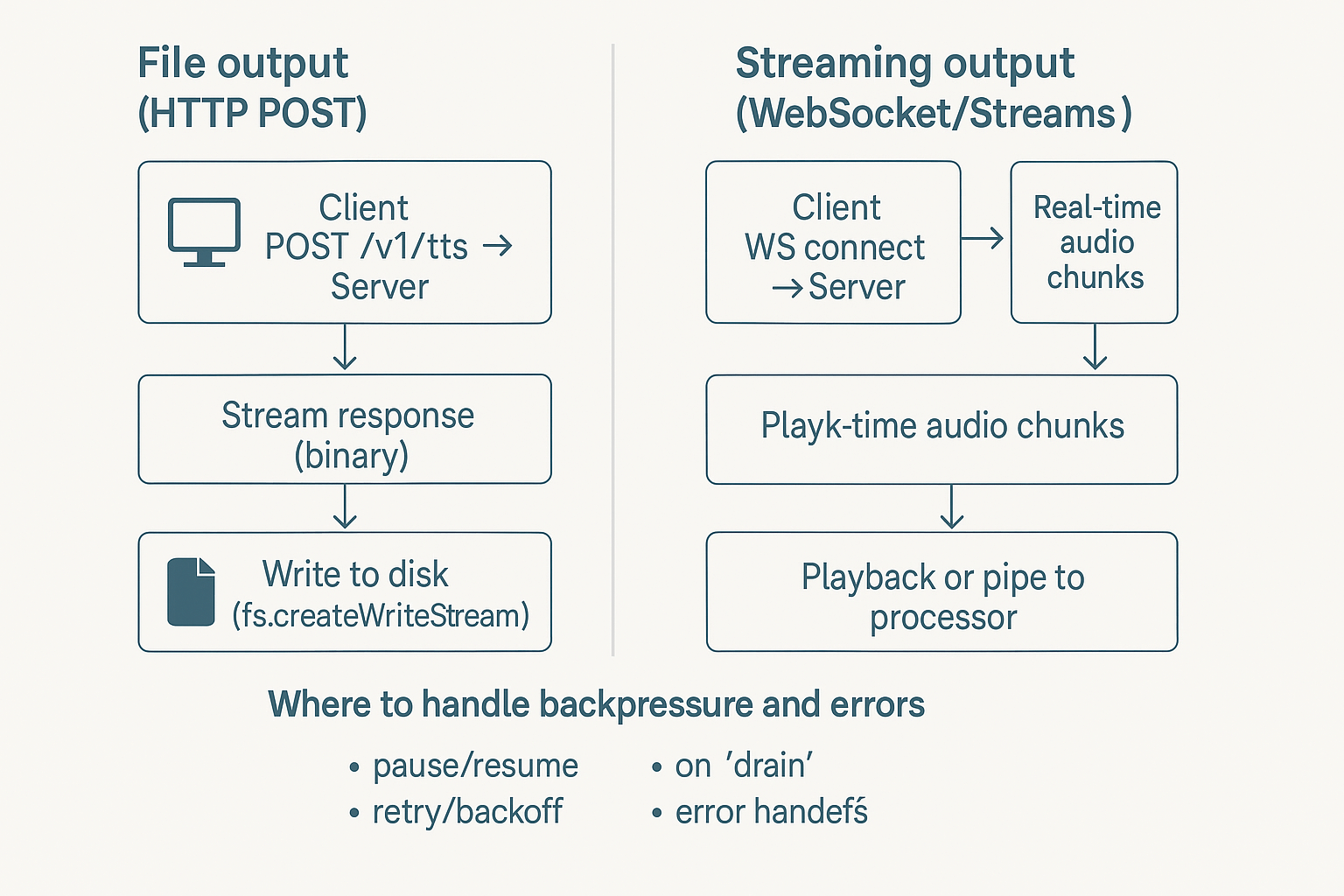
Flow diagram comparing HTTP POST file output versus WebSocket streaming for TTS, showing where to handle backpressure and errors

Start with audio and legal hygiene in mind. This section gives short, actionable tips to cut cost and latency, improve audio quality, and keep voice cloning lawful when you use the dupdub tts api. You’ll get caching and batching strategies, a deployment checklist for reliability, and clear rules on consent and data protection.

Production tips: improve quality, cut cost

  • Use 24 kHz or 48 kHz source audio for voice clones, then downsample only if storage or bandwidth require it. Good input reduces artifacts.
  • Prefer WAV (lossless) for cloning samples and MP3 for delivery to save credits and bandwidth.
  • Cache repeated outputs: store synthesized files for identical text and voice hashes. This saves API credits and reduces latency.
  • Batch short texts into a single request when possible, and use streaming for long content to lower perceived latency.

Privacy and legal: consent first

Always collect clear, recorded consent before cloning a voice. Note that, per EDPB adopts pseudonymisation guidelines (2025), pseudonymised data that could be re-identified remains personal data under the GDPR. Treat voice prints like biometric data: encrypt them, minimize retention, and log access. When in doubt, get signed consent and a scope-limited license from speakers. Need to redistribute or monetize a cloned voice? Get legal review first.

Deployment checklist for reliability

  1. API key rotation and least-privilege keys.
  2. Retries with exponential backoff and idempotency tokens.
  3. Edge caching for static narrations and CDN-backed audio delivery.
  4. Monitoring: latency, error rates, cost per minute.
  5. Data retention policy and encrypted storage.
Follow these rules to scale safely, control costs, and meet privacy obligations.
This section bundles common API errors, audio quality checks, and pricing tips so you can debug faster and cut costs. It walks through authentication and 4xx/5xx failures, rate limits, practical audio tests, and then summarizes DupDub pricing and how credits map to hours. If you are integrating dupdub tts api, follow these steps to reduce downtime and optimize spend.

Quick fixes for common API errors

  • Authentication failures (401): confirm the API key is in the Authorization header and not expired. Rotate keys if you suspect compromise and check environment variables in CI/CD.
  • Client errors (400, 403, 404): validate JSON payloads, required fields, and voice IDs. A 400 usually means malformed input, 403 means permission issues, and 404 means the resource ID is wrong.
  • Server errors (5xx): log request IDs, timestamps, and payloads. Retry with exponential backoff and jitter, and escalate to support if errors persist.
  • Rate limits (429): implement throttling and retries, or queue requests. Reduce parallel synth requests and honor Retry-After headers.
  • Network timeouts: increase client timeout settings and add retry logic for transient failures.

Audio quality checks and debugging steps

Start small, then scale. First, reproduce the issue with a short text snippet and a single voice. Check these items when audio sounds off:
  • Sample rate and encoding: confirm you requested the server format (WAV or MP3) and the sample rate. Mismatches cause distortion.
  • Voice model and style: compare standard versus ultra voices, and test with and without SSML (Speech Synthesis Markup Language) to control prosody.
  • Bitrate and mono/stereo: lower bitrate can mask artifacts, but may reduce clarity; try WAV for lossless debugging.
  • Text normalization: remove unexpected characters, long numerals, or unsupported Unicode that may break parsing.
  • Logs and metadata: capture request params, voice ID, and returned warnings. Use them to reproduce and file a bug with support.

DupDub pricing and how credits map

DupDub offers a 3-day free trial with 10 starter credits. Paid tiers map credits to usable hours roughly like this:
  • Personal ($11/mo annual): 1,800 yearly credits, about 25 hours of Standard TTS or 5 hours of Ultra voices.
  • Professional ($30/mo annual): 6,000 yearly credits, about 83 hours Std or 16 hours Ultra.
  • Ultimate ($110/mo annual): 30,000 yearly credits, about 416 hours Std or 83 hours Ultra.
  • Pay-as-you-go: one-time credit packs available for burst usage.
Credits convert differently by mode: TTS hours, avatar time, and transcription minutes use separate buckets. Monitor the dashboard to see exact burn rates for your use case.

Cost saving recommendations

  • Batch requests: synthesize many short texts in one job to cut per-request overhead.
  • Cache outputs: save and reuse generated audio for repeated phrases or captions.
  • Choose Standard over Ultra for bulk production: use Ultra only for high-value content.
  • Lower bitrate or use mono when acceptable: good for drafts and internal builds.
  • Deduplicate text and pre-render common phrases or intros.
  • Automate monitoring and alerts to catch spikes early.
Test voice quality versus cost early. Log usage, run A/B checks, and set alerts so you control spend while keeping audio quality where it matters.

Alternatives, comparison table, and next steps

If you’re evaluating dupdub tts api against other providers, this section breaks down core tradeoffs. It compares voice quality, language coverage, API access, and pricing. You’ll get a short decision guide and a deployment checklist to move from evaluation to a live test.

Quick comparison table

Feature
DupDub
ElevenLabs
Murf
Play.ht
Synthesia
Voice quality
Natural, many expressive styles
Very natural for narration
Good for e-learning voices
Clear, commercial-ready
Focused on avatar sync and lip sync
Language coverage
90+ TTS languages, 47 cloning languages
Strong English variants, limited coverage
Wide language list, fewer clones
Broad languages, many accents
40+ languages, video-centric
API access & SDKs
Full REST API, Python/Node examples
API available, fewer SDKs
API + web studio focus
API and simple SDKs
API mainly for video pipelines
Pricing model
Free trial, tiers, pay-as-you-go credits
Subscription plus credits
Subscription-first plans
Subscription and credits
Per-video and subscription
Voice cloning
30s sample, multilingual clones
High quality cloning for English
Cloning available on paid plans
Cloning options on higher tiers
Avatar voice tied to video models
Best fit
Video localization, cloning, scale
Narration and audio-first apps
E-learning and voice-over teams
Podcasters and bloggers
Full video avatar production

How to choose: quick guide

Start with your top requirement. Need global languages and video dubbing, pick DupDub. Want the most natural English narration, test ElevenLabs. Need studio-style e-learning, Murf is worth testing. If you want simple TTS for blogs, Play.ht is fast. For avatar-led videos, Synthesia leads.
Consider API maturity, SDK samples, and pricing fit. Run a short head-to-head proof of concept with 2–5 minutes of real content. Measure clarity, latency, and total credits used.

Quick deployment checklist and links

  1. Create a free trial account and get starter credits.
  2. Generate API keys and store them in your secrets manager.
  3. Run the Python or Node sample with a 30s cloning file.
  4. Test language, style, and file export (MP3/WAV/MP4).
  5. Monitor cost per minute and optimize batch synthesis.
For docs and samples, search DupDub API docs, the DupDub free trial page, the DupDub code sandbox samples, and the official samples repo on the DupDub site. These resources have copy‑paste examples and full workflows to fast-track testing.

FAQ — People Also Ask and developer questions

  • What accuracy can I expect from the DupDub TTS API?

    Expect natural, high-quality synthetic speech for most narration and dubbing tasks. Accuracy depends on voice style, input text quality, and the chosen voice model. Test short samples in your target language to judge prosody and pronunciation before full production.

  • How much audio is required for DupDub voice cloning (minimal audio requirements)?

    For a usable clone, provide at least 20 to 30 seconds of clear speech. More varied samples (45 to 60 seconds) improve intonation and multilingual support. Record in a quiet room, use a consistent microphone, and avoid heavy processing or background noise.

  • How does billing and credits work for DupDub (billing credits basics)?

    DupDub offers a 3-day free trial with starter credits, then tiered monthly plans or pay-as-you-go credits. Usage consumes credits by TTS minutes, voice cloning, avatars, and transcription. Monitor credits in the dashboard and set alerts or automated top-ups to avoid surprises.

  • What are common rate limits and how do I handle DupDub API rate limits?

    Public APIs usually enforce per-second or per-minute call limits and payload size caps. Implement exponential backoff on 429 responses, batch text when possible, and process long requests asynchronously. Contact support for higher throughput or enterprise quotas.

  • Where does DupDub store voice data and what is the data storage and sharing policy?

    Cloned voices are locked to the original speaker, processed securely, and stored with encryption. DupDub states it does not share data with third parties and aligns with GDPR practices, though enterprises should verify contract terms. Delete samples via the dashboard if you need immediate removal.

  • Quick next steps for developers: start testing and learn faster

    • Start a free 3-day trial and get starter credits.
    • Read the API docs and try the Python or Node quick-starts.
    • Join a live demo or webinar to ask implementation questions.

Experience The Power of Al Content Creation

Try DupDub today and unlock professional voices, avatar presenters, and intelligent tools for your content workflow. Seamless, scalable, and state-of-the-art.