


-
Video-first pipeline with subtitle alignment and re-voicing, so you can move from source file to localized video quickly.
-
Large language and voice catalog, useful for global training, marketing, and creator workflows.
-
Built-in voice cloning and avatars for consistent brand or instructor voice across languages.
-
Browser-based studio plus API access, so teams can either work in a UI or automate at scale.
-
Flexible plans and a short free trial for hands-on evaluation.
-
High-volume enterprise needs may require API planning and cost modeling.
-
Legal and voice licensing checks are needed for cloned voices and talent rights.
-
Very large file or bespoke SLA needs may need an enterprise contract.
-
Some advanced audio tuning may still need human post-production for perfection.
-
If your priority is fast, video-first localization with reusable voice assets, start a hands-on trial today.
-
If you need guaranteed SLAs, custom integrations, or legal review, request an enterprise demo and compliance docs.
Why evaluate WellSaid Labs alternatives in 2026?
What buyers commonly report about WellSaid Labs
-
Narrower language and accent coverage than expected for global rollouts.
-
Limited end-to-end video dubbing tools, causing manual stitching work.
-
Voice licensing and legal clarity that’s hard to scale across regions.
-
Needs for stronger team management, role controls, and audit logs.
-
SLAs and data residency options that don’t meet enterprise standards.
Why new demands create opportunities for alternatives
How these gaps affect time and cost
|
Limitation
|
Impact on enterprise workflows
|
|
Limited language coverage
|
Adds vendor work, delays global launches
|
|
No automated subtitle alignment
|
Manual sync costs more hours per video
|
|
Weak role-based controls
|
Slows approvals and risks compliance
|
|
Unclear voice licensing
|
Legal hold-ups and inconsistent brand use
|
|
No enterprise SLAs
|
Harder to plan large rollouts reliably
|
What buyers now prioritize in 2026
-
Multilingual dubbing that handles translation, voice cloning, and subtitle sync in one flow.
-
Large language sets and native-sounding accents for target markets.
-
API access and integrations for automated localization pipelines.
-
Enterprise controls: SSO, role-based access, data encryption, and auditable logs.
-
Clear licensing for voice cloning, and contractual SLAs for uptime and support.
Why DupDub and similar alternatives gain interest
What to watch during vendor evaluation
-
Test a full video workflow, from transcript to exported localized MP4. Notice subtitle sync and audio alignment.
-
Try voice cloning end to end, and verify licensing terms in writing.
-
Validate language quality with native speakers in target markets.
-
Request security docs: encryption, data retention, and SOC or ISO attestations.
-
Run API load tests if you plan automated batch dubbing.
Quick comparison: DupDub vs WellSaid Labs (at-a-glance)
How to read the matrix
|
Criteria
|
DupDub (score)
|
WellSaid Labs (score)
|
|
Languages and accents
|
5: 90+ TTS, 47 cloning languages
|
4: strong TTS, fewer cloning locales
|
|
Voice cloning quality
|
5: 30s sample, multilingual clones
|
4: high-quality clones, smaller language set
|
|
Avatars and talking photos
|
5: 40+ languages, talking avatar studio
|
3: limited avatar options
|
|
AI dubbing and subtitle sync
|
5: end-to-end video dubbing, SRT sync
|
3: strong TTS, less video pipeline focus
|
|
API access and automation
|
5: full API for dubbing, TTS, STT
|
4: robust TTS API, fewer dubbing endpoints
|
|
Team collaboration & roles
|
4: team seats, shared projects, review tools
|
4: project sharing, review workflows
|
|
Security and privacy controls
|
4: encrypted processing, cloning locked to speaker
|
4: enterprise controls, vendor policies vary
|
|
Pricing and ROI
|
5: multiple tiers, pay-as-you-go credits
|
3: typically higher per-hour pricing
|
|
Subtitle and localization pipeline
|
5: STT, translate, subtitle alignment
|
3: requires external tooling for end-to-end flow
|
|
Integrations (Canva, YouTube, LMS)
|
5: Canva, Chrome plugin, YouTube plugin
|
3: standard integrations, fewer video hooks
|
|
SLA, uptime, enterprise support
|
4: paid tiers, enterprise SLAs available
|
4: enterprise support offerings exist
|
|
Voice licensing and legal
|
4: cloning locked to original speaker; clear terms
|
3: strong rights process, varies by contract
|
Pricing snapshot and practical ROI
-
DupDub Personal: 11 per month billed annually. Annual cost about 132. Includes 1,800 yearly credits, roughly 25 hours standard TTS. Implied cost: about $5.30 per Std TTS hour.
-
DupDub Professional: 30 per month billed annually. Annual cost about 360. Includes 6,000 credits, roughly 83 hours standard TTS. Implied cost: about $4.35 per Std TTS hour.
-
DupDub Ultimate: 110 per month billed annually. Annual cost about 1,320. Includes 30,000 credits, roughly 416 hours standard TTS. Implied cost: about $3.17 per Std TTS hour.
-
DupDub pay-as-you-go: 6,000 credits for 698, one-time. If 6,000 credits equals ~83 Std hours, cost per hour is about 8.40.
Fit by use case
-
L&D and training: Pick DupDub when you need video-first localization, subtitle pipelines, and enterprise controls. The platform handles end-to-end course dubbing.
-
Marketing and video teams: DupDub excels if you need fast multilingual promos, talking avatars, and Canva or YouTube plugin support.
-
Creators and podcasters: Personal and pay-as-you-go plans work for one-off episodes. Creators who scale should compare Professional or Ultimate for lower per-hour costs.
One-minute decision guide
Quick comparison: DupDub vs WellSaid Labs (at-a-glance)
What this matrix shows
|
Criteria
|
DupDub
|
WellSaid Labs
|
Notes and impact for teams
|
|
Languages supported (TTS)
|
90+ languages and accents
|
~30-50 languages (varies)
|
DupDub aims broader global reach for video localization and e-learning.
|
|
Voice cloning breadth
|
30 second sample, 47 languages
|
High-quality English cloning, fewer multilingual clones
|
DupDub emphasizes multilingual cloning for global voice consistency.
|
|
Avatars / talking characters
|
40+ language avatars, talking photo, video-ready
|
Focus on TTS, limited avatar offering
|
Avatars speed localized video production for marketing and training.
|
|
AI dubbing (video translation)
|
End-to-end dubbing, subtitle alignment, re-voicing
|
Primarily TTS-first, less full video dubbing
|
DupDub is video-first, built for dubbing pipelines.
|
|
API access
|
Full API for automation
|
API focused on TTS and voice endpoints
|
DupDub API includes dubbing and subtitle automation. API means application programming interface.
|
|
Team & collaboration features
|
Team seats, shared assets, project roles
|
Team features for voice projects, fewer video tools
|
Better for distributed content teams working on many videos.
|
|
Subtitles and STT
|
Auto subtitles, 40+ STT languages, sync
|
High-quality STT for core languages
|
DupDub covers subtitle pipelines for localization.
|
|
Integrations
|
Canva, Chrome, YouTube, common LMS
|
Integrations for content and publishing
|
Direct integrations reduce manual export and import steps.
|
|
Security & privacy
|
Encrypted processing, cloning locked to speaker
|
Enterprise controls, vendor-dependent terms
|
Both claim enterprise security, verify contracts for IP.
|
|
Legal and voice licensing
|
Provider-managed licensing controls
|
Usage terms vary by voice model
|
DupDub emphasizes voice licensing safety for enterprise.
|
|
SLA and enterprise support
|
Paid plans with SLAs on enterprise tiers
|
Business support available
|
Ask sales for SLA specifics, uptime, and escalation.
|
|
Pricing transparency and credits
|
Starter credits, monthly plans, pay-as-you-go
|
Subscription-based pricing, enterprise quotes
|
DupDub lists credit tiers, pay-as-you-go available for tests.
|
Notes on the matrix
Concise pricing snapshot
-
DupDub Free trial: 3-day trial, no credit card, 10 starter credits. Good for testing dubbing and voice cloning.
-
DupDub Personal: $11/month billed annually, 1,800 credits, ~25 hours standard TTS, 3 voice clones.
-
DupDub Professional: $30/month billed annually, 6,000 credits, ~83 hours standard TTS, 5 voice clones.
-
DupDub Ultimate: $110/month billed annually, 30,000 credits, ~416 hours standard TTS, 10 voice clones.
-
Pay-as-you-go credits: 500 credits $$68, 1,000 credits$$128, 6,000 credits $698.
How to map the matrix to your use case
-
L&D and training: Prioritize subtitle sync, STT, and multi-language cloning. DupDub fits course localization at scale.
-
Marketing and video: Prioritize avatars, dubbing, and integrations with content tools. DupDub reduces publish time for global ads and social clips.
-
Creators and YouTube: Prioritize an easy trial, pay-as-you-go credits, and YouTube integrations. DupDub’s free trial and Chrome/YouTube tools speed experimentation.
Quick take and next steps
Deep dive, DupDub features mapped to enterprise needs
AI dubbing: cut localization time and keep lip-sync control
-
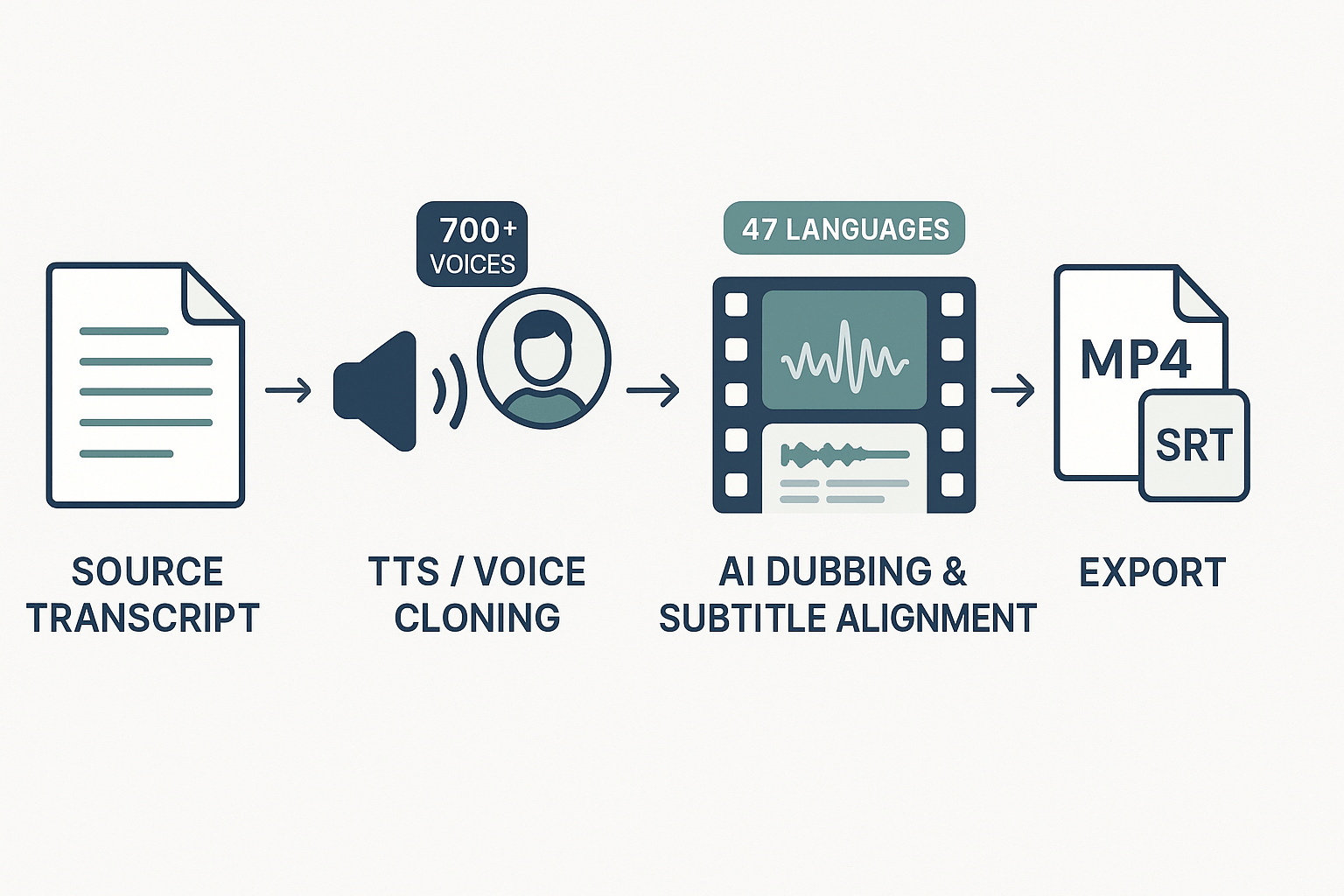
Batch workflow for courses: bulk upload, set voice packs, export MP4 and SRT.
-
Iterative QA: export rough dub, reviewer checks timing and phrasing, finalize audio.
Subtitle alignment and STT: single source of truth for transcripts
-
Clean audio or use up-level filtering first.
-
Review speaker breaks in long recordings.
-
Lock approved transcript before cloning or TTS passes.
TTS, 700+ voices: consistent brand voice at scale
-
Standard: faster, lower-cost for bulk localization.
-
Ultra: high fidelity for customer-facing courses or ads.
Voice cloning in 47 languages: reuse brand talent globally
-
Collect consent and legal release from talent.
-
Create a single "approved clone" instance per role.
-
Track usage in a voice registry for audits.
Avatars and talking photos: faster persona-driven content
API, integrations, and automation: embed localization into pipelines
-
Ingest: upload via API from asset management.
-
Process: trigger STT, translate, and generate TTS automatically.
-
Publish: push MP4 and SRT to LMS or CDN.
Export formats and localization pipelines: fit existing stacks
-
Transcribe and clean base transcripts.
-
Approve transcript, then clone or pick voices.
-
Batch generate dubs and SRTs per language.
-
Human QA pass, then final publish.
Team features: review loops and role control
Measurable KPIs and expected ROI
-
Cycle time per episode in days.
-
Cost per localized hour, inclusive of post-QA.
-
Number of brand-approved voice clones in use.
Trade-offs and where human input still matters
|
Feature
|
Typical enterprise pattern
|
Trade-offs
|
|
AI dubbing
|
Batch translate and re-voice training videos
|
Needs QA on tone and sync
|
|
Subtitle alignment & STT
|
Central transcript as single source of truth
|
Noisy audio needs cleanup
|
|
TTS (700+ voices)
|
Voice catalogs for consistent branding
|
Governance needed across voices
|
|
Voice cloning (47 languages)
|
Clone approved spokespeople for global reach
|
Legal consent and tracking required
|
|
Avatars
|
Rapid persona-driven content
|
Not a replacement for filmed talent
|
|
API & integrations
|
Automate ingest, process, publish
|
Requires engineering work up front
|
Bottom line: where DupDub cuts handoffs and cycle time
Visual workflow
Pricing, plans, and ROI: how DupDub stacks up
Plan breakdown and how credits map to hours
|
Plan
|
Annual price
|
Yearly credits
|
Std TTS hours
|
Std cost per hour
|
Ultra hours
|
Ultra cost per hour
|
|
Free (trial)
|
$0
|
10 credits starter
|
sample
|
sample
|
sample
|
sample
|
|
Personal
|
$132
|
1,800
|
25
|
$5.28
|
5
|
$26.40
|
|
Professional
|
$360
|
6,000
|
83
|
$4.34
|
16
|
$22.50
|
|
Ultimate
|
$1,320
|
30,000
|
416
|
$3.17
|
83
|
$15.90
|
|
Pay-as-you-go (examples)
|
pay-per-bundle
|
500 / 1,000 / 6,000
|
6.94 / 13.89 / 83.33
|
$$9.79 /$$9.22 / $8.38
|
1.39 / 2.78 / 16.67
|
$$48.96 /$$46.11 / $41.88
|
How the credit math works, in plain terms
Quick cost logic you can reuse
-
Find your finished hours per month, for example 40 hours of narrated video.
-
Pick the voice quality: Standard, Ultra, or avatar.
-
Use plan hours to get cost per hour, then multiply by hours needed.
ROI scenarios: L&D team example
ROI scenarios: marketing and video teams
Practical tips to convert estimates into budget requests
-
Start with a pilot: pick 5 hours of content in two languages. Use pay-as-you-go or Personal plan to control spend. Measure time saved in edit cycles and review loops.
-
Include non-production savings: faster time to publish, fewer coordination calls, and reduced vendor invoices. Add those to ROI when asking for budget.
-
Use per-hour numbers here to model 6, 12, and 24 month scenarios. Show conservative and aggressive adoption curves.
Final short checklist to pick a DupDub plan
-
Low volume, experiment: Free trial or Personal plan.
-
Growing team, regular localization: Professional is a sweet spot.
-
Enterprise scale, many languages, API automation: Ultimate for best cost per hour.
-
Sporadic bursts: Pay-as-you-go for flexibility.
Security, privacy, and compliance, what enterprise buyers need to know
Start with certifications and audits
Encryption in transit and at rest: what to demand
Voice cloning consent and locking: protect rights and reputation
-
Do you require written consent from the speaker to create a clone? If so, what form is accepted?
-
Is cloned voice usage restricted by contract to specific accounts or projects?
-
Can the vendor permanently lock a clone to a single customer or speaker? How is that enforced?
-
What safeguards prevent misuse across public models or third-party sharing?
Data handling, retention, and deletion policies
-
How long is each data type retained by default? Can you set retention windows?
-
What is the deletion process, and how fast is it executed on request?
-
Are intermediate artifacts (temporary files, model checkpoints) retained, and for how long?
-
Is deletion audited and reversible only with explicit approval?
Access controls, SSO, and enterprise features
-
Admin controls for inviting and removing users.
-
Granular permissions for cloning, exporting, and billing.
-
Immutable audit logs covering actions on voice assets.
Network and deployment options
Legal, licensing, and voice IP
-
Who owns the synthetic voice files and models?
-
What rights does the vendor retain for trained models?
-
Are there restrictions on commercial use, redistribution, or transfer?
Incident response and breach notifications
Practical checklist (copy into RFP)
-
Provide SOC 2 or ISO audit evidence.
-
Confirm TLS 1.2+ and AES-256 encryption.
-
Support customer-managed keys for sensitive data.
-
Require written speaker consent for cloning.
-
Ability to lock clones to a single customer.
-
Configurable retention, secure deletion, and deletion audit logs.
-
SSO (SAML/OIDC), MFA, RBAC, and immutable audit logs.
-
VPC/dedicated tenancy options or documented isolation model.
-
Clear IP assignment and voice licensing terms.
-
Defined breach notification SLA and incident playbook.
Decision framework: choose the best TTS/dubbing platform for your use case
How the scorecard works
-
1: fails basic needs.
-
2: limited, workarounds required.
-
3: meets needs, some gaps.
-
4: strong, minor limits.
-
5: best in class, enterprise-ready.
Scoring rubric: 12 enterprise criteria
|
Criterion
|
What you measure
|
Weight (suggested)
|
|
Languages & accents
|
Supported TTS, STT, cloning languages and dialects
|
12
|
|
Voice cloning quality
|
Naturalness, multilingual cloning, sample time
|
10
|
|
Avatars & video dubbing
|
Avatar realism, lip sync, export formats
|
9
|
|
API & automation
|
REST/gRPC APIs, batch, webhooks, SDKs
|
10
|
|
Team & collaboration
|
Multi-user roles, shared projects, review flows
|
8
|
|
Subtitle & localization pipeline
|
Auto-subtitle, translation, SRT export
|
8
|
|
Integrations
|
LMS, CMS, YouTube, Canva, storage
|
7
|
|
Security & compliance
|
Encryption, data residency, voice consent
|
12
|
|
Pricing & ROI
|
Cost per hour, credits, overage rules
|
8
|
|
SLAs & uptime
|
Availability guarantees, support SLAs
|
6
|
|
Legal & voice licensing
|
Usage rights, indemnity, takedown support
|
6
|
|
Support & onboarding
|
Dedicated CSM, docs, training materials
|
4
|
Recommended weights: e-learning vs marketing
|
Criterion group
|
E-learning weight (%)
|
Marketing weight (%)
|
|
Localization & subtitles
|
18
|
12
|
|
Cloning & voice quality
|
15
|
16
|
|
Avatars & dubbing
|
12
|
14
|
|
API & automation
|
14
|
10
|
|
Security & compliance
|
18
|
12
|
|
Pricing & ROI
|
10
|
20
|
|
Support & SLAs
|
13
|
16
|
Pilot plan: 2 to 6 week timeline
-
Week 0: Plan and baseline (1 week prep)
-
Select 3 to 5 representative assets: 2 short training videos, 1 marketing ad, 1 long-form lecture.
-
Define success metrics: time to produce, cost per hour, word accuracy, user acceptance score.
-
Assign roles: owner, engineer, content lead, legal reviewer.
-
Weeks 1 to 3: Pilot execution (2 to 3 weeks)
-
Test core flows: STT transcription, TTS output, voice cloning, subtitle translation, avatar export.
-
Run API or manual workflows with one or two assets end to end.
-
Collect quantitative metrics: hours to produce, cost, subtitle alignment error, listener MOS (mean opinion score).
-
Week 4 to 6: Expanded testing and integration (optional)
-
Integrate with target systems: LMS, CMS, YouTube, or automation scripts.
-
Run 1 or 2 scale tests: batch convert 10 videos, or stream cloning API calls.
-
Conduct legal review for voice licensing and data retention.
-
Final week: Evaluate with the scorecard (1 week)
-
Score each criterion using pilot data.
-
Calculate weighted total and compare vendors.
-
Make a recommendation: scale, targeted use, or reject.
How to run the pilot: checklist and metrics
-
Security: confirm encryption in transit and at rest, and request DPA if needed.
-
Quality: run blind listening tests for cloning and TTS naturalness.
-
Localization: check subtitle sync and cultural accuracy in translations.
-
Ops: verify API rate limits and file format exports used in production.
-
Legal: ensure voice consent and licensing terms cover your use cases.
-
Production time per asset (minutes).
-
Cost per hour of final audio/video (USD/hour).
-
Subtitle alignment error (seconds offset average).
-
Listener acceptability (MOS 1 to 5).
-
Integration effort (engineer hours).
Interpreting results and go/no-go rules
-
No encryption or DPA from vendor: automatic no-go.
-
Cloning that fails consent or legal checks: no-go for customer voices.
-
Subtitle accuracy below threshold for e-learning: targeted pilot only.
Quick note on evaluating DupDub in pilots
Real-world use cases and mini case studies (anonymized)
E-learning localization rollout: global training in eight languages
-
Localize a 120-hour compliance course for eight markets.
-
Maintain a single brand voice across narrations and microlearning clips.
-
Cut time to market and lower per-course localization costs.
-
STT/Subtitles for transcript and timing
-
AI Dubbing for translated voice layers
-
Voice Cloning for branded, multilingual voice
-
Editor and SRT export for LMS import
-
Time to localized publish dropped from 6 weeks to 6 days per language.
-
The client kept one consistent brand voice across all languages, avoiding costly re-records.
-
Post-rollout feedback showed higher learner engagement and fewer support tickets for misunderstanding, anecdotal evidence the translations improved clarity.
Creator workflow: a YouTube channel scaling international reach
-
Double monthly foreign views for an education channel.
-
Keep upload cadence the same, avoid doubling editing time.
-
Preserve creator tone when dubbing into five target languages.
-
STT for fast transcripts
-
TTS for low-effort dubs
-
Voice Cloning for flagship episodes
-
Subtitles export for YouTube uploads
-
Integrations for YouTube transcript import
-
Non-English viewership increased by 85 percent in three months.
-
Localization time per video dropped from 10 hours to 90 minutes average.
-
Creator retained tone in priority videos, improving watch time in target languages.
Agency scaling multilingual campaigns: 50-market rollout
-
Localize 200 short ads across 50 markets in four weeks.
-
Maintain legal-safe voice rights across multiple clients.
-
Integrate localization into an existing CI/CD content pipeline.
-
API access for automation
-
AI Dubbing for all language versions
-
Voice Cloning for approved campaigns only
-
Team features, exports, and role controls for workflow
-
The agency met the tight deadline, delivering 200 localized assets in three weeks.
-
Internal review time shrunk by 60 percent because reviewers got synced subtitle previews.
-
The automated pipeline cut per-ad localization costs by an estimated 40 percent vs manual dubbing.
Quick mapping table: use case to DupDub modules and top benefit
|
Use case
|
Key DupDub modules
|
Top benefit
|
|
E-learning localization
|
STT, AI Subtitles, Voice Cloning, AI Dubbing
|
Faster course rollouts, consistent brand voice
|
|
Creator channel scaling
|
STT, TTS, Voice Cloning, Integrations
|
Higher international reach, lower edit time
|
|
Agency campaigns
|
API, AI Dubbing, Team Features, Exports
|
Automated scale, lower per-asset cost
|
What these cases teach enterprise buyers
-
Start with transcripts, not audio. A clean transcript reduces rework.
-
Reserve voice cloning for assets with rights clearance. That avoids legal risk.
-
Automate with API for volume work, use the editor for fine control on high-value assets.
-
Choose 2 content types for a pilot, for example, one course and five top videos.
-
Validate voice licensing and consent for cloning.
-
Run a timed pilot, measure time saved and engagement lift.
-
Ask for a custom SLA if uptime or data retention is critical.
FAQ — common buyer questions about DupDub and WellSaid alternatives
-
Is DupDub better for localization than WellSaid Labs? wellsaid labs alternative for localization
Short answer: often yes for video-first, multilingual workflows. DupDub focuses on end-to-end video localization, including AI dubbing, subtitle alignment, and avatar syncing. It supports 90+ TTS languages and 40+ STT/subtitle languages, which speeds multi-market publishing. Choose DupDub when you need a single pipeline for translate, dub, subtitle, and export to MP4 with matching audio and SRT files.
When DupDub is the better fit:
You publish lots of video and need tight subtitle-to-audio sync.
You want built-in avatar or talking photo options for localized presenters.
You need many languages and quick turnaround for global audiences.
When WellSaid Labs might still work:
You need only short-form TTS for narration or podcasts.
Your priority is studio-grade single-language voice quality over multi-language scale.
-
How accurate is voice cloning for enterprise use? voice cloning accuracy for enterprises
Voice cloning accuracy depends on sample quality, language, and the target use. With a clear 30 second sample, modern systems can reproduce timbre and cadence very well for narration. Expect stronger results for English and major languages, and slightly lower fidelity for less common accents.
Practical tips to improve accuracy:
Use a quiet, well-recorded 30 to 60 second sample.
Provide reference text representing the speaker’s style and common phrases.
Test the clone in-context, with the actual script and pacing you plan to use.
Limitations to note:
Emotional extremes and fast ad-lib speech can sound less natural.
Legal and ethical review is essential before cloning a public figure or a voice you do not own.
-
What are commercial voice rights and how do they work? commercial voice rights for AI voices
Commercial voice rights mean you can monetize content made with a synthetic voice. Rights vary by vendor and plan, so you must confirm licensing terms for production, distribution, and resale. For enterprises, look for explicit commercial use and sublicensing clauses in the TOS.
Checklist to verify rights:
Is commercial use explicitly allowed for the chosen plan?
Are there limits on distribution channels or monetization?
Are cloned voices tied to the original speaker, and is consent documented?
Best practice: keep written consent for any cloned voice, and document the voice asset and permitted uses in your asset management system.
-
How does pricing scale for AI dubbing and TTS? pricing scale for AI dubbing per-hour ROI
Pricing scales by minutes or credits, voice quality tier, and extras like avatars or Ultra voices. DupDub offers plans and pay-as-you-go credits that map to hours of output, so you can estimate cost per localized hour. For example, yearly credits on paid tiers translate to dozens or hundreds of hours of standard TTS, and Ultra voices use more credits per hour.
How to estimate ROI:
Calculate hours of video you localize monthly.
Choose voice quality and avatar needs.
Convert plan credits to hours using the vendor’s published credit-to-hour guide.
Compare to your current manual dubbing costs and turnaround time.
Pricing tips:
Use a free trial to process a representative project.
Leverage pay-as-you-go for one-off peaks.
Track per-hour cost including subtitle and editing time to get full ROI.
-
What security certifications and controls should enterprise buyers expect? security certifications for enterprise AI TTS platforms
Enterprises should expect strong controls for data protection, access, and voice assets. Ask vendors for encryption in transit and at rest, role-based access, audit logs, and data retention controls. Look for alignment to standards like GDPR for data privacy and SOC 2 or ISO 27001 for operational security, when available.
Questions to ask vendors:
Do you encrypt audio and text during processing and storage?
Is voice cloning locked to the original speaker, and how is consent enforced?
Can we control retention, deletion, and export of original recordings and clones?
Do you offer enterprise SLAs and dedicated support options?
If a vendor lacks formal certification, require a security questionnaire and a contract clause for incident response and data handling.
-
How do I evaluate vendor fit for my team and workflow? vendor evaluation checklist for TTS dubbing workflows
Use a focused checklist to compare features, security, and ROI. Score each vendor on the 12 enterprise criteria: languages, voice cloning, avatars, API, team features, security, pricing ROI, subtitle pipelines, integrations, SLAs, legal voice licensing, and support. A standardized rubric makes decisions objective and repeatable.
Quick evaluation steps:
Run a pilot project that mirrors your typical workflow.
Test API automation, subtitle alignment, and final output in target formats.
Validate legal language and get written confirmation on rights and retention.
Measure total time saved and cost versus manual dubbing to confirm ROI.
If you need help, create a one-page scorecard with weighted criteria and require vendors to complete it during your RFP.
-
How do I get started with DupDub trials, demos, or pricing? getting started trial demo pricing calculator
Most vendors, including DupDub, offer a trial and demo to validate fit. Use the free trial to run an actual file through the localization pipeline and test subtitle sync, cloning accuracy, and export formats. Schedule an enterprise demo if you need SLA details, custom integrations, or bulk pricing.
Pro tip: prepare a short test asset and a success checklist before your demo. That way you evaluate technical fit, voice quality, and end-to-end speed on the call.

 Discord
 YouTube
 Tiktok
 Twitter
 Facebook
 Instagram