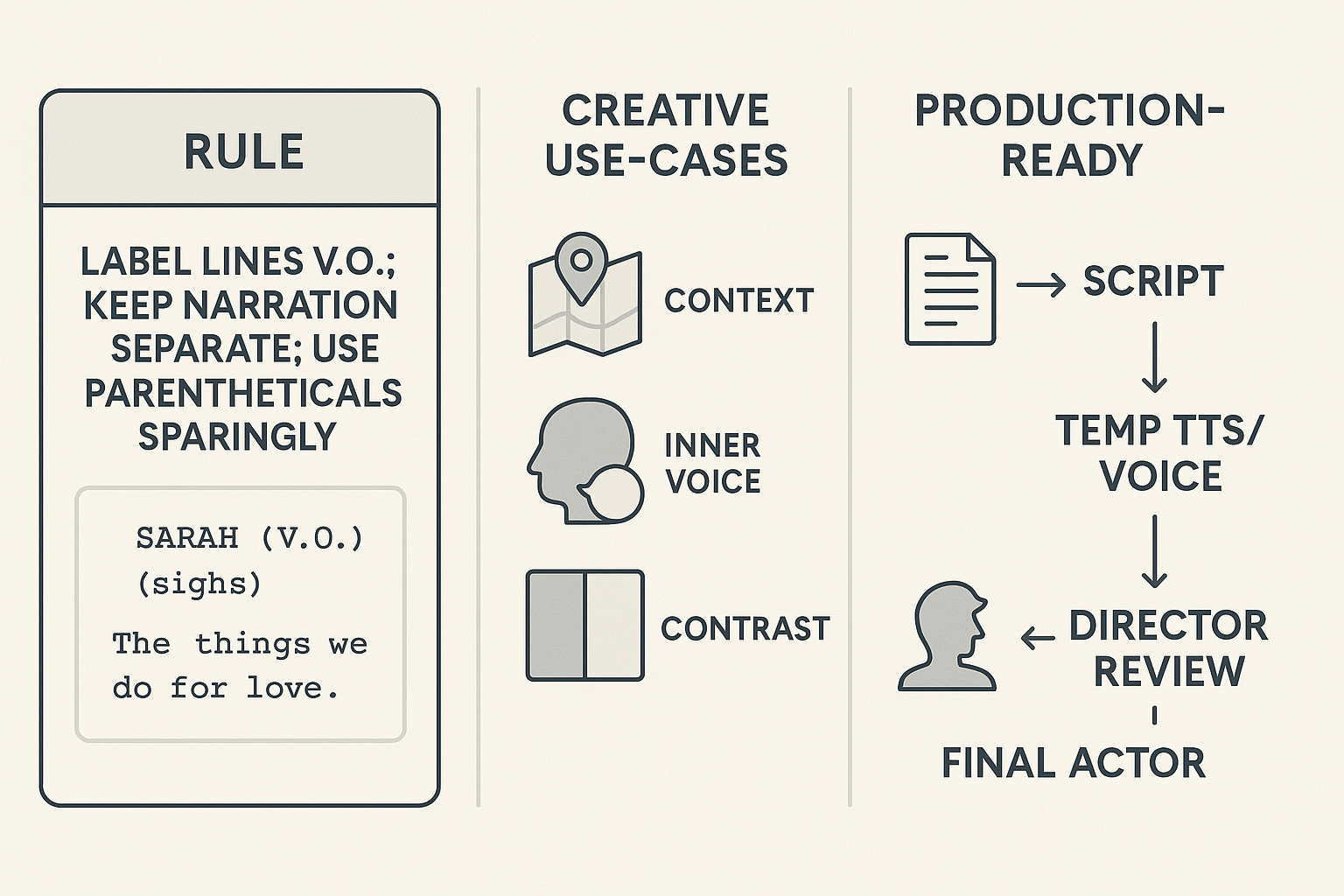
One-sentence formatting rule: When learning how to write voiceover in a script, always mark spoken narration with V.O. after the character slug, place narration on its own lines, and use parentheticals only for essential tone or timing. Keep lines short and spare; narration should never restate what the camera already shows.
Quick decision checklist:
-
Use V.O. when it adds context, inner voice, timeline shifts, or ironic contrast you can’t show visually.
-
Cut V.O. if it repeats on-screen action, slows pacing, or explains what’s obvious.
-
Keep each beat under two sentences and limit total page time to preserve pacing.
A practical production note: synthetic TTS and voice cloning are handy for scratch reads and temp tracks in pre-production, speeding casting and edits while you lock tone before hiring a final reader.
Why voiceover (V.O.) works — storytelling roles and common uses
When learning how to write voiceover in a script, start with function, not flourish. V.O. can deliver clean exposition, open a character's inner life, add ironic distance, or act as a connective tissue that threads montages and scene jumps. Used well, it deepens tone and viewpoint; used poorly, it simply repeats what the camera already shows.
Key narrative roles
-
Exposition: gives necessary background quickly without awkward dialogue. Make it specific and time-bound.
-
Character interiority: reveals thought, memory, or desire the camera can't show. Keep it subjective and linked to behavior.
-
Ironic counterpoint: the voice undercuts or comments on the action, creating tension or dark humor. Use this for unreliable narrators.
-
Montage bridge: names beats, sets the pace, and smooths transitions between images.
When narration clarifies and when it reframes
Straight narration aims to clarify plot and stakes. Commentary reframes events, questions truth, or adds a moral or ironic frame. They both work, but commentary asks for a distinct voice and point of view, while clarifying lines demand economy and precision.
Common genres and practical uses
V.O. strengthens noir, memoir films, documentaries, animation, narrative podcasts, and many games. It also serves training videos and e-learning, where clarity and consistent tone matter. A simple rule of thumb helps: if a line gives new info, deepens character, or shapes tone, keep it. If it only repeatsa visible action, cut it.
Screenplay formatting for V.O. must be clean, minimal, and production-ready. If you need to know how to write voiceover in a script, follow a few firm rules so casting, recording, and localization teams can work fast. Good markup removes guesswork about who speaks, when they speak, and what belongs in action versus what is read aloud.
Core elements and placement
Write the character name in caps on its own centered line, above the dialogue. As
San José State University's Writing Center notes, in screenplay formatting, a character's name is written in all capital letters and centered above their dialogue. Add (V.O.) after the name for off-screen narration, and (O.S.) for off-stage speech only when appropriate. Use parentheticals sparingly: only for timing or essential emphasis like (beat), (urgent), or (whisper).
-
Put scene description in action lines, not inside dialogue. Action explains visuals, pace, and cuts. Dialogue lines only show spoken words.
-
For multi-voice narration, indicate each speaker on separate centered lines, with clear labels like NARRATOR (V.O.) and CHILD (V.O.).
Montage and page formatting
Montages use short action beats and intercut V.O. lines. Start with MONTAGE: or SERIES OF SHOTS: as a slug, then stack brief action lines. Place V.O. lines aligned as normal dialogue, with speaker labels above each line. If V.O. runs across many shots, add a parenthetical header like (V.O. over montage) once, not before every line.
Production-readiness and common mistakes
Clear V.O. markup speeds casting and helps automated TTS or voice-cloning tools match delivery. Avoid buried direction inside long dialogue, dual-direction brackets, or multiple conflicting cues. Common mistakes: tagging internal thoughts as V.O. when they are intended as voiceover, overusing parentheticals, and failing to separate action from spoken text. These cause delays in casting, mis-records in the studio, and errors in automated workflows.
Use simple, consistent labels and you’ll cut studio time and localization headaches.
Step-by-step: a full voice-over montage script page (annotated example)
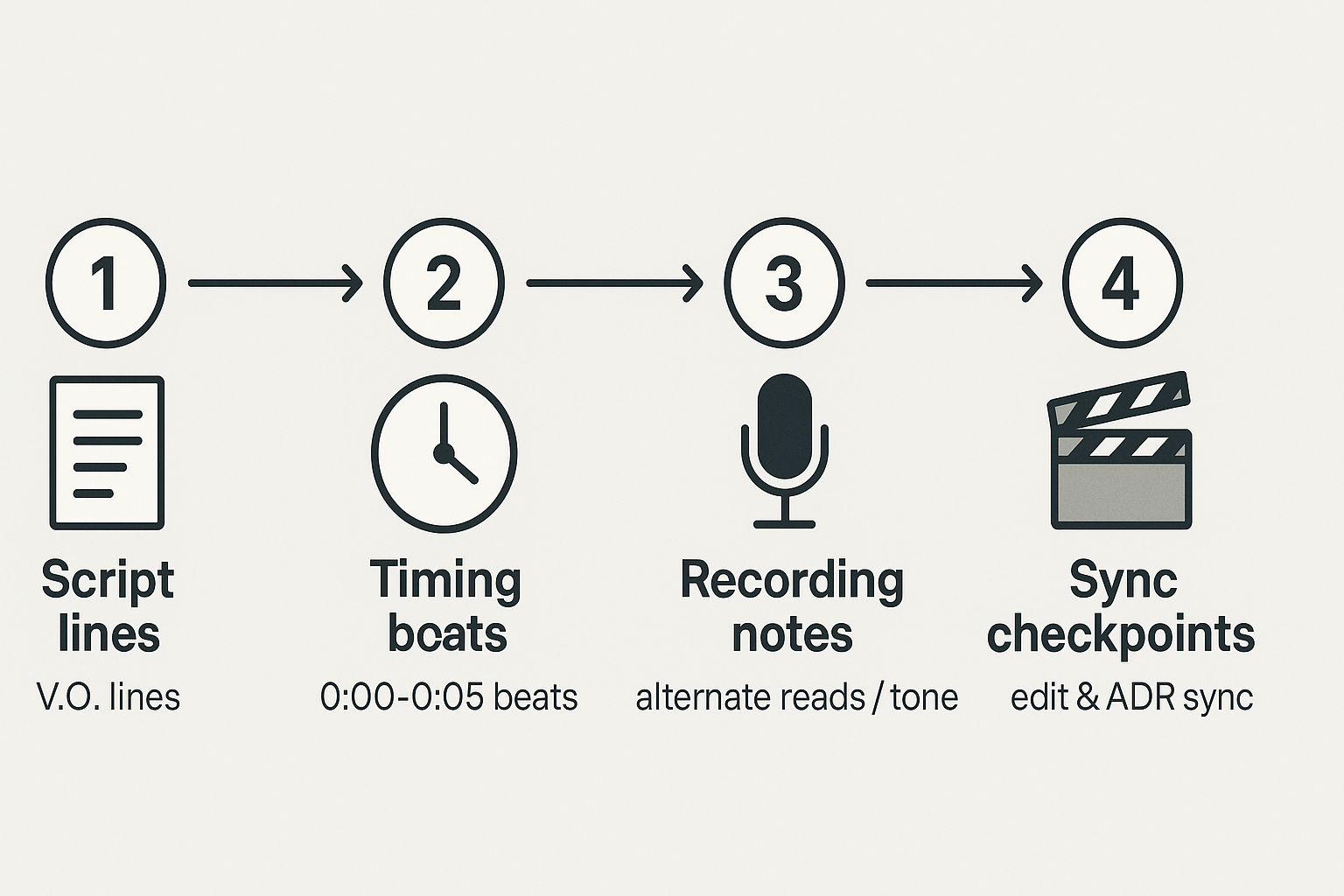
If you searched for how to write voiceover in script, this annotated montage shows a production-ready V.O. page you can drop into a screenplay. It uses clear labels, short beats, and optional time stamps so editors, ADR teams, or TTS engines can match pacing. Read the example, then use the line notes to learn timing, cut points, and alternate reads.
MONTAGE — JOEL'S CITY
INT./EXT. VARIOUS — DAY
[0:00-0:03] STREET: People push past each other. (Quick cuts, 3 shots.)
[0:03-0:07] JOEL (V.O.) We moved like commuters, like ghosts with places to be.
[0:07-0:10] TRAIN: Door slams. Ticket lights blink.
[0:10-0:13] JOEL (V.O.) Sometimes the city felt like a clock. Always counting me out.
[0:13-0:17] APT: Joel sets a kettle on. Bill notices a past-due notice.
[0:17-0:21] JOEL (V.O.) I learned to steal small minutes, to steal breath back.
[0:21-0:25] JOB: Joel types, then erases. Coffee spill. Boss walks by.
[0:25-0:29] JOEL (V.O.) (alternate: resigned) The work ate hours. I gave it teeth and it bit.
[0:29-0:33] PARK: Joel watches kids play. He smiles, folding into the crowd.
[0:33-0:38] JOEL (V.O.) But every Friday, the city would forget me for a moment.
[0:38-0:42] CLOSE ON: Joel's hand on a postcard — a plane on it.
[0:42-0:46] JOEL (V.O.) I held the postcard like a secret, like a plan.
CUT TO: EXT. BUS STOP — DUSK
Line-by-line annotations and production notes
-
Time stamps: brackets show target mix-in points. Keep them when handing to editors. They help align cuts and TTS cues.
-
Short V.O. beats: limit lines to 1 or 2 short sentences. Editors can trim to sync music.
-
Alternate reads: mark tone in parentheses, for ADR or TTS voice style selection.
-
Cut points: use visible action beats between V.O. lines so picture edits don't collide with narration.
-
TTS/SSML mapping: export V.O. lines with time tags and alternate read flags. Add SSML breaks () at bracket times to match natural pauses.
Use this template to give post teams clear sync targets and copy that maps directly to TTS engines or voice actors. Keep each V.O. beat short, tagged, and optional for alternate takes.
Bad vs. good: real examples and revision notes
Short example first, then fix. Below is a weak V.O. excerpt, a diagnosis, and a tightened rewrite writers can use when learning how to write voiceover in script pages.
Bad: ineffective excerpt
NARRATOR (V.O.) I woke up early that morning and felt nervous. I thought about the past and all the mistakes I had made. The city looked different, and I walked down the street slowly, thinking about everything.
Why it fails
This version tells instead of showing, uses vague emotion words, and repeats internal thought. It also overlaps with action that the picture can show, so the voice becomes redundant. Lines like "I thought about the past" offer no sensory detail for actors or synthetic voices to sell. Finally, the phrasing is long and flat, which hurts pacing.
Good: tightened rewrite
NARRATOR (V.O.) Morning light cut the alleys cold. I kept my hands in my pockets, walking slow, watching faces I used to know and not knowing which one belonged to me.
Why this works: the rewrite shows concrete images, gives a small physical action, and narrows focus to one striking idea. It shortens sentences for rhythm, and it gives an actor or TTS engine clear cues about tone and pacing.
Revision checklist you can use now
-
Remove "thinking" and "feeling" unless you add specific detail.
-
Turn general nouns into concrete images.
-
Keep lines short, 1 to 2 beats each.
-
Cut redundancy between picture and V.O.
-
Mark only essential direction for actors or SSML (pause, emphasis).
-
Read aloud or run through TTS to test naturalness.
Adapting V.O. across formats: TV, shorts, animation, documentary, games, and podcasts
Knowing how to write voiceover in script means tuning the voice to format, pace, and audience. Each medium expects different lengths, beats, and levels of exposition. Below are concise rules and practical tweaks to make narration work in production.
TV pilots: set the tone, then back off
Use V.O. in pilots to establish world, tone, or a character’s viewpoint. Keep it specific and evocative. Cut V.O. as visual beats and character actions take over in later episodes.
Shorts and online: punch, not prose
Shorts need tight, image-led lines. Aim for one strong sentence per scene. Time each line to match quick edits and sound cues.
Animation: make the narrator a character
Treat narration as dialogue. Give it quirks, rhythm, and emotional beats. Add brief actor notes for timing and comedic pauses.
Documentary: prioritize clarity and sourcing
Use V.O. to explain, not to argue. Mark citations and on-screen captions in the script. Use SSML (speech markup) for pacing and emphasis during production.
Games: plan for branching and variety
Write modular lines for different states and reactions. Note conditional triggers and line variants so voice actors and engines can map choices cleanly.
Podcasts: intimacy and host trust
Keep language conversational and direct. Use short paragraphs and natural pauses. Mark breaths and tonal shifts for performance.
Quick workflow notes
-
When to use humans vs synthetic TTS: choose human actors for emotion and nuance; pick TTS for fast dubs, translations, or many localized variants.
-
Rapid draft routing: transcribe rough reads, clone or create a reference voice, then export SSML-ready lines. Tools like DupDub speed cloning, multilingual TTS, and alignment so you can iterate fast.
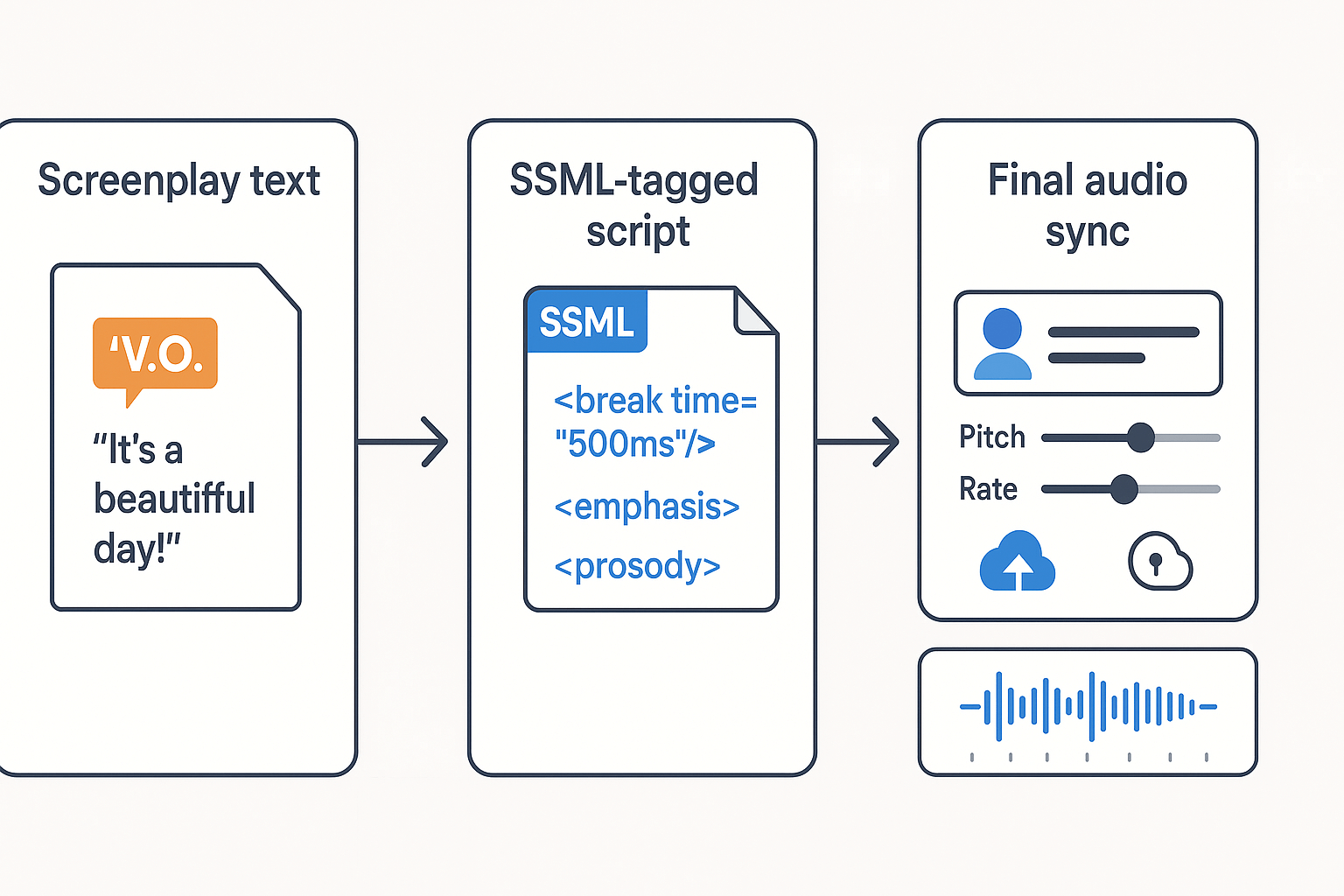
If you're learning how to write voiceover in script, SSML (Speech Synthesis Markup Language) turns stage directions into machine-readable speech cues. SSML lets you mark pauses, emphasis, pitch, and rate so a TTS engine follows performance notes instead of guessing. Use short SSML inserts, then map them to platform controls for consistent, production-ready narration.
What SSML controls and why it matters
W3C Press Release (2010) states: The Speech Synthesis Markup Language (SSML) Version 1.1, published by the W3C in 2010, provides control over voice selection as well as speech characteristics such as pronunciation, volume, and pitch. Use SSML when you need repeatable timing, precise pausing, or consistent emphasis across languages or clones.
-
Pause: inserts a half second pause.
-
Emphasis: word raises stress.
-
Pitch/Rate: text alters tone and speed.
-
Pronunciation: pick fixes tricky words.
-
Script line: write natural direction, e.g., (V.O., quiet, wistful)
-
SSML: add and around beats
-
DupDub: choose voice, paste SSML, tweak pacing and clone if needed
-
Export: render WAV/MP3 and check timing against picture
DupDub mapping: tags to platform settings
-
→ DupDub pacing controls: add manual pause or SSML break in editor.
-
/ → pick a voice with expressive styles, then adjust pitch/rate sliders.
-
→ use DupDub transcription and custom pronunciation overrides.
-
Voice cloning → upload sample to create a reusable synthetic narrator (use for series consistency).
-
Accent/language → select from DupDub's 90+ languages and 700+ voices.
When to use a human actor vs synthetic voice? Choose human if you need raw emotional nuance or ADR interaction. Pick synthetic for fast localization, consistent brand reads, or quick iterations during editing.
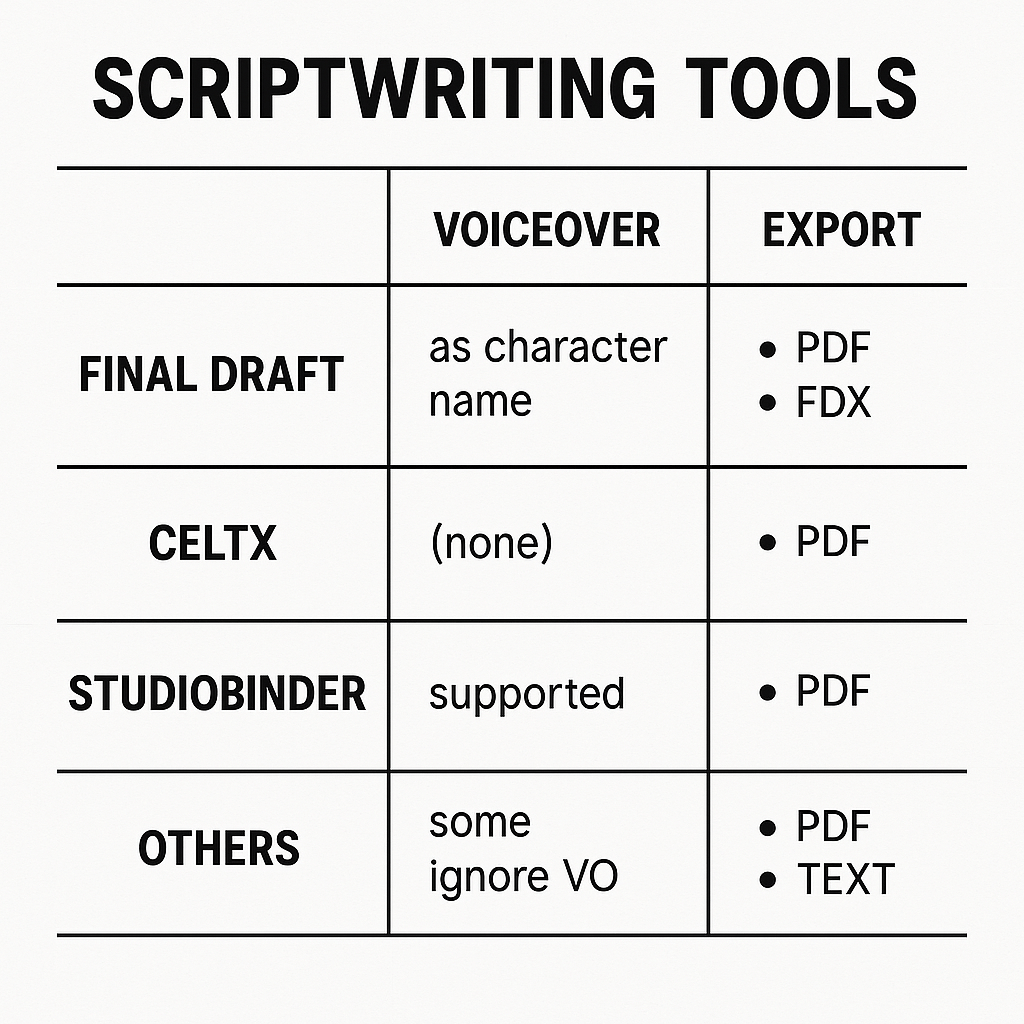
This quick guide shows how to write voiceover in script files and how each major tool handles V.O. markup and exports. Each app uses slightly different V.O. labels, and those differences matter when you export for ADR, localization, or automated TTS. As documented by
The Film & TV Script Editor – Celtx Help Center, Celtx allows users to export scripts to .txt or .fountain formats for use in other programs.
Quick comparison
|
Tool
|
V.O. markup
|
Common export options
|
Preserves parentheticals, timing markers, notes for SSML?
|
|
Final Draft
|
VO or V.O. element, character line flagged
|
.fdx, PDF, .txt
|
Parentheticals kept in .fdx, may strip in plain text
|
|
StudioBinder
|
V.O. as dialogue role or note field
|
PDF, CSV, PDF reports
|
Notes exportable via CSV, parentheticals often lost in PDF
|
|
Celtx
|
VO via character slug or action line
|
.txt, .fountain, PDF
|
Exports plain text formats suitable for SSML prep
|
|
Fade In
|
V.O. as dialogue with V.O. tag
|
.fountain, .fdx, .txt, PDF
|
Keeps inline notes in .fountain and .fdx, better for tooling
|
Common pitfalls when exporting for ADR or TTS workflows. Exports to PDF often flatten notes and timing cues. Plain .txt can lose parenthetical nuance. CSV or .fountain keep structured fields and work best for downstream SSML conversion.
Quick tips:
-
Export a structured format (.fountain, .fdx, or CSV) not PDF. That preserves fields.
-
Strip production notes, then map parentheticals to SSML prosody tags.
-
Use the note field for voice direction, not inline action, so automation reads it.
Case studies & diverse film/TV examples (what to copy, what to avoid)
These quick case studies show how voiceover shapes tone, POV, and production choices. Learn how to write voiceover in script by seeing what each example gets right or wrong. Then use the takeaways to design pre-pro voice tests and cloning runs.
Examples to copy or avoid
-
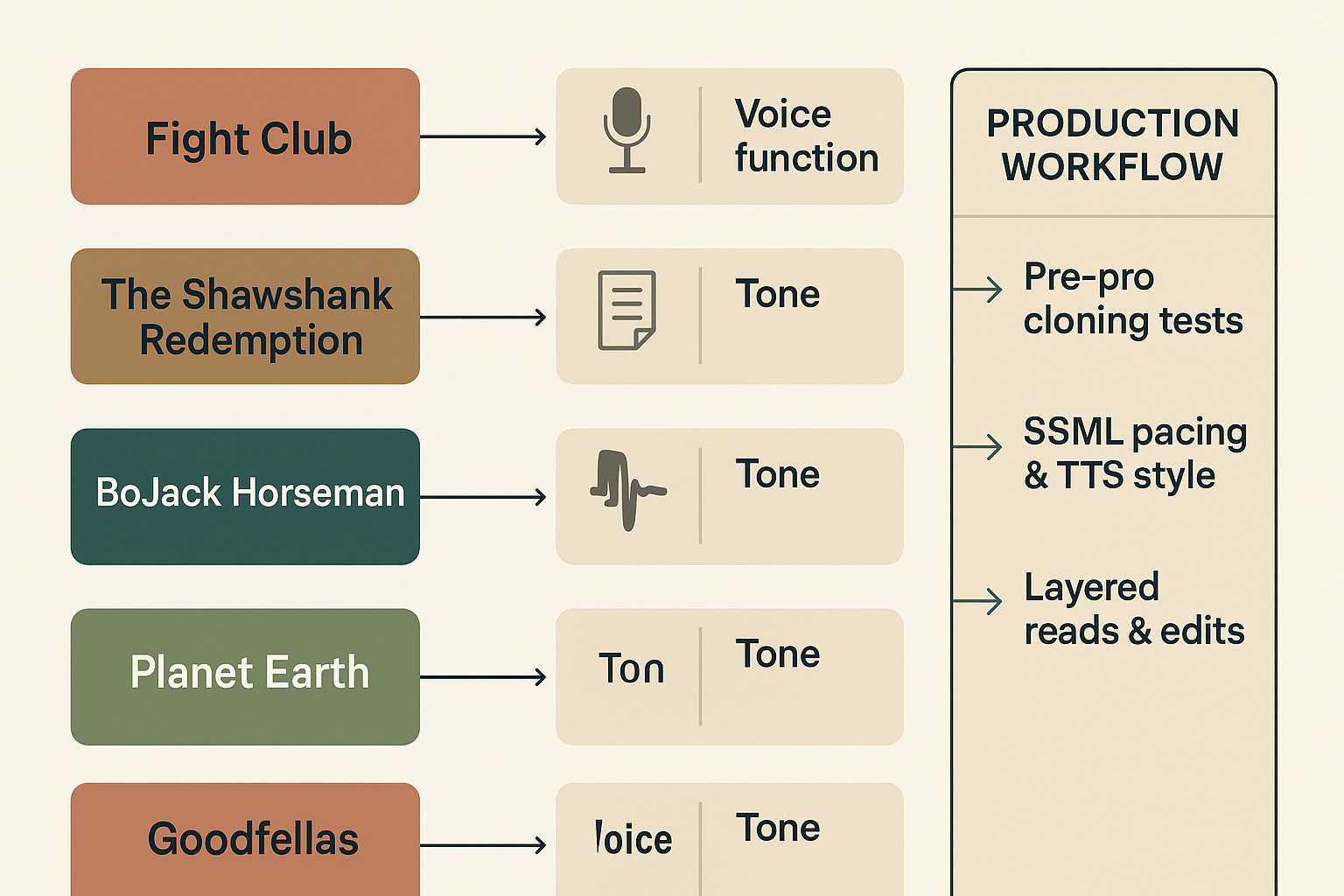
Fight Club — Bold interior voice, unreliable narrator that drives plot; copy its intimacy, avoid over-explaining scenes.
-
The Shawshank Redemption — Warm, reflective V.O. that bookends the story; copy its restraint and clear thematic thread.
-
BoJack Horseman — Confessional, ironic TV narration that mixes humor and pain; copy tonal consistency, avoid tonal whiplash.
-
Planet Earth — Authoritative, informational V.O. paced to visuals; copy precision and timing, avoid personality that fights footage.
-
Goodfellas — Fast, kinetic V.O. that propels energy and context; copy its rhythm, avoid turning it into a recap.
-
Parasite — Minimal to no V.O., showing restraint; copy the discipline, avoid adding narration that dilutes subtext.
Production mapping and voice-cloning tests
-
For intimate first-person reads, run small cloning auditions to match timbre and breath patterns.
-
For documentary reads, create SSML pauses and test TTS styles to match cadence before final sessions.
-
For montage or unreliable narrators, record layered variations and compare clones to pick the right attitude and pacing.
FAQ — People Also Ask and Production FAQs
-
How do I indicate V.O. on a script page (how to write voiceover in script)?
Label the speaker in all caps followed by (V.O.), then write the dialogue beneath. If the voice is offscreen but still present in the scene, use (O.S.). Keep any direction minimal and only what’s necessary for performance.
-
Can TV pilots use V.O. in pilot scripts and should they?
Yes. Voiceover in pilots can be effective for establishing tone, world, or backstory. Use it strategically to add narrative depth, but avoid over-reliance—show whenever possible instead of explaining.
-
SSML vs stage directions: where to put speech markup for production
SSML (Speech Synthesis Markup Language) is applied in post-production when generating synthetic speech. Write creative stage directions normally in the script; add SSML later during voice synthesis if needed.
-
When should I cut voiceover from a script?
Consider removing voiceover if it repeats what’s already visible, slows pacing, or tells instead of shows. Test the scene with and without the V.O. to judge its real impact.
-
Is synthetic voice allowed for submissions and casting?
Sometimes. Some professionals accept synthetic voice demos if they’re clearly disclosed. Always get consent for any voice cloning and follow union or guild rules. Synthetic voices work best for drafts or tests—be ready to provide clean audio or real performances.




 Discord
 YouTube
 Tiktok
 Twitter
 Facebook
 Instagram