Voice tools convert text to natural speech, transcribe spoken words, and create consistent, personalized voices. They remove barriers to information, help users navigate devices and apps, and support everyday communication. This guide focuses on assistive communication technology and clear steps caregivers and decision-makers can use to pilot solutions.
Who should read this:
-
Accessibility and D&I leaders
-
Educators and assistive technology coordinators
-
Speech-language pathologists and clinicians
-
Caregivers and product teams evaluating accessibility
Quick wins and next steps: voice tech speeds content access, raises independence, and scales classroom and clinic supports. To move forward, evaluate platforms with strong text-to-speech, reliable speech-to-text, and secure voice cloning; run a short pilot with real users; and document outcomes (access frequency, independence, content reach). For immediate action, consider a free trial, an institutional demo, or an accessibility audit to map needs and funding options.
Why voice technology matters for people who are visually impaired
Voice-first tools change daily life for people with vision loss. Assistive communication technology such as text-to-speech (TTS), speech-to-text (STT), augmentative and alternative communication (AAC), and voice cloning helps users read, search, speak, and access content without depending on sight. These tools restore independence, speed up tasks, and widen participation at school, work, and in the community.
Everyday information and communication barriers
According to
World Health Organization (2019), Globally, at least 2.2 billion people have a vision impairment, of whom at least 1 billion have a vision impairment that could have been prevented or is yet to be addressed. Many people with vision loss still face simple but persistent barriers. Printed materials, unlabeled images, video without audio descriptions, and forms that need visual navigation block access. Phone trees, group chats, and video meetings create communication friction when interfaces rely on visual cues.
How voice tech reduces those barriers
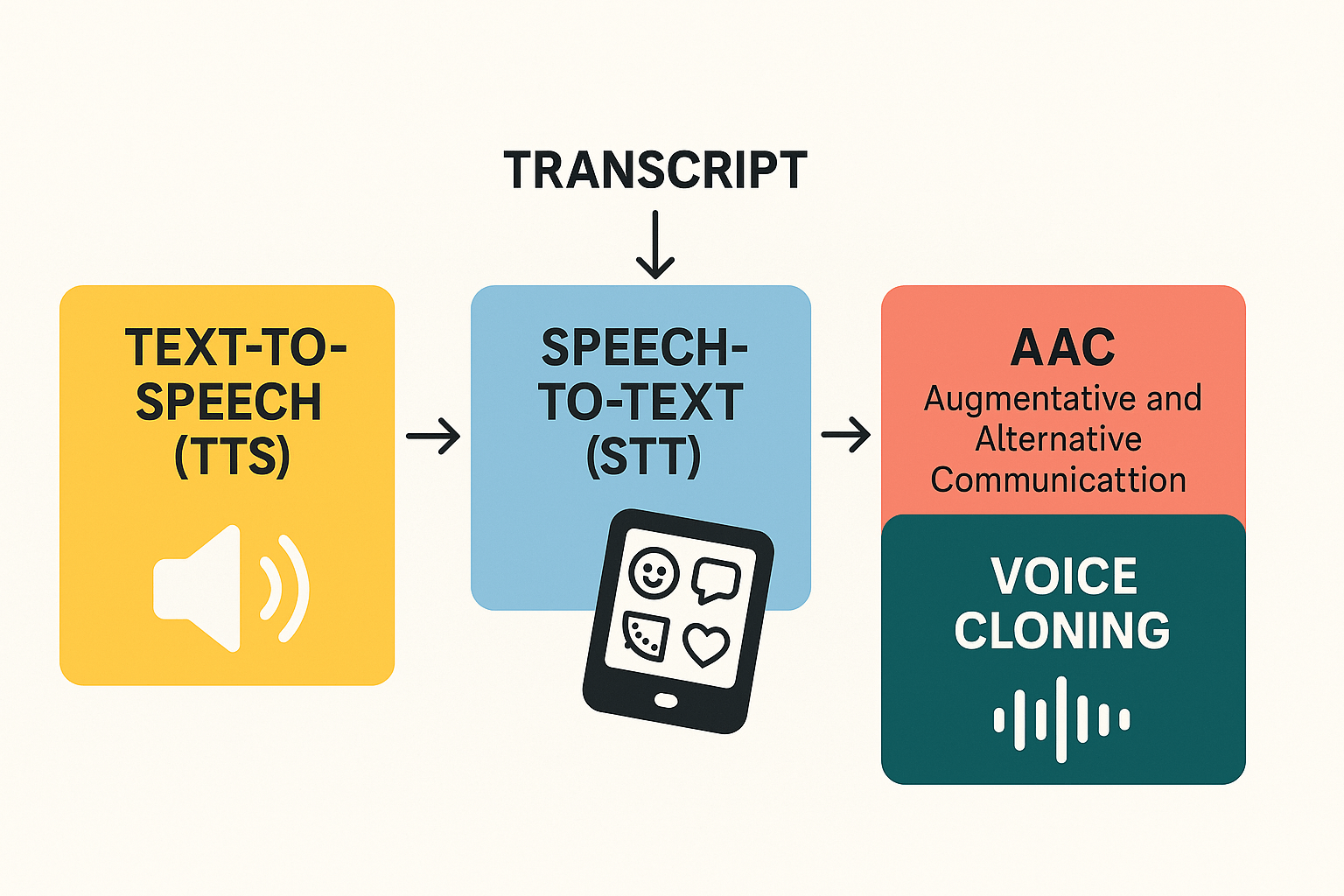
Voice solutions convert inaccessible formats into usable ones. TTS reads text aloud on demand. STT turns spoken responses into searchable transcripts. AAC gives nonverbal users a voice. Voice cloning creates familiar, consistent speech for long tasks or personalized prompts. Together, these features cut the need for sight, reduce reliance on helpers, and speed decision making.
Measurable impact metrics to track
-
Reading and access frequency: hours per week of independent content consumption. Why it matters: shows restored autonomy for learners and users.
-
Communication events per week: calls, messages, and meetings joined independently. Why it matters: tracks social inclusion and classroom participation.
-
Help requests avoided: number of times a user did not need assistance. Why it matters: measures caregiver load and cost savings.
-
Task completion time and error rate: how long and how accurately users finish forms or workflows. Why it matters: useful for schools and D&I teams evaluating outcomes.
Track these metrics to show real gains in independence, reduced support needs, and better access to information.
What is assistive communication technology? A plain-language overview
Assistive communication technology helps people access, create, and share language using devices and software. According to
Global report on assistive technology (2022), Assistive technology is an umbrella term for assistive products and their related systems and services. This short overview defines the main tool types and shows how they can work together for people who are visually impaired.
Core categories: what each tool does
-
Text-to-speech (TTS): converts written text into spoken audio. It reads web pages, books, and app content aloud, on demand or automatically. TTS helps people who cannot see text, or who read more easily by listening.
-
Speech-to-text (STT): turns spoken words into written text. It powers live captions, searchable transcripts, and voice commands. STT helps users capture conversations and control devices hands free.
-
Augmentative and alternative communication (AAC): a set of tools and apps that let people build messages from symbols, words, or phrases. AAC can send those messages as text, email, or synthesized speech.
-
Voice cloning: creates a synthetic version of a real voice from a short sample. It helps preserve personal identity when devices must speak for someone. Ask vendors about consent, security, and usage limits.
How they work together
These tools stack into simple workflows. STT provides editable transcripts for reading or search. TTS and AAC convert that text back into speech. Voice cloning personalizes the spoken output so content sounds familiar.
Accessibility-first vendor checks
-
Privacy and consent for voice data
-
Noise robustness and accuracy in real settings
-
Wide language and accent coverage
-
High-quality subtitle alignment and export formats
-
Keyboard, screen-reader, and assistive input support
-
Clear security and data handling policies
How DupDub’s voice tech maps to accessibility needs
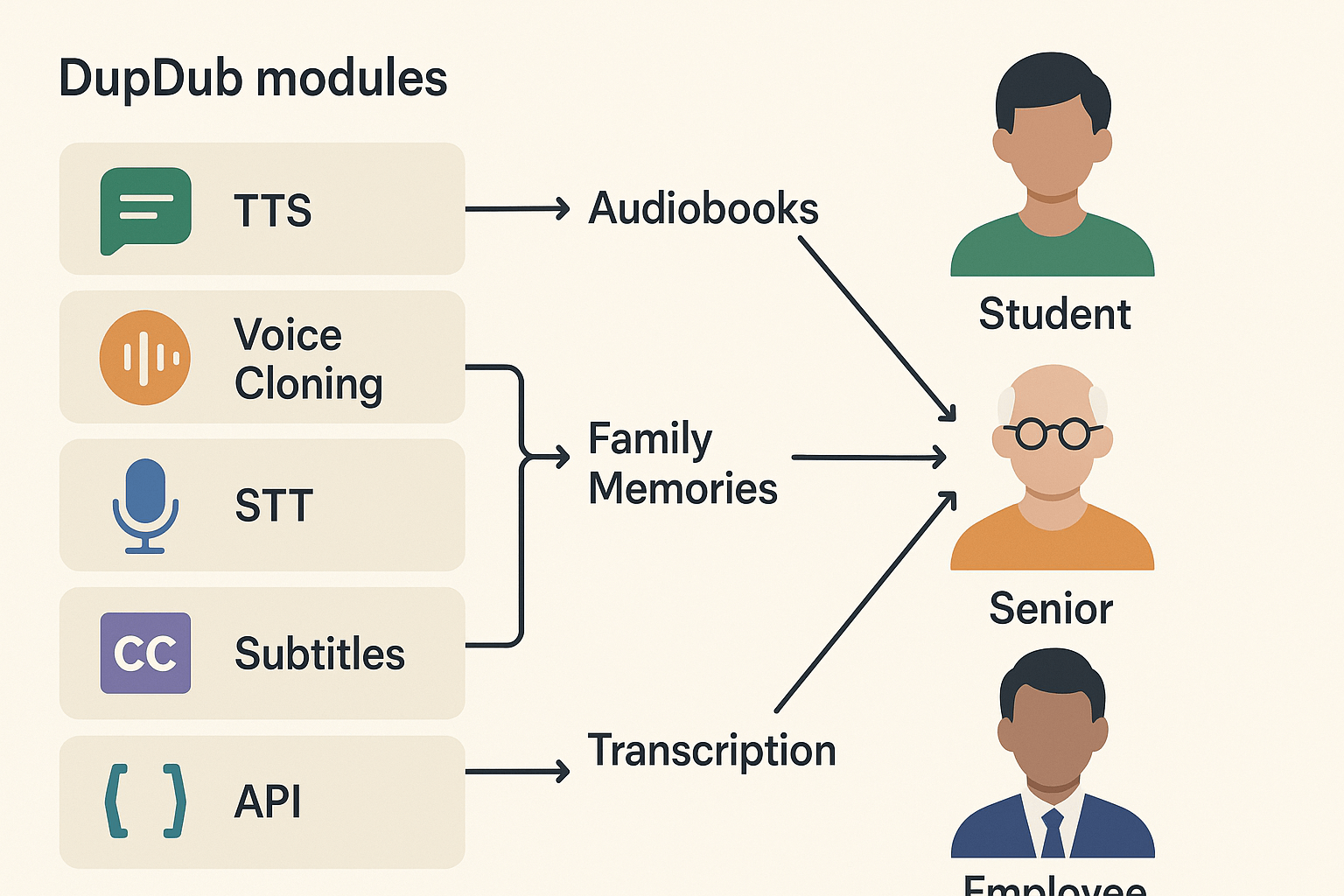
Voice tools help close gaps in access for people who are blind or have low vision. This section maps DupDub modules to real needs. It shows simple use cases for students, seniors, and workplace users, and it explains privacy safeguards.
Map features to needs
TTS (Text-to-Speech): Natural narration for lesson content, menus, and documents. Use cases: read textbooks, web pages, or training videos aloud.
Voice cloning: Create a familiar voice for long-term users, keeping comfort and identity consistent. Use cases: personalized lessons, voice-guided devices, and recorded messages.
STT (Speech-to-Text): Capture spoken input for notes and commands. Use cases: voice diaries, form filling, and classroom participation.
Subtitles and alignment: Generate synced captions and time-aligned transcripts for audio-first content. Use cases: searchable lectures, accessible video, and review materials.
API and integrations: Connect DupDub to LMS, kiosks, or clinic software to scale access across settings.
Persona examples and recommended workflows
Student: A middle schooler uses TTS for reading and STT to submit spoken responses. Teachers add synced subtitles to videos for study notes.
Senior: A retiree hears daily news via TTS and gets medication reminders using a cloned, familiar voice. Family members record consent for the clone.
Employee: A customer service rep uses STT to log calls and TTS to generate spoken briefs. HR uses subtitles to archive training sessions.
Privacy, consent, and enterprise controls
Consent is required for voice cloning and must be stored with the clone. Regulators stress individual control over biometric data, including voice, as noted by
EDPB News (2024). DupDub locks cloned voices to the original speaker, encrypts processing, and offers admin controls for enterprise accounts. Set policies for retention, audit logs, and role-based access before deployment.
Anonymized case studies: real outcomes (social-good initiatives)
These two anonymized mini case studies show how assistive communication technology can restore learning access and social connection. Each case gives the baseline problem, the voice tech intervention, and clear outcomes you can measure and copy in schools or community programs.
Student: regained independent study access
Baseline problem: Student A is a high schooler with low vision. They depended on staff to read PDFs and video captions. That dependence cut study time and confidence.
Intervention: The school added browser-based TTS (text-to-speech) to read curriculum aloud. They used STT (speech-to-text) to make audio notes searchable, and a friendly cloned voice for longer lectures so listening felt personal.
Measured outcomes: Over eight weeks independent study sessions rose from one to six per week. Monthly content access events climbed from about 10 to 120. Classroom quiz scores on read-aloud passages improved by two letter grades.
Practical lessons and metrics to collect:
-
Lessons learned: start with short pilot files and one teacher champion. Check privacy and consent for cloned voices. Train students on playback speed and bookmarks.
-
Key metrics: content access events, independent study hours per week, quiz or comprehension scores, assistive device uptime.
-
Replication tips: integrate TTS with the LMS, use free trials for proof of concept, and document student-level gains for district buy-in.
Senior: regained social connection
Baseline problem: Senior B had progressive vision loss and withdrew from group calls and audiobooks. Social contacts fell and mood declined.
Intervention: The community center deployed TTS for local news, voice messaging with a familiar cloned voice for family notes, and STT for transcribing group calls into short summaries.
Measured outcomes: Weekly social interactions rose from one call to four. Audio content plays jumped from two to 18 per week. Care staff reported clearer conversation starts and fewer missed appointments.
Practical lessons and metrics to collect:
-
Lessons learned: co-create message scripts with family to keep tone natural. Monitor consent and lock cloned voices to original speakers.
-
Key metrics: calls answered, messages played, social interactions per week, self-reported loneliness on simple scales.
-
Replication tips: run a low-cost pilot at a senior center, offer simple onboarding, and partner with local volunteers for tech support.
Comparing leading assistive voice solutions
Assistive communication technology decisions need clear trade offs. This section compares four common paths, focusing on accessibility outcomes, language and voice coverage, privacy controls, and enterprise features. The goal is to help institutions pick tools that scale and protect user privacy.
Choosing the right tool starts with needs. If you need many languages and fast deployment, an all in one platform helps. If your priority is clinical accuracy or custom voice fidelity, a specialized engine may be better. Cost, integration, and staff training are often the final deciders.
Quick comparison table
|
Feature
|
DupDub
|
ElevenLabs
|
Murf AI
|
Built-in OS TTS
|
|
Accessibility outcomes
|
Strong for content access, subtitling and dubbing
|
High voice realism for reading tasks
|
Good for narration and training audio
|
Basic screen reader support, consistent system voice
|
|
Language and voice coverage
|
Very broad, many accents and voices
|
Wide but fewer languages
|
Wide styles, limited accents
|
Limited languages, vendor dependent
|
|
Privacy and controls
|
Speaker-locked cloning, encrypted processing
|
Enterprise options, variable policies
|
Enterprise privacy tiers
|
Local processing option, OS-dependent
|
|
Enterprise features
|
API, subtitles, avatars, workflow tools
|
Focused API and SDKs
|
Studio workflow, team controls
|
Central management via OS tools
|
|
Cost and scalability
|
Tiered plans, free trial, pay-as-you-go
|
Usage-based, higher tier costs
|
Mid-market pricing, studios focus
|
Low cost per seat, limited features
|
When to pick all in one vs specialized
Use an all in one platform when you need end to end localization, subtitles, and centralized admin. Choose a specialized tool for top-tier voice realism or scientific speech models. For pilots, start small with pay as you go or free tiers, then scale with multi-seat licenses.
Plan procurement around training and privacy reviews. Ask vendors for enterprise contracts with data protections, and get clinician sign off for any voice cloning used in therapy.
Implementation roadmap: how to roll out voice tech in home, school, and clinic
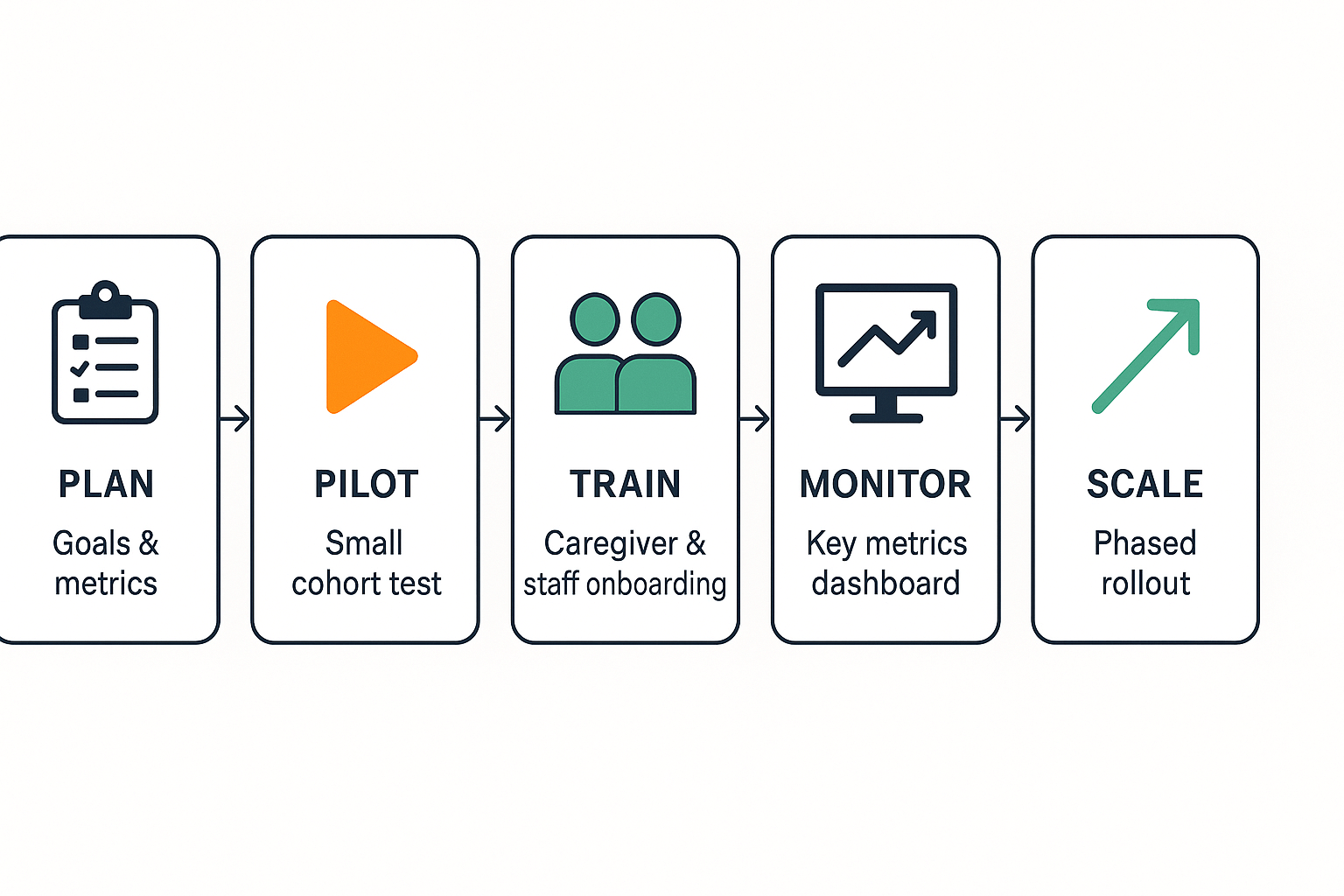
Start small, measure early, and iterate. This implementation roadmap shows step by step how to pilot assistive communication technology (voice, TTS, STT) so teams get quick wins. It focuses on measurable pilots, simple consent flows, and low-friction onboarding for caregivers and staff.
Plan: define goals and pick users
-
Set clear goals and metrics. Pick 2 to 3 success metrics, for example increased independent task completion, fewer help requests, or minutes of content accessed.
-
Choose representative users. Include at least one adult and one child persona, plus a range of vision levels and tech comfort.
-
Prepare privacy and consent. Create short consent scripts and data minimization rules before testing.
Pilot: run short, focused tests
Run a 4 to 6 week pilot with clear criteria. Limit scope to one setting: home, classroom, or clinic. Use these success criteria: adoption rate over 60 percent, positive caregiver feedback, and measurable content access gains. Keep sessions short and repeatable, and collect simple weekly check-ins.
Train: onboard caregivers and staff
Create a one-page quick start and a 30-minute live demo. Cover basic troubleshooting, voice profile setup, and safety notes. Use role-based checklists: caregivers, teachers, and clinicians each get a tailored list.
Monitor and scale
Track these monitoring metrics:
-
Weekly active users (right-aligned metric)
-
Average session length in minutes
-
Number of successful independent tasks
-
Support requests per user Use data to decide whether to expand to more users or more settings. Add a dedicated support hour each week for the first two months.
Quick implementation checklist
-
Goals and metrics documented
-
Representative users selected
-
Consent and privacy in place
-
4 to 6 week pilot scheduled
-
Onboarding materials ready
-
Monitoring dashboard live
Suggested internal resources: link to Accessibility-First audit page (/accessibility-audits) and a staff training plan template (/training-plans). For visuals, add a process schematic: Plan, Pilot, Train, Monitor, Scale. These steps get teams to useful outcomes fast, with low effort and clear evidence for funding decisions.
Funding, insurance, and access: how organizations and families obtain assistive tech
Accessing assistive communication technology can feel complex, but clear funding routes exist for schools, clinics, and families. Public programs, education budgets, medical insurance, grants, and nonprofit aid often pay for devices, software, and training. Below are practical sources and simple steps to improve approval odds.
Practical funding sources
-
Federal and state programs: Medicaid, state vocational rehab, and assistive technology (AT) loan programs often cover equipment and services. Ask your state AT program about eligibility.
-
Education budgets: Individualized Education Programs (IEPs) and 504 plans can authorize school-purchased tech for a student. District special education teams can include software licenses and training in plans.
-
Medical insurance: Some plans cover assistive tech as durable medical equipment when prescribed by a clinician. Get a detailed letter of medical necessity.
-
Grants and nonprofits: Local foundations, parent groups, and national grants can fund trials, adapters, or home setups.
Tips to win approvals and speed procurement
-
Start with an assessment and clear goals tied to daily tasks or learning outcomes.
-
Submit a concise letter of need from a clinician or teacher.
-
Attach trial logs or demo results showing benefit.
-
Include vendor quotes with SKU-level pricing and support terms.
Low-cost interim options and when to scale
Use built-in screen readers, free trials, and low-cost apps while you pursue funding. If you need site licenses, ongoing support, or privacy controls, request an enterprise quote or district procurement for volume discounts and a service contract. Planning ahead cuts approval time and helps secure long-term access.
Looking ahead: trends and innovations in voice-based assistive tech
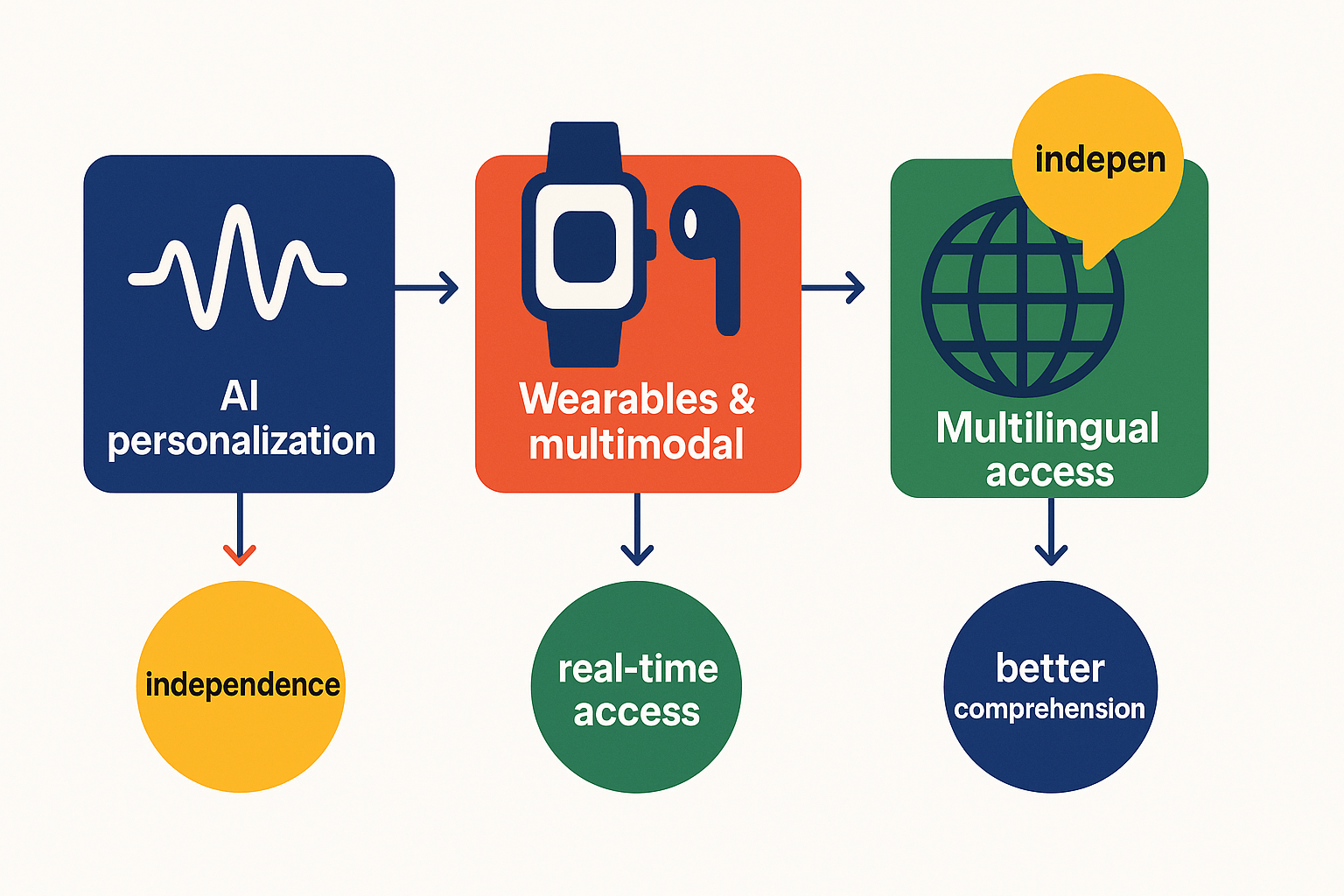
Voice tools are moving fast. Decision-makers should watch three areas where assistive communication technology can change care and procurement. This short look explains AI personalization, ethical voice cloning concerns, wearables and multimodal interfaces, and multilingual access.
AI personalization: adaptive TTS and ethical guardrails
Adaptive text-to-speech (TTS) learns user pace, pronunciation, and preferred voice qualities. That improves comprehension and comfort for people who are visually impaired. At the same time, voice cloning raises consent and misuse risks. Procurement teams should require consent workflows and locked cloning controls from vendors.
Wearables and multimodal interfaces
Smart earbuds, voice-first smartglasses, and haptic devices let users get audio, touch, and brief visual cues together. Multimodal systems reduce friction in daily tasks, and they work well when offline models protect privacy.
Cross-language access and scalable localization
Real-time transcription, translated audio, and synced subtitles expand content reach. Institutions should pick solutions that support multiple languages, subtitle export, and easy updates for new content.
Practical implications for procurement and care teams:
-
Build short pilots that measure comprehension, independence, and daily use.
-
Demand vendor policies on voice consent, data encryption, and voice-locking.
-
Choose platforms with TTS, speech-to-text, and subtitle tools for scale.
Add expert quotes from speech-language pathologists and accessibility directors to boost trust. For visuals, include a blocks diagram linking each trend to concrete outcomes, plus a procurement workflow graphic.
FAQ — common questions about voice tech for the visually impaired
-
Is assistive communication technology safe for voice cloning for visually impaired users?
Yes, safety starts with consent and technical safeguards. Good systems lock a cloned voice to the original speaker and use encryption for stored samples. Next steps: run a privacy audit and review Accessibility-First security guidance, then request a demo or pilot.
-
How accurate are TTS and STT for diverse accents and low-vision users?
Accuracy varies by model and audio quality, but modern engines handle many accents well. Always test with real user samples and noisy-room recordings to measure word error rate and clarity. Try a short trial and use a voice accuracy guide to plan evaluation.
-
What resources should schools and clinics use for procurement and training for assistive voice systems?
Start with a small pilot, clear success metrics, and staff training plans. Include speech-language pathologists and assistive technology coordinators in procurement decisions. Review funding options and templates, and schedule a vendor demo to confirm workflow fit.
-
What about privacy, consent, and compliance for vulnerable users?
Document consent for any voice cloning and limit who can create or export clones. Review vendor policies on data retention, encryption, and GDPR alignment during selection. A legal and accessibility review helps reduce risk before deployment.
-
How do I integrate voice tech into classroom or clinic workflows?
Prefer browser-based tools and API options so devices stay simple for users. Pilot integrations with one class or clinic team, collect feedback, then scale training and device choice. Coordinate with IT and use an integration checklist to plan rollout.




 Discord
 YouTube
 Tiktok
 Twitter
 Facebook
 Instagram