


Why teams look beyond Murf AI (and common evaluation criteria)
Core selection criteria teams use
-
Voice quality and naturalness: Listen for clarity, prosody (rhythm and stress), and emotional range in sample clips.
-
Language and accent coverage: Check supported languages, regional accents, and dialect options for target markets.
-
Dubbing fidelity and sync: Test subtitle alignment, timing, and lip-sync for localized video.
-
Voice cloning safety and consent: Verify how vendors secure source voice files and require consent for clones.
-
Pricing model and predictability: Compare subscriptions, credits, overage rates, and pay-as-you-go options.
-
Throughput and limits: Look at per-file size limits, concurrent jobs, and daily or monthly processing caps.
-
API, integrations, and automation: Confirm REST or GraphQL endpoints, SDKs, and integrations like CMS, LMS, or YouTube.
-
Editing UX and workflow speed: Evaluate recording, timeline editing, versioning, and collaboration features.
-
Output formats and quality controls: Ensure MP3/WAV/MP4 and subtitle exports, plus bitrate and sample-rate options.
-
Security, privacy, and compliance: Ask about encryption, data retention, and alignment to GDPR or regional rules.
How to judge trade-offs in practice
Quick at-a-glance comparison: DupDub vs Murf AI (+ other top alternatives)
Headline finding
|
Feature
|
DupDub
|
Murf AI
|
ElevenLabs
|
Play.ht
|
|
Voice count
|
700+ voices
|
~100+ voices (varies by plan)
|
100+ voices
|
500+ voices
|
|
Language support (TTS)
|
90+ languages and accents
|
~20 languages
|
30+ languages
|
60+ languages
|
|
Voice cloning limits
|
3 to 10 clones by plan
|
cloning available, limits vary by plan
|
high-fidelity cloning, per-seat limits
|
cloning available, limits vary
|
|
Dubbing / video translation
|
Full video dubbing, subtitle alignment, avatars
|
Dubbing, studio editor, subtitles
|
Primarily TTS and narration
|
TTS first, some localization features
|
|
Subtitles & alignment
|
Auto subtitles, translate and sync
|
Subtitle tools, auto-sync
|
Basic subtitle export
|
Subtitle export, some auto tools
|
|
File exports
|
MP3, WAV, MP4, SRT
|
MP3, WAV, MP4, SRT
|
MP3, WAV, SRT
|
MP3, WAV, SRT
|
|
Avatar / talking photo
|
Avatars and talking photos included
|
Not primary focus
|
No avatars
|
No avatars
|
|
API availability
|
Yes, API for workflows
|
API available
|
API available
|
API available
|
|
Enterprise features
|
Role/team controls, encryption
|
Team features, enterprise plans
|
Enterprise APIs
|
Team/enterprise features
|
How to read this matrix and rule in or out
-
Rule in DupDub if you need wide language reach, integrated dubbing, or avatars for video localization. DupDub focuses on multilingual workflows and avatar-driven video output.
-
Rule in Murf AI if your team prioritizes polished studio voices and a team-friendly editor, and you need mature corporate workflows.
-
Rule in ElevenLabs when voice naturalness for long-form narration is the priority.
-
Rule in Play.ht when you want a large template library and simple TTS exports.
Pricing at a glance
-
DupDub: clear tiering, starting with a free 3-day trial. Personal plan roughly 11 per month billed annually, Professional around30 per month, and Ultimate $110 per month. Pay-as-you-go credit packs are available for occasional use.
-
Murf AI: tiered subscriptions for individuals and teams, with added cost for advanced voices and enterprise controls.
-
ElevenLabs: subscription for creators and higher tiers for commercial use, with pay-as-you-go options for API calls.
-
Play.ht: subscription model with personal and commercial tiers, and credits for higher usage.
Quick decision checks
-
Need many target languages, auto-subtitles, and avatars: prioritize DupDub.
-
Need the most human-sounding long-form narration and script control: shortlist ElevenLabs.
-
Need an editor-first studio and team management: shortlist Murf AI.
-
Want a low-cost, easy TTS export flow: consider Play.ht.
What to verify in trials
-
Upload a 2–3 minute video and test dubbing quality, lip sync, and subtitle alignment.
-
Create a clone from a 30-second sample and test multilingual output.
-
Run export and API flows you will use in production, and check file formats and sizing.
DupDub deep dive — features, limits, and real capabilities
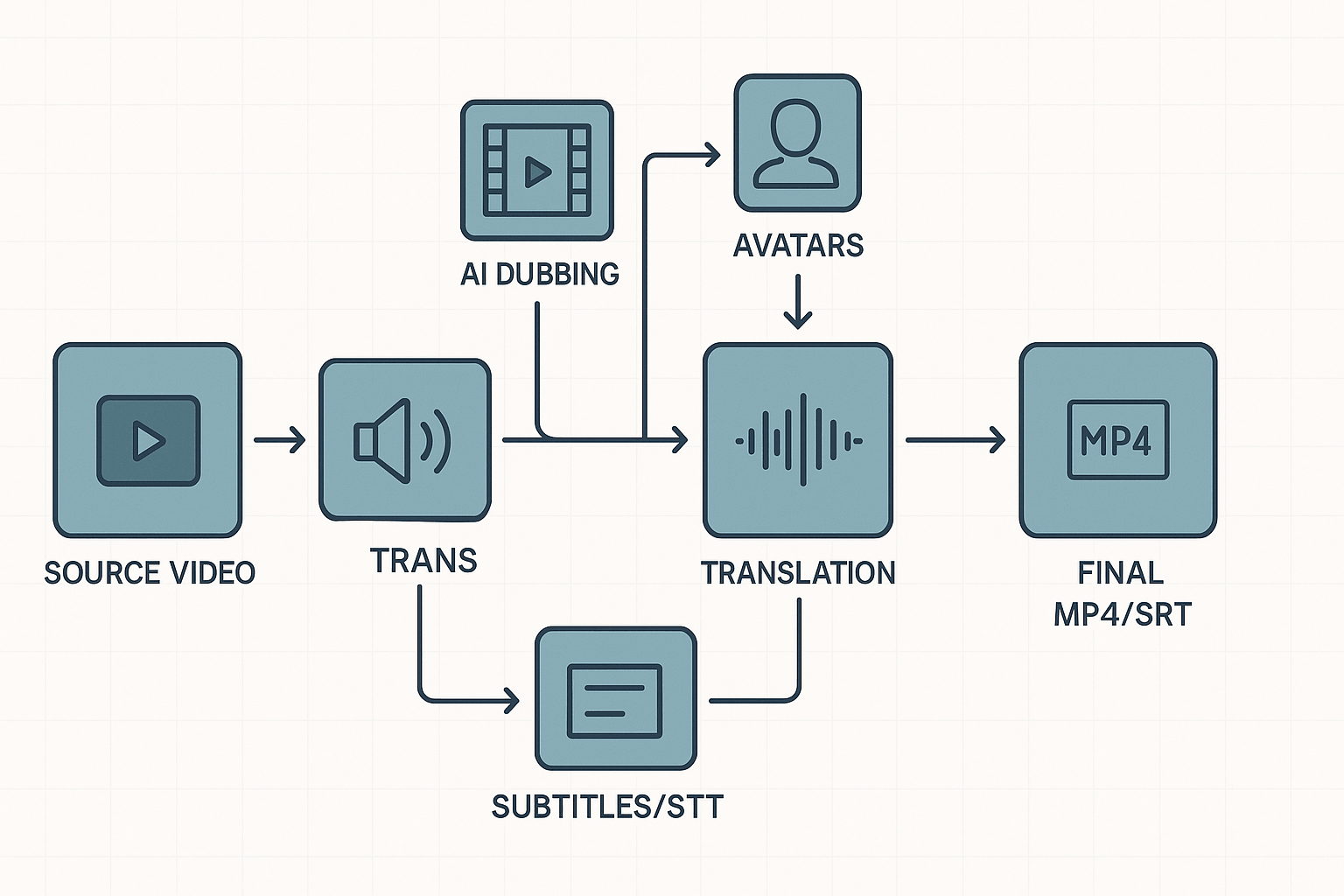
AI dubbing: what it actually does
-
Auto transcribe and timestamp source audio.
-
Auto-translate text and map timestamps.
-
Generate voice output and export new video with audio and SRT.
TTS: voice breadth, styles, and when quality matters
Voice cloning: workflow, language coverage, and safety
-
Minimum audio sample: 30 seconds.
-
Supported cloning languages: 47.
-
Voice lock: clones tied to original speaker (safety control).
Talking photos and AI avatars
STT, subtitles, and integration points
Export formats and file limits
Practical limits and enterprise fit
Pricing explained: DupDub plans and real-world cost scenarios
Plan snapshot: what you get and how credits map
|
Plan
|
Credits / Pack
|
Std TTS hours
|
Ultra TTS hours
|
Voice clones
|
Notes
|
|
Free (3-day)
|
10 credits
|
0.1
|
0.03
|
0
|
Starter credits only
|
|
Personal ($11/mo, billed annually)
|
1,800 yearly
|
25
|
5
|
3
|
10,000 words/file; 25h transcription
|
|
Professional ($30/mo, billed annually)
|
6,000 yearly
|
83
|
16
|
5
|
30,000 words/file; 83h transcription
|
|
Ultimate ($110/mo, billed annually)
|
30,000 yearly
|
416
|
83
|
10
|
Unlimited file size
|
|
Pay-as-you-go packs
|
500 / 1000 / 6,000
|
varies
|
varies
|
n/a
|
One-time credits at higher per-credit cost
|
Real-world scenarios and cost math
-
YouTube channel with weekly videos
-
Assumption: 52 videos, 10 minutes each, one language per video. Total source time 8.7 hours. Standard TTS then needs about 8.7 * 72 = 624 credits. Personal covers that. If you want Ultra voices, credits jump to 8.7 * 360 = 3,132 credits. That needs Professional or higher.
-
-
E-learning batch, single source, multi-language
-
Assumption: 10 hours of core content. Dubbing into 5 target languages equals 60 output hours. Standard TTS credits: 60 * 72 = 4,320 credits. Professional (6,000) covers this. If each language uses Ultra voices, plan needs roughly 60 * 360 = 21,600 credits, so Ultimate or enterprise options are required.
-
-
Enterprise localization pipeline
-
Assumption: 1,000 source hours yearly, localize into 10 languages. That means 10,000 dubbed hours. Standard TTS credits: 10,000 * 72 = 720,000 credits. That scale needs custom enterprise pricing, API automation, or negotiated bulk credits. Pay-as-you-go packs become costly at this volume.
-
Where overages and upgrades typically happen
-
Need more than allotted voice clones for multiple talent.
-
Dubbing into many target languages, raising total hours.
-
Choosing Ultra voices or lifelike avatars for higher output credits.
-
Large single files or long transcripts that exceed per-file limits.
Quick decision notes for budgets and procurement
Vendor notes
Security, privacy & compliance for enterprise use
Practical safeguards for voice cloning
Encryption, retention, and cross-border handling
Vendor questions legal and IT should ask
-
Who owns the voice clone and derivatives, contractually?
-
How is speaker consent captured, stored, and proven?
-
Where are audio, transcript, and model weights stored and processed?
-
Do you support customer-managed keys (CMKs) or bring-your-own-key (BYOK)?
-
What is your incident response SLA and breach notification timeline?
-
Can we audit access logs and encryption key usage?
Procurement checklist: quick go/no-go
-
Contract terms grant explicit ownership or license rights for clones.
-
Written consent and identity verification are mandatory for voice creation.
-
Encryption in transit and at rest, with key management detail.
-
Data residency or explicit cross-border processing clauses.
-
Retention policy, right-to-delete, and exportable data formats.
-
Ability to run a security assessment or receive SOC/ISO reports.
Decision framework: which tool fits your use case?
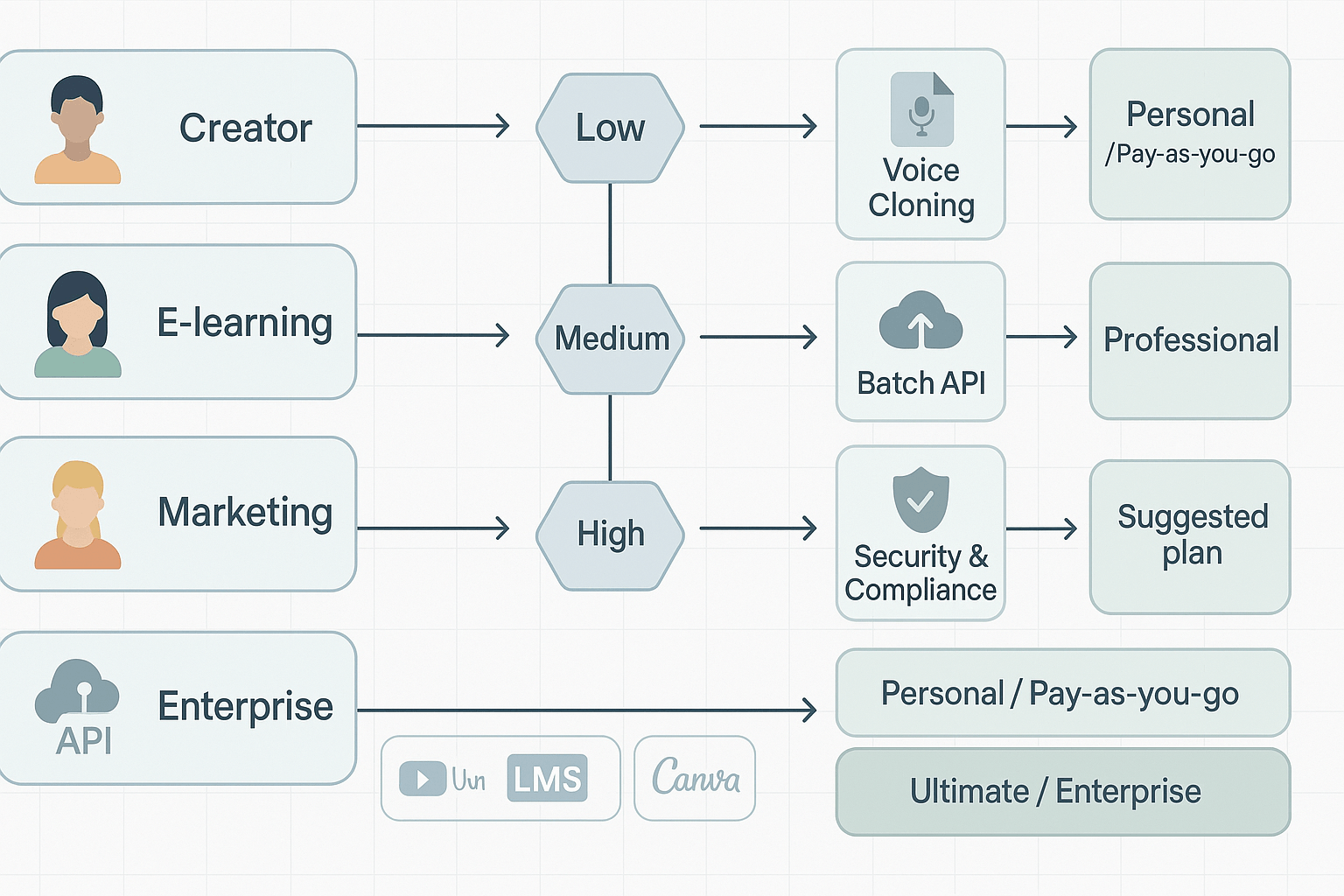
Decision matrix: use case to features, plan, and integrations
|
Use case
|
Must-have features
|
Recommended plan tier
|
Typical integrations
|
|
Creator / YouTuber
|
Fast AI dubbing, multiple voices, easy subtitle sync, small avatar support
|
Personal or Pay-as-you-go for infrequent projects
|
YouTube, Chrome transcript plugins, Canva
|
|
E-learning & L&D
|
High-quality voice cloning, long file exports, LMS-ready captions, SCORM-friendly workflows
|
Professional or Ultimate depending on volume
|
LMS (SCORM/LRS), Zoom, LMS import/export tools
|
|
Marketing & Agency
|
Brand voice cloning, multi-language output, batch processing, SFX and editing studio
|
Professional or Ultimate
|
Canva, Adobe, cloud storage, API for automation
|
|
Enterprise localization
|
Enterprise-grade security, bulk API, SLA, compliance, audit logs
|
Ultimate or custom enterprise plan
|
MAM systems, CMS, cloud storage, translation management systems
|
Pick by scale and output needs
-
Small creators, low volume
-
If you publish weekly or less, pick a low-cost plan. Personal or pay-as-you-go works. Test voice cloning with a few short samples. Focus on fast subtitle sync and one-click exports.
-
-
Mid-size teams, regular output
-
You need team seats, shared assets, and more credits. Professional tiers cover steady monthly volume. Check batch processing and API access for automations.
-
-
Enterprise, high scale and compliance
-
Prioritize encryption, auditability, and contract SLAs. Ask for data retention policies and private cloud options. Confirm voice clone ownership and legal controls.
-
Team and workflow checklist
-
Project owner, who signs off on brand voice and budgets.
-
Audio editor or producer, who polishes output and adds SFX.
-
Localization lead, who coordinates languages and translators.
-
IT or security officer, who reviews compliance and access controls.
-
Expected monthly minutes of exported audio or video. (Estimate low, medium, high.)
-
Number of voice clones needed and their retention policy.
-
Batch job needs, like thousands of clips or automated daily jobs.
-
Output formats required: MP3, WAV, MP4, SRT, SCORM.
-
Who owns the cloned voice files and licensing rights?
-
Is there an API for CI/CD style publishing?
-
Can you preview voice quality in each target language before buying credits?
Red flags for enterprise buyers
-
Vague or missing data processing terms. If a vendor cannot describe how audio and samples are stored, pause.
-
No enterprise-grade encryption at rest and in transit. It should be explicit.
-
Voice clone reuse without clear permissions or opt-out controls. That risks brand misuse.
-
Limited audit logs and no access controls for admins. You need traceability for compliance.
-
No SLAs or unclear uptime and support commitments for high-volume use.
-
Hard limits on file sizes with no enterprise upgrade path. That can break large batch jobs.
-
Poor integration options: no API or limited export formats restrict automation.
Quick decision checklist
-
Define output volume and formats. Match that to plan credits and limits.
-
List required integrations and test them during trial.
-
Validate security and legal terms with IT and legal teams.
-
Run a short pilot with real content to check voice match, timing, and subtitles.
Independent ratings, short customer snapshots, and expert takeaways
Third-party ratings and review trends
Customer snapshots: outcomes and trade offs
-
Emma, head of localization at a mid-size e-learning studio. Emma used DupDub to localize 60 short tutorials per month. Outcome: 75 percent faster turnaround and consistent voice style across languages; trade off: they spent time tweaking lip-sync and timing for a few clips.
-
Raj, creative lead at a marketing agency. Raj tested voice cloning to keep a brand narrator across markets. Outcome: lower per-video dubbing costs and strong brand match; trade off: he limited cloning to vetted speakers because of legal checks and extra consent steps.
-
Lina, YouTuber and solo creator. Lina needed quick subtitles and translated voiceovers for weekly content. Outcome: she expanded reach into three new markets within two months; trade off: she noticed edge cases in translating idioms and adjusted scripts manually.
Objective pros and cons
-
Broad language support and many voice styles, useful for global content teams.
-
Fast workflow from transcript to dubbed file, which speeds time to market.
-
Voice cloning with short sample input, locked to original speaker for safety.
-
Limited independent review volume, so real-world reliability needs larger samples.
-
Enterprise-grade compliance and audit features may need verification for regulated industries.
-
Auto-alignment can require manual tuning for high-fidelity lip sync in some videos.
Expert takeaway: fact versus opinion
How to evaluate DupDub practically — trial checklist, next steps
Quick 3-day trial checklist (what to prove first)
-
Day 1: Feature smoke test
-
Import one short source file, transcribe it, and review the transcript for accuracy.
-
Run two voice outputs: a standard TTS voice and one cloned voice. Compare timing, naturalness, and prosody.
-
Export audio and subtitle files to verify formats: MP3, WAV, MP4, and SRT.
-
-
Day 2: Integration and API validation
-
Test the browser studio, Canva or Chrome plugin, and YouTube transcript import if you use them.
-
Make at least one API call if you have dev resources. Check response times, error handling, and sample rate controls.
-
Validate bulk workflows such as batch subtitle generation or multi-language dubbing.
-
-
Day 3: Scale, cost, and consent checks
-
Run a 10-minute video through a multilingual dubbing workflow to estimate credits used.
-
Test the voice cloning consent flow: upload sample, confirm consent capture, and try clone deletion.
-
Run a final QA pass, measuring sync drift, lip alignment, and any manual edits needed.
-
Integrations and platform checks to validate
-
Playback and alignment: ensure subtitles and re-voiced audio align within 100–300 ms for short lines.
-
Collaboration: invite a teammate, confirm role permissions and shared projects work.
-
Asset export: confirm metadata, file names, and folder structure match your pipeline.
Cost and credits sanity checks
-
Map your expected monthly minutes to the product's credits. Run a low, medium, and high volume test.
-
Test pay-as-you-go buys to confirm instant credit delivery and consumption tracking.
-
Check voice clone limits per plan, and whether avatars or ultra voices use more credits.
Consent, legal, and security checks
-
Verify cloning requires a speaker sample and documented consent steps.
-
Confirm the platform’s stated encryption, and whether cloning is locked to the original speaker.
-
Test account controls, team SSO (if available), and audit logs for enterprise needs.
Practical QA checklist before you sign
-
Confirm exports open cleanly in your CMS or LMS.
-
Review a dubbed video end-to-end on mobile and desktop.
-
Time how long a full edit and re-voice cycle takes for one asset.
FAQ
-
Is DupDub voice quality on par with other AI dubbing tools for professional content?
DupDub provides natural-sounding TTS and voice cloning suitable for marketing, training, and localization. It delivers high fidelity on short scripts and solid prosody for longer narration. Always test with your own content and brand voice to confirm quality.
-
How does DupDub handle cloning legality and consent?
Voice cloning requires a speaker sample and explicit consent. The platform includes consent workflows, and you should verify how permissions are recorded and how clones can be revoked. For commercial or sensitive use, involve legal review.
-
What export formats does DupDub support for localization workflows?
DupDub supports MP3 and WAV for audio, MP4 for video, and SRT for subtitles. During testing, confirm bitrate and codec settings to ensure compatibility with your delivery requirements.
-
How does the DupDub credits and pay-as-you-go model affect real-world costs?
Credits are used for TTS, voice cloning, and transcription tasks. To estimate costs, run sample jobs during the trial and track credit usage. Testing pay-as-you-go purchases helps validate billing and forecast ongoing expenses.

 Discord
 YouTube
 Tiktok
 Twitter
 Facebook
 Instagram