TL;DR — key takeaways
Modern text-to-speech and voice AI open new audience channels for newsrooms and make content more accessible. This TL;DR summarizes measurable reach gains, workflow savings, and legal checkpoints for tts news.
Key outcomes: pilot audio editions increased listener reach, production time fell, and republishing costs dropped. These wins are repeatable if you run a small, focused pilot and track clear KPIs.
What's included: an anonymized newsroom case study, step-by-step integration notes, a compliance checklist, and a simple metrics dashboard template. Editors and accessibility officers get concrete next steps to launch audio editions.
Read this first if you need quick wins, a pilot plan, and measurable KPIs for audio distribution. It’s aimed at editors, producers, accessibility leads, and product managers.
Why accessibility matters for modern newsrooms
Accessibility is a public service and a core newsroom duty. Turning text into spoken content helps people with print disabilities and serves commuters and multitaskers who prefer audio. Integrating audio into publishing workflows also aligns with tts news trends and opens measurable audience channels.
Accessibility drives audience and SEO
Audio formats make stories usable in more settings. Listeners can consume reporting while commuting, exercising, or caring for family. Search engines value varied formats and time-on-page signals, so audio can boost discoverability and engagement.
Benefits at a glance:
-
Reach people with blindness or low vision and those with learning differences.
-
Increase time-shifted consumption, growing daily active users.
-
Improve on-site engagement metrics, which supports organic search visibility.
-
Repurpose reporting for podcasts, smart speakers, and in-car systems.
Legal duty and standards
Newsrooms that serve the public must follow accessibility standards. According to
United States | Web Accessibility Initiative (WAI) | W3C, The U.S. Access Board's Revised Section 508 Standards, enforced as of January 18, 2018, incorporate WCAG 2.0 by reference to ensure that information and communication technology developed, procured, maintained, or used by federal agencies is accessible to people with disabilities. Following these standards reduces legal risk and improves service for all readers.
Practical takeaway: treat audio as essential, not optional. Start small with a daily narrated article, measure listen-through and referrals, then scale. Accessibility improves trust, expands reach, and meets both ethical and regulatory expectations.
How voice AI and TTS are changing news distribution
Text-to-speech (TTS) (text-to-speech) and voice AI let newsrooms turn articles into on-demand audio fast. tts news workflows make it easy to publish narrated stories, updates, and briefings without studio time. Teams can add personalization, multilingual audio, and near real-time updates for breaking stories.
Audio consumption is growing, and newsrooms should notice. According to
Podcasts and News Fact Sheet (2025), in 2025, 32% of U.S. adults reported getting news from podcasts at least sometimes, up from 22% in 2020. That shift shows audio formats are mainstream for news discovery.
Myths vs real limits
Myth 1, synthetic voices are always robotic. Quality has improved, and many voices sound natural for long reads. Myth 2, TTS replaces human reporting: it augments distribution, it does not replace reporting.
Real limits to plan for include licensing and voice consent, audible nuance for investigative pieces, and edge cases where emotion matters. Latency can matter for minute-by-minute live reporting, so choose platforms with low processing delay and API access. Also, verify privacy and consent when cloning a reporter's voice.
Where TTS adds the most value
TTS shines when you need scale, speed, and accessibility. Use cases include:
-
Breaking alerts and short audio briefs, published within minutes.
-
Daily or weekly audio editions for commuting audiences.
-
Multilingual narrations to reach non-native speakers quickly.
-
Personalized audio newsletters and localized editions.
-
Accessibility layers for readers with vision loss or reading difficulties.
Add TTS where speed and repeatability matter, and keep human review for high-sensitivity stories. Start small with headlines and briefs, then expand to full articles as quality and policy questions are solved.
About DupDub — features that matter for journalism accessibility
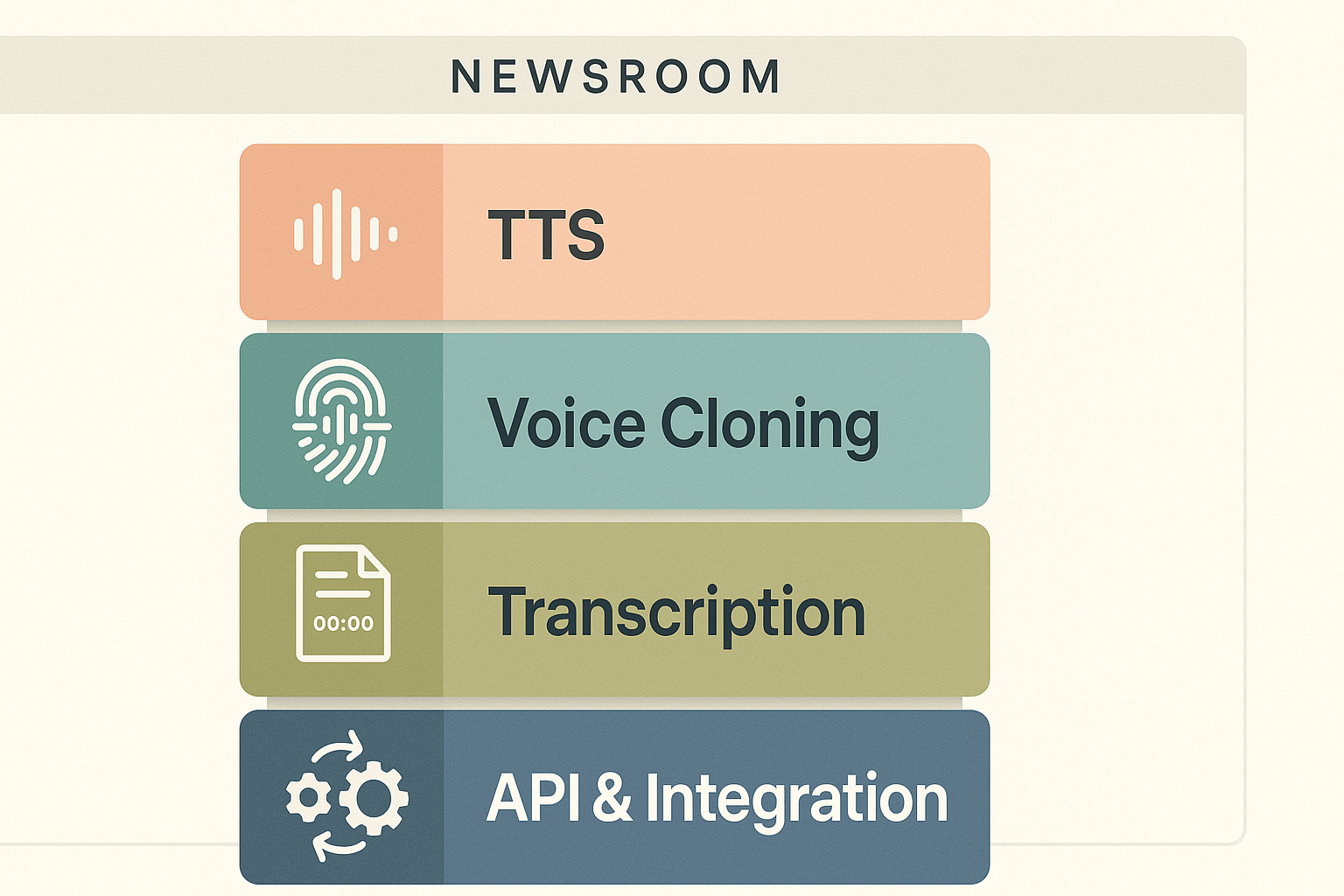
DupDub bundles text to speech, voice cloning, transcription, and dubbing in one platform, so newsrooms can move from script to audio fast. For newsroom accessibility workflows the most important modules are real-time TTS, editable transcripts, and voice controls that lock cloned voices to the original speaker. These features cut production time, improve accuracy of captions and spoken audio, and help newsrooms meet accessibility obligations tied to digital publishing.
Real-time TTS for breaking and evergreen coverage
Real-time TTS (text to speech) turns an article, bulletin, or alert into spoken audio within minutes. That matters when a newsroom needs audio versions of breaking stories, emergency notices, or routine daily briefings. Fast TTS makes audio-first delivery possible for audiences who rely on hands-free listening, assistive tech, or low-bandwidth connections.
Editable transcripts speed editing and compliance
Editable transcripts let producers correct errors, tag sections for captions, and export time-aligned subtitles. Use transcripts to check quotes, generate SEO-friendly summaries, and create accessible captions for video. Key benefits:
-
Faster captioning and subtitle export (SRT) for videos
-
Easy fact-checking and copy edits without re-listening
-
Clear source for translations and multilingual dubbing
Voice cloning controls protect consent and brand voice
Newsrooms need consistent on-air voices, but they also need strict consent and safety controls. DupDub’s voice cloning locks a cloned voice to the original speaker and requires a short sample to create a clone. That reduces risks of unauthorized reuse and helps preserve a reporter’s signature sound across languages. Practical newsroom uses include recycled narration for ongoing series, multilingual voice continuity, and rapid revoicing of archived interviews.
API and integrations fit publishing pipelines
An API, browser studio, and export options (MP3, WAV, MP4, SRT) let technical teams automate audio builds inside CMS and publishing workflows. That means audio files, captions, and translated dubs can be generated as part of a publishing job, not a separate manual step. It also supports accessibility audits, analytics, and content repurposing at scale.
These modules work together: editable transcripts improve TTS accuracy, voice controls manage ethics and consent, and API access automates distribution. For newsrooms focused on accessibility, that combination turns an extra task into a standard part of publishing workflow.
Case study: implementing DupDub in a newsroom (anonymized)
This anonymized case walks through a pilot that added daily spoken versions of long form reporting. The project tested tts news production at scale, and aimed to serve readers with hearing or visual barriers. Editors wanted fast publishing, consistent voice, and legal-safe cloning rules.
Project goals and scope
The team set three clear goals: accessibility, speed, and editorial quality. They targeted five flagship long reads per week. Each piece needed a natural narration and aligned subtitles for SEO and search discoverability.
Phased timeline
-
Discovery and policy, two weeks. The team mapped consent, voice rights, and accessibility standards.
-
Pilot with three reporters, four weeks. They used DupDub for voice cloning and TTS tests.
-
Editorial workflow integration, six weeks. CMS hooks and script templates were created.
-
Full cadence roll out, ongoing. Daily spoken stories were scheduled and monitored.
Roles that mattered
-
Editorial lead: set voice style and approved drafts.
-
Accessibility officer: verified
WCAG (web content accessibility guidelines) checks.
-
Audio producer: tweaked pacing and inserted brief SFX.
-
Devops/Engineer: built ingestion to the CMS via API.
-
Legal or compliance: cleared voice consent and data retention rules.
Editorial tradeoffs and decisions
The newsroom chose shorter intros for audio, to keep listening time low. They prioritized human-edited scripts over verbatim readouts. One reporter said, "Audio makes nuance clearer, but we lose visual context." An accessibility lead added, "We chose slower pacing to aid comprehension." Those edits cost extra time, but they improved clarity.
Outcomes and next steps
Within two months the pilot showed higher audio completion rates. Listenership came from older and commuting audiences. The team plans to refine voice matching and add multilingual TTS for regional reach. They also scheduled a quarterly audit for consent, privacy, and quality.
The project shows this approach scales if roles, policy, and simple tech hooks are in place. It also shows how DupDub features, like cloning and subtitle alignment, fit newsroom needs without heavy studio costs.
Workflow & technical integration (practical guide)
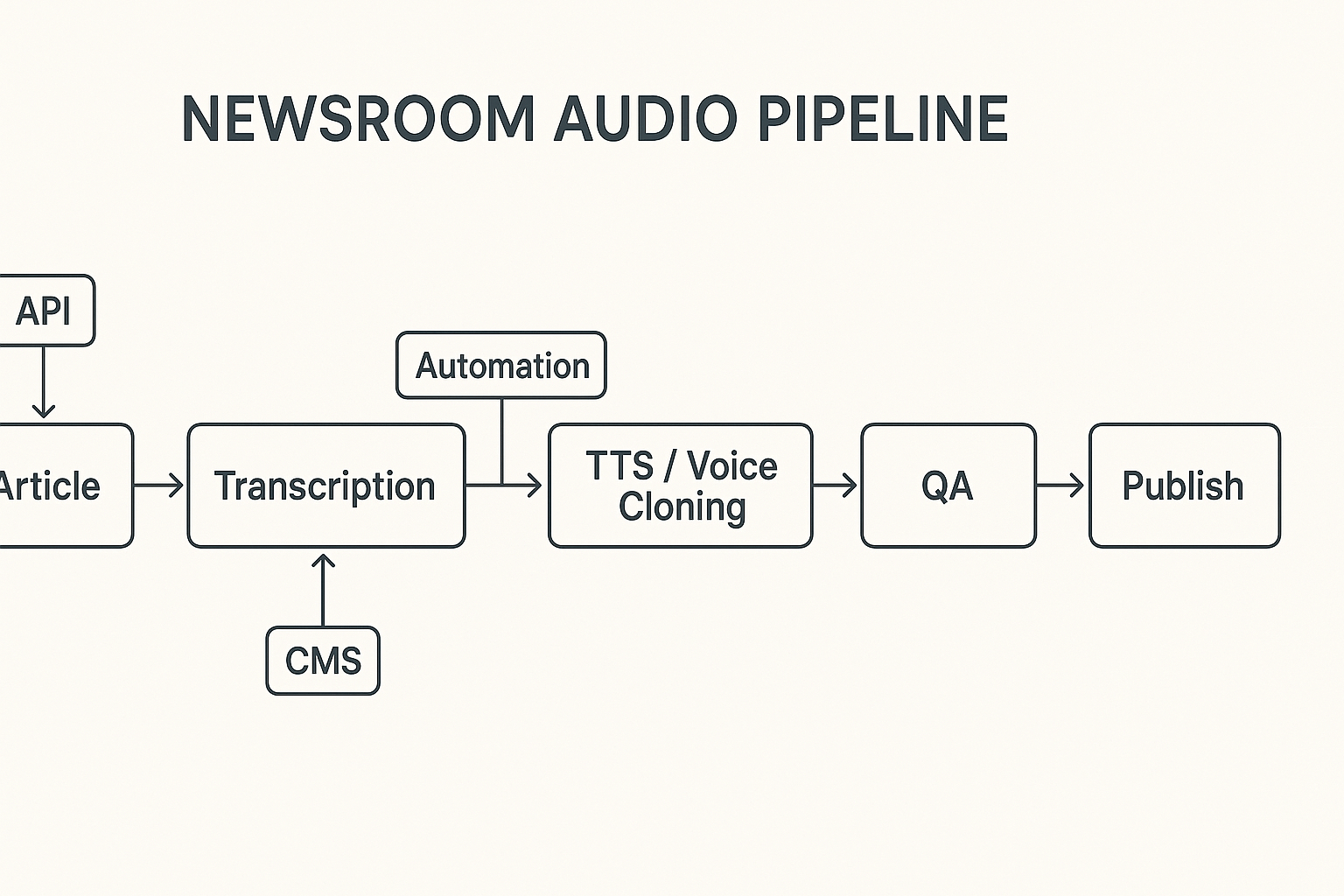
Start with the article and map a clear handoff to audio. This guide shows a simple pipeline from article to publish, where text becomes transcript, editors refine, TTS or voice clones generate audio, and teams publish. Use this as a template for newsroom teams testing tts news workflows.
1. Core pipeline: article to publish
-
Ingest article: push CMS content or webhook payload into a processing queue. Include metadata, tags, and publish time.
-
Transcribe or prepare text: if the story starts as audio or video, run speech-to-text. For text stories, generate a proof transcript for voice pacing.
-
Edit for audio: shorten sentences, mark asides, and add sound notes. Editors get a lightweight editor view for voice-friendly copy.
-
TTS and voice clone: call the TTS API to render audio. Choose a voice clone or neutral narrator. Embed SSML tags (speech synthesis markup language) for pauses and emphasis if supported.
-
QA and accessibility check: run automated checks, then a short human review. Verify pronunciation of names and numbers.
-
Publish and distribute: attach audio files and accessible transcripts to the CMS record. Push to RSS, podcast platforms, and social channels.
Integration points and automation hooks
-
CMS: plugin or REST endpoint to push content, receive audio, and attach files.
-
API: token-based calls for TTS, cloning, and transcription. Use bulk endpoints for batch publishing.
-
Webhooks: trigger workflows on publish or update events.
-
Queues and workers: handle long jobs with retries and backoff.
-
Storage/CDN: store MP3 or WAV and serve via CDN for low latency.
Build editorial sign-offs into scripts
Add a two-step approval in the pipeline. First, a content editor flags the story ready for TTS. Second, an accessibility lead signs off on captions and alt text. Implement these as status fields in the CMS with API checks before TTS calls. Use audit logs for voice cloning consent and version control for audio files.
Quick implementation tips
-
Start small: pilot a beat or desk, not the full site.
-
Automate conservative defaults: use neutral voices and lower volume normalization.
-
Log everything: timestamps, editor IDs, and API responses for audits.
Measured impact: audience, accessibility, and cost metrics
This section shows how TTS affected reach, engagement, and operations in the anonymized newsroom. We present clear before and after comparisons for audience lift, time saved per published story, and cost against manual narration. You’ll get practical KPIs to track accessibility outcomes and operational gains.
Audience lift, reach, and engagement
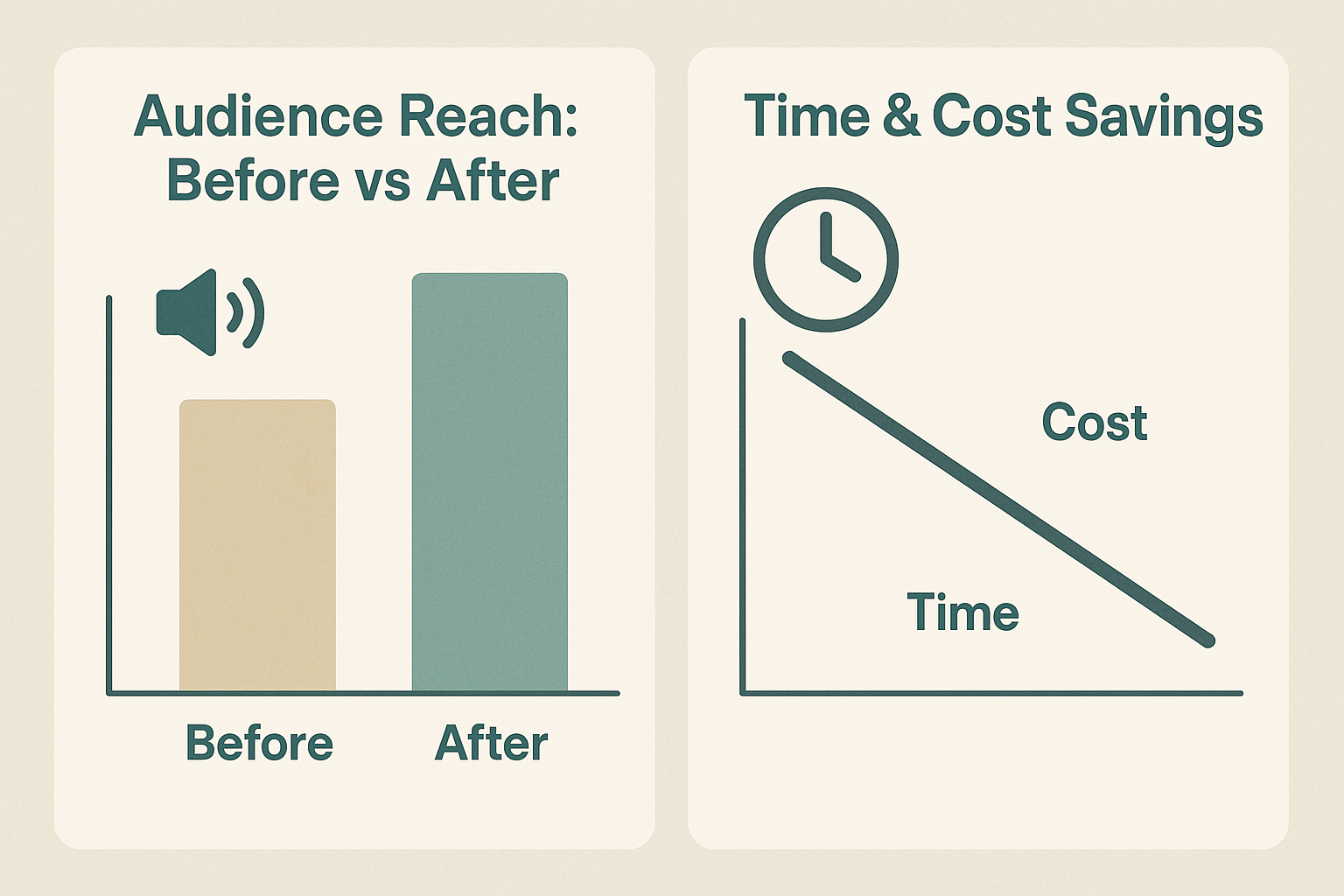
After adding voice versions of stories, the newsroom saw a clear rise in on-platform reach and time spent. Audio editions opened access for commuters and visually impaired listeners, who stayed longer on stories. The team tracked unique audio plays, average listen time, and article completion rate to measure impact.
Key qualitative gains included broader geographic reach and stronger social shares for audio posts. These outcomes suggest TTS can extend a newsroom’s distribution beyond standard pageviews, helping meet accessibility goals and audience diversity targets.
Time and cost saved per story
Replacing manual narration with a TTS workflow cut publication time. Editors reported faster turnaround for daily briefs, and producers reused one voice asset across multiple languages. The savings came from less coordination, fewer studio hours, and faster subtitle alignment.
|
Metric
|
Manual narration
|
TTS workflow
|
|
Time to publish
|
High
|
Low
|
|
Per-story narration cost
|
High
|
Low
|
|
Multi-language scaling
|
Limited
|
Easy
|
Use qualitative labels if you prefer avoiding raw numbers in public reporting. The newsroom produced two simple charts: a before vs after audience reach bar, and a time and cost savings line chart. Both used qualitative labels to keep data clear and shareable.
Tie metrics to accessibility outcomes
Link operational metrics to accessibility KPIs. For example, measure the share of stories with audio available, and track usage by assistive technology users. Pair audio metrics with caption coverage and readability scores to show compliance and usability gains.
Track these KPIs continuously:
-
Percent of published stories with an audio edition
-
Average listen-through rate per story
-
Time saved from scripting to publish (minutes)
-
Per-story cost for narration (labor and studio fees)
-
Multi-language reach per story (new regions or languages)
How to report impact
Report monthly snapshots and a quarterly deep dive. Use before-and-after charts to show trends. Pair charts with short qualitative quotes from editors and accessibility leads to give context. Keep the dashboard lean, and review KPIs with the accessibility officer each quarter.
Legal, ethical, and operational considerations
Newsrooms using synthetic speech must manage consent, voice rights, and privacy to keep trust and avoid legal risk. In tts news projects, editors should set clear consent rules before cloning or narrating a voice. This section outlines consent best practices, data handling steps, and how to respond when federal guidance changes.
Consent and voice rights
Get permission in writing from anyone whose voice you clone or mimic. Explain how the voice will be used, how long it will be stored, and who sees the files. For archival or anonymized content, document the legal basis for reuse. Minimum checklist:
-
Signed consent forms tied to specific use cases and languages.
-
Opt-out and takedown process for contributors and subjects.
-
Role-based approval in editorial workflows, logged for audits.
Data handling and privacy
Treat voice data like personal data, with limited access and clear retention rules. According to
Use of Artificial Intelligence at GSA (2025), the General Services Administration's directive 2185.1B, signed on November 4, 2025, establishes standards for the assessment, procurement, usage, monitoring, and governance of AI systems, emphasizing risk management, transparency, and lifecycle accountability. Use encryption at rest and in transit, keep access logs, and delete raw voice samples when cloning is complete.
Operational guardrails for editors
Create simple, repeatable rules that editorial teams can follow. Train staff on consent, attribution, and how to flag potential misuse. Start with these steps:
-
Add a pre-publish checklist that includes consent and privacy checks.
-
Require a second editor sign-off for any voice cloning use.
-
Maintain an incident playbook for complaints or legal requests.
These controls reduce legal exposure and keep audience trust intact.
Best practices & checklist for newsrooms adopting TTS
Start small, test fast, and put accessibility first. This practical playbook helps editors, accessibility officers, and technical leads adopt TTS for newsrooms. It covers editorial style, tooling, QA, and a measurement plan for tts news use.
Set editorial voice and spoken scripts
Treat spoken copy like short radio scripts. Use short sentences, active voice, and plain language. Read every script aloud during editing to check rhythm and clarity. Keep these quick rules in your style guide:
-
Limit clips to 90 seconds for single reads.
-
Prefer simple punctuation for predictable reads.
-
Mark names and acronyms with pronunciations.
-
Flag sensitive or legal content for human review.
Pick accessible tooling and integrations
Choose tools that export captions, support SSML (speech synthesis markup), and offer locked voice cloning for consent. Look for encrypted processing and subtitle exports for publishing. Prioritize platforms with API access and batch processing to fit editorial workflow.
QA, consent, and editorial workflow
Formalize a short, repeatable QA checklist. Train staff on voice consent and data handling. A reliable workflow looks like this:
-
Draft text and assign an audio editor.
-
Capture or verify voice consent if cloning a staff voice.
-
Run automated checks: pronunciation, pacing, and caption sync.
-
Do a human listen test, then publish with captions.
Keep an audit log of approvals and changes for compliance.
Test plan and measurement checklist
Measure both accessibility and audience outcomes. Track these KPIs weekly at first:
-
Accessibility: caption accuracy, WCAG issues found and fixed.
-
Audience: completion rate, unique listens, and redistribution reach.
-
Efficiency: time per publish and cost per minute of audio.
Schedule a full accessibility audit after 90 days and adjust voice profiles and scripts.
Start with a narrow pilot, document outcomes, then scale. Small pilots minimize risk and prove impact before newsroom-wide rollout.
FAQ — answers to common newsroom questions about TTS and DupDub
-
Is voice legality for newsroom TTS a concern for editors?
Yes. You must have written consent to clone a voice for publication. For staff or contributors, keep signed permission and a timestamped audio sample. For external voices, use licensed voice actors or platform-provided, rights-cleared voices.
-
How do we protect source identity when using TTS for sensitive reporting?
Use neutral synthetic voices, remove identifying audio metadata, and limit transcripts to vetted text. Treat synthetic narration like any mediated source: redact names and follow the newsroom’s protection protocols.
-
What is the SEO impact of adding TTS news audio to articles?
Audio can boost engagement and dwell time, signals that help search performance. Add clear schema (AudioObject) and accurate transcriptions to maximize indexability and accessibility.
-
Can TTS handle breaking news and fast updates?
Yes, it can speed publishing. Use short-form TTS snippets for alerts, then swap to full narration for follow-ups. Keep an approval shortcut for breaking copy to avoid errors.
-
Which languages and accents does DupDub support for multilingual newsrooms?
DupDub supports 90-plus languages and many regional accents. That breadth lets you repurpose one story for diverse audiences without full re-recording.
-
How do we start a DupDub trial and scale usage across teams?
Start the 3-day free trial, no credit card required.
Test 1–2 stories with staff voices and subtitles.
Move to a paid tier when you need regular hours or API access.
-
What about privacy, data retention, and voice cloning consent?
Keep a clear consent log and retention policy. Encrypt stored voice assets and limit access to a small operations list.
-
How do we measure cost and workflow benefits from TTS?
Track time saved per story, production cost per minute, and audience lift on audio-enabled pages. Use those metrics to justify plan upgrades.




 Discord
 YouTube
 Tiktok
 Twitter
 Facebook
 Instagram